How bulk verification works
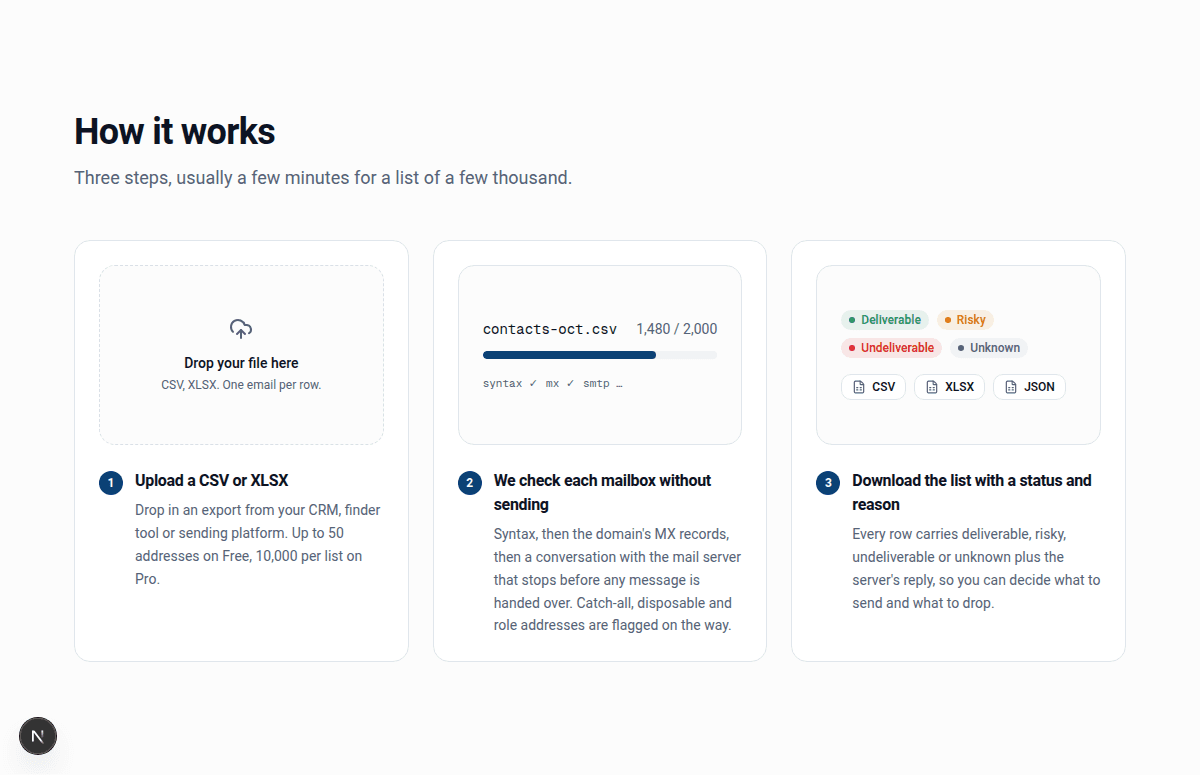
- Upload a CSV or XLSX. Drop the file in, or export one from your CRM or sending tool first. InboxSure picks out the email column and keeps the rest.
- Every address is checked. Syntax first, then the domain's DNS and MX records, then a short SMTP conversation with the mail server that stops before any message is sent. Company domains also get a random-address probe to detect catch-all servers.
- Download the results. Each row carries Deliverable, Risky, Undeliverable or Unknown and the reason, including the server's own reply for rejections. Export the whole list or one segment as CSV, XLSX or JSON.
Preparing your file
InboxSure is forgiving about layout, but a tidy file gives tidier results.
- One address per row. Cells holding two addresses separated by a comma or semicolon are treated as invalid.
- A header row helps. A column called email, e-mail or similar is found automatically. Without a header, the column that looks most like addresses is used.
- Keep your other columns. Names, company, deal stage and IDs come back unchanged next to the result, so you can import straight back into your CRM.
- No need to de-duplicate first. Addresses are trimmed, lower-cased and de-duplicated before the checks run.
What each result means, and what to do
| Result | What the server said | What to do |
|---|---|---|
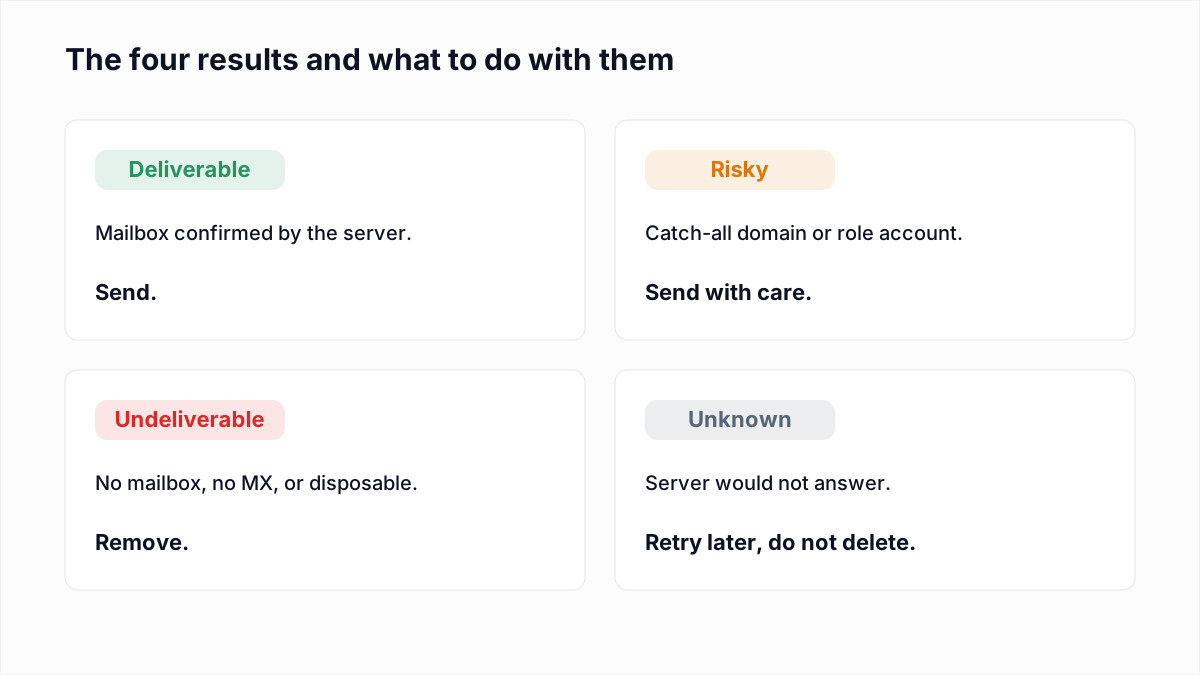
| Deliverable | The mailbox exists and the domain is not catch-all. Reason: accepted. | Send. This is your clean list. |
| Risky | Catch-all domain (catch-all-accepted) or a role account such as info@ or sales@. | Send to catch-all and role addresses in smaller batches after the Deliverable segment. |
| Undeliverable | The server rejected the mailbox, for example 550 5.1.1 user unknown, or the domain has no mail servers. | Remove. Sending to these is what drives bounce rate up. |
| Unknown | The server would not answer: greylisting (451), a timeout, or a provider that rejects unfamiliar senders before asking about the recipient. | Keep, re-verify later, and send cautiously. Do not treat as bad. |
Catch-all is worth a closer look because it affects so many B2B lists. The catch-all verification page explains how the probe works and how to decide what to send.
Reading the reason column
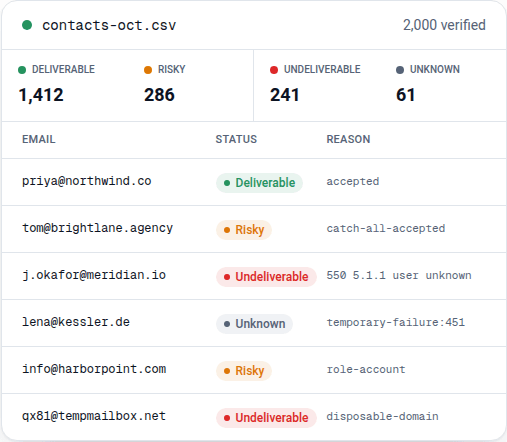
The status is our reading of the server's reply; the reason is the evidence. A few you will see on almost every list:
accepted: the server answered 250 for the mailbox and rejected the random probe, so the address is confirmed.catch-all-accepted: the server answered 250 for the mailbox and for the probe. The domain accepts everything.550 5.1.1 user unknownand its variants: the server's own text for a missing mailbox. Gmail, iCloud and Zoho use 5.1.1; Microsoft 365 says550 5.4.1 Recipient address rejected; Yandex says550 5.7.1 No such user. All mean the same thing.temporary-failure:451: greylisting or a busy server. Re-verify in a few hours and most of these resolve.sender-rejected:MAIL FROM:550: the server refused to talk before the recipient was named. Common on Outlook.com, Hotmail and Yahoo, and not a verdict on the address.disposable-domain,role-account,no-mx: the domain is a temporary-inbox service, the address is a shared inbox, or the domain has no mail servers at all.
Keeping the raw reply matters when you have to explain a result to a client or decide whether to retry. The provider-by-provider guide shows what each major provider actually says.
A worked example: a 2,000-row CRM export
A typical B2B export of 2,000 contacts, collected over three years, comes back looking like the preview above: around seven in ten Deliverable, one in seven Risky, one in eight Undeliverable, and a few dozen Unknown. The Undeliverable rows are mostly people who changed jobs; their old mailboxes were deleted and the server now rejects them. The Risky rows are dominated by catch-all company domains plus a handful of info@ and sales@ addresses. The Unknown rows cluster on consumer Microsoft and Yahoo domains.
The sensible send plan is three batches: Deliverable first, Risky second in smaller groups watching the bounce rate, Unknown last and smallest. Undeliverable goes straight into the suppression list. Done this way the campaign's bounce rate stays well under the thresholds mailbox providers watch, which is the whole point of verifying.
Bulk verification or real-time checks?
Bulk verification cleans what you already have. Real-time verification at the point of sign-up stops bad addresses getting in. Most teams need both eventually, but bulk comes first: the existing list is where the bounces are hiding. InboxSure is a bulk tool today, with an API for real-time checks coming on the Pro plan. Until then, the free single-address checker on this page covers the occasional manual lookup.
Where bad addresses come from
- Typos at sign-up. gmial.com, hotmal.com and a missing letter in a name. Syntax passes; the mailbox does not exist.
- Age. People change jobs, companies rename, domains lapse. A list older than a year has usually lost a tenth of its mailboxes.
- Purchased or scraped lists. Guessed name patterns on catch-all domains, role addresses, and spam traps. These lists verify badly for a reason.
- Disposable sign-ups. Ten-minute inboxes used to grab a download. The address was dead before you sent anything.
How long a list takes
Each address needs its own short conversation with a mail server. Gmail answers in a few seconds; Microsoft 365 tenants often take longer, and a server that is greylisting or timing out can hold a connection for twenty seconds before the verifier gives up and records Unknown. Checks run in parallel, so a list of a few thousand addresses usually finishes in minutes rather than hours, and you can close the tab and come back. Pro lists go to the front of the queue.
Exports and what to do with them
Download everything, or just one segment. Most teams export Deliverable as the send list, Risky as a second batch, and Undeliverable as a suppression list to upload to their sending tool so those addresses are never mailed again. The export keeps every column from your original file and adds status, reason and the catch-all, role and disposable flags. The integration guides walk through the import for Mailchimp, HubSpot, Klaviyo, SendGrid, ActiveCampaign and Brevo.
Pricing for bulk verification
Lists of up to 50 addresses are free, as many as you like, with no card. Pro is $49/month flat for lists of up to 10,000 addresses, any number of lists, no credits and no charge for Unknown results. See how that compares with per-credit vendors on the unlimited email verification page.
Try one address first
The free checker below runs the same checks as a bulk list on a single address, so you can see the kind of result you will get before uploading a file.