What the check does
A valid-looking address and a real mailbox are different things. The checker runs the same four steps the InboxSure app runs on a list.
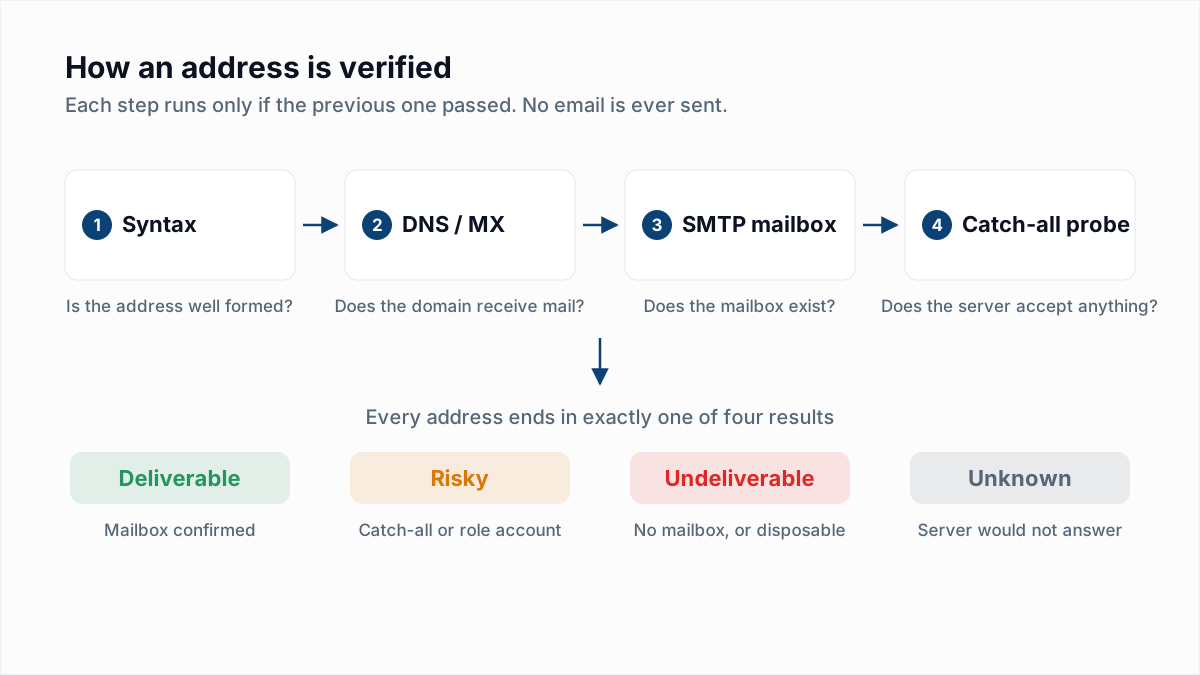
- Syntax. Is the address well formed? Obvious typos and impossible characters stop here.
- DNS and MX. Does the domain exist, and does it publish mail servers? A domain with no MX records cannot receive mail.
- Mailbox check over SMTP. The verifier connects to the mail server, introduces itself, names the recipient and reads the reply. A 250 means the server will accept mail for that mailbox; a 550 means it will not. The conversation ends there, before any message exists.
- Catch-all probe. For company domains, the verifier also asks about a random address that cannot exist. If the server accepts that too, every yes from it is unreliable and the address is marked Risky.
Reading the result
| Result | Example reply | Meaning |
|---|---|---|
| Deliverable | 250 2.1.5 OK | The server confirmed the mailbox. Safe to send. |
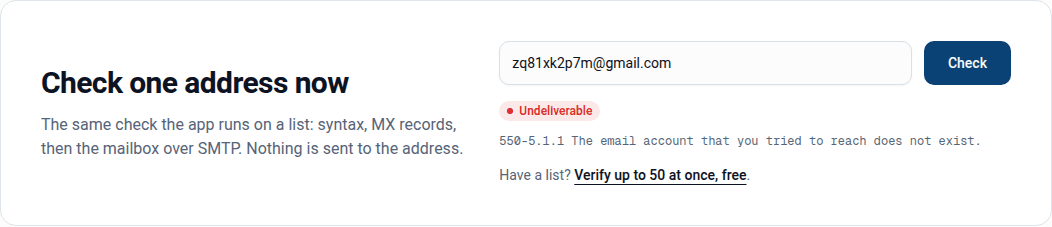
| Undeliverable | 550 5.1.1 The email account that you tried to reach does not exist, disposable-domain | The server rejected the mailbox, or the domain is a temporary-inbox service. Remove it. |
| Risky | catch-all-accepted, role-account | Unconfirmed or shared. Send with care. |
| Unknown | temporary-failure:451, sender-rejected:MAIL FROM:550 | The server would not answer. Try again later. |

What the free check cannot do
- Resolve catch-all domains. When a server accepts every address, no SMTP check can tell a real mailbox from a fake one. Some vendors guess using other data; InboxSure reports the catch-all honestly as Risky.
- Get an answer from every provider. Yahoo and Outlook.com often refuse to discuss recipients with servers they do not know, and some company gateways greylist first contact. Those come back Unknown. The provider-by-provider guide shows exactly what each one replies.
- Prove someone reads the inbox. A mailbox can exist and be abandoned. Verification removes bounces; engagement is a separate question.
- Run at volume. The checker is rate limited per network. For more than a handful of addresses, upload a list instead.
What the checker catches that a form validator does not
A sign-up form checks that an address has an @ and a dot. That lets through every address that is well formed and wrong. The checker goes further on each of these:
| Address | Form validator | Email verifier |
|---|---|---|
| jane@gmial.com | Valid | Undeliverable: the domain has no mail servers, and the likely intended domain is suggested |
| j.doe@company.com (left the company) | Valid | Undeliverable: the server answers 550, mailbox removed |
| sales@company.com | Valid | Risky: a role account, shared inbox, not a person |
| x9@tempmailbox.net | Valid | Undeliverable: a disposable domain, the inbox expired within minutes |
| anyname@catchall-corp.com | Valid | Risky: the server accepts every name, so nothing is proven |
The difference between verification and validation is the subject of its own guide.
How providers answer differently
Not every mail server is equally talkative, and that shapes what the checker can tell you. Gmail answers a missing mailbox with a clear 550 in a few seconds, and confirms a real one with 250, so Gmail results are dependable. Microsoft 365 business domains answer too, with a 550 5.4.1 for a missing mailbox, though some tenants are configured to accept everything. Outlook.com, Hotmail, Yahoo and AOL often reject unfamiliar servers before the recipient is named, so a single check against them usually comes back Unknown. Apple iCloud, Zoho, GMX and Yandex answer plainly, each in their own wording. All of this was measured on InboxSure's own infrastructure and is written up with the exact replies.
When to check a single address
- Before replying to a lead whose address was typed by hand or copied from a business card.
- When a bounce looks odd. Paste the address in and see what the server says now; a 451 means try again, a 550 means stop.
- To test a domain before importing a list from it. One real address and one made-up one tell you whether the domain is catch-all.
- To see what verification does before uploading a client's file.
Checking more than one address
The free plan verifies lists of up to 50 addresses, as many lists as you like, with no card. Upload a CSV or XLSX and download the results with a status and reason per row. Pro takes lists of up to 10,000 for a flat $49/month. The bulk email verifier page explains the upload and the exports.
Why verify before you send
Mailbox providers watch bounce rates closely. A campaign that bounces on a few percent of its addresses can land the rest in spam, and the damage follows your domain into the next campaign. Checking addresses first is the cheapest fix there is. The guide on reducing bounce rate covers the rest of the picture, and the free bounce rate calculator shows where you stand.