Email Validation Regex: Patterns That Work and Their Limits
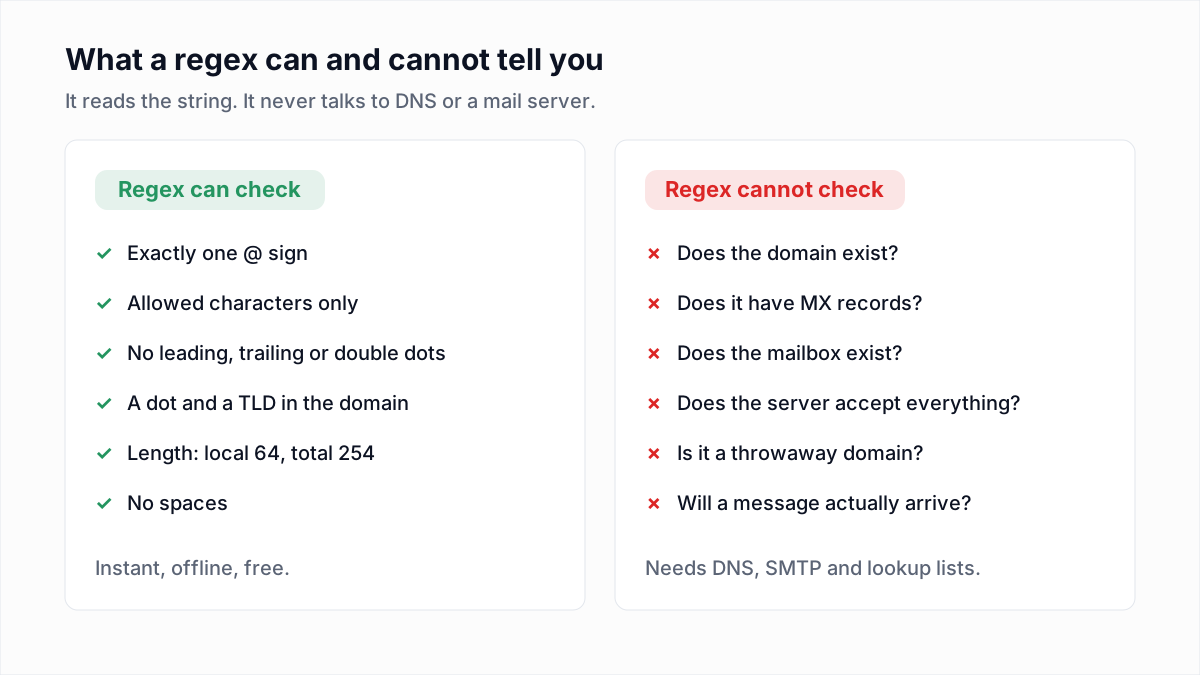
For most forms, the email regex you want is ^[^\s@]+@[^\s@]+\.[^\s@]+$: something, an @, something, a dot, something, and no spaces. If you need a stricter rule, use the pattern the HTML standard uses for <input type="email">, or the dot-atom check below. Whatever you pick, a regex only tells you an address is shaped like an email. It cannot tell you the domain takes mail or the mailbox exists. That needs a DNS lookup and an SMTP check.
This guide gives three copy-paste patterns, shows them in JavaScript, Python, PHP and HTML, and lists real test results for each one. Every result in the table below was produced by running the patterns, not by reading them.
Three email regex patterns you can copy
1. The simple practical pattern
^[^\s@]+@[^\s@]+\.[^\s@]+$One or more characters that are not whitespace or @, then @, then a domain with at least one dot. It rejects the mistakes people actually make in forms (a missing @, a space, two @ signs, no dot in the domain) and accepts every real address, including ones with accented letters. It also accepts plenty of junk such as jane@example..com. For a sign-up form, that trade is usually right: a false rejection loses a real user, while a false acceptance gets caught by the later checks.
2. The WHATWG HTML pattern (what browsers use)
^[a-zA-Z0-9.!#$%&'*+\/=?^_`{|}~-]+@[a-zA-Z0-9](?:[a-zA-Z0-9-]{0,61}[a-zA-Z0-9])?(?:\.[a-zA-Z0-9](?:[a-zA-Z0-9-]{0,61}[a-zA-Z0-9])?)*$This is the regular expression the HTML Living Standard gives as its definition of a "valid email address", and it is what a browser checks when a field has type="email". The local part allows letters, digits, dots and the RFC 5322 symbol set. The domain must be made of labels that start and end with a letter or digit, up to 63 characters each.
The spec is open about its choices. It calls the rule "a willful violation of RFC 5322", because the RFC grammar is "simultaneously too strict (before the "@" character), too vague (after the "@" character), and too lax" to be useful in a form. Two consequences matter in practice: it accepts a domain with no dot (jane@localhost), and it accepts dots anywhere in the local part, including jane..doe@ and .jane@, which RFC 5322 does not allow unquoted.
3. The check InboxSure runs first
Before any DNS or SMTP work, InboxSure's verifier splits the address at the last @ and tests each half separately. The local part must be a dot-atom:
^[A-Za-z0-9!#$%&'*+/=?^_`{|}~-]+(\.[A-Za-z0-9!#$%&'*+/=?^_`{|}~-]+)*$The domain must match:
^(?=.{1,253}$)([A-Za-z0-9-]+\.)+[A-Za-z]{2,}$Then three length rules apply:
- local part at most 64 characters
- whole address at most 254 characters
- each domain label at most 63 characters
The dot-atom rule means dots are only allowed between runs of characters, so a leading dot, a trailing dot or two dots in a row fail. The domain rule requires at least one dot and a top-level domain of two or more letters. It is stricter than the browser on the local part and looser in one place on the domain: it does not stop a label from starting with a hyphen, which the WHATWG pattern does. The test table shows that case.
What each pattern accepts and rejects
These results come from running all three in Node.js 24. The InboxSure column is the two patterns plus the length rules, exactly as above. For the +news form in the second row, see plus addressing and email aliases.
| Address | Simple | WHATWG | InboxSure first check |
|---|---|---|---|
jane.doe@example.com | Accepts | Accepts | Accepts |
jane+news@example.co.uk | Accepts | Accepts | Accepts |
o'brien@example.ie | Accepts | Accepts | Accepts |
jane..doe@example.com | Accepts | Accepts | Rejects |
.jane@example.com | Accepts | Accepts | Rejects |
jane@localhost | Rejects | Accepts | Rejects |
jane@example..com | Accepts | Rejects | Rejects |
jane@-example.com | Accepts | Rejects | Accepts |
jane@exa_mple.com | Accepts | Rejects | Rejects |
jane@example.c | Accepts | Accepts | Rejects |
jane@192.0.2.1 | Accepts | Accepts | Rejects |
jane@[192.0.2.1] | Accepts | Rejects | Rejects |
"john doe"@example.com | Rejects | Rejects | Rejects |
josé@example.com | Accepts | Rejects | Rejects |
jane@münchen.de | Accepts | Rejects | Rejects |
jane@xn--mnchen-3ya.de | Accepts | Accepts | Accepts |
| 65-character local part @example.com | Accepts | Accepts | Rejects |
64-character domain label (jane@aaa...a.com) | Accepts | Rejects | Rejects |
jane doe@example.com | Rejects | Rejects | Rejects |
No pattern is right on every row. The quoted address is legal under RFC 5322 and all three reject it. The josé@ and münchen.de rows are legal on servers that support internationalized email and only the simple pattern lets them through. That is the nature of the trade-off: pick the pattern whose mistakes you can live with, then let the next layers catch what it misses.
Email regex in JavaScript
const LOCAL = /^[A-Za-z0-9!#$%&'*+/=?^_`{|}~-]+(\.[A-Za-z0-9!#$%&'*+/=?^_`{|}~-]+)*$/;
const DOMAIN = /^(?=.{1,253}$)([A-Za-z0-9-]+\.)+[A-Za-z]{2,}$/;

function isValidSyntax(address) {
  if (address.length > 254) return false;
  const at = address.lastIndexOf("@");
  if (at < 1) return false;
  const local = address.slice(0, at);
  const domain = address.slice(at + 1);
  if (local.length > 64) return false;
  if (!LOCAL.test(local) || !DOMAIN.test(domain)) return false;
  return domain.split(".").every((label) => label.length <= 63);
}

// The simple version
const SIMPLE = /^[^\s@]+@[^\s@]+\.[^\s@]+$/;
SIMPLE.test(input.trim());
Trim the input before testing. People paste addresses with a trailing space, and all three patterns reject it. Do not add the g flag to a regex you call .test() on repeatedly: a global regex remembers lastIndex between calls and will return false on every second check of the same string.
Email regex in Python
import re

LOCAL = re.compile(r"[A-Za-z0-9!#$%&'*+/=?^_`{|}~-]+(\.[A-Za-z0-9!#$%&'*+/=?^_`{|}~-]+)*")
DOMAIN = re.compile(r"(?=.{1,253}$)([A-Za-z0-9-]+\.)+[A-Za-z]{2,}")

def is_valid_syntax(address: str) -> bool:
    if len(address) > 254:
        return False
    local, sep, domain = address.rpartition("@")
    if not sep or not local or len(local) > 64:
        return False
    if not LOCAL.fullmatch(local) or not DOMAIN.fullmatch(domain):
        return False
    return all(len(label) <= 63 for label in domain.split("."))

SIMPLE = re.compile(r"[^\s@]+@[^\s@]+\.[^\s@]+")
SIMPLE.fullmatch("jane@example.com")  # match object, truthy
Use re.fullmatch, not re.match with ^...$. In Python, $ also matches just before a trailing newline. We checked: re.match(r"^[^\s@]+@[^\s@]+\.[^\s@]+$", "jane@example.com\n") returns a match, while fullmatch with the same pattern returns None. If you must use match, end the pattern with \Z instead of $.
Email regex in PHP
<?php
function is_valid_syntax(string $address): bool {
    if (strlen($address) > 254) return false;
    $at = strrpos($address, '@');
    if ($at === false || $at === 0) return false;
    $local  = substr($address, 0, $at);
    $domain = substr($address, $at + 1);
    if (strlen($local) > 64) return false;

    $localRe  = '/^[A-Za-z0-9!#$%&\'*+\/=?^_`{|}~-]+(\.[A-Za-z0-9!#$%&\'*+\/=?^_`{|}~-]+)*$/D';
    $domainRe = '/^(?=.{1,253}$)([A-Za-z0-9-]+\.)+[A-Za-z]{2,}$/D';
    if (!preg_match($localRe, $local) || !preg_match($domainRe, $domain)) return false;

    foreach (explode('.', $domain) as $label) {
        if (strlen($label) > 63) return false;
    }
    return true;
}
PHP's preg_match uses PCRE, which has the same trailing-newline behaviour as Python: $ matches before a final \n. The D modifier at the end of each pattern turns that off. The / inside the character class is escaped because / is the pattern delimiter. PHP also ships filter_var($address, FILTER_VALIDATE_EMAIL), which applies its own built-in rule rather than any of the three patterns here; test it against your own edge cases before relying on it.
Email validation in HTML: type=email and the pattern attribute
<!-- The browser applies the WHATWG rule for you -->
<input type="email" name="email" required autocomplete="email">

<!-- Add a rule on top, e.g. require a dot in the domain -->
<input type="email" name="email" required
       pattern="[^@\s]+@[^@\s]+\.[^@\s]{2,}">
type="email" already runs the WHATWG pattern, so you do not need to paste it into pattern. In fact you cannot: the spec compiles the pattern attribute with the JavaScript v flag, which forbids several unescaped symbols inside character classes. We tested it: the WHATWG regex throws "Invalid character in character class" when compiled with v, and the spec says an invalid pattern is simply ignored. The short pattern above compiles fine. The browser adds the ^ and $ anchors itself, so leave them out. And because anyone can bypass a form, repeat the check on the server.
RFC 5321 and RFC 5322: the actual limits
Two standards define an email address. RFC 5322 defines the syntax of addresses in message headers. RFC 5321 defines what SMTP servers must handle, including size limits:
- Local part: up to 64 octets (RFC 5321 section 4.5.3.1.1).
- Domain: up to 255 octets, with each DNS label up to 63.
- Path: up to 256 octets including the angle brackets around the address, which leaves 254 for the address itself. That is where the 254 rule comes from.
Inside those limits, RFC 5322 section 3.4.1 allows more than most people expect. A local part can be a quoted string, so "john doe"@example.com and "a@b"@example.com are syntactically valid. The domain can be an address literal in square brackets. The header syntax also allows comments in parentheses. Quoted local parts are rare enough in real lists that most validators, including all three patterns here, simply reject them.
Internationalized email addresses (EAI and IDN)
Non-ASCII addresses come in two parts. A domain like münchen.de is an internationalized domain name. In DNS it is stored as its ASCII form, xn--mnchen-3ya.de, and every pattern above accepts that form. If you want to accept the Unicode form, convert it to ASCII first (the URL constructor in JavaScript does this, as does the idna codec in Python) and validate the result.
A non-ASCII local part like josé@ is different. It needs the SMTPUTF8 extension defined in RFC 6531, and both the sending and receiving servers must support it. There is no ASCII conversion for the local part. If your audience uses such addresses, use the simple pattern, which accepts them, and let the SMTP check decide.
Why the "full RFC 5322 regex" is a bad idea
Search long enough and you will find a regex that claims to implement the whole standard. The best known is the one published with the Perl module Mail::RFC822::Address, which runs to more than 6,000 characters. Its own author notes that it was generated by a program, not written by hand, and that it cannot handle comments, because the RFC allows them to nest and a single regular expression cannot match nesting.
Even if you get one working, it is the wrong tool:
- It accepts addresses no real mailbox provider issues, like quoted strings and comments.
- No one on your team can read it, test it or safely edit it.
- Complex patterns can backtrack badly on hostile input, which turns a form field into a denial-of-service risk.
- It still says nothing about whether the address works.
The last point is the important one. Perfect syntax checking buys you very little over a simple pattern, because an address for a deleted or never-created mailbox is perfectly well formed, and so is a typo like gmial.com. A regex cannot catch either.
Why regex cannot tell you if a mailbox exists
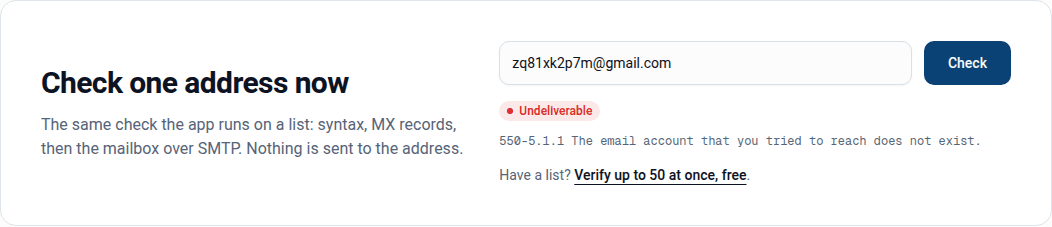
zq81xk2p7m@gmail.com passes every pattern in this article. Gmail rejects it, because no such account exists. A regex works on the string alone, so it has no way to know. Real validation happens in layers, and each layer only runs if the one before passed:
- Syntax. One of the patterns above. Cheap, instant, catches typing mistakes.
- Domain and MX. Look up the domain's MX records. No MX record, no mail. You can try it with the free MX lookup tool.
- Mailbox. Connect to the mail server and ask whether it will accept mail for this address, then disconnect before sending anything. The steps are in how to verify an email address without sending an email.
- Catch-all. Check whether the server accepts every address, in which case a yes from step 3 proves less.
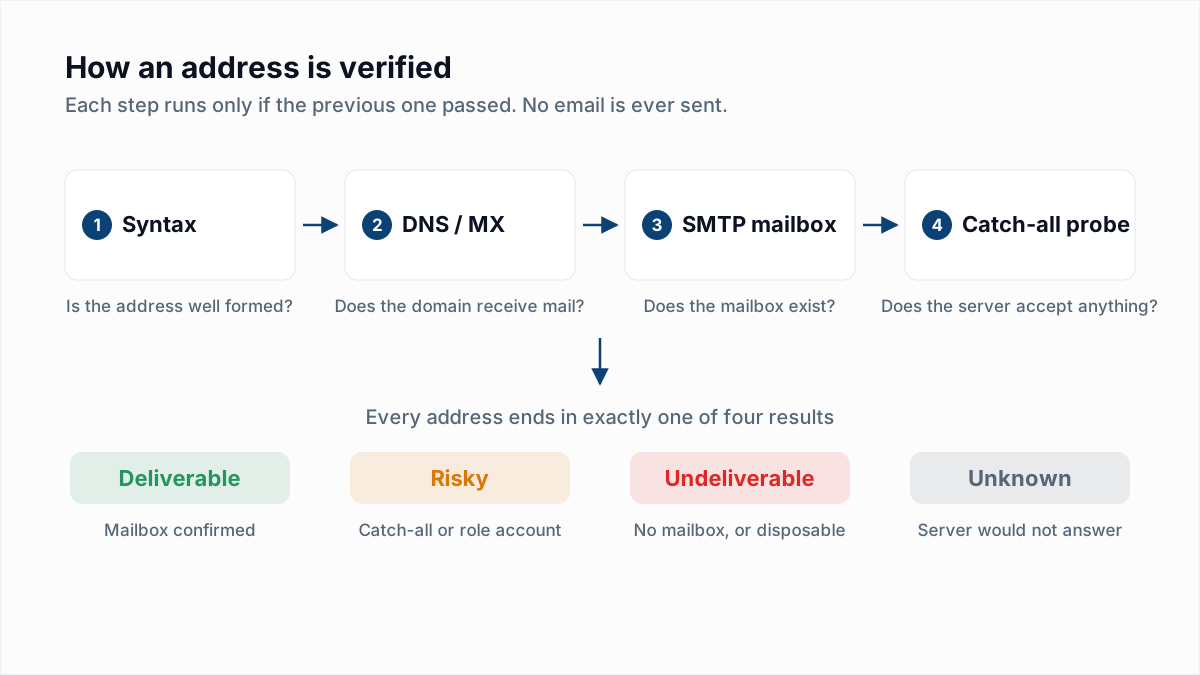
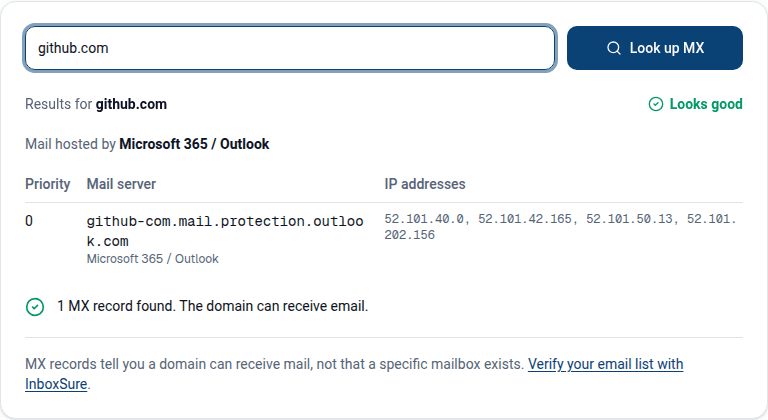
This is what InboxSure does after its syntax check: MX lookup, an SMTP mailbox check that sends nothing, catch-all detection, and flags for role accounts and known disposable domains. An address that passes the regex but would bounce comes back Undeliverable with the server's own reply.
Which pattern should you use?
| Situation | Use |
|---|---|
| Sign-up or checkout form | type="email" in the browser, simple pattern on the server |
| International audience with non-ASCII addresses | Simple pattern only |
| Cleaning an imported list before sending | Dot-atom check, then MX and SMTP verification |
| Matching the browser exactly on the server | WHATWG pattern |
| "Strict RFC compliance" | Do not use a regex; use a parser library, and still verify |
If you want to see all four layers run on a real address, paste it into the free email verifier. It runs the syntax check, the MX lookup and the SMTP mailbox check, and tells you which step decided the result.
Frequently asked questions
Related reading
Ready to clean your email list?
Upload a CSV or XLSX and get every address marked deliverable, risky, undeliverable or unknown, with the reason. Free for lists of up to 50, no card. Nothing is sent to your contacts.