Plus Addressing and Email Aliases: How They Work and Verify
The rule that explains everything else in this guide: the meaning of the + in jane+news@gmail.com is decided by the mail server for gmail.com and by nobody else. Plus addressing is a way for one mailbox to receive mail at many addresses by adding a tag after the name. Whether that works, and which character separates the tag, differs from one provider to the next.
That matters to anyone who keeps a list. A plus address is a real, deliverable address, so it should not be rejected. It can also be the same person signing up five times. This guide covers what each provider's own documentation says, how plus addresses differ from aliases, relay addresses and disposable inboxes, and what a verifier can and cannot tell you about them.
What is plus addressing (subaddressing)?
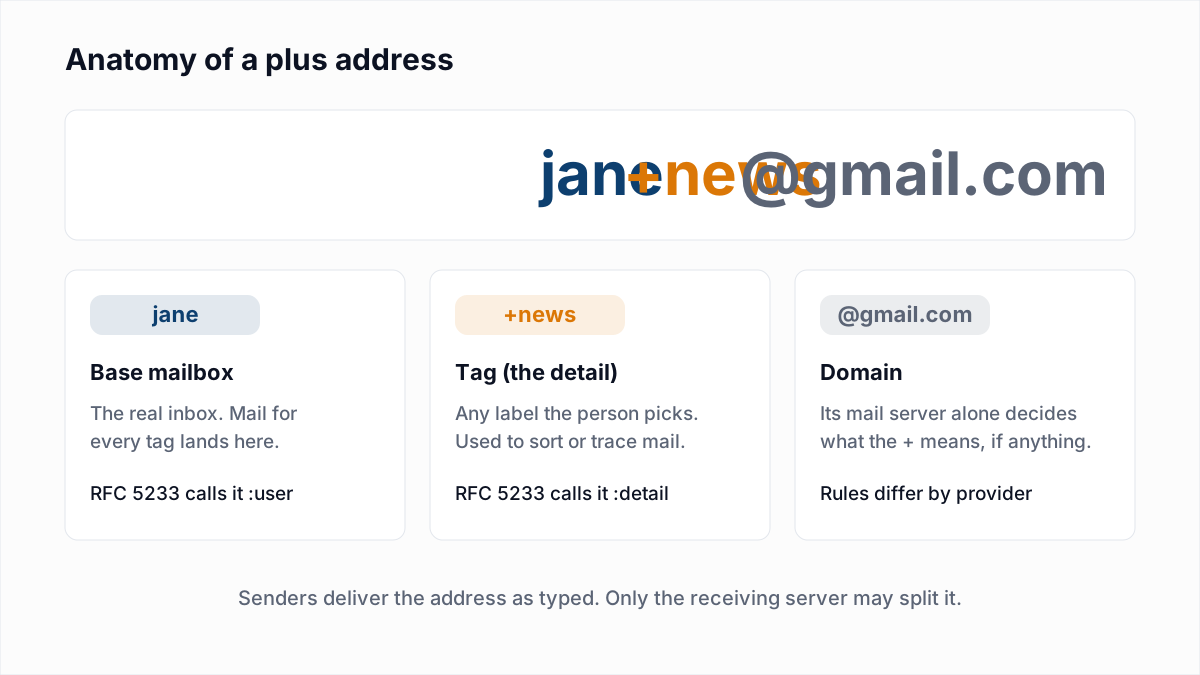
Plus addressing, also called subaddressing, is the practice of adding extra detail to the part of an email address before the @ so that several addresses reach one mailbox. The term comes from RFC 5233, published in January 2008, which defines it as "the practice of augmenting the local-part of an address with some 'detail' information". Its example: a message to ken+sieve@example.org is delivered into a mailbox called "sieve" belonging to the user "ken".
RFC 5233 is a mail-filtering standard, not a rule that every server must follow. It names the two halves :user and :detail and then says that "the logic used to split the address is implementation-defined". The core SMTP standard, RFC 5321, is stricter still about who may read meaning into an address: "the local-part MUST be interpreted and assigned semantics only by the host specified in the domain part of the address."
Which email providers support plus addressing?
Gmail, Microsoft 365 (Exchange Online), Fastmail and Proton Mail all document plus addressing on their own help pages, and Yahoo documents a different scheme built on a hyphen. The table records what each page said when we read it on 13 November 2026.
| Provider | What its own page says |
|---|---|
| Gmail (personal) | Gmail Help says janedoe+school@gmail.com and janedoe+notes@gmail.com "will all go to janedoe@gmail.com", and suggests filters on each one. |
| Microsoft 365 (Exchange Online) | Microsoft Learn says plus addressing "is enabled by default in Exchange Online". An admin can turn it off for the whole organisation. |
| Outlook.com (consumer) | The Microsoft Learn page covers Exchange Online only. We did not find a Microsoft page documenting plus addressing for consumer Outlook.com accounts, so we make no claim about it. |
| iCloud Mail | Apple's alias page lets you "create up to nine @icloud.com email aliases". It does not mention plus addressing. |
| Yahoo Mail | Yahoo Help describes disposable addresses in the form nickname-keyword@yahoo.com, with a hyphen, "available to Yahoo Mail Plus subscribers and users with existing nickname and disposable email addresses". The page does not mention a plus sign. |
| Fastmail | Fastmail's help page says mail to alias+whateveryoulike@domain.tld "is still sent to your account", and also supports the form whateveryoulike@alias.domain.tld. |
| Proton Mail | Proton's support page says "All mail sent to a plus alias arrives in your regular inbox" and gives the example ericnorbert+bills@proton.me. |
Three details from those pages matter later. Microsoft says Exchange first tries to match the full address, tag included, to a known mailbox, and only then retries without the tag. Microsoft and Fastmail both note that a tag is something the owner invents on the spot: nothing is created in advance. And Fastmail warns that "addresses with a + are incorrectly considered invalid by some websites".
Do dots matter in a Gmail address?
No, dots do not matter in a personal Gmail address: Google says mail to any dotted version reaches the same person. Google's page Dots don't matter in Gmail addresses states that the owner of johnsmith@gmail.com also owns john.smith@gmail.com and jo.hn.sm.ith@gmail.com, and that "Emails sent to any dotted version of your address will only go to you."
The same page carries the exception that catches people out. For Gmail used through "work, school, or other organization", meaning a Google Workspace domain, Google says "dots do change your address." So j.doe@company.com and jdoe@company.com can be two different employees even though Google hosts the mail.
What is the difference between an email alias and a plus address?
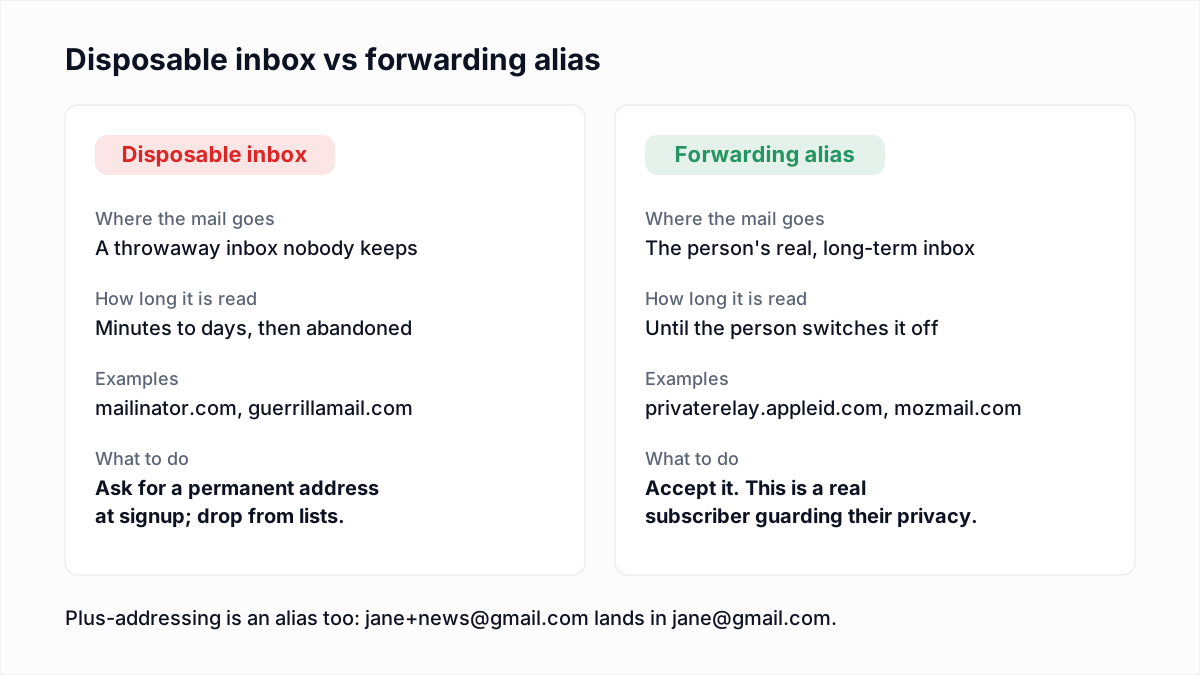
An email alias is a separate address the mailbox owner sets up in advance, while a plus address is made up on the spot by adding a tag to an address that already exists. Relay addresses and disposable inboxes are different again.
| Type | Example | How it is created | Shows the real address? | What a list owner should do |
|---|---|---|---|---|
| Plus address | jane+news@gmail.com | Typed by the person, with no setup. | Yes. Remove the tag and you have it. | Accept it and mail it as typed. |
| Alias | j.smith@icloud.com | Added in the mail account's settings. | No. It looks like any other address. | Accept it. You cannot tell it is an alias. |
| Relay address (Hide My Email, Firefox Relay) | x7k2@privaterelay.appleid.com | Generated by a privacy service, which forwards the mail. | No. That is its purpose. | Accept it. A real person reads the mail. |
| Disposable inbox | anything@mailinator.com | Handed out by a throwaway-mail site. | No. There is no real address behind it. | Ask for a permanent address at signup. |
The line that matters is between the first three rows and the last. A plus address, an alias and a relay address all reach an inbox the person keeps. A disposable inbox does not. The detection methods for that last group are in disposable email addresses.
Why do people use plus addresses?
People use plus addresses to sort incoming mail, to trace who passed their address on, and to register more than once with a single inbox.
- Sorting. Google suggests
yourname+news@gmail.comfor newsletters with a filter that labels or archives them. Fastmail files mail straight into a folder whose name matches the tag. - Tracing. Sign up as
jane+shopname@, and when spam arrives at that tag you know where the address leaked. - Testing. Developers and QA teams create many accounts that all land in one inbox.
- Repeat signups. The same trick gets a second free trial or a second first-order discount.
Are plus addresses valid email addresses?
Yes, plus addresses are valid: the plus sign is an allowed character in the local part of an email address, and a form that rejects it is turning away real people. The patterns that accept it correctly are in email validation regex. Valid syntax is not the same as a working mailbox, which is the difference covered in email verification vs validation.
What do plus addresses mean for an email list?
Plus addresses on a list mean that one person can appear as several contacts, each of which is a deliverable address. Two things follow.
- Duplicates of one person.
jane@gmail.com,jane+a@gmail.comandj.ane@gmail.comare three rows and one inbox. That person gets every campaign three times, which is a quick route to an unsubscribe or a spam complaint, and your contact count is overstated. - Trial and promo abuse. A product that gives one trial per email address gives unlimited trials to anyone who knows about the plus sign.
Should you strip the plus tag to remove duplicates?
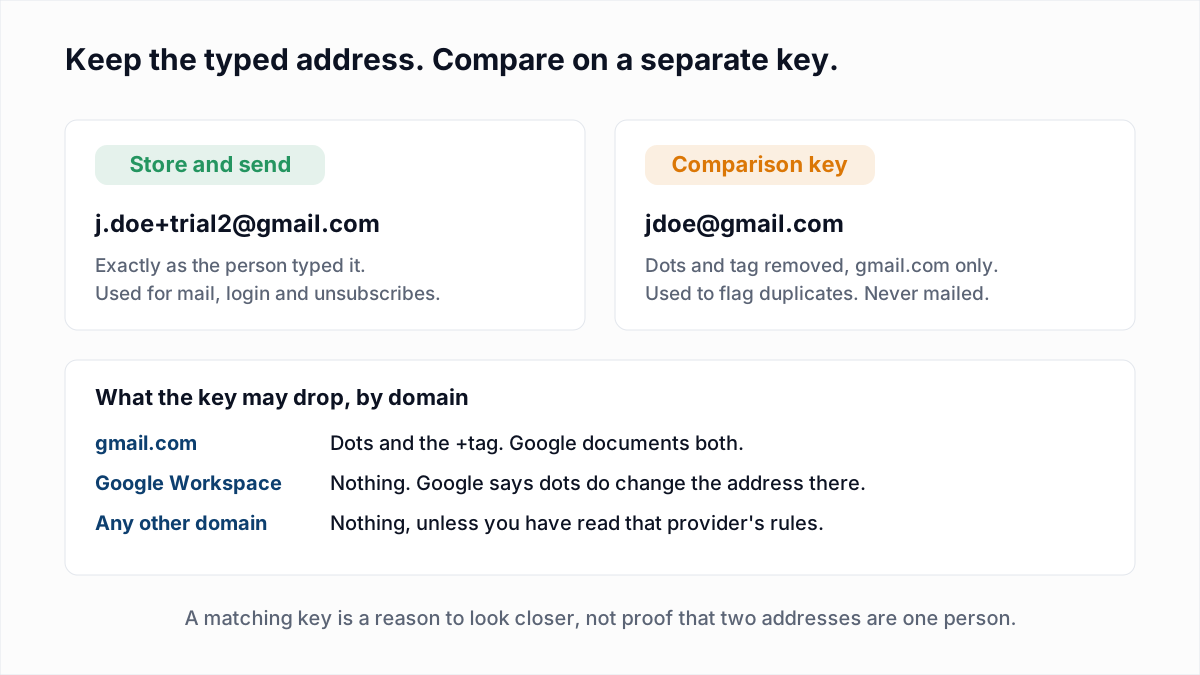
Stripping the plus tag is safe only as a private comparison key for domains whose rules you have read, and it is never safe on the address you send to. The reasons come straight from the provider pages above.
- Dots are a gmail.com rule. On a Google Workspace domain Google says dots do change the address, so removing them can merge two different people.
- The plus sign is not universal. Microsoft lets an admin switch plus addressing off, and Exchange matches the full address to a mailbox first. On a server with no subaddressing,
billing+eu@can be its own mailbox. - Other separators exist. Yahoo uses a hyphen and Fastmail also uses a subdomain. Treating hyphens as tags everywhere would wreck ordinary names like
mary-ann@. - The typed address is the one with consent. It may be the login, the address the person's filters expect, and the address they will unsubscribe. Rewriting it before sending breaks all three, and at some providers delivers to a stranger.
The handling that respects those limits:
- Store and send the address exactly as typed. Change nothing but surrounding spaces.
- Build a separate comparison key. For
gmail.comonly: lower-case it, remove dots from the local part and cut everything from the+. For every other domain, lower-case it and stop there unless you have read that provider's rules. - Use a matching key as a flag. A second trial on the same key can go to review or need a payment card. Do not silently merge or delete contacts on it.
- Send one copy. When two contacts share a key, pick one to receive campaigns and keep the other suppressed, not rewritten.
- Date your rules. Provider behaviour changes; note when you last read each help page.
How does email verification treat a plus address?
Email verification treats a plus address as an ordinary address: it asks the mail server whether the full address, tag included, would be accepted. At a provider that supports plus addressing, the server resolves the tag to the base mailbox before it answers, so the result is in effect the result for the base mailbox. At a provider that does not, the tagged address is simply a different mailbox name, and it will come back as not existing unless someone created it.
We read InboxSure's verifier code to state exactly what it does, as of November 2026:
- There is no special case for the plus sign. The tag is not stripped, and the address is checked as typed through the usual syntax, MX and SMTP mailbox steps.
- Each address gets its own result.
jane+a@andjane+b@are not merged or marked as duplicates of each other. - The role-account flag compares the whole local part with a list of role names, so
sales@is flagged andsales+eu@is not. See role-based email addresses.
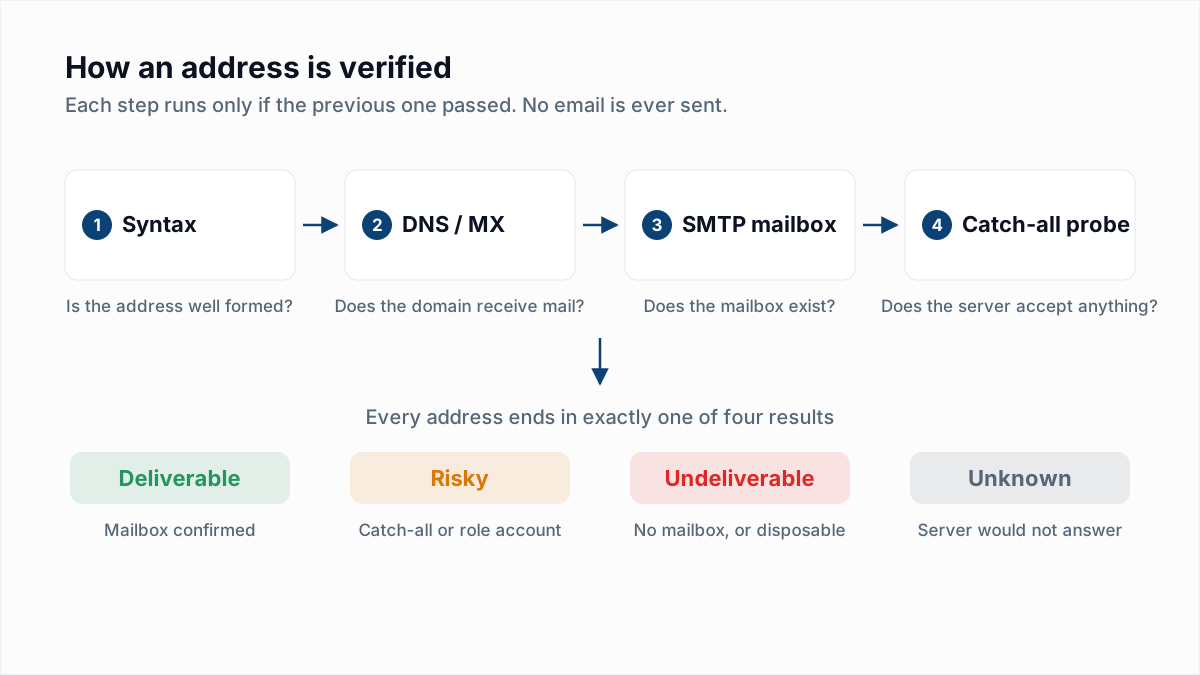
Two limits apply. Verification cannot tell you that two addresses belong to one person: that is a comparison between rows, and the server is never asked. And the provider still has to answer the check. Yahoo and Outlook.com consumer addresses come back Unknown from InboxSure today, with or without a tag, for the reasons in how Gmail, Outlook and Yahoo respond to verification.
What to do with plus addresses on your list
Accept them at signup, mail them as typed, and flag likely duplicates with a provider-specific key instead of rewriting anything. Confirming each new address with double opt-in proves the inbox is read, though it does not stop one person confirming several tags.
To find out which addresses on a list exist at all, tagged or not, upload it to the bulk email verifier. Lists of up to 50 addresses are free with no card, and Pro checks lists of up to 10,000 for a flat $49 a month. Every row is checked as typed and comes back Deliverable, Risky, Undeliverable or Unknown.
Frequently asked questions
Related reading
Ready to clean your email list?
Upload a CSV or XLSX and get every address marked deliverable, risky, undeliverable or unknown, with the reason. Free for lists of up to 50, no card. Nothing is sent to your contacts.