Disposable Email Addresses: How to Detect and Block Them
A disposable email address is a temporary inbox, often called a 10-minute email, that someone uses once and abandons: to grab a download, start a free trial or get past a signup form without giving a real address. You detect them mainly by checking the domain against a maintained list of known disposable providers, backed up by MX and pattern checks. You block them at signup with a short inline message, while still accepting privacy aliases like Apple Hide My Email and Firefox Relay, which forward to a real person and are not disposable at all.
What is a disposable email address?
Disposable email services hand out a working address instantly, with no account and no password. Some give you a random address that lasts a few minutes. Others, like Mailinator, let you invent any address on their domain and read its inbox on their website, where anyone else who types the same name can read it too. Either way, the person has no intention of reading that inbox again after today.
The defining feature is not the domain or the service. It is that nobody keeps the address. Mail you send next week reaches an inbox no one is watching, or a domain that has stopped accepting mail.
Forwarding aliases are not disposable
This is where many signup forms go wrong. Plenty of real customers sign up with a privacy alias: a unique address that forwards to their main inbox, so they can see who sold their address and switch off any one sender. These people read your email. Blocking them turns away real, often careful, customers.
- Apple Hide My Email and Sign in with Apple. Apple's support page says Hide My Email "generates unique, random email addresses that automatically forward to your personal email inbox." Addresses created through Sign in with Apple end in
privaterelay.appleid.com. - Firefox Relay. Mozilla's Relay FAQ describes its masks as "private, email addresses that forward messages to your true email address." They use the
mozmail.comdomain. - SimpleLogin. An open-source alias service owned by Proton AG, according to its own site. Mail to an alias is passed on to the person's real mailbox.
- Gmail plus-addressing and dots. Google's Gmail help shows that
janedoe+school@gmail.comdelivers tojanedoe@gmail.com, and another help page confirms that dots in a personal Gmail address do not change where mail goes. These are the same inbox, not throwaway ones. More in plus addressing and email aliases.
The test that separates the two: does mail reach an inbox the person keeps? For an alias, yes, until they switch it off, and if they do, it simply bounces like any other address that stops working. For a disposable inbox, no. The open disposable-email-domains list discussed below agrees: when we checked it on 12 November 2026, it did not include privaterelay.appleid.com, mozmail.com or simplelogin.com.
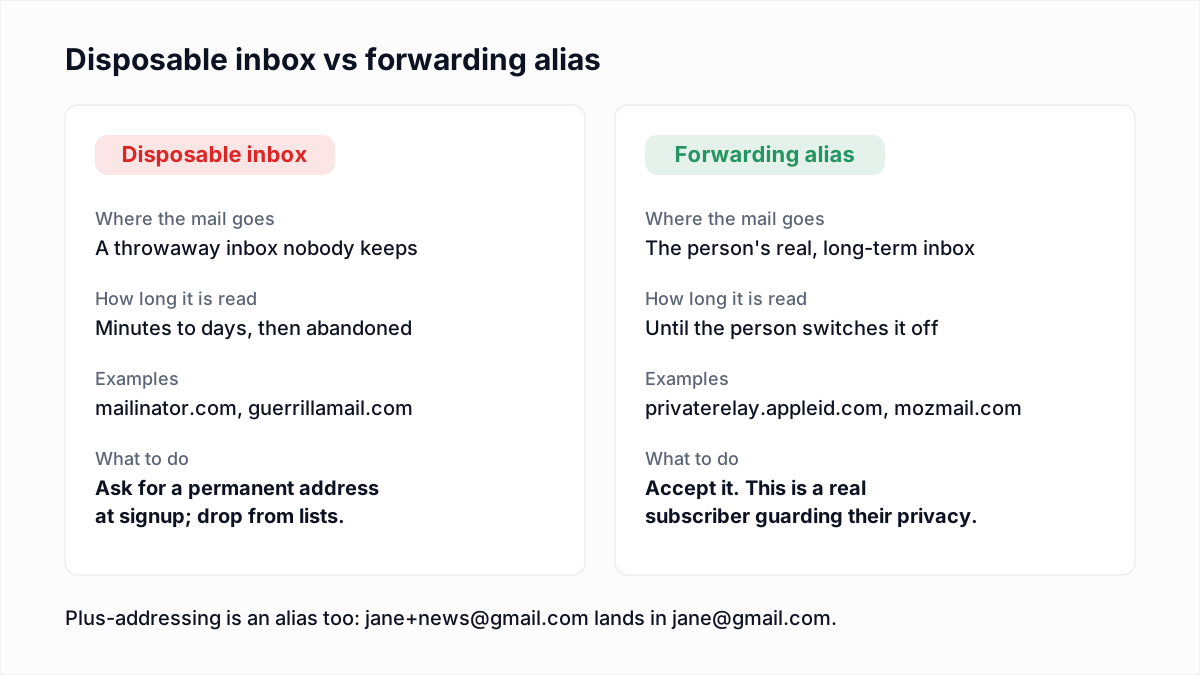
One related case: if you want to stop one person claiming several free trials with jane+1@gmail.com, jane+2@gmail.com and so on, normalise the address for duplicate checks (strip the plus tag, and the dots for gmail.com) but store and mail the address exactly as typed. That handles abuse without treating plus-addressing as fake.
Why disposable emails hurt
- Fake signups. Accounts created with a throwaway inbox inflate your user count and conversion figures with people who will never come back.
- Trial and promo abuse. A new disposable address per signup means a new free trial, a new first-order discount or a new referral credit every time.
- Mail to inboxes nobody reads. Your onboarding sequence and newsletters go to addresses that never open, which weakens the engagement signals mailbox providers use to judge you.
- Bounces later. Temporary inboxes expire and throwaway domains get dropped. Addresses that accepted mail at signup start returning hard bounces months later, pushing up a bounce rate you thought you had under control.
Spamhaus counts this as a hygiene problem. Its sender guidelines tell senders to "implement a robust email sunset policy to help remove temporary email sign-ups."
How temporary email detection works
There is no flag in an email address that says "temporary". Every detection method infers it from the domain, and each one has gaps.
Domain lists
The main method is a list of domains known to belong to disposable services. The best known open one is the disposable-email-domains project on GitHub: a plain text file with one domain per line, released under CC0, and used by PyPI to block registrations. When we downloaded it on 12 November 2026 it held a little over 10,000 domains, including mailinator.com, guerrillamail.com and 10minutemail.com. New entries need a screenshot of the domain handing out addresses, which keeps false positives down, and the maintainers warn that some listed domains may no longer be disposable.
Lists are precise but always behind. A disposable service can register a fresh domain in minutes, and that domain is invisible to every list until someone reports it.
MX patterns
Many disposable services run dozens of domains on the same mail servers. So a second check is to look up an unknown domain's MX records and compare them with the mail servers behind known disposable domains. A lookup we ran while writing this:
$ dig +short MX mailinator.com
1 mail.mailinator.com.
1 mail2.mailinator.com.

$ dig +short MX mozmail.com
10 inbound-smtp.us-west-2.amazonaws.com.
A new domain whose MX points at mail.mailinator.com is almost certainly a Mailinator alias domain. The second result shows the trap in this method: Firefox Relay receives mail through Amazon's shared inbound service, which many legitimate businesses also use. Match on hosts that belong to a disposable service, never on shared cloud mail hosts. You can run these lookups with our MX lookup tool.
Heuristics
Some systems also score signals around the address: a domain registered in the last few days, a domain with no website, a random-looking local part, or a burst of signups from the same unfamiliar domain. These catch some new disposable domains that lists miss. They also catch real people at small companies and new startups, so they suit a review queue or extra confirmation step better than an outright block.
Why a mailbox check alone does not catch them
An SMTP mailbox check asks the server whether the address exists. Disposable services are built to accept mail, and many accept any address on their domain, so the server says yes. Without a domain list, a verifier would report a fresh Mailinator inbox as a working address, because technically it is one. This is why disposable detection is a separate check from mailbox verification.
| Method | Catches | Misses | False positive risk |
|---|---|---|---|
| Domain list | Known, established disposable domains | Domains registered since the last update | Low, if the list requires proof |
| MX pattern | New domains on a known service's mail servers | Services that run their own fresh servers | High if you match shared cloud hosts |
| Heuristics | Some brand-new domains | Disposable domains that look normal | Medium to high |
| SMTP mailbox check | Nothing, on its own | Disposable inboxes that accept mail | Not applicable |
How to block disposable emails at signup without losing real users
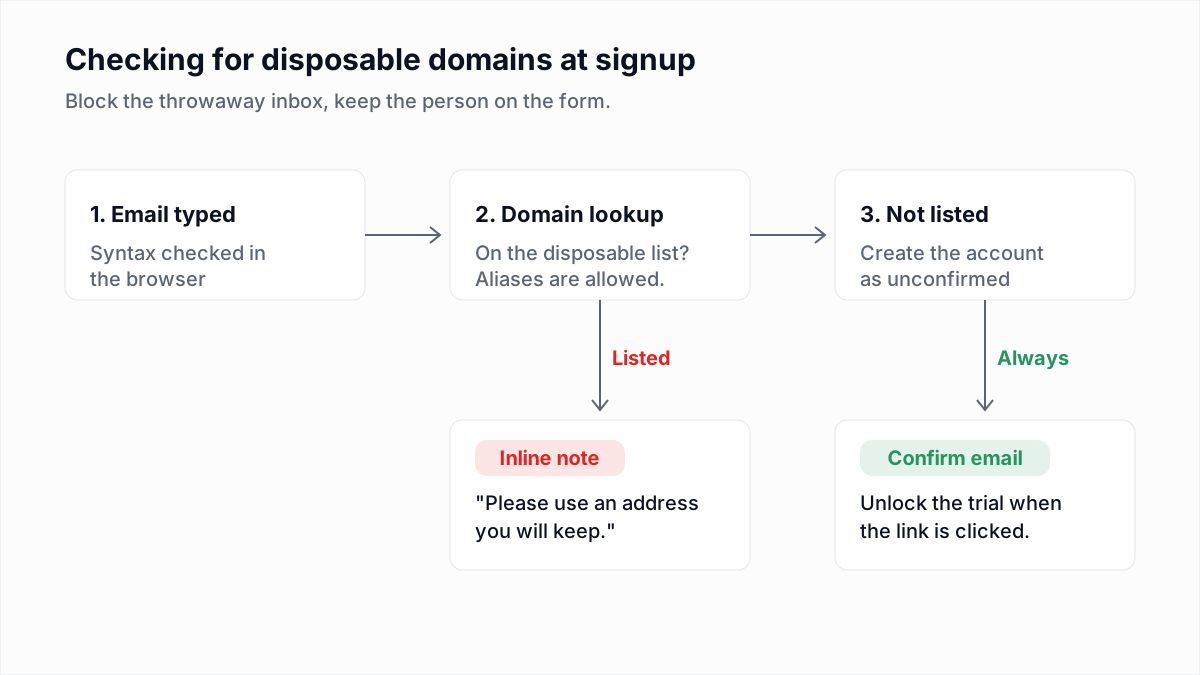
The goal is to stop the throwaway inbox while keeping the person on the form. Most people who type a disposable address will give a real one if you ask politely at the moment they type it.
- Check on the server. A browser check is easy to bypass. Run the domain lookup in the signup handler, and optionally mirror it in the browser for instant feedback.
- Show an inline message, not an error page. Keep everything they typed and put a short note under the email field, such as: "This looks like a temporary inbox. Please use an address you will keep, so your login link and receipts reach you."
- Allow forwarding aliases and plus-addressing. Do not add
privaterelay.appleid.com,mozmail.comor alias services to your blocklist, and never reject an address because it contains a+. - Do not block on heuristics alone. An unfamiliar domain is usually a small business. Send those through normal confirmation.
- Confirm every address. A confirmation link, with the trial or discount unlocked only after it is clicked, makes a 10-minute inbox far less useful, because the person has to come back to it.
- Update the list on a schedule. Pull the latest version weekly or monthly; a list from last year misses everything registered since.
A minimal server-side check against a downloaded list looks like this. It checks the domain and each parent domain, so subdomains of a listed domain are caught too:
// blocked: a Set built from disposable_email_blocklist.conf,
// one lowercase domain per line, reloaded on a schedule
function isDisposable(email, blocked) {
  const domain = email.split("@").pop().trim().toLowerCase();
  const parts = domain.split(".");
  for (let i = 0; i < parts.length - 1; i++) {
    if (blocked.has(parts.slice(i).join("."))) return true;
  }
  return false;
}
How to check if an email is disposable
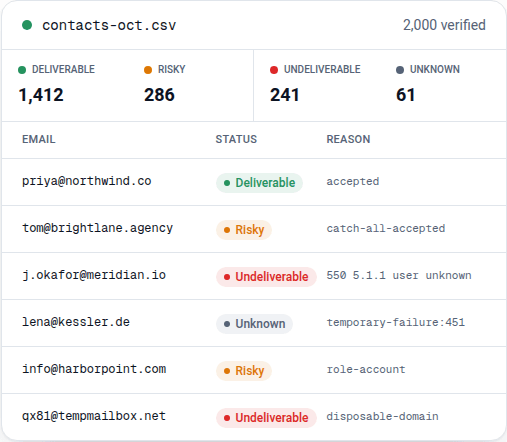
For a single address, paste it into the free email verifier. InboxSure checks the domain against a maintained list of known disposable providers alongside the syntax, MX and mailbox checks. A match comes back Undeliverable with the reason disposable-domain, and the checker adds the note "Disposable domain: temporary inbox, do not keep it." Forwarding aliases are not on that list and are checked like any other address.
By hand, the quick tests are: search the domain name together with "temporary email", open the domain in a browser to see whether it is an inbox generator, and look up its MX records against the known disposable mail hosts described above.
Cleaning disposable addresses out of an existing list
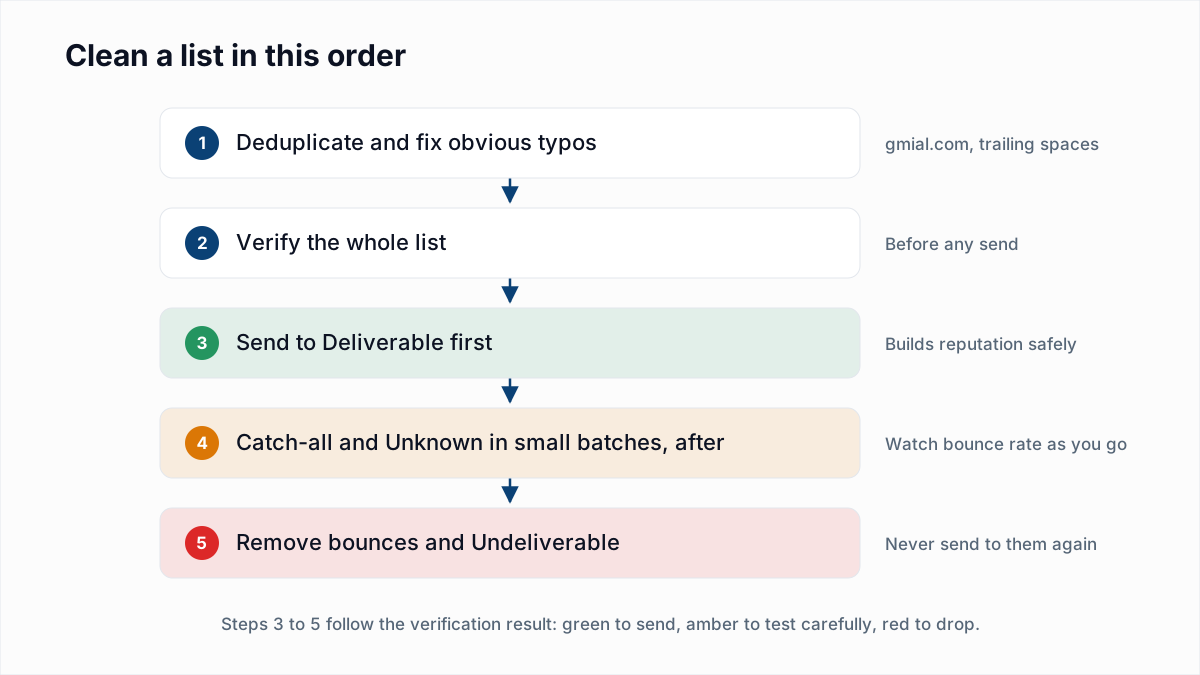
Most lists collected without confirmation contain some throwaway addresses. Clearing them out is part of a normal clean:
- Verify the whole list. In InboxSure, download the results as CSV and filter the reason column for
disposable-domain. - Remove those rows from marketing sends. They will not open, and the ones that have expired will bounce.
- For paying customers or active users on a disposable domain, do not just delete them. Ask for a permanent address inside your app the next time they log in.
- Fix the form that let them in, using the signup steps above, so the list stays clean.
The limits of disposable detection
Every list-based checker, InboxSure's included, can miss a disposable domain that was registered recently, because no list knows about it yet. Detection reduces throwaway signups; it does not end them. Confirmation emails, watching for repeat signups and a sunset policy for addresses that never engage cover what the list misses. For how disposable flags sit alongside other risky categories, see role-based email addresses and what is a catch-all email.
To find the disposable addresses already on your list, upload it to the bulk email verifier. Lists of up to 50 addresses are free with no card, and Pro checks lists of up to 10,000 for a flat $49 a month, with each disposable row marked so you can drop it in one filter.
Frequently asked questions
Related reading
Ready to clean your email list?
Upload a CSV or XLSX and get every address marked deliverable, risky, undeliverable or unknown, with the reason. Free for lists of up to 50, no card. Nothing is sent to your contacts.