Double Opt-In vs Single Opt-In: Which Should You Use?
With single opt-in, an address goes onto your list the moment someone submits a form. With double opt-in, also called confirmed opt-in, it waits as "pending" until the owner clicks a link in a confirmation email, and only then gets your mail. Double opt-in gives you a cleaner list and better proof of consent. It costs you the people who never click the link. For most marketing lists, and for anyone mailing people in Germany, double opt-in is the safer default. If you stay with single opt-in, add checks at the form and watch how new subscribers respond to their first emails.
What is double opt-in (confirmed opt-in)?
The industry body M3AAWG sets out three levels of opt-in in its Sender Best Common Practices (version 4.0, updated August 2026):
- Single opt-in. The person gives an address and starts receiving mail. No notification is sent and no confirmation is asked for.
- Single opt-in with notification (M3AAWG calls it "Better"). A welcome message tells the person they have subscribed, but they do not have to do anything.
- Confirmed opt-in ("Best"). A confirmation message asks the person to click a link or reply, and nothing else is sent until they do.
"Double opt-in" and "confirmed opt-in" mean the same thing. M3AAWG lists them as synonyms, along with "closed-loop subscription". It is blunt about level one: "Single opt-in should be used with extreme caution as it allows unconfirmed addresses to be added to mailing lists."
How the double opt-in flow works
- The person submits the form. You store the address with a status of pending, plus the time, the form it came from and the consent wording they saw.
- The thank-you page tells them to check their inbox and click the link.
- You send the confirmation email straight away. It holds one link with a unique, single-use token.
- When they click, you mark the contact as confirmed, log the time of the click and send the welcome email.
- If they never click, the contact stays pending, gets no marketing, and is deleted after a set number of days.
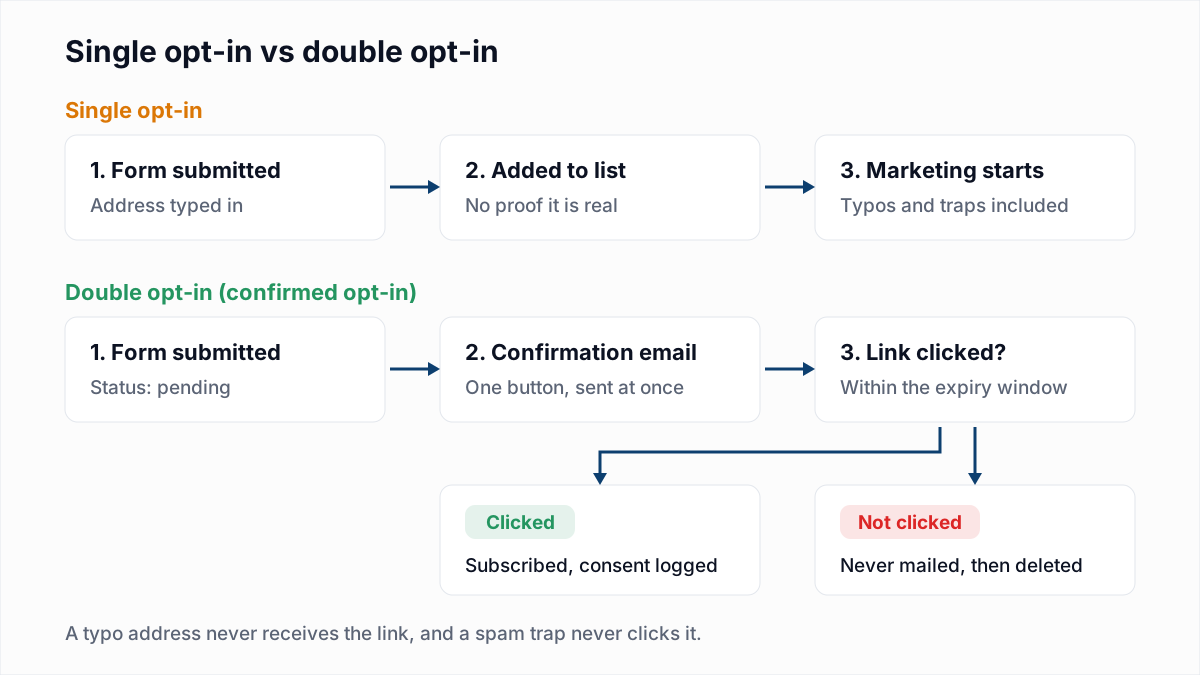
Double opt-in vs single opt-in: pros and cons
| Factor | Single opt-in | Double opt-in |
|---|---|---|
| Typos (gmial.com, missing letters) | Added to the list and bounce on the first send | Never confirmed, so never mailed |
| Typo and pristine spam traps | Can be added by a typo or a bot | A trap never clicks, so it never joins |
| Someone else's address entered | The owner gets mail they did not ask for and may report it as spam | The owner gets one confirmation and nothing more |
| Bots and list bombing | Fake addresses flood the list | They stay pending, but each still triggers a confirmation email |
| Proof of consent | A form submission, which anyone could have made | A click from the mailbox itself, with a timestamp |
| Signups you keep | All of them, real or not | Only those who click; some real people never do |
| Time to first email | Immediate | Waits on the click |
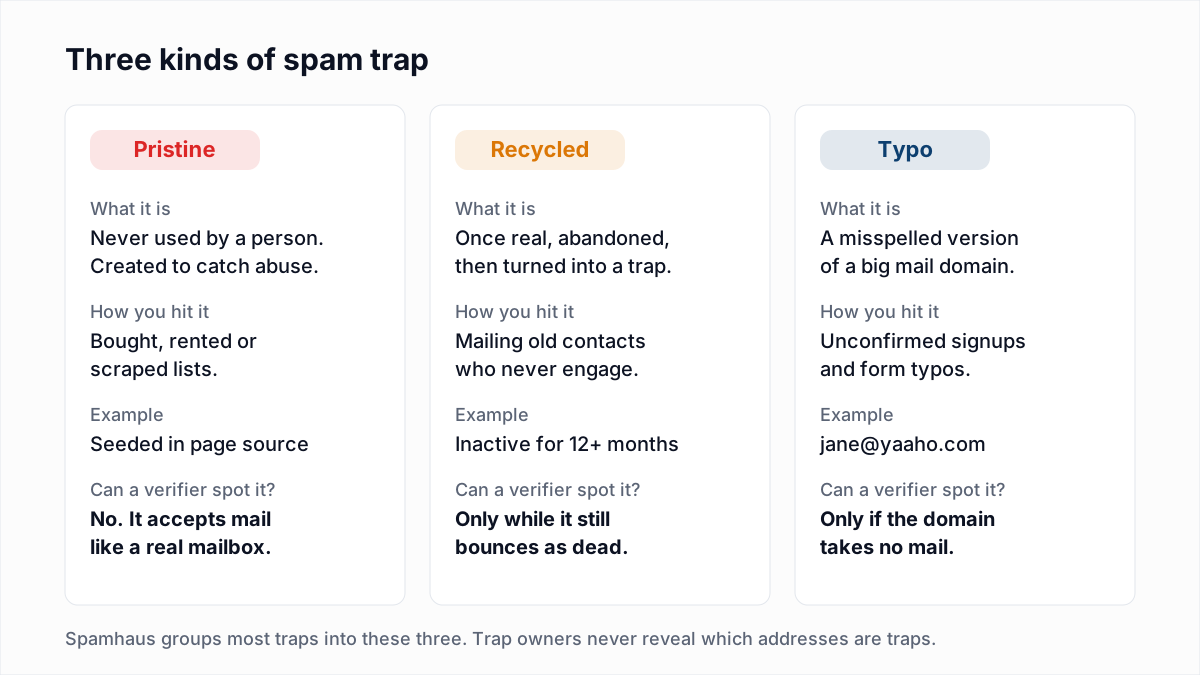
Spam traps are covered in depth in our spam trap explainer. The short version for this choice: typo traps and pristine traps reach a list through addresses nobody confirmed, and double opt-in closes that door. For the typos themselves, see email typos and misspelled domains.
Is double opt-in required by law?
Usually not in so many words, but it depends on where your subscribers live. This section is a summary of public sources, not legal advice. For cold outreach, see is cold email legal.
GDPR: you must be able to prove consent
The GDPR does not mention double opt-in. What it does say, in Article 7(1), is: "Where processing is based on consent, the controller shall be able to demonstrate that the data subject has consented to processing of his or her personal data." A form submission shows that someone typed an address. A confirmation click shows that the mailbox owner agreed. That is why double opt-in is the common way to meet the requirement, even though the regulation does not name it.
Germany: double opt-in is the practical standard
In some EU countries, notably Germany, double opt-in is widely treated as the practical standard. Al Iverson's review of the German position concludes that no statute explicitly requires it, but German courts have held that single opt-in is not sufficient proof of consent. It also reports that 2022 guidance from the German data protection authorities says the double opt-in procedure is required to verify the person's intent. If you mail German residents, use double opt-in and keep the confirmation email free of advertising.
United States: CAN-SPAM does not require opt-in at all
The FTC's CAN-SPAM compliance guide describes an opt-out law. You must identify yourself, include a working way to opt out and honour opt-out requests within 10 business days. You do not need prior consent. Legal and deliverable are different things, though: mailbox providers filter mail people did not ask for, whatever the law allows.
What Spamhaus and the mailbox providers recommend
- Spamhaus's sender guidelines recommend confirmed opt-in: "Each recipient should confirm their address by clicking a link in a confirmation email" and "If no opt-in is received, do not send email to that address." They also ask you to keep a timestamped record of when and how permission was obtained.
- Yahoo's best practices say to send new subscribers an email asking them to click to confirm their opt-in.
- Google's sender guidelines say: "Confirm each recipient's email address before subscribing them."
None of these are laws, but they are the rules your mail is filtered by. Our summary of Gmail, Yahoo and Outlook sender requirements covers the parts that are enforced.
How many signups does double opt-in lose?
We have not found a primary source that measures this reliably across senders, so we will not quote a number. It varies with your audience, how quickly the email arrives, whether it lands in spam and how clearly the form explains the next step. Measure your own:
- Confirmation rate. Confirmed contacts divided by form submissions over the same period. Split it by form and traffic source. A low rate on one form usually points to bots or a confusing thank-you page, not to double opt-in itself.
- Time to confirm. Log the gap between submission and click. If many clicks come hours later, your confirmation email is slow or landing in spam.
- What happens next. Compare bounce, complaint and click rates over the first 90 days for confirmed contacts against any single opt-in contacts you still have. The signups double opt-in "loses" are often the ones that would have bounced or never opened anything.
How to write a confirmation email that gets clicked
- Send it instantly. The person is still on your site and expecting it. Send it as a transactional message, not in a batched marketing send. M3AAWG suggests keeping confirmation traffic on separate IPs from bulk mail where possible.
- Make the subject say what to do. "Confirm your subscription to Acme Weekly" or "One click to start your Acme newsletter". Use the same sender name and address as your future emails so people recognise them.
- One button, nothing else to click. M3AAWG says the confirmation "should be simple and free of advertising". German practice expects the same. No offers, no social links, no product images.
- Say why they got it. One line naming the form they used, so someone whose address was entered by another person knows they can ignore it.
- Offer a resend. Put a "Resend confirmation" button on the thank-you page and tell people to check their spam folder. Rate-limit it so it cannot be abused.
Subject: Confirm your subscription to Acme Weekly

Hi,

You (or someone using this address) signed up for Acme Weekly
at acme.example/newsletter. Click below to confirm.

[ Confirm my subscription ]

If this wasn't you, ignore this email. You won't hear from us again.
Should the confirmation link expire?
Yes. Make each token single-use and give it an expiry window long enough to cover a weekend, so a few days to a week works for most lists. When someone clicks an expired link, do not show an error page. Show a button that sends a fresh link. Protect the form too: M3AAWG's list-bombing advice includes a CAPTCHA, rate limits per IP and a hidden field that only bots fill in, so your form cannot be used to flood a stranger's inbox with confirmation emails.
What to do with unconfirmed contacts
Do not mail them. An unconfirmed contact is not a subscriber, and sending them a newsletter undoes everything double opt-in gives you. Keep them in a separate pending status, never in your main audience, and delete them after a fixed period, such as 30 days. Holding personal data you will never use is hard to justify under the GDPR's data minimisation principle, and old pending rows serve no purpose. If you want to send a reminder, send at most one, keep it as plain as the original, and check that it fits the rules where your subscribers live.
The middle ground: single opt-in done carefully
Some teams cannot accept any drop at signup: a free trial where the person is waiting to use the product, or a checkout where the purchase itself shows intent. If that is you, move up to M3AAWG's level two and add checks around it:
- Check the address at the form. Validate syntax in the browser, suggest fixes for misspelt common domains, and reject known throwaway domains. Our guide to disposable email addresses covers how to block them without turning away real users. InboxSure's API for real-time checks is coming on the Pro plan; today you would use your form tool's own validation or your own code for this step.
- Send a welcome email immediately. It is the notification M3AAWG asks for, and the first test of the address. Remove anything that hard-bounces at once.
- Watch early engagement. If a new contact has not clicked anything in their first few weeks, move them to a short probation segment and stop regular sends to them. Our sunset policy guide covers what to do next.
- Verify signups in batches. Export new contacts each week and run them through a bulk check before they get your main campaigns. How often depends on volume; see how often to clean an email list.
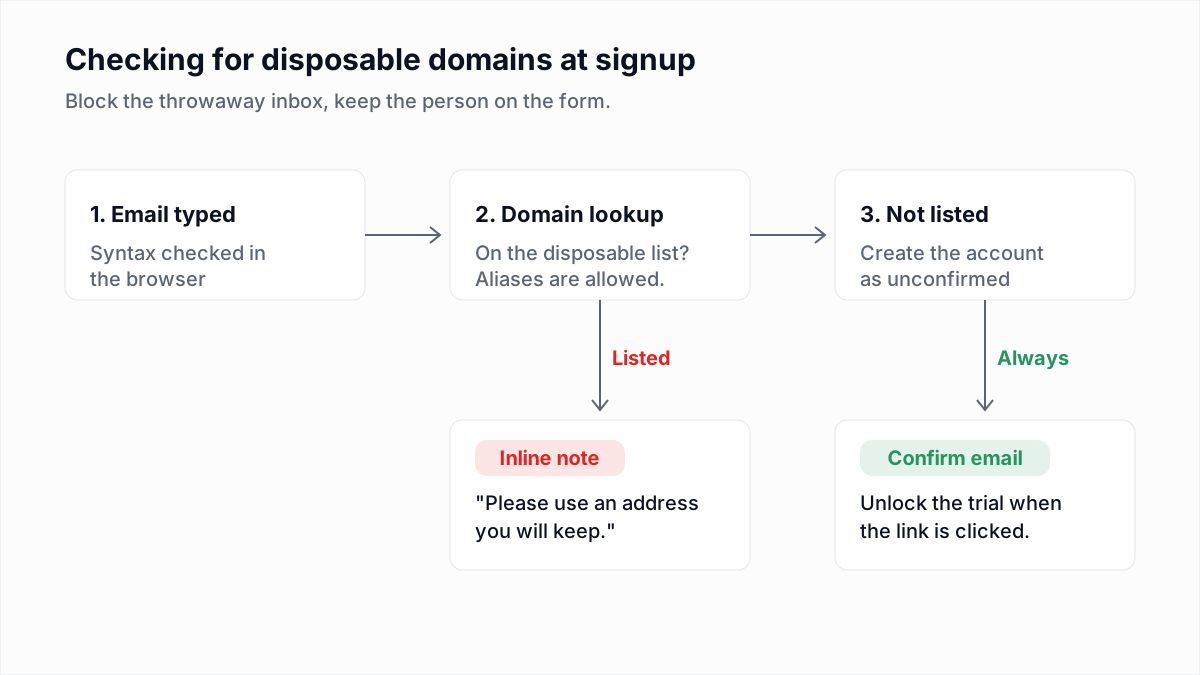
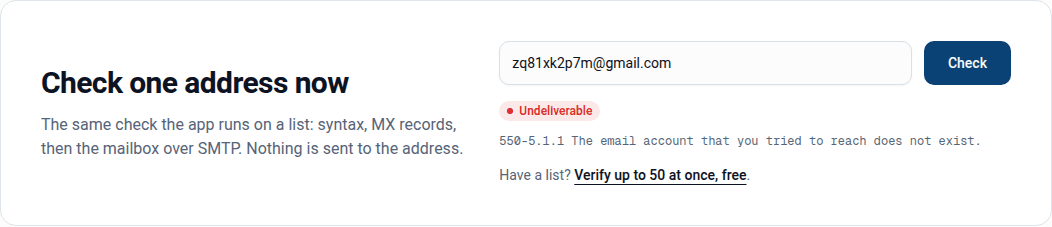
Verification and double opt-in do different jobs. A verifier tells you whether a mailbox exists. It cannot tell you whether the owner asked for your mail, and it cannot spot a spam trap, because a trap answers like a real mailbox. Double opt-in proves consent but will happily confirm a real mailbox that later goes dead. Use both if you can.
Which should you use?
| Your situation | Recommendation |
|---|---|
| Newsletter or marketing list with EU subscribers | Double opt-in, with consent records kept |
| Any list that includes people in Germany | Double opt-in, with an ad-free confirmation email |
| Bot signups or fake addresses already showing up | Double opt-in plus CAPTCHA and rate limits |
| Lead magnet or content download | Double opt-in, with the download unlocked by the confirmation click |
| Product signup or checkout, US audience | Single opt-in with a welcome email, form checks and early-engagement monitoring |
Cleaning the list you already have
Switching to double opt-in protects new signups but does nothing for the contacts you collected before. Run your existing list through the InboxSure bulk email verifier to find the addresses that no longer exist, have no mail server or use a known disposable domain. The free plan checks any number of lists of up to 50 addresses with no card, and Pro covers lists up to 10,000 addresses for a flat $49 a month. To test a single signup by hand, use the free email verifier.
Frequently asked questions
Related reading
Ready to clean your email list?
Upload a CSV or XLSX and get every address marked deliverable, risky, undeliverable or unknown, with the reason. Free for lists of up to 50, no card. Nothing is sent to your contacts.