Email Typos: Common Misspelled Domains and How to Catch Them
jane@gmial.com passes every format check a signup form can run. It has one @, a name, a domain and a real ending. It is also wrong, and nothing about its shape says so. An email typo is an address that a person mistyped, most often in the domain, so that it is well formed but does not lead to their inbox.
What happens next depends on a detail most people never look at: whether the misspelled domain exists, and whether it runs a mail server. We looked up several typo domains in DNS on 13 November 2026 and found all three cases. This guide shows the patterns, the DNS answers, and which typos a form, a confirmation email and a verifier can each catch.
Where do email typos come from?
Email typos come from anywhere a person types or copies an address by hand: signup and checkout forms, and manual entry by staff. The usual routes onto a list are:
- Signup and checkout forms, especially on a phone keyboard, where the person is in a hurry and the field is small.
- Manual entry from a phone call, a paper form, a business card or an event badge scan, typed into a CRM by someone who has never seen the address before.
- Spreadsheet work, where a find-and-replace, a merged column or a trailing character changes addresses that were once correct.
A form with no confirmation step stores whatever was typed. That is the common thread in every case below.
What are the common email typo patterns?
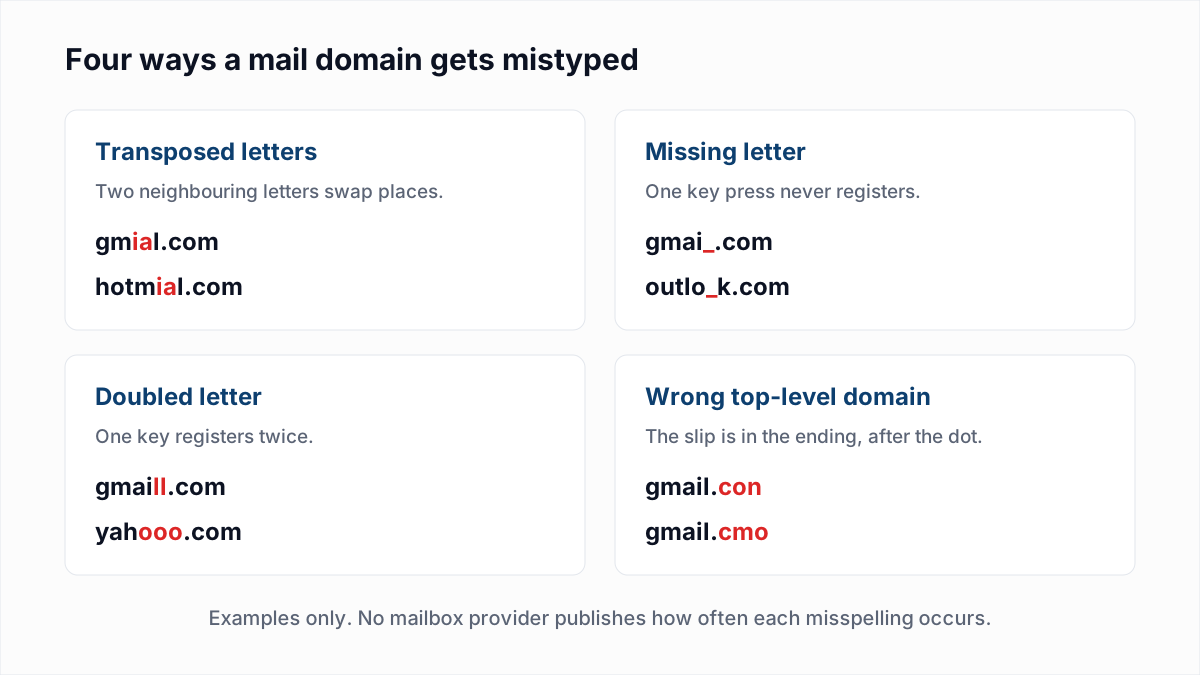
Email domain typos fall into four patterns: two letters swapped, a letter missing, a letter doubled, and a wrong ending after the dot. The table gives examples of each for the five large consumer mail domains.
| Correct domain | Transposed letters | Missing letter | Doubled letter | Wrong ending |
|---|---|---|---|---|
gmail.com | gmial.com, gamil.com | gmai.com, gmal.com | gmaill.com | gmail.con, gmail.cmo |
yahoo.com | yhaoo.com | yaho.com | yahooo.com | yahoo.con |
outlook.com | outloko.com | outlok.com | outloook.com | outlook.cmo |
hotmail.com | hotmial.com | hotmal.com | hotmaill.com | hotmail.co, hotmail.con |
icloud.com | iclodu.com | iclod.com | iclooud.com | icloud.con |
These are examples of the patterns, not a ranking. We have not found a mailbox provider or other primary source that publishes how often each misspelling occurs, so this article does not say which is the most common. Your own list will tell you: sort it by domain and count.
Typos also happen before the @, as in jhon.smith@gmail.com. Those cannot be spotted by pattern at all, because the domain is correct. They are covered further down.
What happens when you send to a mistyped domain?
Sending to a mistyped domain ends in one of three ways: the domain does not exist and the message bounces, the domain exists but has no mail server and the message bounces, or the domain has a mail server and the message may be accepted by someone who is not your subscriber. DNS tells you which. These are the answers we got on 13 November 2026.
1. The domain does not exist
$ dig MX gmail.con | grep status
;; ->>HEADER<<- opcode: QUERY, status: NXDOMAIN, id: 26420
NXDOMAIN means there is no such name. .con and .cmo are not top-level domains, so every address ending in them fails the same way. Your own mail server gives up before it contacts anyone and writes the bounce itself. The wording varies by sending system, usually some form of "domain not found". It is a hard bounce; the codes are in the email bounce codes reference.
2. The domain exists but has no mail server
$ dig +short MX gmial.com
$ dig +short A gmial.com
51.79.68.169

$ dig +noall +answer +authority MX hotmial.com
hotmial.com.		1319	IN	SOA	ns1.parkingcrew.net. hostmaster.hotmial.com. 1793096034 28800 7200 604800 86400
Both names are registered, and neither returned an MX record. gmial.com has an address record only. hotmial.com returned no MX answer at all, just a start-of-authority record naming a domain-parking service's name server. Under the SMTP standard a sender that finds no MX record tries the domain's address record instead, so a message to gmial.com can sit in a retry queue before it bounces. That fallback is explained in what is an MX record.
3. The domain exists and accepts mail
$ dig +short MX gmai.com
1 mail.h-email.net.

$ dig +short MX yahooo.com
0 .
gmai.com publishes a mail server. We did not send mail to it and do not know who operates it or what it does with messages. What DNS shows is that a message addressed to jane@gmai.com has somewhere to go, and that place is not Jane's inbox. yahooo.com shows the opposite choice: 0 . is a null MX, the owner's statement that the domain takes no mail, described in null MX and 556 5.1.10.
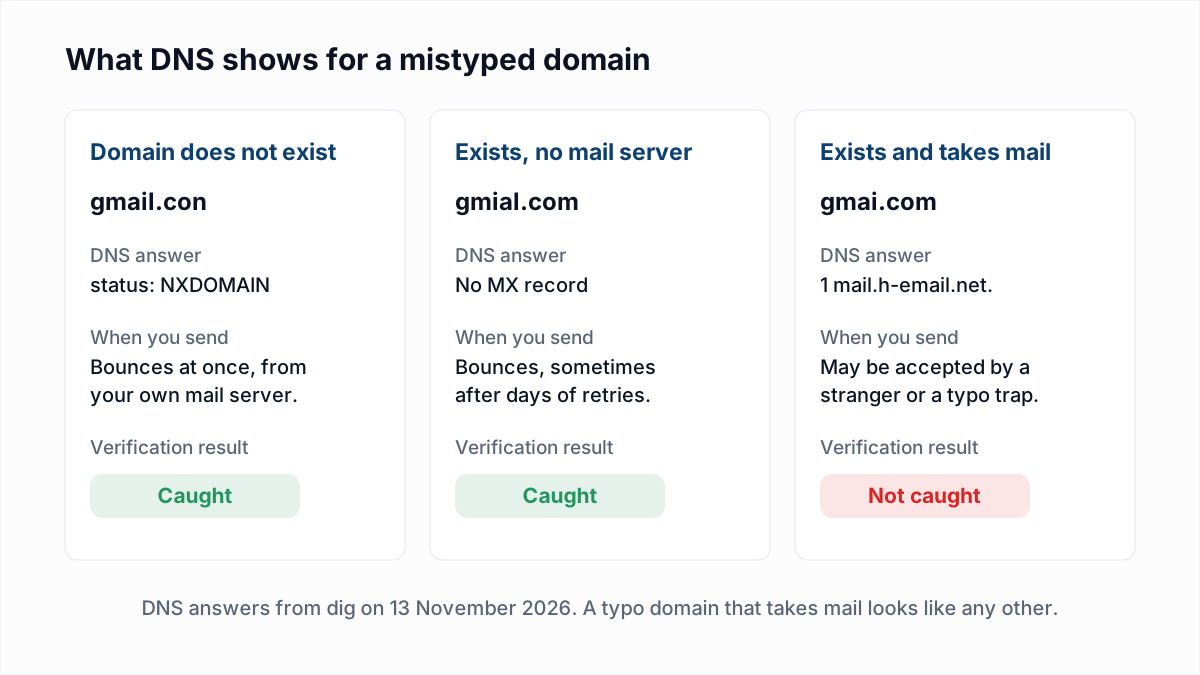
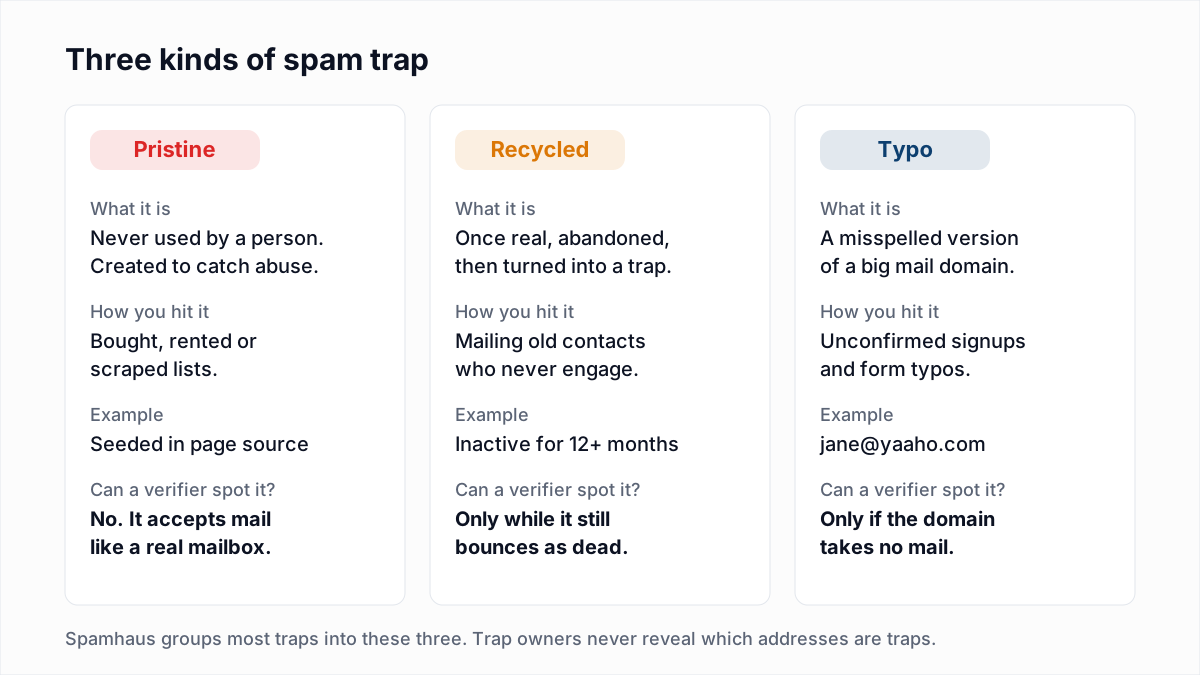
The third case is the costly one. No bounce comes back, so the address stays on your list and you keep mailing it. The person who signed up never hears from you. And some misspelled domains are run on purpose to collect this mail. Spamhaus, in Spamtraps: fix the problem, not the symptom, describes typo traps as "traps at domains that are similar to common domains: yaaho.com or ynail.com, homail.com, etc." It adds that they "can contain a lot of real mail, and are generally weighted accordingly", so they count for less than other traps, but they still count. The full picture is in spam traps explained.
Can a typo before the @ be caught?
A typo before the @ can be caught only by asking the mail server whether that mailbox exists, and only when the misspelled name is not someone else's real address. If jhon.smith@gmail.com does not exist, Gmail rejects it with 550-5.1.1 The email account that you tried to reach does not exist, the reply explained in SMTP error 550 5.1.1. If the misspelling happens to be another person's mailbox, every check passes and your mail goes to a stranger. Only a confirmation email settles that.
How do you catch email typos at the signup form?
You catch email typos at the signup form by making the person look at the address again and by proving it works before you rely on it. In order of effort:
- Use the right field type.
type="email"brings up a keyboard with @ and a dot on phones and lets the browser offer the saved address, which avoids typing altogether. It checks format only; see email validation regex. - Show the address back. A line such as "We will send your receipt to jane@gmial.com" on the next screen, with an edit link, gives the person a second look.
- Consider a confirmation field. Asking for the address twice catches a mismatch between the two entries. It also adds a field to fill, and a person who pastes the first entry into the second repeats the typo.
- Offer a "did you mean" suggestion. Open-source libraries do this in the browser. One example is mailcheck, MIT-licensed, which describes itself as a way to "reduce misspelled email addresses in your web apps". It compares the typed domain with lists of known domains and endings using a string-distance function, and its README shows
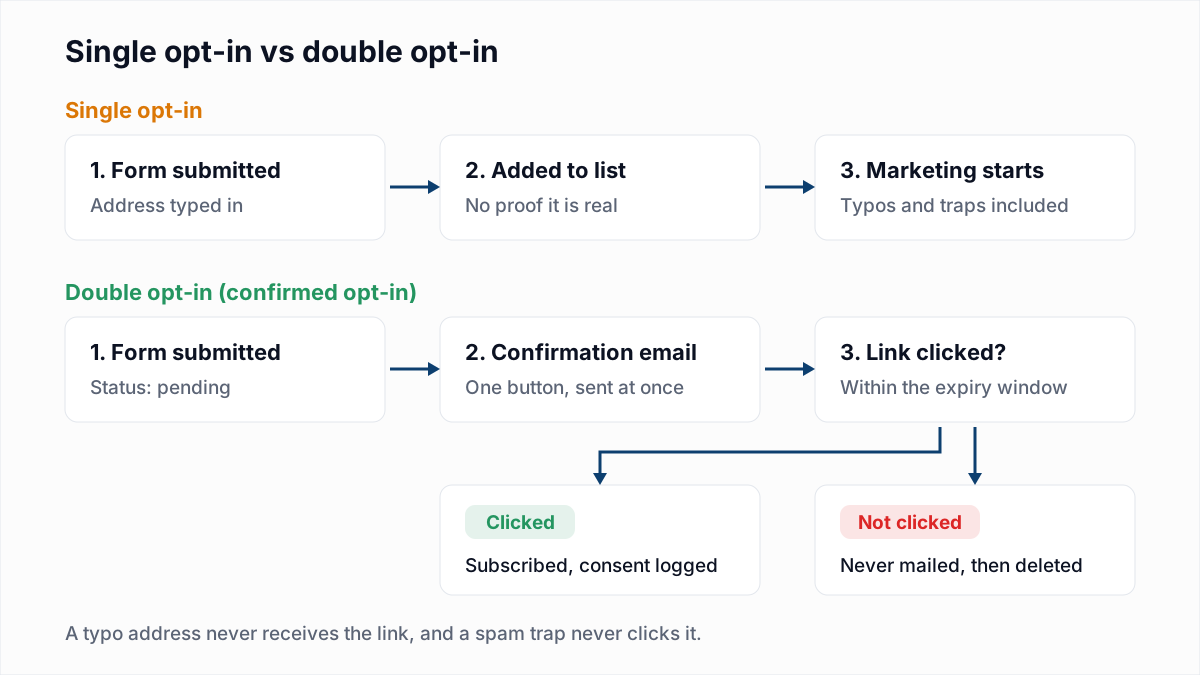
sample@gmial.conproducing the suggestionsample@gmail.com. Show the suggestion and let the person choose. Do not apply it automatically: a real company domain can sit one letter away from a famous one. - Send a confirmation email. With double opt-in, an address joins the list only after its owner clicks a link. A typo never receives the link, so it never joins. This is the one step that also catches a mistyped name at a correct domain, and it is what Spamhaus recommends for typo traps.
How do you catch typos in a list you already have?
In an existing list, email verification catches the typo domains that have no mail server and misses the ones that do. Both halves of that sentence matter.
Verification looks up each domain's MX records before anything else. In InboxSure, a domain that does not exist, or that exists without an MX record, is marked Undeliverable, so gmail.con, gmial.com and hotmial.com would all be removed by that step alone. A mistyped name at a correct domain comes back Undeliverable too, when the provider answers the mailbox check. Yahoo and Outlook.com consumer addresses come back Unknown from InboxSure today, so a mistyped name there is not caught.
A typo domain that accepts mail will not be caught. To a verifier, gmai.com is a domain with a working mail server, and the result depends on what that server replies, not on how the name is spelled. InboxSure does not offer typo correction or "did you mean" suggestions, and it does not identify spam traps. For those domains the check is manual:
- Export the list and split each address at the @ to get a domain column.
- Count addresses per domain and sort by the count.
- Read down the list for names one or two characters away from
gmail.com,yahoo.com,outlook.com,hotmail.comandicloud.com. Real typo domains show up as a tail of look-alikes with one or two addresses each. - Look up any you are unsure of with the MX lookup tool, then suppress them.
Should you correct a typo yourself?
Correcting a typo yourself is reasonable only when the intended domain is beyond doubt, and the corrected address should then be treated as new and unconfirmed. jane@gmail.con can only have meant gmail.com. Even so, you are guessing that the name before the @ is right. Keep the original value, record the change, verify the corrected address, and send it a confirmation message before any marketing. Bulk find-and-replace across a list with no record is how a stranger ends up subscribed.
Typo types, DNS answers and fixes
| Typo type | What DNS shows | Verification result | Fix |
|---|---|---|---|
Ending that is not a real top-level domain (gmail.con) | NXDOMAIN: the name does not exist. | Undeliverable. | Remove, or correct, re-verify and confirm. |
Misspelled domain, registered, no mail server (gmial.com) | No MX record. There may be an address record or a parking name server. | Undeliverable. | Remove, or correct, re-verify and confirm. |
Misspelled domain with a null MX (yahooo.com) | 0 .: the owner accepts no mail. | Unknown in InboxSure as of November 2026. | Do not send. Remove or correct. |
Misspelled domain that accepts mail (gmai.com) | One or more MX records, like any working domain. | Not caught. The result reflects that server's reply. | Find by sorting domains by count; suppress. |
| Mistyped name at the correct domain | The provider's normal MX records. | Undeliverable if no such mailbox exists and the provider answers. | Remove. Use a confirmation email to prevent it. |
Where verification fits
Typos are a form problem first. A confirmation email stops them joining the list, and a suggestion prompt stops many being submitted. Verification is the clean-up for the lists you already hold: it removes every address whose domain has no mail server or whose mailbox does not exist, and leaves you a short manual job for look-alike domains that do accept mail. Where that fits in a wider routine is in email list hygiene.
To clear the dead domains out of a list, upload it to the bulk email verifier. Lists of up to 50 addresses are free with no card, and Pro checks lists of up to 10,000 for a flat $49 a month. To test one address first, use the free email verifier.
Frequently asked questions
Related reading
Ready to clean your email list?
Upload a CSV or XLSX and get every address marked deliverable, risky, undeliverable or unknown, with the reason. Free for lists of up to 50, no card. Nothing is sent to your contacts.