Email List Hygiene: A Complete Checklist
Most list problems are caused by a missing routine, not a missing tool. An address gets in through an unchecked form, sits unmailed for a year, bounces, and nobody records the bounce. Each stage below closes one of those gaps, and each item links to the guide that covers it in full.
Email list hygiene is the ongoing work of keeping invalid, unwanted and unengaged addresses off a mailing list. "Email scrubbing" and "list cleaning" usually mean one part of it: the one-off pass that removes dead addresses. Hygiene is that pass plus the habits that stop the list filling up again.
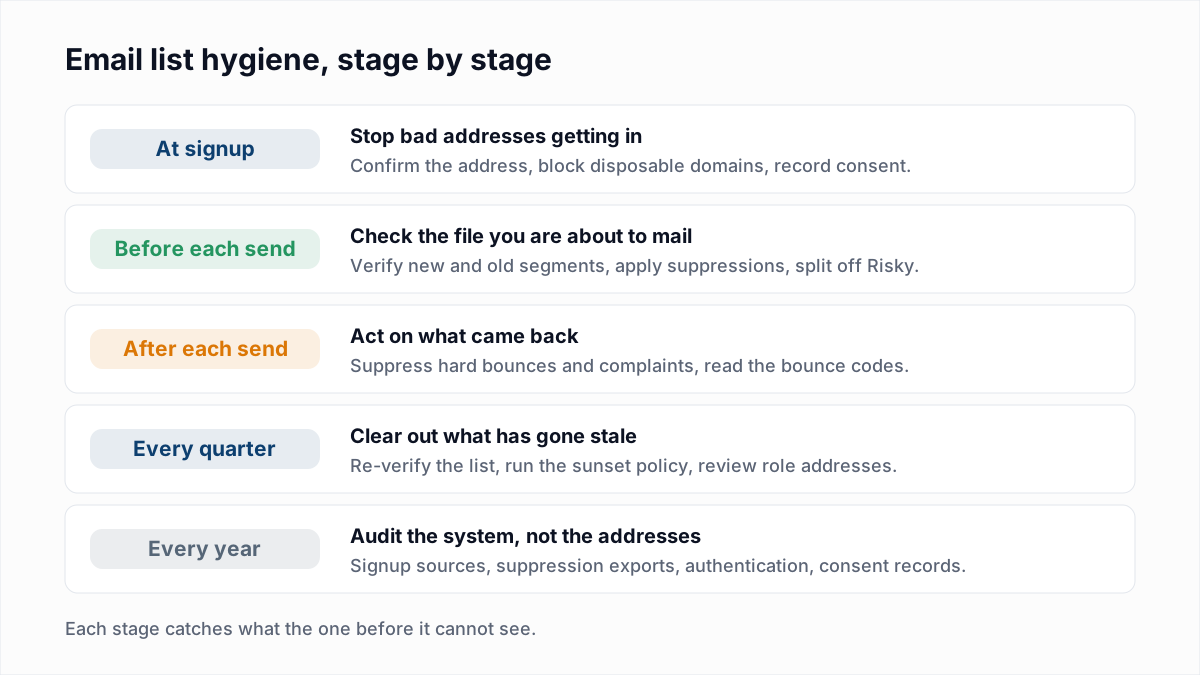
What should you check when an address is collected?
At signup, check that the address is real, belongs to the person typing it and comes with recorded consent. A bad address stopped at the form never has to be cleaned out later.
- Confirm the address. Google's email sender guidelines say: "Confirm each recipient's email address before subscribing them." A confirmation link does this, because a typo never receives it and a bot never clicks it. See double opt-in vs single opt-in for the trade-off in lost signups.
- Block disposable domains. Throwaway inboxes expire within minutes or days, so the signup is dead before your second email. Check the domain against a maintained list and ask for a lasting address. No list is complete, as our guide to disposable addresses explains.
- Catch malformed addresses, lightly. A simple pattern catches missing @ signs and spaces. It cannot tell you whether the mailbox exists, which is the limit covered in email validation regex.
- Record the source and the consent. Store the form, the date and the wording the person agreed to. You will need the source later to find which form produced a bounce spike.
- Do not buy or rent addresses. Google's guidelines say: "Don't purchase email addresses from other companies." Verification cannot make a bought list safe; see buying email lists.
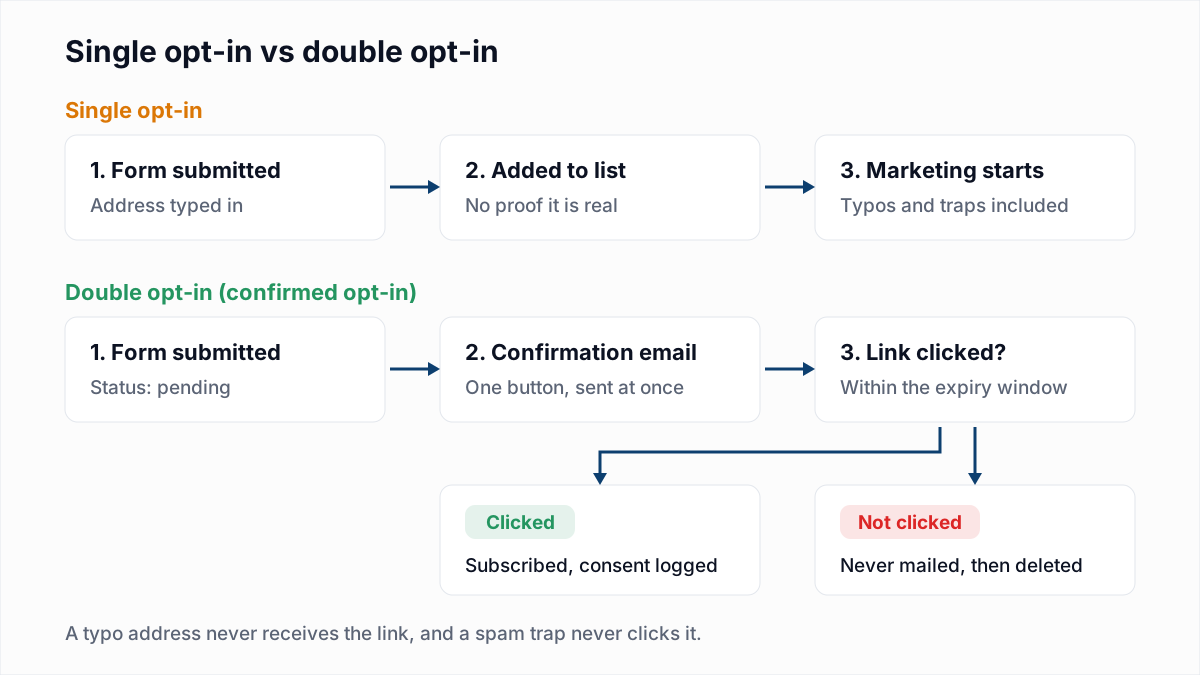
What should you do before each send?
Before each send, verify anything new or long unmailed, apply the suppression list and split risky addresses into their own segment. These checks apply to the exact file or segment about to be mailed.
- Verify new imports. CSVs from events, partners, a CRM or a prospecting tool have had no bounce processing by your platform. Verify them before they merge with the main list. Cold lists need this every time: how to clean a list before a cold campaign.
- Verify segments that have gone quiet. A segment not mailed for three months or more has been decaying with nothing to catch it. Check it before the first send back.
- Apply the suppression list. Past bounces, unsubscribes and complaints must be removed from every import, including files from outside your platform. The email suppression list guide covers scope and exports.
- Separate catch-all addresses. A catch-all domain accepts every address, so the mailbox cannot be confirmed. Send to them after the confirmed addresses, in small batches. See is it safe to send to catch-all emails.
- Decide on role addresses. Addresses such as
info@reach a shared inbox and complain more readily. Keep the ones that opted in and drop them from cold sends, as explained in role-based email addresses. - Check authentication. A clean list still fails if SPF, DKIM or DMARC is broken. The free SPF checker, DKIM checker and DMARC checker take a minute each.
What should you do after each send?
After each send, suppress the hard bounces, complaints and unsubscribes it produced, and read the bounce codes before the next campaign. Most platforms do the suppressing automatically. Reading the codes is your job.
- Suppress hard bounces at once. A hard bounce is permanent and the address will not recover. Retrying it only adds to your bounce rate. The dividing line is in soft bounce vs hard bounce.
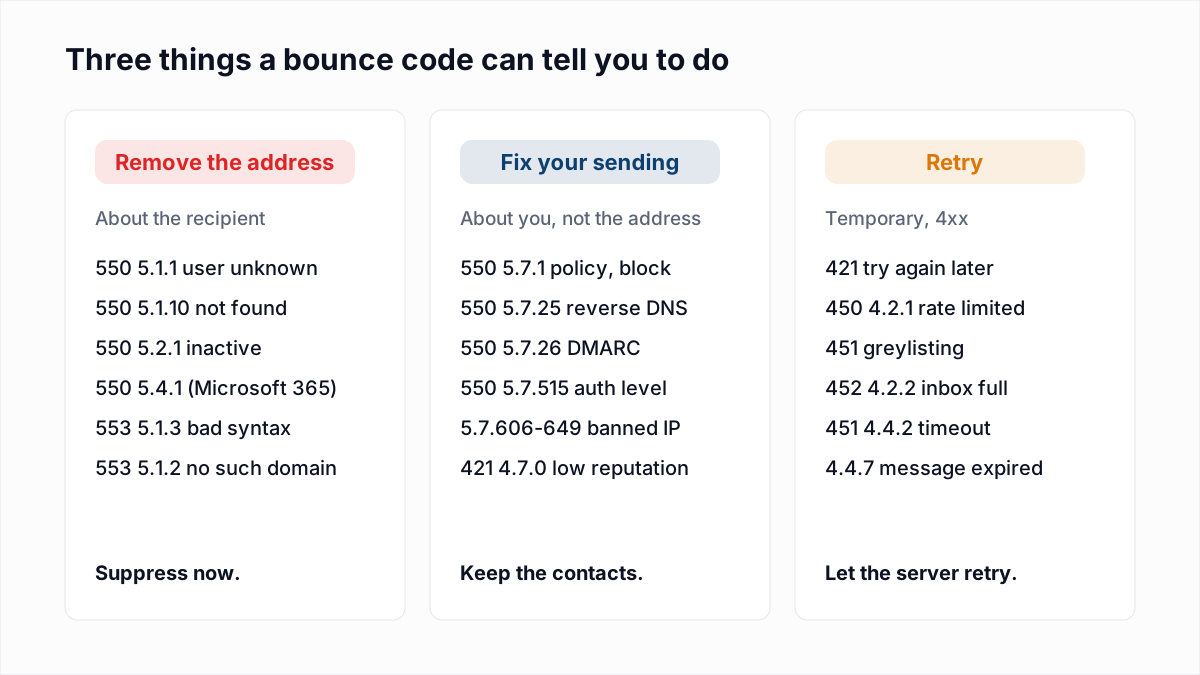
- Sort the codes. Some bounces are about the address and some are about you. A
5.1.1means remove the contact; a5.7.xblock means fix your sending and keep the contact. The email bounce codes hub lists each one. - Retry soft bounces, then review. Temporary failures usually clear on their own. An address that soft-bounces on several sends in a row is worth re-verifying.
- Remove complainers. Google's guidelines tell senders to keep the spam rate in Postmaster Tools "below 0.10%" and to avoid "0.30% or higher". Suppress everyone who complains and find the campaign that caused it. See spam complaint rate.
- Honour unsubscribes fast. The FTC's CAN-SPAM guide allows 10 business days. Gmail and Yahoo expect far quicker, as the List-Unsubscribe header guide shows.
- Work out the bounce rate. Put sent and bounced counts into the bounce rate calculator. Then follow how to reduce your bounce rate if the number is climbing.
What should you do every quarter?
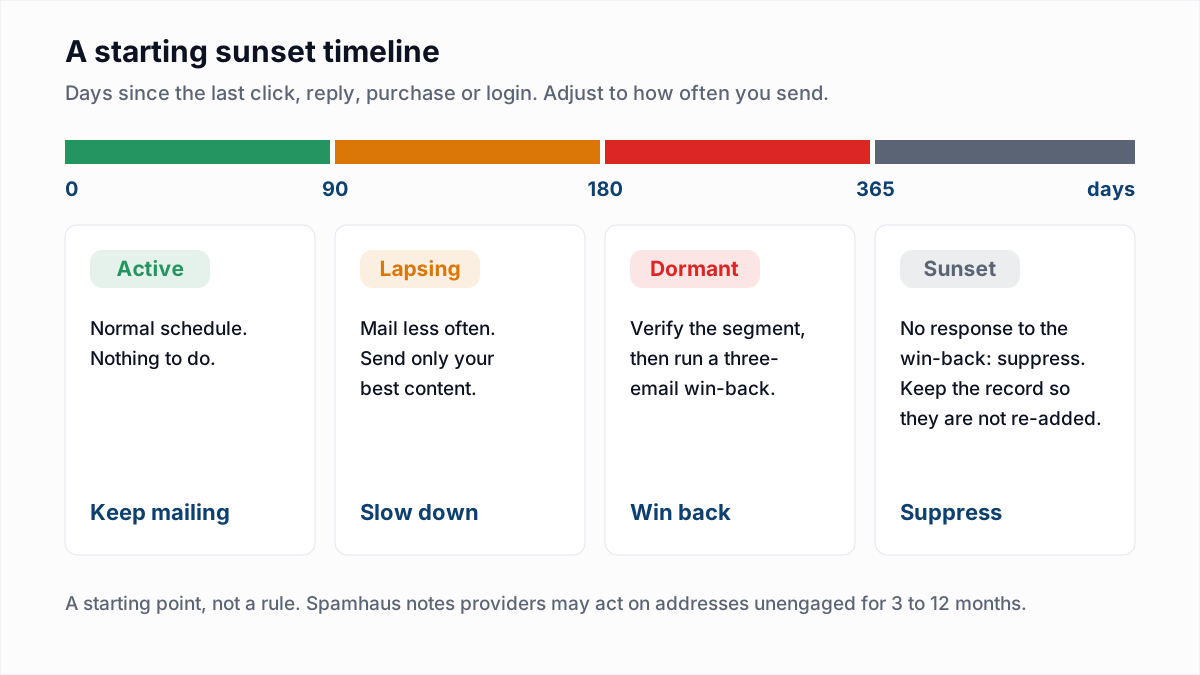
Every quarter, re-verify the list, run the sunset policy on unengaged subscribers and look for signs of spam traps. Quarterly is the default for a B2B newsletter. The right interval for other list types is in how often to clean your email list, which gives a schedule by list type and the triggers that override it.
- Re-verify. Export the active contacts, verify them, and suppress the Undeliverable results. The export and re-import steps differ by platform: Mailchimp, HubSpot, Klaviyo, Brevo, ActiveCampaign and SendGrid.
- Run the sunset policy. Google's guidelines say: "Consider unsubscribing recipients who don't open or read your messages." A sunset policy sets the day count and the win-back emails that come first. See email sunset policy.
- Look for spam trap signals. No verifier can list the traps on your file. What you can do is remove the sources that carry them: old unengaged addresses, unconfirmed signups and bought data. Spam traps explained covers the signs.
- Check reputation. Look at Google Postmaster Tools and run a one-time blacklist check. How to check domain reputation has the full routine.
What should you review once a year?
Once a year, review the system that feeds the list: where addresses come from, where suppressions are stored and whether the records behind them are still sound.
- Audit every signup source. List each form, integration and import route, and compare bounce and complaint rates by source. One neglected form often accounts for most of the bad addresses.
- Export and store the suppression list. Keep a dated copy outside the platform. If you change platforms or an account is closed, that file is the only record of who said no.
- Test the unsubscribe path. Unsubscribe a test address from a real campaign and confirm the next send skips it.
- Review authentication and DNS. Senders added during the year can break SPF or leave DMARC at
p=none. Start with SPF, DKIM and DMARC and confirm your MX records with the MX lookup.
What does the full email list cleaning checklist look like?
The full email list cleaning checklist has twelve tasks across the five stages. Copy the table into your own document and add an owner for each row.
| Task | When | Why | How |
|---|---|---|---|
| Confirm new addresses | At signup | Typos and fake addresses never join the list | Double opt-in confirmation email |
| Block disposable domains | At signup | Throwaway inboxes expire and then bounce | Domain check on the form |
| Record source and consent | At signup | Bad sources can be traced and consent proved | Store form name, date and wording |
| Verify imports and quiet segments | Before each send | Nothing has processed their bounces yet | Bulk verification of the exported file |
| Apply the suppression list | Before each send | Opt-outs and dead addresses stay out | Import suppressions before contacts |
| Segment catch-all and role addresses | Before each send | Uncertain addresses are tested in small batches | Filter on the Risky result |
| Suppress hard bounces and complaints | After each send | Repeat failures damage sender reputation | Platform automation, checked by hand |
| Read bounce codes | After each send | Address problems and sender problems need different fixes | Sort by enhanced status code |
| Re-verify the active list | Every quarter | Addresses go stale between sends | Export, verify, suppress Undeliverable |
| Run the sunset policy | Every quarter | Unengaged addresses lower engagement and can become traps | Win-back sequence, then suppress |
| Back up the suppression list | Every year | The record survives a platform change | Dated export stored outside the platform |
| Audit sources and authentication | Every year | Forms and DNS records drift | Bounce rate by source; SPF, DKIM and DMARC checks |
Where do you start if the list has never been cleaned?
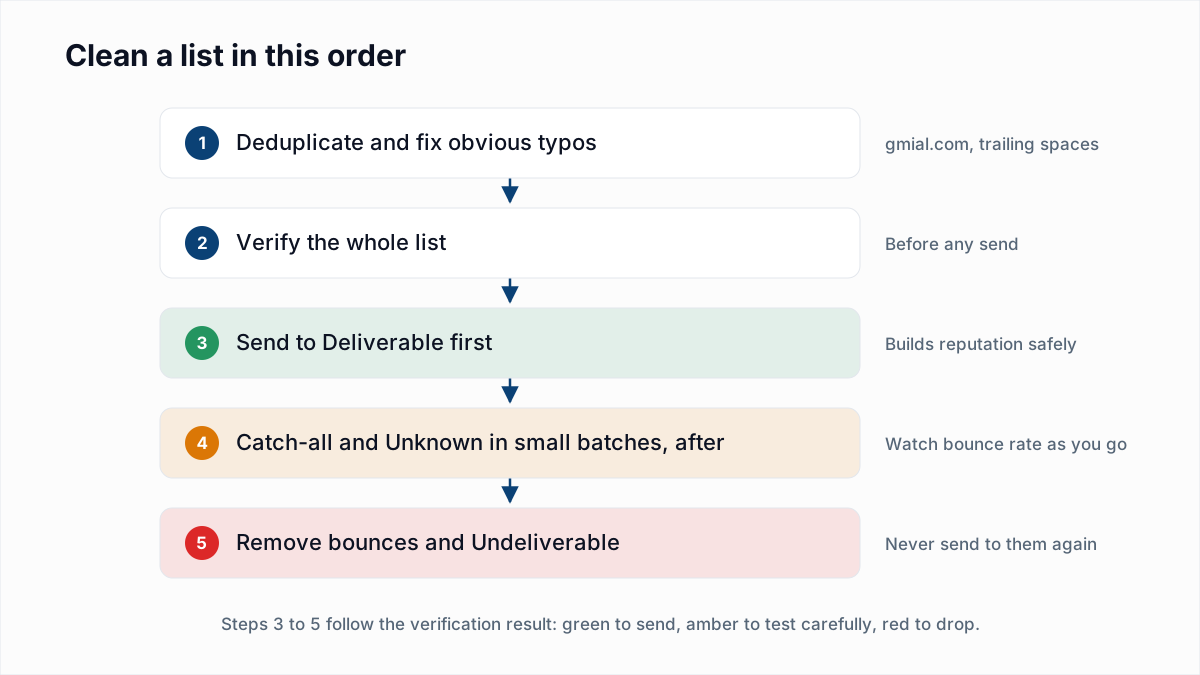
Start a list that has never been cleaned with one full verification pass, then switch to the routine above. In order:
- Pause any large sends to the list.
- Export every contact, with signup date and last activity if you have them.
- Deduplicate the file and verify all of it.
- Suppress the Undeliverable results. Do not delete them.
- Send to Deliverable addresses first, then Risky ones in small batches.
- Re-verify Unknown results a few days later.
- Turn on confirmation at signup so the problem does not rebuild.
How fast do email lists decay?
Email lists decay at a rate that depends on the list, and no primary source we can link to measures it. The yearly percentages quoted across the industry are vendor-reported and vary widely. Work addresses go stale faster than personal ones, because they end when the job does. Your own bounce logs, broken down by signup year, are the best measure of your list.
What can email verification not do for list hygiene?
Email verification cannot tell you who wants your email. Verification answers one question, whether a mailbox exists, so it finds no unsubscribes, complainers or spam traps. Some servers will not answer at all.
InboxSure checks syntax, DNS and MX records and the mailbox over SMTP without sending, and flags catch-all domains, role accounts and known disposable domains. Results are Deliverable, Risky, Undeliverable or Unknown, and download as a CSV. There is no native sync with any email platform: you export, verify and re-import. As of November 2026, Yahoo, AOL and Outlook.com consumer addresses come back Unknown, for the reasons in can you verify Yahoo email addresses. A verified address can still bounce later; why a verified email bounced explains how.
To run the quarterly pass, upload the export to the bulk email verifier, or test one address with the free email verifier. The Free plan takes lists of up to 50 addresses with no card. Pro is a flat $49 a month for lists up to 10,000 addresses, so cleaning every quarter costs the same as cleaning once.
Frequently asked questions
Related reading
Ready to clean your email list?
Upload a CSV or XLSX and get every address marked deliverable, risky, undeliverable or unknown, with the reason. Free for lists of up to 50, no card. Nothing is sent to your contacts.