Email Suppression List: What It Is and How to Manage One
Most senders already have a suppression list and have never looked at it. Every email platform builds one in the background as bounces, unsubscribes and complaints come in. The problems start when the list is deleted during a tidy-up, left behind in a platform migration, or applied to one list while the same person sits on another.
An email suppression list is a record of addresses that must not be mailed, checked automatically before every send. This guide covers what goes on it, how long each entry stays, what US and UK regulators say, and how to move or share the list safely.
What belongs on an email suppression list?
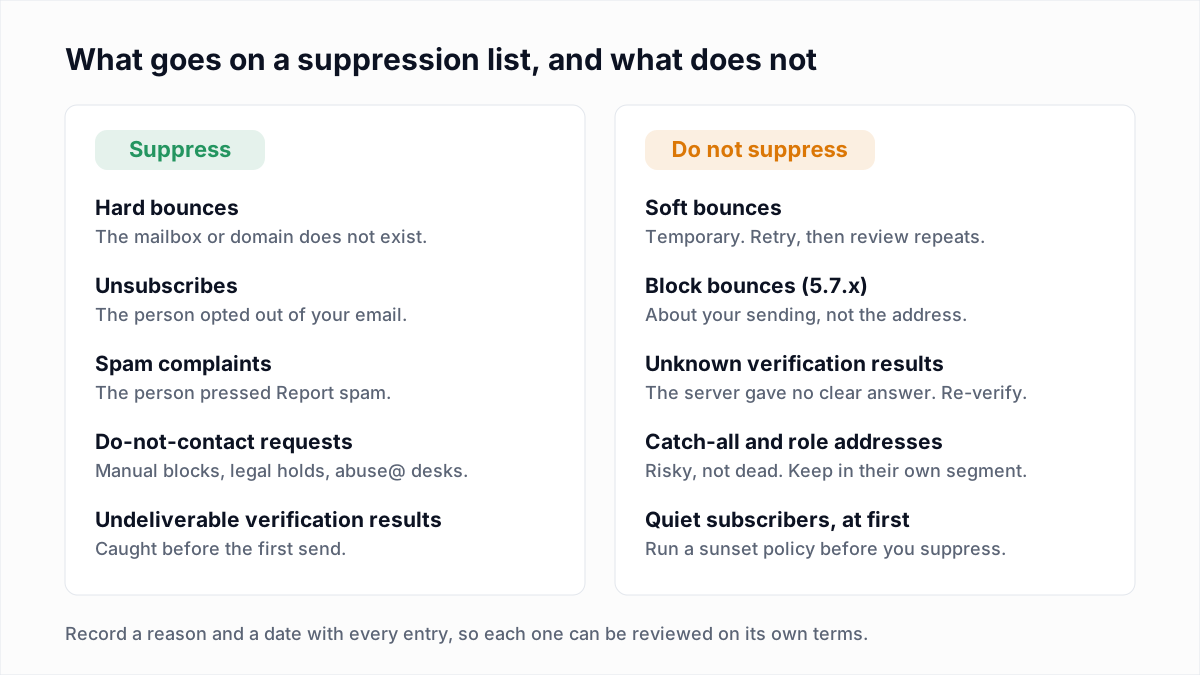
An email suppression list should hold every address that cannot receive your mail or whose owner has told you to stop. That gives five groups:
- Hard bounces. The mailbox or domain does not exist, for example
550 5.1.1 User unknown. See soft bounce vs hard bounce for which replies count. - Unsubscribes. Clicks on the unsubscribe link, one-click requests from the List-Unsubscribe header, and replies asking to be removed.
- Spam complaints. Reports that reach you through a feedback loop. Each one counts towards your spam complaint rate.
- Manual blocks. People who phoned, wrote to support or told a sales rep to stop, plus competitors and anyone in a legal dispute with you.
- Role and legal do-not-contact addresses. Desks such as
abuse@andpostmaster@that never opted in, and whole domains a contract forbids you to market to. Our guide to role-based addresses explains which are worth keeping.
What should not go on a suppression list?
Soft bounces, block bounces and Unknown verification results should not go on a suppression list, because none of them says the address is dead or the person objected. Suppressing them throws away contacts who can still be reached.
- Soft bounces are temporary: a full mailbox, a busy server, greylisting. Retry them. Suppress only when the same address keeps failing across several sends.
- Block bounces (most
5.7.xreplies) are about your IP, domain or content. The bounce code guide sorts them from address failures. - Unknown results mean the server would not answer the check. Re-verify later.
- Catch-all and role addresses are risky, not dead. Keep them in their own segment.
Which addresses should you suppress, and for how long?
Suppress hard bounces, unsubscribes, complaints and do-not-contact requests with no end date, and keep temporary failures off the list. The table gives a working rule for each type. The durations are our recommendation, not a legal standard.
| Address type | Suppress? | For how long |
|---|---|---|
| Hard bounce (mailbox or domain does not exist) | Yes | No end date. Release only if the owner confirms the address works again and opts in. |
| Unsubscribe | Yes | Until the same person opts in again themselves. Never because of an import. |
| Spam complaint | Yes | Permanently. Treat a later signup with caution and confirm it by double opt-in. |
| Manual block or legal do-not-contact | Yes | Permanently, or until the person or your legal team lifts it in writing. |
| Undeliverable verification result | Yes | No end date, with the reason recorded as "verification" and the date. |
| Inactive subscriber after a failed win-back | Yes, under a separate reason | Until the person signs up again. |
| Soft bounce | No | Retry. Suppress only after repeated failures over several sends. |
| Block bounce (5.7.x) | No | Not at all. Fix the sending problem and send again. |
| Unknown verification result | No | Not at all. Re-verify after a few hours or days. |
The inactive row is the one judgement call. The email sunset policy guide covers when a quiet subscriber becomes a suppression.
What is the difference between a suppression list and an unsubscribe list?
An unsubscribe list is one part of a suppression list. The unsubscribe list holds only people who opted out, while the suppression list also holds hard bounces, spam complaints and manual blocks.
The difference matters when you export. An export of "unsubscribed contacts" alone leaves the bounces and complaints behind. Keep the reason with each entry, because the reasons are released differently: an unsubscribed person can opt back in, and a dead mailbox cannot.
Why suppress an address instead of deleting it?
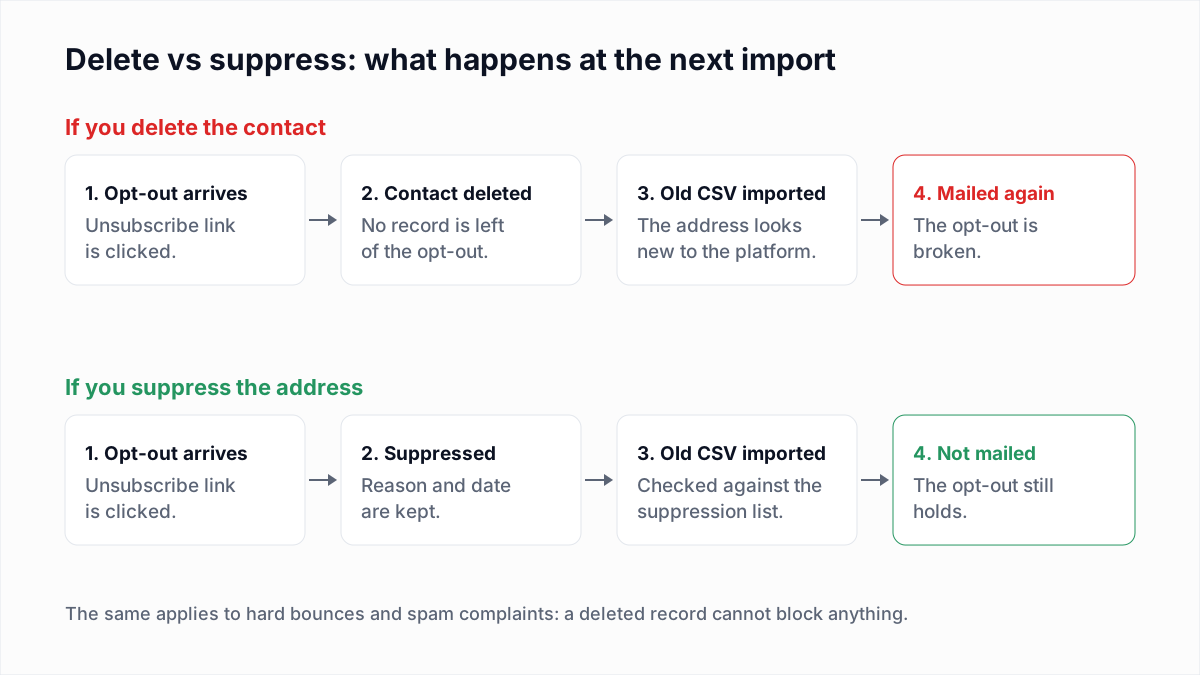
Suppress an address instead of deleting it because a deleted contact leaves no record to block the next import. When the same address arrives again in an old CSV, a CRM sync or a partner file, the platform treats it as new and mails it.
Whether a suppressed contact counts towards your bill depends on the platform. The answers for each are in our guides to cleaning Mailchimp, HubSpot, Klaviyo, Brevo, ActiveCampaign and SendGrid.
What does the law say about suppression lists?
US and UK regulators both expect an opt-out to keep working, which in practice needs a suppression list. This section summarises two regulator pages read on 13 November 2026. It is not legal advice.
CAN-SPAM (United States)
The FTC's CAN-SPAM compliance guide says: "You must honor a recipient's opt-out request within 10 business days." It also restricts what you do with the address afterwards: "you can't sell or transfer their email addresses, even in the form of a mailing list." The one exception is a transfer "to a company you've hired to help you comply with the CAN-SPAM Act." The guide sets a deadline for honouring an opt-out and describes no point at which one lapses, so treat opt-outs as permanent.
UK GDPR and erasure requests
The ICO, the UK data protection regulator, says keeping a minimal suppression record is compatible with an objection to marketing. Its direct marketing guidance tells organisations to put a person's details "onto a suppression or 'do not contact' list, instead of deleting them", and describes that as "keeping just enough information about someone to ensure you respect their preferences in the future". It adds that "keeping a suppression list isn't for direct marketing purposes" and that "there is no automatic right for people to have their information on such a list deleted".
The ICO's right to object guidance, updated on 2 November 2026, is blunter: "You should not delete a person's information from a suppression list." In practice, erase the profile, purchase history and notes, and keep the address and the reason. The ICO is the UK regulator. For subscribers in the EU or elsewhere, check the local regulator's position.
What is the difference between list-level, account-level and global suppression?
List-level suppression blocks an address on one list, account-level suppression blocks it for everything your account sends, and global suppression is kept by the platform across all of its customers. Vendors use the words differently, so read the scope before relying on it.
| Scope | Example from the vendor's own docs | What to watch |
|---|---|---|
| List-level | Mailchimp's About Unsubscribes article: "Mailchimp treats all audiences in your account independently." | An unsubscribe from one audience leaves the person subscribed in your other audiences. |
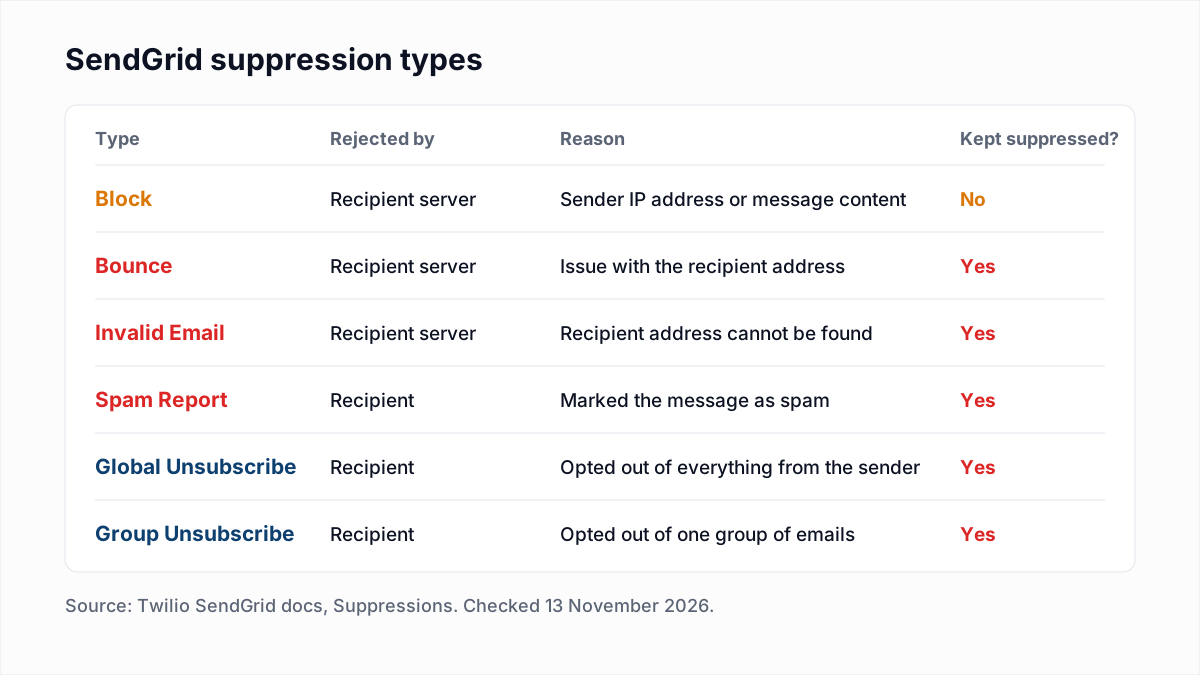
| Group vs account | Twilio SendGrid's Suppressions doc separates a group unsubscribe ("a specific group of email messages") from a global unsubscribe ("anything from the sender"). | "Global" here means everything you send, not every SendGrid customer. |
| Account-level | Amazon SES's account-level suppression list "applies to your AWS account in the current AWS Region". Entries "remain there until you remove them." | Each region has its own list. AWS also notes that Gmail complaints are not added, because Gmail does not send complaint data to SES. |
| Provider-wide | Amazon SES's global suppression list "applies to all SES customers". An address stays on it "for up to 14 days". | You cannot query it, and sends to it count toward your bounce rate. It is not a substitute for your own list. |
If you send from two platforms, such as a marketing tool and a transactional API, neither knows about the other's suppressions. Sync unsubscribes and complaints between them yourself.
How do you move a suppression list to a new email platform?
Move the suppression list before the contacts. An address imported first can be mailed by a welcome automation before its suppression arrives.
- Export every suppression type from the old platform: bounces, unsubscribes, complaints and manual blocks. They are often separate downloads.
- Keep the reason and date as columns, and merge the files into one.
- Import the file into the new platform's suppression list at the widest scope it offers.
- Remove suppressed addresses from the contact file, then import the contacts.
- Test it. Add an address you control to the suppression list, include it in a small send and confirm nothing arrives.
- Export again just before you close the old account. Unsubscribe links in old emails keep working for a while, and the FTC guide requires an opt-out mechanism to process requests "for at least 30 days after you send your message."
Should you hash a suppression list before sharing it?
Hash a suppression list before sharing it with a partner or affiliate, but treat the hashed file as personal data. Hashing an email address is pseudonymisation, not anonymisation.
Both sides trim the address, lowercase it and apply the same function, then compare hashes:
jane.doe@example.com
MD5      0cba00ca3da1b283a57287bcceb17e35
SHA-256  86e0b9e56c17cc4d12387e1949b85053fbe73bc3ce5a1188713a9d300cc6133d
The weakness is that email addresses are guessable. Anyone holding a list of real addresses can hash each one and match it against your file. The FTC said so in a July 2024 post: "hashes aren't 'anonymous' and can still be used to identify users." The ICO's pseudonymisation guidance advises against "outdated hashing algorithms (eg MD5 and SHA-1)" and against hashing without a salt, pepper or key. For a suppression file that means SHA-256 with a secret key both parties hold (HMAC), not the plain MD5 files still common in affiliate marketing. Share the file only for suppression, under a contract.
Where does email verification fit with a suppression list?
Email verification runs before the import and catches dead addresses without a bounce. Add every Undeliverable result to the suppression list straight away, so the address never costs you a hard bounce.
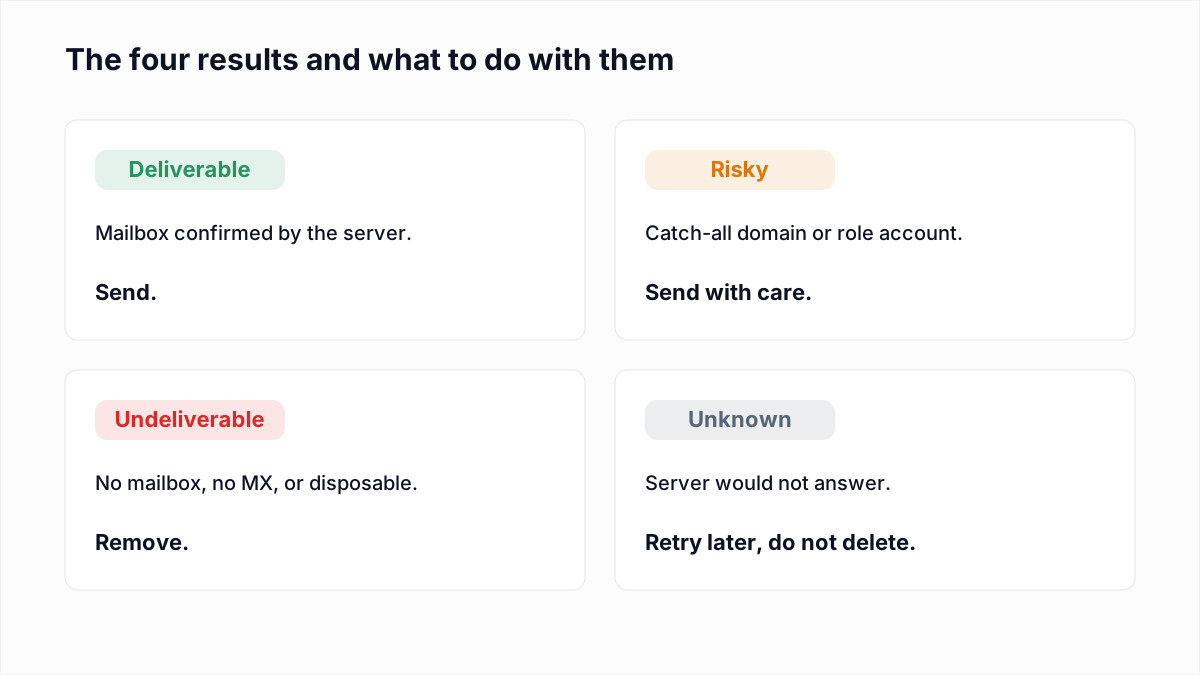
InboxSure checks syntax, MX records and the mailbox over SMTP without sending, and returns a CSV you can filter by result. Two limits apply. A verifier sees only whether a mailbox exists, so it cannot find unsubscribes or complaints, and a Deliverable result is never a reason to release someone who opted out. As of November 2026, Yahoo, AOL and Outlook.com consumer addresses come back Unknown, because those providers refuse the check.
Suppression is one item in a wider routine. The email list hygiene checklist puts it in order with the rest. To clear dead addresses before your next import, upload the file to the bulk email verifier: the Free plan takes lists of up to 50 addresses with no card, and Pro is a flat $49 a month for lists up to 10,000.
Frequently asked questions
Related reading
Ready to clean your email list?
Upload a CSV or XLSX and get every address marked deliverable, risky, undeliverable or unknown, with the reason. Free for lists of up to 50, no card. Nothing is sent to your contacts.