Email Bounce Codes: Every Common SMTP Error and What to Do
An email bounce code is the reply a receiving mail server gives when it refuses a message. It has two parts: a three-digit basic code (550) and, on most modern servers, a dotted enhanced status code (5.1.1). A first digit of 4 means a temporary failure that is worth retrying. A first digit of 5 means a permanent failure. The middle number of the enhanced code tells you what failed: 1 means the address, 2 the mailbox, 7 your sending setup or policy. This page lists the codes you will actually see, the wording Gmail, Microsoft and Yahoo use, and what to do about each one.
How to read a bounce code
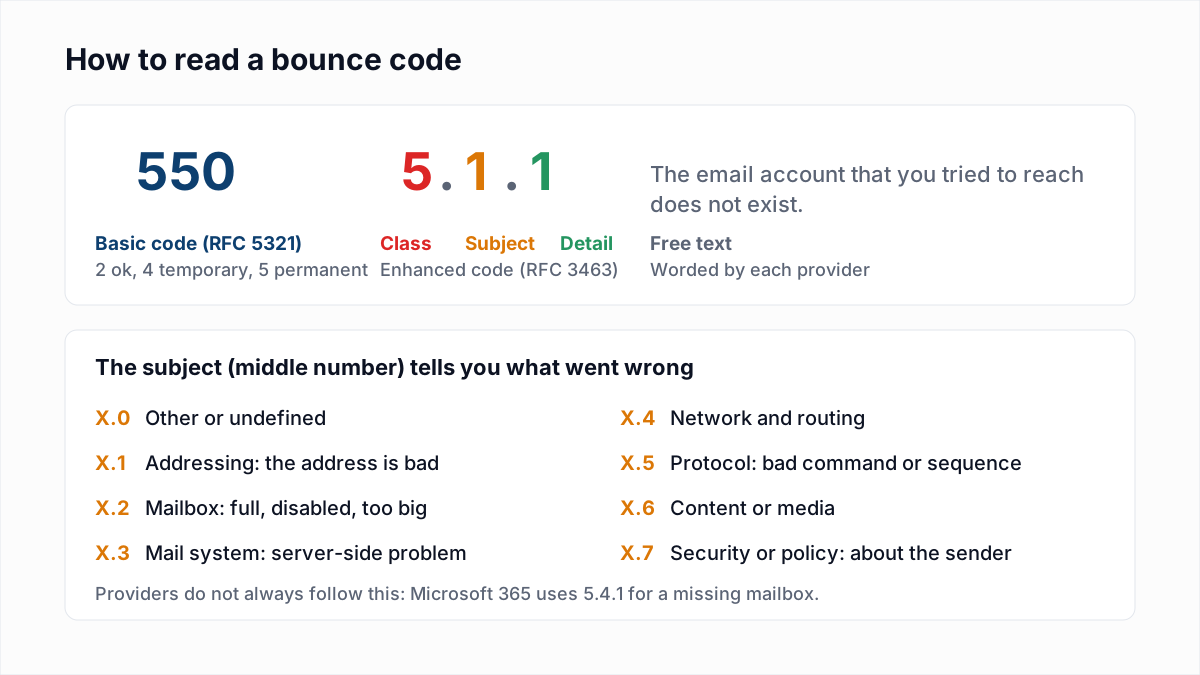
Take a typical Gmail bounce:
550-5.1.1 The email account that you tried to reach does not exist.- 550 is the basic reply code defined in RFC 5321, the SMTP standard. It says the request failed permanently.
- 5.1.1 is the enhanced status code from RFC 3463. It reads as class 5 (permanent), subject 1 (addressing), detail 1 (bad destination mailbox address).
- The text after the codes is free-form. Every provider words it differently, and it often carries the most useful detail, such as a block list name or a help link.
Basic SMTP reply codes: 2xx, 4xx and 5xx
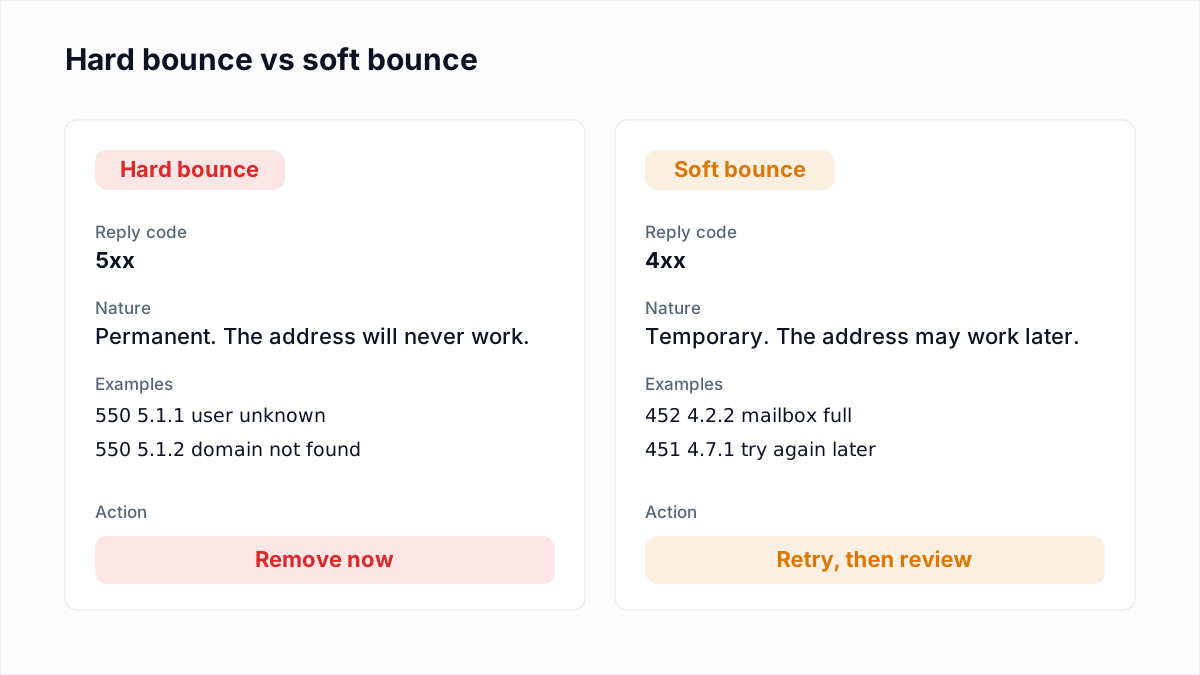
Every SMTP reply starts with a three-digit code. 2xx means success (250 is the ordinary "OK"). 3xx means "go on", as in 354 after the DATA command. 4xx is a transient failure: the sending server should keep the message and try again. 5xx is a permanent failure: retrying the same message will get the same answer. These are the failure codes that matter in bounce logs, with the wording RFC 5321 gives them.
| Code | RFC 5321 wording | What it usually means in practice |
|---|---|---|
| 421 | Service not available, closing transmission channel | Server busy, rate limiting or a reputation deferral. Temporary. |
| 450 | Requested mail action not taken: mailbox unavailable | Mailbox busy or temporarily blocked, often greylisting. Temporary. |
| 451 | Requested action aborted: local error in processing | Server-side problem or greylisting. Temporary. |
| 452 | Requested action not taken: insufficient system storage | Mailbox full or too many recipients in one transaction. Temporary. |
| 550 | Requested action not taken: mailbox unavailable | The catch-all permanent failure. The RFC lists "mailbox not found, no access, or command rejected for policy reasons", so read the enhanced code. |
| 551 | User not local; please try <forward-path> | Rare. The recipient has moved; update the address if one is given. |
| 552 | Requested mail action aborted: exceeded storage allocation | Mailbox over quota, or the message is too large. |
| 553 | Requested action not taken: mailbox name not allowed | The address syntax is invalid or the domain cannot be found. |
| 554 | Transaction failed | Generic permanent refusal, often a block or a content rejection. See 554 5.7.1 explained. |
The basic code alone is too coarse to act on. A 550 can mean the mailbox is gone or that your IP is on a block list, and those need opposite responses. That is why the enhanced code exists.
Enhanced status codes: class.subject.detail
RFC 3463 defines enhanced codes as three numbers. The class repeats the basic code's verdict (2 success, 4 persistent transient failure, 5 permanent failure). The subject sorts the problem into one of eight groups:
- X.0 Other or undefined status.
- X.1 Addressing. Something is wrong with the address itself: no such mailbox (X.1.1), no such domain (X.1.2), bad syntax (X.1.3).
- X.2 Mailbox. The address exists but the mailbox cannot take mail: disabled (X.2.1), full (X.2.2), message over its size limit (X.2.3).
- X.3 Mail system. The receiving system has a problem, such as the message being too big for the system (X.3.4).
- X.4 Network and routing. No answer from the host (X.4.1), unable to route (X.4.4), routing loop (X.4.6), delivery time expired (X.4.7).
- X.5 Protocol. Invalid command, bad sequence, too many recipients (X.5.3).
- X.6 Content or media. The message is malformed or uses something the server will not accept.
- X.7 Security or policy. The server refused you: not authorised (X.7.1), SPF failed (X.7.23), reverse DNS failed (X.7.25), multiple authentication checks failed (X.7.26).
The full list lives in the IANA enhanced status code registry. Providers also invent their own detail numbers. Microsoft uses three-digit details such as 5.7.515 and 5.7.606, which are not in the registry, and reuses 5.1.10 for "recipient not found" even though the registry assigns X.1.10 to a null MX record. Treat the subject number as a strong hint, not a guarantee.
Addressing and mailbox codes (X.1 and X.2)
These are the codes that are genuinely about the recipient. Wording is quoted from Gmail's SMTP error reference, Microsoft's Exchange Online NDR reference and Yahoo's sender hub.
| Code | Typical wording | Hard or soft | What to do |
|---|---|---|---|
| 550 5.1.1 | Gmail: "The email account that you tried to reach does not exist." | Hard | Remove. See 550 5.1.1 explained. |
| 550 5.4.1 | Microsoft 365: "Recipient address rejected: Access denied" | Hard | Remove; check for typos first. See 550 5.4.1 explained. |
| 550 5.1.10 | Microsoft: "Recipient not found" | Hard | Remove. |
| 550 5.5.0 | Microsoft (Outlook.com, Hotmail): "Requested action not taken: mailbox unavailable" | Hard | Remove. Microsoft describes it as similar to 5.1.10. |
| 554 | Yahoo: "delivery error: dd This user doesn't have a yahoo.com account" | Hard | Remove. Yahoo says not to retry. |
| 553 5.1.2 | Gmail: "We weren't able to find the recipient domain." | Hard | Look for a domain typo (gmial.com); otherwise remove. |
| 553 5.1.3 | Gmail: "The recipient address ... is not a valid RFC 5321 address." | Hard | Fix the syntax or remove. |
| 550 5.2.1 | Gmail: "The email account that you tried to reach is inactive." | Hard | Remove. Gmail also uses 5.2.1 for a rate limit, so read the text. See 550 5.2.1 explained. |
| 452 4.2.2 | Gmail: "The recipient's inbox is out of storage space." | Soft | Retry. Remove after repeated failures over several weeks. See 552 5.2.2 mailbox full. |
| 552 5.2.2 | Gmail: "The recipient's inbox is out of storage space and inactive." | Hard | Remove. Full and inactive means abandoned. |
| 450 4.2.1 | Gmail: "The user you are trying to contact is receiving email too quickly." | Soft | Retry later; slow down if you send many messages to one person. |
Server, routing, protocol and content codes (X.3 to X.6)
These codes are about the connection, the receiving system or the message itself. Most are temporary, and none of them is a reason to delete an address.
| Code | Typical wording | Hard or soft | What to do |
|---|---|---|---|
| 421 4.4.5 | Gmail: "Server busy, try again later." | Soft | Retry automatically. |
| 451 4.3.0 | Gmail: "Email server has temporarily rejected this message." | Soft | Retry automatically. |
| 451 4.4.2 | Gmail: "Timeout - closing connection." | Soft | Retry; check your own network if it happens everywhere. |
| 4.4.7 | Microsoft: "Message expired" | Soft, then gave up | Retries ran out. Usually a problem at the receiving end; try again later. |
| 5.4.6 / 5.4.14 | Microsoft: "Routing loop detected" | Hard | Configuration error, usually forwarding rules. The recipient's admin must fix it. |
| 452 4.5.3 | Gmail: "Your message has too many recipients." | Soft | Send to fewer recipients per transaction. See too many recipients errors. |
| 552 5.3.4 | Gmail: "Your message exceeded Google's message size limits." | Hard for this message | Shrink attachments or send a link. The address is fine. |
| 554 5.6.0 | Gmail: "Email message is malformed. Not accepted." | Hard for this message | Fix the MIME structure or headers your software produces. |
| 451 4.7.1 / 450 4.2.0 | Greylisting, for example "Greylisting in action, please come back later" | Soft | Retry after a few minutes. See greylisting explained. |
Security and policy codes (X.7)
X.7 codes are almost always about the sender: your IP, your DNS, your authentication or your sending pattern. The address may be perfectly good. Removing it is the wrong fix. If the code is a 535 from your own provider at sign-in, see SMTP error 535 authentication failed.
| Code | Typical wording | Hard or soft | What to do |
|---|---|---|---|
| 421 4.7.0 | Gmail: "This message is suspicious due to the very low reputation of the sending IP address." | Soft | Fix reputation and slow down. See 421 4.7.0 explained. |
| 421 4.7.28 | Gmail: "Gmail has detected an unusual rate of email..." | Soft | Reduce volume and ramp up gradually. |
| 421 4.7.26 | Gmail: "This email has been rate limited because it is unauthenticated." | Soft | Publish SPF and DKIM. |
| 550 5.7.1 | Gmail: "This message is likely unsolicited email. To reduce the amount of spam sent to Gmail, this message has been blocked." | Hard (sender) | Keep the address; review content, consent and complaint rates. See Gmail 550 5.7.1 explained. |
| 550 5.7.1 | Outlook.com: "Unfortunately, messages from [IP] weren't sent..." | Hard (sender) | IP block. See Outlook 550 5.7.1 explained. |
| 550 5.7.1 | Microsoft 365: "Delivery not authorized" | Hard (sender) | A restricted group or a mail flow rule blocked you; ask the recipient. |
| 550 5.7.25 | Gmail: "Gmail requires that sending IP addresses have a PTR record." Yahoo: "Forward-confirmed reverse DNS failed" | Hard (sender) | Fix the PTR record. See 550 5.7.25 explained. |
| 550 5.7.26 | Gmail: "Unauthenticated email from domain-name is not accepted due to domain's DMARC policy." | Hard (sender) | Fix SPF, DKIM and alignment. See 550 5.7.26 explained. |
| 550 5.7.27 / 5.7.30 | Gmail: "...didn't pass SPF authentication." / "...didn't pass DKIM authentication." | Hard (sender) | Fix the failing record. |
| 550 5.7.509 | Microsoft: "Access denied, sending domain [$SenderDomain] does not pass DMARC verification and has a DMARC policy of reject." | Hard (sender) | Fix authentication for the From domain. See 550 5.7.509 explained. |
| 550 5.7.515 | Outlook.com: "Access denied, sending domain [SendingDomain] does not meet the required authentication level." | Hard (sender) | Meet Microsoft's bulk-sender rules. See 550 5.7.515 explained. |
| 5.7.606-649 | Microsoft: "Access denied, banned sending IP [IP1.IP2.IP3.IP4]" | Hard (sender) | Request removal through Microsoft's delist portal. |
| 4.7.500-699 | Microsoft: "Access denied, please try again later" | Soft | Suspicious activity hold. Microsoft says valid traffic is released shortly. See 451 4.7.500 explained. |
| 550 5.7.0 | Proofpoint: "Blocked - see https://ipcheck.proofpoint.com/?ip=[IP]" | Hard (sender) | Check the IP at the linked page and request removal. |
The Outlook.com, Yahoo 5.7.25 and Proofpoint wordings above are the replies InboxSure recorded on 4 November 2026, written up in how Gmail, Outlook and Yahoo respond to email verification. The rest come from the providers' own documentation. Apple's replies have their own page: iCloud Mail bounce errors. So do the Proofpoint 550 5.7.0 block and Mimecast error codes.
Which codes mean remove, fix your sending, or retry
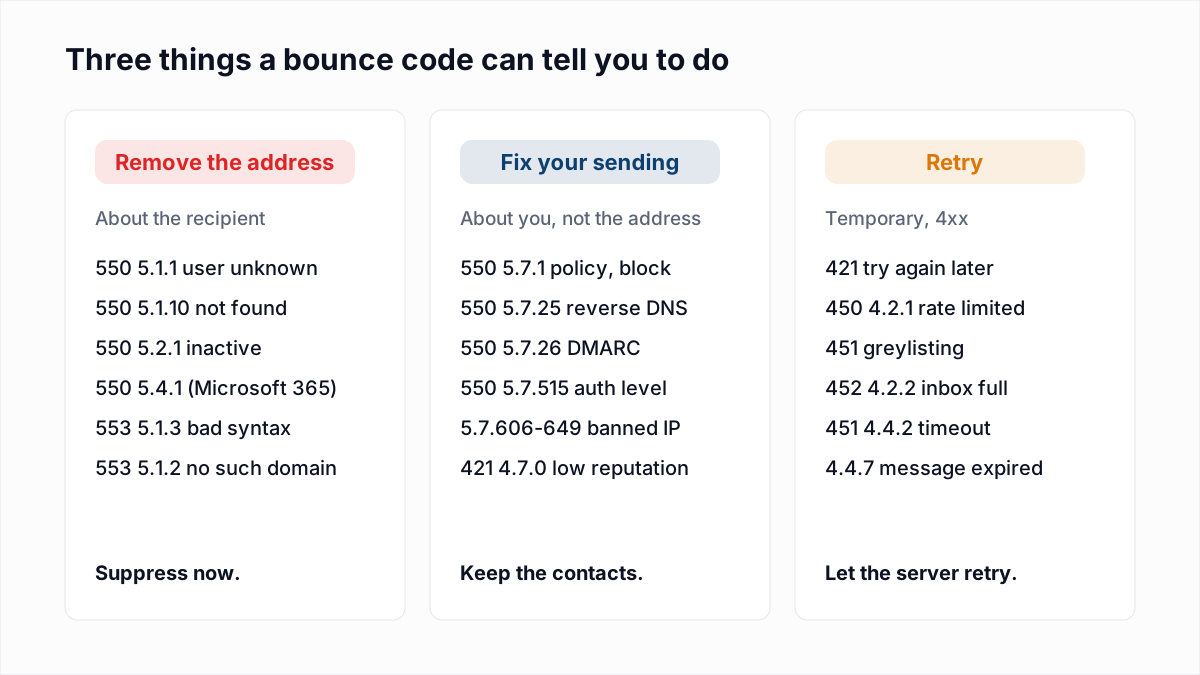
Sorting bounces by "starts with 5" is the most common mistake in list hygiene. A better split has three buckets.
Remove the address
5xx codes in the X.1 and X.2 groups that say the mailbox or domain does not exist or is disabled: 5.1.1, 5.1.2, 5.1.3, 5.1.10, 5.2.1, Microsoft's 5.5.0 and 5.4.1 "Recipient address rejected", and Yahoo's 554 "doesn't have a yahoo.com account". Suppress these immediately. The one exception: if every address on one domain fails at the same moment, suspect a DNS or migration problem on their side and wait a few days.
Fix your sending
5xx codes in the X.7 group, plus any reply that names your IP, a block list, SPF, DKIM, DMARC or reverse DNS. Keep these contacts. If your platform suppressed them automatically, restore them after the cause is fixed. These bounces tell you about your infrastructure, and they will hit every recipient at that provider until you act.
Retry
Every 4xx: 421, 450, 451, 452. Your sending server should retry on its own for hours or days. Only treat a soft bounce as hard when the same address keeps failing across several campaigns. The detail on retry schedules and benchmarks is in soft bounce vs hard bounce. For Yahoo's 421 deferrals, see Yahoo 421 4.7.0 [TSS04].
Where in the conversation the code arrived
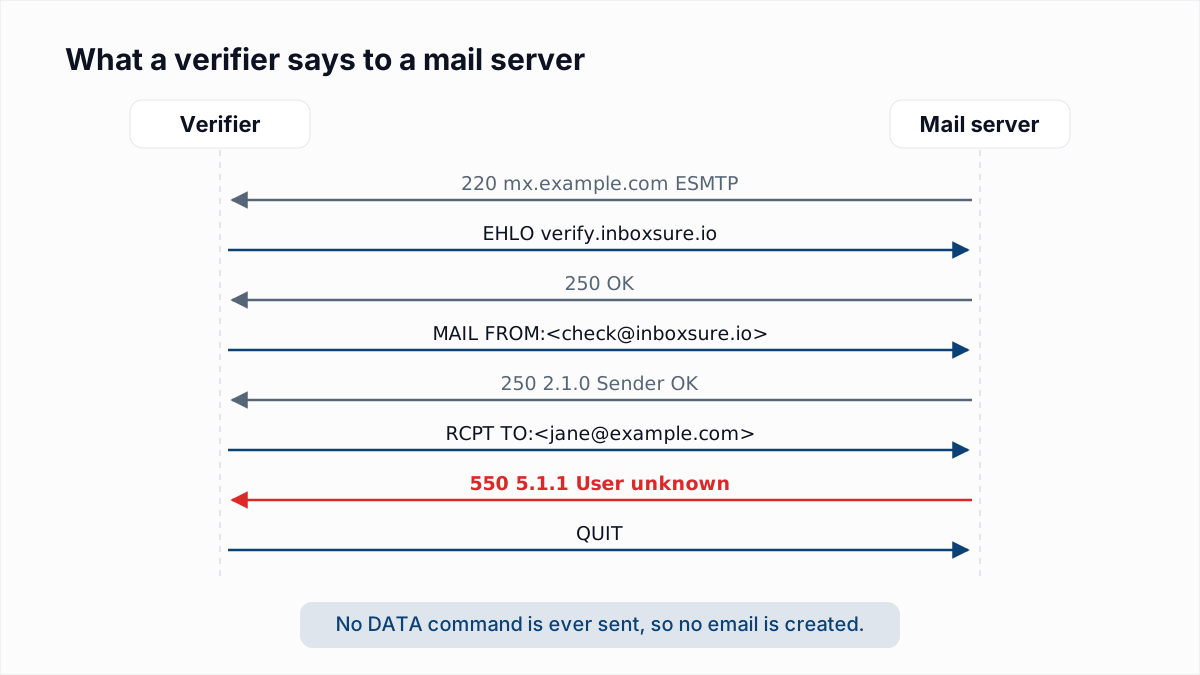
A bounce says more when you know which SMTP command it answered. Many MAILER-DAEMON bounce messages show this, for example "in reply to RCPT TO command".
- At connection or EHLO: the server refused your IP before hearing anything else. Nothing is known about the recipient.
- At MAIL FROM: the refusal is about the sender address or the IP. Yahoo's 5.7.25 and Outlook.com's 5.7.1 blocks arrive here.
- At RCPT TO: the server is judging the recipient. This is where 5.1.1 and Microsoft's 5.4.1 appear, and it is the only point where a 5xx is a verdict on the address.
- After DATA: the server read the message and refused it, usually for content, size or authentication (5.7.26, 5.3.4, 5.6.0).
How to read a bounce you do not recognise
- Check the first digit. 4 means wait and retry. 5 means something must change before the same mail will go through.
- Check the subject number. X.1 or X.2 points at the address. X.7 points at you. X.3 to X.6 point at the system, the route or the message.
- Read the text. Words like "does not exist", "no such user" or "user unknown" mean the address. Words like "blocked", "reputation", "policy", "SPF" or an IP address mean you.
- Follow the link. Gmail, Microsoft (aka.ms/EXOSmtpErrors) and Proofpoint put a help or lookup link in the reply. It usually names the exact cause.
- Look for a pattern. One address failing is about that address. A whole provider failing at once is about you.
Seeing these codes before you send
The address-level codes in the first table are visible without sending anything. A verifier opens the same SMTP conversation, stops at RCPT TO, records the reply and disconnects before DATA. A mailbox that would bounce with 5.1.1 or 5.4.1 returns that code to the verifier too. The method is explained in how email verification works without sending an email.
Verification has limits worth knowing. It cannot predict X.7 rejections, because those depend on your sending IP and content, not the verifier's. It cannot see past a catch-all domain that accepts every address. And when a provider blocks or greylists the verifier, the honest answer is "unknown", not a guess.
InboxSure reports each address as Deliverable, Risky, Undeliverable or Unknown with the reason behind each result, so the addresses that would have bounced are removed before your sending platform sees them. Check a single address with the free email verifier, or upload a CSV to the bulk email verifier before your next campaign.
Frequently asked questions
Related reading
Ready to clean your email list?
Upload a CSV or XLSX and get every address marked deliverable, risky, undeliverable or unknown, with the reason. Free for lists of up to 50, no card. Nothing is sent to your contacts.