What Is SMTP? How Email Gets From Server to Server
SMTP is the set of rules mail servers follow to hand a message from one machine to the next. The current specification is RFC 5321, published in October 2008. The protocol is plain text: one side sends a short command such as MAIL FROM, the other answers with a three-digit code, and the pair repeat until the message is accepted or refused.
This guide is the overview. Ports, bounce codes, MX records and bounce messages each have a deeper guide, linked where they come up.
What does SMTP stand for?
SMTP stands for Simple Mail Transfer Protocol, and the name describes the job exactly: SMTP transfers mail and does nothing else. SMTP does not store messages in a mailbox, show them in an app or sync folders between devices.
SMTP is also one-directional. The side that has the message opens the connection and pushes it. A server never uses SMTP to fetch mail, which is why reading email needs a second protocol, covered in the comparison table below.
How does SMTP work, step by step?
SMTP works as a relay: each server accepts the message from the one before it, takes responsibility for it, and passes it one step closer to the recipient's mailbox. One message from sam@sender.example to jane@recipient.example makes four moves.
- Submission. Sam's mail app signs in to his provider's server and hands over the message using SMTP on port 587 or 465. The ports are explained in SMTP ports 25, 465 and 587.
- MX lookup. Sam's provider asks DNS for the MX records of
recipient.example, which name the servers that accept its mail. You can run the same query with the MX lookup tool. - Relay. Sam's provider connects to that server on port 25 and holds the SMTP conversation shown in the next section. No sign-in is involved. Large providers often pass the message through further internal servers.
- Delivery. The final server files the message in Jane's mailbox. SMTP's part is over. Jane's app collects the message with IMAP or POP3.
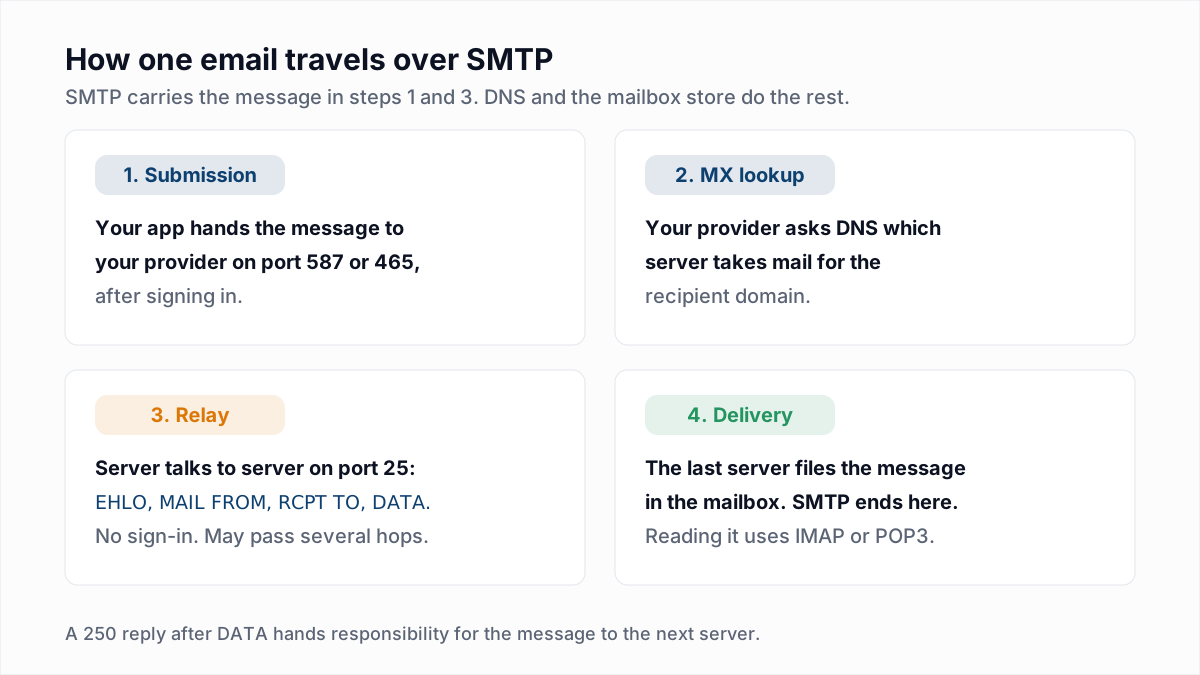
Section 6.1 of RFC 5321 says a server that answers 250 after the message data "is accepting responsibility for delivering or relaying the message". That rule is what lets a sender stop worrying once the next server has said yes.
What does an SMTP session look like?
An SMTP session is a short text conversation in which the receiving server greets, the client introduces itself, names the sender and the recipient, sends the message and disconnects. The opening below is real. We connected to Gmail's MX server on port 25 with nc on 13 November 2026; our IP address is replaced with [IP] and Google's connection ID is trimmed.
$ nc gmail-smtp-in.l.google.com 25
220 mx.google.com ESMTP ... - gsmtp
EHLO probe.example.org
250-mx.google.com at your service, [IP]
250-SIZE 157286400
250-8BITMIME
250-STARTTLS
250-ENHANCEDSTATUSCODES
250-PIPELINING
250-CHUNKING
250-SMTPUTF8
250 LIMITS MAILMAX=1000 RCPTMAX=100 RCPTDOMAINMAX=1
STARTTLS
220 2.0.0 Ready to start TLS
The 220 line is the server's greeting. The lines after EHLO list the extensions the server supports: here, a maximum message size of 157,286,400 bytes and the offer to encrypt with STARTTLS. We stopped there. The rest of a delivery is shown below as an illustrative transcript with made-up names, because completing it would have sent a real email. C: is the sending server and S: is the receiving one.
   (TLS is now active; the client sends EHLO again)
C: MAIL FROM:<bounce@sender.example>
S: 250 2.1.0 Sender OK
C: RCPT TO:<jane@recipient.example>
S: 250 2.1.5 Recipient OK
C: DATA
S: 354 Start mail input; end with <CRLF>.<CRLF>
C: From: Sam <sam@sender.example>
C: To: Jane <jane@recipient.example>
C: Subject: Lunch on Friday
C:
C: Are you free at noon?
C: .
S: 250 2.0.0 OK: queued
C: QUIT
S: 221 2.0.0 Bye| Command | What the command does | Reply when it works |
|---|---|---|
EHLO | Introduces the client by host name and asks for the server's extension list | 250, one line per extension |
STARTTLS | Asks to switch the connection to TLS encryption, defined in RFC 3207 | 220, then the TLS handshake |
MAIL FROM | Names the envelope sender, the address that will receive any bounce | 250 |
RCPT TO | Names one recipient. The client repeats the command for each recipient | 250 per accepted recipient |
DATA | Sends the headers and body, ended by a line holding a single dot | 354 to begin, 250 once the message is accepted |
QUIT | Ends the session | 221 |
What do SMTP reply codes mean?
SMTP reply codes are three-digit numbers whose first digit tells the client what to do next: 2 means success, 3 means continue, 4 means try again later and 5 means stop. RFC 5321 section 4.2.1 defines the four classes.
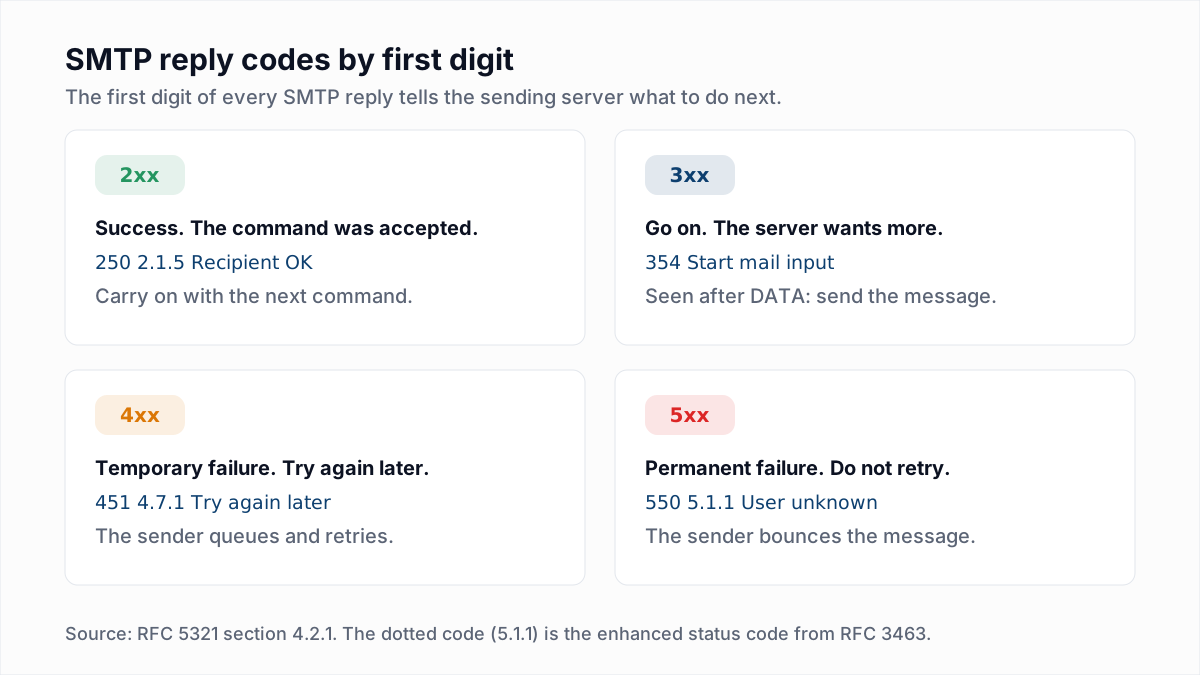
A server can refuse at any step, and the step matters as much as the number. A 550 after RCPT TO is usually about the recipient. A 550 at the greeting or after MAIL FROM is about the sender. Every common code is listed in the email bounce codes reference.
What is the difference between the SMTP envelope and the message headers?
The SMTP envelope is the sender and recipient addresses given in MAIL FROM and RCPT TO, and the headers are the From, To and Subject lines sent inside DATA. Servers route on the envelope. People read the headers.
RFC 5321 section 2.3.1 puts it in one line: "A mail object contains an envelope and content." Nothing in SMTP forces the two to match. That is how a Bcc recipient receives a message whose headers never mention them, and how a newsletter can show a brand in From while bounces go to the email platform.
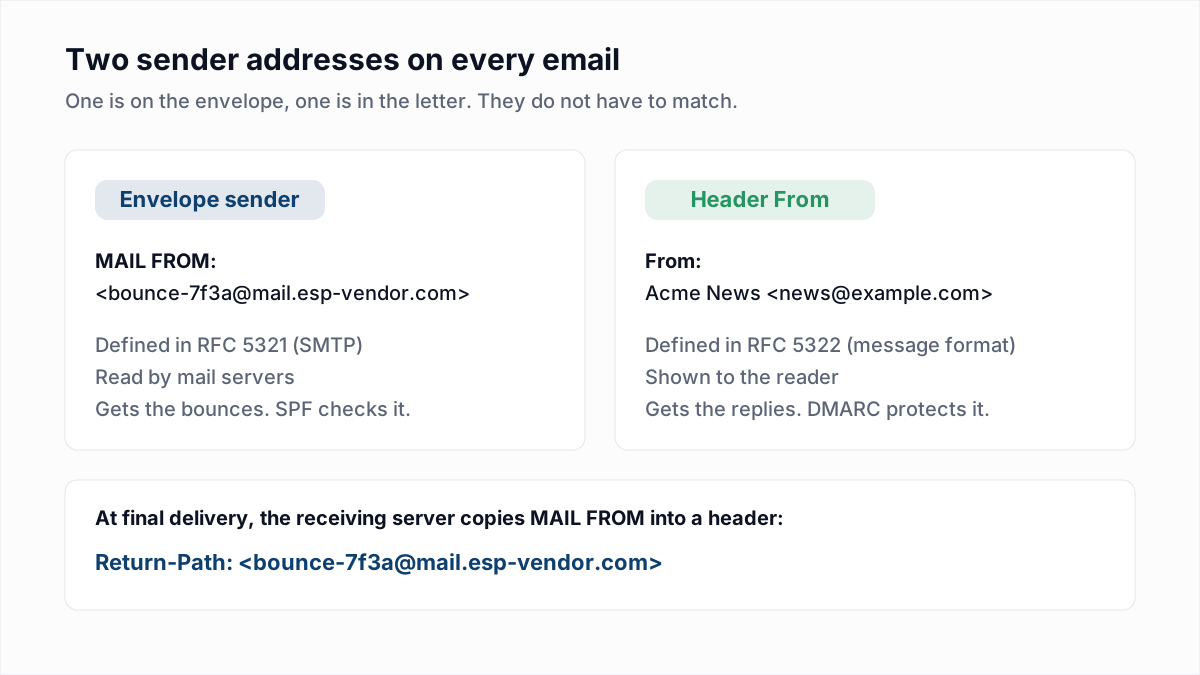
The same gap is why forging a From header is easy, and why SPF, DKIM and DMARC were added on top of SMTP. For the envelope sender in detail, see the Return-Path explained; to see both in a real message, see how to read email headers.
What is the difference between SMTP, IMAP and POP3?
SMTP sends mail, while IMAP and POP3 let a mail app read mail that has already been delivered. An app normally needs SMTP plus one of the other two.
| Protocol | Job | Direction | Where mail is kept | Usual ports |
|---|---|---|---|---|
| SMTP (RFC 5321) | Sends and relays mail | App to server, and server to server | Nowhere; SMTP only moves mail | 25 for relay, 587 or 465 for submission |
| IMAP (RFC 9051) | Reads and organises mail on the server | App fetches from server | On the server, synced across devices | 993 with TLS from the start, 143 with STARTTLS |
| POP3 (RFC 1939) | Downloads mail to one device | App fetches from server | On the device; the server copy is often deleted | 995 with TLS from the start, 110 with STARTTLS |
What does the "SMTP server" setting in an app mean?
The "SMTP server" setting in an app is the host name of your own provider's submission server, the machine in step 1 of the journey. The setting is not the recipient's server, which your provider finds through DNS.
A website, CRM or printer that asks for SMTP details wants four things: a host such as smtp.example.com, a port (587 with STARTTLS or 465 with TLS from the start), a username and a password or app password. The provider-by-provider values are in the SMTP ports guide. If the sign-in is refused, see 535 authentication failed.
Where do bounces come from?
Bounces come from SMTP replies: when a server answers a command with a 5xx code, or keeps answering 4xx until the sender gives up, the sending server writes a bounce message to the MAIL FROM address.
- A 5xx reply ends the attempt at once. The result is a hard bounce.
- A 4xx reply makes the sender queue the message and retry. RFC 5321 section 4.5.4.1 says "the give-up time generally needs to be at least 4-5 days", though each provider and email platform sets its own limit.
- A failure after acceptance, such as a forward that breaks, makes the accepting server send the bounce itself.
The bounce message is the one that arrives from MAILER-DAEMON, and what is MAILER-DAEMON shows how to read it.
How does email verification use SMTP?
Email verification uses the first half of the SMTP conversation: the verifier connects on port 25, sends EHLO, MAIL FROM and RCPT TO, reads the server's answer about the recipient, and sends QUIT before DATA. No message exists, so nothing is delivered.
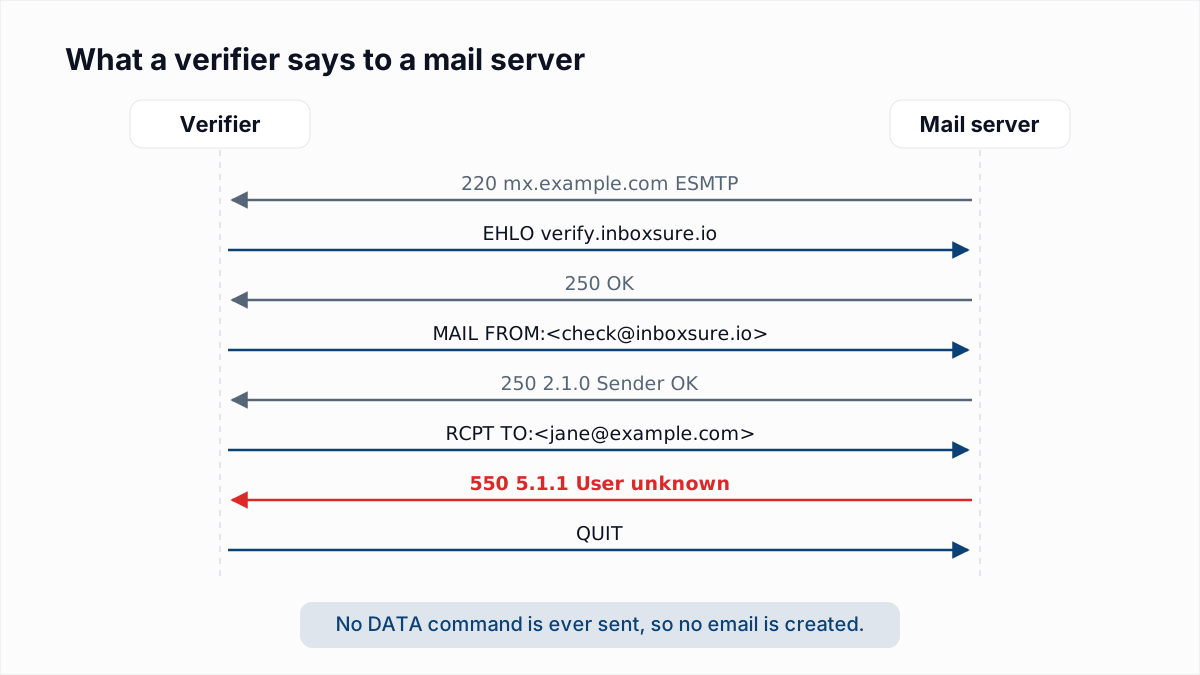
In InboxSure's own tests on 4 November 2026, Gmail answered a made-up address at RCPT TO with 550-5.1.1 The email account that you tried to reach does not exist. That reply is a clear Undeliverable. The method has limits, and they are worth knowing:
- Some providers refuse before the recipient is named. In the same tests, Yahoo and AOL answered at
MAIL FROMwith550 5.7.25 Forward-confirmed reverse DNS failed, and Outlook.com refused with a550 5.7.1block. Those addresses come back Unknown, not Undeliverable. - Catch-all servers say 250 to everything. A
250then proves nothing about the mailbox, so the result is Risky. - Greylisting and other temporary refusals return a 4xx. Fastmail and Mimecast answered
451in those tests. The check has to be retried later.
The full method is in how email verification works without sending an email, and the provider replies are in how Gmail, Outlook and Yahoo respond to verification.
InboxSure runs this conversation for every address on a list, after syntax and MX checks, and returns Deliverable, Risky, Undeliverable or Unknown with the server's reply as the reason. The Free plan takes lists of up to 50 addresses with no card, and Pro is a flat $49 a month for lists of up to 10,000 addresses. To watch one SMTP check happen, try the free email verifier.
Frequently asked questions
Related reading
Ready to clean your email list?
Upload a CSV or XLSX and get every address marked deliverable, risky, undeliverable or unknown, with the reason. Free for lists of up to 50, no card. Nothing is sent to your contacts.