What Is an MX Record? Priority, Lookup and Common Problems
An MX (mail exchanger) record is the DNS record that tells the internet which servers receive email for a domain. When someone sends mail to anna@example.com, their server looks up the MX records for example.com, sorts them by priority number (lowest first) and delivers to the first server that answers. Each record is a priority plus a host name, such as 10 mx1.example.com. No working MX record usually means the domain cannot receive mail, and every address at it bounces. You can see any domain's records in seconds with the free MX lookup tool.
What an MX record looks like
In a DNS zone file, an MX record has the domain, a time to live (TTL), the type, a priority and a target host:
example.com.   3600   IN   MX   10   mx1.example.com.
example.com.   3600   IN   MX   10   mx2.example.com.
example.com.   3600   IN   MX   20   backup.example.net.
In a registrar's DNS panel the same thing is usually four fields: host (@ for the root domain), type MX, priority, and the mail server name. Some panels want a trailing dot after the host name; some put the priority and host in one field.
MX record priority, with a worked example
The priority (the standards call it preference) is a number from 0 to 65535. Under RFC 5321 section 5.1, lower numbers are more preferred, and when several records share the same number the sender must pick among them at random to spread the load.
Using the three records above, a sending server does this:
- Looks up MX for
example.comand gets three hosts. - Sorts them.
mx1andmx2both have 10, so it picks one of them at random, saymx2. - If
mx2times out or answers with a temporary 4xx code, it triesmx1. - Only if both priority 10 servers are unreachable does it try
backup.example.netat 20. - If every host fails temporarily, the message waits in the sender's queue and is retried later.
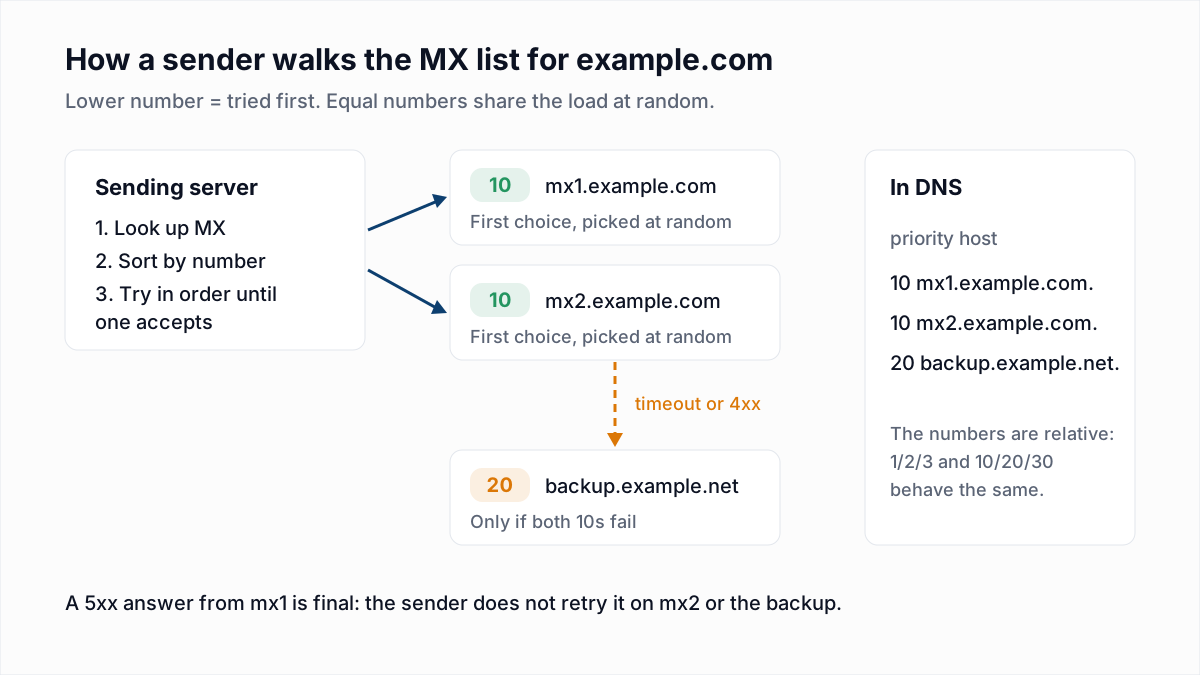
Two details trip people up. The numbers are only relative: 1, 2, 3 behaves the same as 10, 20, 30. And a permanent rejection (5xx) from the preferred server is final. The sender does not shop the message around to the backup, so a backup MX does not rescue mail that a primary rejects.
A backup MX that does not know your real mailboxes can also become a spam path, because it accepts everything and passes it on. Hosted providers run redundancy behind one name, so do not add a third-party backup in front of Google or Microsoft.
What happens when a domain has no MX record
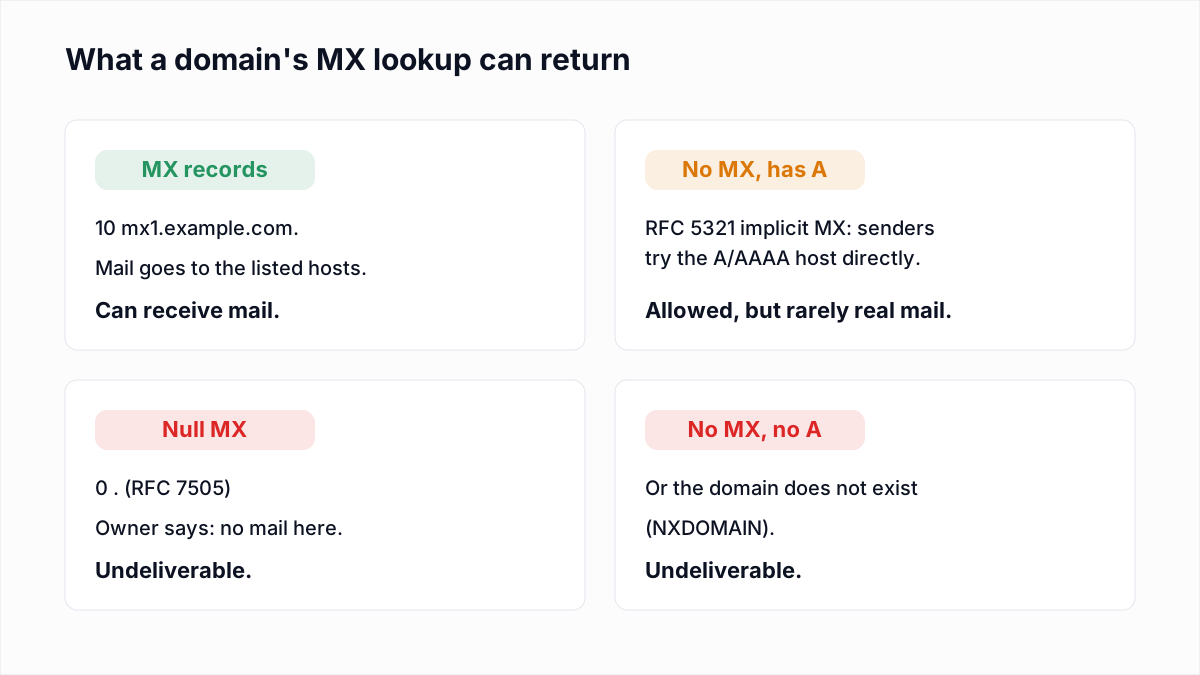
RFC 5321 section 5.1 says that if the MX lookup returns no records, the sender treats the domain as if it had an implicit MX with preference 0 pointing at the domain itself, and delivers to its A or AAAA address. If MX records exist, the A record is never used for mail.
In practice, a domain with a website and no MX record is almost always a domain that does not handle email: the web server answers port 80, not port 25. That is why verifiers treat no-MX domains carefully. InboxSure marks an address at a domain with no MX record as Undeliverable rather than trying the web server, and a domain that does not exist at all (NXDOMAIN) gets the same result.
What a null MX record means
A null MX is a domain owner saying "this domain receives no mail" on purpose. Defined in RFC 7505, it is a single MX record with priority 0 and a target of a lone dot:
$ dig +noall +answer MX example.com
example.com.    18    IN    MX    0 .
That is the real answer for example.com when we checked on 12 November 2026. A domain with a null MX must not publish any other MX record. Senders can fail the message immediately instead of queueing it, and RFC 7505 suggests the reply code 556 5.1.10 ("Recipient address has null MX"). Every address at a null MX domain is undeliverable. Parked domains and domains used only for websites should publish one, because it stops spammers from using them in fake sender addresses that bounce nowhere.
MX records must point to a host name, not an IP or a CNAME
- Not an IP address. The target field of an MX record is a domain name. RFC 5321 section 5.1 says it must contain a domain name that resolves to at least one A or AAAA record. Entering
203.0.113.10as the target makes resolvers treat it as a host name called203.0.113.10, which does not exist. Create an A record such asmail.example.comand point the MX at that. - Not a CNAME. RFC 2181 section 10.3 says the host named in an MX record must not be an alias. Many senders follow the alias anyway, so it may appear to work, but some do not, and RFC 5321 puts it outside the standard. Point to the canonical name the provider gives you.
- The target must resolve. An MX pointing at a host with no A or AAAA record is the same as no mail server. The MX lookup shows the IPs each host resolves to, so a blank IP column is the giveaway.
MX record examples for Gmail, Google Workspace, Microsoft 365 and Zoho
The host names in an MX record identify the provider. These are the values we captured in our 4 November 2026 provider research, plus what each provider tells customers to publish.
| Provider | MX host(s) | Notes |
|---|---|---|
| Gmail (gmail.com) | gmail-smtp-in.l.google.com, alt1 to alt4.gmail-smtp-in.l.google.com | Priorities 5, 10, 20, 30, 40. |
| Google Workspace | smtp.google.com | One record, priority 1, per Google's MX setup page. Older accounts may still use aspmx hosts, which Google says still work. |
| Microsoft 365 | yourdomain-com.mail.protection.outlook.com | Dots in your domain typically become dashes, as in microsoft-com.mail.protection.outlook.com. Priority 0. Microsoft plans to move new domains to hosts under mx.microsoft, so copy the value from your admin center. |
| Outlook.com / Hotmail | outlook-com.olc.protection.outlook.com | Consumer mail. olc distinguishes it from Microsoft 365 tenants. |
| Zoho Mail | mx.zoho.com, mx2.zoho.com, mx3.zoho.com | Priorities 10, 20, 50 per Zoho's help. The suffix changes by data center (zoho.eu, zoho.in). |
| Yahoo / AOL | mta5.am0.yahoodns.net, mx-aol.mail.gm0.yahoodns.net | Anything ending in yahoodns.net. |
| Proofpoint, Mimecast | *.pphosted.com, *.mimecast.com | Security gateways. The mailbox host sits behind them and is not visible. |
A gateway in the MX tells you the domain filters inbound mail heavily, which matters for verification: in our research Proofpoint blocked the check outright and Mimecast answered with a temporary 451. Their replies are covered in the Proofpoint 550 5.7.0 block and Mimecast error codes.
How to do an MX record lookup
With the free MX lookup tool
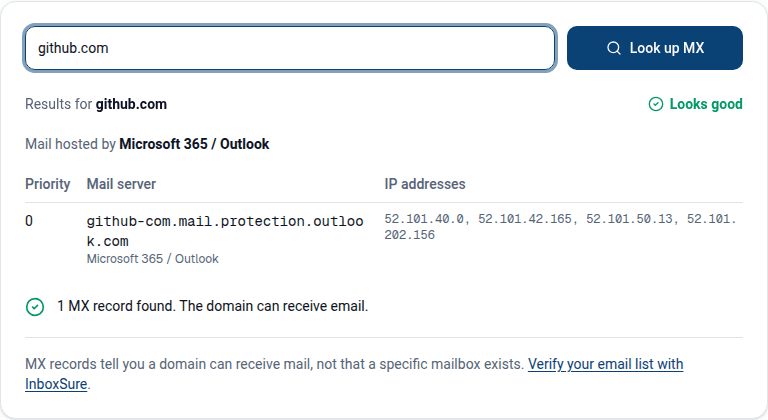
Enter a domain in the InboxSure MX lookup. It lists every record in priority order, the IP addresses each host resolves to, the provider it recognises from the host names, and flags a null MX or missing MX.
With dig (macOS, Linux)
$ dig +short MX gmail.com
5 gmail-smtp-in.l.google.com.
10 alt1.gmail-smtp-in.l.google.com.
20 alt2.gmail-smtp-in.l.google.com.
30 alt3.gmail-smtp-in.l.google.com.
40 alt4.gmail-smtp-in.l.google.com.
Results come back in any order, so sort by the first number yourself. Add @8.8.8.8 to ask a public resolver instead of your local cache, which helps after a change.
With nslookup (Windows)
C:\> nslookup -type=mx gmail.com
Non-authoritative answer:
gmail.com       mail exchanger = 5 gmail-smtp-in.l.google.com
gmail.com       mail exchanger = 10 alt1.gmail-smtp-in.l.google.com
...
If the answer says Non-existent domain (or status: NXDOMAIN in dig), the domain itself is not registered or not delegated. An empty answer with no error means the domain exists but publishes no MX.
How MX records affect email verification
The MX check is step 2 of verification, right after syntax. If the domain cannot receive mail, there is no point asking a server about the mailbox, and the address is marked Undeliverable. Typo domains (gmial.com) and expired company domains with no mail host are caught here. One exception as of November 2026: InboxSure does not yet special-case a null MX record, so addresses at a null MX domain come back Unknown, not Undeliverable. The MX lookup tool does flag a null MX. If an MX exists, the verifier connects to the preferred host and asks about the mailbox over SMTP without sending anything.
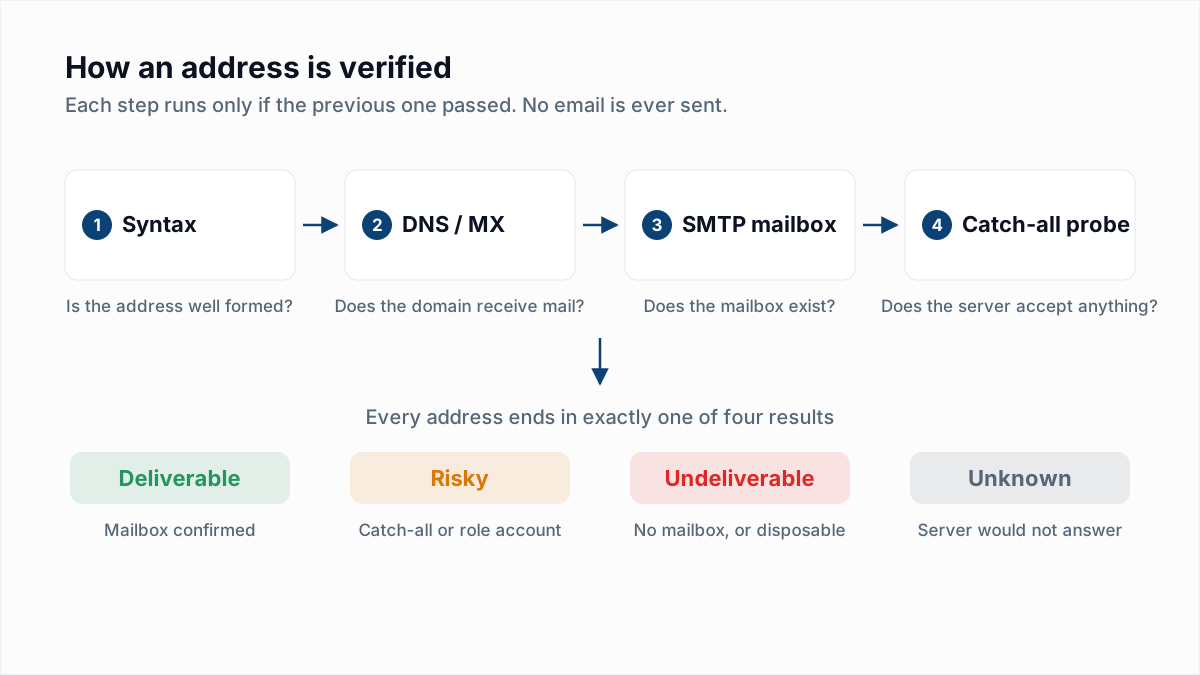
Note the limit: an MX record proves the domain takes mail, not that a given mailbox exists. That needs the SMTP step, explained in how to verify an email without sending.
Changing MX records during a migration
- Lower the TTL first. A day or two before the switch, drop the TTL on the existing MX records to 300 seconds, so resolvers stop caching the old answer for hours.
- Create mailboxes on the new provider before you change anything. Microsoft's DNS guide makes the same point: mail starts arriving at the new host as soon as the MX changes.
- Replace the records with the new provider's values and remove the old ones. Google's setup page says to remove any other MX records; leaving old ones at a lower number keeps sending mail to the old server.
- Keep the old mailboxes running until the old TTL has passed and no new mail arrives there. Senders with a cached answer keep using the old host for a while.
- Raise the TTL back to 3600 or your provider's default. Microsoft says Exchange Online supports MX TTLs under 6 hours.
- Update SPF and DKIM for the new provider. MX only covers inbound mail; outbound authentication is separate (see what is DKIM and DNS records for email). If the domain publishes an MTA-STS policy, its list of MX hosts has to change too; see MTA-STS and TLS-RPT explained.
Troubleshooting MX records
| Symptom | Likely cause | Fix |
|---|---|---|
| "No MX record found" | Record never created, created on the wrong host (e.g. www), or typo in the domain | Add MX at @ with the provider's value, then recheck |
| Lookup shows the MX but its IP is blank | Target host has no A/AAAA record, or is a typo | Copy the provider's host name exactly |
Target looks like mx.example.com.example.com | Panel appended the domain to a name without a trailing dot | Add the trailing dot or enter the short form your panel expects |
| Some mail still goes to the old provider | Old MX records left in place, or cached answers before TTL expiry | Delete old records; wait out the old TTL |
Mail bounces with 556 5.1.10 | Domain publishes a null MX | Remove the 0 . record if the domain should receive mail |
| Provider says the MX is wrong, but dig shows it right | Provider checked before propagation | Wait (Google allows up to 72 hours) and recheck from the admin console |
| MX target is an IP address | Not allowed; target must be a host name | Create an A record and point the MX at it |
Check domains before you send
One MX lookup answers one domain. For a list, the MX check runs on every address as part of verification, along with the SMTP mailbox check and catch-all detection. The free email verifier checks a single address, and the free plan verifies lists of up to 50 addresses with no card. Remember the limit of any verifier: a domain whose server will not answer clearly comes back Unknown, not Deliverable.
Frequently asked questions
Related reading
Ready to clean your email list?
Upload a CSV or XLSX and get every address marked deliverable, risky, undeliverable or unknown, with the reason. Free for lists of up to 50, no card. Nothing is sent to your contacts.