DNS Records for Email: MX, SPF, DKIM, DMARC and More
A DNS record for email is an entry in a domain's zone that mail servers look up before they deliver to the domain or accept mail from it. Most are TXT records, and most sit at a prefixed host name such as _dmarc, not at the domain itself, which is where most setup mistakes happen. This page is the reference: every record in one table, how to add one at a DNS host, and how to check it with dig.
Which DNS records does email use?
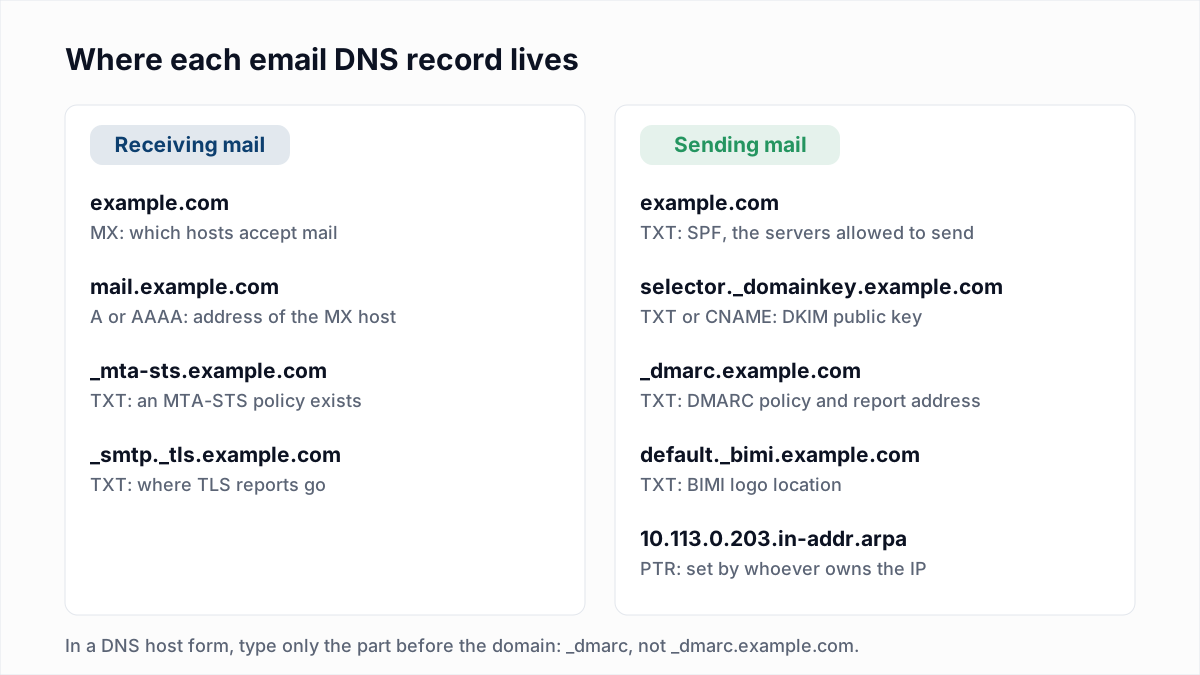
Email uses eleven kinds of DNS record: three decide where mail is delivered, four prove who sent it, and the rest cover transport security, logos, parked domains and mail app setup. Examples use example.com.
| Record | Host name | Example value | What breaks without it | Guide or tool |
|---|---|---|---|---|
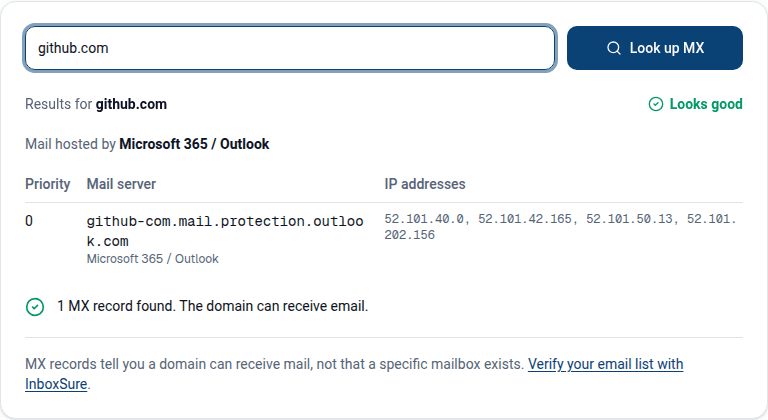
| MX | example.com | 1 smtp.google.com. | Senders fall back to the domain's A record, where usually no mail server listens. | What is an MX record, MX lookup |
| A / AAAA for the mail host | mail.example.com (only if you run the server) | 203.0.113.10 | An MX target with no address cannot be reached. MX must point to a host name, never to a CNAME. | What is an MX record |
| PTR | 10.113.0.203.in-addr.arpa, set by the owner of the IP | mail.example.com. | Receivers that require reverse DNS refuse the mail with 550 5.7.25. | 550 5.7.25 and PTR records |
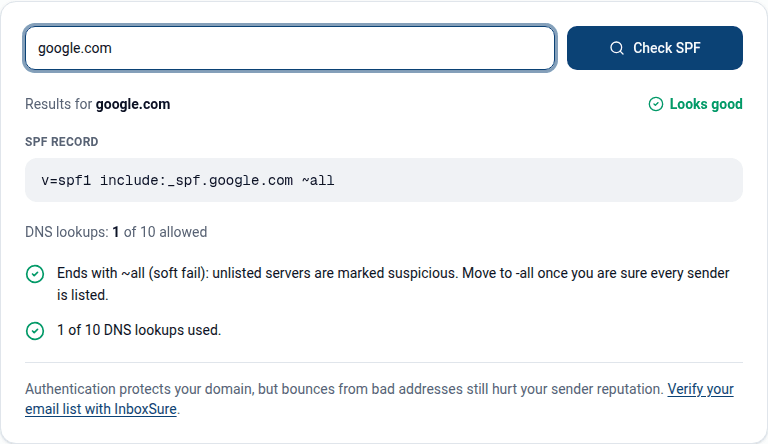
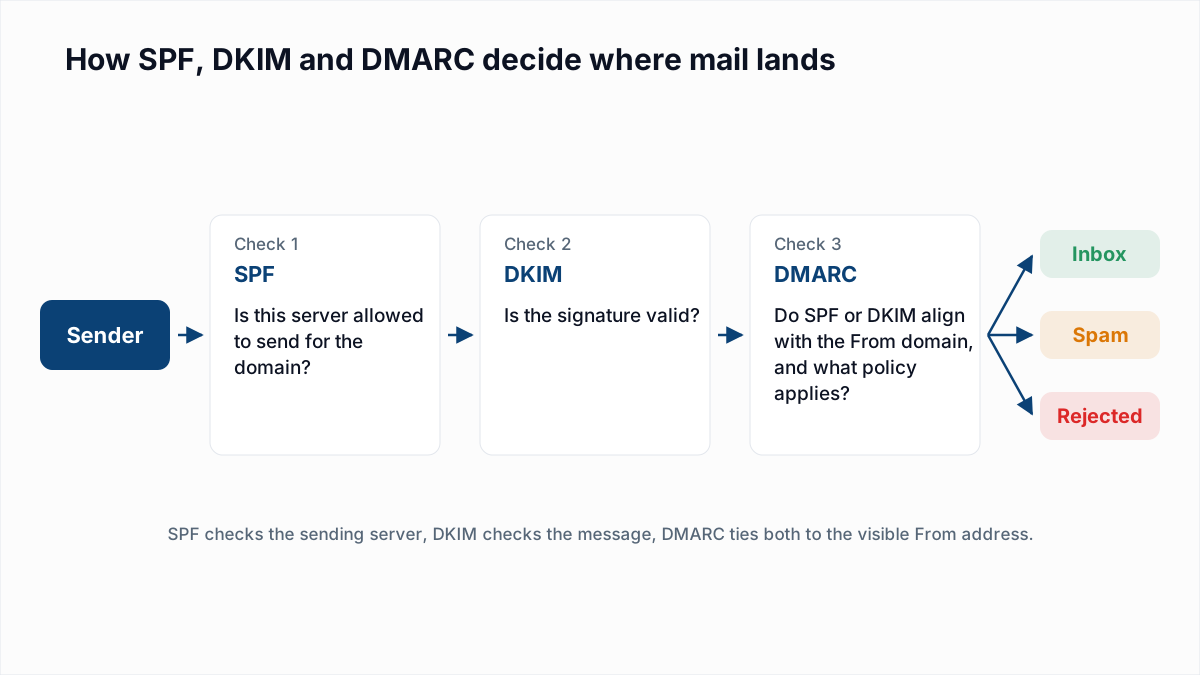
| SPF (TXT) | example.com, and each sending subdomain | v=spf1 include:_spf.google.com ~all | SPF returns none, so authentication rests on DKIM alone. | What is an SPF record, SPF generator, SPF checker |
| DKIM (TXT or CNAME) | selector._domainkey.example.com | v=DKIM1; k=rsa; p=MIIBIjANBg... or a CNAME to the platform's key | Receivers find no key and DKIM fails. | What is DKIM, DKIM checker |
| DMARC (TXT) | _dmarc.example.com | v=DMARC1; p=none; rua=mailto:dmarc@example.com | Bulk mail breaks the Gmail, Yahoo and Outlook.com sender rules, and you get no reports. | What is DMARC, DMARC generator, DMARC checker |
| BIMI (TXT) | default._bimi.example.com | v=BIMI1; l=https://example.com/logo.svg; a=https://example.com/vmc.pem | No logo beside the sender name. Delivery is unaffected. | What is BIMI |
| MTA-STS (TXT plus a policy host) | _mta-sts.example.com, and an A or CNAME record for mta-sts.example.com | v=STSv1; id=20261113T000000 | Senders cannot be told to require TLS for mail coming in. Delivery still works. | MTA-STS and TLS-RPT |
| TLS-RPT (TXT) | _smtp._tls.example.com | v=TLSRPTv1; rua=mailto:tls@example.com | No reports of TLS failures on inbound mail. | MTA-STS and TLS-RPT |
| Null MX | A domain that accepts no mail | 0 . | Senders queue and retry mail to a dead domain, not fail it at once. | Null MX and 556 5.1.10 |
| Autodiscover (CNAME or SRV) | autodiscover.example.com | autodiscover.outlook.com. for Microsoft 365 | Mail apps cannot find server settings automatically. Delivery is unaffected. | Microsoft's DNS record list |
Other mailbox providers use their own autodiscover or autoconfig names; use the values your provider gives you. SPF and DKIM are not inherited by subdomains, as sending from a subdomain explains.
How do you add a TXT record or CNAME record for email?
To add a TXT or CNAME record, open the DNS settings at the company that runs your domain's name servers, create a record of that type, and fill in three fields: host, value and TTL.
- Find where DNS is hosted. Run
dig +short NS example.com; the answer names the DNS host, which may not be the registrar. - Choose the record type your email provider names. SPF, DMARC, BIMI, MTA-STS and TLS-RPT are always TXT. DKIM is TXT or CNAME depending on the provider.
- Enter the host. For the domain itself most hosts use
@. For anything else, enter only the prefix, such as_dmarcorgoogle._domainkey. - Paste the value exactly as given, without adding quotation marks unless your host asks for them.
- Leave TTL on the default, save, then check the record with dig (below).
Before adding SPF, look for an existing record. RFC 7208 says a lookup that finds more than one SPF record returns permerror, so edit the record you have; the details are in SPF PermError.
Gotchas the DNS hosts document themselves
| DNS host | What its own page says (read 13 November 2026) | What to do |
|---|---|---|
| Cloudflare | Cloudflare's proxy status page says a proxied record is "answered with Cloudflare anycast IP addresses", that MX and TXT records are "always DNS-only", and lists email records among those that should be DNS-only. | Set the mail host's A record and every DKIM or autodiscover CNAME to DNS only (grey cloud). |
| Namecheap | Namecheap's TXT record article says: "The domain name itself should not be included in the Host field." | Enter _dmarc, not _dmarc.example.com, and @ for the root. |
| GoDaddy | GoDaddy's help page on adding a TXT record returned an error to us on 13 November 2026, so we do not quote it. | Check the saved record with dig; a doubled domain shows up at once. |
The doubled name is the most common symptom. Mailchimp's authentication help covers the case where the host appends the domain a second time: the fix it gives is to shorten the CNAME name so that it includes only k2._domainkey.
How long do DNS changes take to propagate?
A new DNS record is usually visible within minutes; the "up to 48 hours" and "up to 72 hours" figures are worst-case allowances for cached answers, not typical waits. The providers' own statements, read on 13 November 2026:
- Google Workspace's MX setup page: "It can take up to 72 hours for the new MX records to be recognized." Its SPF and DKIM pages say up to 48 hours.
- Mailchimp: "Most records update within a few minutes, but this could take up to 48 hours."
- Namecheap: "Normally, it takes 30 minutes for newly created host records to take effect."
TTL (time to live) is the number of seconds a resolver may keep an answer before asking again. A brand-new name has nothing cached, so it appears quickly. A changed record can keep returning the old value until its previous TTL runs out. Cloudflare's TTL page says its Auto setting is 300 seconds and that "a longer TTL also means that updates to your records take longer to go into effect." Before a planned change such as an MX migration, lower the TTL a day ahead.
What is the 255-character limit on a TXT record?
The 255-character limit applies to each quoted string inside a TXT record, not to the whole record. RFC 1035 defines a character-string as a length octet followed by up to 255 characters, and a TXT record as "One or more" of them. RFC 7208 says multiple strings are "concatenated together without adding spaces". A 2048-bit DKIM key is longer than 255 characters, so it is published as two strings. This is Mailchimp's own key, fetched on 13 November 2026:
$ dig +short TXT k2._domainkey.mailchimp.com
dkim2.mcsv.net.
"v=DKIM1; k=rsa; p=MIIBIjANBgkqhkiG9w0BAQEFAAOCAQ8AMIIBCgKCAQEAv2aC2KjGKLOwTweBY5A9RpjsxaBXR9r7OAU6U8/zn92ivImI75naUujWbItRI/QmL1jy5PWGqLwoUA0b90ObWaLDc+i9MtTNmGeWO009hr20fIxhGg6XBT2kjZ1DTThopSe1nAndsupmcBwlQ5Q6LJ+ZAxLcujnPIxM0ZBLmgpkv8u6RfY4eFP8OLvdAW3oSu" "B0DyLDigQX4Sj8wBO4YIdQH6AAmBeOsidsKAFNFUCpc3vCxtBDR12U+cBg724l3sBkMQ8evnz6idnqxq9QAVYh8k4kJ+RP+6cqTdy7LjIm8xY/bQNpQIpGUAuDo2DjLcCDun9DAI4Q/3z+Q0o9QuQIDAQAB;"
The first line is the CNAME; the key is two strings split at " ". Many DNS hosts split a long value for you. If yours rejects it, Google's DKIM setup page notes that "Some domain providers limit TXT record length" and offers a 1024-bit key as the fallback.
How do you check email DNS records with dig?
To check email DNS records with dig, query the record type at the exact host name and compare the answer with what you entered. These are real answers for google.com on 13 November 2026:
$ dig +short MX google.com
10 smtp.google.com.
$ dig +short TXT google.com | grep spf1
"v=spf1 include:_spf.google.com ~all"
$ dig +short TXT _dmarc.google.com
"v=DMARC1; p=reject; rua=mailto:mailauth-reports@google.com"
$ dig +short TXT _mta-sts.google.com
"v=STSv1; id=20210803T010101;"
$ dig +short TXT _smtp._tls.google.com
"v=TLSRPTv1;rua=mailto:sts-reports@google.com"
$ dig +short A smtp.google.com
192.178.211.26
192.178.211.27
$ dig +short -x 192.178.211.26
lcbomp-in-f26.1e100.net.
$ dig +noall +answer TXT _dmarc.google.com
_dmarc.google.com.  300  IN  TXT  "v=DMARC1; p=reject; rua=mailto:mailauth-reports@google.com"
The A and PTR answers depend on where you query from. The 300 in the last line is the TTL in seconds. An empty answer means nothing exists at that name: check for a doubled domain. On Windows, nslookup -type=TXT _dmarc.example.com does the same job.
What does a complete email DNS zone look like?
A complete email DNS zone for a small business has about eight records. This worked example is a fictional domain that uses Google Workspace for mailboxes and Mailchimp for newsletters.
; receiving mail (Google Workspace)
example.com.                    3600 IN MX    1 smtp.google.com.

; SPF: one record for the domain
example.com.                    3600 IN TXT   "v=spf1 include:_spf.google.com ~all"

; DKIM: Google Workspace (TXT) and Mailchimp (two CNAMEs)
google._domainkey.example.com.  3600 IN TXT   "v=DKIM1; k=rsa; p=<key from the Admin console>"
k2._domainkey.example.com.      3600 IN CNAME dkim2.mcsv.net.
k3._domainkey.example.com.      3600 IN CNAME dkim3.mcsv.net.

; DMARC: start at p=none with reports
_dmarc.example.com.             3600 IN TXT   "v=DMARC1; p=none; rua=mailto:dmarc@example.com"

; optional: TLS policy and reports for inbound mail
_mta-sts.example.com.           3600 IN TXT   "v=STSv1; id=20261113T000000"
mta-sts.example.com.            3600 IN CNAME <host serving the policy file>
_smtp._tls.example.com.         3600 IN TXT   "v=TLSRPTv1; rua=mailto:tls@example.com"
Where each value comes from:
- The MX value, the SPF include and the
google._domainkeyname are the ones Google's setup pages give. Steps are in SPF, DKIM and DMARC for Google Workspace. - Mailchimp's help page asks for two CNAME records and a DMARC TXT record, and shows the exact values in your account. The k2 and k3 targets above are what mailchimp.com's own selectors pointed to on 13 November 2026. The page does not ask for an SPF change. See SPF, DKIM and DMARC for Mailchimp.
- No A or PTR record appears, because Google and Mailchimp run the servers. BIMI is left out until DMARC is enforced.
How do you know the records work?
The records work when a real message passes: send one to a Gmail address and paste its header into the email header analyzer to see SPF, DKIM and DMARC results. If you run your own sending IP, the blacklist check does a one-time lookup of it. Then work through the email deliverability checklist.
DNS records prove who you are; they say nothing about whether the addresses on your list exist. Track bounces with the bounce rate calculator, and check an address before you send with the free email verifier, which looks up the domain's MX records and asks the mail server about the mailbox without sending an email.
Frequently asked questions
Related reading
Ready to clean your email list?
Upload a CSV or XLSX and get every address marked deliverable, risky, undeliverable or unknown, with the reason. Free for lists of up to 50, no card. Nothing is sent to your contacts.