550 5.7.25 Reverse DNS Failed: How to Fix PTR Records for Email
550 5.7.25 means the receiving server looked up the reverse DNS (PTR record) of the IP address your mail came from and the check failed: either the IP has no PTR record, or the hostname in it does not resolve back to the same IP. To fix it, ask whoever owns the sending IP (your VPS, hosting or cloud provider, not your domain's DNS host) to set a PTR record to a hostname such as mail.example.com, make sure that hostname has an A record pointing to the same IP, and use it as your server's HELO name. The error is about your sending server. It says nothing about the recipient's address.
What 550 5.7.25 means
The enhanced status code 5.7.25 is registered in RFC 7372 with the text "Reverse DNS validation failed", for when "an SMTP client's IP address failed a reverse DNS validation check". The 550 in front makes it permanent: the server will refuse every attempt from that IP until the DNS changes.
When InboxSure tested how the big mailbox providers respond to verification on 4 November 2026, Yahoo and AOL both rejected our connection at MAIL FROM, before any recipient was named, with this reply:
550 5.7.25 Forward-confirmed reverse DNS failedThe full results are in how Gmail, Outlook and Yahoo respond to email verification. Because the rejection came before RCPT TO, Yahoo never looked at the address at all. That is the pattern to recognise: one sending IP, every Yahoo and AOL recipient refused, the same reply each time.
How Gmail words it
Google lists the PTR replies on its Gmail SMTP errors and codes page. The permanent one is:
550 5.7.25 This message was blocked because the sending IP address doesn't have a PTR record, or the forwarding DNS entry doesn't reference the sending IP address. Gmail requires that sending IP addresses have a PTR record.Gmail also has two temporary versions and one for IPv6:
451 4.7.23 The sending IP address for this message doesn't have a PTR record, or the PTR record's forward DNS entry doesn't match the sending IP address. To protect users from spam, your email has been temporarily rate limited.

421 4.7.0 The IP address sending this message does not have a PTR record, or the corresponding forward DNS entry does not point to the sending IP. To protect our users from spam, email sent from your IP address has been temporarily rate limited.

550 5.7.1 This message does not meet IPv6 sending guidelines regarding PTR records and authentication.
The 4xx versions slow your mail rather than refuse it. Same problem, same fix.
This is not just a Gmail habit. Google's email sender guidelines put it under the requirements for all senders, not only bulk senders: "Ensure that sending domains or IPs have valid forward and reverse DNS records, also referred to as PTR records." The same page spells out the match: "The sending IP address must match the IP address of the hostname specified in the Pointer (PTR) record."
PTR record vs A record
DNS works in two directions, and email checks both.
| A (or AAAA) record | PTR record | |
|---|---|---|
| Direction | Name to IP | IP to name |
| Example | mail.example.com to 203.0.113.10 | 203.0.113.10 to mail.example.com |
| Where it lives | Your domain's zone | The reverse zone, 10.113.0.203.in-addr.arpa (IPv6 uses ip6.arpa) |
| Who edits it | You, at your DNS host | Whoever owns the IP address |
| How many | A name can point to many IPs | An IP normally has one PTR |
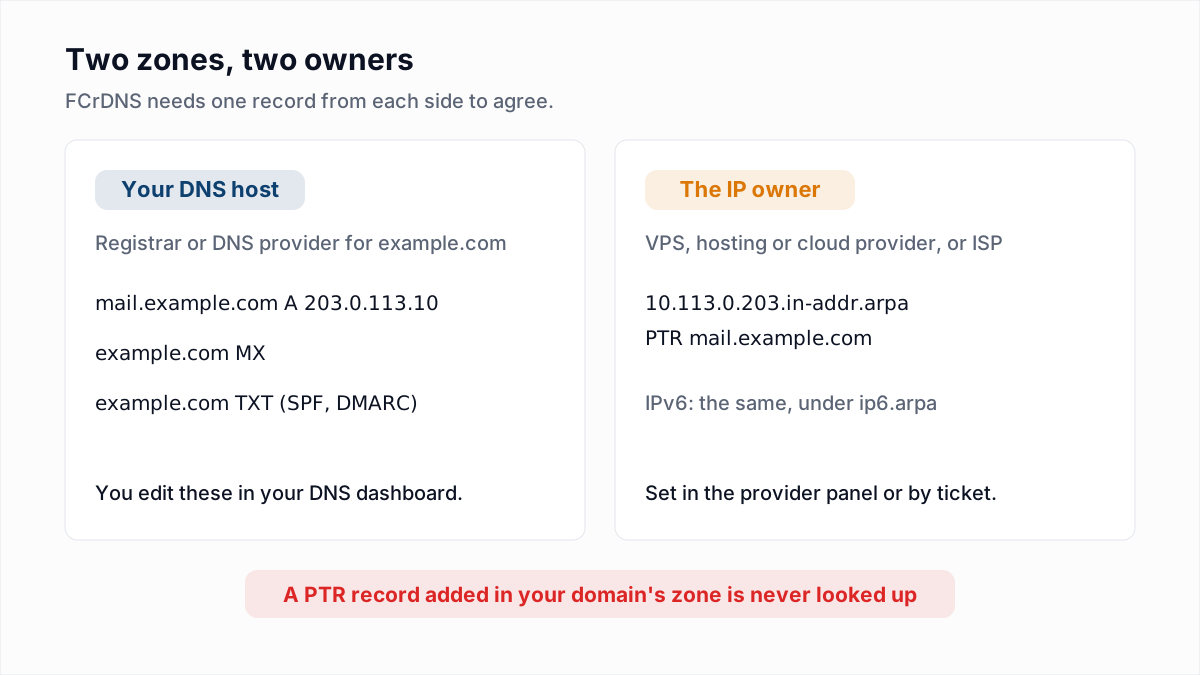
The reverse zone name is the IP written backwards with .in-addr.arpa on the end. That backwards name is why a PTR record cannot live in your own domain's zone: nobody looking up 203.0.113.10 ever asks the DNS servers for example.com.
What forward-confirmed reverse DNS (FCrDNS) means
Having a PTR record is not enough. Whoever runs an IP's reverse zone can, in principle, make its PTR say anything, even mail.google.com. So the receiving server confirms the name by looking it up in the other direction. The check has three steps:
- Your server connects from
203.0.113.10. - The receiver looks up the PTR record for that IP and gets
mail.example.com. - The receiver looks up the A record for
mail.example.comand gets203.0.113.10. The IP matches the one in step 1, so the name is confirmed.
The forward lookup can return several IPs; the check passes if the connecting IP is one of them. It fails if step 2 finds nothing, if the PTR name has no A record, or if the A record points somewhere else.
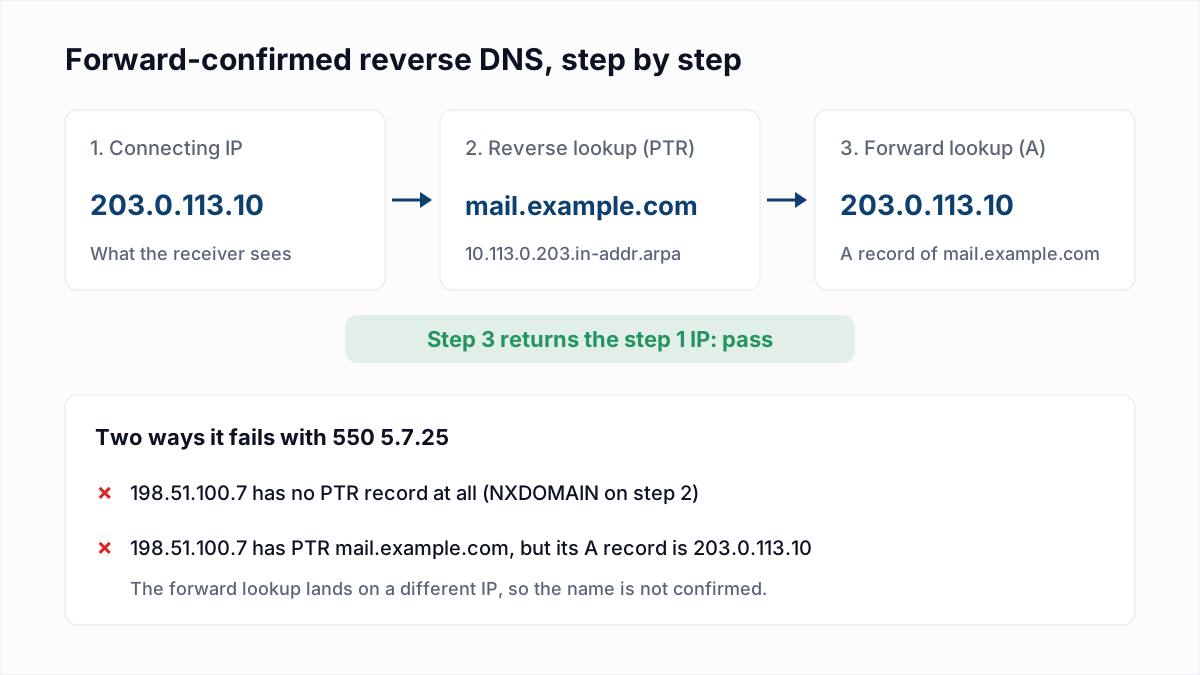
A common way to fail step 3 is moving servers. You set the PTR on the old IP, migrate to a new IP, update the A record for mail.example.com, and forget that the new IP's PTR still says something like 203-0-113-77.vps.example.net, or nothing.
Who controls your PTR record
The owner of the IP address controls its reverse zone, through the regional internet registry delegation for that address block. In practice that means:
- A VPS or dedicated server: the hosting company. Most have a reverse DNS or rDNS field next to each IP in their control panel. Some need a support ticket.
- A cloud VM: the cloud provider, through its own console or API (details below).
- An office or home connection: the ISP. Many will not set custom PTR records on residential lines, and you should not be sending mail directly from one.
Your registrar or DNS host (where your MX, SPF and DMARC records live) cannot fix this. Adding a PTR record to example.com in their dashboard does nothing, because nobody queries it there.
How to check your PTR record
First find the public IP your mail actually leaves from. The most reliable way is to send a message to an account you control and read the topmost Received header added by the receiving side. On a server, curl -4 ifconfig.me shows its public IPv4 address, though a NAT gateway or relay may mean mail leaves from a different one.
Then run the reverse lookup, and the forward lookup on the name you get back.
dig
$ dig -x 203.0.113.10 +short
mail.example.com.

$ dig mail.example.com A +short
203.0.113.10
host
$ host 203.0.113.10
10.113.0.203.in-addr.arpa domain name pointer mail.example.com.

$ host mail.example.com
mail.example.com has address 203.0.113.10
nslookup (Windows, macOS, Linux)
> nslookup 203.0.113.10
10.113.0.203.in-addr.arpa    name = mail.example.com.

> nslookup mail.example.com
Name:    mail.example.com
Address: 203.0.113.10
What failure looks like
$ host 198.51.100.7
Host 7.100.51.198.in-addr.arpa. not found: 3(NXDOMAIN)
NXDOMAIN means no PTR record exists. The quieter failure is a PTR whose name resolves to a different IP or to nothing, so always run both lookups. These examples use documentation addresses (192.0.2.0/24, 198.51.100.0/24, 203.0.113.0/24); substitute your own IP.
How to set a PTR record at common providers
The pattern is the same everywhere: create the A record first, then ask the IP owner for the PTR. Several providers refuse to set a PTR until the forward record already points at the IP, precisely so nobody can claim a hostname they do not control.
- VPS and dedicated hosts: look for "Reverse DNS", "rDNS" or "PTR" in the IP or networking settings of the server. If it is not there, open a ticket asking for the PTR of your IP to be set to your mail hostname.
- AWS EC2: use an Elastic IP. In the EC2 console, choose Elastic IPs, select the address, then Actions, Update reverse DNS. AWS requires a matching A record first. EC2 also restricts outbound email on port 25 by default; lifting that is a separate request to remove email sending restrictions.
- Google Cloud Compute Engine: edit the VM's primary network interface and fill in the Public DNS PTR record, or use
gcloud compute instances update-access-config --public-ptr --public-ptr-domain. Google asks you to verify you own the domain first, either in Search Console or by pointing an A record at the VM's IP. IPv6 PTRs are supported on dual-stack subnets. - Azure: set the
ReverseFqdnproperty on the public IP, for example withaz network public-ip update --reverse-fqdn. The Azure documentation says it is not available in the portal, only for IPv4, and only if the name already resolves to that IP or to a name in your subscription.
PTR changes can take time to appear, depending on the TTL of the old record. Re-run dig -x until it shows the new name before you retry the bounced mail.
Make the HELO name match
When your server connects, it introduces itself with EHLO or HELO and a hostname. RFC 5321 section 4.1.1.1 says that name must be a fully qualified domain name or an address literal. Use the same name as your PTR, so the three agree:
EHLO mail.example.com          <- what your server says
203.0.113.10 PTR mail.example.com  <- what reverse DNS says
mail.example.com A 203.0.113.10    <- what forward DNS says
In Postfix the EHLO name comes from smtp_helo_name, which defaults to myhostname, so setting myhostname = mail.example.com in main.cf is usually enough. In Exim it is primary_hostname. A server that says EHLO localhost or an internal name like ip-10-0-0-5 is a common reason for rejections even after the PTR is fixed.
IPv6 needs a PTR record too
If your server has an IPv6 address, it may deliver over IPv6 whenever the receiving MX has one. Then the receiver checks the IPv6 address, and an IPv4 PTR does not help. The IPv6 reverse name is the address written out nibble by nibble, backwards:
$ dig -x 2001:db8::25 +noall +answer
5.2.0.0.0.0.0.0.0.0.0.0.0.0.0.0.0.0.0.0.0.0.0.0.8.b.d.0.1.0.0.2.ip6.arpa. 3600 IN PTR mail.example.com.
The forward check then uses an AAAA record. Google's guidelines name this case directly: "An IPv6 authorization error could mean that the PTR record for the sending server isn't using IPv6." If your provider cannot set an IPv6 PTR (Azure, for one, does not for its own IPv6 addresses), make the server send over IPv4 only. In Postfix that is inet_protocols = ipv4.
This is about the sending server, not your list
A 5.7.25 bounce does not mean the address is bad. The receiver refused the connection because of your IP's DNS, usually before it even read the recipient. If your sending platform suppressed those addresses as hard bounces, restore them once the PTR is fixed.
You will not normally see this error if you send through Google Workspace, Microsoft 365 or an email service provider, because they manage reverse DNS for their own sending IPs. It shows up when you run your own mail server, or when an application on a VPS or cloud VM delivers mail directly instead of through a relay.
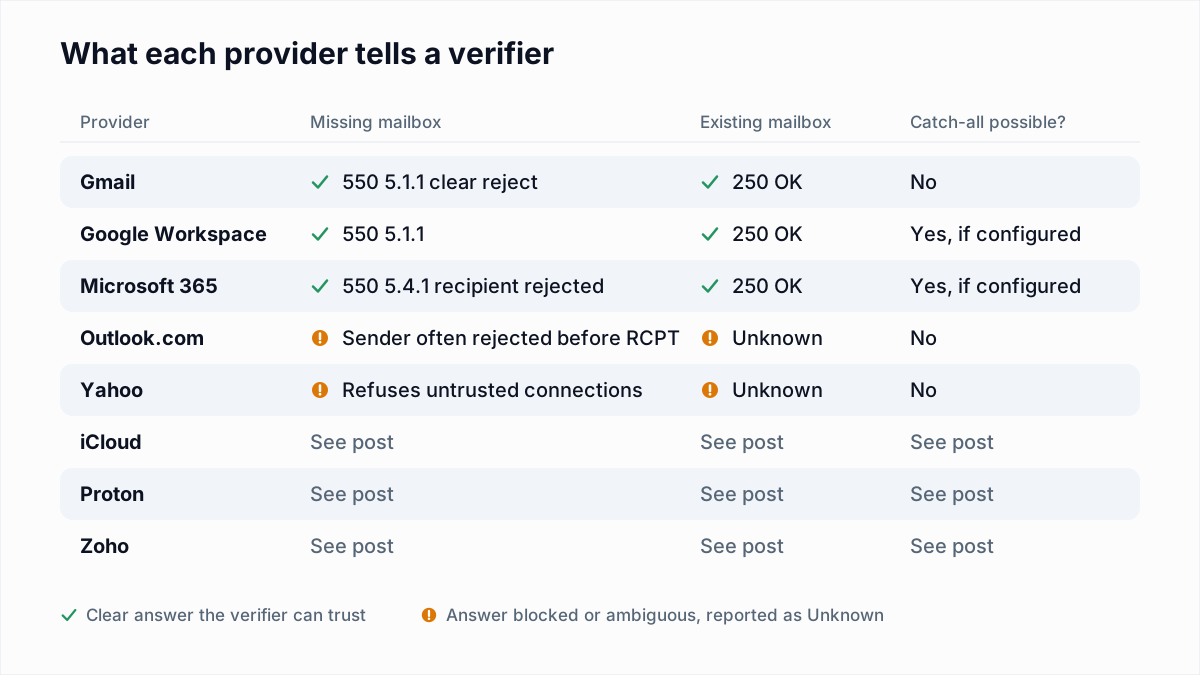
The same applies to email verification. A verifier talks to mail servers from its own IP, and if that IP fails FCrDNS, Yahoo refuses the check the same way. That is what happened in our own test: every Yahoo and AOL address came back with 5.7.25, real or not. An honest verifier reports those as Unknown rather than guessing.
550 5.7.25 fix checklist
| If you see | It means | Do this |
|---|---|---|
host on your IP returns NXDOMAIN | No PTR record | Create an A record for a mail hostname, then ask the IP owner to set the PTR |
| PTR returns a generic provider name | Default PTR, not yours | Replace it with your own hostname at the provider |
| PTR name resolves to a different IP | Forward confirmation fails | Point the A record at the sending IP, or change the PTR |
| PTR name has no A record | Forward confirmation fails | Add the A (and AAAA for IPv6) record at your DNS host |
| IPv4 passes, Gmail still mentions IPv6 | Mail leaves over IPv6 with no PTR | Set an IPv6 PTR, or send over IPv4 only |
| DNS passes, rejections continue | EHLO name or another check | Set EHLO to the PTR name; then check SPF, DKIM, DMARC and block lists |
Reverse DNS is one item on a longer list of sender requirements. Once it passes, check your authentication with the free SPF checker and DMARC checker, and read how SPF, DKIM and DMARC work together.
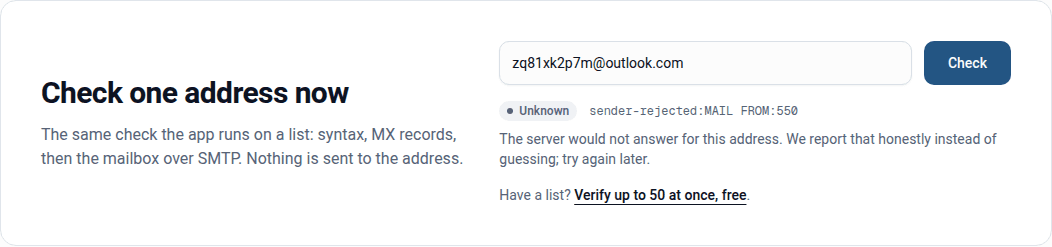
When you are sure the server is not the problem, the remaining bounces are about the addresses themselves. The free email verifier checks a single address for syntax, MX records and the mailbox over SMTP without sending anything, and reports a refusal like 5.7.25 as Unknown instead of calling a good address bad.
Frequently asked questions
Related reading
Ready to clean your email list?
Upload a CSV or XLSX and get every address marked deliverable, risky, undeliverable or unknown, with the reason. Free for lists of up to 50, no card. Nothing is sent to your contacts.