SMTP Ports Explained: 25 vs 465 vs 587 vs 2525
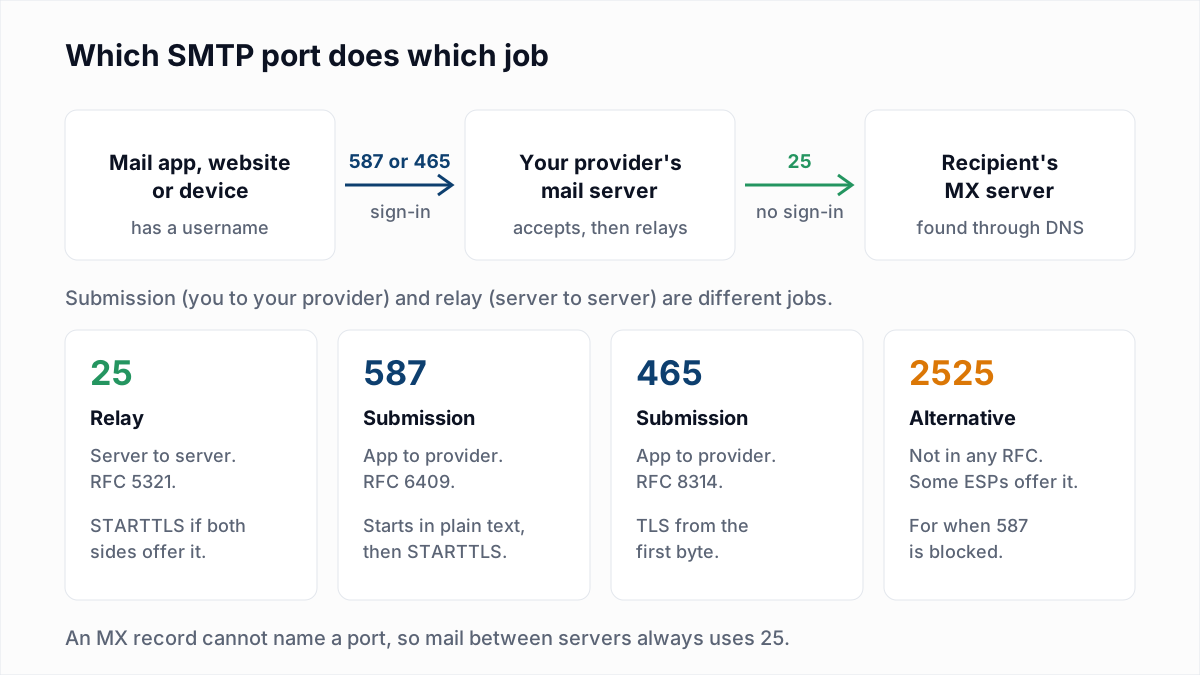
An SMTP port is the TCP port number a mail client or mail server connects to in order to hand over email. The number is not cosmetic. It tells the server which of two jobs you want: submission, where a signed-in app gives a message to its own provider, or relay, where one mail server delivers to another. Most port problems come from using the port for one job to do the other. For the protocol itself, see what SMTP is.
Which SMTP port should you use?
Use port 587 with STARTTLS, or port 465 with implicit TLS, to send mail from an app, website or device through your email provider. Port 25 is for mail servers delivering to other mail servers. Port 2525 is a fallback some sending services offer.
| Port | Job | Encryption | Sign-in | Use it when |
|---|---|---|---|---|
| 25 | Relay between mail servers (RFC 5321) | STARTTLS if both servers offer it | None | You run a mail server that delivers to recipients' MX hosts. |
| 587 | Message submission (RFC 6409) | STARTTLS, after a plain-text start | Required | An app or device sends through your provider. The safe default. |
| 465 | Message submission over implicit TLS (RFC 8314) | TLS from the first byte | Required | Your provider offers it and your software calls it SSL or SSL/TLS. |
| 2525 | Unofficial alternative to 587 | STARTTLS, where the service supports it | Required | Your network blocks 587 and your sending service lists 2525. |
What is SMTP port 25 used for?
SMTP port 25 is used for relay: one mail server delivering a message to the mail server named in the recipient domain's MX record. RFC 5321 calls it "the SMTP port (specified by IANA as port 25)".
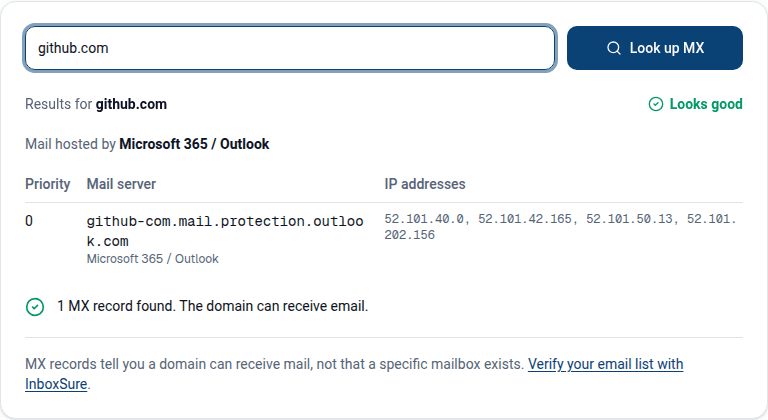
Relay cannot move to another port. RFC 8314 puts it bluntly: "the SMTP transport MX infrastructure has no way to specify a port, so port 25 is always used." An MX record names a host and a priority, nothing else.
No sign-in happens on port 25. The receiving server judges the connecting IP address, its reverse DNS and SPF, DKIM and DMARC instead. Encryption is opportunistic: RFC 3207 says a public mail server on port 25 "MUST NOT require use of the STARTTLS extension in order to deliver mail locally". Closing that gap is the job of MTA-STS.
What is SMTP port 587 used for?
SMTP port 587 is used for message submission: a mail app, website or device handing a new message to its own provider after signing in. RFC 6409 says "Port 587 is reserved for email message submission".
The difference from port 25 is the sign-in. RFC 6409 requires that the submission server "MUST, by default, issue an error response to the MAIL command if the session has not been authenticated". A wrong password here produces SMTP error 535; no sign-in at all produces 530 Authentication required or Relay access denied. Other reply codes are in the guide to email bounce codes.
Splitting the jobs lets a provider apply different rules to each. Its own users must prove who they are on 587, while port 25 stays open to the world but only for mail addressed to its own domains.
Is port 465 or port 587 better?
Port 465 and port 587 are equally secure when the client is set to require TLS, so use whichever your provider documents. The current standard prefers 465, while noting that STARTTLS on 587 is "relatively widely deployed".
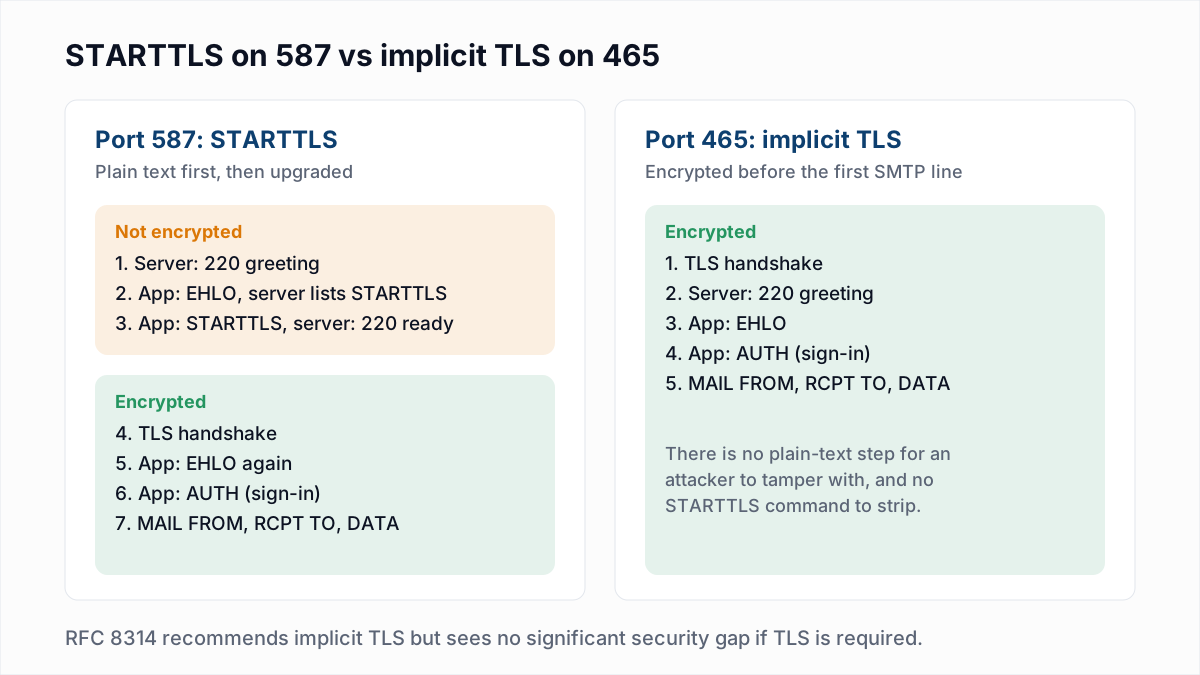
RFC 8314, published in January 2018, recommends that connections to submission servers "be made using 'Implicit TLS' ... in preference to connecting to the 'cleartext' port and negotiating TLS using the STARTTLS command". The same document adds that "there is no significant difference between the security properties of STARTTLS on port 587 and Implicit TLS on port 465 if the implementations are correct and if both the client and the server are configured to require successful negotiation of TLS", and that clients and servers "SHOULD implement both".
STARTTLS vs implicit TLS
With STARTTLS the session opens in plain text, the client sends the STARTTLS command, and the connection is upgraded. With implicit TLS the TLS handshake comes first and every SMTP line is encrypted. Mail software often labels implicit TLS "SSL" or "SSL/TLS" and STARTTLS "TLS".
Port 465 has an odd history. RFC 8314 records that it "was briefly registered as the 'smtps' port", the registration was revoked, and mail software kept using it anyway, so the RFC registered it again for submission. Not every provider followed: Microsoft's documentation says a device that defaults to port 465 does not support what Microsoft 365 client submission requires.
What is SMTP port 2525?
SMTP port 2525 is an unofficial submission port that some email sending services open as an alternative to 587. RFC 5321, RFC 6409 and RFC 8314 do not mention it, and smtp.gmail.com did not answer on it when we tested on 13 November 2026.
Twilio SendGrid's SMTP documentation says: "For an unencrypted or a TLS connection, use port 25, 2525, or 587." Postmark's SMTP guide lists "Ports - 25, 2525, or 587" and explains that a port can "be blocked by a specific ISP". It works only where the service says it does.
Why is port 25 blocked by ISPs and cloud hosts?
Port 25 is blocked outbound by many ISPs and cloud hosts because it needs no sign-in, so any infected or abusive machine can use it to send spam directly to recipients' mail servers. The three large clouds document their blocks:
- AWS. The EC2 user guide says: "Traffic over port 25 is blocked to public IPv4 addresses and IPv6 addresses." You can request removal.
- Google Cloud. The Compute Engine documentation says that "Due to the risk of abuse, connections to destination TCP Port 25 are blocked when the destination is external to your VPC network", and that it places no restrictions on ports 587 or 465.
- Azure. Microsoft's outbound SMTP article says port 25 is not blocked on standard Enterprise Agreement and MCA-E subscriptions, and for other types: "The Azure platform blocks outbound SMTP connections on TCP port 25 for deployed VMs."
Google Cloud and Azure recommend the same route: send through an authenticated relay service on port 587 or 465. That is the normal setup for application mail anyway, as explained in email sending limits.
What are the SMTP settings for Gmail, Outlook, Yahoo, iCloud and Zoho?
These are the outgoing server settings each provider publishes on its own help page, read on 13 November 2026. All require a sign-in, and most require an app password or OAuth, not the normal account password.
| Provider | SMTP host | Port and encryption |
|---|---|---|
| Gmail | smtp.gmail.com | 465 with implicit SSL/TLS, or 587 with STARTTLS |
| Outlook.com | smtp-mail.outlook.com | 587 with STARTTLS; OAuth2 sign-in required |
| Microsoft 365 | smtp.office365.com | 587 (recommended) or 25, with STARTTLS; 465 is not supported |
| Yahoo Mail | smtp.mail.yahoo.com | 465 or 587, SSL required; app password |
| iCloud Mail | smtp.mail.me.com | 587, SSL required (Apple says to try TLS or STARTTLS if SSL errors); app-specific password |
| Zoho Mail | smtp.zoho.com (personal and free), smtppro.zoho.com (paid organisations) | 465 with SSL, or 587 with TLS; hosts vary by data centre |
How do you test whether an SMTP port is open?
Test an SMTP port by opening a connection from the machine that will send the mail and reading the first line back. A working SMTP port answers with a line starting 220. The replies below are what we received from Gmail on 13 November 2026, with IP addresses and session IDs trimmed.
- Check that the port is reachable.
A timeout means a firewall, ISP or host is dropping the traffic. "Connection refused" means nothing is listening on that port.nc -vz smtp.gmail.com 587 Connection to smtp.gmail.com 587 port [tcp/submission] succeeded! - Test 587 with STARTTLS.
After the certificate lines, typeopenssl s_client -connect smtp.gmail.com:587 -starttls smtp -crlf -quietEHLO test.example.com. A good answer lists the server's features, including the sign-in methods:250-smtp.gmail.com at your service 250-AUTH LOGIN PLAIN XOAUTH2 PLAIN-CLIENTTOKEN OAUTHBEARER XOAUTH 250-ENHANCEDSTATUSCODES - Test 465 with implicit TLS. Drop the
-starttlsflag. The greeting arrives straight after the handshake:openssl s_client -connect smtp.gmail.com:465 -crlf -quiet 220 smtp.gmail.com ESMTP ... - gsmtp - Test outbound port 25 against a real MX host, since that is where relay goes:
nc -v gmail-smtp-in.l.google.com 25 220 mx.google.com ESMTP ... - gsmtp - Type
QUITto close each session.
If step 3's command is pointed at 587 by mistake, OpenSSL fails with wrong version number: the server spoke plain text while the client expected TLS. That is what a wrong encryption setting looks like.
Why does email verification need port 25?
Email verification needs port 25 because it asks the recipient's own mail server whether a mailbox exists, and that server is only reachable through its MX record, which means port 25. Ports 587 and 465 lead to your provider, not the recipient's.
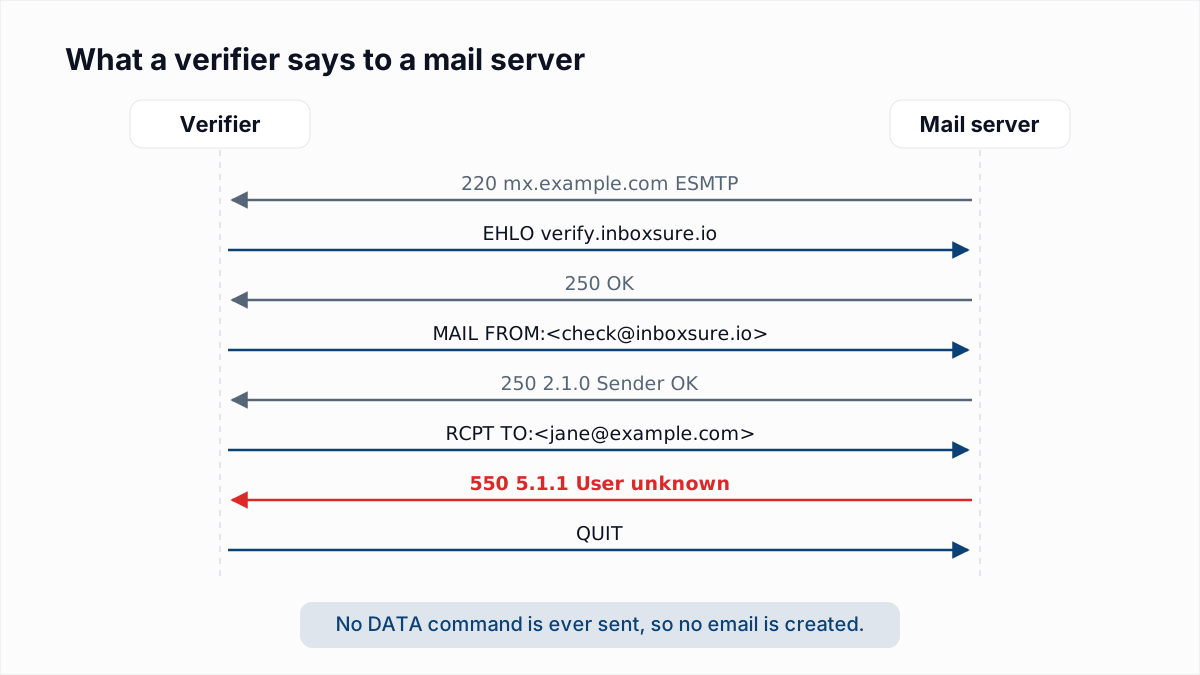
The steps are in how email verification works without sending an email. The consequence is practical: a script on a laptop, a home connection or a default cloud instance often cannot verify addresses, because outbound port 25 is blocked there.
An honest note on limits. An open port 25 is necessary, not sufficient. Receiving servers judge whoever connects, and in InboxSure's research on 4 November 2026 Yahoo and AOL refused our check with 550 5.7.25 Forward-confirmed reverse DNS failed and Outlook.com refused it at MAIL FROM. InboxSure reports those addresses as Unknown, never as Undeliverable. See how Gmail, Outlook and Yahoo respond to verification.
InboxSure runs the port 25 conversation for you, so nothing needs opening on your side. Upload a list and each address comes back Deliverable, Risky, Undeliverable or Unknown with the reason. The Free plan covers lists up to 50 addresses with no card. Start with the bulk email verifier.
Frequently asked questions
Related reading
Ready to clean your email list?
Upload a CSV or XLSX and get every address marked deliverable, risky, undeliverable or unknown, with the reason. Free for lists of up to 50, no card. Nothing is sent to your contacts.