SMTP Error 535: Authentication Failed (5.7.8, 5.7.3, 5.7.139)
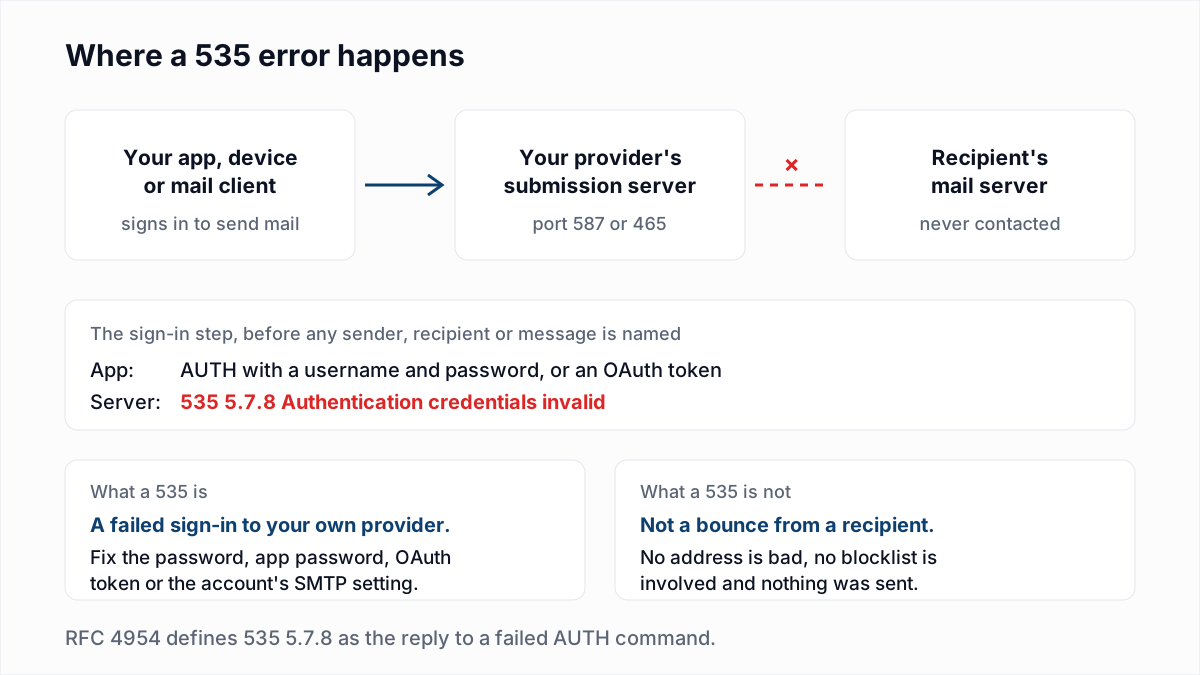
A 535 is not a bounce. No recipient refused anything, no address on your list is bad, and no blocklist is involved. SMTP error 535 is the reply a mail server gives when an app, device or mail client tries to sign in to send mail and the server does not accept the credentials. The server is your own provider's, and the conversation ended before a sender, a recipient or a message was named.
That makes the fix a settings job on your side: the password, the kind of password, the sign-in method, or a switch on the account. Which one depends on the words after the code.
What does SMTP error 535 mean?
SMTP error 535 means the server rejected the AUTH command because the username, password or token was invalid or not sufficient for that account. It is a permanent reply, so retrying with the same credentials fails again.
The definition is in RFC 4954, the SMTP authentication standard, which lists it as 535 5.7.8 Authentication credentials invalid: "This response to the AUTH command indicates that the authentication failed due to invalid or insufficient authentication credentials." The word "insufficient" matters. A correct password still earns a 535 if the provider no longer accepts passwords from that app.
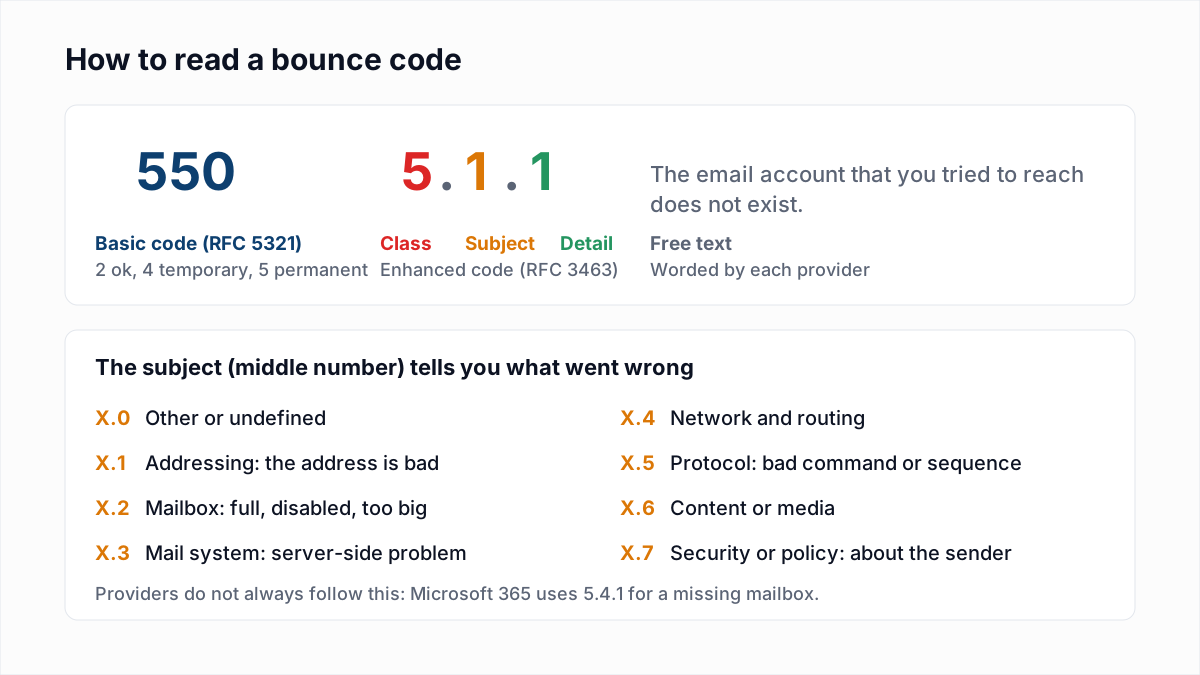
In the enhanced code, 5 is permanent, 7 is security or policy and 8 is the detail. The full scheme is in our guide to email bounce codes.
Which 535 error did you get?
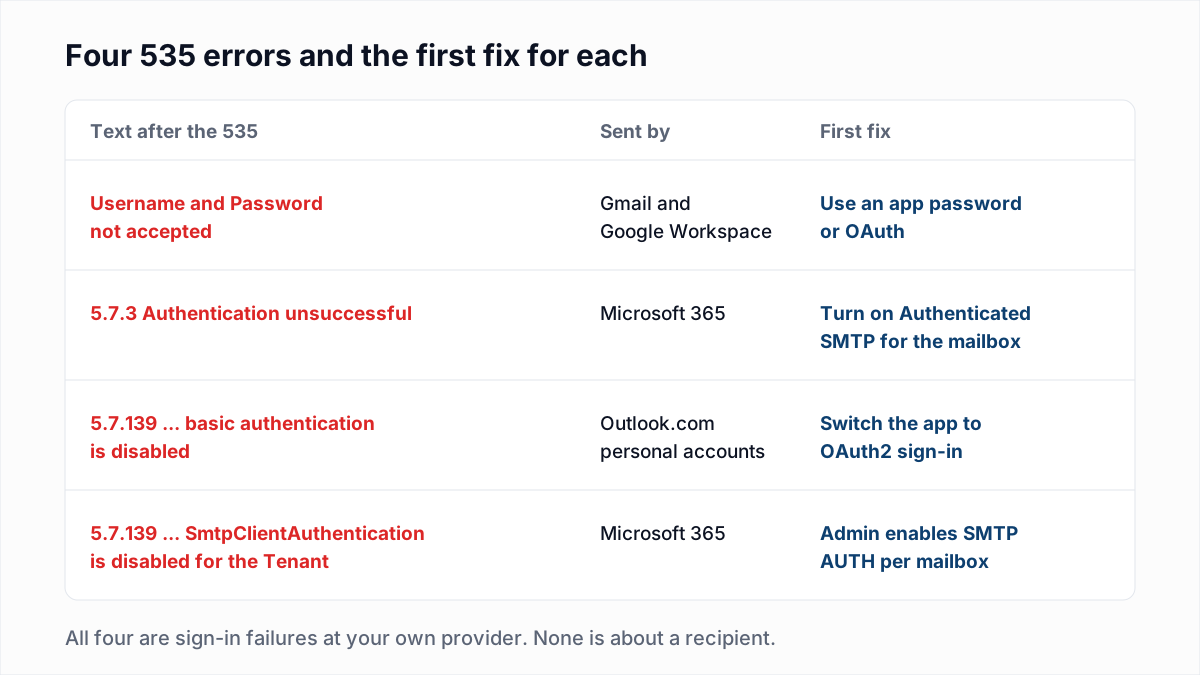
The wording after 535 identifies the provider and the cause. The Microsoft 5.7.139 wordings marked "user report" are quoted from threads on Microsoft's Q&A site, because Microsoft's reference article does not list them.
| Wording | Cause | Fix |
|---|---|---|
535 Username and Password not accepted (Gmail, Google Workspace) | The account password was used, or the app password is wrong or revoked. | Create a new app password, or sign in with OAuth. |
534 Application-specific password required (Gmail) | 2-Step Verification is on and the app sent the normal password. | Create an app password and use it in the app. |
535 5.7.3 Authentication unsuccessful (Microsoft 365) | SMTP AUTH is off for the mailbox, a security policy blocks password sign-in, or the password is wrong. | Enable Authenticated SMTP on the mailbox, then check Security Defaults. |
535 5.7.139 Authentication unsuccessful, basic authentication is disabled. (Outlook.com, user report) | The account no longer accepts a username and password over SMTP. | Use an app that signs in with OAuth2. |
535 5.7.139 Authentication unsuccessful, SmtpClientAuthentication is disabled for the Tenant (Microsoft 365, user report) | SMTP AUTH is switched off for the whole organisation. | An admin enables it for the one mailbox that needs it. |
535 5.7.139 Authentication unsuccessful, federated STS service was unreachable. (Microsoft 365) | Microsoft could not reach the organisation's own federation server. | Fix the on-premises federation server and confirm it supports TLS 1.2. |
530 5.7.0 Authentication required | The app did not try to sign in at all. | Turn on SMTP authentication in the app and enter credentials. |
How do you fix Gmail's 535 "Username and Password not accepted"?
Gmail's 535 "Username and Password not accepted" is fixed by replacing the normal account password with a 16-character app password, or by switching the app to OAuth. Gmail stopped accepting the normal password from third-party apps.
Google's page Transition from less secure apps to OAuth gives 14 March 2025 as the date when "Access to less secure apps will be turned off for all Google Accounts", and says "CalDAV, CardDAV, IMAP, SMTP, and POP will no longer work with legacy passwords (basic authentication)". App passwords are the stated exception.
- Turn on 2-Step Verification. Google's Sign in with app passwords page says app passwords "can only be used with accounts that have 2-Step Verification turned on".
- Create an app password from the link on that page and paste it into the app's password field. The username is the full email address.
- If the option is missing, the same page lists why: 2-Step Verification is set up only for security keys, the account belongs to a work or school organisation, or it has Advanced Protection. For a Workspace account, ask the admin.
- Check host, port and encryption. Use
smtp.gmail.comon 587 with STARTTLS or 465 with SSL/TLS. See SMTP ports explained. - If it worked and then stopped, create a new app password. Google says it revokes app passwords "when you change your Google Account password".
- For software you control, move to OAuth. Google's developer documentation says its mail servers "support authentication and authorization using OAuth 2.0".
One honest note on the number. Google's SMTP errors and codes page, as read on 13 November 2026, prints this row as 535 with status code 5.7.80, and an example in Google's XOAUTH2 developer page shows 535-5.7.1 Username and Password not accepted. The form senders usually paste from live logs is 535-5.7.8, which matches RFC 4954. We did not capture a live reply ourselves, so match on the words, not the digits.
How do you fix 535 5.7.3 Authentication unsuccessful in Microsoft 365?
535 5.7.3 Authentication unsuccessful is fixed in most cases by enabling SMTP AUTH on the specific mailbox and making sure no security policy blocks password sign-in. Microsoft says SMTP AUTH is disabled by default for organisations created after January 2020.
These steps follow Microsoft's troubleshooting article and its SMTP AUTH article.
- Test the password in a browser. Sign in to Outlook on the web as that mailbox and send a message, which also shows whether the account is blocked.
- Enable SMTP AUTH on the mailbox. In the Microsoft 365 admin center go to Users, Active users, select the user, Mail, Manage email apps, and tick Authenticated SMTP. Or in PowerShell:
The mailbox setting overrides the organisation-wide one.Set-CASMailbox -Identity sean@contoso.com -SmtpClientAuthenticationDisabled $false - Check Security Defaults. Microsoft states: "If security defaults is enabled in your organization, SMTP AUTH is already disabled in Exchange Online." Security Defaults block legacy authentication, which Microsoft defines to include any client using IMAP, SMTP or POP3.
- Check Conditional Access and MFA. A policy that blocks legacy authentication, or multifactor authentication on the mailbox, stops password sign-in over SMTP. Microsoft's article has you exclude the mailbox from the policy and disable MFA on it.
- Check the connection settings. Microsoft specifies
smtp.office365.com, port 587 (or 25), STARTTLS with TLS 1.2 or 1.3, and says a device that defaults to port 465 does not support the TLS that client submission requires. - Send as the signed-in mailbox. A different From address needs Send As permission, or the result is
5.7.60, not 535.
Steps 3 and 4 weaken account security. The better fix is OAuth: Microsoft's OAuth guide for SMTP uses the scope https://outlook.office.com/SMTP.Send. SMTP AUTH must still be enabled on the mailbox.
What does 535 5.7.139 "basic authentication is disabled" mean?
535 5.7.139 "basic authentication is disabled" means the Microsoft account refuses a username and password over SMTP and expects OAuth2 instead. Microsoft's settings page for personal accounts says "Outlook.com requires the use of Modern Auth / OAuth2".
For Outlook.com, Hotmail and Live addresses the only fix is an app that supports OAuth2, on smtp-mail.outlook.com port 587. That settings page also says an app password may be needed for some devices. We did not test whether one is accepted over SMTP, so try it before relying on it.
For Microsoft 365, password sign-in over SMTP still works as of 13 November 2026 where an admin allows it, but the end is scheduled. Microsoft's Exchange Team timeline post of 27 January 2026 sets out:
- Until December 2026: behaviour "remains unchanged".
- End of December 2026: Basic authentication for SMTP AUTH is disabled by default for existing tenants. Admins can turn it back on.
- New tenants created after December 2026: unavailable by default.
- Second half of 2027: Microsoft announces the final removal date.
An earlier Microsoft post said rejected submissions would receive 550 5.7.30 Basic authentication is not supported for Client Submission. A device that only knows a username and password needs a new route before then.
Is 535 the same as "Relay access denied"?
No, 535 and "Relay access denied" are different failures. A 535 means the app tried to sign in and was refused. Relay access denied means it never signed in and then asked the server to pass mail to another domain.
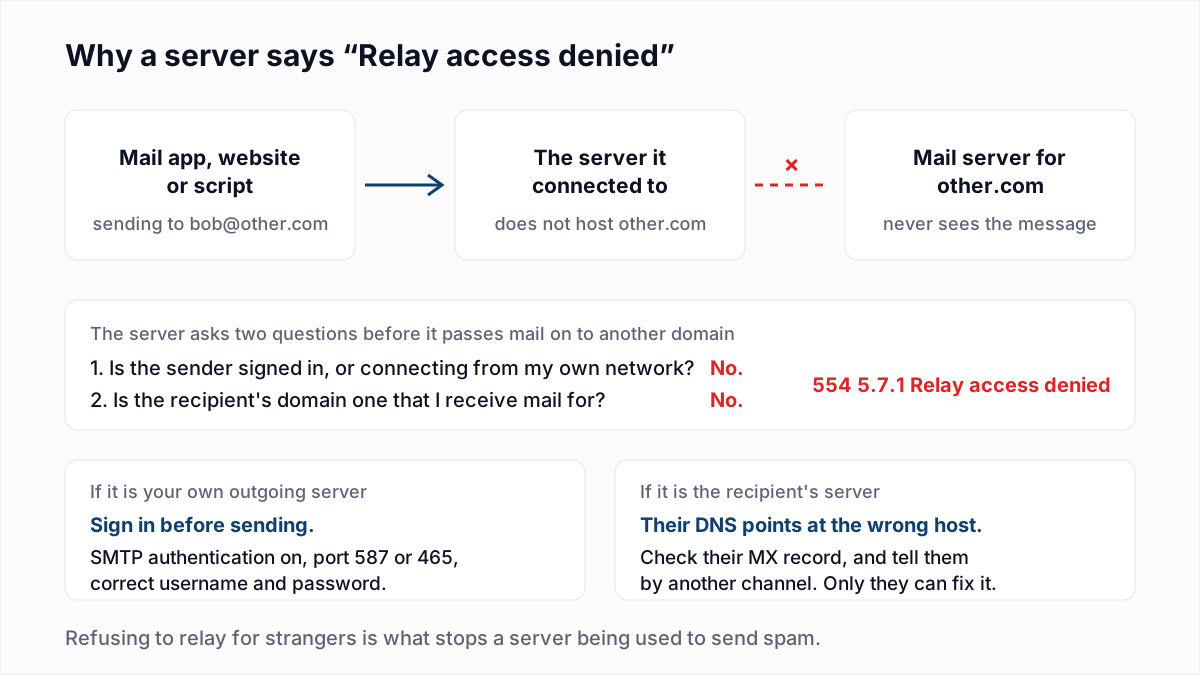
The relay case is covered in 554 5.7.1 and Relay access denied.
What can you use if the device cannot do OAuth or app passwords?
A device that cannot do OAuth or app passwords can send through a relay that identifies it by IP address or certificate, or through a separate sending service with its own credentials.
- Google Workspace SMTP relay. Google's printer, scanner or app guide recommends
smtp-relay.gmail.comon port 25, 465 or 587, which "authenticates messages with IP addresses". - Microsoft 365 SMTP relay. Microsoft's device and application guide describes an inbound connector that identifies the device by TLS certificate or static IP on port 25, with no mailbox. It also points to High Volume Email for internal recipients and Azure Communication Services Email for external ones.
- An email service provider. Its API key is the SMTP password, and your mailbox's sign-in rules stop mattering. See when to move from a mailbox to an ESP.
Does a 535 error hurt deliverability?
No, a 535 error does not hurt deliverability, because nothing was sent and no receiving provider saw a message. Leave your list alone: do not suppress or remove any address because of a 535.
Real bounces start once sign-in works and mail flows, and they are about addresses. InboxSure checks a list before you send (syntax, DNS and MX, and an SMTP mailbox check that sends nothing) and marks each address Deliverable, Risky, Undeliverable or Unknown. It cannot fix or detect a sign-in problem, and Yahoo, AOL and Outlook.com consumer addresses come back Unknown today. Check one address with the free email verifier.
Frequently asked questions
Related reading
Ready to clean your email list?
Upload a CSV or XLSX and get every address marked deliverable, risky, undeliverable or unknown, with the reason. Free for lists of up to 50, no card. Nothing is sent to your contacts.