Email Sending Limits for Gmail, Outlook, Yahoo and More (2026)
A free Gmail account can send 500 emails a day. A paid Google Workspace mailbox can send 2,000 messages a day to at most 10,000 recipients. A Microsoft 365 mailbox can reach 10,000 recipients a day at no more than 30 messages a minute. iCloud Mail allows 1,000 messages a day. Yahoo and Zoho do not publish a number at all. Every figure in this guide was read from the provider's own help page on 12 November 2026, and each one is linked so you can check it, because these limits change without notice.
Email sending limits by provider
"Not published" means the provider's help page gives no number. It does not mean there is no limit.
| Provider | Messages per day | Recipients per message | Recipients per day |
|---|---|---|---|
| Gmail (free) | 500 | 500 | Not published separately |
| Google Workspace | 2,000 (500 on a trial account) | 2,000, of which at most 500 external. 100 when sending through SMTP or IMAP clients | 10,000 total, 3,000 external, 3,000 unique (2,000 unique external) |
| Outlook.com (Microsoft 365 subscriber) | Not published | 500 | 5,000, of which 1,000 can be people you have never emailed before |
| Outlook.com (free) | Not published | Not published | Not published. Microsoft says only that limits "will be lower for non-subscribers" |
| Microsoft 365 (Exchange Online) | No daily count. 30 messages per minute | Up to 1,000 (admin can lower it) | 10,000 per mailbox, plus a tenant-wide cap on external recipients |
| Yahoo Mail | Not published | Not published | Not published |
| Zoho Mail | Not published ("dynamic", based on reputation) | Not published ("dynamic") | Not published |
| iCloud Mail | 1,000 | 500 | 1,000 |
| Proton Mail | Free plan: 150, and 50 per hour. Paid plans: not published | 100 | Not published |
Some notes on the rows that need them.
- Google Workspace. Mail merge has its own lower cap of 1,500 messages and 1,500 recipients a day. Google says paid limits only apply in full once the domain has paid at least 100 US dollars in total, which can take up to 75 days, and that "sending limits can change without notice".
- Outlook.com. Microsoft says a new account starts with a low quota, which it calls "a temporary restriction" that rises once the account has established credibility. It gives no figure for that starting quota.
- Yahoo. The help page says it plainly: "In order to better enforce anti-spam policies, Yahoo does not disclose the number of recipients or emails that can be sent at one time." Any Yahoo number you see quoted elsewhere is somebody's estimate.
- Zoho. "The number of emails you can send is dynamic. It is determined based on each user's reputation." Zoho says this stays true on a paid subscription.
The four kinds of sending limit
Most confusion about limits comes from mixing up what is being counted. Providers count up to four different things, and you can be well under one while hitting another.
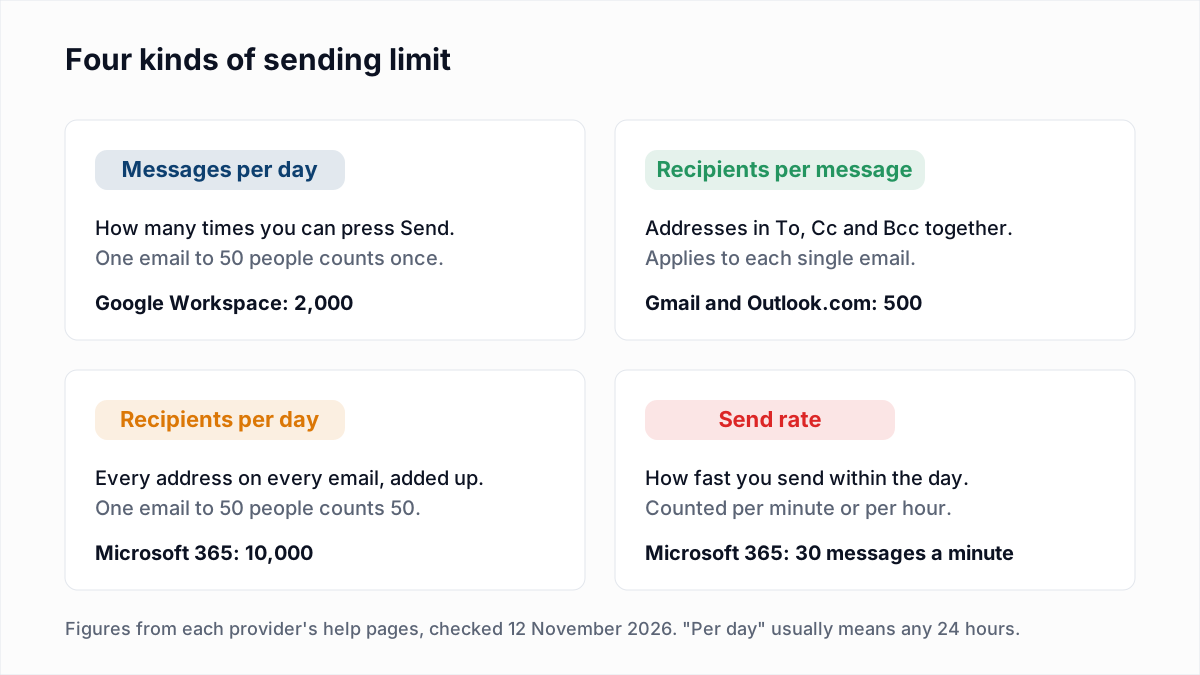
The one people hit most is recipients per message, by pasting a whole list into Bcc. Google also counts recipients per day twice: total recipients, where the same person counts every time, and unique recipients, where they count once. The errors a recipients-per-message limit produces are in too many recipients (550 5.5.3 and 452 4.5.3).
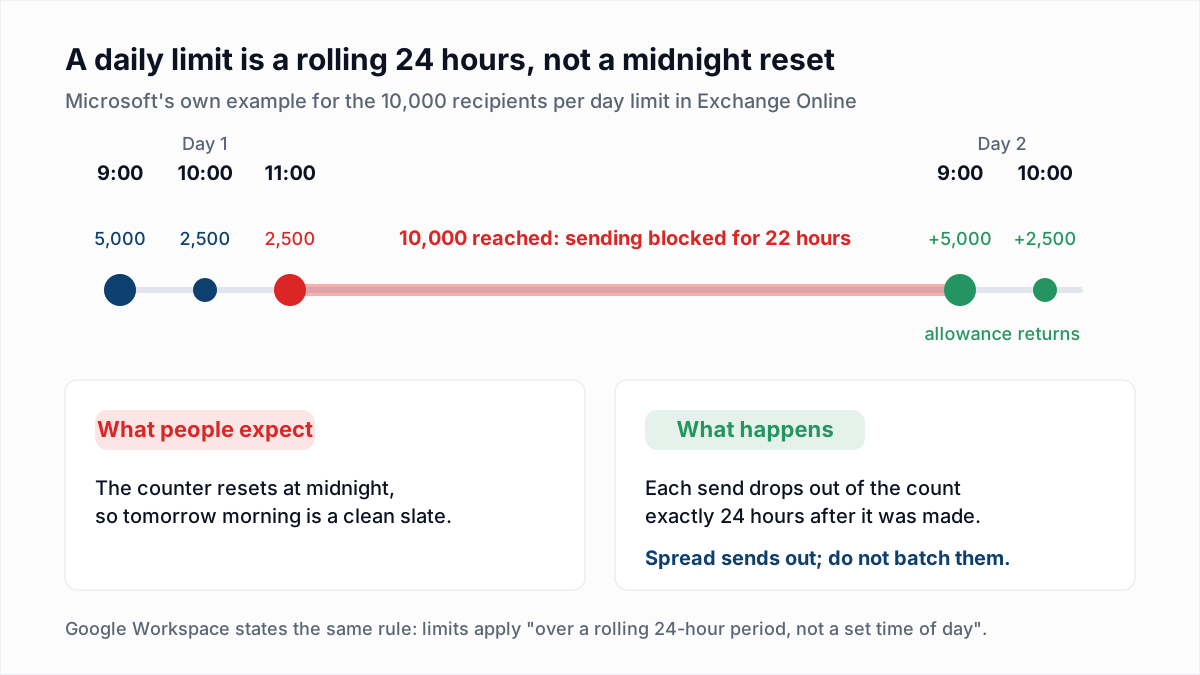
"Per day" means a rolling 24 hours
Google is explicit: "Limits per day are applied over a rolling 24-hour period, not a set time of day." Microsoft works the same way and gives an example in its documentation. A user sends to 5,000 recipients at 9:00, 2,500 at 10:00 and 2,500 at 11:00. That is 10,000, so the mailbox is blocked, and it "won't be able to send messages again until 09:00 AM the next day", when the first batch drops out of the window.
What happens when you hit a sending limit
The message is refused, you get an error, and you wait. Incoming mail keeps working. These are the errors the providers document.
| Provider | What you see | How long it lasts |
|---|---|---|
| Gmail (free) | "You have reached a limit for sending mail" | Google says you can usually send again within 1 to 24 hours |
| Google Workspace | "You have reached a limit for sending email", or over SMTP 550 5.4.5 Daily user sending limit exceeded. Too many addresses on one email gives 452 4.5.3 Your message has too many recipients | "Up to 24 hours", after which the limits reset |
| Microsoft 365 | 5.1.90 Your message can't be sent because you've reached your daily limit for message recipients, or 5.2.2 Submission quota exceeded | Until your count for the past 24 hours falls back under the limit |
| iCloud Mail | "Cannot send message. You have exceeded the total number of messages you can send each day." | Not stated |
| Yahoo Mail | A notification that a limit has been met | Not fixed. Yahoo says most notifications "inform you of how long you'll have to wait" |
| Zoho Mail | A banner in the mailbox explaining the block | "In most cases, the block is lifted automatically within a few hours" |
| Proton Mail | A sending-limit message | One hour for the hourly limit; up to 48 hours if the account is flagged for abuse |
The Google codes are from Google's SMTP error reference and the Microsoft ones from the Exchange Online NDR reference. Two details are worth knowing. Google warns that a user who exceeds limits "might be suspended", which is worse than a 24-hour pause. And Microsoft's advice for both of its codes is to check whether the account has been compromised, because a mailbox that suddenly sends to 10,000 people usually has been. Microsoft's use of 5.2.2 here is unusual: on most servers that code means the recipient's mailbox is full, which we cover in 552 5.2.2 mailbox full. For other codes, see the email bounce codes reference.
Microsoft 365: the tenant-wide external limit
Microsoft 365 has a second limit on top of the per-mailbox one, and it is the part most often reported wrongly. The Tenant External Recipient Rate Limit (TERRL) caps how many external recipients your whole organisation can email in a rolling 24 hours. Microsoft's announcement gives the formula as 500 x (number of non-trial email licences ^ 0.7) + 9,500, which works out to 10,000 for one licence, 12,006 for 10 and 22,059 for 100. It states that TERRL is "fully implemented for tenants in WW environment" and postponed for the GCC, GCC High, DoD and 21Vianet clouds. Going over returns 550 5.7.233 (5.7.232 on a trial tenant). Admins can see their own figure in the Exchange admin center under Reports, Mail flow.
Three related points, as Microsoft documents them today:
- Trial tenants. Microsoft's two pages disagree. The announcement says trial tenants are limited to 500 external recipients a day; the service description page says 5,000. Check the report in your own admin center.
- onmicrosoft.com addresses. Mail sent from a default onmicrosoft.com domain is limited to 100 external recipients per organisation per 24 hours, with error
550 5.7.236. - The 2,000 per-mailbox external limit never happened. Microsoft announced a 2,000 external recipients per mailbox limit in 2024, and many guides still list it. The original post now carries a notice that it "has now been CANCELLED and will not go into effect".
Mailbox limits are not the bulk-sender rules
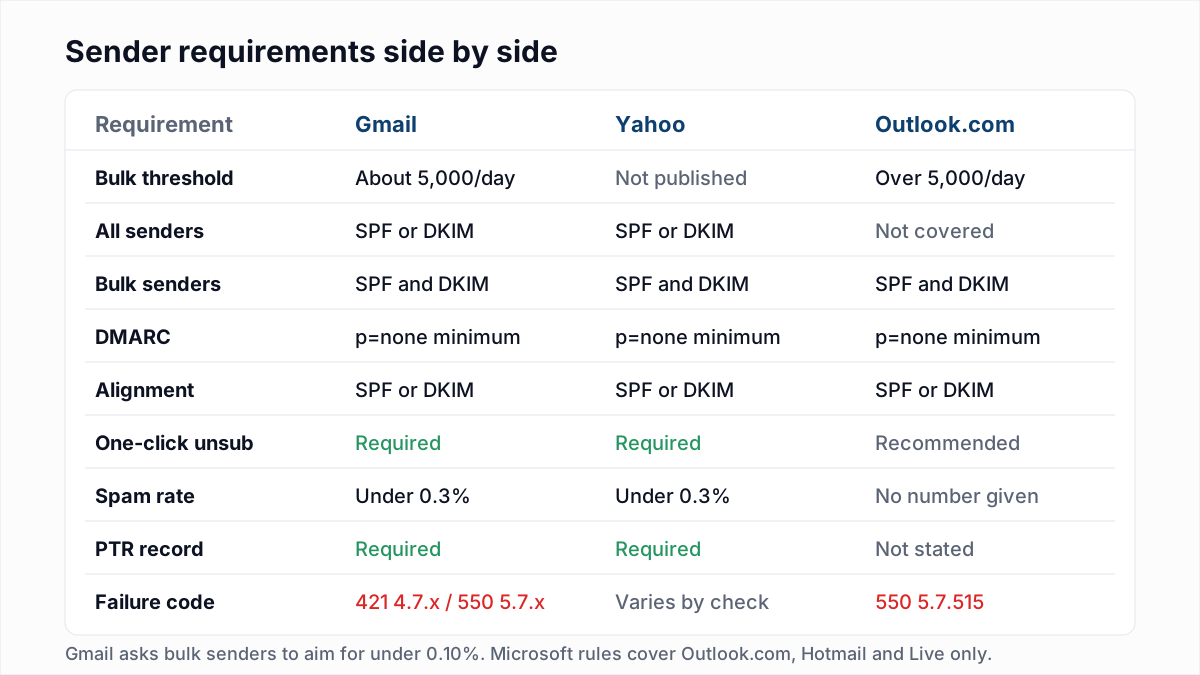
Everything above is about how much you may send from a mailbox. The bulk-sender rules that Gmail, Yahoo and Outlook.com introduced are about what you must do when you send to their users in volume: authenticate with SPF, DKIM and DMARC, offer one-click unsubscribe and keep complaints low. The two are easy to confuse because both involve a number around 5,000 a day, but one is a ceiling on your account and the other is a threshold that triggers extra requirements at the receiving end. You can be far under your Google Workspace limit and still be refused by Gmail for failing authentication. The details are in Gmail, Yahoo and Outlook sender requirements.
Why bounces make your limits tighter
Published limits are a ceiling, not a promise. Several providers say outright that the real figure depends on how your mail behaves, and bounces are on the list.
- Zoho names the number of bounces among the factors behind its dynamic limit, and lists a high volume of bounces as a trigger for an automatic block on outgoing mail.
- Proton says an account that sends spammy or undeliverable email can be stopped from sending for up to 48 hours.
Google and Microsoft do not publish a bounce threshold for mailbox limits, so we will not invent one. The direction is the same everywhere, though: a mailbox that sends to many addresses that do not exist looks like a compromised account or a bought list, and it getsthrottled sooner. That is the practical case for checking a list before you send it. A verifier asks each mail server whether the mailbox exists, without sending anything, so the dead addresses come out before they can bounce. InboxSure's bulk email verifier marks those as Undeliverable and gives you a CSV to filter on. It cannot raise a provider's limit; it only stops you spending your allowance on addresses that were never going to receive the message.
When to move from a mailbox to an ESP or SMTP relay
Mailboxes are built for a person writing to people. The providers say so themselves:
- Apple: "iCloud Mail service is designed primarily for personal use."
- Proton: "Proton Mail is not designed for bulk mailing."
- Yahoo: if you plan to send bulk email regularly, consider "a third-party bulk email option".
- Microsoft: "Exchange Online isn't suited to accommodate bulk-mailing scenarios", and it points organisations that need more external volume to Azure Communication Services.
Move to an email service provider (ESP) or an SMTP relay when any of these is true:
- You send one message to a list. Newsletters, announcements and promotions need unsubscribe handling, bounce processing and complaint feedback, which an ESP does for you and a mailbox does not. See how to send bulk email without landing in spam.
- Software sends the mail. Receipts, password resets and notifications belong on a transactional service, not on a person's mailbox whose daily limit a busy day can exhaust. See transactional vs marketing email.
- You are regularly above a few hundred recipients a day. At that point one bad day locks a real person out of their email for 24 hours.
An ESP has limits too, set by your plan and your reputation, and it will suspend an account with a high bounce rate. The list hygiene does not go away; only the ceiling moves.
Cold outreach: practical volumes per inbox
This section is guidance from common practice, not a provider rule. No provider publishes a "safe" number for cold email, and the technical caps in the table above are not targets. A Google Workspace mailbox may send 2,000 messages a day, but 2,000 cold emails from one mailbox will damage its reputation long before the limit is reached.
- New mailbox: start with a handful of messages a day to people who will reply, and ramp over four to eight weeks.
- Warmed-up mailbox: most experienced senders stay under about 50 new contacts per mailbox per day, spread across working hours.
- To send more: add mailboxes and domains instead of pushing one harder.
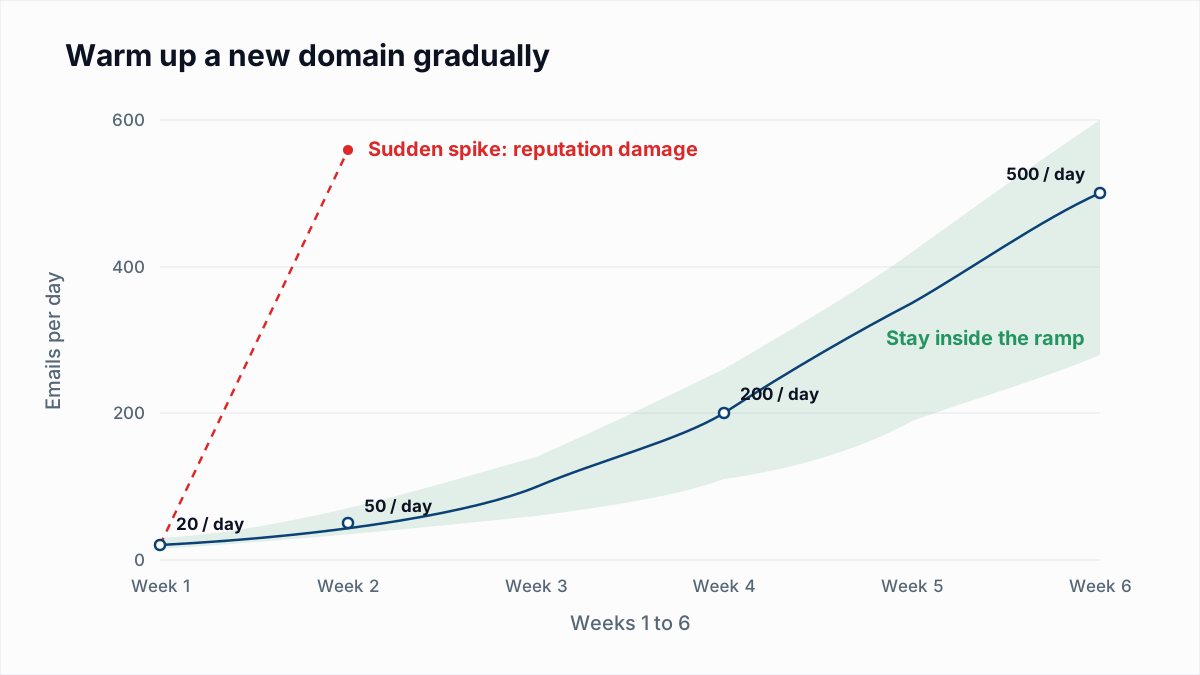
The week-by-week schedule is in email warm-up and sender reputation.
If you see this, do this
| What happened | What to do |
|---|---|
| "You have reached a limit for sending mail" in Gmail | Stop sending and wait up to 24 hours. Retrying sooner does not help. |
452 4.5.3 too many recipients | Split the message. Keep SMTP and IMAP sends through Google under 100 recipients each. |
5.1.90 or 5.2.2 Submission quota exceeded on Microsoft 365 | Check the account for compromise first, then wait for the 24-hour window to roll forward. |
550 5.7.233 on Microsoft 365 | The whole tenant is over its external limit. Find the mailbox or app responsible in the admin report and move bulk mail to a dedicated service. |
| You hit a limit and many of the sends bounced | Verify the list before the next send, and remove the Undeliverable addresses. |
Send less to addresses that do not exist
A sending limit is a budget, and every message to a dead address spends part of it. InboxSure checks syntax, MX records and the mailbox itself over SMTP without sending an email, and flags catch-all domains and role accounts as Risky so you can decide about them separately. The Free plan covers lists of up to 50 addresses with no card; Pro is $49 a month for lists of up to 10,000 addresses, with no credits to count. Start with the bulk email verifier, or test one address with the free email verifier.
Frequently asked questions
Related reading
Ready to clean your email list?
Upload a CSV or XLSX and get every address marked deliverable, risky, undeliverable or unknown, with the reason. Free for lists of up to 50, no card. Nothing is sent to your contacts.