Email Throttling: What It Is and How to Send Around It
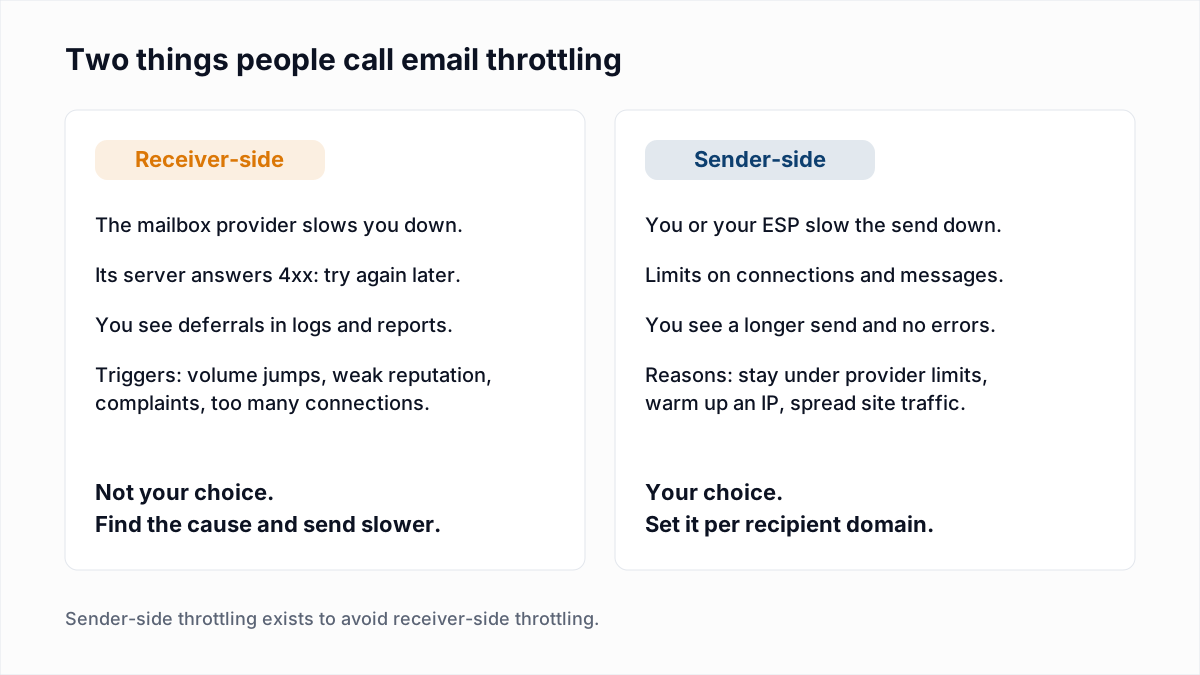
The word "throttling" is used for two opposite things, and most confusion about it comes from mixing them up. Receiver-side throttling is done to you: a mailbox provider answers "try again later" and your mail waits. Sender-side throttling is done by you or your email service provider (ESP): the send is slowed down on purpose so the receiver never has to say that.
Email throttling is a limit on how many messages move from one sender to one receiver in a period of time. Mailchimp's help page on throttling defines the sender-side kind as "Intentionally limiting the amount of emails sent through a server in a limited amount of time." This post covers both kinds, starting with what the receiver actually says.
What does email throttling look like in SMTP?
Email throttling shows up in SMTP as a reply that starts with 4, most often 421, 450, 451 or 452, which means the message was not accepted now and may be accepted later. These are real replies from the three largest providers' own references, read on 13 November 2026:
421 4.7.28 Gmail has detected an unusual rate of email originating from
  your IP address ip-address.
421 4.7.0 This message is suspicious due to the very low reputation of the
  sending IP address. To protect our users from spam, email sent from your
  IP address has been temporarily rate limited.
450 4.2.1 The user you are trying to contact is receiving email at a rate
  that prevents additional messages from being delivered.
451 4.7.500-699 Access denied, please try again later| Provider | Throttling replies | What the provider's page says | Our guide |
|---|---|---|---|
| Gmail | 421 4.7.0, 421 4.7.28, 450 4.2.1 | Google's SMTP error reference lists a 4.7.28 variant for the IP, the netblock, the DKIM domain, the SPF domain and link domains. | 421 4.7.0 try again later |
| Microsoft 365 | 451 4.7.500-699, 451 4.7.850-899 | Microsoft's NDR reference says: "Suspicious activity was detected and sending was temporarily restricted for further evaluation." | 451 4.7.500 server busy |
| Yahoo and AOL | 421 and 451, including the TS deferrals | Yahoo's Sender Hub says: "A 421 or 451 SMTP error indicates a temporary problem blocking the delivery of your message." It groups them as "Message temporarily deferred" and does not define each TS tag. | Yahoo 421 4.7.0 [TSS04] |
Not every 4xx is throttling. A greylisting deferral usually clears on a retry whoever you are, and a full mailbox is about the recipient. Throttling is about the sender. The full list of codes is in the email bounce codes hub.
What triggers email throttling?
Email throttling is triggered by a sender doing more than its history supports: more volume, more connections, or more complaints than the receiver has seen from that IP or domain before. The providers name these causes themselves.
- A sudden jump in volume. Google's sender guidelines warn that "immediately doubling previously sent volumes suddenly could result in rate limiting or reputation drops." Microsoft's fix article for 451 4.7.500-699 describes the same cause and adds: "This error response is called IP throttling".
- A new IP address or domain. No history means a small allowance. See the IP warm-up schedule.
- Reputation and complaints. Yahoo's list of causes for a 421 or 451 includes unusual traffic from the sending IP, spam-like content and complaints from Yahoo users. Track yours with spam complaint rate.
- Too much on one connection. Yahoo's sending best practices say: "Yahoo accepts a limited number of messages per SMTP connection." The number is not published.
- One busy recipient. Gmail's 450 4.2.1 is a limit on a single mailbox, not on you.
- Failed authentication. Gmail rate limits unauthenticated mail with 421 4.7.26 and its siblings. Fix SPF, DKIM and DMARC before touching send speed.
A shared outbound limit is a different thing again. Google Workspace and Microsoft 365 cap what each mailbox may send per day; those are in email sending limits.
How do mail servers retry throttled emails?
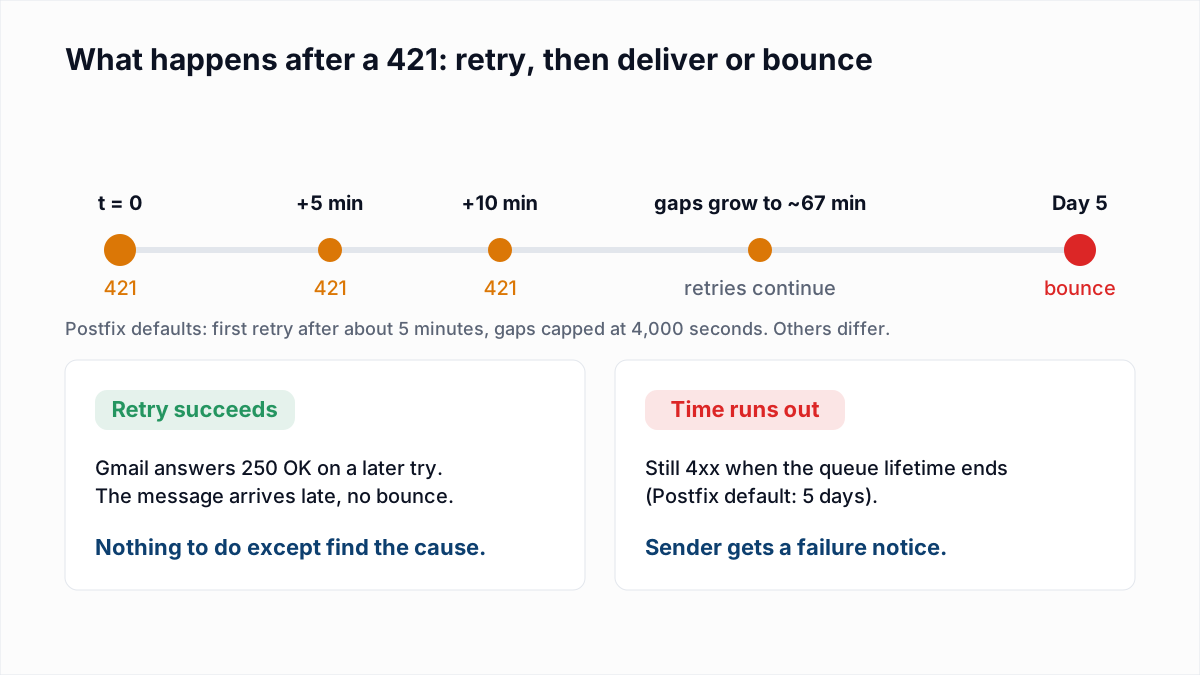
Mail servers retry throttled emails automatically: the message goes into a deferred queue and the server tries again at growing intervals until it is accepted or a time limit runs out. The standard, RFC 5321 section 4.5.4.1, sets the baseline:
- "The sender MUST delay retrying a particular destination after one attempt has failed. In general, the retry interval SHOULD be at least 30 minutes".
- "Retries continue until the message is transmitted or the sender gives up; the give-up time generally needs to be at least 4-5 days."
- The RFC favours "a policy of two connection attempts in the first hour the message is in the queue, and then backing off to one every two or three hours."
Real servers are quicker than the RFC's 30 minutes on the first tries. The Postfix defaults (first retry after about 5 minutes, queue lifetime of 5 days) are worked through in the 421 4.7.0 post. The point that matters here: a retry is one more attempt. Resending the campaign by hand on top of the queue adds volume to an IP that is being told to send less.
How do you configure sending to avoid throttling?
You avoid throttling by limiting, per recipient domain, how many connections you open, how many messages go down each one, and how many messages leave per hour. The setting names differ by mail server; the five controls are the same everywhere.
- Group mail by destination. Queue by receiving provider, not just by domain name: a Google Workspace customer domain and gmail.com reach the same servers. The MX lookup shows which provider hosts a domain.
- Set a per-domain concurrency limit. This is the maximum number of simultaneous connections to one destination. RFC 5321 allows "multiple concurrent outgoing mail transactions" and adds that "some limit may be appropriate". In Postfix the setting is the destination concurrency limit; other servers call it max connections per domain.
- Set messages per connection. Close and reopen the connection after a fixed number of messages, because providers such as Yahoo stop accepting after their own unpublished count.
- Set a rate limit per hour. A messages-per-hour cap for each destination turns one burst into a steady stream. Google asks for exactly that: "Send email at a consistent rate. Avoid sending email in bursts."
- Back off when you see 4xx. Lower the limits for that destination automatically when deferrals start. For a Gmail 4.7.28, Google's guidelines give the procedure: "Do not send email for at least 10 minutes. After 10 minutes, send emails from a single connection." Then add connections "one at a time".
No provider publishes the numbers to put in those settings, so start low, raise one setting at a time, and let the deferral rate tell you where the ceiling is.
On a hosted ESP you usually cannot reach these controls. Mailchimp says so plainly: "There isn't a way to manually delay the send process or specify how quickly we send to corporate or personal domains." The platform manages connection limits for its shared IPs. What you can control is the shape of your own send: Mailchimp offers batch delivery to send a campaign in timed batches, and Twilio SendGrid's automated IP warm-up is sender-side throttling by another name, an hourly cap on a new IP. If your ESP has neither, split the audience into segments and schedule them an hour apart.
What is the difference between throttled, blocked and bounced emails?
A throttled email is delayed and still queued, a blocked email was refused because of who sent it or what it contains, and a hard-bounced email was refused because the address does not work. The first digit and the middle of the enhanced code tell them apart.
| State | Typical reply | What happens to the message | What to do |
|---|---|---|---|
| Throttled (deferred) | 421 4.7.28, 451 4.7.500, 421 4.7.0 [TSS04] | The message stays in the sending queue and is retried automatically. | Send more slowly to that provider. Do not resend. Keep the address. |
| Blocked | 550 5.7.1, 554 5.7.1, 550 5.7.606 | The message is returned at once. Retrying unchanged gets the same answer. | Fix reputation, authentication or the listing, then send again. Keep the address. |
| Hard bounced | 550 5.1.1, 550 5.4.1 | The message is returned at once because the mailbox or domain does not exist. | Remove the address and never mail it again. |
| Expired (soft bounced) | The last 4xx, quoted in a failure notice | The queue lifetime ended while the receiver was still deferring. | Keep the address. Find out why the deferral lasted days. |
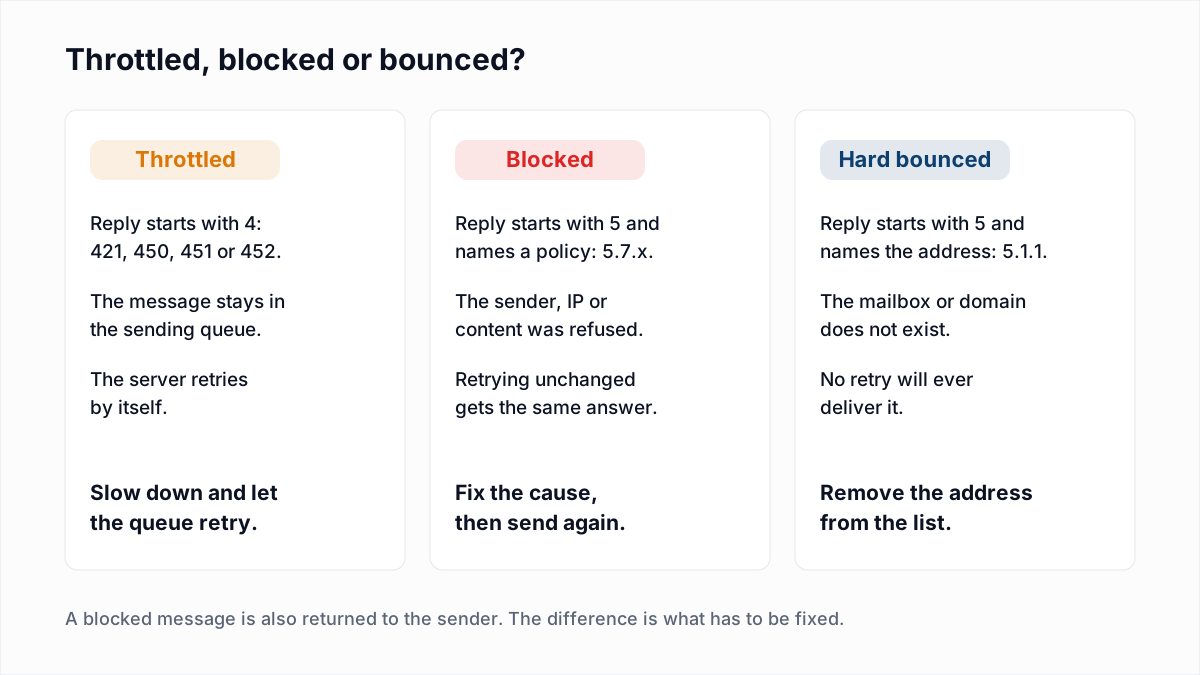
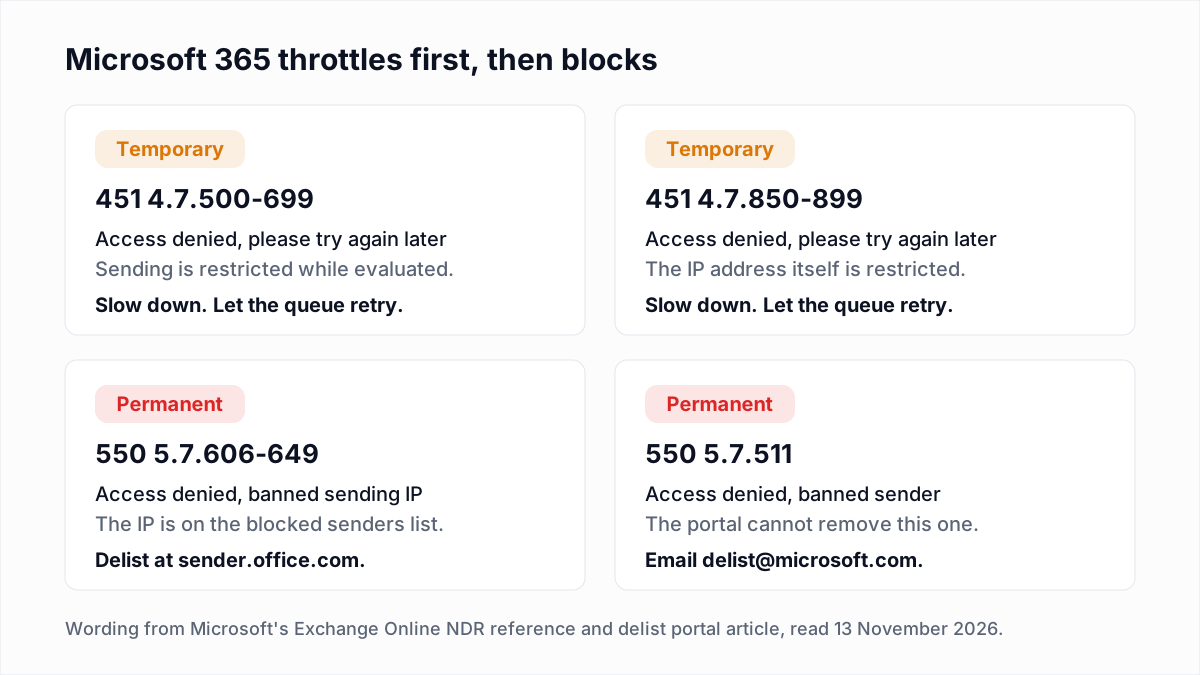
Throttling that is ignored tends to move one column to the right. Microsoft 365 documents the sequence: the temporary 451 4.7.500-699 range first, the permanent 550 5.7.606-649 "banned sending IP" after it.
When do deferred emails become bounces?
Deferred emails become bounces when the sending server's queue lifetime ends before any retry is accepted. The lifetime belongs to the sender, not the receiver. RFC 5321 suggests at least 4 to 5 days, Postfix defaults to 5 days, and hosted platforms choose their own, which may be shorter. Twilio SendGrid's IP warm-up page, for example, says mail held back by a warm-up cap with no other IP available is retried for 72 hours.
When the clock runs out, the sender gets a failure notice that quotes the last temporary reply. Exchange Online labels this 4.4.7 Message expired, and Microsoft's NDR reference explains: "The sending server tried to relay or deliver the message, but the action wasn't completed before the message expiration time." A bounce that quotes a 4xx code is a soft bounce: the address may be fine.
How does throttling show up in email reports?
Throttling shows up in email reports as deferred or delayed messages, and later as soft bounces if the deferral outlasts the retry window. Where to look:
- ESP activity feed. Look for a status such as "deferred" or "delayed" with the receiver's reply attached. Deferred mail is not yet counted as delivered or bounced, so the delivery rate for a throttled campaign keeps changing for days.
- Your own mail log. In Postfix, search for
status=deferredand group by destination domain. One provider deferring is throttling; every provider deferring is more likely your DNS or network. - Google Postmaster Tools. The Delivery errors dashboard shows the share of mail Gmail rejected or temporarily failed and lists "rate limit exceeded" as a reason. See Google Postmaster Tools.
- Timing. Opens and clicks that arrive hours after the send time, for one provider only, are the visible trace of a throttle that eventually cleared.
Does list quality affect throttling?
Yes, list quality affects throttling, because receivers set a sender's allowance from its reputation, and bounces and complaints lower it. Mail to addresses that do not exist spends that allowance on messages nobody can read.
This is the part a verifier can help with. InboxSure checks each address for syntax, MX records and a live mailbox over SMTP, without sending a message, and returns Deliverable, Risky, Undeliverable or Unknown. Removing the Undeliverable addresses before a send takes the hard bounces out of the picture. Verification does not change how fast you send or how recipients react, and Yahoo, AOL, Outlook.com and Hotmail addresses come back Unknown as of November 2026 because those providers refuse the check.
Before the next large send, run the list through the bulk email verifier, then send it at a rate the receivers have seen from you before. The rest of the process is in how to send bulk email without landing in spam. The Free plan covers lists of up to 50 addresses with no card; Pro is a flat $49 a month for lists of up to 10,000 addresses each.
Frequently asked questions
Related reading
Ready to clean your email list?
Upload a CSV or XLSX and get every address marked deliverable, risky, undeliverable or unknown, with the reason. Free for lists of up to 50, no card. Nothing is sent to your contacts.