552 5.2.2 Mailbox Full: Is It a Hard or Soft Bounce?
552 5.2.2 means the recipient's mailbox is out of storage and the server refused your message. Treat the first one as a soft bounce: the address is real, and the problem clears as soon as the owner frees some space. Treat it as a hard bounce when it repeats over several weeks, or when Gmail's version of the error says the inbox is "out of storage space and inactive", because a mailbox nobody empties is a mailbox nobody reads.
The confusion is built into the code. The leading 5 says permanent, yet a full mailbox is the textbook temporary condition. This guide covers what the code says, the exact wording Gmail and Microsoft use, a retry and suppress policy you can copy, how sending platforms classify it, and why an email verifier usually cannot warn you in advance.
What 552 5.2.2 means
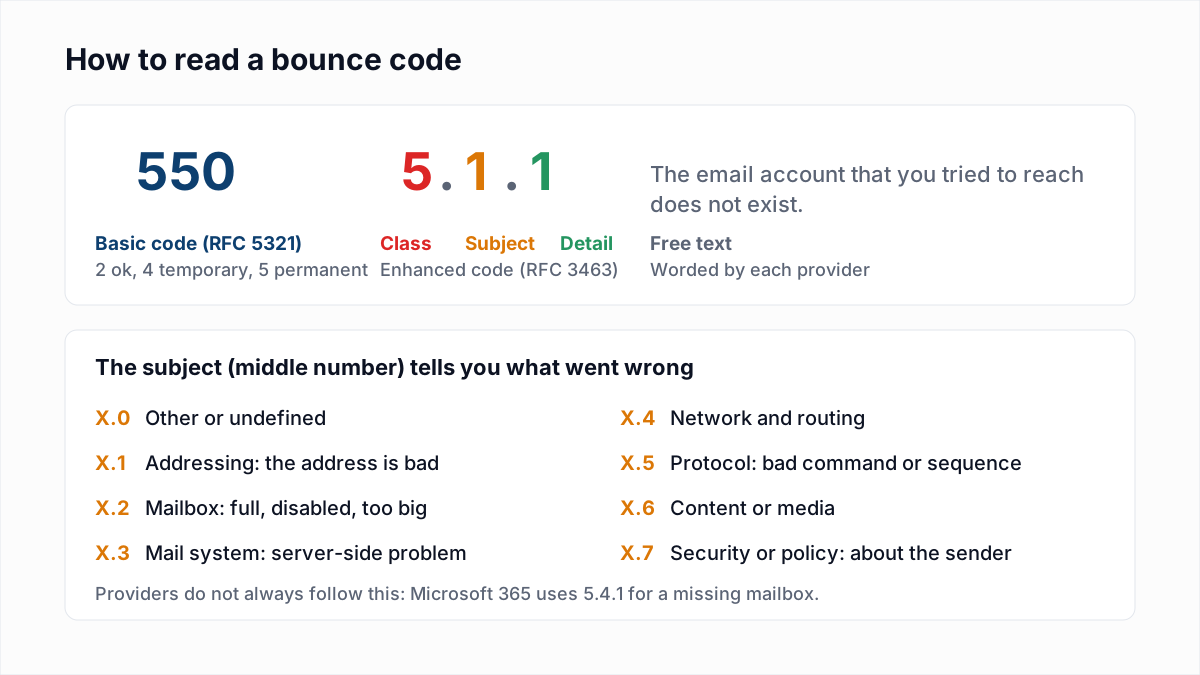
The reply has three parts.
- 552 is the basic SMTP code. RFC 5321 defines it as "Requested mail action aborted: exceeded storage allocation".
- 5.2.2 is the enhanced status code: class 5 (permanent), subject 2 (mailbox), detail 2 (mailbox full). RFC 3463 describes X.2.2 as "The mailbox is full because the user has exceeded a per-mailbox administrative quota or physical capacity."
- The text is written by each provider, and it is the part to read.
The temporary twin is 452 4.2.2. RFC 5321 defines 452 as "Requested action not taken: insufficient system storage", and a 4xx reply asks the sending server to try again later. The standard itself leans toward temporary: RFC 3463 says the mailbox-full code "should be used as a persistent transient failure", which is the 4.2.2 form. Servers that answer 5.2.2 are choosing to stop your server's retries, not telling you the address is gone.
What Gmail, Microsoft, Yahoo and iCloud actually say
The wording below is copied from each provider's own documentation, read on 12 November 2026. Where a provider documents nothing, the table says so.
| Provider | Reply | Note |
|---|---|---|
| Gmail / Google Workspace | 452 4.2.2 The recipient's inbox is out of storage space. Please direct the recipient to Manage files in your Google Drive storage. | Temporary. Your server keeps retrying. |
| Gmail / Google Workspace | 552 5.2.2 The recipient's inbox is out of storage space and inactive. Please direct the recipient to Manage files in your Google Drive storage. | Permanent. The words "and inactive" are the difference. |
| Microsoft Exchange | 554 5.2.2 mailbox full; STOREDRV.Deliver.Exception:QuotaExceededException.MapiExceptionQuotaExceeded | The bounce email reads "The recipient's mailbox is full and can't accept messages now. Please try resending this message later or contact the recipient directly." |
| Outlook.com | No SMTP text published | Microsoft's storage page says only: "Any emails sent to you are returned to the sender." |
| Yahoo Mail | Not documented | Yahoo's sender error-code page lists no mailbox-full code. |
| iCloud Mail | No SMTP text published | Apple says: "If you run out of iCloud storage, you won't be able to send or receive emails with your iCloud Mail address." More in iCloud Mail bounce errors. |
Sources: Google's SMTP error reference, a Microsoft troubleshooting article that shows the 554 5.2.2 report (its example is a full public folder), Outlook.com storage limits, Yahoo's SMTP error codes and Apple's iCloud Mail limits. Self-hosted servers use their own wording, often "quota exceeded" or "over quota", and may put it behind 452, 552 or 554. Match on the words as well as the number.
One trap: Microsoft 365 also uses 5.2.2 for a sender limit
In Microsoft's Exchange Online error reference, the entry for 5.2.2 is Submission quota exceeded, described as "The sender exceeded the recipient rate limit or the message rate limit". That one is about you, not the recipient: your own Microsoft 365 mailbox has sent too much. If the bounce comes from your own mail system and mentions a submission quota, read email sending limits instead of this page.
Is mailbox full a hard or soft bounce?
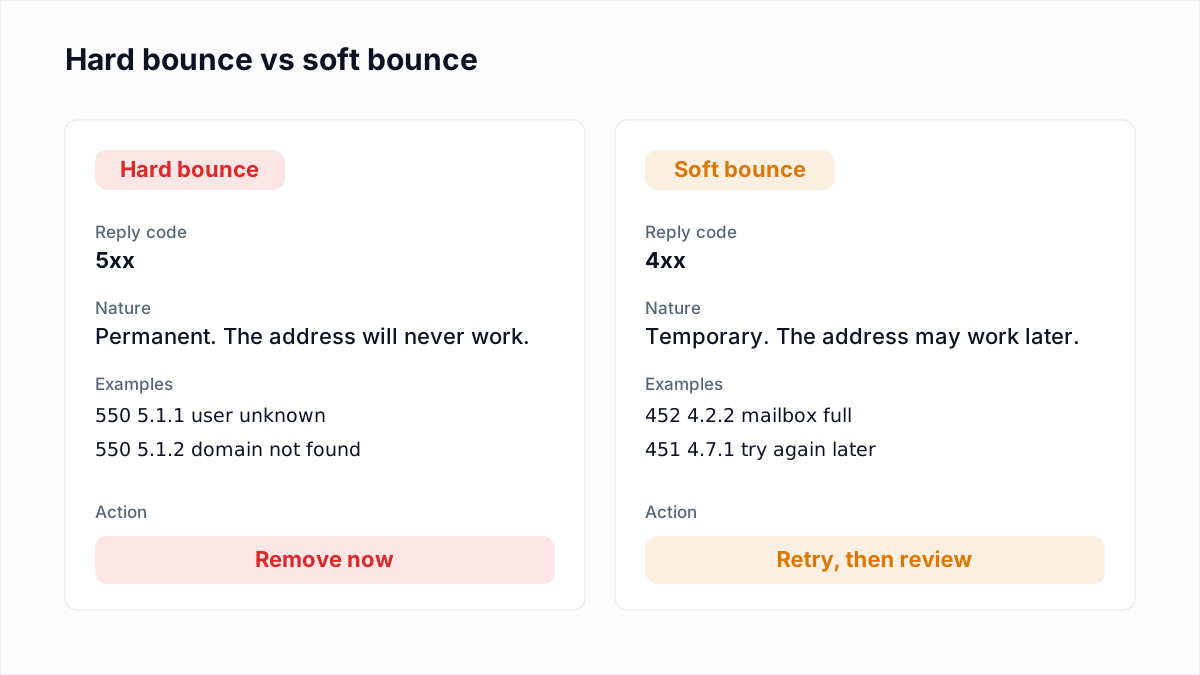
By convention, soft. A hard bounce means the address can never receive mail; a full mailbox can receive mail again five minutes from now. But the convention has an expiry date, and the code alone will not tell you when it has passed.
| What you received | Treat as | Why |
|---|---|---|
452 4.2.2, once | Soft | The server asked you to retry. The owner may clear space today. |
552 5.2.2 or 554 5.2.2 "mailbox full", once | Soft | The 5 stops automatic retries, but the cause is still a temporary one. |
Gmail 552 5.2.2 "out of storage space and inactive" | Hard | Google is telling you the account is not being used. |
| Mailbox full on three sends in a row, weeks apart | Hard | Nobody is reading a mailbox that stays full. |
The general rules for sorting bounces are in soft bounce vs hard bounce, and every other code is in the email bounce codes reference.
Why a full mailbox often means an abandoned one
There are two kinds of full mailbox, and they look identical in a bounce log.
The active user who ran out of room. On a personal Google account, storage is, in Google's words, "up to 15 GB of storage which is shared among Drive, Gmail, and Photos". Someone can fill it with phone photo backups without receiving a single large email, and Google's storage help page states the result: "Messages sent to you go back to the sender." Outlook.com is similar: 15 GB of mailbox storage on a free account, and mail is blocked if either the mailbox or the separate Microsoft cloud storage quota is full. These people notice within days, because their own email stops working, and they fix it.
The account nobody opens. An unattended mailbox keeps collecting newsletters, notifications and spam until it hits the quota, and then it stays there. This is the stage before the address disappears. Google says that if an account is over its storage quota for 2 years, "we might delete your content across Gmail, Drive, and Photos". Separately, Google's inactive account policy defines an inactive account as one "that has not been used within a 2-year period" and reserves the right to delete it with its data. That policy covers personal accounts only; it "doesn't apply to any Google Account that was set up for you through your work, school, or other organization".
So the usual path for a dead consumer address is: full (452 4.2.2), then full and inactive (552 5.2.2), then gone (550 5.1.1). A repeated mailbox-full bounce is an early warning that the address is on that path. Mailing it for another year adds nothing except bounces on your sending record. A mailbox the provider has switched off answers differently: see 550 5.2.1 mailbox disabled or inactive.
A retry and suppress policy for mailbox-full bounces
No provider publishes a rule for this, so what follows is guidance. It is deliberately simple, because a policy people can remember gets applied.
| Situation | Action |
|---|---|
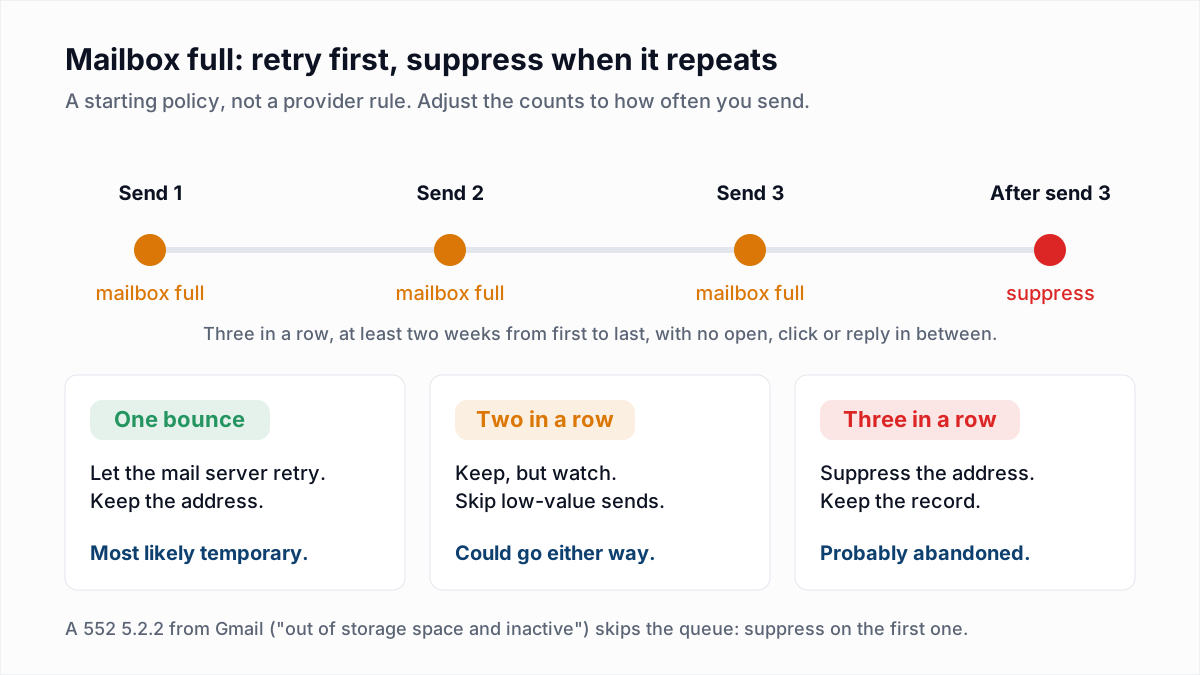
| First 452 4.2.2 | Do nothing. Your mail server or ESP retries on its own, typically for several days. |
| First 552 or 554 5.2.2 "mailbox full" | Keep the address. Send again with your next scheduled email, not sooner. |
| Second consecutive mailbox-full bounce | Keep, and flag it. Leave it out of low-value sends. |
| Third consecutive, with at least two weeks between the first and the last | Suppress. Keep the record so the address is not imported again. |
| Gmail 552 5.2.2 "out of storage space and inactive" | Suppress on the first one. |
| Any open, click or reply in between | Reset the count to zero. The person is there. |
| A one-to-one email to a customer or colleague | Never auto-suppress. Reach them another way. |
The two-week condition matters. Three bounces in three days only proves the mailbox was full that week, which a holiday can explain. If you send daily, count by time instead of by number: suppress after three to four weeks of nothing but mailbox-full replies. If you already run an engagement-based sunset policy, repeated full-mailbox bounces are a reason to move a contact to the suppress stage early.
On retries: when the reply is a 4xx, the sending server queues the message and tries again without you. RFC 5321 says the give-up time for a queued message "generally needs to be at least 4-5 days". A 5xx reply ends that immediately, which is why 552 produces a bounce at once while 452 may produce one only days later, or never if space is freed in time.
How sending platforms classify mailbox full
The two platforms below document their handling; both call it soft.
- Amazon SES reports it as bounce type
Transient, subtypeMailboxFull, with the description: "You might be able to send to the same recipient in the future when the mailbox is no longer full." - Mailchimp lists "Mailbox is full (over limit)" as a soft bounce. It cleans an address after 7 soft bounces if the contact has no activity, and after up to 15 if they have.
Seven soft bounces on a monthly newsletter is seven months of mailing a dead mailbox, so check what your platform does by default and apply the table above yourself if it is slower than you want. Our cleanup guides for Brevo contact lists and SendGrid contacts and suppressions show where those platforms keep bounced addresses.
Can an email verifier detect a full mailbox?
Usually not, and any tool that promises otherwise deserves a second look. A verifier connects to the mail server, names the address with RCPT TO, reads the answer and disconnects without sending a message. What it learns depends on when the server checks storage.
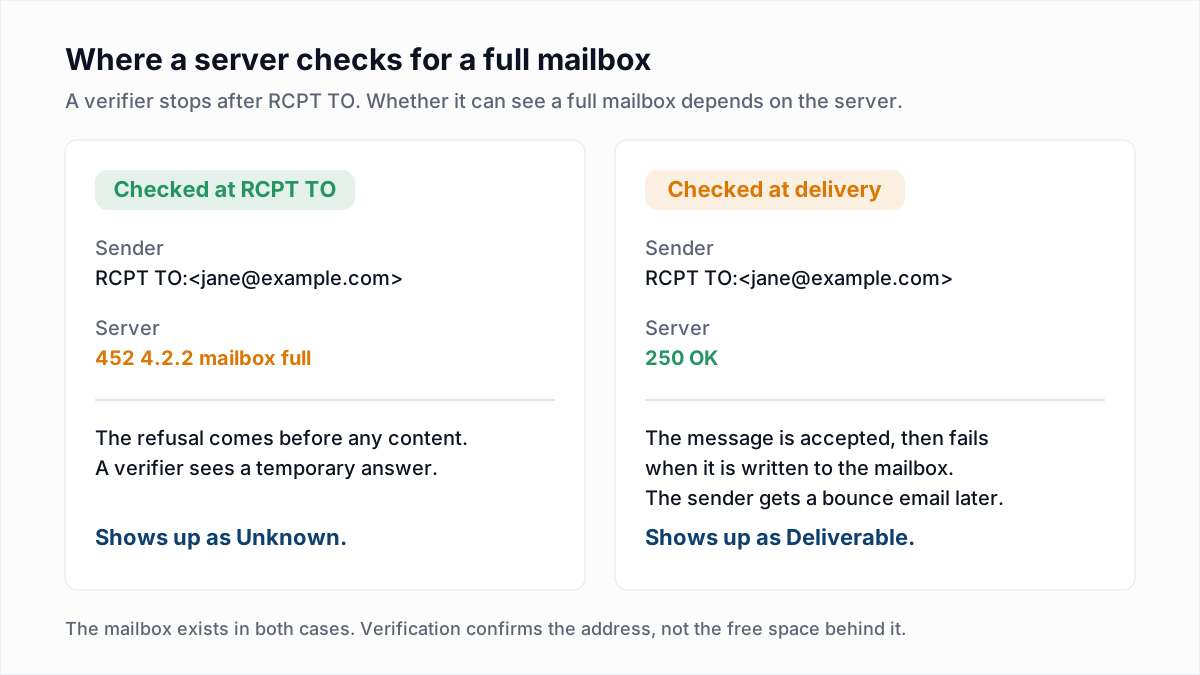
- Checked at delivery. Many servers accept the recipient with
250and discover the quota problem only when they try to write the message into the mailbox. A verifier sees a normal, existing mailbox, because it is one. - Checked at RCPT TO. Some servers refuse there with a 4.2.2 or 5.2.2. A verifier can see that reply, but it is still not proof the address is bad.
InboxSure does not have a "mailbox full" result and does not claim to detect one. An address whose server answers 250 is reported as Deliverable, full or not, and a temporary 4xx answer is reported as Unknown, since the server did not give a clear yes or no. Any reading is also a snapshot: full on Monday can be empty on Tuesday.
Verification does help with the end of the story. Once an abandoned account is deleted, it returns 550 5.1.1, and that is exactly what a verifier catches. Re-checking a list a few times a year removes the addresses that went from full to gone while you were not looking.
What to tell the recipient
If the person matters to you, a customer, a lead who asked for a quote, a colleague, email cannot carry the message, so use something else.
- Contact them another way. Phone, text, a chat app or another email address. Say that your message bounced because their mailbox is full; many people do not know, because the warning arrives in the mailbox they are not reading.
- Tell them where the space went. For Gmail it is often Drive or Photos, not email. Google's own bounce text asks you to direct the recipient to manage files in their Google Drive storage. For Outlook.com, Microsoft's storage page (linked above) explains what counts toward the quota.
- Resend after they confirm. A bounced message is not held anywhere. Microsoft's Outlook.com page says the same: senders have to resend once the recipient is back under quota.
Keep the addresses that are worth keeping
A single mailbox-full bounce is not a reason to delete anyone. A run of them is. Count consecutive bounces, give it a few weeks, and suppress what never recovers. For the addresses that have already gone from full to deleted, verification finds them before your next send does: InboxSure checks syntax, MX records and the mailbox over SMTP without sending an email, and returns Deliverable, Risky, Undeliverable or Unknown for each address as a CSV. The Free plan covers lists of up to 50 addresses with no card, and Pro is $49 a month for lists of up to 10,000. Try one address in the free email verifier, or clean a whole list with the bulk email verifier.
Frequently asked questions
Related reading
Ready to clean your email list?
Upload a CSV or XLSX and get every address marked deliverable, risky, undeliverable or unknown, with the reason. Free for lists of up to 50, no card. Nothing is sent to your contacts.