How to Clean Your Brevo Contact List (Step by Step)
Brevo (formerly Sendinblue) blocklists an address only after it has hard bounced, and it can suspend your campaigns when the hard bounce rate on a send passes 2%. Those two facts are why a Brevo list is worth cleaning before the send, not after it: the bounce that gets an address blocklisted is the same bounce that counts against your account.
The menu names and limits below come from Brevo's help center articles as of 13 November 2026. Each article is linked next to the step in case a button has moved.
What is a blocklisted contact in Brevo?
A blocklisted contact in Brevo is a contact that Brevo will no longer send to on a given channel, such as email campaigns. Brevo's What are the different types of blocklisted contacts? article lists four reasons a contact is blocklisted for email campaigns:
- The contact unsubscribed through your unsubscribe form.
- The contact marked one of your campaigns as spam.
- A campaign sent to the contact hard bounced.
- You blocklisted the contact yourself, one at a time or through an import.
Soft bounces can end the same way. Brevo's What are soft bounces and hard bounces in email? article says Brevo keeps retrying a deferred email for 36 hours, and that an address is blocklisted once an email campaign has soft bounced to it five times in a row. The five-bounce rule does not apply to transactional emails. For the same idea on any platform, see email suppression list.
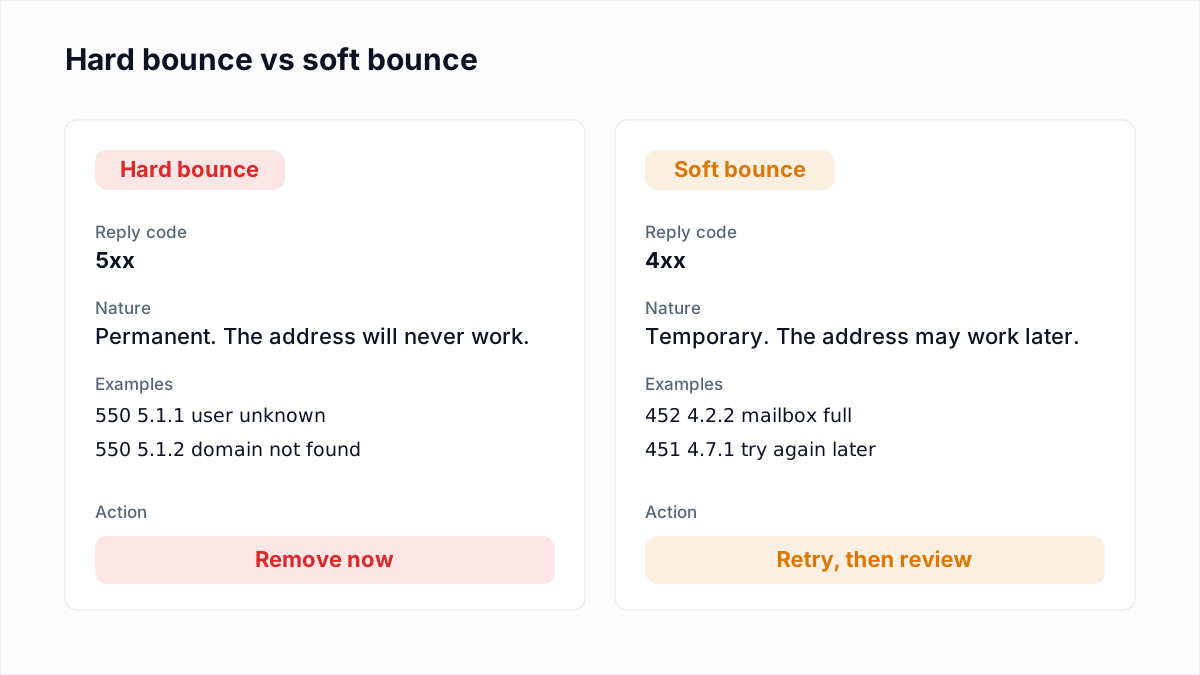
To see who is already blocklisted, Brevo's View your blocklisted contacts article says to go to CRM > Contacts, click Add filter and select Email > Email campaigns subscriptions > Blocklisted. You can then narrow the filter by reason. Every hard bounce in that view was a real send to a dead address (see soft bounce vs hard bounce).
How do contacts count toward a Brevo plan?
Brevo plans are priced by the number of emails you send, and the email volume you choose also sets a cap on how many contacts you can store. Brevo's About Brevo's pricing plans article describes it this way, as of November 2026:
- Free plan. 300 email sends per day and storage for up to 100,000 contacts.
- Starter and Standard. You pick a monthly email volume, and that tier sets the contact cap. The smallest tier in the article is 5,000 emails a month with up to 500 contacts; the larger tiers allow up to 500,000.
- Professional. Storage for up to 2 million contacts.
Brevo's older What are the different quotas applied in Brevo? article lists the Starter and Standard caps in less detail, so read the pricing article for your own tier. Two points matter for cleaning. The blocklist article says blocklisted contacts are still added to your total number of contacts. It also says they are left out of the recipients, so no email credits are used on them. A dead address that is not yet blocklisted is the expensive kind: it uses a send and comes back as a hard bounce.
Should you blocklist or delete contacts in Brevo?
Blocklist contacts in Brevo in most cleaning cases, because blocklisting stops the email, keeps the data and can be reversed. Brevo's Optimize and clean your contact list to improve email deliverability article recommends blocklisting unengaged and invalid contacts instead of deleting them.
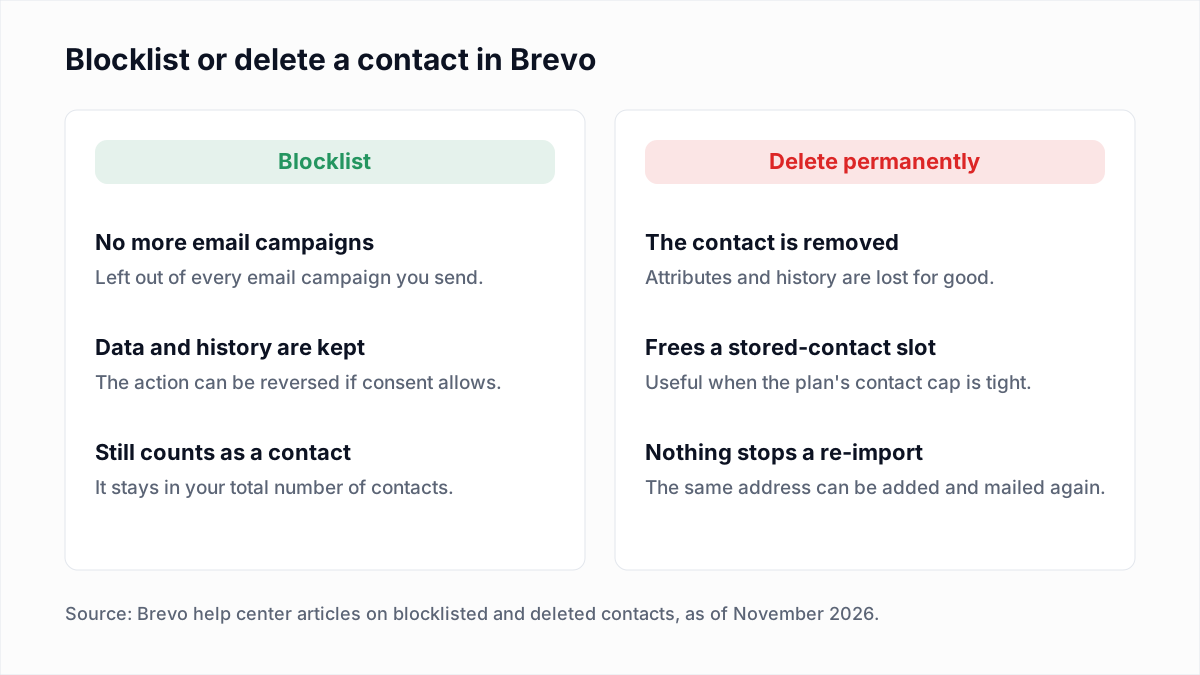
| Action | Counts toward total contacts? | Reversible? | Use it for |
|---|---|---|---|
| Blocklist | Yes. Blocklisted contacts stay in your lists and in the total. | Yes for contacts you blocklisted yourself. Brevo warns that unblocking someone who asked to be blocklisted is illegal. | Undeliverable addresses and contacts that stay silent after a win-back |
| Delete permanently | No, the contact is gone. | No. Brevo's Delete contacts article says all data is permanently lost. | Privacy-law erasure requests, or dead addresses when you are at the stored-contact cap |
The trade-off is specific to Brevo. Because blocklisted contacts still count, only a delete brings you back under a contact cap. If you delete, keep the verification file: nothing in Brevo will remember that the address was dead if it is imported again. Brevo's Blocklist, unblock, or resubscribe contacts article also notes that support cannot unblock contacts in bulk, so check the filter before you confirm.
How do you clean a Brevo contact list step by step?
Cleaning a Brevo contact list takes five moves: export the contacts, verify the file outside Brevo, import the undeliverable addresses as blocklisted, import the remaining results as a contact attribute, and deal with the unengaged. Nothing in the account changes until the first import.
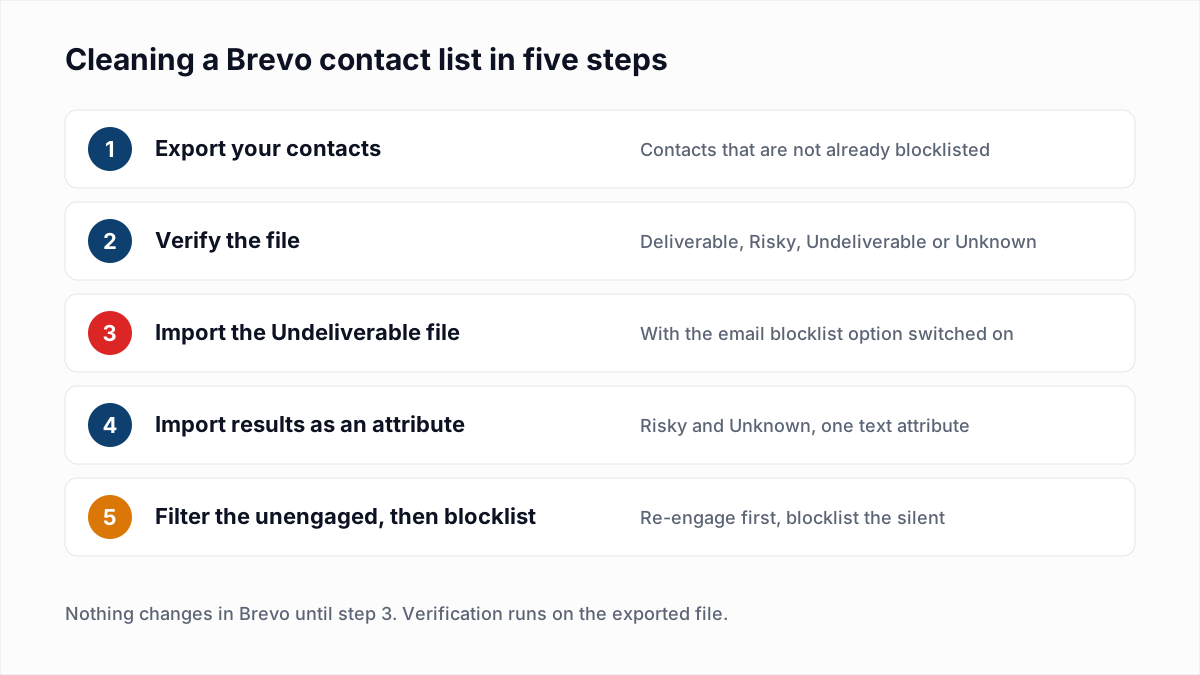
- Export your contacts. Brevo's Update the information of your contacts article describes the export: in CRM > Contacts, select the contacts, open More actions and choose Export. Keep the email column, since Brevo matches on email when the file comes back. The file is downloaded from your notifications when it is ready. Filter out contacts that are already blocklisted first; there is nothing to learn from verifying them.
- Verify the file. Upload it to a verifier such as the InboxSure bulk email verifier. InboxSure checks syntax, DNS and MX records and the mailbox itself over SMTP without sending an email, and returns a CSV with a result for each address. The Pro plan takes lists of up to 10,000 addresses each, so split a larger export into several files.
- Import the Undeliverable file as blocklisted. Save the Undeliverable rows as their own file. Brevo's Import a list of blocklisted contacts article says this is a normal contact import with one extra option: at the finalize step, switch on Blocklist the imported Email contacts, then click Confirm your import. The article is clear that the file should hold only the contacts you want blocklisted.
- Import Risky and Unknown as an attribute. Save a second file with the email column and a result column. Following Brevo's Import your contacts to Brevo article: go to CRM > Contacts > Import contacts, upload the file and map the result column to a text attribute such as
VERIFICATION_RESULT. At the finalize step, turn on Update the attributes of the existing contacts. Leave the option that imports empty fields off, because it erases existing attribute data, and leave the blocklist options off for this file. - Filter on the attribute. On the Contacts page, add a filter on the new attribute to see each group, and save it as a segment if you want to exclude or target it in campaigns. Brevo's Use segments article covers saved segments.
If you would rather review before blocklisting, import all four results as the attribute, filter to Undeliverable, tick the checkbox at the top of the table, click Select all contacts, then Blocklist, and type the number of contacts to confirm, as the cleaning article describes.
What should you do with each verification result in Brevo?
Each verification result maps to one Brevo action: keep Deliverable contacts, blocklist Undeliverable ones, mark Risky ones with an attribute and leave Unknown ones alone until a re-check. The four results are explained in email verification vs validation.
| InboxSure result | What it means | What to do in Brevo |
|---|---|---|
| Deliverable | The mail server confirmed the mailbox exists. | Keep. No import needed. |
| Undeliverable | The mailbox does not exist, the domain has no MX record, the syntax is bad or the domain is disposable. | Import as blocklisted before the next campaign. Delete instead only if you need the room under your contact cap. |
| Risky (catch-all) | The domain accepts every address, so the mailbox cannot be confirmed. | Import the attribute and keep. Blocklist only the ones Brevo also marks as unengaged. |
| Risky (role account) | A shared mailbox such as info@ or sales@. | Import the attribute and keep if the address opted in. Brevo's cleaning article flags generic addresses for low engagement, so watch them. |
| Unknown | The server would not give a clear answer. | Import the attribute, keep and verify again in a few days. Do not blocklist on an Unknown. |
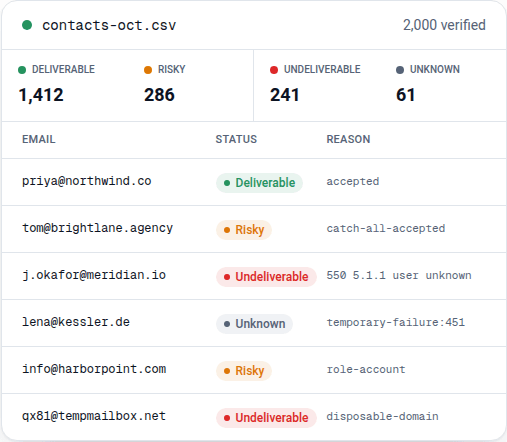
Expect a large Unknown group on a consumer list. In InboxSure's own tests on 4 November 2026, Yahoo, AOL, Outlook.com and Hotmail refused the check before the mailbox could be tested, so those addresses come back Unknown today (the full results are here). For those providers, recent engagement is the better signal. A Deliverable result also has a limit: it says the mailbox exists, not that the person wants your email, and no mailbox check can detect a spam trap.
How do you find unengaged contacts in Brevo?
Unengaged contacts in Brevo are found with the built-in Engagement status condition: in CRM > Contacts, click Add filter and select Contact attributes > Engagement status > Unengaged. The path is from Brevo's cleaning article, which says the status comes from a pre-defined segment whose criteria you can change in the Unengaged Contacts settings. The article does not publish the default criteria, so open that setting to see what your account uses.
Brevo's advice in the same article is to send re-engagement emails first and blocklist the contacts who stay inactive. Timing and win-back content are covered in our email sunset policy guide. Verify the unengaged group before the win-back, since it holds the oldest addresses you have.
What bounce and complaint rates get a Brevo account suspended?
Brevo can suspend an account or its email campaigns when campaigns sent in the last 24 hours show a hard bounce rate above 2%, an unsubscribe rate above 1% or a complaint rate above 0.2%. The figures are from Brevo's Why have my account or email campaigns been suspended? article, as of November 2026.
| Metric on recent campaigns | Brevo's published limit | What cleaning changes |
|---|---|---|
| Hard bounce rate | Above 2% can lead to suspension. | Blocklisting Undeliverable addresses before the send removes most hard bounces. |
| Unsubscribe rate | Above 1% can lead to suspension. | Verification does not change this. Consent and relevance do. |
| Complaint rate | Above 0.2% can lead to suspension. | Verification does not change this. Leaving out unengaged contacts helps. |
The same article describes two more checks. A campaign to newly added contacts is first sent to a random sample, and Brevo decides within 1 to 3 hours whether to continue or to suspend the campaign and the account. An account suspended straight after sign-up means Brevo's system flagged the registration, and you have to contact support for a review. We did not find a separate article that sets out Brevo's account-validation criteria. The article also says a second suspension cannot be reactivated, and that your subscription keeps running while the account is suspended.
These are Brevo's own rules, not mailbox-provider limits. Provider figures are in how to reduce your email bounce rate and spam complaint rate.
Does Brevo allow purchased email lists?
Brevo does not allow purchased email lists. Brevo's Anti-Spam Policy, an appendix to its terms of service, prohibits contact lists that were scraped, acquired or purchased from a third party, and says accounts that break the policy risk immediate suspension or restriction. Verifying a bought list does not change that: verification shows a mailbox exists, not that its owner agreed to hear from you. The wider problem is covered in buying email lists.
Keep the list clean
Repeat the export and verify pass on the schedule in how often to clean your email list, and always before the first campaign to an imported list, since that is the send Brevo samples. Double opt-in keeps bad addresses out at sign-up.
InboxSure is a flat price, so repeat passes cost nothing extra: the Free plan verifies lists of up to 50 addresses with no card, and Pro is $49 a month for any number of lists of up to 10,000 addresses each, with no credits. The export and import steps are summarised on the Brevo integration page. There is no native sync: you export a CSV, verify it, and import the results as shown above.
Frequently asked questions
Related reading
Ready to clean your email list?
Upload a CSV or XLSX and get every address marked deliverable, risky, undeliverable or unknown, with the reason. Free for lists of up to 50, no card. Nothing is sent to your contacts.