How Often Should You Clean Your Email List? A Schedule by List Type
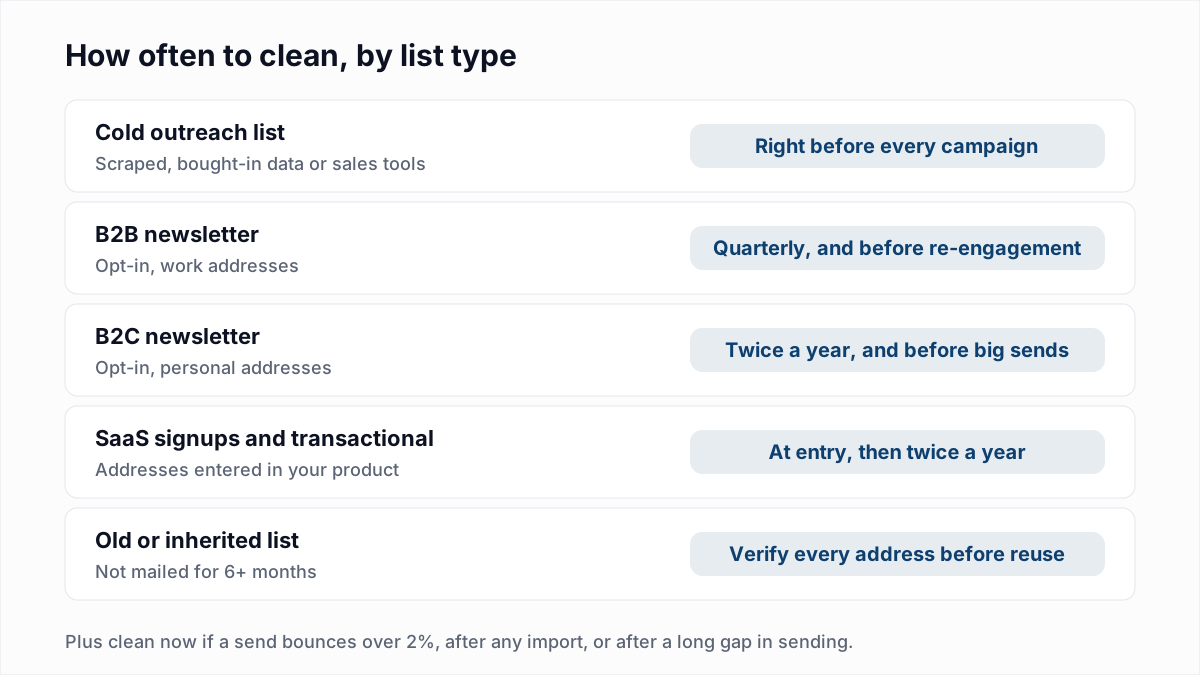
How often you should clean your email list depends on where the addresses came from. Cold outreach lists should be verified right before every campaign. A B2B newsletter needs a clean every quarter, a B2C newsletter about twice a year, and signup lists should be checked when the address is entered and again twice a year. Any list you have not mailed for six months or more should be verified in full before you use it again. On top of the schedule, clean immediately whenever a send bounces above 2%.
The rest of this guide explains why lists go bad, gives the schedule as a table you can copy, lists the triggers that mean "clean now", and explains what to remove and what to keep once the results come back.
Why email lists decay
An address that worked when you collected it can stop working without anyone telling you. Nobody sends a note to every mailing list they are on when they change jobs. The address just stops accepting mail, and you find out from a bounce. The main causes:
- Job changes. When someone leaves a company, IT usually deletes or disables their mailbox. Their old work address now returns
550 5.1.1 User unknown. This is why B2B lists decay faster than consumer lists: work addresses are tied to a job, personal addresses are tied to a person. - Abandoned inboxes. People open a new personal account and stop logging in to the old one. Some providers eventually close inactive accounts. Before that happens, the mailbox may fill up and start soft-bouncing.
- Domains expiring. A small business rebrands or lets its domain lapse. The domain loses its MX records, or stops resolving entirely, and every address on it fails at once.
- Company closures and mergers. An acquired company is moved onto the parent's domain and the old one is shut down. A closed company takes all its addresses with it.
- Bad data at entry. Typos like
gmial.com, fake addresses typed to get past a form, and throwaway addresses from disposable email services. These are not decay in the strict sense, but they pile up in the same place.
You will see many articles quote a yearly decay percentage. We have not found a primary source that measures this in a way we can link to and check, so we are not going to quote one. What matters for your schedule is the direction: every month a list sits unused, more of it stops working, and work addresses go stale faster than personal ones. Your own bounce logs are the best measure of how fast your list decays.
How often to clean your email list: the schedule by list type
The right frequency is set by two things: how fast the addresses decay, and how much a bad send would cost you. Cold outreach scores badly on both. An opt-in newsletter scores well on both. The table below is the schedule we recommend.
| List type | Clean how often | Why |
|---|---|---|
| Cold outreach (sales tools, scraped or researched lists) | Right before every campaign, even if it was verified last month | The data was often stale before you got it, the recipients never opted in, and you usually send from a young domain that cannot absorb bounces |
| B2B newsletter (opt-in, work addresses) | Quarterly, plus before any re-engagement campaign | Job changes remove work addresses steadily all year |
| B2C newsletter (opt-in, personal addresses) | Twice a year, plus before big seasonal sends | Personal addresses last longer, but abandoned inboxes add up |
| SaaS signups and transactional lists | At entry (double opt-in or a check on the form), then twice a year | Password resets and receipts must arrive. Old signups who never activated are the usual source of bounces |
| Old, inherited or purchased lists | Never buy lists. Verify every address older than six months before you reuse it | Purchased lists break the terms of most email platforms and often contain spam traps. Inherited lists have an unknown history |
Cold outreach: verify right before you send
Cold lists are where the schedule matters most. Contact data from prospecting tools is collected over months or years and goes stale at the rate people change jobs. A list verified six weeks ago has had six weeks to decay, and cold senders have the least room for error: no opt-in, often a new sending domain, and recipients who are quick to mark mail as spam. Verify the exact file you are about to upload, not a version from last quarter. Our guide to cleaning a list before a cold campaign walks through the full process.
Newsletters: on a calendar, plus before big sends
Opt-in newsletters bounce less because the addresses were real when people subscribed, and you mail them regularly, so your email platform suppresses hard bounces as they happen. Regular sending is a kind of slow cleaning. The gaps are the addresses that start soft-bouncing and never quite hard-bounce, and the people who subscribed and then went quiet. A quarterly pass for B2B and a twice-yearly pass for B2C catches them before they build up. The steps differ by platform, so we have a walkthrough for each: cleaning a Mailchimp audience, a HubSpot contact list, a Klaviyo list, a Brevo contact list, an ActiveCampaign list and SendGrid contacts and suppressions.
Signups and transactional lists: at entry, then periodically
The cheapest time to catch a bad address is when someone types it. Double opt-in is the simplest check: the address is only added once the person clicks a confirmation link. After that, run the whole signup list through a bulk check twice a year, focusing on accounts that never activated or have not logged in for months.
Old and purchased lists: never buy, verify before reuse
Do not buy lists. Beyond the legal and terms-of-service problems, purchased lists are where spam traps live (see our explainer on spam traps). If you inherit a list from a colleague, an old tool or an acquisition, treat anything not mailed in the last six months as unverified. Verify all of it, then send to the Deliverable addresses in small batches first.
Signs you need to clean your list now
A schedule is the minimum. These triggers mean you should clean before the next send, no matter when you last did it.
| If you see this | Do this |
|---|---|
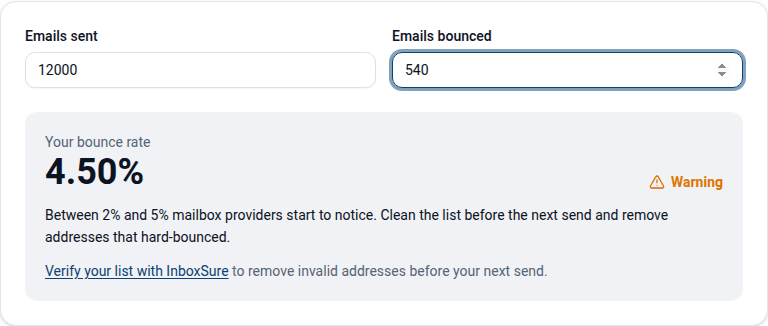
| A campaign bounced above 2% | Stop sending to that list, verify all of it, then resume with Deliverable only |
| A sudden spike in hard bounces (5.1.1, 5.1.2) on one send | Find which segment or import it came from and verify that segment before anything else goes out |
| A big send coming up: a launch, a sale, an annual announcement | Verify the target segment a few days before, so you have time to act on results |
| You just imported contacts from a CSV, event, CRM or partner | Verify the import before it is merged into your main list |
| A list or segment has not been mailed for three months or more | Verify before the first send back. Your platform has not suppressed anything in that time |
| Block or reputation bounces (5.7.x) appear | Clean the list, then deal with the block itself. See how to check and clear email blacklists |
The 2% figure is a working threshold widely used across the industry, not a published rule from Gmail, Yahoo or Microsoft. Treat it as the point where you stop and look, not a safe target. Healthy lists run well below it. If you are not sure what your rate is, the bounce rate calculator works it out from sent and bounced counts. The limits that are published are in what is a good email bounce rate.
What to remove and what to keep after cleaning
A verification pass does not give a simple valid or invalid answer for every address. You get four groups, and each needs a different decision.
| Result | What it means | What to do |
|---|---|---|
| Deliverable | The receiving server confirmed the mailbox exists | Keep and send |
| Undeliverable | Mailbox does not exist, bad syntax, no MX records, or a disposable domain | Remove. Add to your suppression list so it cannot be re-imported |
| Risky | Catch-all domain (accepts every address) or a role account such as info@ | Keep, but in a separate segment. Send in small batches after your Deliverable sends and watch the bounces |
| Unknown | The server would not give a clear answer: greylisting, a timeout, or a block | Do not delete. Re-verify in a few hours or days; most resolve on a retry |
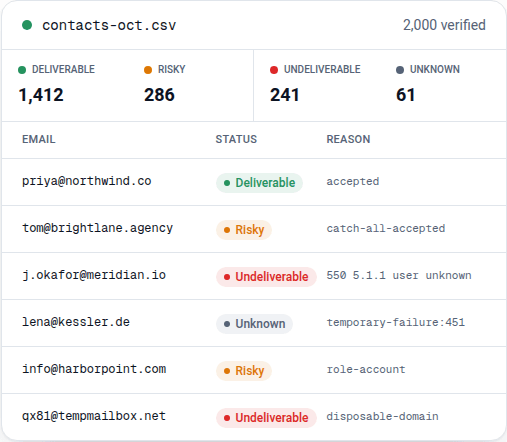
Two mistakes are common here. The first is deleting Unknown addresses: they are not bad addresses, just unconfirmed ones, and our greylisting explainer covers why a retry usually settles them. The second is mailing the whole Risky segment at full speed. Catch-all domains accept the check for any address, so some of those addresses will still bounce. Read whether it is safe to send to catch-all emails before you decide.
Verification also has limits. It tells you whether a mailbox exists. It does not tell you whether the person reads it, and it cannot spot every spam trap, because a recycled trap looks like any working mailbox. Cleaning by engagement is a separate job: people who have not opened or clicked in a long time are worth a re-engagement campaign, and if they still do not respond, removing them is good for your sender reputation even though their addresses are technically valid.
Does cleaning more often cost more?
With most verification services, yes. Per-credit pricing charges for every address, every time. A 10,000-address B2B list verified quarterly uses 40,000 credits a year. Verify before every monthly send instead and that becomes 120,000. The schedule above is what a careful sender should do, but with credits each extra pass is a new bill, which pushes people to clean less often than they should. Credit pricing does have a real advantage if you verify one list once or twice a year: you pay only for what you use. Our pricing comparison sets out the numbers across vendors.
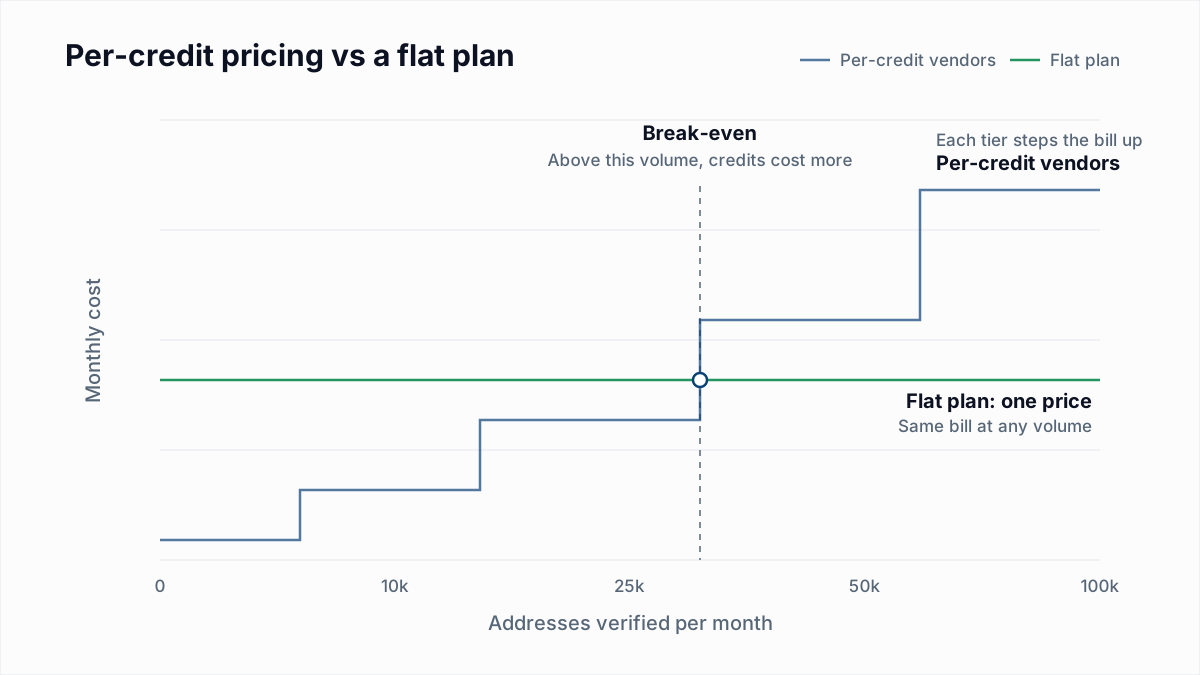
A flat price removes that trade-off. InboxSure Pro is $49 a month for any number of lists up to 10,000 addresses each, with no credits, so re-verifying before every campaign costs nothing extra. The Free plan covers lists up to 50 addresses with no card, which is enough to test a sample of an old list and see how much of it has decayed.
A simple routine you can follow
- Label each list by type: cold, B2B newsletter, B2C newsletter, signups, or old.
- Put the next verification date for each one in your calendar, using the table above.
- Before any send, check the last campaign's bounce rate. Over 2% means clean first.
- Verify every import before it joins your main list.
- After each pass, remove Undeliverable, segment Risky, and queue Unknown for a retry.
- Suppress every hard bounce from real sends, whatever the last verification said.
If you clean often and do not want each pass to be a new bill, see unlimited email verification for how the flat plan works. Where cleaning sits among the other routine tasks is in the email list hygiene checklist.
Frequently asked questions
Related reading
Ready to clean your email list?
Upload a CSV or XLSX and get every address marked deliverable, risky, undeliverable or unknown, with the reason. Free for lists of up to 50, no card. Nothing is sent to your contacts.