What Is a Good Email Bounce Rate? Published Limits and Formula
Email bounce rate is the percentage of sent emails that receiving mail servers rejected or returned. Most articles on this subject open with a table of averages by industry. This one does not, for a plain reason: on 13 November 2026 we tried to read the benchmark pages of seven email platforms, and none of the pages we could open showed a bounce rate. The details are in the section on industry averages below.
What can be cited is narrower and more useful: the limits that a blocklist operator and several sending platforms have put in writing, the formula, and the reasons a list runs high. Every number in this guide is either one of those published limits, named with its source, or arithmetic on an example we made up and labelled as such.
What is a good email bounce rate?
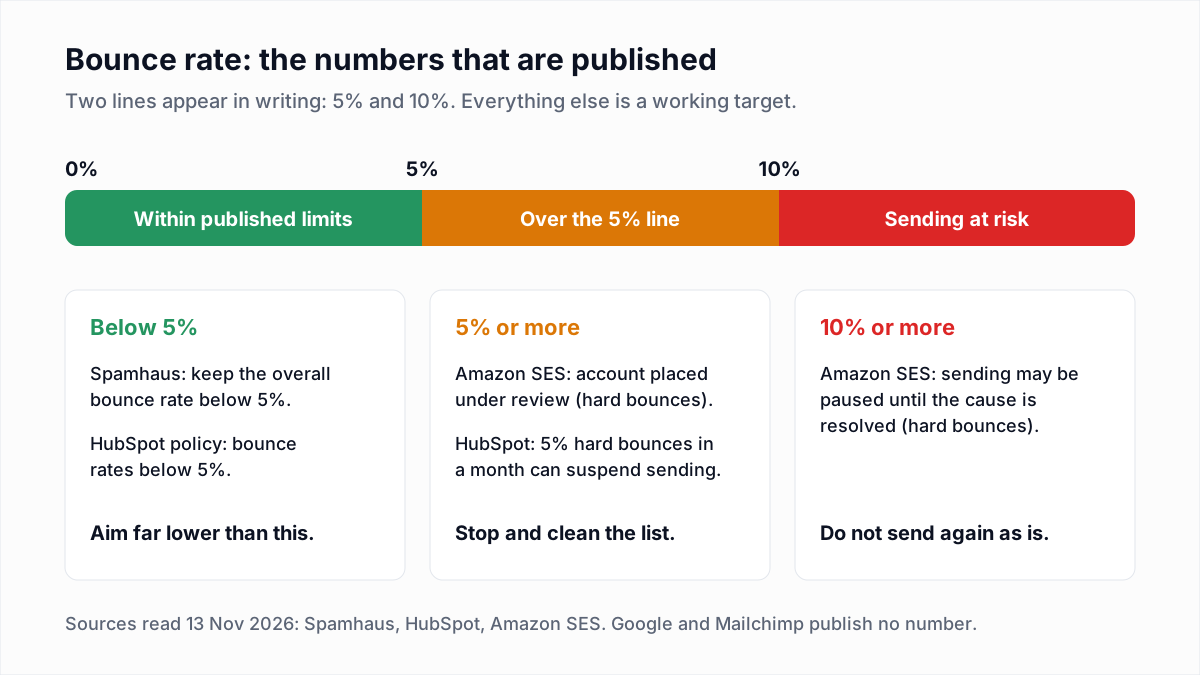
A good email bounce rate is one that stays well under 5%, because 5% is the lowest ceiling that any source we could read has published. The Spamhaus Sender Guidelines say: "Keep the overall bounce rate below 5%." Amazon SES and HubSpot use the same figure for hard bounces alone.
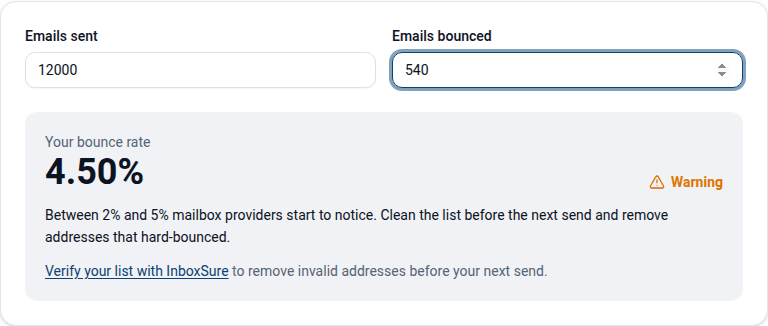
A ceiling is not a target. InboxSure's own working target, used in our bounce rate calculator, is a total bounce rate under 2% per campaign. That 2% is our rule of thumb for leaving a margin below the published 5%. No mailbox provider has published it.
What bounce rate do providers and sending platforms treat as acceptable?
Providers and sending platforms that publish a bounce rate limit set it at 5%, and Amazon SES adds a second line at 10%. Several large names publish no number at all. The table lists what each source says on its own page, as read on 13 November 2026.
| Source | What is counted | Published threshold |
|---|---|---|
| Spamhaus Sender Guidelines | Overall bounce rate | Keep it below 5%. Suppress hard bounces immediately, and remove repeated soft bounces after a set threshold, typically 3 to 5 consecutive bounces. |
| Amazon SES reputation metrics messages | Hard bounces only, over a "representative volume" of email | Stay below 5%. At 5% or greater the account is placed under review. At 10% or greater Amazon SES might pause sending. |
| HubSpot knowledge base (updated 23 September 2026) | Hard bounces, in a specific month | An account may be suspended at a hard bounce rate of 5%. |
| HubSpot Anti-Spam Policy (modified 2 February 2026) | Bounce rates, type not stated | Customers must maintain "bounce rates below 5%". |
| Google Email sender guidelines | Not applicable | No bounce rate limit is published. The page gives spam rate limits and says to unsubscribe recipients who have multiple bounced messages. |
| Mailchimp, About Bounces | Not stated | No number. Mailchimp says limits vary between providers and that "ISPs do not publicly release their limits"; high rates can bring a warning or suspension. |
| Mailgun documentation | Not stated | No number. Mailgun says it has thresholds that, if exceeded, result in a domain being temporarily disabled. |
Two cautions. Third-party articles quote bounce limits for many other platforms, and we left out any we could not find on the platform's own page. And Brevo's anti-spam policy page returned no readable text on 13 November 2026, so this guide makes no statement about Brevo's limits.
What is the average email bounce rate by industry?
The average email bounce rate by industry could not be confirmed from any platform's own benchmark page that we were able to read on 13 November 2026, so this guide does not quote one. Here is what each page showed:
- Mailchimp. The email marketing benchmarks page says its data was last updated in December 2023 and covers campaigns sent to at least 1,000 subscribers. Its method note says soft and hard bounce rates were calculated, but the table as we read it listed only open, click and unsubscribe rates.
- MailerLite. The benchmarks article covers December 2024 to November 2025 and reports medians for open, click, click-to-open and unsubscribe rates. It has no bounce rate.
- Constant Contact. The knowledge base article on average industry rates (updated 27 April 2026) loaded without a table, and the benchmark blog post returned an access error.
- Brevo, GetResponse, Campaign Monitor and Moosend. Brevo's page returned only its title. The other three could not be reached.
Many articles do quote industry bounce rates and credit them to these platforms. We could not check those figures against the publisher, so they are not repeated here. If you find a table, ask four questions before comparing your number with it:
- Hard, soft or both? Amazon SES counts hard bounces only. Klaviyo's help article on bounce rates counts both types. The same campaign can score very differently.
- Whose customers? Each platform reports only its own senders, and platforms differ in who they accept and how fast they suspend accounts with poor lists.
- Which campaigns? Mailchimp's page excludes campaigns under 1,000 subscribers. MailerLite reports the median, not the mean.
- Which year? A table dated 2023 describes mail sent before Gmail and Yahoo began enforcing bulk sender requirements.
How do you calculate email bounce rate?
To calculate email bounce rate, divide the number of bounced emails by the number of emails sent and multiply by 100. Klaviyo's help article defines it the same way: "The number of bounced emails divided by the total number of emails sent."
Total bounce rate = (Hard bounces + Soft bounces) / Sent x 100
Hard bounce rate  =  Hard bounces / Sent x 100
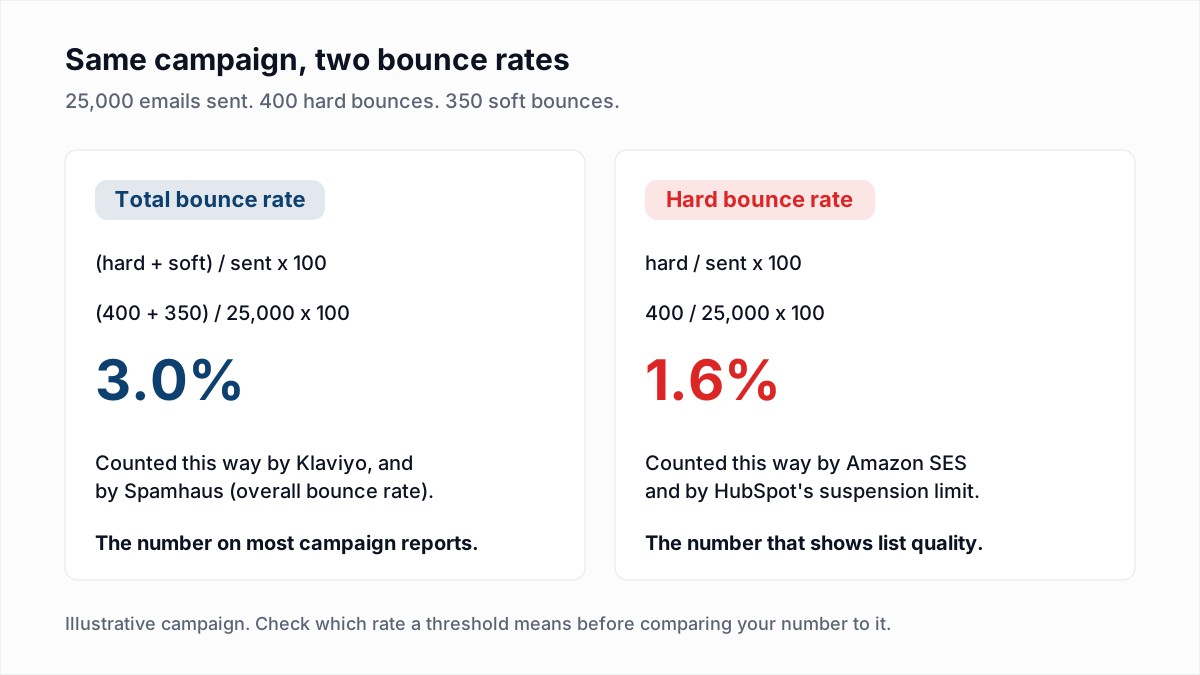
A worked example, with made-up numbers:
- A campaign goes to 25,000 addresses.
- The platform reports 400 hard bounces and 350 soft bounces: 750 in total.
- Total bounce rate: 750 / 25,000 x 100 = 3.0%.
- Hard bounce rate: 400 / 25,000 x 100 = 1.6%.
- Against the Spamhaus line (overall, below 5%) the campaign is at 3.0%. Against the Amazon SES line (hard only, below 5%) it is at 1.6%.
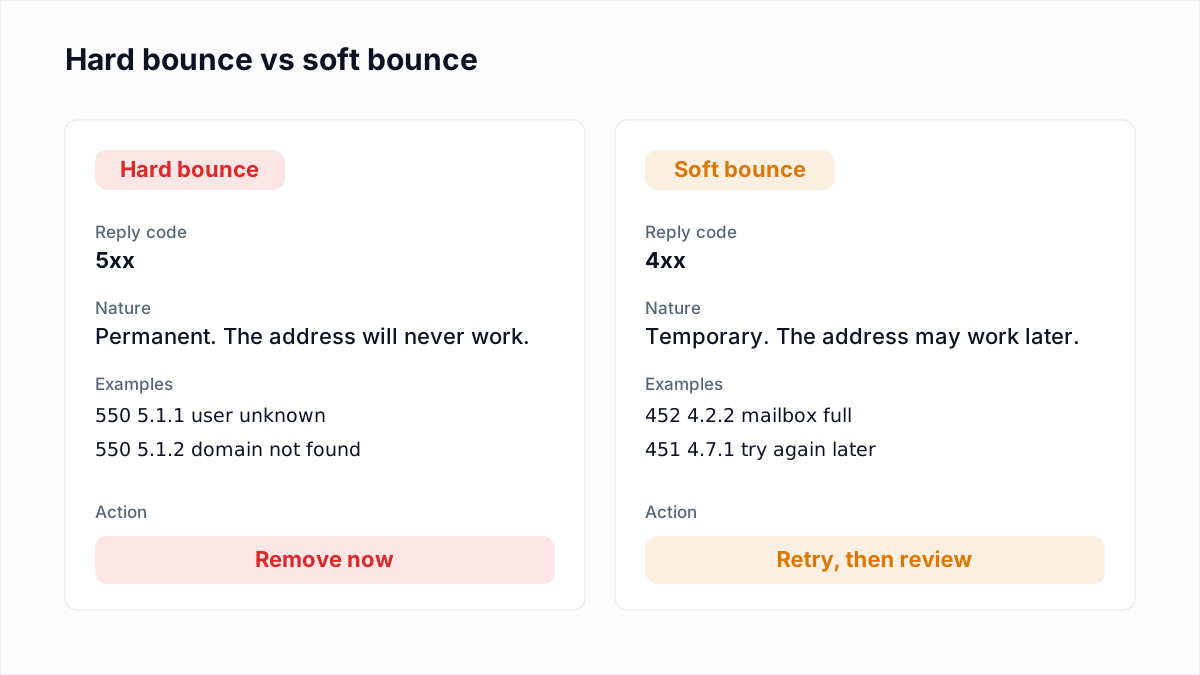
The difference between the two kinds of bounce, with the SMTP codes for each, is in soft bounce vs hard bounce. To skip the arithmetic, enter sent and bounced counts in the free bounce rate calculator.
Why does a new or old email list bounce more?
A new or old email list bounces more because nobody has yet removed its dead addresses: a new list has never been mailed, and an old list has decayed since its last send. Mailchimp's Causes of High Bounce Rates names four causes, and three are about the list:
- Outdated audience. Mailchimp says an old audience "may include stale or inactive addresses". People change jobs and close accounts, and each closed mailbox is a hard bounce.
- Bad audience data. Mailchimp points to "where your contacts came from or how they were compiled". Bought and scraped lists are the usual case; see buying email lists.
- Formatting errors in imports. A column shifted in a spreadsheet produces addresses that cannot exist.
- A free-mail From address. Sending from a free email service can make receiving servers that check DMARC bounce the mail. This cause is the sender, not the list.
The first send to any list is the worst one, because every later send benefits from the suppressions made after it. Providers do not publish how fast lists decay, so our cleaning schedule goes by list type.
What should you do at each bounce rate level?
What to do at each bounce rate level depends on which published line the campaign has crossed. The 2% row is InboxSure's working target; the 5% and 10% rows are the published limits from the table above.
| Bounce rate | What it means | What to do |
|---|---|---|
| Under 2% total | Inside our working target, with margin below every published limit. | Suppress the hard bounces and carry on. |
| 2% to under 5% total | Still below the Spamhaus 5% line, with little margin left. | Verify the segment that produced the bounces before the next send. |
| 5% or more, hard bounces | Over the Spamhaus, HubSpot and Amazon SES limits. | Stop sending to the list. Follow the steps below. |
| 10% or more, hard bounces | The level at which Amazon SES might pause sending. | Do not send again until the list is verified and the source is known. |
If a campaign crossed 5%:
- Read the bounce text before blaming the list. Replies about your IP, authentication or a block list are rejections of the sender; the addresses may be fine. The bounce code reference sorts them.
- Suppress every hard bounce in every tool that holds the list.
- Find the source. Sort the bounces by import date, form or list. One source usually accounts for most of them.
- Verify what is left and send to confirmed addresses first.
- Fix the intake. Double opt-in stops mistyped addresses from reaching the list.
The longer version of each fix is in how to reduce email bounce rate. And a low bounce rate is not proof of inbox placement: a message filed in spam did not bounce, as delivery rate vs deliverability explains.
Where InboxSure fits, and where it does not
InboxSure checks a list before you send it: syntax, DNS and MX, and an SMTP mailbox check that sends no email. Addresses whose mailbox does not exist come back Undeliverable, and removing them removes the main source of hard bounces. Verification has limits. Catch-all domains come back Risky, and Yahoo, AOL and Outlook.com consumer addresses come back Unknown as of November 2026 because those providers refuse the check, so a verified list can still bounce a little. Verification also does nothing for bounces caused by your own authentication or reputation.
The Free plan takes lists of up to 50 addresses with no card, and Pro is a flat $49 a month for lists of up to 10,000 addresses. Upload a CSV to the bulk email verifier before the next campaign, then check the result in the bounce rate calculator.
Frequently asked questions
Related reading
Ready to clean your email list?
Upload a CSV or XLSX and get every address marked deliverable, risky, undeliverable or unknown, with the reason. Free for lists of up to 50, no card. Nothing is sent to your contacts.