Gmail, Yahoo and Outlook Sender Requirements: 2026 Checklist
Gmail, Yahoo and Outlook.com now expect the same core setup from anyone sending in volume: SPF and DKIM that pass, a DMARC record of at least p=none with the From domain aligned to SPF or DKIM, and a low spam complaint rate. Gmail and Yahoo also require one-click unsubscribe on marketing mail and a valid reverse DNS (PTR) record on every sending IP. Gmail and Microsoft apply the full rules once you send around 5,000 messages a day to their consumer mailboxes. Yahoo does not publish a number. Mail that falls short is sent to spam, slowed down with 421 4.7.x replies, or refused with 550 5.7.26 at Gmail and 550 5.7.515 at Outlook.com.
Everything below comes from each provider's own pages, linked inline, as they read on 12 November 2026. Where the providers are vague or contradict themselves, we say so.
The requirements side by side
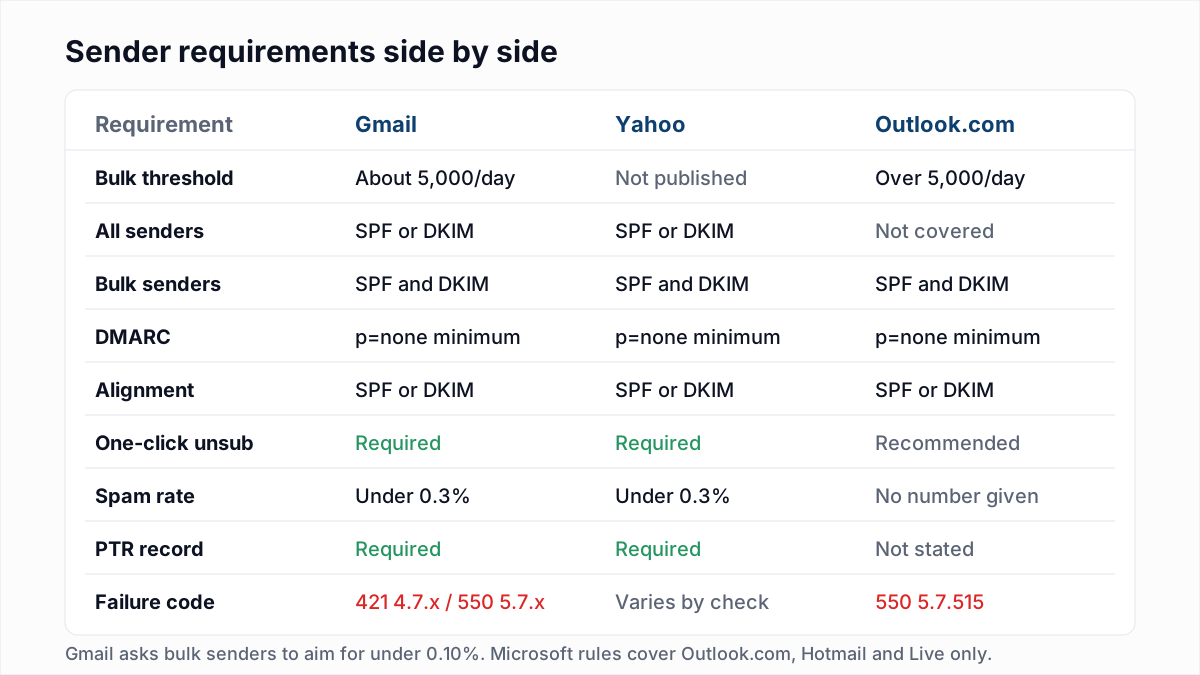
| Requirement | Gmail | Yahoo | Outlook.com |
|---|---|---|---|
| Who counts as bulk | Close to 5,000+ messages in 24 hours to personal Gmail accounts | No number published | Over 5,000 emails a day to Outlook.com, Hotmail and Live addresses |
| Authentication, all senders | SPF or DKIM | SPF or DKIM | Not covered by the announcement |
| Authentication, bulk | SPF and DKIM | SPF and DKIM | SPF and DKIM must both pass |
| DMARC | Required for bulk, p=none allowed | Required for bulk, at least p=none, must pass | At least p=none |
| Alignment | From domain aligned with SPF or DKIM | From domain aligned with SPF or DKIM, relaxed is fine | Aligned with SPF or DKIM, preferably both |
| Unsubscribe | One-click (RFC 8058) on marketing and subscribed mail; Google recommends honouring within 48 hours | One-click list-unsubscribe header plus a visible link, honoured within 2 days | Working unsubscribe link recommended |
| Spam rate | Below 0.3% for everyone; bulk senders should aim below 0.10% | Below 0.3% | No number published |
| Reverse DNS and TLS | Valid PTR and TLS required | Valid forward and reverse DNS required | Not stated |
| What failure looks like | Spam folder, 421 4.7.x rate limits, 550 5.7.x blocks | Spam folder or rejection; codes vary | Junk folder, then 550 5.7.515 |
Gmail sender requirements
Google splits its Email sender guidelines into rules for everyone and extra rules for bulk senders. Both sets have applied since February 2024.
For every sender, at any volume
- SPF or DKIM set up for the sending domain.
- Valid forward and reverse DNS (PTR) records for the sending IPs.
- A TLS connection for transmitting email.
- A spam rate, as reported in Postmaster Tools, below 0.3%.
- Messages formatted according to RFC 5322, and no impersonating Gmail in the From header.
So a company sending 200 emails a day from a domain with no SPF and no DKIM is not a bulk sender, and can still be refused with 550 5.7.26.
Extra rules for bulk senders
- SPF and DKIM, not one or the other.
- A DMARC record. The policy can be
p=none. - For direct mail, the domain in the From header aligned with either the SPF domain or the DKIM domain.
- One-click unsubscribe on marketing and subscribed messages: a
List-Unsubscribeheader with a URL plusList-Unsubscribe-Post: List-Unsubscribe=One-Click. - Spam rate kept below 0.10%, and never reaching 0.30%.
Google's sender guidelines FAQ fills in the details that matter in practice. A bulk sender is one that has sent close to 5,000 messages or more to personal Gmail accounts in a 24-hour period, and mail from the same primary domain counts together. Once you cross that line, you are permanently treated as a bulk sender, even if your volume drops later. The guidelines do not apply to mail sent to Google Workspace accounts, only to personal Gmail. Unsubscribe requests should be honoured within 48 hours. A sender whose spam rate reaches 0.3% loses access to Google's delivery mitigation until it has stayed below 0.3% for 7 days in a row.
The same FAQ says that starting November 2025, Gmail is ramping up enforcement on non-compliant traffic, with temporary or permanent error codes or spam foldering. Expect rejections, not warnings.
Yahoo bulk sender requirements
Yahoo's Sender Hub best practices page reads almost like Google's. Yahoo also began enforcing in February 2024, rolling the rules out gradually.
For all senders, Yahoo asks for:
- SPF or DKIM at a minimum.
- A spam rate below 0.3%.
- Valid forward and reverse DNS for the sending IPs.
- Compliance with RFC 5321 and RFC 5322.
Bulk senders must also:
- Implement both SPF and DKIM.
- Publish a valid DMARC policy of at least
p=none, and DMARC must pass. Yahoo strongly recommends aruatag so you receive reports. - Align the From domain with either the SPF or the DKIM domain. Relaxed alignment is acceptable.
- Use a list-unsubscribe header that supports one-click unsubscribe, show an unsubscribe link in the body, and honour unsubscribes within 2 days. Yahoo highly recommends the RFC 8058 POST method but accepts mailto.
The gap is the definition of "bulk". Yahoo's page does not give a volume threshold. Many third-party guides quote the same 5,000-a-day figure Google uses, but we could not find that number on any Yahoo page. The safe reading is to meet the bulk rules if you send marketing email at all.
One Yahoo check catches people early: reverse DNS. When InboxSure tested the major providers on 4 November 2026, Yahoo and AOL refused our connection at MAIL FROM with 550 5.7.25 Forward-confirmed reverse DNS failed, before any recipient was named (details in how Gmail, Outlook and Yahoo respond to email verification). If your sending IP's PTR record does not resolve back to the same IP, fix that first; see 550 5.7.25 explained.
Outlook.com high-volume sender requirements
Microsoft announced its rules in a Tech Community post first published on 2 April 2025. They cover the consumer Outlook.com service, meaning outlook.com, hotmail.com and live.com addresses, and apply to domains sending over 5,000 emails a day. They do not cover Microsoft 365 business mailboxes, which have their own filtering.
- SPF must pass for the sending domain.
- DKIM must pass.
- DMARC must be at least
p=noneand align with either SPF or DKIM, preferably both.
Microsoft lists further practices as recommended rather than required: a valid From or Reply-To address that accepts replies, a working unsubscribe link, list hygiene and bounce management including regular removal of invalid addresses, and honest subject lines and headers. On the first of those, see why to stop using no-reply addresses.
The rejection text Microsoft gives is:
550; 5.7.515 Access denied, sending domain [SendingDomain] does not meet the required authentication level.When that rejection starts is where the sources conflict, including Microsoft's own post. The version updated on 30 April 2025 says that after 5 May 2025, non-compliant mail goes to the Junk folder and rejection follows at a date "to be announced". Another passage in the same post still says rejection takes effect on 5 May. Several deliverability vendors now write that rejection is in force, but we found no Microsoft statement giving a date. Plan as if 5.7.515 can arrive today.
Bounce codes each provider uses
When a provider enforces these rules at the SMTP level, the reply tells you which rule you broke. These are from Google's Gmail SMTP errors and codes reference and the Microsoft post above. A 4.7.x reply is a temporary rate limit that your server will retry; a 5.7.x reply is a block.
| Code | Provider | What it means |
|---|---|---|
421 4.7.26 / 550 5.7.26 | Gmail | Unauthenticated: SPF and DKIM both failed, or the DMARC policy rejected the mail |
421 4.7.27 / 550 5.7.27 | Gmail | SPF did not pass (bulk requirement) |
421 4.7.30 / 550 5.7.30 | Gmail | DKIM did not pass (bulk requirement) |
421 4.7.32 / 5.7.32 | Gmail | From header not aligned with the SPF or DKIM domain |
421 4.7.40 / 550 5.7.40 | Gmail | No DMARC record, or the record has no policy |
451 4.7.23 / 550 5.7.25 | Gmail | Sending IP has no PTR record, or it does not match |
421 4.7.29 / 550 5.7.29 | Gmail | Not sent over TLS |
550 5.7.25 | Yahoo / AOL | Forward-confirmed reverse DNS failed (seen in our own testing) |
550 5.7.515 | Outlook.com | Sending domain does not meet the required authentication level |
Yahoo's SMTP error code page describes authentication failures in categories rather than listing one code, so match on the wording ("DMARC", "authentication") as well as the number. The most common of these in practice, Gmail's 550 5.7.26, has its own guide: how to fix 550 5.7.26.
Step-by-step setup checklist
- List everything that sends as your domain: mailbox provider, marketing platform, CRM, help desk, billing, cold email tool. Each needs SPF coverage or DKIM signing, ideally both.
- Publish or fix SPF. One TXT record starting
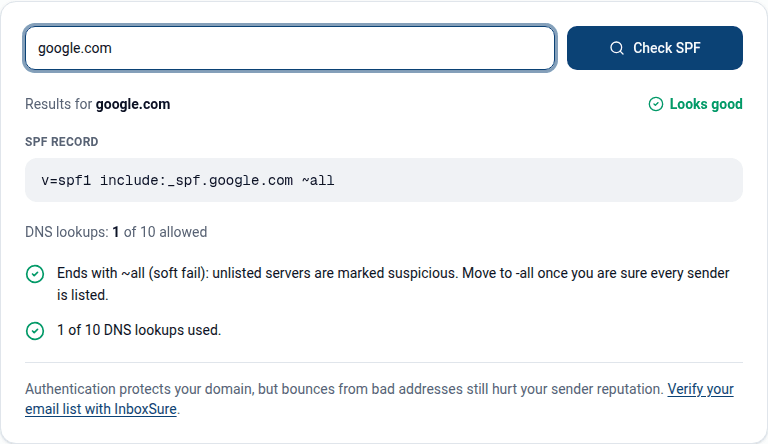
v=spf1, with aninclude:for each sender, ending in~allor-all(see SPF softfail vs hardfail). The SPF generator builds one from the services you pick. Run it through the SPF checker to confirm it parses and stays under the 10 DNS lookup limit; going over causes a permanent error, which we explain in SPF PermError: too many DNS lookups. - Turn on DKIM with your own domain at every sender. Most platforms sign with their own domain by default, which passes DKIM but does not align with your From address. Look for "custom domain authentication" or "domain verification" and add the CNAME or TXT records they give you. The DKIM checker confirms each selector is published.
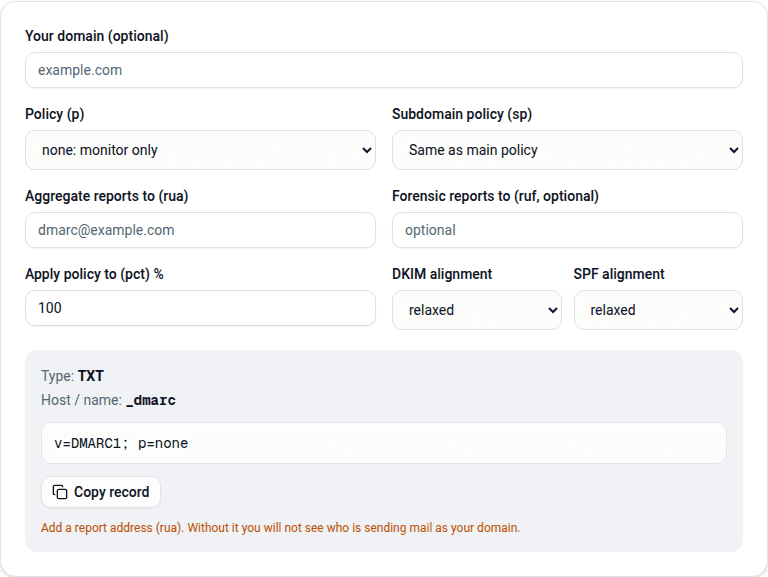
- Publish DMARC. Start with
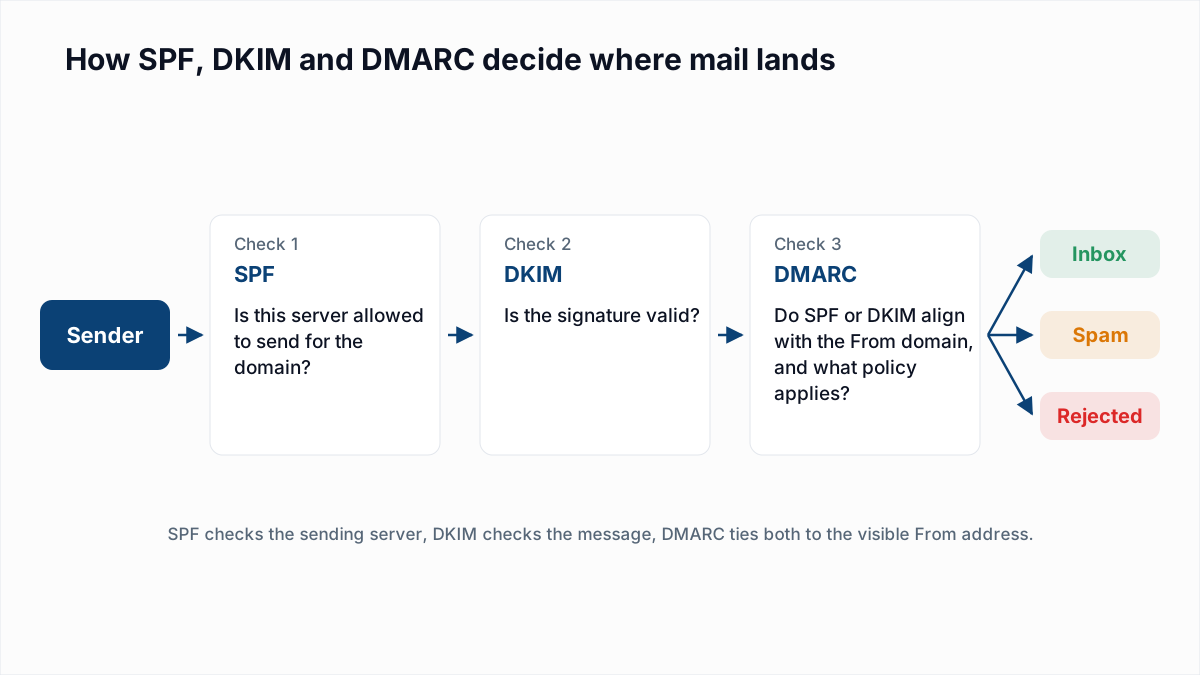
p=noneand aruaaddress so reports come back to you. The DMARC generator builds the record, and the DMARC checker confirms it is live. - Check alignment in a real message. Send a test to a Gmail address, open it, choose "Show original", and confirm SPF, DKIM and DMARC all say PASS.
- Check PTR and TLS if you run your own mail server. Hosted platforms handle both for you.
- Add one-click unsubscribe to marketing mail. Most email platforms add the headers automatically once you use their unsubscribe link; confirm the
List-Unsubscribe-Postheader appears in the raw message. - Register for Google Postmaster Tools to see the spam rate Google measures for your domain, and watch it stay well under 0.3%.
- Move DMARC towards enforcement once reports show every legitimate sender passing. Our guide to DMARC none, quarantine and reject covers the rollout. Enforcement is also the first requirement for BIMI, the sender logo shown in the inbox.
Why list hygiene is part of compliance
Authentication proves who you are. Two other signals these rules care about, complaints and bounces, come straight from the quality of your list.
- Spam complaints. Old, bought or scraped contacts are the people most likely to press "Report spam", and a 0.3% ceiling is three complaints per thousand delivered messages. Mail only people who asked to hear from you, and remove anyone who has not opened in months.
- Bounces. Microsoft names bounce management and removal of invalid addresses in its recommendations. Sending to mailboxes that do not exist tells every provider that you do not maintain your list.
This is where verification helps and where it does not. A verifier will not fix a missing DKIM record, and it cannot tell you whether someone will complain. What it does is remove the addresses that would hard bounce before you send. InboxSure checks syntax, MX records and the mailbox itself over SMTP without sending an email, and flags catch-all, role and disposable addresses. Our guide to reducing your bounce rate covers the rest of the routine, and how often to clean your list covers the timing. For a large send from start to finish, see how to send bulk email without landing in spam.
What to do if you are already being rejected
| If you see | Do this |
|---|---|
550 5.7.26 from Gmail | Read the text: set up SPF and DKIM, or fix DMARC alignment at the platform that sent it |
421 4.7.27, 4.7.30 or 4.7.40 | Add the missing SPF, DKIM or DMARC record now; these turn into blocks |
550 5.7.515 from Outlook.com | Make SPF and DKIM both pass and publish DMARC with alignment |
550 5.7.25 from Yahoo or Gmail | Fix the PTR record of the sending IP so it resolves back to the same IP |
| Everything authenticates but mail lands in spam | Check the spam rate in Postmaster Tools, cut unengaged contacts, verify the list |
If your authentication is in order and you want to keep bounces out of the picture, the bulk email verifier checks a CSV of up to 50 addresses on the free plan and up to 10,000 per list on Pro, at a flat $49 a month with no credits.
Frequently asked questions
Related reading
Ready to clean your email list?
Upload a CSV or XLSX and get every address marked deliverable, risky, undeliverable or unknown, with the reason. Free for lists of up to 50, no card. Nothing is sent to your contacts.