Gmail 550 5.7.26 Error: Unauthenticated Sender and How to Fix It
550 5.7.26 is Gmail refusing your message because it could not confirm that you are allowed to send as your domain. Either neither SPF nor DKIM passed, or one passed but not for the domain in your From address, so DMARC failed. The fix is on the sending side: add the sending service to your SPF record, turn on DKIM signing with your own domain, and make sure the From domain lines up with at least one of them. The recipient's address is fine. Do not remove it from your list.
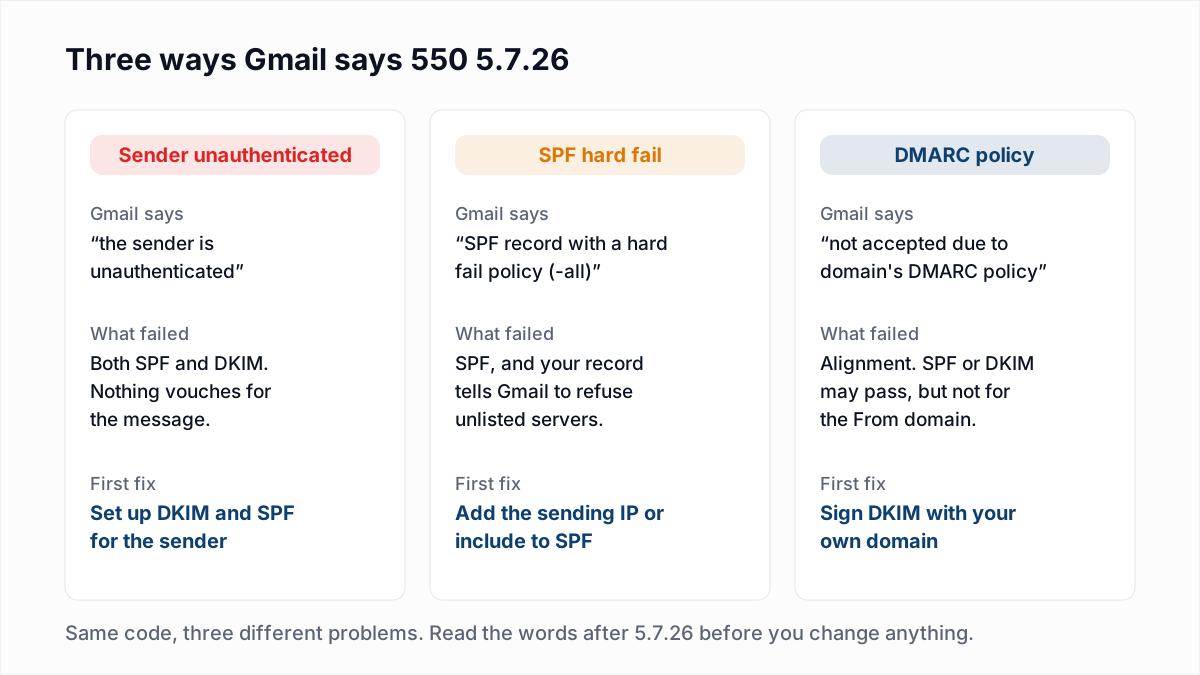
Gmail uses the same code for three different failures, and each needs a different fix. This guide shows the exact wording of each, how to tell which one you have from the message headers, and what to change for each kind of sending platform.
The exact 550 5.7.26 messages Gmail sends
These are quoted from Google's Gmail SMTP errors and codes reference. In a real bounce, the placeholders are filled with your domain and IP, and the text is split across several lines that each begin 550-5.7.26.
1. Sender is unauthenticated
550 5.7.26 This email has been blocked because the sender is unauthenticated.
Gmail requires all senders to authenticate with either SPF or DKIM.
Authentication results:
DKIM = did not pass
SPF [domain-name] with ip: [ip-address] = did not pass
Both SPF and DKIM failed. This applies to every sender, not just bulk senders: Google's Email sender guidelines require SPF or DKIM from anyone sending to a Gmail account.
2. SPF hard fail
550 5.7.26 The (E)MAIL FROM domain [domain-name] has an SPF record with a hard
fail policy (-all) but it fails to pass SPF checks with the ip: [ip-address].
To best protect our users from spam and phishing, the message has been blocked.
Your SPF record ends in -all, which tells receivers to refuse any server not listed, and the server that sent this message is not listed. How that differs from ~all is in SPF softfail vs hardfail.
3. DMARC policy
550 5.7.26 Unauthenticated email from [domain-name] is not accepted due to
domain's DMARC policy. Contact the administrator of [domain-name] domain if
this was legitimate email.
The From domain publishes a DMARC policy that asks receivers to reject failing mail (p=reject), and the message did not pass DMARC. SPF or DKIM may well have passed, but for a different domain from the one in the From header.
The temporary versions
Gmail also has softer forms of the same failures. 421 4.7.26 This email has been rate limited because it is unauthenticated means the same as variant 1, but Gmail is deferring rather than refusing for now; your server will retry, and if nothing changes it will eventually give up. 451 4.7.26 with the words "temporary DNS failures prevent authentication" means Gmail could not look up your records at that moment. That one usually clears on its own; if it keeps happening, check that your DNS host is answering reliably.
Why it happens
Almost every 550 5.7.26 traces back to one of these causes.
- No SPF or DKIM at all. A new domain, or one that only ever received mail. Common with website contact forms and small business domains set up years ago.
- A third-party sender missing from SPF. You added a new marketing platform, CRM or help desk, it sends with your domain in the envelope sender, and nobody added its
include:to your SPF record. - A platform signing DKIM with its own domain. Many platforms sign with something like
d=sendingplatform.comuntil you complete their domain authentication. DKIM passes, but it does not align with your From domain, so DMARC fails. - SPF broken by the 10-lookup limit. A record with too many includes returns a permanent error, which counts as an SPF fail. See SPF PermError: too many DNS lookups.
- Forwarding. When a message is forwarded, the forwarding server's IP is not in your SPF record, so SPF fails at Gmail. Google's own forwarding best practices say forwarded messages often fail SPF. DKIM normally survives forwarding unless the forwarder changes the message, for example by adding a footer, so DKIM is what keeps forwarded mail passing. See why email forwarding breaks SPF and DMARC.
- Sending as a domain you do not control. If a platform sends with a From address like
you@yahoo.comoryou@aol.com, it fails, because both domains publishp=rejectand the platform cannot sign for them. Use an address on your own domain.
How to diagnose it step by step
Step 1: read the bounce text
Find the full bounce message, not just the code. The variant tells you where to look: "sender is unauthenticated" means start with SPF and DKIM; "hard fail policy (-all)" means start with SPF; "DMARC policy" means start with DMARC alignment. Also note the IP address in the text. That IP is the server that actually sent the message, and it is often not the one you expected.
Step 2: read the Authentication-Results header
Send a test from the same platform to a Gmail address you control. If it arrives, open it in Gmail, choose "Show original", and find the Authentication-Results header. A message that would bounce with the DMARC variant looks like this:
Authentication-Results: mx.google.com;
       dkim=pass header.i=@mailer.platform.com header.s=s1;
       spf=pass (google.com: domain of bounce@mailer.platform.com
         designates 203.0.113.25 as permitted sender)
         smtp.mailfrom=bounce@mailer.platform.com;
       dmarc=fail (p=REJECT sp=REJECT dis=REJECT) header.from=example.com
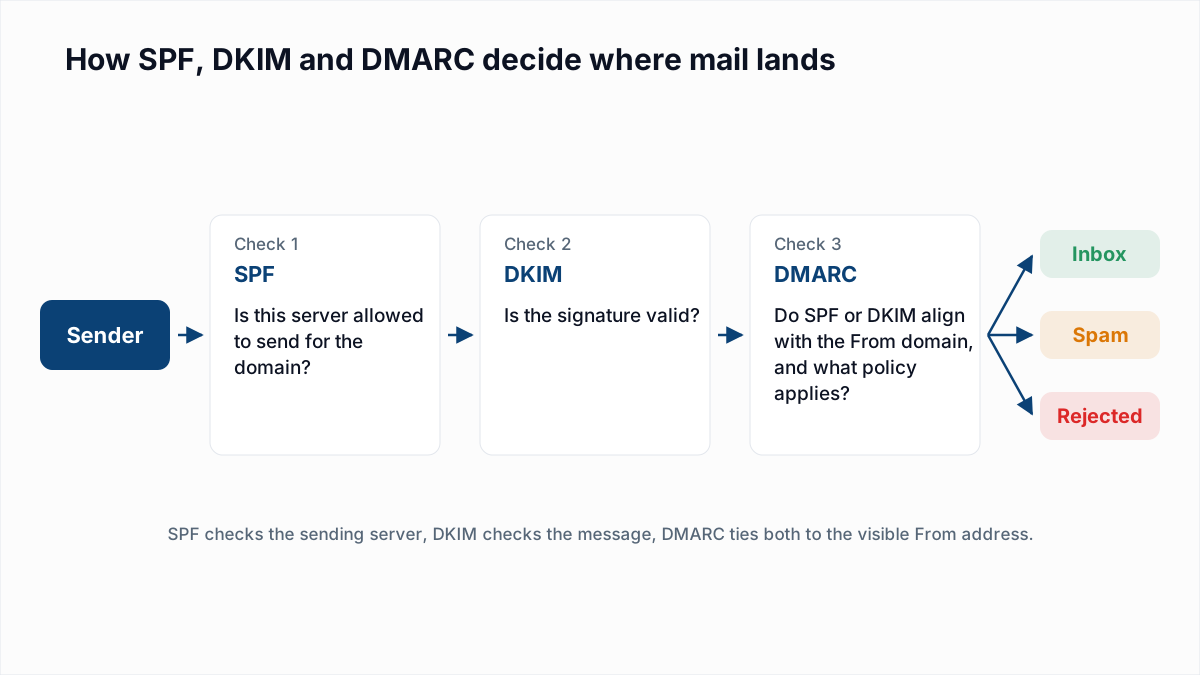
Read it in three parts. DKIM passed, but for platform.com. SPF passed, but for platform.com, the envelope sender. The visible From is example.com, which matches neither, so DMARC fails and the p=reject policy is applied. The fix is to get DKIM signed with d=example.com, or to set a custom envelope sender on a subdomain of example.com.
If the test never arrives because Gmail refuses it, send it to a non-Gmail mailbox you control. Most providers add a similar header. To have it parsed for you, paste it into the email header analyzer.
Step 3: check your SPF record
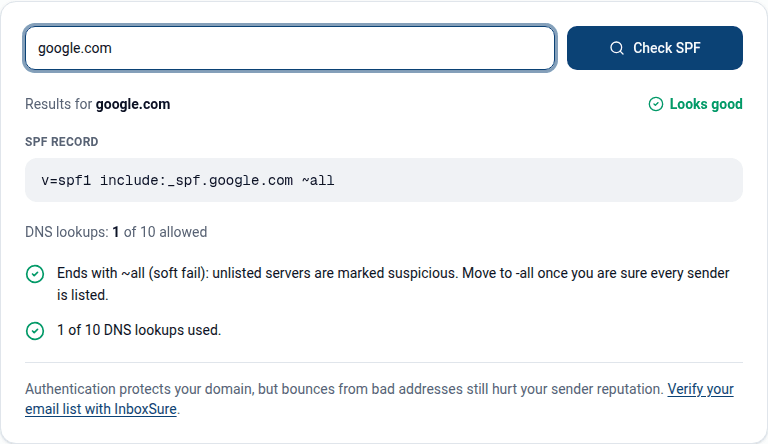
Put your domain into the SPF checker. Confirm there is exactly one SPF record, that it includes every service that sends for you, and that it uses fewer than 10 DNS lookups. If the IP from the bounce belongs to a service that is not listed, that is your answer. The SPF generator lets you build a new record that includes the missing service.
Step 4: check your DMARC record
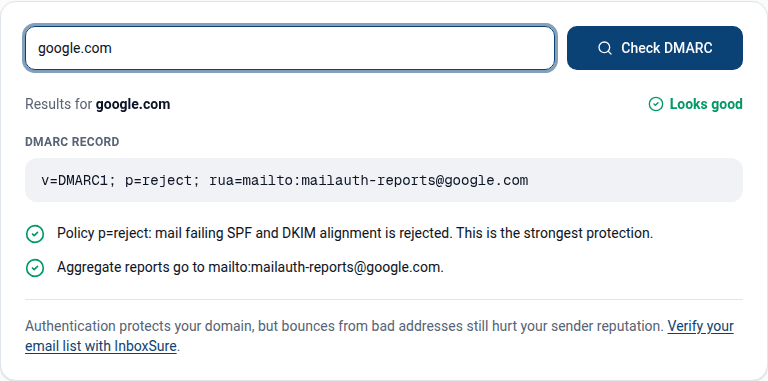
Run the domain through the DMARC checker. If the policy is p=reject or p=quarantine, any sender that is not aligned will be refused or filtered. That is DMARC working as designed, so fix the sender, not the policy. Dropping to p=none is a reasonable emergency step while you fix a legitimate platform, but go back once it is fixed.
Step 5: check DKIM at the platform
DKIM records live at a selector you cannot guess, so check in the sending platform's settings. Look for a page called domain authentication, sender authentication or DKIM, and confirm it says verified for your domain, not for the platform's.
How to fix it, by sending platform
| Where the mail comes from | What to fix |
|---|---|
| Google Workspace or Microsoft 365 mailbox | Add the provider's SPF include (include:_spf.google.com or include:spf.protection.outlook.com) and turn on DKIM in the admin console. Neither signs with your own domain until you turn it on. |
| Email marketing or newsletter platform | Complete its domain authentication: add the DKIM CNAMEs it gives you, and set a custom return-path if offered. Then send from your own domain, never a free mailbox. |
| CRM, help desk, billing or scheduling tool | Same as above. These are the senders most often forgotten in SPF and DKIM because they were set up by another team. |
| Transactional service (API or SMTP relay) | Verify the sending domain in the service and publish its DKIM records. |
| Your own server, or a website form using the host's mail function | Add the server IP to SPF with ip4:, set up DKIM signing on the server, and give the IP a PTR record. Or route the mail through a transactional service. |
| Cold email tool sending through your mailbox | Authentication comes from the mailbox provider. Fix SPF and DKIM there; the tool usually needs nothing. |
| Forwarded or mailing-list mail | Make sure the original sender signs with DKIM. If you run the forwarder, avoid changing the message body or subject. |
A typical SPF fix looks like this. Before, the record covers only the mailbox provider:
v=spf1 include:_spf.google.com -allAfter, it also covers the newsletter platform that was failing:
v=spf1 include:_spf.google.com include:mail.newsletterplatform.example -allUse the exact include your platform documents. DNS changes usually take effect within the record's TTL, and then you can resend. For the full picture of how the three standards fit together, see SPF, DKIM and DMARC explained.
550 5.7.26 compared with 550 5.7.1 and 550 5.1.1
| Code | What it is about | Who fixes it | Remove the address? |
|---|---|---|---|
| 550 5.7.26 | Your domain's authentication failed at Gmail | You, in DNS and your sending platform | No |
| 550 5.7.1 | Policy or reputation block, often your IP | You, by fixing reputation or contacting the provider | No |
| 550 5.1.1 | The mailbox does not exist | Nobody; the address is dead | Yes |
The 5.7.x codes are about you, and 5.1.1 is about the recipient. We cover the other two in why emails bounce from Outlook with 550 5.7.1 and 550 5.1.1 explained. Gmail's own 5.7.1 variants are in Gmail 550 5.7.1 explained. If you send in volume, also check the rest of the Gmail, Yahoo and Outlook sender requirements: Microsoft's equivalent rejection is 550 5.7.515. Its DMARC rejection is 550 5.7.509.
Will email verification fix 550 5.7.26?
No. This error is about your domain, not the recipient. Every address that bounced with 5.7.26 may be a perfectly good mailbox, and running the list through a verifier, ours included, will not change the result. Do not delete those contacts. Fix SPF, DKIM and alignment, then resend.
Where verification does matter is what happens next. Once authentication is fixed, Gmail judges you on how your mail behaves, and sending to mailboxes that do not exist is one of the clearest bad signals. InboxSure checks each address over SMTP without sending an email and sorts it into Deliverable, Risky, Undeliverable or Unknown, so the 5.1.1 bounces are gone before your first resend. Our guide to reducing bounce rate covers the rest. To test a single address, use the free email verifier.
Frequently asked questions
Related reading
Ready to clean your email list?
Upload a CSV or XLSX and get every address marked deliverable, risky, undeliverable or unknown, with the reason. Free for lists of up to 50, no card. Nothing is sent to your contacts.