Why Email Forwarding Breaks SPF and DMARC (and How ARC Helps)
Email forwarding is when a server that received a message for one address sends it on, unchanged, to another address: an alumni alias, a .forward file, a "forward all mail to" rule or a mailing list. The message arrives at its final mailbox from a server the original sender has never heard of, and the SPF, DKIM and DMARC checks run again from scratch there. One of them breaks every time, one usually survives, and which is which decides whether your mail is delivered.
Why does SPF fail after forwarding?
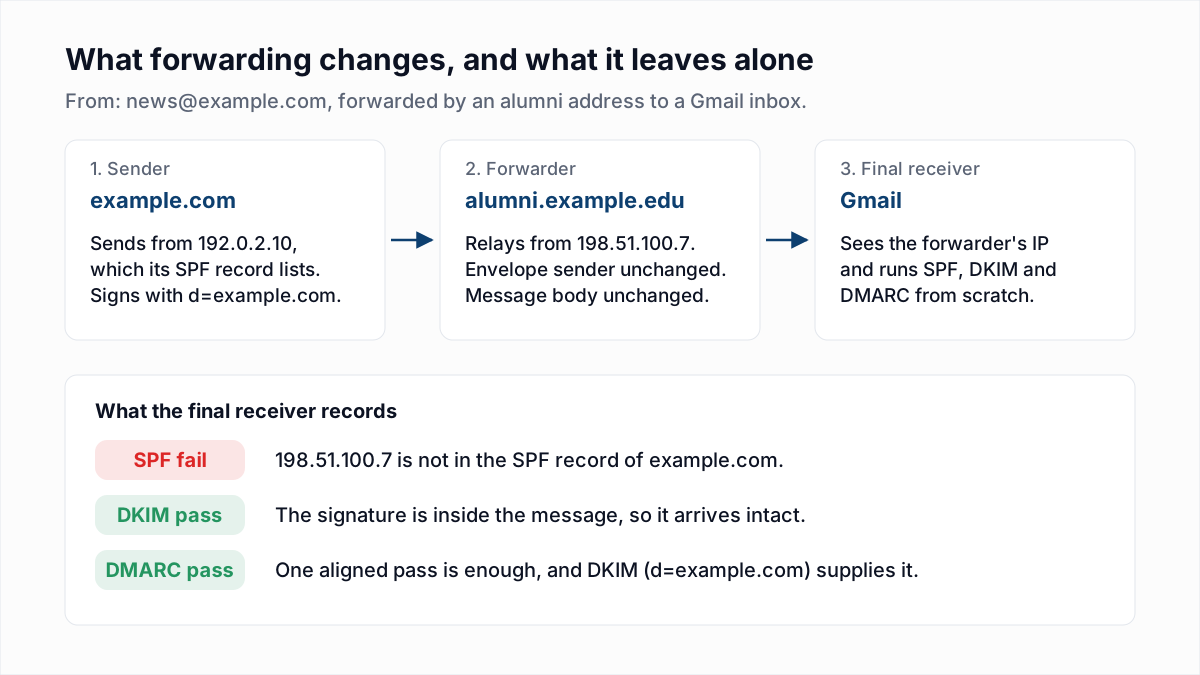
SPF fails after forwarding because the forwarder sends the message from its own IP address while keeping the original envelope sender. The final receiver looks up the SPF record of the envelope sender's domain, and the forwarder's IP is not in it.
SPF checks one thing: is the connecting IP listed by the domain in the envelope sender (the Return-Path)? On the first hop the answer is yes. On the second hop the domain is the same and the IP is the forwarder's. An illustrative header written by the final receiver:
Authentication-Results: mx.google.com;
  spf=softfail (domain of transitioning news@example.com does not
    designate 198.51.100.7 as permitted sender)
    smtp.mailfrom=news@example.com;
  dkim=pass header.i=@example.com header.s=s1;
  dmarc=pass (p=REJECT) header.from=example.com
Nothing in your SPF record fixes this. You cannot list every server your recipients might forward through, and Google's best practices for forwarding email to Gmail say plainly that "forwarded messages often fail SPF authentication."
Does DKIM survive email forwarding?
DKIM survives email forwarding as long as the forwarder does not change the signed headers or the body, because the DKIM signature is a header inside the message and is verified against a public key in the sender's DNS, not against an IP address.
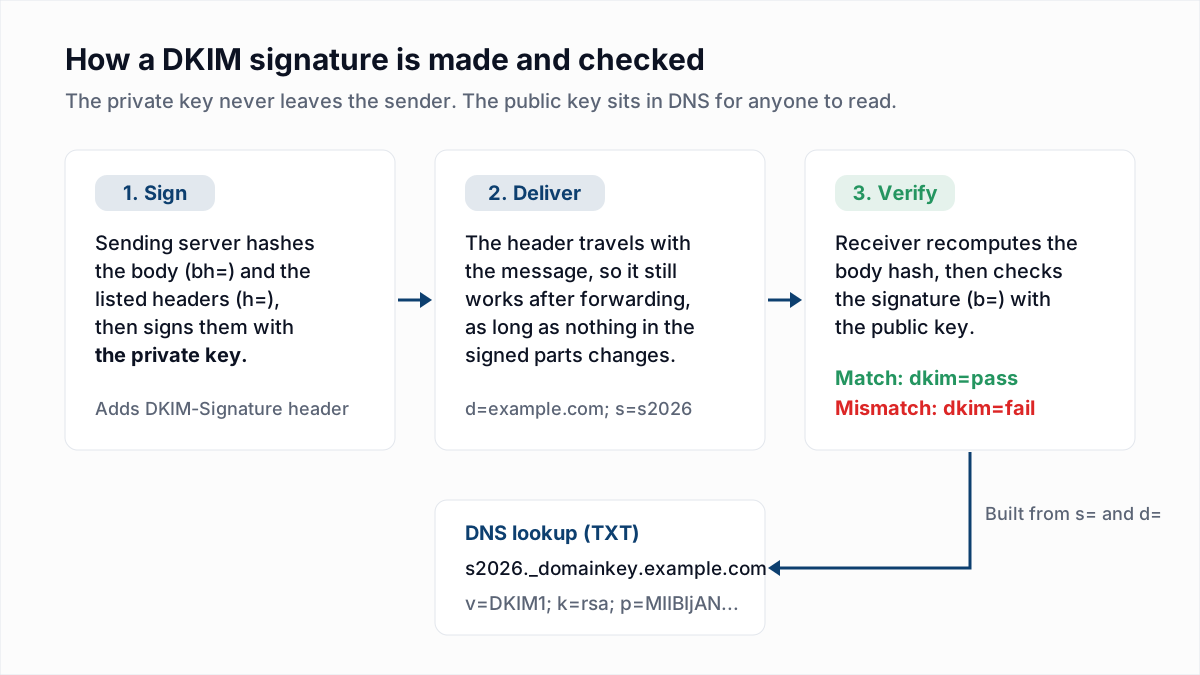
DKIM breaks when the message is edited in transit. Google's forwarding page lists the edits that do it: modifying the Subject, changing the body or re-encoding it, changing MIME boundaries, and altering signed headers such as To, Cc, Date and Message-ID. Mailing lists are the usual cause, because they add a [list-name] tag to the subject and an unsubscribe footer to the body. Security gateways that rewrite links or strip attachments do the same. Our DKIM guide covers the body hash did not verify error this produces.
What does DMARC do with a forwarded message?
DMARC passes a forwarded message if either SPF or DKIM passes with a domain that matches the From header, so a forwarded message with an intact, aligned DKIM signature passes DMARC even though SPF failed. If DKIM is missing, unaligned or broken, DMARC fails.
When DMARC fails, the receiver applies your policy: nothing at p=none, spam folder at quarantine, rejection at reject. The scenarios below assume the sender publishes a DMARC record.
| Scenario | SPF at the final receiver | DKIM at the final receiver | DMARC result |
|---|---|---|---|
| Direct send, DKIM signed with the From domain | Pass, aligned | Pass, aligned | Pass |
| Plain forward, message unchanged | Fail: forwarder's IP is not in the sender's record | Pass, aligned | Pass, through DKIM |
| Forward with SRS, message unchanged | Pass for the forwarder's domain, not aligned | Pass, aligned | Pass, through DKIM |
| Plain forward, sender relied on SPF alone | Fail | None, or signed by another domain | Fail: the sender's policy applies |
| Mailing list adds a footer, keeps the original From | Pass for the list's domain, not aligned | Fail: body changed | Fail, unless the receiver accepts the list's ARC seal |
| Mailing list rewrites From to its own domain and re-signs | Pass, aligned with the list | Pass, aligned with the list | Pass, judged against the list's domain |
What is SRS (Sender Rewriting Scheme)?
SRS, the Sender Rewriting Scheme, is a way for a forwarder to replace the envelope sender with an address at its own domain, so that SPF is checked against the forwarder's SPF record and passes. A rewritten address looks like SRS0=HHH=TT=example.com=news@forwarder.example.
SRS fixes SPF and nothing else. The domain that now passes SPF is the forwarder's, not the one in your From header, so the pass is not aligned and does not count for DMARC. SRS stops receivers that reject on SPF failure alone and keeps bounces flowing back through the forwarder. Google recommends it in other words: "Change the envelope sender to reference your forwarding domain."
What is ARC in email?
ARC, the Authenticated Received Chain, is a set of three headers that a forwarder adds to record the SPF, DKIM and DMARC results it saw before passing the message on, signed so the next receiver can verify who recorded them. ARC is defined in RFC 8617, published in July 2019 with Experimental status, not as an Internet standard.
ARC does not make a failing message pass. It hands the final receiver evidence: "this passed DMARC when it reached me, and here is my signature." The receiver then decides whether it trusts that forwarder.
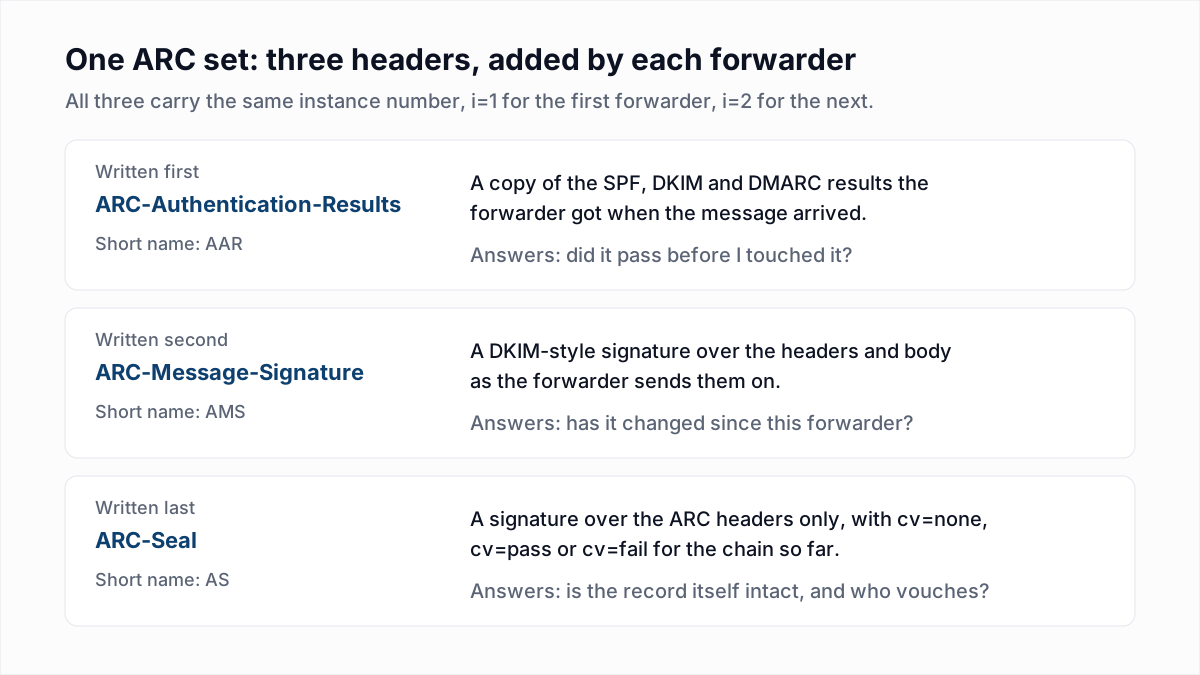
Here is an illustrative ARC set, constructed for this article and not taken from a real message. Signatures are shortened.
ARC-Seal: i=1; a=rsa-sha256; t=1794552000; cv=none;
    d=forwarder.example; s=arc2026; b=Qm9nVXNTaWc...
ARC-Message-Signature: i=1; a=rsa-sha256; c=relaxed/relaxed;
    d=forwarder.example; s=arc2026; t=1794552000;
    h=from:to:subject:date:message-id:dkim-signature;
    bh=47DEQpj8HBSa...; b=kT4xVm0yUGw...
ARC-Authentication-Results: i=1; mx.forwarder.example;
    spf=pass smtp.mailfrom=bounce.example.com;
    dkim=pass header.d=example.com header.s=s1;
dmarc=pass header.from=example.com- i=1 is the instance number. The first forwarder writes 1, the next writes 2, up to a limit of 50.
- ARC-Authentication-Results is the forwarder's own verdict on arrival. Here everything passed.
- ARC-Message-Signature works like a DKIM signature over the message as the forwarder sent it, footer included.
d=is the forwarder's domain. - ARC-Seal signs the ARC headers themselves. Its
cv=tag is the chain validation status:noneon the first set, because there was no earlier chain,passwhen the earlier sets verified, andfailwhen they did not. RFC 8617 treats a failed chain the same as no chain.
Which mailbox providers evaluate ARC?
Google and Microsoft both document that they read ARC headers, as of November 2026, and neither treats an ARC pass as an automatic pass for the message.
- Google. Google's ARC email authentication page says ARC "reduces the possibility that forwarded messages will fail email authentication." The forwarding page adds that Gmail "doesn't automatically authenticate forwarded messages that previously passed authentication" and "does its own authentication check." Google's email sender guidelines used to tell forwarding services, mailing lists and inbound gateways to "add ARC headers to outgoing email": that sentence is in the copy archived on 1 June 2025. When we read the live page on 13 November 2026 it was gone, and the page sends forwarders to the forwarding best practices.
- Microsoft 365. Microsoft's Configure trusted ARC sealers documentation lets an admin list the
d=domains of services it trusts. After that, "Microsoft 365 uses the original email authentication information that the ARC sealer provides." An override shows asarc=passwithoda=1, andcompauth=pass reason=130. Microsoft notes that ARC overrides DMARC failures only, not spam filtering.
What should senders do about forwarding?
Senders should sign every message with DKIM using their own From domain, because an aligned DKIM signature is the only authentication that survives a plain forward. A sender cannot add ARC for hops that happen later, and cannot fix SPF for them.
- Turn on DKIM with your own domain at every service that sends as you. The free DKIM checker confirms the key is published.
- Keep SPF correct for direct mail with the SPF checker, and do not count on it for DMARC.
- Only then tighten the policy. Moving to
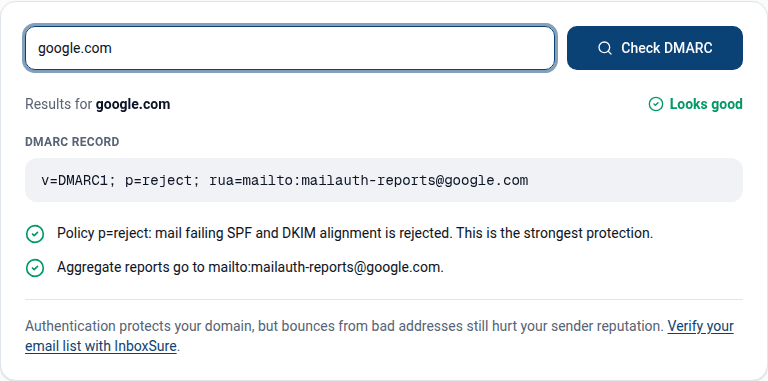
p=rejectwhile a mail stream passes DMARC on SPF alone means every forwarded copy of that stream is rejected. Check the published record with the DMARC checker.
What should forwarders and mailing lists do?
Forwarders should pass messages on without editing them, rewrite the envelope sender to their own domain, and add an ARC set. Lists that must edit the message should also rewrite the From header to the list's domain and sign with their own DKIM key.
Google's forwarding page also asks forwarders to filter spam before forwarding it, because the forwarder's IP takes the reputation hit, and to add an X-Forwarded-For: or X-Forwarded-To: header.
How do you spot forwarding in a DMARC report or in headers?
Forwarding shows in a DMARC aggregate report as a small number of messages from an IP you do not send from, with SPF failing and DKIM passing for your domain. In the headers it shows as an extra Received hop plus forwarding or ARC headers.
| Where | What you see | What it means |
|---|---|---|
| DMARC report row | Source IP of a university, ISP or mailbox provider; spf fail, dkim pass | A recipient forwards their mail. No action is needed. |
| DMARC report row | reason type forwarded, mailing_list or local_policy with a comment starting arc=pass | The receiver overrode your policy. RFC 8617 defines the ARC comment. |
| Return-Path header | Address beginning SRS0= | A forwarder rewrote the envelope sender. |
| Message headers | X-Forwarded-To, X-Forwarded-For, or ARC-Seal: i=1 from a domain that is not the sender or the receiver | The message passed through that intermediary. |
How to read DMARC reports covers the report fields, and how to read email headers covers the Received chain. To skip reading by hand, paste the header into the email header analyzer.
Where list quality fits
Authentication decides whether a receiver believes the message is from you. It does not decide whether the address exists. A forwarding alias that points at a dead mailbox still bounces, and the bounce comes from a server you never sent to. InboxSure checks syntax, MX records and the mailbox itself over SMTP without sending, and flags catch-all domains and role accounts. It cannot see whether an address forwards elsewhere: no verifier can, because the forwarding rule is private to the receiving server.
If forwarded bounces are showing up in your reports, clean the list before the next send. The bulk email verifier takes a CSV, and the Free plan covers lists of up to 50 addresses with no card.
Frequently asked questions
Related reading
Ready to clean your email list?
Upload a CSV or XLSX and get every address marked deliverable, risky, undeliverable or unknown, with the reason. Free for lists of up to 50, no card. Nothing is sent to your contacts.