Return-Path Explained: The Bounce Address Behind Every Email
The Return-Path is the address that bounces are sent to. It is the envelope sender: the address the sending server gives in the SMTP MAIL FROM command, which the receiving server then writes into a Return-Path: header when it delivers the message. It is often different from the From: address the reader sees, especially when you send through an email platform. It is also the address SPF checks, which is why a mismatched Return-Path can make DMARC fail even when SPF passes.
What is the Return-Path in email?
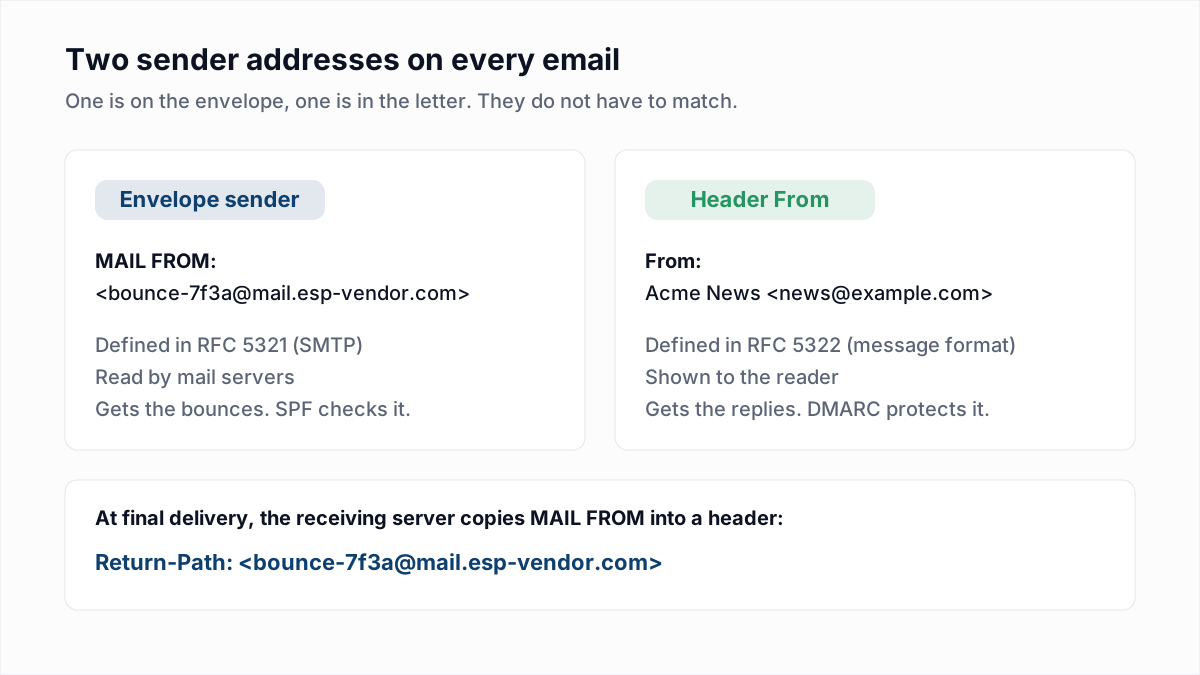
Every email carries two sender addresses. One is on the envelope, used by mail servers to move the message and to report failures. The other is inside the message, shown to the person reading it. The Return-Path is the first kind.
The same thing goes by many names, which is most of the confusion. These all mean the address given in MAIL FROM:
| Name | Where you see it |
|---|---|
| Return-Path | The header on a delivered message |
| Envelope sender, envelope from | Mail server documentation and logs |
| MAIL FROM | The SMTP command that carries it |
| Reverse-path | The term RFC 5321 itself uses |
| RFC5321.MailFrom, 5321.MailFrom, MFrom | DMARC and SPF specifications and reports |
| Bounce address | Email platform settings and help pages |
Return-Path vs From: what is the difference?
| Return-Path (envelope sender) | From (header) | |
|---|---|---|
| Defined in | RFC 5321, the SMTP standard | RFC 5322, the message format standard |
| Set by | The sending server, in MAIL FROM | The author or the sending application |
| Seen by | Mail servers; hidden unless you open the full headers | The reader, in the inbox |
| Used for | Bounces and delivery reports | Display, and replies unless Reply-To is set |
| Checked by | SPF | DMARC, which compares it with the SPF and DKIM domains |
The two are allowed to differ, and RFC 5321 section 4.4 says so directly: the return path can be different from the actual sender's mailbox "if error responses are to be delivered to a special error handling mailbox rather than to the message sender". That is exactly what an email platform does.
How the Return-Path header gets written
The sender does not add the Return-Path header. The receiving server does. Here is the part of an SMTP session that matters, with placeholder domains:
S: 220 mx.recipient.example ESMTP
C: EHLO out12.mail.esp-vendor.com
S: 250 mx.recipient.example
C: MAIL FROM:<bounce-7f3a@mail.esp-vendor.com>
S: 250 2.1.0 Sender OK
C: RCPT TO:<jane@recipient.example>
S: 250 2.1.5 Recipient OK
C: DATA
S: 354 Go ahead
C: From: Acme News <news@example.com>
C: To: jane@recipient.example
C: Subject: Your November update
C: ...
The address in MAIL FROM never appears in what the sender transmits after DATA. RFC 5321 section 4.4 covers what happens next: "When the delivery SMTP server makes the 'final delivery' of a message, it inserts a return-path line at the beginning of the mail data." It adds that this line "preserves the information in the <reverse-path> from the MAIL command".
Two details from the same section are worth knowing. A sending system should not send a message that already contains a Return-Path header, and a server making final delivery may remove any existing one before adding its own. So you cannot set the Return-Path by adding a header to your message. You set it by controlling the envelope.
A real header, annotated
This is what the top of a delivered message typically looks like when a company sends through an email platform. Domains are placeholders. For the other fields, see how to read email headers, or paste a header of your own into the email header analyzer.
Return-Path: <bounce-7f3a@mail.esp-vendor.com>
Received: from out12.mail.esp-vendor.com (out12.mail.esp-vendor.com [198.51.100.24])
        by mx.recipient.example with ESMTPS id a81f...
Authentication-Results: mx.recipient.example;
        spf=pass smtp.mailfrom=mail.esp-vendor.com;
        dkim=pass header.d=example.com;
        dmarc=pass header.from=example.com
From: Acme News <news@example.com>
Reply-To: support@example.com
To: jane@recipient.example
Subject: Your November update- Return-Path is the platform's bounce address, not the company's. Bounces go to the platform, which records them against the right contact.
- smtp.mailfrom in Authentication-Results is the Return-Path domain. SPF passed for
mail.esp-vendor.com, not forexample.com. - header.from is the domain the reader sees. DMARC passed here only because the DKIM signature uses
d=example.com. - Reply-To is a third address, for human replies. It has nothing to do with bounces.
Why bounces go to the Return-Path
Because the standard says so. RFC 5321 requires a server that accepted a message and then cannot deliver it to send an "undeliverable mail" notification "to the originator of the undeliverable mail (as indicated by the reverse-path)". The From header is not consulted. This separation is useful: a newsletter can show a friendly From address while thousands of bounce reports go to a mailbox built to process them.
Many rejections happen during the SMTP session itself, as a 5xx reply to the sending server, so no separate bounce email is generated. The Return-Path matters for the failures that occur after a server has accepted the message. For reading either kind, see the bounce code reference. The bounce email itself is covered in what MAILER-DAEMON is.
VERP: a different Return-Path for every recipient
Bounce messages are inconsistent. Some do not say which address failed, and a forwarded message can bounce from an address that is not on your list at all. Variable envelope return paths, described by D. J. Bernstein in 1997, solve this by encoding the recipient into the envelope sender, so that each recipient sees a different one. A message to jane@recipient.example might be sent with:
MAIL FROM:<bounce-jane=recipient.example@mail.esp-vendor.com>Any bounce that comes back to that address identifies the recipient from the address alone, whatever the bounce text says. Modern platforms usually encode an opaque ID instead of the readable address, which is why Return-Paths often look like bounce-7f3a9c21@....
The null Return-Path: what <> means
Some messages have an empty envelope sender, written MAIL FROM:<> and recorded as Return-Path: <>. This is deliberate. RFC 5321 section 4.5.5 lists the notifications that are sent with a null reverse-path: non-delivery notifications, other delivery status notifications, and message disposition notifications such as read receipts. Many auto-replies follow the same convention.
The reason is loop prevention. If a bounce had a real Return-Path and itself bounced, two servers could send failure notices to each other indefinitely. With an empty Return-Path there is nowhere to send a bounce of a bounce. The same section says automated systems should not reply to messages with a null reverse-path.
SPF checks the Return-Path, not the From
This is the part with real consequences. RFC 7208, the SPF standard, defines two identities to check: the HELO name and the MAIL FROM address. The From header is not one of them. When the receiving server evaluates SPF, it looks up the SPF record of the Return-Path domain and asks whether the connecting IP is allowed. When the Return-Path is null, the RFC says to use postmaster@ plus the HELO name instead.
So if your Return-Path is on your email platform's domain, SPF is checking the platform's record. The SPF record on your own domain is not consulted for that message. SPF will pass, but it has proven something about the platform, not about you.
DMARC closes that gap with alignment. RFC 7489 section 3.1.2 only counts an SPF pass if the Return-Path domain matches the From domain. RFC 9989, which replaced RFC 7489 in May 2026, keeps the rule in section 4.4.2 (see what DMARC is):
- Relaxed (the default,
aspf=r): the two must share the same organisational domain. A Return-Path atbounce.example.comaligns with a From atexample.com. - Strict (
aspf=s): the domains must match exactly.bounce.example.comdoes not align withexample.com.
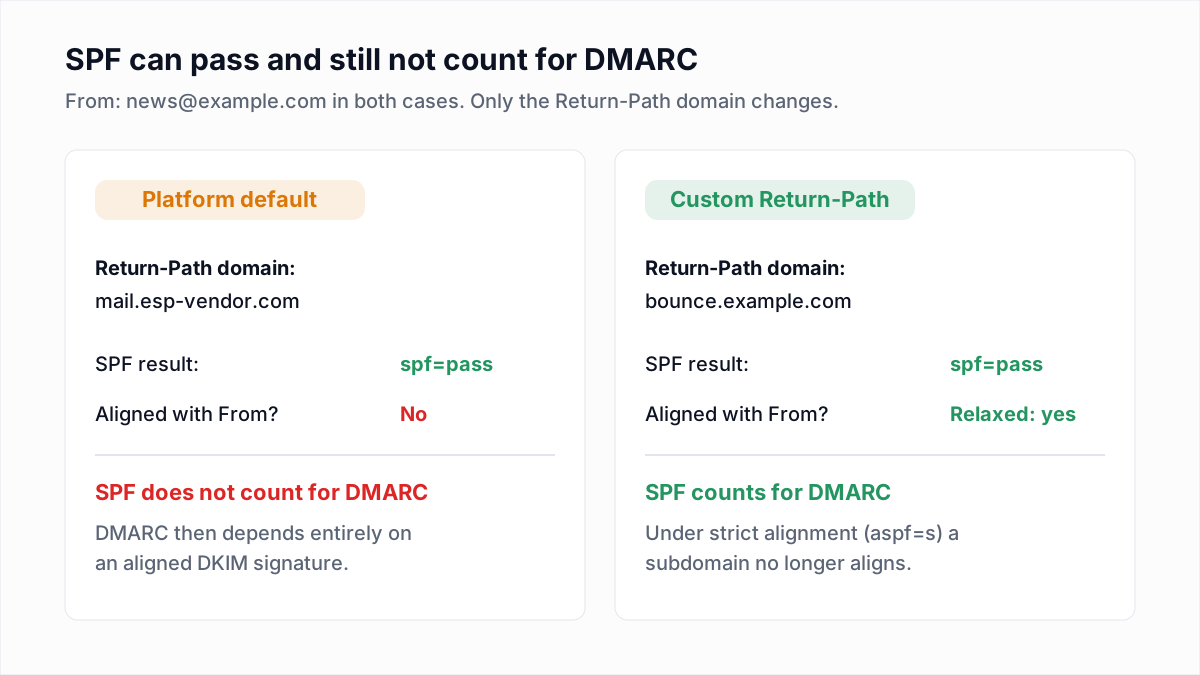
DMARC needs one aligned pass, from SPF or from DKIM. With a platform-default Return-Path, SPF cannot supply it, so everything rests on an aligned DKIM signature. If that is missing too, the message fails DMARC, and Gmail may reject it with 550 5.7.26. Our guides to SPF, DKIM and DMARC and DKIM cover the full picture, including a worked example of one message through all three checks.
How to set a custom Return-Path
A custom Return-Path (also called a custom bounce domain or custom MAIL FROM domain) replaces the platform's domain in the envelope with a subdomain of yours, such as bounce.example.com. Bounces still reach the platform, because the subdomain points at it in DNS. Most email platforms offer this, though the name of the setting and the plan it comes with vary.
The general steps are the same everywhere:
- Pick a subdomain used for nothing else, for example
bounceorem. Do not use your root domain, since it would need to hand its mail handling to the platform. - Add the DNS records the platform gives you. Commonly this is one CNAME, which lets the platform serve both the SPF record and the bounce-receiving MX for the subdomain:
Some platforms ask for an MX record and an SPF TXT record on the subdomain instead. Use exactly what yours specifies.bounce.example.com. CNAME <target your platform gives you> - Verify the domain in the platform and enable the custom Return-Path for sending.
- Send yourself a test and open the headers.
Return-Pathshould now show your subdomain, and Authentication-Results should showspf=passwithsmtp.mailfromon your domain.
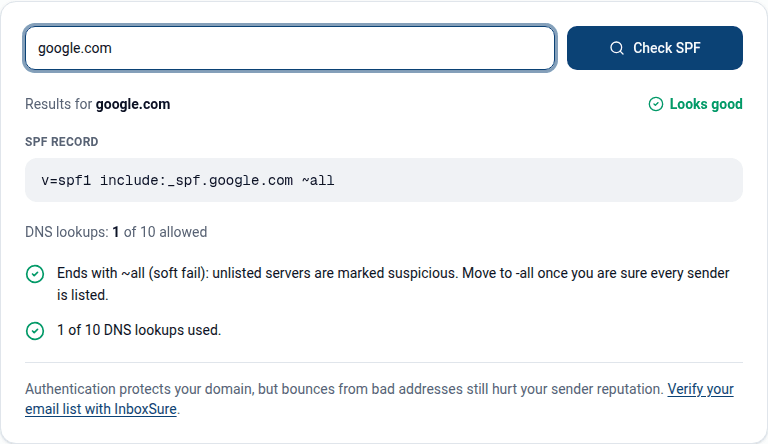
You can confirm the SPF record resolves for the new subdomain with the free SPF checker. Enter the subdomain, not the root domain, because that is the name receivers will look up.
It is not strictly required, since an aligned DKIM signature is enough for DMARC. It gives you a second aligned pass for when a DKIM signature breaks in transit.
How to see the Return-Path in Gmail and Outlook
- Gmail (web): open the message, click the three-dot More menu next to Reply, and choose Show original. Google's help page covers other mail clients too. The Return-Path is near the top of the raw text, and the summary table above it shows the SPF, DKIM and DMARC results.
- Outlook on the web and new Outlook: open the message, choose More actions, then View, then View message details.
- Classic Outlook for Windows: double-click the message to open it in its own window, then File, Properties, and read the Internet headers box. Microsoft documents both routes here.
Common Return-Path problems
| Symptom | Cause | Fix |
|---|---|---|
spf=pass but dmarc=fail | The Return-Path is on the platform's domain, so SPF is not aligned, and DKIM is missing or signed with the platform's domain | Set up DKIM on your own domain first, then add a custom Return-Path |
| DMARC fails only after switching to strict alignment | aspf=s requires an exact match, and the Return-Path is on a subdomain | Return to relaxed alignment. Strict SPF alignment rarely suits third-party sending |
| You never see bounces, and dead addresses stay on the list | The Return-Path points at a mailbox nobody reads, or at a domain with no working MX | Point it at something that processes bounces. Check the domain with the MX lookup |
spf=fail on mail that was forwarded | The forwarder kept your Return-Path but sent from its own IP, which your SPF record does not list | Nothing on your side fixes SPF here. Sign with DKIM, which survives forwarding |
Return-Path begins with SRS0= | A forwarder rewrote the envelope sender to its own domain (Sender Rewriting Scheme) so that SPF passes for the forwarded copy | Expected. SPF now passes for the forwarder but is not aligned with your From |
On the forwarding rows: the Sender Rewriting Scheme turns news@example.com into something like SRS0=HHH=TT=example.com=news@forwarder.example. Either way, forwarding is the main reason DKIM, not SPF, should be the check you rely on for DMARC. More in why email forwarding breaks SPF and DMARC.
The Return-Path in email verification
A verifier's mailbox check uses an envelope sender too. To ask a mail server whether an address exists, the verifier opens an SMTP session, gives its own MAIL FROM, names the address in RCPT TO, reads the reply and disconnects before DATA. No message is created, so no Return-Path header is ever written, but the receiving server still judges the sender at that step.
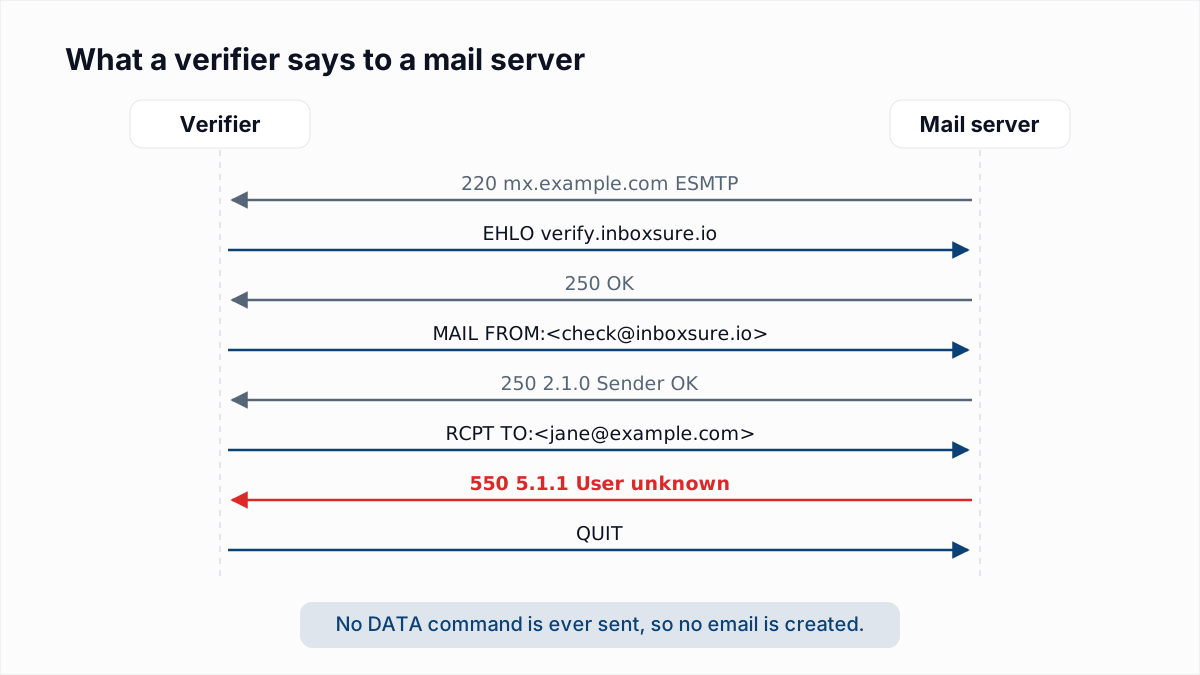
In InboxSure's 4 November 2026 research, that is where two large providers stopped us. Yahoo and AOL answered our MAIL FROM with 550 5.7.25 Forward-confirmed reverse DNS failed. Outlook.com and Hotmail answered it with 550 5.7.1 Unfortunately, messages from [IP] weren't sent..., citing block list S3140. In both cases the refusal was about our sending IP and came before any recipient was named, so it says nothing about the mailbox. InboxSure reports those addresses as Unknown, not Undeliverable.
A working Return-Path makes sure you hear about bounces after they happen. Verifying a list first means fewer of them happen. You can check a single address with the free email verifier, which runs syntax, MX and mailbox checks without sending anything.
Frequently asked questions
Related reading
Ready to clean your email list?
Upload a CSV or XLSX and get every address marked deliverable, risky, undeliverable or unknown, with the reason. Free for lists of up to 50, no card. Nothing is sent to your contacts.