What Is DMARC? How It Works, Record Syntax and Setup
DMARC stands for Domain-based Message Authentication, Reporting and Conformance. DMARC is a DNS record in which a domain owner tells receiving mail servers how to treat mail that uses the domain in the From header but cannot be tied to it by SPF or DKIM. The shortest useful record is one line:
v=DMARC1; p=none; rua=mailto:dmarc-reports@example.comDMARC was first specified in RFC 7489 in March 2015. In May 2026 the IETF published RFC 9989, the revision known for years as DMARCbis, which obsoletes RFC 7489 and moves DMARC onto the Standards Track. Records written for RFC 7489 still start with v=DMARC1 and still work, so this guide uses the RFC 7489 tags that almost every published record contains and notes where RFC 9989 differs.
What does DMARC add to SPF and DKIM?
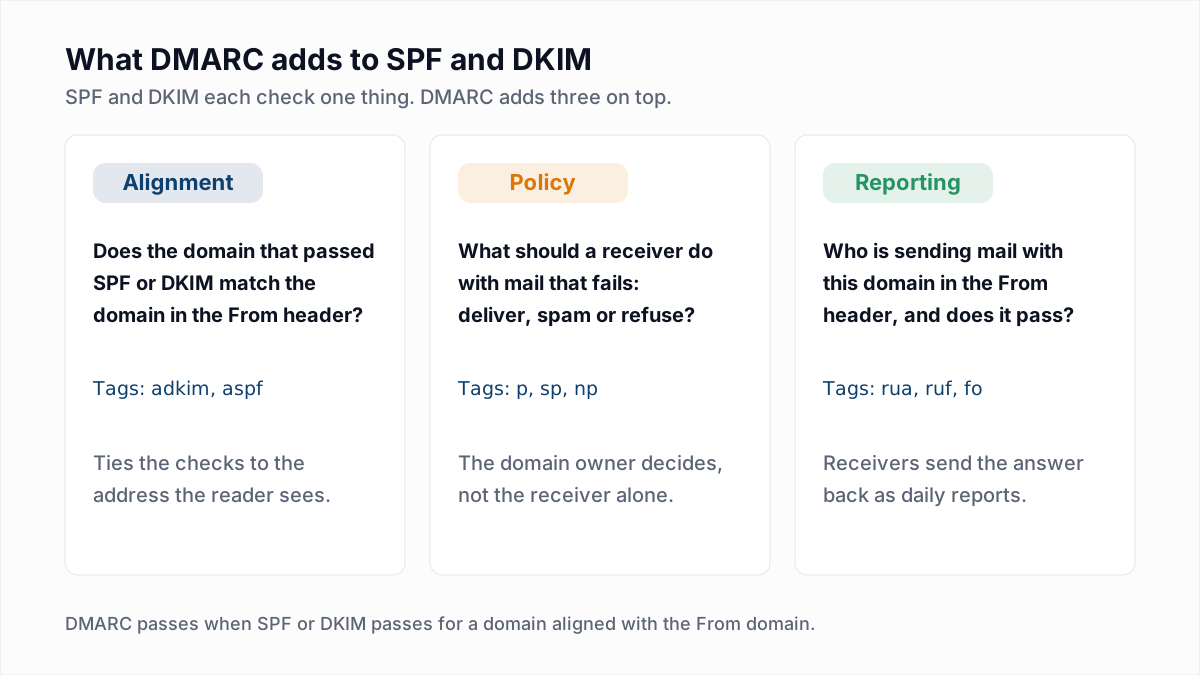
DMARC adds three things that SPF and DKIM lack: alignment with the visible From address, a published policy for mail that fails, and reports sent back to the domain owner.
- Alignment. SPF checks the envelope sender and DKIM checks the signing domain. Neither looks at the From header a person reads. DMARC requires that the domain which passed SPF or DKIM matches the From domain.
- Policy. The
ptag asks receivers to deliver, quarantine or reject failing mail. The three values have their own guide: DMARC none, quarantine and reject. - Reporting. The
ruatag gives receivers an address for daily summaries of every source that sent mail as the domain. See how to read DMARC reports.
How does DMARC work when a message arrives?
DMARC works by having the receiving server look up the From domain's record, compare the SPF and DKIM results against that domain, and then apply the published policy if neither result lines up.
- The receiving server reads the domain in the From header.
- The server queries DNS for a TXT record at
_dmarc.plus that domain. - The server runs SPF and DKIM as usual.
- The server checks alignment. DMARC passes if SPF passed for a domain aligned with the From domain, or a DKIM signature verified for an aligned domain. One aligned pass is enough.
- If neither is aligned, the message fails DMARC and the receiver applies
p. Either way, the result is counted for the next aggregate report.
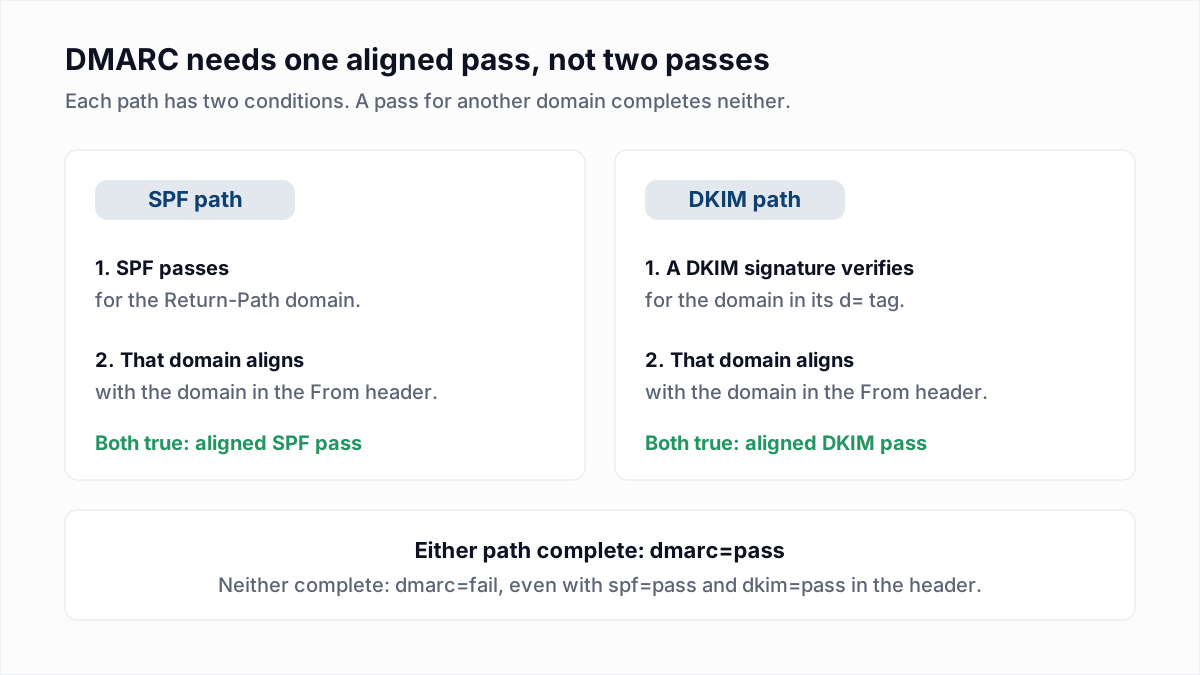
Step 4 is where most real failures happen, usually because an email platform signs with its own domain. Relaxed and strict alignment, and every failure pattern, are covered in DMARC fail: causes and fixes.
Where is the DMARC record published?
A DMARC record is published as a DNS TXT record at the host name _dmarc under the domain used in the From header, for example _dmarc.example.com. The record is never placed on the root of the domain, where SPF lives.
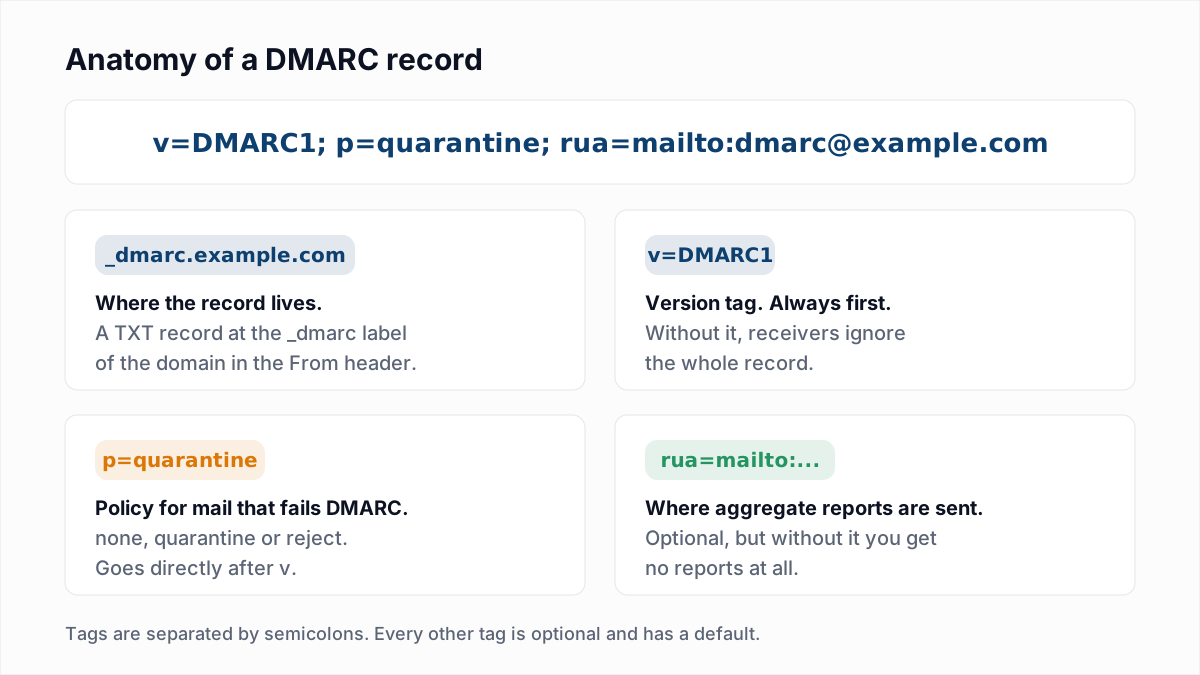
Subdomains do not need their own record. Under RFC 7489 section 6.6.3, a receiver that finds nothing at _dmarc.news.example.com falls back to the record at the organisational domain, _dmarc.example.com. The same section says that if a lookup returns more than one DMARC record, DMARC is not applied to the message at all. RFC 9989 replaces the fallback with a "DNS Tree Walk" up the domain name, and notes that the two methods can occasionally reach different records.
What do the DMARC record tags mean?
A DMARC record is a list of tag=value pairs, and only v and p are required by RFC 7489. The defaults below are quoted from RFC 7489 section 6.3.
| Tag | What it sets | Default in RFC 7489 section 6.3 |
|---|---|---|
v | Version. Must be the first tag | "REQUIRED". It "MUST have the value of "DMARC1"" |
p | Policy for failing mail: none, quarantine or reject | "REQUIRED for policy records". No default |
sp | Policy for subdomains | "If absent, the policy specified by the "p" tag MUST be applied for subdomains" |
rua | Addresses for aggregate reports, comma-separated | "OPTIONAL". "If not provided, Mail Receivers MUST NOT generate aggregate feedback reports" |
ruf | Addresses for per-message failure reports | "OPTIONAL". "If not provided, Mail Receivers MUST NOT generate failure reports" |
pct | Percentage of failing mail the policy applies to, 0 to 100 | "default is 100" |
adkim | DKIM alignment mode: r relaxed or s strict | "default is "r"" |
aspf | SPF alignment mode: r relaxed or s strict | "default is "r"" |
fo | When to send failure reports: 0, 1, d or s. Ignored without ruf | "default is "0"", meaning only when SPF and DKIM both fail to give an aligned pass |
ri | Requested seconds between aggregate reports | "default is 86400", which is one day |
RFC 7489 also defines rf, the failure report format, with a default of afrf. Appendix C.5 of RFC 9989 removes pct, rf and ri, and adds np (policy for subdomains that do not exist), psd and t (a test mode that replaces part of what pct did). RFC 9989 also downgrades p from required to recommended: a record without it is treated as p=none. RFC 7489 says unknown tags must be ignored, so the old tags do no harm in a record. Mailbox providers do not publish which version each of them has implemented.
What do real DMARC records look like?
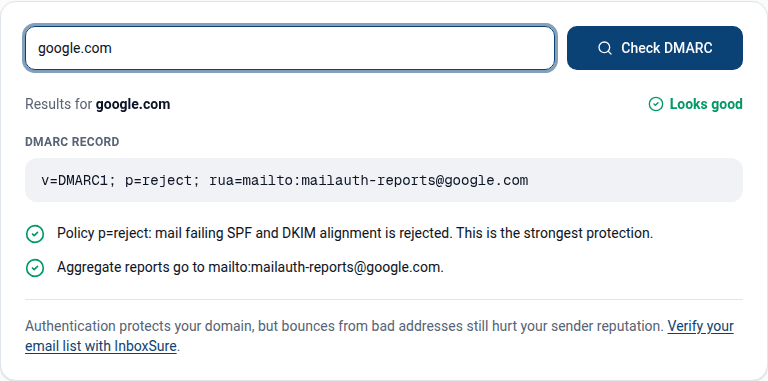
Real DMARC records are short, and most use four to six tags. These three were returned verbatim by dig +short TXT _dmarc.<domain> on 13 November 2026.
$ dig +short TXT _dmarc.google.com
"v=DMARC1; p=reject; rua=mailto:mailauth-reports@google.com"

$ dig +short TXT _dmarc.microsoft.com
"v=DMARC1; p=reject; pct=100; rua=mailto:itex-rua@microsoft.com; ruf=mailto:itex-ruf@microsoft.com; fo=1"

$ dig +short TXT _dmarc.github.com
"v=DMARC1; p=quarantine; sp=reject; pct=100; rua=mailto:dmarc@github.com; ruf=mailto:dmarc@github.com; fo=1"- google.com uses three tags and leaves everything else at the default: reject failing mail, send aggregate reports to one mailbox.
- microsoft.com spells out the default
pct=100and asks for failure reports as well.fo=1requests one whenever SPF or DKIM does not produce an aligned pass, not only when both fail. - github.com splits its policy:
p=quarantinefor github.com itself andsp=rejectfor every subdomain.
Who requires a DMARC record now?
Google, Yahoo and Microsoft all require a DMARC record from bulk senders as of November 2026, and all three accept a policy of p=none.
- Google. Google's Email sender guidelines, in force since 1 February 2024, require SPF, DKIM and DMARC from anyone who sends more than 5,000 messages a day to Gmail accounts, and add: "Your DMARC enforcement policy can be set to none." The From domain must align with the SPF or the DKIM domain.
- Yahoo. Yahoo's Sender Hub best practices tell bulk senders to "Publish a valid DMARC policy with at least p=none - DMARC must pass", and strongly recommend a
ruatag. The page gives no volume that defines a bulk sender. - Microsoft. Outlook.com, Hotmail and Live require at least
p=none, aligned with SPF or DKIM, from domains sending over 5,000 messages a day. The details and Microsoft's announcement are in our Gmail, Yahoo and Outlook sender requirements guide.
Smaller senders are not exempt in practice. A record costs nothing, and without one anybody can put your domain in a From header.
How do you set up DMARC?
You set up DMARC by getting SPF and DKIM working first, publishing one TXT record at _dmarc with p=none and a report address, and tightening the policy once the reports are clean.
- Make SPF and DKIM pass for every sender. List each service that sends as your domain and check it with the SPF checker and DKIM checker. DMARC has nothing to align with until one of them passes.
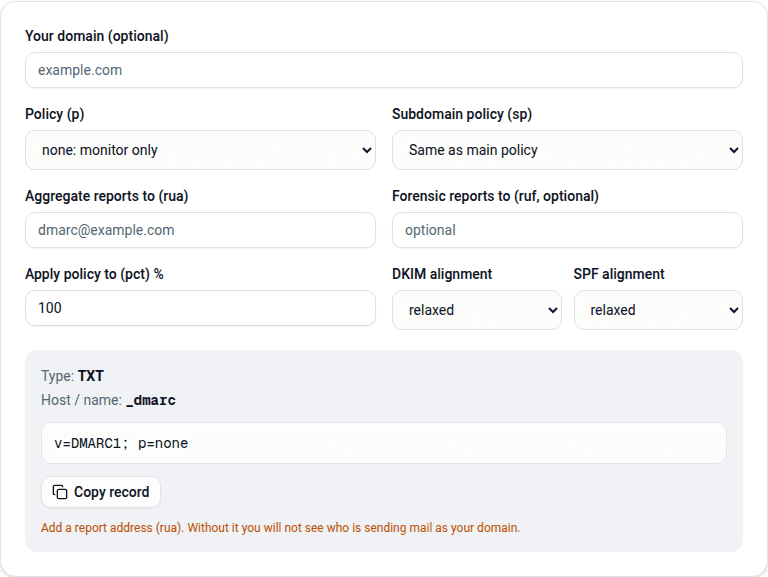
- Build the record. Create a mailbox for reports, then use the DMARC generator to produce a record such as
v=DMARC1; p=none; rua=mailto:dmarc-reports@example.com. - Publish it in DNS. Add a TXT record with the host
_dmarcand the record as the value. Most DNS panels append the domain for you. - Confirm it is live. Run
dig +short TXT _dmarc.example.comor use the DMARC checker. Exactly one record should come back. - Read the reports, then enforce. Fix each legitimate source that fails, then move to
quarantineandrejecton the timeline in the policy guide.
Platform-specific steps are in the setup guides for Google Workspace and Microsoft 365, and SPF, DKIM and DMARC explained walks one message through all three checks.
What are the common DMARC record mistakes?
The most common DMARC record mistakes are publishing the record in the wrong place, publishing two of them, and breaking the syntax so that receivers ignore it.
| Mistake | What happens | Fix |
|---|---|---|
The record is on example.com, not _dmarc.example.com | Receivers never find the record, so the domain has no DMARC | Move the record to the _dmarc host |
The host was typed as _dmarc.example.com in a panel that appends the domain | The record lands at _dmarc.example.com.example.com | Enter only _dmarc, then check with dig |
Two DMARC records exist at _dmarc | RFC 7489 section 6.6.3 says DMARC is not applied | Merge them into one record |
v=DMARC1 is not first, or is misspelt | RFC 7489 says the entire record must be ignored | Start the record with exactly v=DMARC1; |
The rua value has no mailto: | The value is not a valid URI, so no reports are sent | Write rua=mailto:address@example.com |
The rua address is on another domain that has not authorised it | Receivers withhold the reports | Add the authorisation record described in the reports guide |
The policy stays at p=none for years | Spoofed mail is still delivered; DMARC only reports it | Move to quarantine, then reject |
What does DMARC not do?
DMARC does not stop lookalike domains, forged display names or spam sent from a domain the spammer owns, and DMARC does not put mail in the inbox by itself. DMARC protects one thing: the exact domain in your From header.
DMARC also says nothing about whether the addresses you send to exist. A fully authenticated campaign sent to a stale list still bounces, and bounces damage the reputation that authentication was meant to protect. InboxSure checks each address for syntax, MX records and a live mailbox without sending a message, and returns Deliverable, Risky, Undeliverable or Unknown. The Free plan takes lists of up to 50 addresses, and Pro is a flat $49 a month for lists of up to 10,000. Start with the bulk email verifier.
Frequently asked questions
Related reading
Ready to clean your email list?
Upload a CSV or XLSX and get every address marked deliverable, risky, undeliverable or unknown, with the reason. Free for lists of up to 50, no card. Nothing is sent to your contacts.