How to Read DMARC Reports (RUA XML Explained)
A DMARC aggregate report is an XML file that a mailbox provider sends to the address in your rua tag, listing every server that sent mail claiming to be from your domain and whether that mail passed SPF, DKIM and DMARC. The file looks hostile the first time you open one, but it has only three parts, and you make every decision from about six fields.
This guide walks through a full sample report, then shows how to sort the rows into "fix this" and "ignore this". It assumes you already publish a rua address; if not, the DMARC record generator writes the record.
What is the difference between rua and ruf reports?
A rua (aggregate) report is a daily summary of counts per sending IP, with no message content. A ruf (failure, or forensic) report is a copy of details from one failed message, sent as it happens, and most large providers do not send them.
| Question | Aggregate report (rua) | Failure report (ruf) |
|---|---|---|
| What does it contain? | An aggregate report contains sending IPs, message counts and authentication results. | A failure report contains details of one failed message, which can include headers and addresses. |
| How often does it arrive? | An aggregate report usually arrives once a day from each reporting provider. | A failure report is sent soon after each failure, where it is sent at all. |
| Does Google send it? | Yes, Gmail sends aggregate reports. | No. Google says "Gmail doesn't support the ruf tag, which is used to send failure reports." |
| Does Microsoft 365 send it? | Yes, when the recipient domain's MX record points directly to Microsoft 365. | No. Microsoft says Microsoft 365 does not send forensic reports, even if a valid ruf address exists. |
The Google line is from its Set up DMARC help page and the Microsoft line from Microsoft's DMARC documentation, both read on 13 November 2026. Since the two largest receivers ignore ruf, you can leave the tag out. Everything below is about aggregate reports.
Who sends DMARC reports, and how often?
DMARC reports are sent by the mailbox providers that receive your mail, not by your own mail server, and they usually arrive once a day from each provider. Google's About DMARC reports page says "DMARC reports are usually sent once a day by email."
Each receiver sends its own file covering only the mail it saw, so twenty receiving hosts can mean twenty reports a day. Google notes that "Large organizations might get up to hundreds or even thousands of reports daily", which is why both Google and Microsoft tell you to use a dedicated mailbox. The daily rhythm comes from the ri tag, whose default in RFC 7489 is 86400 seconds. RFC 9989, which replaced RFC 7489 in May 2026, removed the ri and pct tags; what DMARC is lists what changed.
Not every receiver reports, so the files never add up to all of your mail. A report also arrives a day late by design: Tuesday's file describes Monday. The attachment name follows a fixed pattern from the RFC, receiver, your domain, then the start and end of the period as Unix timestamps. The RFC specifies an .xml or .xml.gz extension; Google's files arrive as .zip:
google.com!example.com!1794355200!1794441599.zipWhat does a DMARC aggregate report look like?
A DMARC aggregate report is one feedback element with three parts: report_metadata, policy_published, and one record per sending source. The schema is defined in Appendix C of RFC 7489.
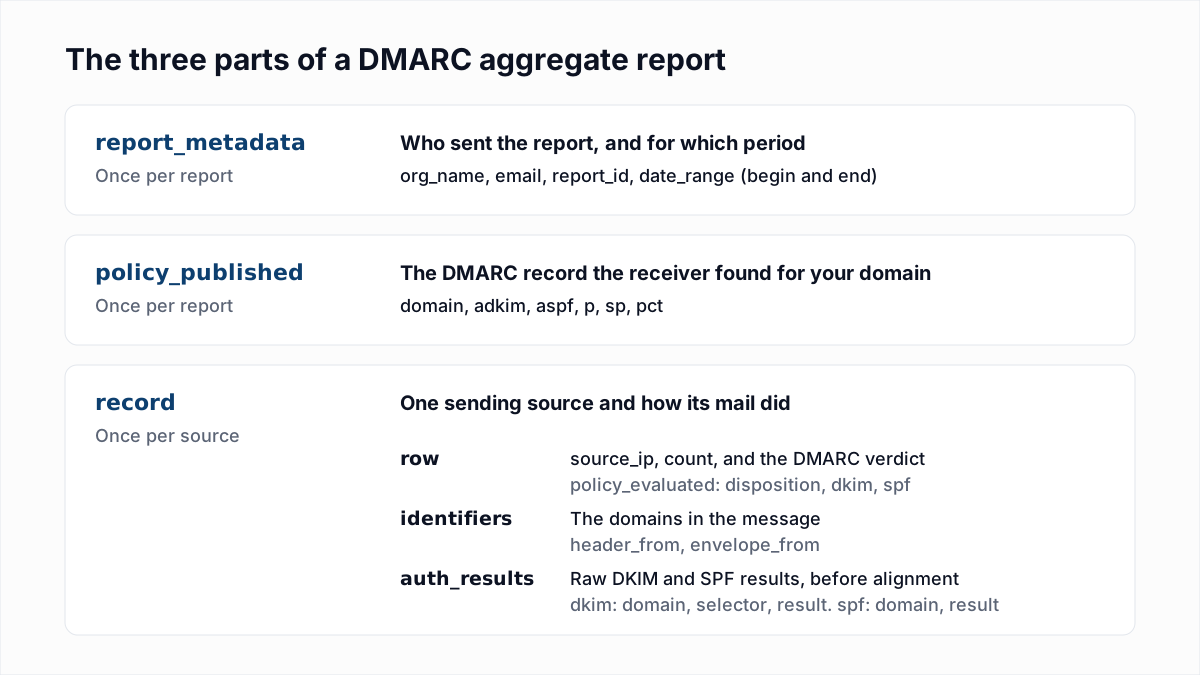
Here is a complete sample for example.com with two records. The addresses and IPs are documentation examples, and the structure follows the RFC schema.
<?xml version="1.0" encoding="UTF-8"?>
<feedback>
  <report_metadata>
    <org_name>google.com</org_name>
    <email>noreply-dmarc-support@google.com</email>
    <report_id>10431927653811428721</report_id>
    <date_range>
      <begin>1794355200</begin>
      <end>1794441599</end>
    </date_range>
  </report_metadata>

  <policy_published>
    <domain>example.com</domain>
    <adkim>r</adkim>
    <aspf>r</aspf>
    <p>none</p>
    <sp>none</sp>
    <pct>100</pct>
  </policy_published>

  <record>
    <row>
      <source_ip>198.51.100.24</source_ip>
      <count>312</count>
      <policy_evaluated>
        <disposition>none</disposition>
        <dkim>pass</dkim>
        <spf>fail</spf>
      </policy_evaluated>
    </row>
    <identifiers>
      <header_from>example.com</header_from>
      <envelope_from>bounce.esp-vendor.com</envelope_from>
    </identifiers>
    <auth_results>
      <dkim>
        <domain>example.com</domain>
        <selector>s1</selector>
        <result>pass</result>
      </dkim>
      <spf>
        <domain>bounce.esp-vendor.com</domain>
        <result>pass</result>
      </spf>
    </auth_results>
  </record>

  <record>
    <row>
      <source_ip>203.0.113.77</source_ip>
      <count>41</count>
      <policy_evaluated>
        <disposition>none</disposition>
        <dkim>fail</dkim>
        <spf>fail</spf>
      </policy_evaluated>
    </row>
    <identifiers>
      <header_from>example.com</header_from>
      <envelope_from>mail.unrelated-host.net</envelope_from>
    </identifiers>
    <auth_results>
      <spf>
        <domain>mail.unrelated-host.net</domain>
        <result>pass</result>
      </spf>
    </auth_results>
  </record>
</feedback>
report_metadata: who sent the report and for when
org_name is the receiver that wrote the report, here Google. report_id is unique per report, which helps when the same file arrives twice. date_range gives the period as Unix timestamps in UTC: 1794355200 to 1794441599 is the whole of 11 November 2026.
policy_published: the record the receiver found
This block repeats your DMARC record as the receiver read it: the domain, the alignment modes adkim and aspf (r for relaxed, s for strict), the policy p, the subdomain policy sp and pct. If Wednesday's report still shows a policy you changed on Monday, the DNS change did not take.
record: one sending source
Each record has three children: row, identifiers and auth_results. The difference between the verdict inside row and the raw results in auth_results is the key to reading the file:
- row holds
source_ip(the server that connected),count(how many messages it sent in the period) andpolicy_evaluated. - policy_evaluated, inside the row, is the DMARC verdict. Its
dkimandspfvalues mean "passed and aligned with the From domain". A message passes DMARC if either ispass.dispositionis what the receiver did:none,quarantineorreject. - identifiers gives
header_from, the domain in the visible From address, and oftenenvelope_from, the Return-Path domain. - auth_results holds the raw checks before alignment: which domain DKIM verified for (with its selector) and which domain SPF was checked against, each with its own
result.
Read the first record with that in mind. Under auth_results, SPF says pass, but for bounce.esp-vendor.com, which is not example.com. So under policy_evaluated, SPF is fail: it passed but did not align. DKIM passed for example.com itself, so it aligns, and the 312 messages pass DMARC. This is the normal, healthy shape for mail sent through an email platform.
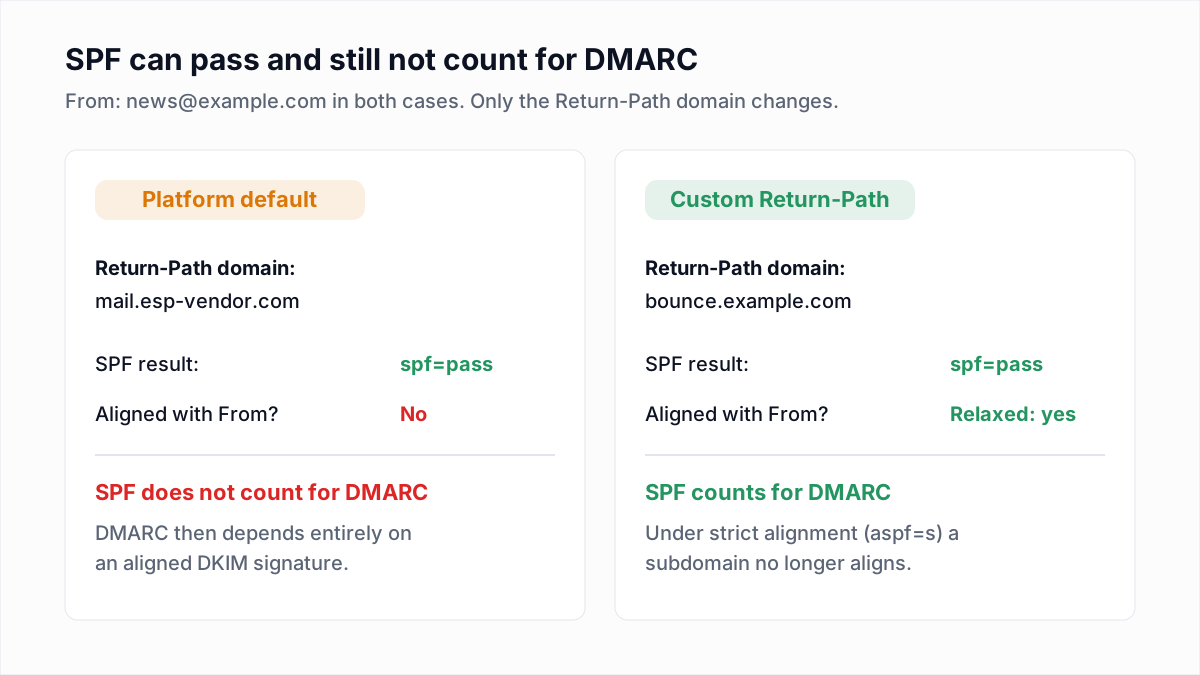
The second record fails both. There is no DKIM result at all, and SPF passed only for a domain that has nothing to do with example.com. Those 41 messages failed DMARC, and because the policy is p=none, the disposition is still none: they were delivered anyway.
A receiver that does not apply your policy to a failing message may add a reason inside policy_evaluated. The RFC allows forwarded, sampled_out, trusted_forwarder, mailing_list, local_policy and other.
How do you tell a misconfigured sender from spoofing?
A misconfigured legitimate sender is a source IP you can trace to a service you use that fails DMARC alignment. Spoofing is a source you cannot trace to anything you use, failing both checks, with domains in auth_results that are not yours.
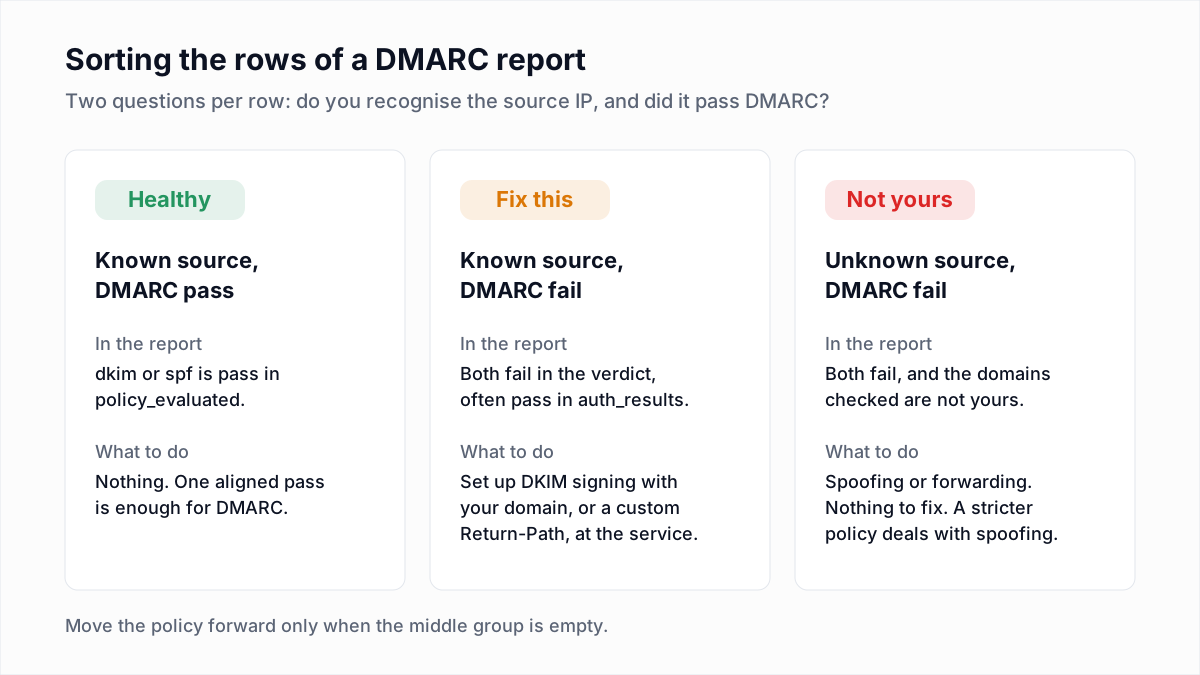
Work through each failing row in this order:
- Look up the source IP. A reverse DNS lookup (
dig -x 198.51.100.24) or a WHOIS query usually names the service behind it. - Compare it with your list of senders. Write down every tool that sends as your domain: staff mail, marketing, billing, support, website forms.
- Read the domains in auth_results. A legitimate service usually passes SPF or DKIM for its own domain. That is a setup gap, not an attack.
- Look at the count and the pattern. A known service failing every day at steady volume is misconfigured. A burst from an unknown network that appears for two days and vanishes is typical of spoofing.
- Check for forwarding. Small counts from universities, ISPs or other mailbox providers, with SPF failing, are usually messages your recipients forwarded.
When a known service fails, the fix is almost always to turn on DKIM signing with your own domain at that service. Our guide to DKIM covers how, and SPF, DKIM and DMARC explained covers alignment in full.
What do the common patterns in a DMARC report mean?
Most rows in a DMARC report match one of a few patterns, and each pattern has one meaning and one fix. In this table, "aligned" means the value under policy_evaluated and "raw" means the value under auth_results.
| What you see | What it means | Fix |
|---|---|---|
| Known IP, aligned DKIM fail, raw DKIM pass for the vendor domain | The service signs with its own domain, not yours. | Set up custom DKIM at the service so it signs with your domain. |
| Known IP, no DKIM result, raw SPF fail or softfail | The service is missing from your SPF record and does not sign. | Turn on DKIM at the service, and add its include to SPF. |
| Raw SPF result is permerror on every row | Your SPF record is broken, often by too many DNS lookups. | Repair the record; see SPF PermError: too many DNS lookups. |
| Unknown IP, both aligned results fail, domains not yours | Someone is sending as your domain, or a forwarder rewrote the envelope. | No fix on your side. A stricter policy blocks the spoofed mail. |
| header_from is a subdomain you never use | Spoofers are using a subdomain that has no mail of its own. | Set sp=reject once your real subdomains pass. |
| Disposition is none although your policy is reject, with a reason element | The receiver overrode the policy, usually for forwarding or a mailing list. | No fix is needed. The receiver made a local decision. |
When is it safe to move from p=none to quarantine?
Moving from p=none to p=quarantine is safe when every source you recognise shows an aligned DKIM or SPF pass, across reports from all your main receivers, for at least two weeks in a row.
Before you change the record, confirm four things in the reports:
- Every service on your sender list appears in the reports. A tool that sends once a month, such as invoicing, may need a full month to show up.
- Each of those sources has
passfordkimorspfunderpolicy_evaluated. - The remaining failures are sources you have looked up and decided are not yours, or small forwarding counts.
- Subdomains that send mail show up with their own
header_fromand pass too.
Then move in stages with the pct tag. RFC 9989 removed pct, but receivers that still follow RFC 7489 may honour it, and Google's rollout page linked below still uses it. After the change, a legitimate source showing quarantine in the disposition field is your signal to step back. The week-by-week schedule is in DMARC policy: none, quarantine or reject, and Google publishes its own recommended DMARC rollout. Once the policy is at quarantine or reject, BIMI becomes an option for showing your logo.
Why are no reports arriving at an address on another domain?
Reports sent to an address on a different domain arrive only if that domain publishes an authorization record at yourdomain._report._dmarc.theirdomain. Without it, receivers ignore the address, as section 7.1 of RFC 7489 requires.
Say example.com publishes rua=mailto:reports@dmarc-inbox.net. The owner of dmarc-inbox.net must add this TXT record to its own DNS:
example.com._report._dmarc.dmarc-inbox.net. TXT "v=DMARC1;"The rule stops anyone pointing a flood of reports at a stranger's mailbox. Reporting services publish a wildcard version (*._report._dmarc) for their customers. You add the record yourself when reports go to another domain you own. Subdomains of the same organizational domain do not need it.
Two simpler causes are worth ruling out first: a rua value without mailto: (Google's help page says "The email address must include mailto:"), and a mailbox that is full or rejects large attachments.
What are free ways to read DMARC reports?
The free ways to read DMARC reports are opening the XML yourself, running the open-source parsedmarc tool on your own machine, or using the free tier of a hosted DMARC service. Which one fits depends on your volume.
- Read the XML by hand. Unzip the attachment and open it in a browser. This works for a domain with two or three senders and stops working on anything bigger.
- parsedmarc. parsedmarc is an open-source parser that reads reports from a mailbox and outputs JSON or CSV. It is free, and you host and maintain it yourself.
- Postmark's free weekly digest. Postmark's DMARC tool described its free level on 13 November 2026 as "A free weekly email to help monitor & implement DMARC", limited to the top ten sources and seven days of history.
- Cloudflare DMARC Management. Cloudflare's documentation lists it as available on all plans to customers who use Cloudflare DNS.
Google recommends the hosted route outright: "We recommend using a third-party service that specializes in DMARC to receive, store, and analyze your reports." Free tiers change, so check the limits before you depend on one.
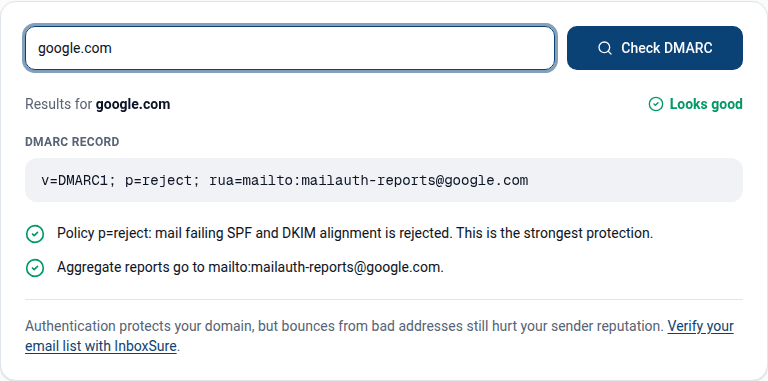
To be clear about our own product: InboxSure does not offer DMARC report monitoring. It verifies email lists, checking whether each address has a working mailbox without sending anything. What we do offer for DMARC is free and narrow: the DMARC checker reads the record a domain publishes and flags a missing rua address, and the DMARC generator builds the record. Reading the reports that come back is up to you or one of the tools above.
Frequently asked questions
Related reading
Ready to clean your email list?
Upload a CSV or XLSX and get every address marked deliverable, risky, undeliverable or unknown, with the reason. Free for lists of up to 50, no card. Nothing is sent to your contacts.