DMARC Fail: Why It Happens When SPF and DKIM Pass
The confusing version of a DMARC failure looks like this in the headers of a delivered message: SPF passed, DKIM passed, and DMARC failed anyway.
Authentication-Results: mx.receiver.example;
  spf=pass smtp.mailfrom=bounces.esp-vendor.com;
  dkim=pass header.d=esp-vendor.com;
  dmarc=fail header.from=example.com
Nothing here is contradictory. DMARC (Domain-based Message Authentication, Reporting and Conformance) is a check on the domain in the visible From header. SPF and DKIM each passed for esp-vendor.com. The From address is at example.com, and nothing vouched for that domain. This guide covers the alignment rule, the senders that trip over it, and the fix for each. For the policy tags themselves, see DMARC policy: none, quarantine and reject.
What does a message need to pass DMARC?
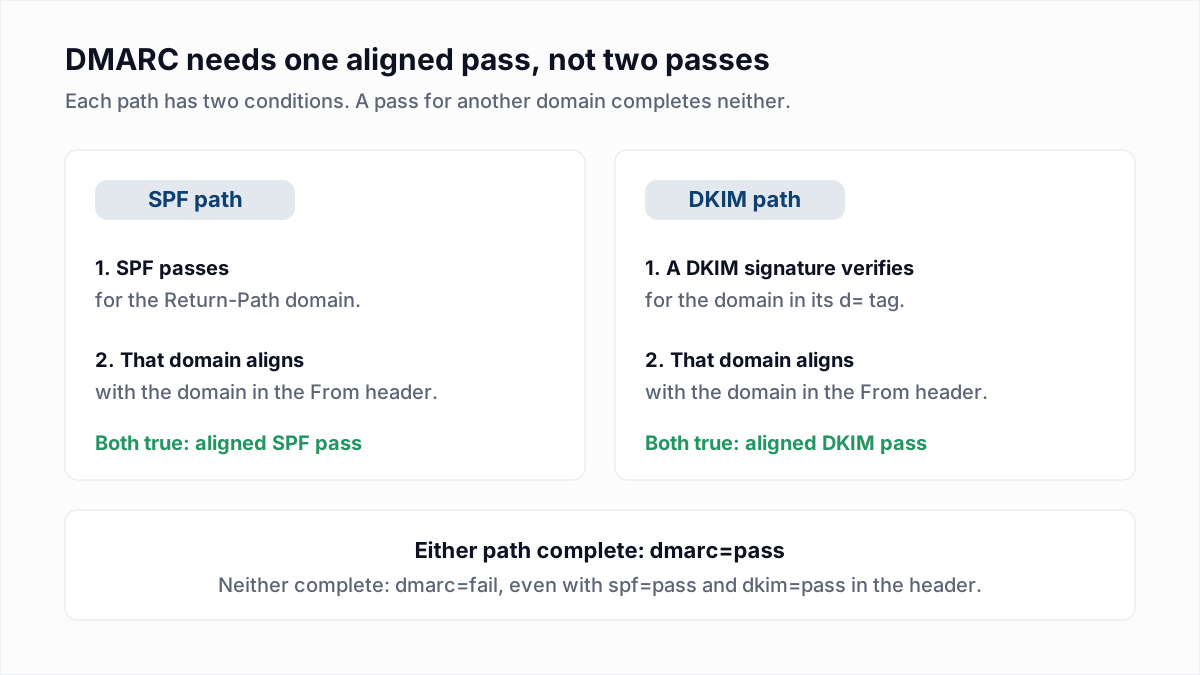
A message passes DMARC when at least one of SPF or DKIM passes for a domain that aligns with the domain in the From header. One aligned pass is enough, and two unaligned passes count for nothing.
Section 3.1 of RFC 7489 says DMARC authenticates the From domain "by requiring that it match (be aligned with) an Authenticated Identifier". There are two such identifiers:
- For SPF, the domain of the envelope sender, which you see as the Return-Path and as
smtp.mailfrom=in Authentication-Results. - For DKIM, the domain in the
d=tag of a signature that verified, shown asheader.d=.
What is DMARC alignment, relaxed versus strict?
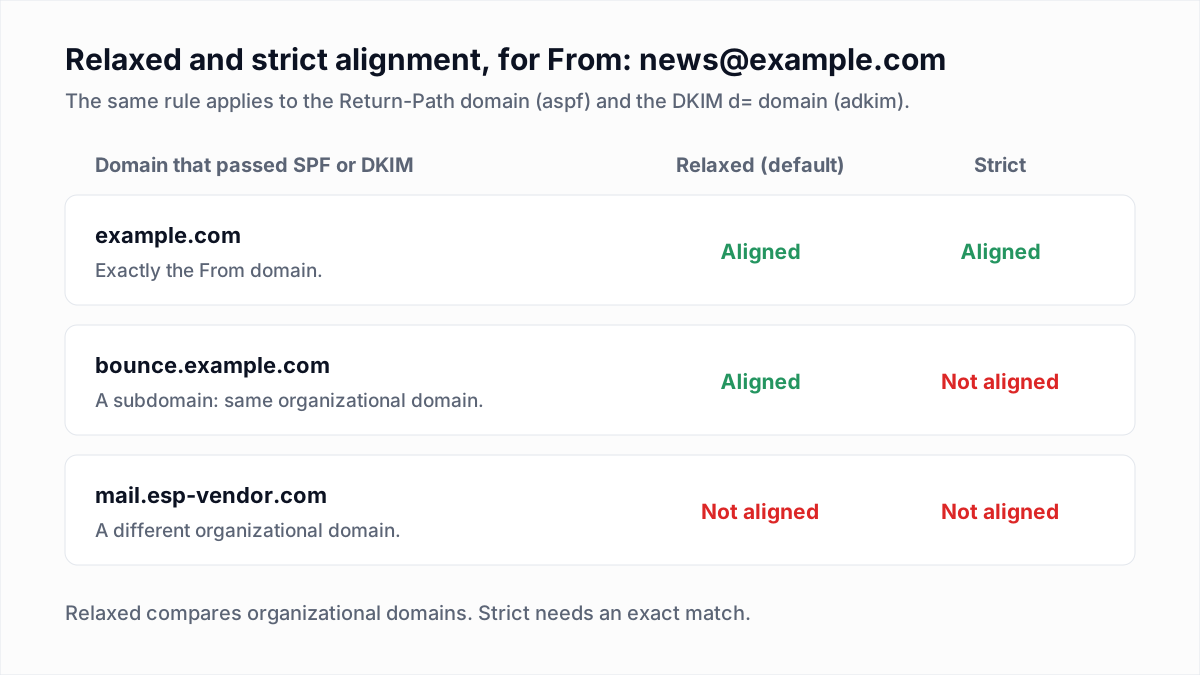
DMARC alignment is the comparison between the From domain and the domain that SPF or DKIM authenticated. In relaxed mode the two must share an organizational domain; in strict mode they must be identical.
The organizational domain is the registered domain: example.com for mail.example.com. RFC 7489 relied on a public suffix list to find it. RFC 9989, which replaced RFC 7489 in May 2026 (see what DMARC is), uses a DNS Tree Walk instead: the receiver queries _dmarc at the domain and then at each parent name above it, in no more than eight queries, and unless a psd tag says otherwise the shortest name with a valid record is the organizational domain. The mode is set per mechanism in your DMARC record with aspf for SPF and adkim for DKIM. Each takes r or s, and RFC 7489 makes r the default for both. In this table the From address is always news@example.com.
| Return-Path domain (SPF pass) | DKIM d= (signature verifies) | Relaxed (default) | Strict (aspf=s; adkim=s) |
|---|---|---|---|
example.com | example.com | Pass: both align. | Pass: both align. |
bounces.esp-vendor.com | example.com | Pass through DKIM. | Pass through DKIM. |
bounce.example.com | esp-vendor.com | Pass through SPF. | Fail: the subdomain is not an exact match. |
bounce.example.com | mail.example.com | Pass: both align. | Fail: neither is an exact match. |
bounces.esp-vendor.com | esp-vendor.com | Fail: neither is your domain. | Fail: neither is your domain. |
bounces.esp-vendor.com | No signature | Fail: SPF passes but does not align. | Fail: SPF passes but does not align. |
Alignment only counts on top of a pass. If the Return-Path is at your domain but SPF returns fail or softfail, that path is dead whatever the domains look like.
Why does DMARC fail when SPF and DKIM both pass?
DMARC fails with SPF and DKIM passing when both passes belong to a domain other than the one in the From header. Six situations account for most cases.
- A third-party sender signs with its own domain. Email platforms sign everything, and until you finish their domain authentication the signature carries their
d=. DKIM passes and does not align. For two platforms, see authenticating your domain in Mailchimp and setting up a branded sending domain in Klaviyo. - The default Return-Path belongs to the ESP. Platforms put their own bounce domain in the envelope so they can process bounces. SPF passes for that domain and does not align. Combined with cause 1, you get the header at the top of this page.
- A subdomain under strict alignment. With
aspf=s, a Return-Path ofbounce.example.comno longer aligns with a From ofexample.com. Withadkim=s, the same goes for a signature atd=mail.example.com. - Forwarding. The forwarder's IP is not in your SPF record, so SPF fails or passes for the forwarder's own domain. DMARC then depends on your DKIM signature surviving. See why email forwarding breaks SPF and DMARC.
- Mailing lists. A list that adds a footer or a subject tag breaks your signature, then re-signs and sends from its own domain. The receiver sees SPF and DKIM pass for the list and nothing aligned with your From address.
- More than one From address. RFC 7489 section 6.6.1 says messages with several From fields, or one From field holding several addresses, are typically rejected. Google's sender guidelines say From headers should include only one email address.
One more: if your DKIM signature is failing outright, alignment never comes into it. Those cases are in DKIM fail: causes and fixes.
What happens to a message that fails DMARC?
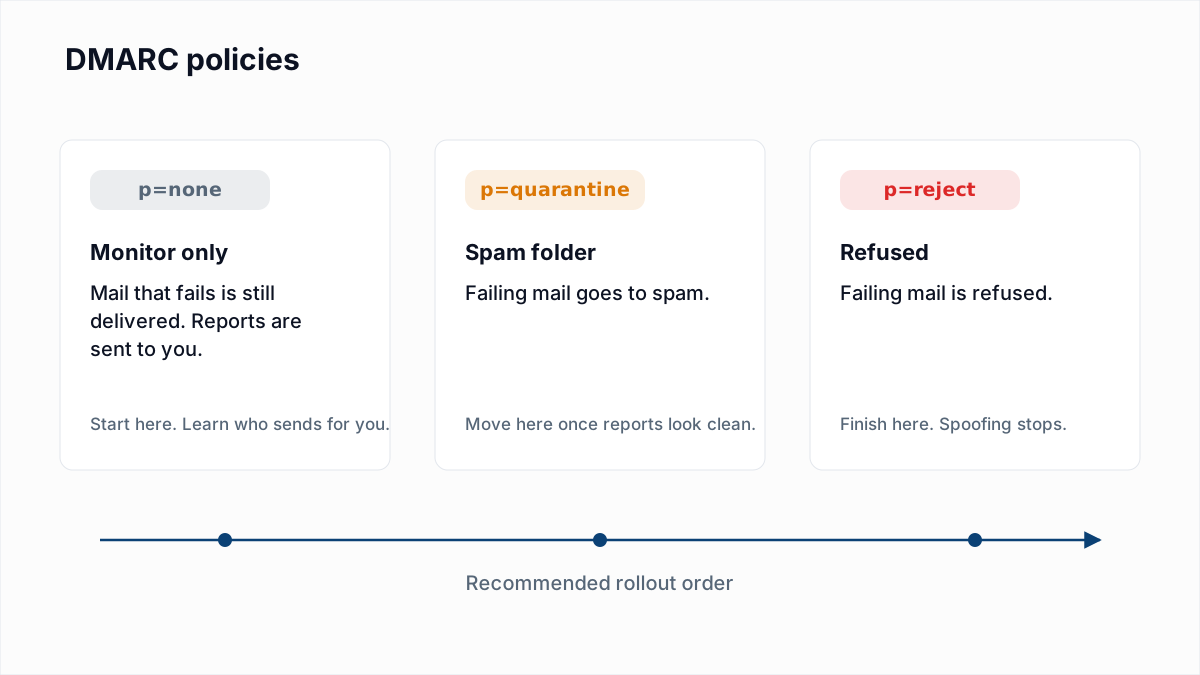
A message that fails DMARC is handled according to the policy in the From domain's DMARC record: delivered as normal under p=none, sent to spam under p=quarantine, and refused with a bounce under p=reject.
| Your policy | What the receiver does with failing mail | What you see |
|---|---|---|
p=none | No DMARC action. Other spam filtering still applies. | No bounce. dmarc=fail in headers and in aggregate reports. |
p=quarantine | Delivers to the spam or junk folder. | No bounce. Replies and opens drop for the affected sender. |
p=reject | Refuses the message during the SMTP conversation. | A bounce. Gmail: 550 5.7.26 Unauthenticated email from [domain] is not accepted due to domain's DMARC policy. Microsoft: 550 5.7.509 Access denied, sending domain [domain] does not pass DMARC verification and has a DMARC policy of reject. |
The two bounces have their own guides: 550 5.7.26 at Gmail and 550 5.7.509 at Microsoft. Microsoft's documentation is not uniform on the code: its Exchange Online error reference lists 5.7.509 with the text above, while its DMARC setup page (read 13 November 2026) describes the reject as 550 5.7.1. Match on the words "DMARC" in the bounce, not only the number.
Receivers are allowed to deviate. RFC 7489 section 6.7 says final disposition "is always a matter of local policy", and in Microsoft 365 the behaviour depends on a tenant setting called Honor DMARC record policy. A failing message can therefore be delivered despite p=reject, or filtered despite p=none.
How do you diagnose a DMARC failure from the headers?
You diagnose a DMARC failure by comparing three domains in the Authentication-Results header of one delivered copy: header.from, smtp.mailfrom and header.d.
- Send a test from the failing system to a mailbox you control and open the raw headers (how to read email headers), or paste them into the email header analyzer.
- Write down the
header.from=domain. Everything is judged against it. - Read the
spf=result andsmtp.mailfrom=. Ask two questions: did SPF pass, and is that domain the From domain or a subdomain of it? - Read each
dkim=result and itsheader.d=. Ask the same two questions. Any one signature that passes and aligns is enough. - If neither path has two yes answers, look up your record with the DMARC checker and check whether
aspf=soradkim=sis turning a subdomain into a miss. - Confirm the fix the same way: send another test and look for
dmarc=pass.
Microsoft 365 writes extra detail into the same header. Its DMARC page lists action=oreject for a failure under p=reject, action=quarantine under p=quarantine, and dmarc=bestguesspass when the From domain publishes no DMARC record at all.
How do aggregate reports show a DMARC alignment failure?
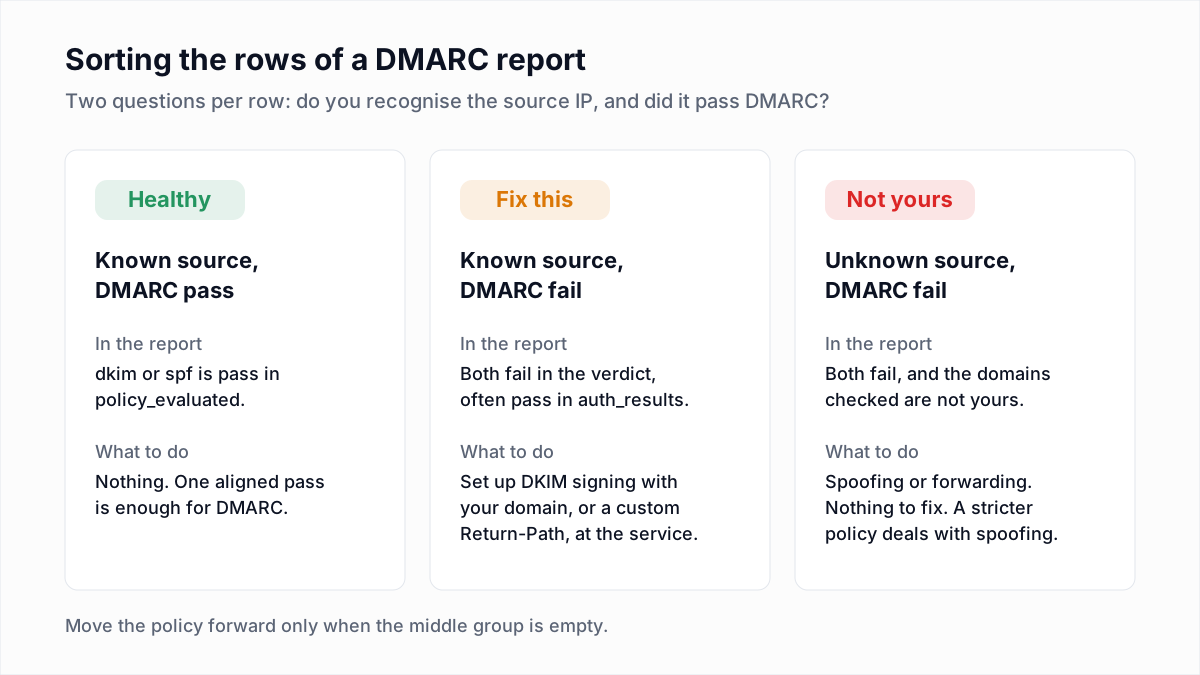
A DMARC aggregate report shows an alignment failure as a row where auth_results says pass and policy_evaluated says fail for the same mechanism. The first is the raw result; the second is the result after alignment.
Headers tell you about one message. Reports tell you about every source using your domain, including the ones you forgot, so they are how you find the helpdesk or billing tool nobody mentioned. Check the domain under auth_results: if it is a vendor's, that vendor needs domain authentication. The full walkthrough is in how to read DMARC reports.
How do you fix DMARC failures for each type of sender?
You fix a DMARC failure at the sending service, by making it sign with your domain or use a Return-Path on your domain. Editing the DMARC record itself only helps when strict alignment is the cause.
| Sender | Why it fails | Fix checklist |
|---|---|---|
| Email platform (ESP) | Signs with its own domain and uses its own bounce domain. | Complete the platform's domain authentication: publish its DKIM records under your domain, and add the custom Return-Path CNAME if offered. Send from your own domain, never a free mailbox address. |
| Google Workspace | Custom DKIM is not switched on, so the signature is for a Google domain, or SPF lacks Google. | Generate the key, publish google._domainkey and start authentication. Include _spf.google.com in SPF. Steps are in the DKIM setup guide. |
| Microsoft 365 | Until custom DKIM is enabled, mail from your domain is unsigned or signed for the onmicrosoft.com domain. Neither aligns. | Publish the two selector CNAMEs and turn on signing for the custom domain. Include spf.protection.outlook.com in SPF. |
| CRM | Sends through its own servers with your From address and its own signing domain. | If the CRM sends through your connected mailbox, fix authentication at the mailbox provider. If it sends from its own servers, add your domain in its email settings and publish the DKIM records it gives you. |
| Helpdesk | Replies go out as support@yourdomain from the vendor's servers, often set up by another team. | Verify the support address domain in the helpdesk and publish its DKIM records, or send from a dedicated subdomain such as help.example.com. |
| Any sender, strict alignment | aspf=s or adkim=s rejects subdomains. | Remove the tag to return to relaxed, or make the Return-Path and d= exactly equal to the From domain. |
| Forwarders and lists | The message was changed or re-sent after it left you. | Sign with an aligned DKIM key so plain forwards survive. Copies a list rewrites are outside your control. |
Microsoft's DMARC page suggests the subdomain route for any service that can do neither: send from a subdomain with its own DMARC record and have the service sign for that subdomain. More on that in using a sending subdomain.
What fixing DMARC does not fix
A DMARC pass confirms the message is really from your domain. It does not tell a mailbox provider that the recipients exist or want the mail, and those signals are judged separately. If the campaign that exposed the DMARC failure was also going to an old list, clean that before the resend: the InboxSure bulk email verifier checks each address over SMTP without sending and returns Deliverable, Risky, Undeliverable or Unknown. It does not check authentication, and addresses that bounced with a DMARC error are not bad addresses, so do not delete them.
Frequently asked questions
Related reading
Ready to clean your email list?
Upload a CSV or XLSX and get every address marked deliverable, risky, undeliverable or unknown, with the reason. Free for lists of up to 50, no card. Nothing is sent to your contacts.