How to Set Up a Branded Sending Domain in Klaviyo (DKIM, SPF, DMARC)
A Klaviyo branded sending domain is a subdomain of your own domain, such as send.example.com, that Klaviyo sends your email from instead of its shared domain klaviyomail.com. Klaviyo's help center also calls it a dedicated sending domain. Setting one up is how you get DKIM and SPF that align with your From address, which is what DMARC checks.
Every menu path, record type and host pattern below comes from Klaviyo's own help articles, read on 13 November 2026 and linked where they are used. For the theory, see SPF, DKIM and DMARC explained.
What is the difference between a shared and a branded sending domain in Klaviyo?
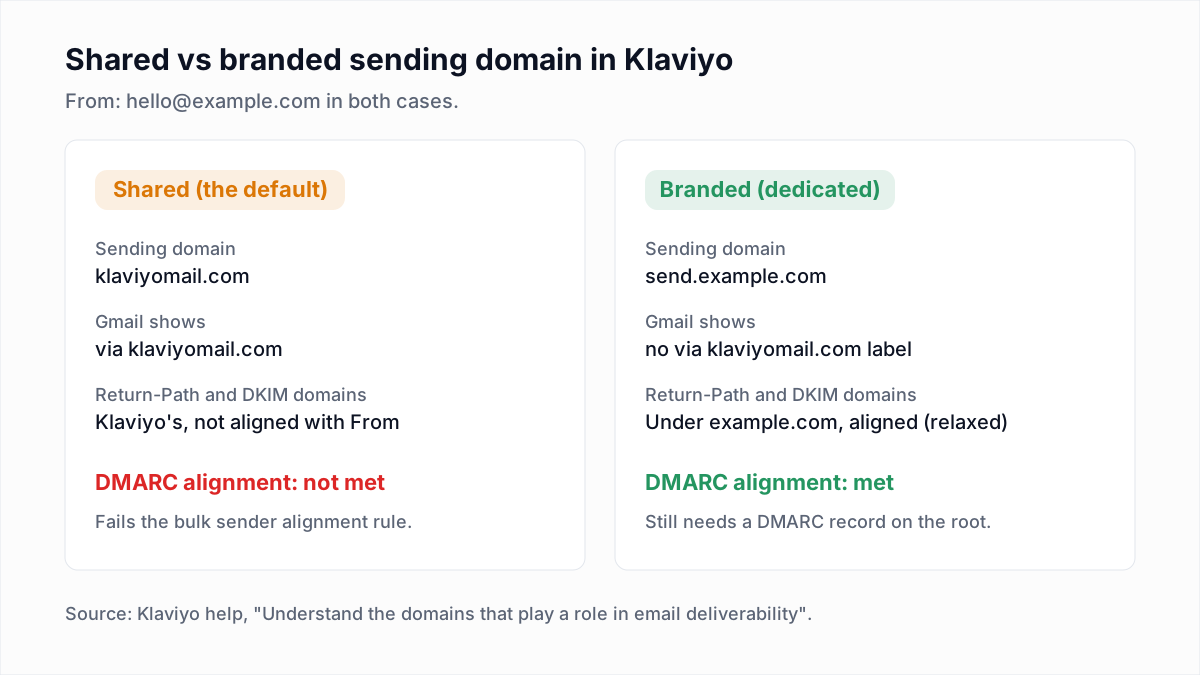
A shared sending domain belongs to Klaviyo and is used by many accounts; a branded sending domain is a subdomain of your own domain. Klaviyo's Understand the domains that play a role in email deliverability article describes the difference this way.
| Question | Shared sending domain (default) | Branded sending domain |
|---|---|---|
| Which domain sends the mail? | klaviyomail.com, on shared infrastructure | Your subdomain, for example send.example.com |
| What does Gmail show next to the sender? | "via klaviyomail.com" | No "via klaviyomail.com" message |
| Which domain signs with DKIM? | A Klaviyo-owned domain | Your domain is added as a DKIM signer alongside the shared one |
| Do the Return-Path and DKIM domains align with your From address? | No, so DMARC alignment cannot be met | Yes, when the subdomain is on the same root domain as the From address |
| What do you add to DNS? | Nothing | NS or CNAME records, plus one TXT record |
Do you need a branded sending domain in Klaviyo?
You need a branded sending domain in Klaviyo if you are a bulk sender, because bulk senders must pass DMARC with alignment and the shared domain cannot provide that. Klaviyo's domains article says bulk senders need both an aligned branded sending domain and a DMARC record.
The rule comes from the mailbox providers. Google's email sender guidelines apply the bulk requirements to senders of more than 5,000 messages a day to Gmail accounts and say the From domain "must be aligned with either the SPF domain or the DKIM domain". Klaviyo adds that all traffic counts toward that figure, including transactional email. Below the threshold a branded domain is optional, and Klaviyo says any company is eligible to create one. If your root domain already publishes DMARC at p=quarantine or p=reject, you need one at any volume: mail on the shared domain fails your own policy (see why DMARC fails).
Which subdomain should you use for Klaviyo?
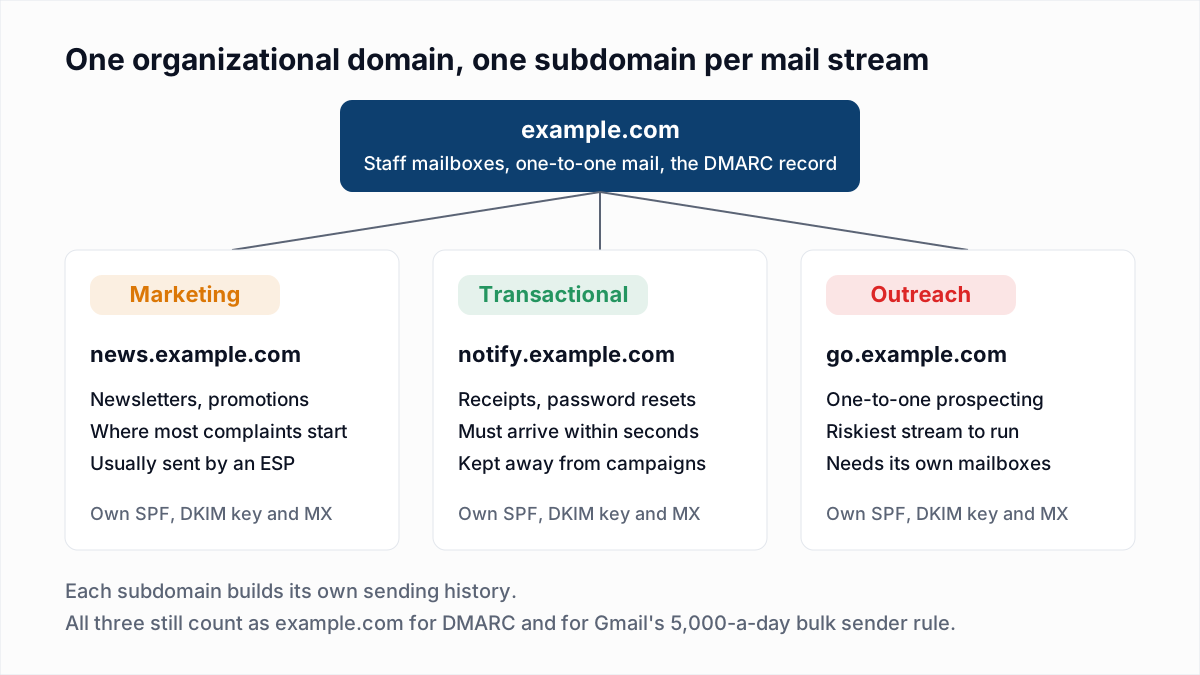
Use a subdomain that nothing else uses; Klaviyo says the most common choice is send, as in send.example.com. Its How to set up a branded sending domain article allows one active branded domain per send type and suggests a pattern:
- Marketing (campaigns and flows):
send - Transactional (order confirmations, password resets):
updates - Service (Klaviyo Helpdesk and Customer Agent replies):
support
All send types in one account must share the same root domain. Klaviyo also warns against using the sending subdomain in your From address for marketing or transactional mail, because you will not receive replies there. Keep the From address on the root domain, for example hello@example.com. Why streams are split this way is covered in email sending subdomains.
What DNS records does Klaviyo generate for a branded sending domain?
Klaviyo generates either NS records or CNAME records for the subdomain, depending on the routing type you pick, plus one TXT verification record on the root domain. Klaviyo's setup article says it "recommends the Dynamic option for best sending performance".
| Routing type | How Klaviyo describes it | Records to add |
|---|---|---|
| Dynamic | Klaviyo selects a sending provider for each message. | 4 NS records on the subdomain pointing to ns1 through ns4.klaviyo.com, and 1 TXT record on the root domain with a klaviyo-site-verification value. |
| Static | Uses one sending provider. Choose it if your DNS provider does not support NS records. | 1 CNAME for the subdomain pointing to a klaviyodns.com target, 2 DKIM CNAME records on _domainkey, and 1 TXT verification record on the root domain. |
For Static routing, the DKIM selectors depend on the send type: km1 and km2 for marketing, kt1 and kt2 for transactional, ks1 and ks2 for service. Klaviyo's DNS records article says older static domains that use kl1 and kl2 keep working and need no action. Dynamic routing has no selector-named CNAMEs, because the NS records hand the whole subdomain to Klaviyo. Copy each Name/Host, Type and Value exactly as shown; the values are specific to your account.
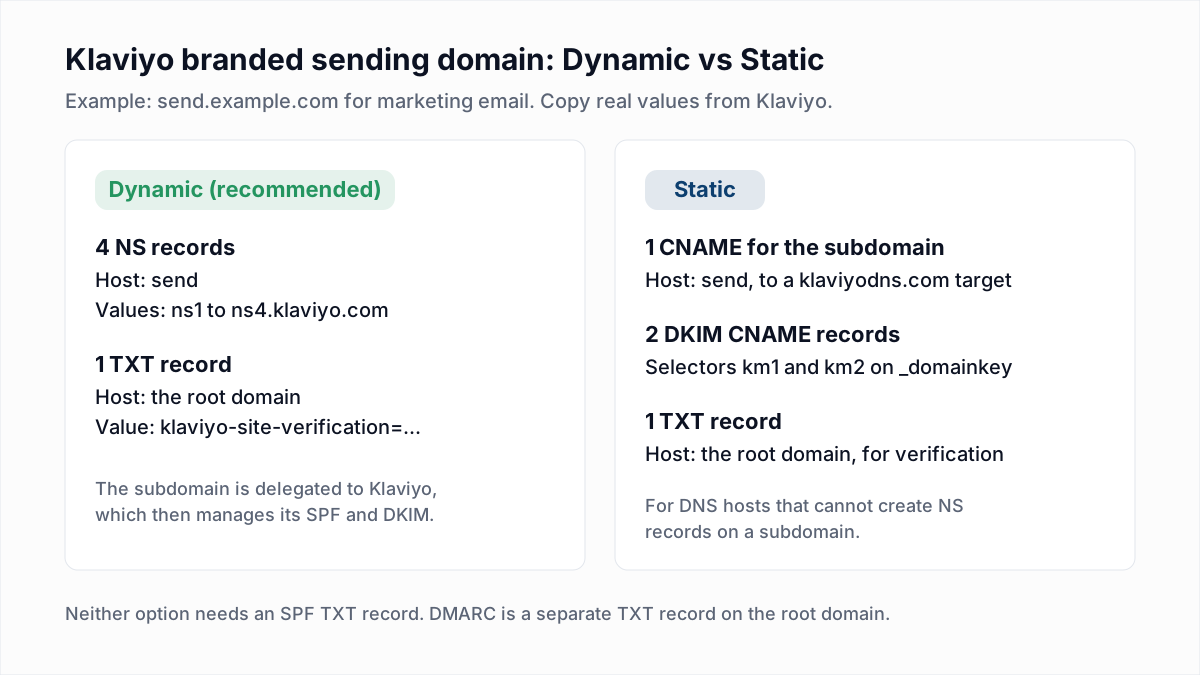
One side effect of Dynamic routing: Klaviyo says records added at your DNS provider for the delegated subdomain will not take effect, apart from the NS records themselves. Any extra TXT record for that subdomain has to be added inside Klaviyo.
Does Klaviyo need an SPF record?
No, Klaviyo does not need a separate SPF TXT record. Klaviyo's DNS records article says SPF is preconfigured for its shared sending domains, and that the NS or CNAME records of a branded sending domain connect it to SPF that Klaviyo manages.
The reason is that SPF is checked on the Return-Path domain, and with a branded domain that is your sending subdomain, which Klaviyo answers for. Adding a Klaviyo include to the SPF record on your root domain does nothing for this mail and uses up one of SPF's 10 DNS lookups. Klaviyo also warns not to add a TXT record at a host that already has a Klaviyo CNAME. The basics are in what an SPF record is.
How do you set up a branded sending domain in Klaviyo, step by step?
You set up a branded sending domain under Settings, Domains, Add domain, then publish the records and activate the domain. These steps follow Klaviyo's setup article, which limits the task to the Owner, Admin, Manager and Campaign Coordinator roles.
- Click your company name in the bottom left corner, select Settings, then Domains.
- Select Add domain.
- Under Email type, choose Marketing, Transactional or Service, then Next.
- Check the root domain Klaviyo pulled from your account, then Next.
- Enter an unused subdomain under Sending domain and pick the Routing type, Dynamic or Static, then Next.
- If your domain has no DMARC record, decide whether to turn on Add DMARC record, then Next.
- Choose Connect with Entri to have the records added for you, or Set up manually. For manual setup, pick your DNS provider, copy each generated record and add it to your zone.
- Select Verify (Entri starts this automatically), then Finish. The Domains page shows Verifying, Verified, Action required or Failed.
- Once the status is Verified, select Activate on the domain's row.
Klaviyo says DNS records can take up to 48 hours to update after you publish them. To see the records again later, open the domain's three-dot menu under Settings, Domains and select View records.
What DMARC record does Klaviyo require?
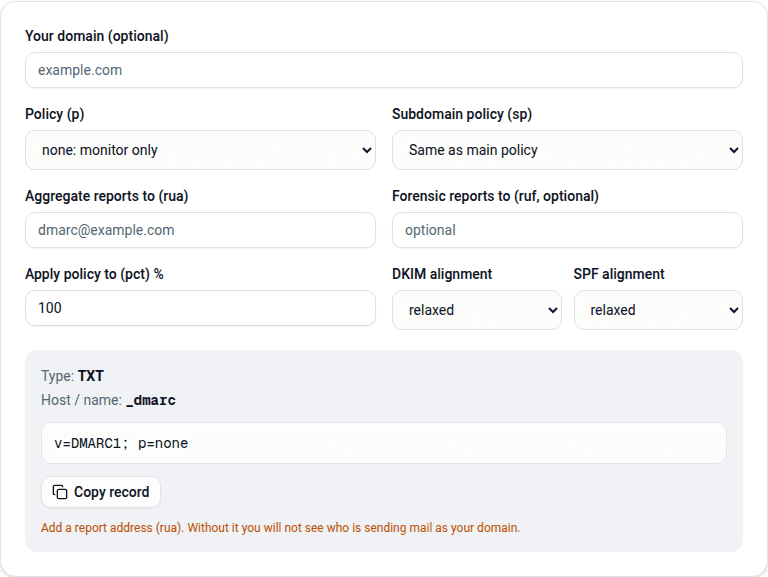
Klaviyo requires bulk senders to have a DMARC TXT record on the root domain, and a policy of p=none is enough to start. If you turn on Add DMARC record during setup, the record Klaviyo generates is:
v=DMARC1; p=none;Klaviyo says this meets the DMARC policy requirement for bulk senders and that DMARC is otherwise configured outside Klaviyo. That record has no rua address, so it sends you no reports. To get them, build a record with the DMARC generator. A domain can hold only one DMARC record, so run the DMARC checker first. Moving past p=none is covered in DMARC p=none, quarantine and reject.
Do you need to warm a new Klaviyo sending domain?
You need to warm a new marketing sending domain if the account or the domain is new; Klaviyo says transactional and service domains typically do not require warming. Its setup article splits the cases:
- New marketing accounts, or domains registered within the last 30 days, should warm over the first 2 to 4 weeks.
- Existing customers activating their first marketing domain do not need to re-warm if the domain was registered at least 30 days ago and has already sent email.
- When replacing a branded domain with a new subdomain, choose Move traffic with domain warming. Klaviyo warns that Move all traffic now "can harm deliverability".
Klaviyo's How to warm your sending domain guide is engagement-based. It recommends a first campaign to fewer than 10,000 recipients drawn from a 30-day engaged segment, keeping that segment for the first two weeks, and widening to 60 and then 90 days only while open rates stay above 20%. Our email warm-up guide explains why the ramp works.
How do you check that Klaviyo authentication works?
You check Klaviyo authentication by sending a test email to your own mailbox after activation and reading the Authentication-Results header. Open the raw message (how to read email headers) or paste it into the email header analyzer. Expect this shape:
Authentication-Results: mx.google.com;
  dkim=pass header.i=@<a domain under example.com>;
  spf=pass smtp.mailfrom=<an address under example.com>;
  dmarc=pass header.from=example.com
What matters is that a dkim=pass names a domain under your root and that dmarc=pass appears. A second DKIM signature for a Klaviyo domain is normal. For Static routing you can look up a key in the DKIM checker with the selector from the record, such as km1.
Why is my Klaviyo branded sending domain not verifying?
A Klaviyo branded sending domain usually fails to verify because the DNS host changed the record you typed. The fixes below are from Klaviyo's Troubleshooting branded sending domain issues article.
| What you see | Cause | Fix |
|---|---|---|
The hostname resolves as send.example.com.example.com | The DNS host appends the root domain automatically | Enter only the subdomain, send |
| The root domain is appended to a record value | The DNS host expects a period at the end of the value | Add a trailing period to the value |
| Records are correct but verification fails on Cloudflare | Proxying hides the CNAME target | Turn proxying off for the Klaviyo records and leave it off |
| The DNS host rejects underscores in a DKIM name | Names like km1._domainkey require underscores | Ask the host to create the record, or switch to Dynamic routing |
| The DNS host does not accept @ as a host | The TXT verification record belongs on the root domain | Type the root domain name as the hostname |
| A TXT record already exists on the root domain | Root domains often hold several TXT records | Add Klaviyo's value as a separate TXT record; leave the others unchanged |
| Status stays at Verifying | DNS changes can take up to 48 hours | Wait; if the status is Incomplete, select Verify from the action menu |
| Verified, but DMARC still fails | The From address is on a different root domain from the sending domain | Use a From address on the same root as the branded domain |
What a branded sending domain does not fix
A branded sending domain makes your reputation your own, which cuts both ways. Hard bounces and complaints now count against your domain rather than a shared one, and warming goes badly if the first sends hit dead addresses.
InboxSure checks a list before you send: syntax, MX records and whether each mailbox answers, without sending anything, with results of Deliverable, Risky, Undeliverable or Unknown. There is no native Klaviyo sync; you export a CSV, verify it and import the results, as described in how to clean a Klaviyo list and on the Klaviyo integration page. It cannot reliably check Yahoo, AOL or Outlook.com consumer addresses today; those come back Unknown. The Free plan covers lists of up to 50 addresses and Pro is a flat $49 a month for lists of up to 10,000. Start with the bulk email verifier.
Frequently asked questions
Related reading
Ready to clean your email list?
Upload a CSV or XLSX and get every address marked deliverable, risky, undeliverable or unknown, with the reason. Free for lists of up to 50, no card. Nothing is sent to your contacts.