How to Clean Your Klaviyo List (Step by Step)
Klaviyo bills its email plans on active profiles, and a dead address stays an active profile until it bounces on a real send. Cleaning a Klaviyo list means two jobs: finding the addresses that will bounce before you email them, and deciding what to do with profiles that receive everything and open nothing.
Every menu name below was checked against Klaviyo's help center on 13 November 2026. Each article is named and linked next to the step in case a button has moved since.
How does Klaviyo handle hard and soft bounces?
Klaviyo suppresses an email address automatically after one hard bounce or after 7 soft bounces in a row. Klaviyo's Understanding bounced emails in Klaviyo article states both rules:
- Hard bounces. "Klaviyo automatically suppresses any email address that hard bounces."
- Soft bounces. "If an email soft bounces 7 consecutive times, Klaviyo will suppress this address." Only soft bounces from the past 2 years count, and a successful delivery breaks the streak.
- Lists. A profile suppressed for bouncing is removed from every list it is on.
- Suspicious addresses. Klaviyo uses hard-bounce history from across its sending infrastructure, so an address that bounced for another Klaviyo customer can be skipped in your account even if it has never bounced for you.
A suppressed profile in Klaviyo is a profile that cannot receive email marketing from your account. Automatic suppression is a record of a bounce that already happened on a real campaign (the two bounce types are explained in soft bounce vs hard bounce). Cleaning the list yourself finds those addresses without sending to them. For suppression across platforms, see email suppression list.
Do suppressed profiles count toward Klaviyo billing?
Suppressed profiles do not count toward a Klaviyo email plan. Klaviyo's Understanding active profile management in Klaviyo article says email billing is based on active profiles, defines an active profile as any profile that can be emailed through Klaviyo, and confirms that suppressed profiles are left out of the active count.
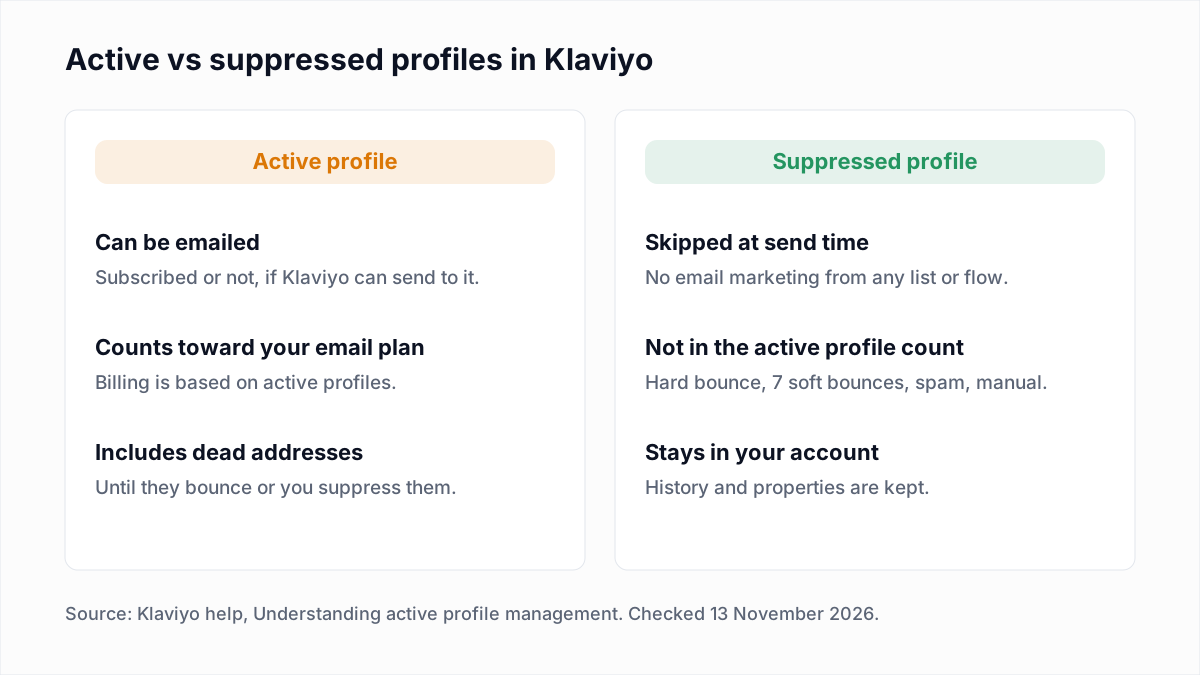
Three details from the same article decide whether the bill actually falls:
- Active does not mean subscribed. A customer who placed an order without opting in is still an active profile.
- A lower active count does not lower the bill by itself. Klaviyo says you may need to choose a lower plan unless auto-downgrade is enabled for your account.
- Accounts on Advanced KDP are billed for that product on total profiles, which includes suppressed ones.
Should you suppress or delete profiles in Klaviyo?
Suppress profiles in Klaviyo in almost every cleaning case, because suppression stops the email, removes the profile from the active count and keeps its history. Klaviyo's How to manage email suppressions and delete profiles in bulk article gives the same advice: "Generally, you should aim to suppress rather than delete profiles."
| Action | Counts as an active profile? | Reversible? | Use it for |
|---|---|---|---|
| Suppress | No. The profile stays in the account but is skipped at send time. | Yes, but a profile you unsuppress cannot be manually suppressed again for 90 days. | Undeliverable addresses and profiles that stay silent after a win-back |
| Unsubscribe | No. An unsubscribed profile cannot be emailed, so it is not active. | Not by you. The person has to opt in again. | People who told you they revoke consent to email marketing |
| Delete | No, the profile is gone. | No. Deletion cannot be undone, and the person can come back as a new profile if they visit your site again. | Privacy-law erasure requests and profiles you are certain you never need |
Klaviyo's Understanding suppressed email profiles article adds a reporting reason: deleting profiles skews segments and makes accurate insights impossible. One limit to know: suppression covers email only. It does not stop SMS or push.
How do you clean a Klaviyo list step by step?
Cleaning a Klaviyo list takes five moves: export the list or segment, verify the file outside Klaviyo, import the undeliverable addresses as suppressions, import the remaining results as a profile property, and suppress the unengaged. Nothing in the account changes until the first import.
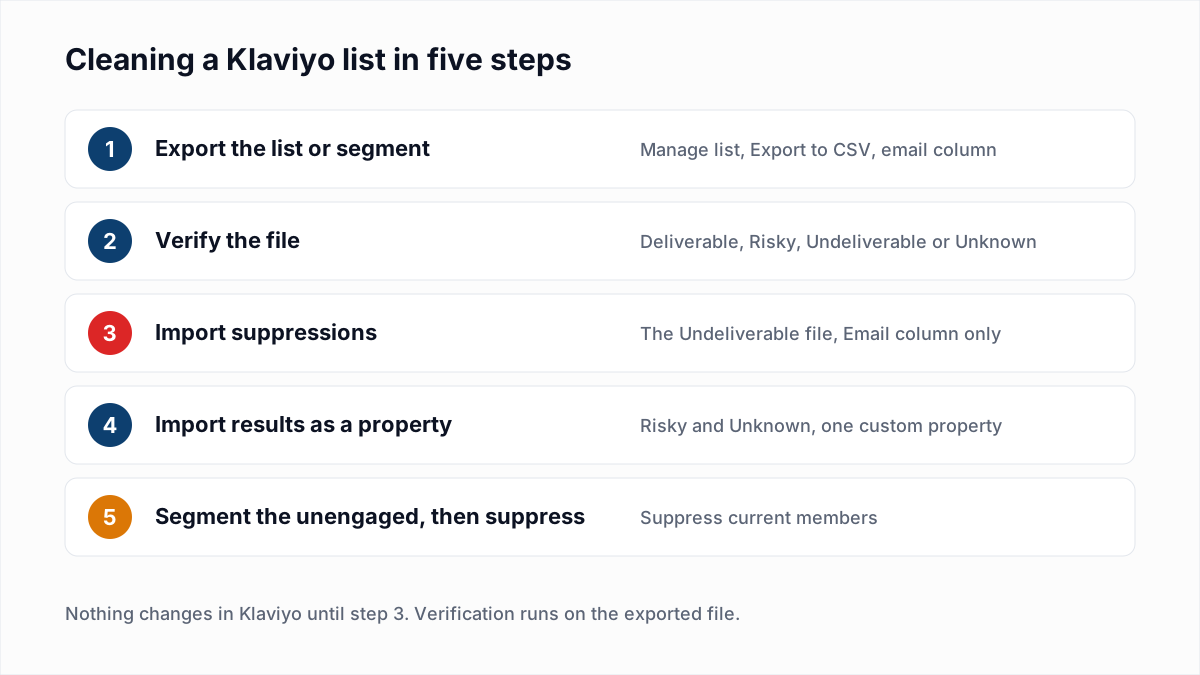
- Export the list or segment. Following Klaviyo's How to export a list or segment to a CSV file article: go to Audience > Lists & segments, open the list or segment, select the Manage list or Manage segment dropdown, choose Export to CSV, pick the properties to include (email is enough) and click Start Export. The article says Owner, Admin and Analyst roles can export. A segment of everyone who can receive email marketing covers all billable addresses in one file.
- Verify the file. Upload the CSV to a verifier such as the InboxSure bulk email verifier. InboxSure checks syntax, DNS and MX records and the mailbox itself over SMTP without sending an email, and returns a CSV with a result for each address. The Pro plan takes lists of up to 10,000 addresses each, so split a larger export into several files.
- Import the Undeliverable addresses as suppressions. Filter the results to Undeliverable and save a file with one column headed
Email. Following the bulk suppressions article: go to Audience > Profiles, click View suppressed profiles, open More actions and select Import suppressions (the article notes some accounts show an Import button), choose the CSV and click Upload. - Import Risky and Unknown as a profile property. Save a second file with two columns:
Emailand a property such asVerification Result. Following Klaviyo's How to import profile properties using a CSV upload article: in Audience > Lists & segments select Create > List, name it and click Create list. Click Upload, pick the file and map the columns. For the new column open Select or create new, choose Create New Field, enter the property name and click Create. Click Next, select Only import the consent in my file, then Import. - Build a segment from the property. Following Getting started with segments: click Create, then Segment, add a Properties about someone condition for the property and value you imported, and click Create segment.
Two warnings from the import article. Leave consent columns out of the file and do not select Apply bulk consent, which can resubscribe people who unsubscribed. And use a new list for the upload, because "contacts newly added to a list can enter its list-triggered flows". Blank cells do not clear existing values, and a new value replaces the old one.
If you would rather keep every result on the profile, put all four results in the property file, build a segment where the property is Undeliverable, and suppress it from Audience > Lists & segments: open the action menu next to the segment, select Suppress current members, review the count and click Suppress profiles.
What should you do with each verification result in Klaviyo?
Each verification result maps to one Klaviyo action: keep Deliverable profiles, suppress Undeliverable ones, tag Risky ones with a property and leave Unknown ones active until a re-check. The four results are explained in email verification vs validation.
| InboxSure result | What it means | What to do in Klaviyo |
|---|---|---|
| Deliverable | The mail server confirmed the mailbox exists. | Keep active. No import needed. |
| Undeliverable | The mailbox does not exist, the domain has no MX record, the syntax is bad or the domain is disposable. | Import as suppressions before the next campaign. Do not wait for Klaviyo to suppress it with a hard bounce. |
| Risky (catch-all) | The domain accepts every address, so the mailbox cannot be confirmed. | Import the property and keep active. Suppress only the ones that also sit in your unengaged segment. |
| Risky (role account) | A shared mailbox such as info@ or sales@. | Import the property and keep active if the address signed up or ordered. Watch spam complaints. |
| Unknown | The server would not give a clear answer. | Import the property, keep active and verify again in a few days. Do not suppress on an Unknown. |
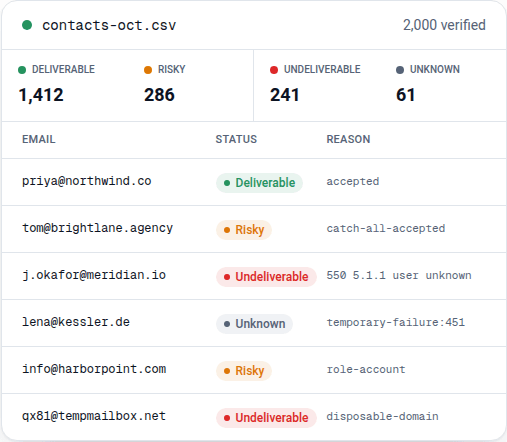
Expect a large Unknown group on an e-commerce list, which is mostly consumer mailboxes. In InboxSure's own tests on 4 November 2026, Yahoo, AOL, Outlook.com and Hotmail refused the check before the mailbox could be tested, so those addresses come back Unknown today (the full results are here). For those providers, a recent click or order is the better signal. A Deliverable result also has a limit: it says the mailbox exists, not that the person wants your email, and no mailbox check can detect a spam trap.
What unengaged segment does Klaviyo recommend?
Klaviyo recommends an unengaged segment of profiles that can receive email marketing, have received at least 5 emails over all time, and have opened and clicked 0 times in the last 90 days. The definition is in Klaviyo's How to create an unengaged segment article, with the conditions joined by AND:
- Person can receive email marketing
- Received Email is at least 5 over all time
- Opened Email 0 times in the last 90 days
- Clicked Email 0 times in the last 90 days
Klaviyo's How to clean your email list to maintain good deliverability article says to shorten the window to 30 days if you send daily or several times a week, and to exclude the segment from most campaigns. The same article describes a prefilled Never Engaged (Email) segment, found under Analytics > Deliverability in the Action Center: at least 5 emails received in the last 180 days with no opens, clicks or product views over all time. Klaviyo's advice is to suppress that segment with Suppress current members.
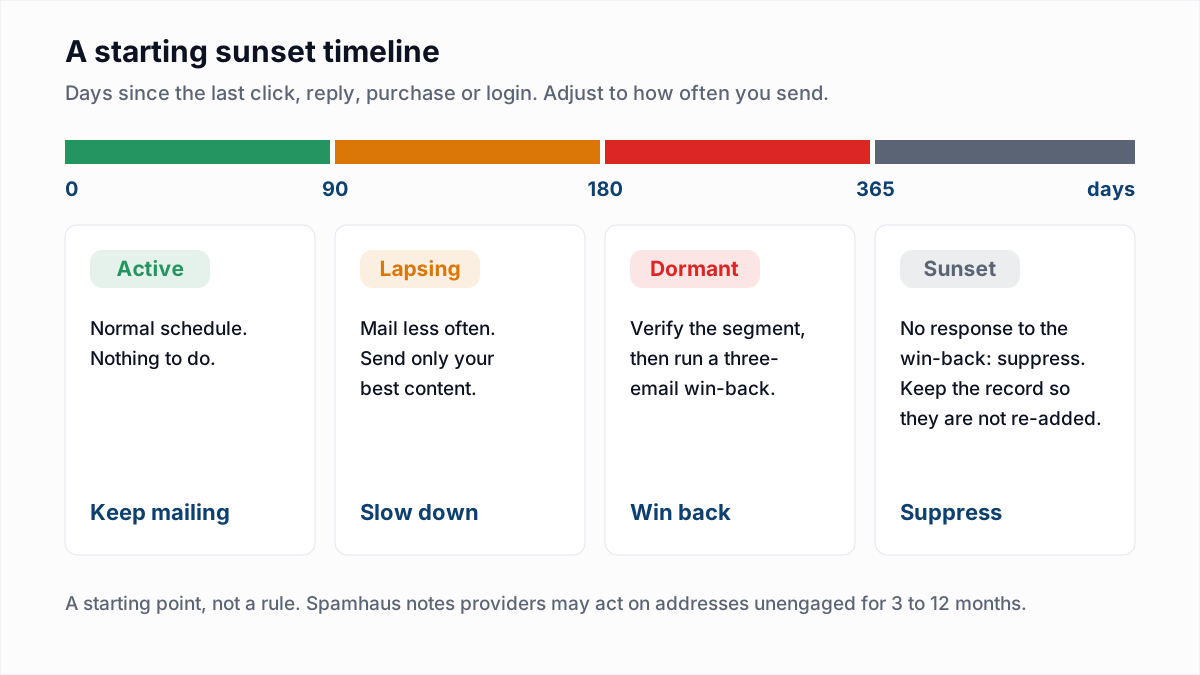
Two cautions. Suppression applies to the current members only, so profiles that join the segment later are not suppressed until you repeat the action. And do not suppress the 90-day unengaged segment straight away: run a win-back first, as described in our email sunset policy guide, and verify the segment before that send, since it holds the oldest addresses on the list. Opens are a weak signal on their own because of Apple Mail Privacy Protection.
Does Klaviyo publish bounce and complaint thresholds?
Klaviyo publishes numeric targets for bounce, unsubscribe and spam complaint rates in its help center, as of November 2026. The table is from Klaviyo's Getting started with email deliverability monitoring and performance metrics article.
| Metric | Healthy | Room for improvement | Needs attention |
|---|---|---|---|
| Bounce rate | Below 1.0% | 1% to 2% | Above 2% |
| Unsubscribe rate | Below 0.3% | 0.3% to 1% | Above 1% |
| Spam complaint rate | Below 0.01% | 0.01% to 0.05% | Above 0.05% |
These are Klaviyo's own monitoring targets, measured inside Klaviyo. They are not mailbox-provider limits, and the articles we read do not tie them to a specific account penalty. Klaviyo's complaint target is far stricter than Gmail's published figures, which are covered in spam complaint rate. Bounce causes are in how to reduce your email bounce rate.
Keep the list clean
Repeat the export and verify pass on the schedule in how often to clean your email list, and always before a campaign to a list you imported or have not mailed in months. Double opt-in keeps typos and fake discount-form addresses from becoming active profiles at all. For the DNS side, see setting up a branded sending domain in Klaviyo.
InboxSure is a flat price, so repeat passes cost nothing extra: the Free plan verifies lists of up to 50 addresses with no card, and Pro is $49 a month for any number of lists of up to 10,000 addresses each, with no credits. The export and import steps are summarised on the Klaviyo integration page. There is no native sync: you export a CSV, verify it, and import the results as shown above.
Frequently asked questions
Related reading
Ready to clean your email list?
Upload a CSV or XLSX and get every address marked deliverable, risky, undeliverable or unknown, with the reason. Free for lists of up to 50, no card. Nothing is sent to your contacts.