Apple Mail Privacy Protection: What It Did to Open Rates
Apple Mail Privacy Protection (MPP) makes the Apple Mail app download an email's images in the background, through Apple's relays, whether or not the person ever reads the message. Open tracking works by counting downloads of a hidden image, so every one of those background downloads is recorded as an open. Since it shipped with iOS 15 in September 2021, open rates have been inflated and can no longer tell you who read an email. Clicks are not affected. Measure clicks, replies, conversions, unsubscribes and complaints instead, and stop defining "active" subscribers by opens.
What is Apple Mail Privacy Protection?
Apple announced it on 7 June 2021. Its press release said the feature "stops senders from using invisible pixels to collect information about the user". It reached the public when iOS 15 was released on 20 September 2021, with Apple describing it this way: "Mail Privacy Protection prevents senders from learning whether an email has been opened, and hides IP addresses so senders can't learn a user's location or use it to build a profile on them."
The detail is in Apple's Mail Privacy Protection & Privacy page (the version we read is dated 12 December 2025). It describes two settings:
- Protect Mail Activity. Apple says that "rather than only downloading remote content when you open an email, Protect Mail Activity downloads remote content in the background by default", and that it does so "regardless of whether you engage with the email". The downloads are routed "through two separate relays operated by different entities", so that no single party knows both who you are and what mail content you received.
- Hide IP Address. A separate setting that masks the IP address with the same two-relay design, and keeps working if Protect Mail Activity is turned off.
Three points in Apple's wording matter to senders:
- It belongs to the app, not the mailbox. Apple describes mail received "in the Mail app or Mail on iCloud.com". A Gmail or company mailbox read in Apple Mail is covered. You cannot spot affected contacts by looking for @icloud.com addresses.
- Users can turn it off. Both settings can be disabled, so not every open from Apple Mail is a machine open.
- Apple does not say when the download happens. The page says "in the background". It gives no timing, so do not assume it is the moment of delivery.
Why does Mail Privacy Protection inflate open rates?
An email platform cannot see inside anyone's inbox. To estimate opens, it puts a tiny image in each message with a URL unique to that recipient. When the image is requested, the platform logs an open for that person. The method always assumed that a request for the image meant a human was looking at the email.
Protect Mail Activity breaks that assumption. The image is requested in the background, by Apple's relays, for mail the person may never look at. Your platform sees the request and records an open. This is a machine open: a real request, from a real mailbox, with no reader behind it.
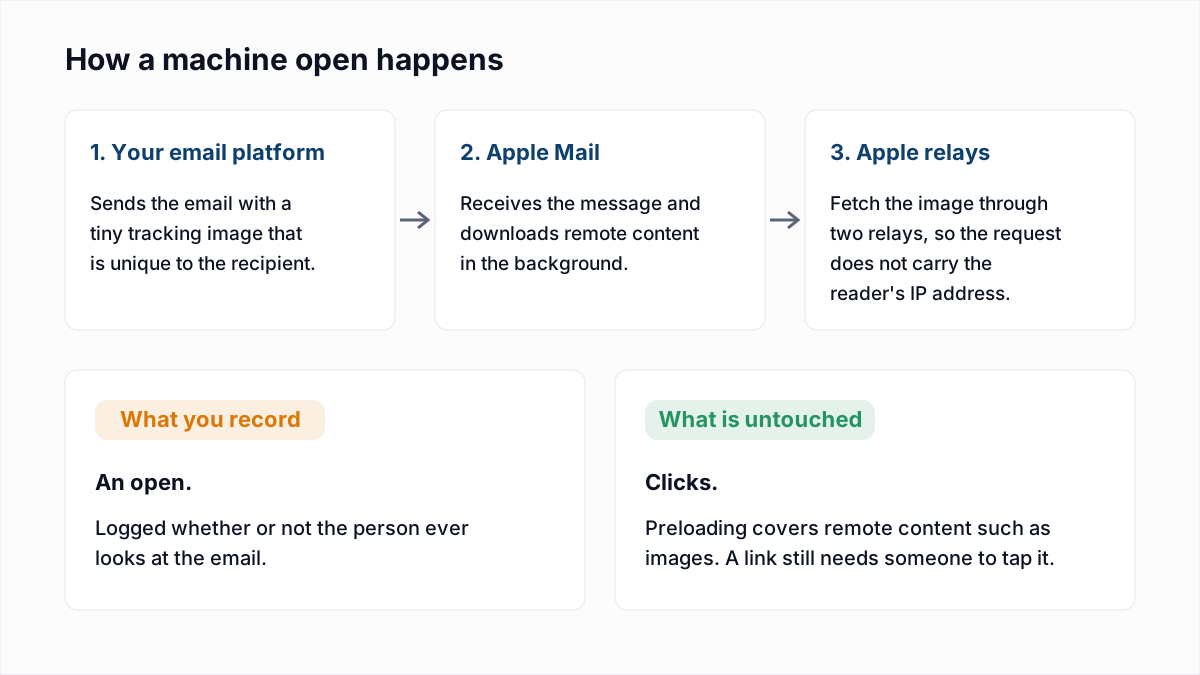
A worked illustration, with invented numbers to show the arithmetic and nothing more. Suppose you send to 10,000 people, 4,000 of them read mail in Apple Mail with the feature on, and all 4,000 messages are preloaded. You have a 40% open rate before a single person has read anything. If 1,500 of the other 6,000 open it, the report says 55%. The honest answer for the Apple group is "unknown", and the report has no way to show that.
The related data goes with it. Apple lists what a sender could previously learn: when and how many times you opened an email, whether you forwarded it, and your IP address. With the feature on, open time reflects when Apple fetched the image, repeat-open counts cannot be relied on, and location from IP address points at a relay.
What is not affected: clicks
Apple's description is about remote content that a message loads, such as images. Nothing in it says Apple follows the links in your email. A click is still a request that happens because someone tapped a link, which is why clicks became the main engagement signal after 2021. Replies, purchases, logins and unsubscribes are equally untouched, because each needs a person to do something. Clicks do have their own source of noise, covered next.
Other sources of machine opens and clicks
Gmail's image proxy
On 12 December 2013 Google announced on the Gmail blog that "instead of serving images directly from their original external host servers, Gmail will now serve all images through Google's own secure proxy servers", and that images would be displayed automatically. For senders, a proxy means the image request comes from Google and not from the reader's device, so IP-based location and device data for Gmail readers has been unreliable since then. The post does not describe downloading images before a message is opened, which is the part of Apple's design that creates opens from nothing. Google also does not vouch for the metric: its sender guidelines say "Google doesn't track open rates" and "can't verify the accuracy of open rates reported by third parties".
Security scanners that fetch and click links
Corporate mail security products inspect links before the recipient sees the message. Microsoft's documentation for Safe Links in Defender for Office 365 says it "scans incoming email for known malicious hyperlinks" and that "URLs that don't have a valid reputation are detonated asynchronously in the background". The standard for one-click unsubscribe, RFC 8058, was written partly because of this: "anti-spam software often fetches all resources in mail header fields automatically, without any action by the user".
To your tracking, a scanner following a link is a click. The usual signs in B2B data are every link in the email clicked within seconds of delivery, the same pattern across everyone at one company, and clicks on links no person would choose, such as the unsubscribe link and the logo together. This is also why an unsubscribe endpoint must never act on a plain link fetch, which we cover in the List-Unsubscribe header guide.
Are email open rates accurate now?
No, not as a count of people who read the email. Opens are overstated wherever mail is preloaded, and understated wherever a reader has images turned off, because a text-only read never requests the tracking image. Both errors exist in every list and you cannot net them off.
How large the effect is depends on how many of your subscribers read mail in Apple Mail, and that varies a lot between a consumer newsletter and a B2B list. We are not quoting a market share figure here, because any single number would be wrong for your list. Litmus publishes a regularly updated email client market share page if you want a general reference, but the number that matters is your own: most email platforms report opens by mail client, and many label Apple's preloaded opens separately.
Opens are still usable as a rough trend on the same audience: a sharp drop between two similar sends is a prompt to check inbox placement. Google itself cautions that low open rates are not necessarily an accurate indicator of deliverability or spam classification issues, so treat a drop as a question, not a diagnosis.
What to measure instead of opens
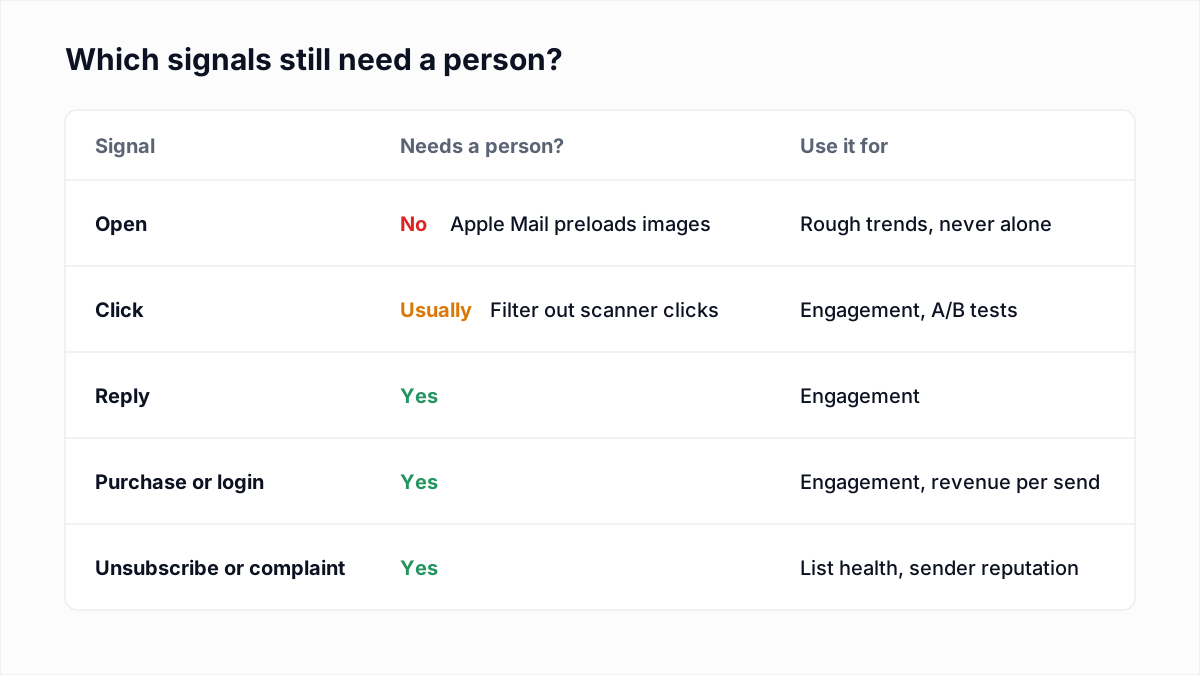
| Metric | What it tells you | Watch out for |
|---|---|---|
| Click rate (clicks divided by delivered) | Whether the email gave people a reason to act | Scanner clicks; exclude clicks on every link within seconds of delivery |
| Replies | The strongest sign of a real reader, especially in B2B and cold email | Auto-replies and out-of-office messages are not engagement |
| Conversions and revenue per send | Whether the email did its job | Needs your store or app data connected to the email platform |
| Spam complaint rate | How many people reported you; the number mailbox providers act on | Use the provider's own figure where you can; see spam complaint rate |
How Apple MPP affects send-time tests, A/B tests and automations
| If you use opens for | What goes wrong | Do this instead |
|---|---|---|
| Send-time optimisation | Open timestamps for Apple Mail readers record when the image was fetched, not when the person read it | Base send time on click times, or on purchase and login times |
| A/B subject line tests | Preloaded opens land in both versions equally and bury the real difference; a winner picked on a small gap may be noise | Pick the winner on clicks or conversions, with a larger test group and a longer wait |
| "Did not open" resends | Apple Mail readers always look like they opened, so they never get the resend | Resend to people who did not click |
| Re-engagement and sunset rules | Contacts who stopped reading years ago keep counting as active | Define engaged by clicks, replies, purchases and logins |
How email platforms flag machine opens
Many platforms now try to separate preloaded opens from the rest, using the image request itself (the network it came from and the software making it) and its timing. The result is usually a filter such as "exclude machine opens". Names and accuracy differ by platform, so read your own platform's documentation. The flag is an estimate, and excluding machine opens does not turn those contacts into non-openers; it leaves them as unknown.
How to redefine "engaged" for your sunset policy
A sunset policy decides when to stop mailing people who no longer respond, and it depends entirely on the definition of "engaged". With opens in that definition, an Apple Mail reader who has not looked at your mail for two years still qualifies every time you send. Rewrite the rule around actions a machine does not produce: a contact is engaged if they clicked, replied, bought or logged in during the last N days. Keep one "last engaged" date per contact, fed from all of those sources.
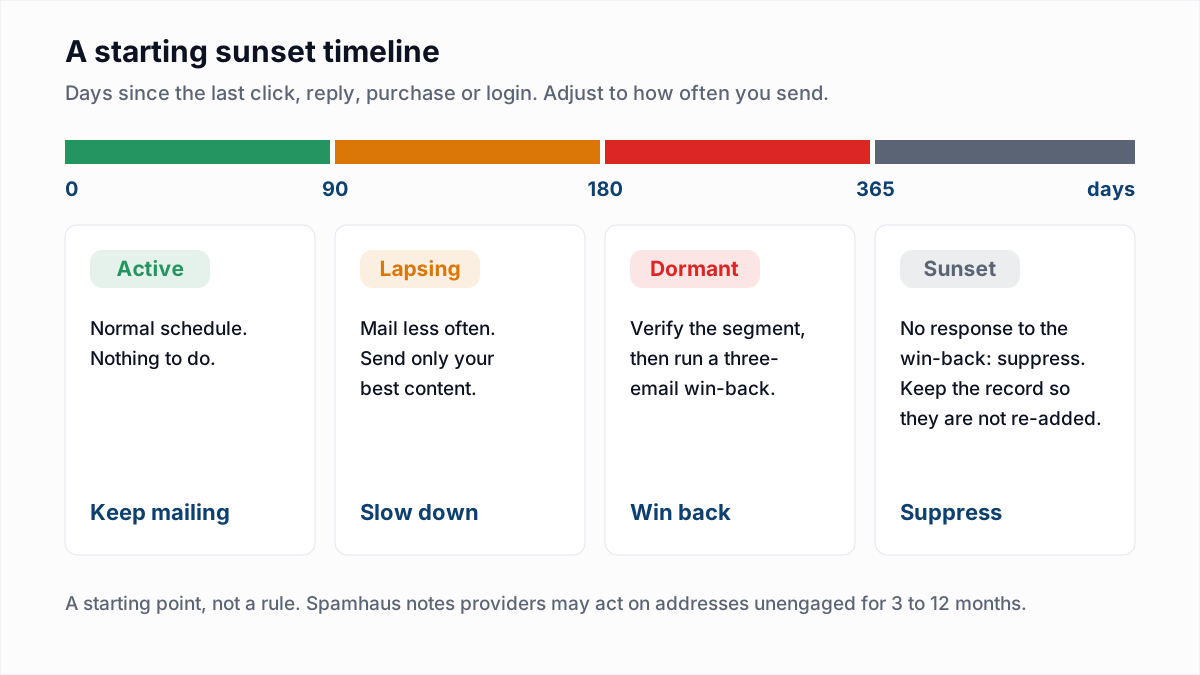
The thresholds, the win-back sequence and the suppress-or-delete question are covered in our email sunset policy guide, so they are not repeated here. One warning: the first time you rebuild segments on clicks, the "inactive" group will be much larger than the open-based one was. That is the dead weight the old definition was hiding. Do not mail all of it at once.
What MPP means for cleaning your email list
Before 2021, "opened in the last 90 days" was a cheap test that an address was alive and wanted. It is no longer either. An address that records an open on every send could be a keen reader using Apple Mail, or a mailbox still connected to an old iPad that nobody picks up. The open looks identical in both cases. An address with no opens could belong to someone who reads every email with images off.
So list hygiene now has to ask two separate questions, with two separate tools:
- Does this mailbox exist? Email verification answers this. It asks the receiving mail server about the address without sending a message.
- Does this person still want the mail? Only their behaviour answers this: clicks, replies, purchases, or a response to a re-engagement email.
Neither answers the other's question. Verification cannot tell you whether anyone reads a mailbox, and it cannot detect a spam trap. Engagement data cannot tell you that a mailbox was closed last month until the bounce arrives. So verify the click-inactive segment first, remove the addresses that no longer exist, then run a win-back on the rest.
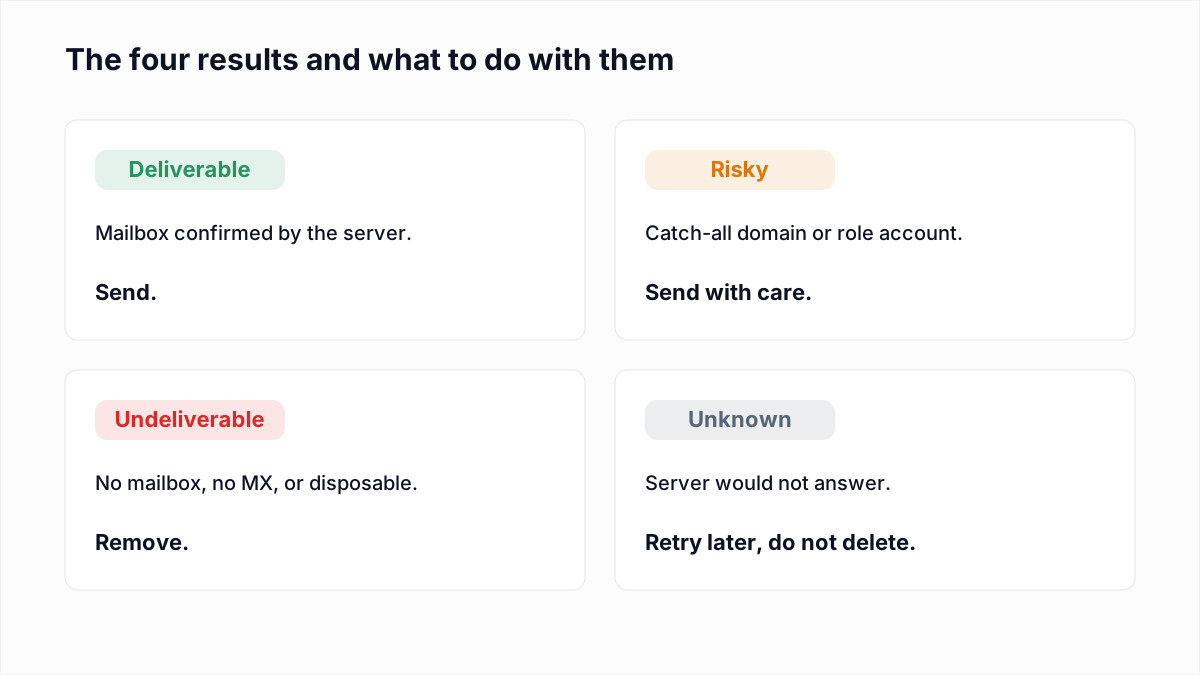
InboxSure checks syntax, MX records and the mailbox itself over SMTP without sending an email. Unknown results, where the server would not answer clearly, should be retried, not deleted. How often to run this is covered in how often to clean an email list.
To start, export the click-inactive segment as a CSV and run it through the InboxSure bulk email verifier. The free plan handles any number of lists of up to 50 addresses with no card. Pro covers lists of up to 10,000 addresses, as many lists as you like, for a flat $49 a month with no credits, and results download as CSV to re-import as a tag or field.
Frequently asked questions
Related reading
Ready to clean your email list?
Upload a CSV or XLSX and get every address marked deliverable, risky, undeliverable or unknown, with the reason. Free for lists of up to 50, no card. Nothing is sent to your contacts.