List-Unsubscribe Header: Add One-Click Unsubscribe (RFC 8058)
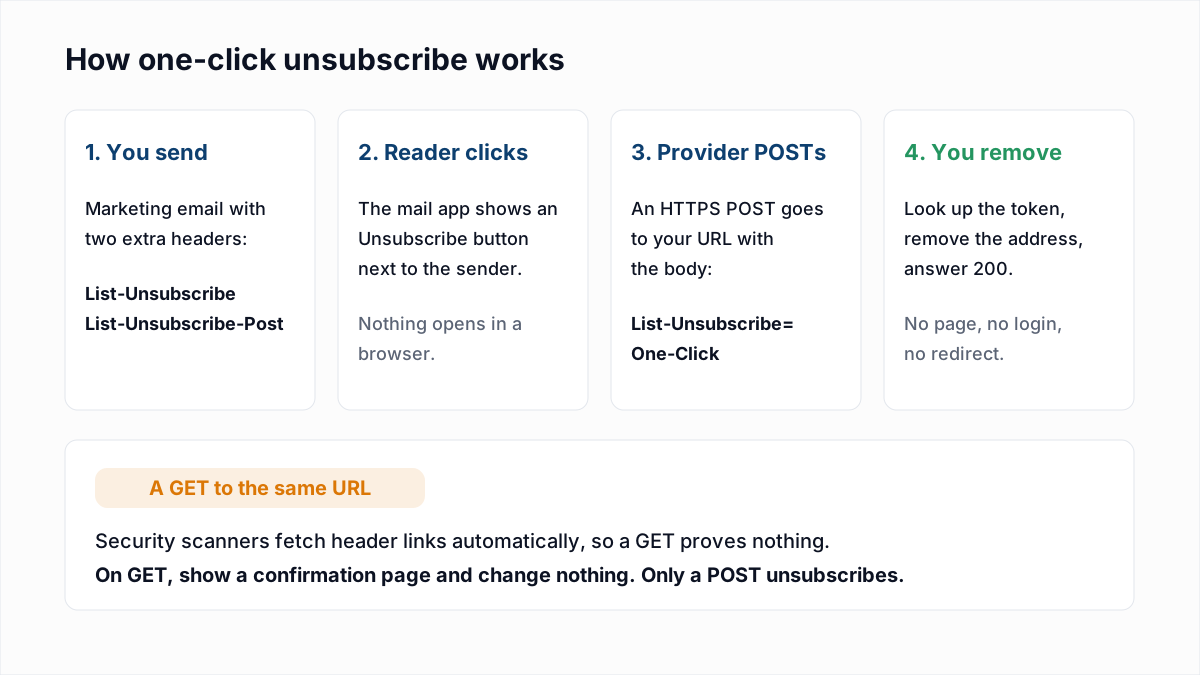
The List-Unsubscribe header is a line in an email's headers that tells the mail app how to take the reader off your list. To support one-click unsubscribe, send two headers on every marketing message: List-Unsubscribe containing an HTTPS URL, and List-Unsubscribe-Post: List-Unsubscribe=One-Click. When the reader presses Unsubscribe, the mailbox provider sends an HTTPS POST to that URL and your server removes the address with no page, login or confirmation. Both headers must be covered by your DKIM signature. Gmail and Yahoo require this from bulk senders of marketing mail.
List-Unsubscribe: <https://example.com/unsub?id=abc>, <mailto:unsub@example.com?subject=unsubscribe>
List-Unsubscribe-Post: List-Unsubscribe=One-Click
The rules quoted below come from the two RFCs and from Google, Yahoo and Microsoft's own pages as they read on 12 November 2026.
What is the List-Unsubscribe header?
It is a header defined in RFC 2369, published in July 1998, alongside others such as List-Help and List-Subscribe. Its value is one or more URLs in angle brackets, separated by commas. The RFC says the URLs "have order of preference from left to right" and that the mail app should use the leftmost protocol it supports. It expected mailto: to be the usual choice, and its examples include both forms:
List-Unsubscribe: <mailto:list@host.com?subject=unsubscribe>
List-Unsubscribe: <http://www.host.com/list.cgi?cmd=unsub&lst=list>,
    <mailto:list-request@host.com?subject=unsubscribe>
Readers never see the header. The mail app reads it and can show its own Unsubscribe control near the sender name, separate from the link in your footer.
RFC 2369 vs RFC 8058: what one-click adds
The 1998 header had a weakness with web URLs. RFC 8058, published in January 2017, describes it: "anti-spam software often fetches all resources in mail header fields automatically, without any action by the user", and the sender cannot tell an automatic fetch from a real request. So senders put a confirmation page behind the link, and the process stopped being one click.
RFC 8058 fixes that by adding a second header, List-Unsubscribe-Post, which signals that the HTTPS URL in List-Unsubscribe accepts a POST request and will complete the unsubscribe without further interaction. Scanners fetch links with GET. A POST carrying the agreed body is a deliberate action, which the RFC says a mail app must not perform without the user's consent.
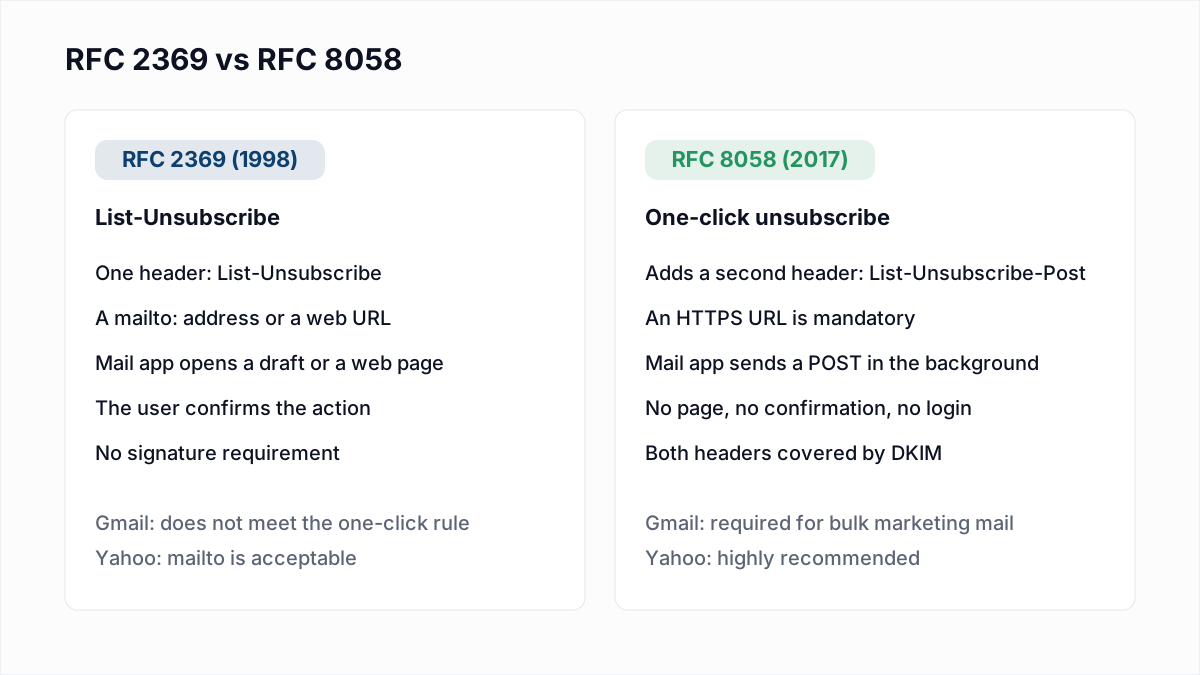
RFC 8058 requirements for one-click unsubscribe
These are the rules in sections 3 and 4 of the RFC, in plain words.
- One HTTPS URL. The List-Unsubscribe header "MUST contain one HTTPS URI". Plain
http://does not qualify. Amailto:address may sit beside it. - The exact Post header. List-Unsubscribe-Post must contain the single key/value pair
List-Unsubscribe=One-Click, and nothing else. - Everything in the URL. The URL must carry enough information to identify the recipient and the list, because the POST has no room for extra arguments. The RFC recommends an opaque, hard-to-forge identifier in place of a plain email address, and says your server should check that it is valid.
- No cookies, no login. The request "MUST NOT include cookies, HTTP authorization, or any other context information". Your endpoint has to work for a request that arrives with no session.
- No redirect. The sender "MUST NOT return an HTTPS redirect", because redirected POSTs have historically been turned into GETs.
- DKIM over both headers. Section 4 says the List-Unsubscribe and List-Unsubscribe-Post headers "MUST be covered by the signature and included in the 'h=' tag of a valid DKIM-Signature header field". If they are not, the receiver "SHOULD NOT offer a one-click unsubscribe for that message".
The request your server receives looks like this. Google shows the same shape in its sender guidelines:
POST /unsub?id=abc HTTP/1.1
Host: example.com
Content-Type: application/x-www-form-urlencoded
Content-Length: 26

List-Unsubscribe=One-Click
The RFC says the body should be sent as multipart/form-data and may be sent as application/x-www-form-urlencoded, so accept both.
Who requires one-click unsubscribe?
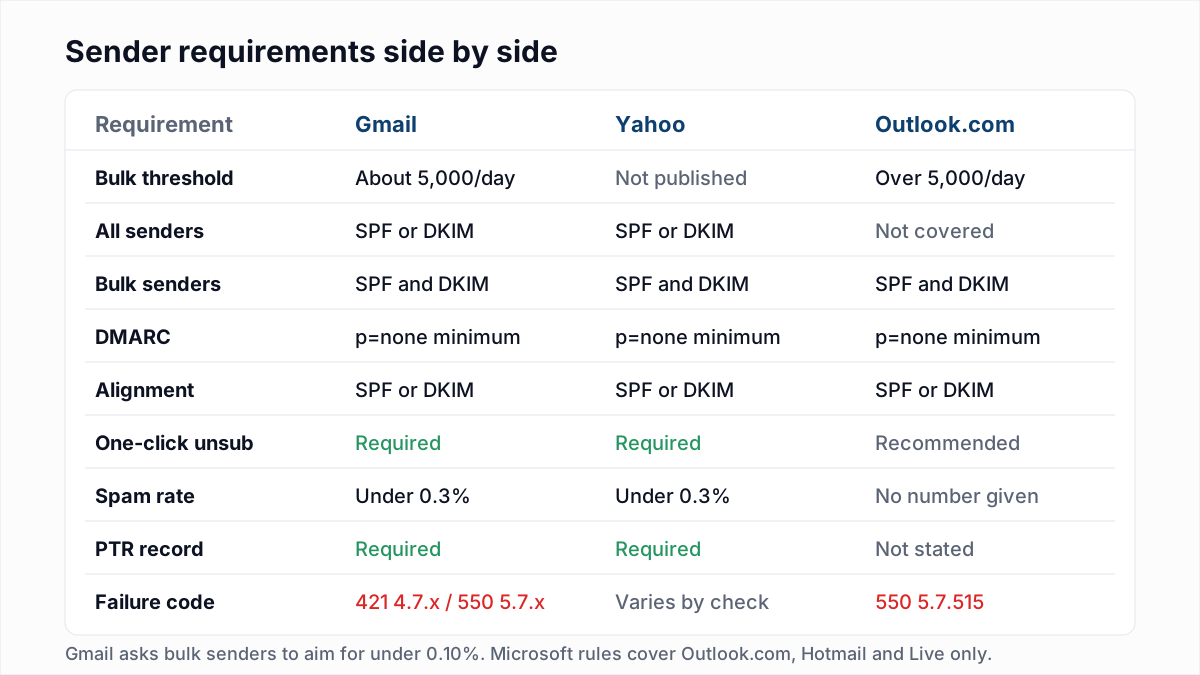
| Provider | What its own page says | Deadline to act on a request |
|---|---|---|
| Gmail | Senders of more than 5,000 messages a day: marketing and subscribed messages "must support one-click unsubscribe" and include a clearly visible unsubscribe link in the body | Google recommends within 48 hours |
| Yahoo | Bulk senders: a functioning list-unsubscribe header that supports one-click for marketing and subscribed messages. The POST method is "highly recommended"; mailto is "acceptable" | "Honor unsubscribes within 2 days" |
| Outlook.com | Listed under recommendations, not requirements: an easy, clearly visible way to opt out | Not stated |
The sources are Google's Email sender guidelines and sender guidelines FAQ, Yahoo's Sender Hub best practices, and Microsoft's high-volume sender post. The full set of rules, including authentication and spam rate, is in our guide to Gmail, Yahoo and Outlook sender requirements.
Google's FAQ settles several points people argue about:
- mailto alone is not enough for Gmail. "We'll continue to support mailto links but they don't meet our one-click unsubscribe requirement." You need one HTTPS URL in the header.
- A link in the body does not count. If the header is missing, Google does not look in the body for a substitute.
- The header URL cannot be a landing page. One-click links that lead to a landing or preferences page do not comply with RFC 8058. The link in the body can go to a preferences page.
- It is per list. One-click removes the recipient only from the mailing list associated with that message, not from everything you send.
- Missing it is not an automatic rejection. Google says it does not reject or spam-folder mail for this alone, but only bulk senders that meet every requirement, one-click included, are eligible for mitigation when delivery goes wrong.
Is one-click unsubscribe required for transactional email?
No. Google's FAQ says: "One-click unsubscribe is required only for marketing and promotional messages. Transactional messages are excluded from this requirement." Its examples are password reset messages, reservation confirmations and form submission confirmations. Yahoo's rule names marketing and subscribed messages. See also transactional vs marketing email.
The line between the two is not yours to draw alone. Google adds that "message recipients, not Google, determine the nature of the messages they receive". A receipt with a large promotional block in it may be treated as marketing by the person reading it. If a message is something a person could reasonably want to stop getting, add the headers.
Why is the Gmail unsubscribe button not showing?
Adding the headers does not guarantee the button. Google's FAQ says unsubscribe buttons or links are displayed at the top of messages, next to the sender name, "only for messages that pass Google's automated eligibility checks". It lists what that involves: complying with the sender requirements, implementing correct one-click headers, increasing sending volumes gradually and monitoring recipients' spam reports.
Google does not publish the checks themselves or a threshold. So if your headers are correct and DKIM covers them, and the button still does not appear, the documented causes left are your wider compliance and your sending history, not the header syntax. Google names gradual volume increases and spam reports, so start there; see warming up a sending domain.
How to handle the unsubscribe request on your server
The safe pattern is the same in any language: look up the token from the URL, change the subscription only when the method is POST, and answer 200 directly. Treat GET as a person or a scanner looking at the link: show a confirmation button and change nothing. The examples below use an in-memory token table that you would replace with your database.
Node (Express)
const express = require("express");
const app = express();

// Replace these two with your own token lookup and database update.
const tokens = new Map([["abc", { email: "ann@example.org", list: "newsletter" }]]);
function unsubscribe(sub) {
  console.log("unsubscribed", sub.email, sub.list);
}

app.get("/unsub", (req, res) => {
  // Scanners and link checkers send GET. Never change anything here.
  if (!tokens.has(req.query.id)) return res.status(404).send("Unknown link");
  res.send('<form method="post"><button>Confirm unsubscribe</button></form>');
});

app.post("/unsub", (req, res) => {
  const sub = tokens.get(req.query.id);
  if (!sub) return res.status(404).send("Unknown link");
  unsubscribe(sub);
  res.status(200).send("Unsubscribed");
});

app.listen(3000);
Python (Flask)
from flask import Flask, request

app = Flask(__name__)

# Replace these two with your own token lookup and database update.
TOKENS = {"abc": {"email": "ann@example.org", "list": "newsletter"}}


def unsubscribe(sub):
    print("unsubscribed", sub["email"], sub["list"])


@app.route("/unsub", methods=["GET", "POST"])
def unsub():
    sub = TOKENS.get(request.args.get("id", ""))
    if sub is None:
        return "Unknown link", 404
    if request.method == "POST":
        unsubscribe(sub)
        return "Unsubscribed", 200
    # Scanners and link checkers send GET. Never change anything here.
    return '<form method="post"><button>Confirm unsubscribe</button></form>'
We ran both against Express 5 and Flask 3: a GET returned the confirmation form without unsubscribing, a POST with either body encoding unsubscribed and returned 200, and an unknown token returned 404. Four things to add before production:
- Generate long random tokens per recipient and list, or sign the value, so nobody can unsubscribe other people by guessing IDs.
- Exempt the route from CSRF protection and login middleware. The provider's POST carries no cookie and no session, so a framework that demands a CSRF token will answer 403 and the unsubscribe silently fails.
- Make it idempotent. A second POST for someone already unsubscribed should still return 200.
- Write to the suppression list at once, not in a weekly sync. Yahoo gives you 2 days and Google recommends 48 hours.
If you also include a mailto: address, something has to read that mailbox and process the requests automatically. An unmonitored unsubscribe address is worse than none.
Do email platforms add List-Unsubscribe automatically?
Most email marketing platforms add both headers to campaign mail and host the endpoint for you, usually tied to their own unsubscribe link. Transactional email APIs and SMTP relays often leave it to you, either as a setting or as custom headers you pass with each message. Platforms differ, so do not assume: send yourself a message and look, as described next. Google's FAQ gives the same advice to anyone using a third-party provider.
If you send through your own mail server, you add the headers and you must also make sure your DKIM signer lists them. Many signers have a configurable list of headers to sign, and the two unsubscribe headers are not always in the default.
How to check your own email for the headers
- Send a real campaign message, not a preview, to a mailbox you control.
- Open the raw message. In Gmail this is "Show original" in the message menu; other mail apps call it "View source" or "View raw message".
- Search for
List-Unsubscribe. You should find both headers, with anhttps://URL in the first. - Find the
DKIM-Signatureheader and read itsh=tag. Both header names must be in the list:
DKIM-Signature: v=1; a=rsa-sha256; d=example.com; s=s2026;
    h=from:to:subject:date:list-unsubscribe:list-unsubscribe-post;
bh=...; b=...- Test the endpoint yourself. The POST should unsubscribe and the GET should not:
curl -i -X POST -d "List-Unsubscribe=One-Click" "https://example.com/unsub?id=abc"
curl -i "https://example.com/unsub?id=abc"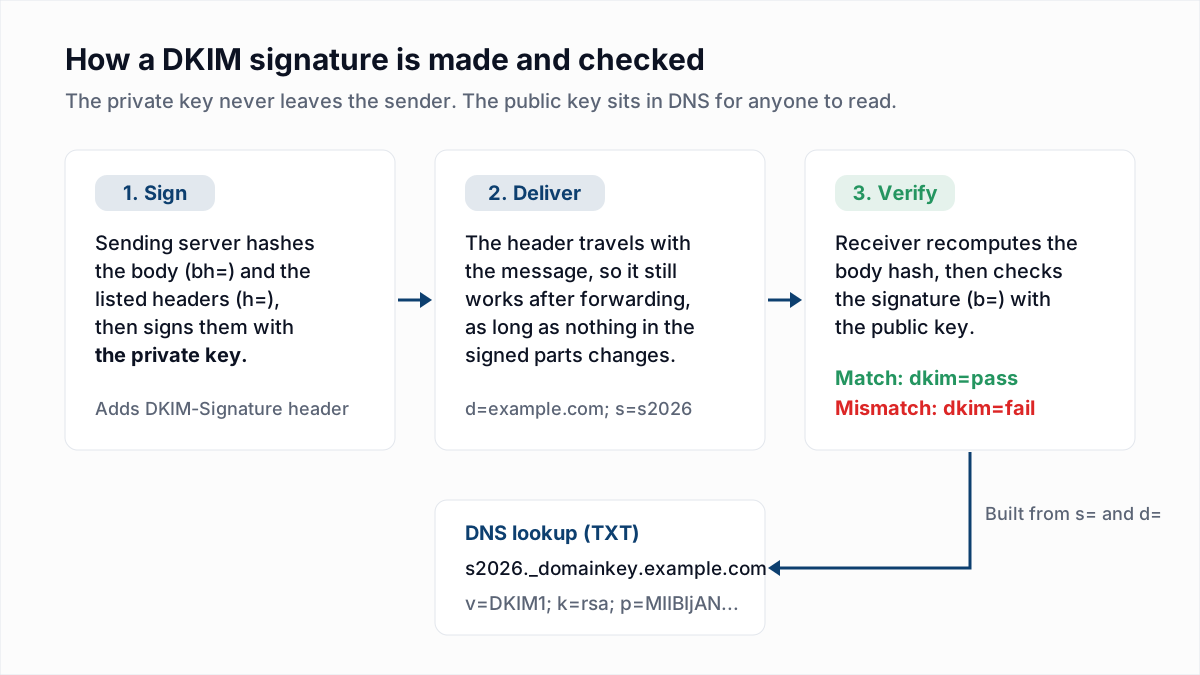
If the h= tag is new to you, our DKIM explainer walks through every tag in the signature.
Common List-Unsubscribe mistakes
| If you see | What is wrong | Do this |
|---|---|---|
Only <mailto:...> in the header | Valid under RFC 2369 and acceptable to Yahoo, but not one-click for Gmail | Add an HTTPS URL and the List-Unsubscribe-Post header |
| An HTTPS URL but no List-Unsubscribe-Post | The mail app has no signal that a POST is safe | Add List-Unsubscribe-Post: List-Unsubscribe=One-Click |
An http:// URL | RFC 8058 requires HTTPS | Serve the endpoint over HTTPS |
| The header URL opens a preferences or login page | Not one-click; Google says landing pages do not comply | Keep the preferences page for the body link only |
| People unsubscribed who never asked to be | The endpoint acts on GET, and a scanner fetched the link | Change state on POST only |
| POST returns 301, 302 or 403 | A redirect, or CSRF or login middleware in the way | Answer 200 directly at the URL in the header |
Headers present but missing from h= | They were added after signing, or the signer does not list them | Add both to the signed header list |
| The email address in plain text in the URL | Anyone can unsubscribe anyone | Use an opaque or signed token and validate it |
Why this matters for your spam complaint rate
RFC 8058 states the reason: if unsubscribing is too difficult, the recipient's alternative is to report the mail as junk. Each of those reports counts against the 0.3% ceiling Gmail and Yahoo set, which we cover in spam complaint rate explained. A working one-click header turns some of those complaints into unsubscribes, which cost you nothing.
It does nothing about a dead address, though. That is a separate job: a sunset policy for people who stopped responding, and verification for mailboxes that no longer exist.
For that last part, the InboxSure bulk email verifier checks syntax, MX records and the mailbox itself over SMTP without sending an email, and flags catch-all, role and disposable addresses. The free plan takes any number of lists of up to 50 addresses with no card; Pro covers lists of up to 10,000 addresses for a flat $49 a month, with no credits.
Frequently asked questions
Related reading
Ready to clean your email list?
Upload a CSV or XLSX and get every address marked deliverable, risky, undeliverable or unknown, with the reason. Free for lists of up to 50, no card. Nothing is sent to your contacts.