Email Sunset Policy: When to Remove Inactive Subscribers
An email sunset policy is a written rule for when you stop mailing subscribers who no longer engage. A workable starting point: slow down after 90 days without a click, reply, purchase or login; verify the segment and send a short re-engagement sequence at around 180 days; suppress anyone still silent after that, and never let a contact go past 12 months without engaging. Adjust the numbers to how often you send. The reason to bother is that long-dead addresses become spam traps, and mailbox providers judge you on how many of your recipients actually want your mail.
What is an email sunset policy?
It is the part of your list hygiene that deals with people, not addresses. Bounce handling removes mailboxes that no longer exist. A sunset policy removes mailboxes that still exist but whose owners have stopped paying attention. It has four parts: a definition of "engaged", time thresholds, a last attempt to win people back, and a rule for what happens to those who do not respond.
Spamhaus's sender guidelines tell senders to "implement a robust email sunset policy", and its article on sunset policies explains why in detail.
Why remove inactive subscribers?
Recycled spam traps
Spamhaus warns, citing M3AAWG, that "mailboxes that remain inactive for more than 12 months can be repurposed as spamtraps." The person who subscribed in 2023 may have abandoned that inbox. The provider closes it, it bounces for a while, then it can come back as a trap. If you are still mailing it, you hit the trap. The mechanics are in our spam trap explainer.
Engagement shapes filtering
Yahoo's sender best practices say: "Sending email to users who are not reading them, or who report them as spam, will harm your delivery metrics and reputation." They also suggest sending a reconfirmation email to inactive subscribers from time to time. Google's sender guidelines go further: "Consider unsubscribing recipients who don't open or read your messages." Neither provider publishes how its filters weigh engagement, but both tell you to stop mailing people who ignore you.
Cost and noise
Many email platforms price plans by the number of contacts you store, so silent contacts cost money every month. They also drag down every metric you report, which makes it harder to see whether a campaign worked.
How to define an inactive subscriber now that opens are unreliable
Opens used to be the default signal. Apple Mail Privacy Protection broke that. Apple's own description says Protect Mail Activity "downloads remote content in the background by default", regardless of whether you engage with the email. The tracking pixel loads either way, so Apple Mail users can look engaged when they have not read anything. Google makes a related point in its guidelines: low open rates are not necessarily an accurate indicator of deliverability problems.
Build your definition from actions that need a person:
| Signal | How strong | Notes |
|---|---|---|
| Click on a link in your email | Strong | Ignore clicks within seconds of delivery on every link at once; security scanners do that |
| Reply | Strong | Common for B2B and founder-led newsletters |
| Purchase, login or product use | Strong | Needs your store or app data synced to the email platform |
| Preference centre update | Strong | They chose to stay |
| Open | Weak | Inflated by Apple MPP; use only alongside other signals, never alone |
Your rule then reads: "a contact is engaged if they clicked, replied, bought or logged in during the last N days". Store a single "last engaged" date per contact and update it from all of these sources.
When to remove unengaged subscribers: a tiered timeline
No standard sets one number. Spamhaus's sunset article says mailbox providers "can investigate an email address that has been unengaged for anywhere from three to twelve months", that M3AAWG suggests 12 months as a minimum for aging spam traps, and that your sending cadence should shape the threshold. M3AAWG's Sender Best Common Practices describe a dirty list as including addresses not mailed "in a year or more". From that, treat 12 months as the outer limit and pick tiers inside it:
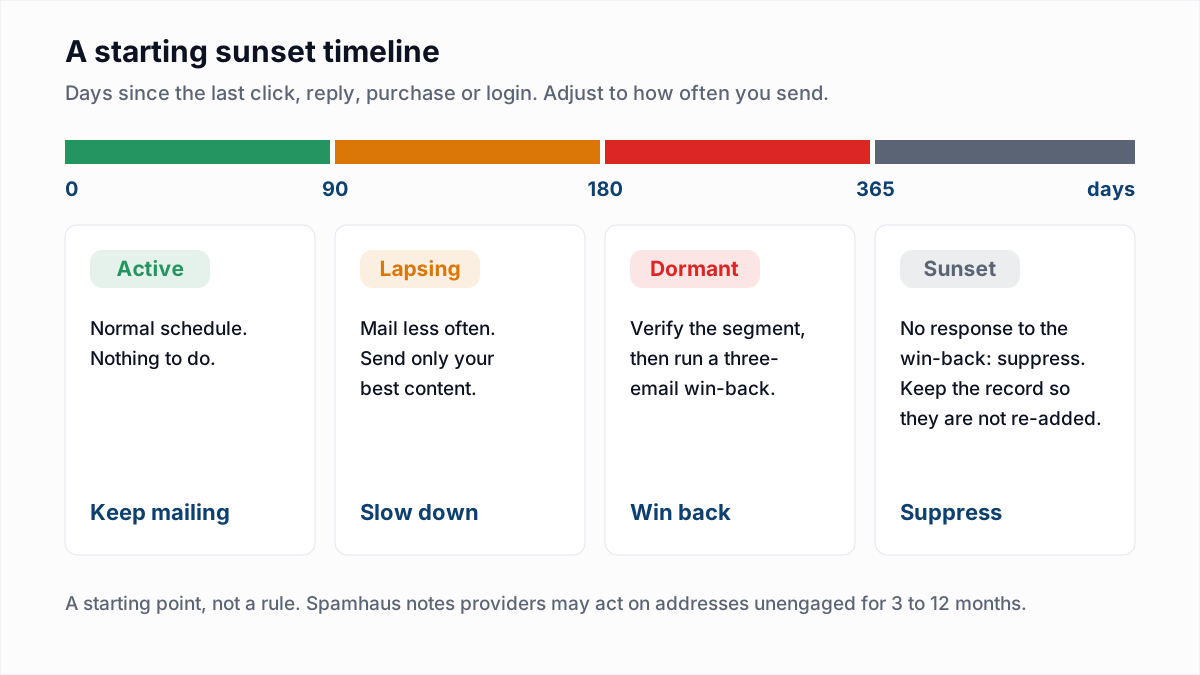
| Days since last engagement | Tier | What to do |
|---|---|---|
| 0 to 90 | Active | Normal schedule |
| 90 to 180 | Lapsing | Cut frequency, send only your strongest campaigns |
| 180 to 365 | Dormant | Stop regular sends, verify, run the win-back sequence |
| No response to win-back, or over 365 | Sunset | Suppress |
Cadence matters. A monthly newsletter that sunsets at 90 days gives people three chances to click; a daily sender gets ninety. Think in sends as well as days. New subscribers need their own rule too: someone who joined and never clicked a single email in their first couple of months is a weak signup, not a lapsed fan. Move them to the dormant track early.
Verify the dormant segment before the win-back
Your dormant segment is the oldest part of your list, so it holds the most dead addresses. People change jobs, abandon personal inboxes and lose domains. Send a win-back to all of it unchecked and the first thing you get is a burst of hard bounces, at exactly the moment you are mailing people most likely to ignore you.
Export the segment and run it through the bulk email verifier first. A mailbox that no longer exists answers the check with a hard rejection. When we tested Gmail on 4 November 2026 for our provider research, a nonexistent mailbox returned 550-5.1.1 The email account that you tried to reach does not exist. Remove the Undeliverable results, send the Deliverable ones first, and treat catch-all and Unknown results with care.
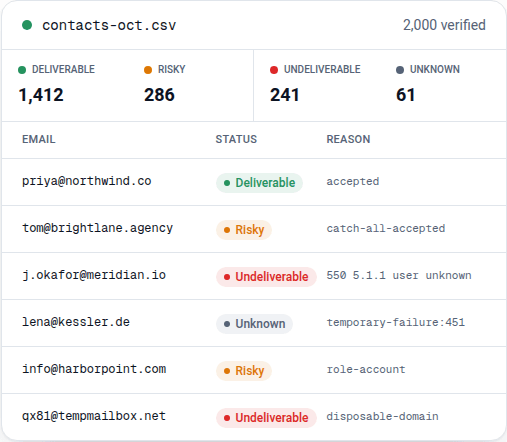
Two limits are worth knowing. Verification confirms the mailbox exists, not that anyone reads it, so a Deliverable dormant contact still needs the win-back. And it cannot spot a recycled spam trap, because a trap accepts mail like any working mailbox. That is why the 12-month cap matters even for addresses that verify. For how this fits a regular routine, see how often to clean an email list.
A three-email re-engagement campaign
Spamhaus advises a re-engagement or permission-pass campaign before suppressing anyone, and warns that "sending to all unengaged users at once is a sure-fire way to destroy your reputation!" Stagger the sends over several days and watch your bounce and complaint rates as you go. Three emails is enough:
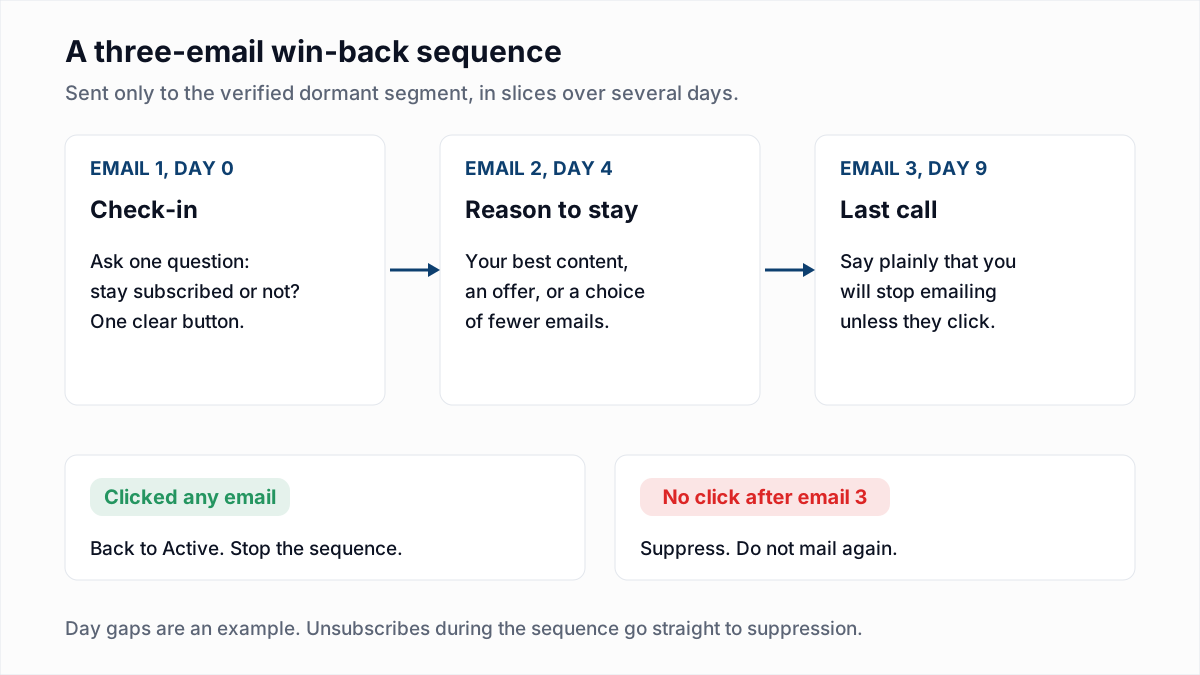
- The check-in. Ask one question with one button. Example subjects: "Do you still want these emails?", "Should we keep writing to you?".
- A reason to stay. Your most useful recent content, an offer if you sell something, or the option to get fewer emails. Example subjects: "The three posts readers saved most this year", "Prefer one email a month?".
- The last call. Say plainly that you will stop. Example subjects: "We'll stop emailing you on Friday", "Last email unless you click".
These subject lines are examples we wrote, not tested winners. Count only clicks as a response, for the reasons above. Start with a small slice of the segment, the most recently engaged first, and widen it only if bounces and complaints stay low. If you use Google Postmaster Tools, check your domain reputation each day while the campaign runs.
Suppress or delete inactive subscribers?
Suppress. Deleting looks tidier but causes problems later:
| Suppress | Delete | |
|---|---|---|
| Re-imported by a CSV or sync | Blocked, because the address is on the suppression list | Added back as a new contact and mailed again |
| Unsubscribes honoured | Yes, permanently | Only until the address comes back from another source |
| Person comes back and signs up | Remove the suppression after a fresh opt-in | Treated as new |
| Contact cost | Depends on the platform; check whether yours bills for suppressed contacts | None |
Unsubscribes are the reason this matters. The FTC's CAN-SPAM guide requires you to honour opt-out requests within 10 business days, and you cannot do that if a deleted address quietly comes back through an import. Keep sunset suppressions and unsubscribes as separate reasons, so you know who opted out and who simply went quiet. What else belongs on the list is in email suppression list. If someone asks for their data to be erased under the GDPR, ask your legal adviser how to keep the minimum needed to stop mailing them again.
How to set up a sunset policy in Mailchimp, HubSpot and Klaviyo
The steps are the same on every major platform, even if the menus differ:
- Build segments by last engagement. Use campaign activity conditions, such as "clicked any campaign in the last 90 days", and combine them with purchase or website activity where the platform tracks it. Avoid conditions based only on opens.
- Exclude the lapsing and dormant segments from regular campaigns, or send them a reduced schedule.
- Export the dormant segment, verify it and re-import the results as a tag or field. Our setup notes for Mailchimp, HubSpot and Klaviyo walk through the export and import. The full cleanup on each platform is in how to clean a Mailchimp audience, a HubSpot contact list, a Klaviyo list or an ActiveCampaign list.
- Run the win-back as an automation that ends as soon as the contact clicks.
- Suppress, archive or unsubscribe the non-responders, using whichever option your platform offers that keeps the address blocked from future imports.
- Schedule it. Review the segments monthly so the policy runs all the time, not once a year after a deliverability scare.
Common mistakes
- Counting opens as engagement and keeping Apple Mail users who have not read anything in a year.
- Sending the win-back to the whole dormant segment in one go.
- Skipping verification and taking a wave of hard bounces on the win-back.
- Deleting non-responders, then re-adding them from the next CRM sync.
- Never running the policy again after the first clean-up.
Start with the dormant segment
Pull everyone with no click, reply, purchase or login in the last 180 days, and verify them with the InboxSure bulk email verifier before the win-back goes out. The free plan handles any number of lists of up to 50 addresses with no card; Pro covers lists up to 10,000 addresses for a flat $49 a month, so verifying the segment every month costs the same as verifying it once.
Frequently asked questions
Related reading
Ready to clean your email list?
Upload a CSV or XLSX and get every address marked deliverable, risky, undeliverable or unknown, with the reason. Free for lists of up to 50, no card. Nothing is sent to your contacts.