Transactional vs Marketing Email: Differences That Affect Delivery
The difficulty with transactional and marketing email is that three different parties draw the line: the law, the mailbox providers and the person reading the message. They do not draw it in the same place. A receipt with a discount code in it can be transactional under US law, marketing under UK guidance, and spam to the customer who opens it.
This guide sets out each definition with its source, as read on 13 November 2026, and then covers the practical side: how to keep the two kinds of mail apart so that a bad campaign does not delay a password reset. It is general information, not legal advice.
What is transactional email?
Transactional email is a message sent to one person because of something that person did or an account they hold, containing information they need in order to complete or use what they asked for. The recipient is usually waiting for it.
- Password resets, sign-in codes and email address confirmations.
- Order confirmations, receipts and invoices.
- Shipping and delivery updates.
- Booking and appointment confirmations and reminders.
- Security alerts, such as a sign-in from a new device.
What is marketing email?
Marketing email, also called promotional email, is a message sent to a list of people to advertise a product or service or to encourage them to do something they have not asked to do. The sender chooses the timing, and the same content goes to many recipients.
- Newsletters and product announcements.
- Sales, discount codes and seasonal offers.
- Abandoned-cart and win-back emails.
- Upgrade prompts and cross-sell recommendations.
- Event and webinar invitations.
Being triggered by an action does not make a message transactional. An abandoned-cart email fires automatically, but nobody completed a transaction, and its purpose is to sell.
Transactional vs marketing email: what are the differences?
| Attribute | Transactional email | Marketing email |
|---|---|---|
| What triggers it | An action by the recipient or a change to their account | A decision by the sender to run a campaign |
| Who receives it | One person per message | A list or a segment |
| How quickly it must arrive | Within seconds; a late sign-in code is useless | Within hours is normally fine |
| US law (CAN-SPAM) | Exempt from most provisions, but must not carry false or misleading routing information | Must meet every requirement, including an opt-out honoured within 10 business days |
| UK guidance (ICO) | A service message, if it has no promotional element | Direct marketing, covered by the PECR rules on electronic mail |
| One-click unsubscribe at Gmail | Not required; Google excludes transactional messages | Required for senders of more than 5,000 messages a day |
| Spam complaints | Rare, because the recipient expects the message | The stream where most complaints arise |
| Sending setup | Its own stream, ideally its own subdomain | A separate stream and subdomain |
| What a dead address does | Hard bounces, and a customer is locked out or uninformed | Hard bounces, and the bounce rate of the campaign rises |
Where does the law draw the line between transactional and marketing email?
US law draws the line by the primary purpose of the message, and UK guidance draws it by whether the message promotes anything at all. The two tests give different answers for the same email.
United States: CAN-SPAM
The FTC's CAN-SPAM Act compliance guide says the primary purpose of an email is "transactional or relationship" if it consists only of content that:
- "Facilitates, completes, or confirms a commercial transaction that the recipient already has agreed to";
- "gives warranty, recall, safety, or security information about a product or service the recipient bought";
- notifies the recipient about a change in the terms or features of a membership, subscription, account, loan or other ongoing commercial relationship, a change in their standing in it, or regular account balance information;
- "provides information about an employment relationship or employee benefits"; or
- "delivers goods or services as part of a transaction that the recipient already has agreed to."
A message in one of those five categories, the guide says, "may not contain false or misleading routing information, but is otherwise exempt from most provisions of the CAN-SPAM Act." A commercial message must meet all of them, including a working opt-out that is honoured within 10 business days. The same law applied to outreach is covered in is cold email legal.
United Kingdom: service messages and direct marketing
The Information Commissioner's Office uses the term service message. Its guidance on identifying direct marketing says a service message "covers messages that aren't promotional but are for administrative or customer services purposes", and that phrasing, tone and context decide which side a message falls on. The ICO is stricter than the FTC on one point: "If your service message has elements that are direct marketing, even if that is not the main purpose of your message, then it will count as direct marketing." General branding and logos do not count.
So the US asks what the message is mainly for, and the UK asks whether any part of it promotes something. EU countries each implement their own rules, which we have not read.
How do Gmail and Yahoo treat transactional and marketing email?
Gmail and Yahoo apply the same authentication and spam-rate rules to both kinds of email, and require one-click unsubscribe only on marketing and subscribed messages. Both also tell senders to keep the two kinds apart.
- One-click unsubscribe. Google's sender guidelines FAQ says: "One-click unsubscribe is required only for marketing and promotional messages. Transactional messages are excluded from this requirement." Its examples are "password reset messages, reservation confirmations, and form submission confirmations."
- Who decides. The same FAQ says: "Message recipients, not Google, determine the nature of the messages they receive." If readers treat a message as promotional and report it, the label you gave it does not help.
- Mixed content. Google's Email sender guidelines say: "Don't mix different types of content in the same message. For example, don't include promotions in sales receipt messages."
- Separate addresses and IPs. Google asks that "messages of the same category should have the same From: email address" and, for senders with several IP addresses, to "use a different IP address for each message type."
- Yahoo. The Sender Hub best practices page has a heading "Segregate Email types by IP or DKIM domain" and says: "Don't send bulk/marketing email from the same IPs you use to send user mail, transactional mail, alerts, etc."
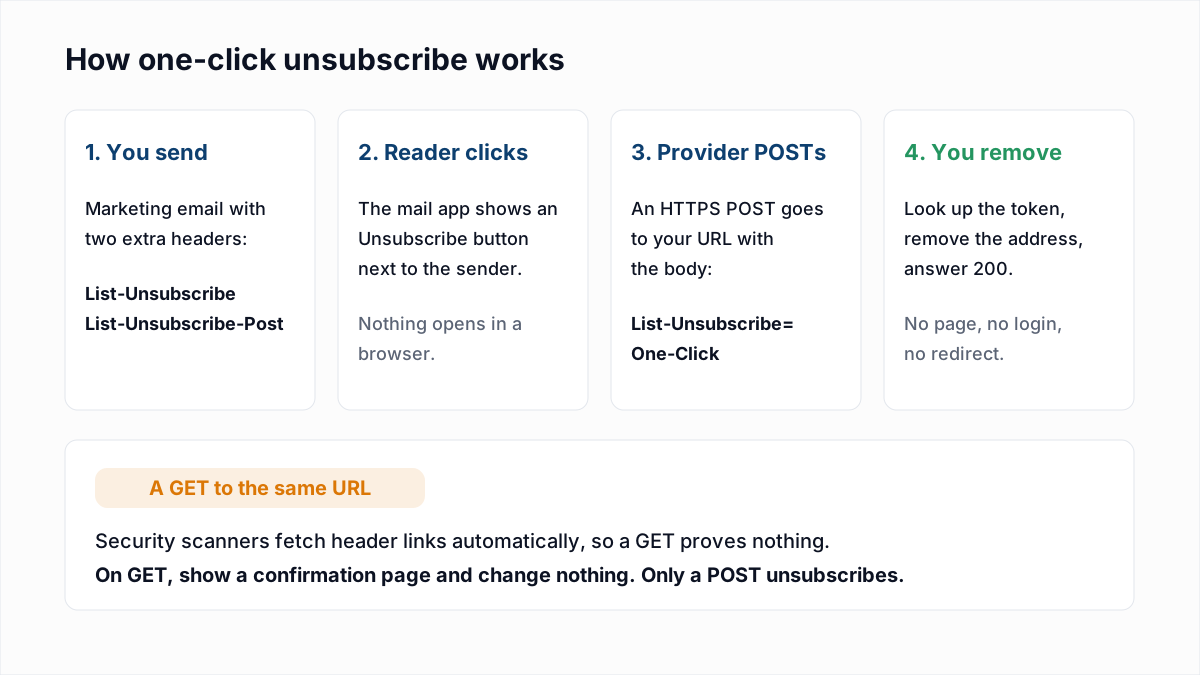
One thing transactional mail does not escape is the bulk-sender threshold. Google's FAQ defines a bulk sender by messages sent to personal Gmail accounts from one primary domain and makes no exception for transactional messages, so receipts and newsletters count together. The full rules are in Gmail, Yahoo and Outlook sender requirements, and the header itself in the List-Unsubscribe header guide.
Should transactional and marketing email use separate subdomains or IPs?
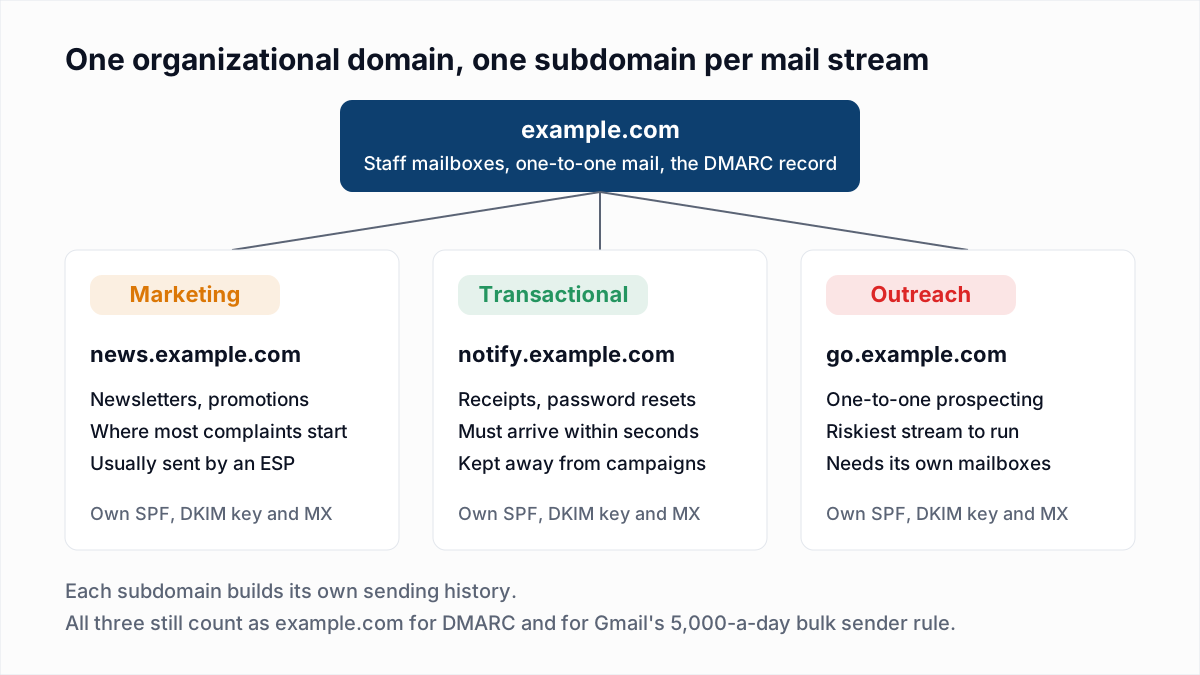
Yes, transactional and marketing email should be sent as separate streams, and at any real volume from separate subdomains, so that complaints about campaigns do not slow down receipts and password resets. Separate IP addresses only matter once you send enough to need a dedicated IP at all.
Email platforms build this in. Postmark's Message Streams documentation describes transactional streams as "for one-to-one emails triggered by a user action" and broadcast streams as "for one-to-many sends", adding that "Broadcast traffic uses dedicated infrastructure so transactional delivery stays fast and reliable." Its advice: "Keep Transactional and Broadcast on separate streams and subdomains with custom DKIM + Return-Path."
To separate the two streams:
- List every system that sends mail as your domain and label each one transactional or marketing.
- Pick a subdomain for each, such as
notify.example.comandnews.example.com. Naming and DNS records are in email sending subdomains. - Publish SPF, DKIM and MX for each subdomain and confirm DMARC passes (authentication guide).
- Use a different From address for each category, and one that accepts replies; see no-reply email addresses.
- Put each stream on its own message stream, API key or IP pool at your provider. Whether you need your own IP is covered in dedicated vs shared IP.
- Keep unsubscribes scoped to marketing, and keep hard bounces suppressed on both.
A business that sends a few hundred messages a month gains little from this. Different From addresses on one domain, such as billing@ and news@, are enough until volume grows.
What goes wrong when transactional and marketing email are mixed?
When transactional and marketing email share one domain, IP and stream, every problem caused by campaigns is applied to receipts and password resets as well. Three failures are common.
- Shared reputation. A campaign draws complaints, the provider starts deferring or junking mail from that domain and IP, and sign-in codes are caught by the same filter. Complaint limits are in spam complaint rate.
- Queueing. A password reset waits behind a large campaign in the same queue, or behind the deferrals it caused. See email throttling.
- Unsubscribes applied to the wrong mail. If one suppression list covers everything, a customer who unsubscribes from the newsletter stops getting receipts. If nothing is suppressed for transactional mail, hard-bounced addresses keep being retried. Scopes are explained in email suppression lists.
Can a receipt or order confirmation include a promotion?
A receipt can include a promotion under US law if the transactional content comes first and the subject line is about the transaction, but Google advises against it and UK guidance treats the whole message as marketing. The FTC guide gives the test: the primary purpose is commercial if "a recipient reasonably interpreting the subject line would likely conclude that the message contains an advertisement or promotion", or if the transactional content "does not appear mainly at the beginning of the message".
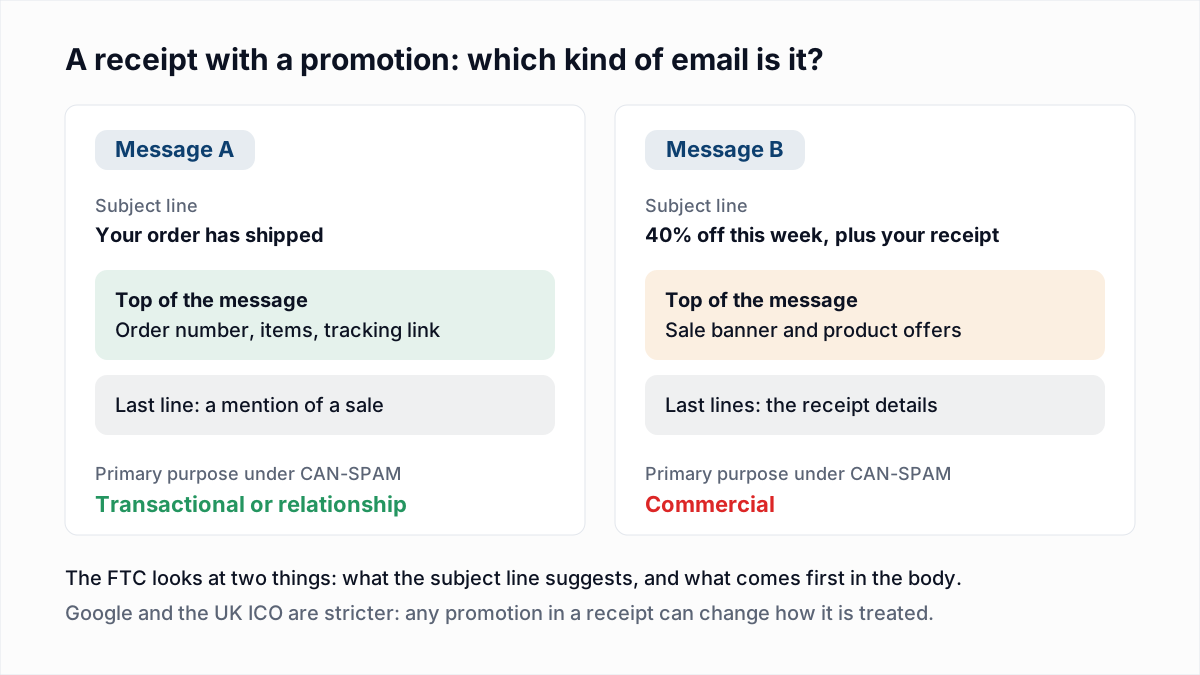
The simpler choice is the one Google asks for: keep promotions out of receipts. If you add one anyway, the safe reading is:
- Treat it as marketing: consent where the law asks for it, plus an unsubscribe link.
- Add the one-click unsubscribe headers, since Gmail lets recipients decide what it is.
- Do not let that unsubscribe stop plain receipts. Send those separately, with no promotion in them.
Does a bad email address matter for transactional email?
Yes, a bad address matters more for transactional email, because a password reset sent to a mailbox that does not exist bounces exactly as a newsletter does, and the customer is left waiting for it. In InboxSure's provider research of 4 November 2026, Gmail answered such an address with 550-5.1.1 The email account that you tried to reach does not exist.
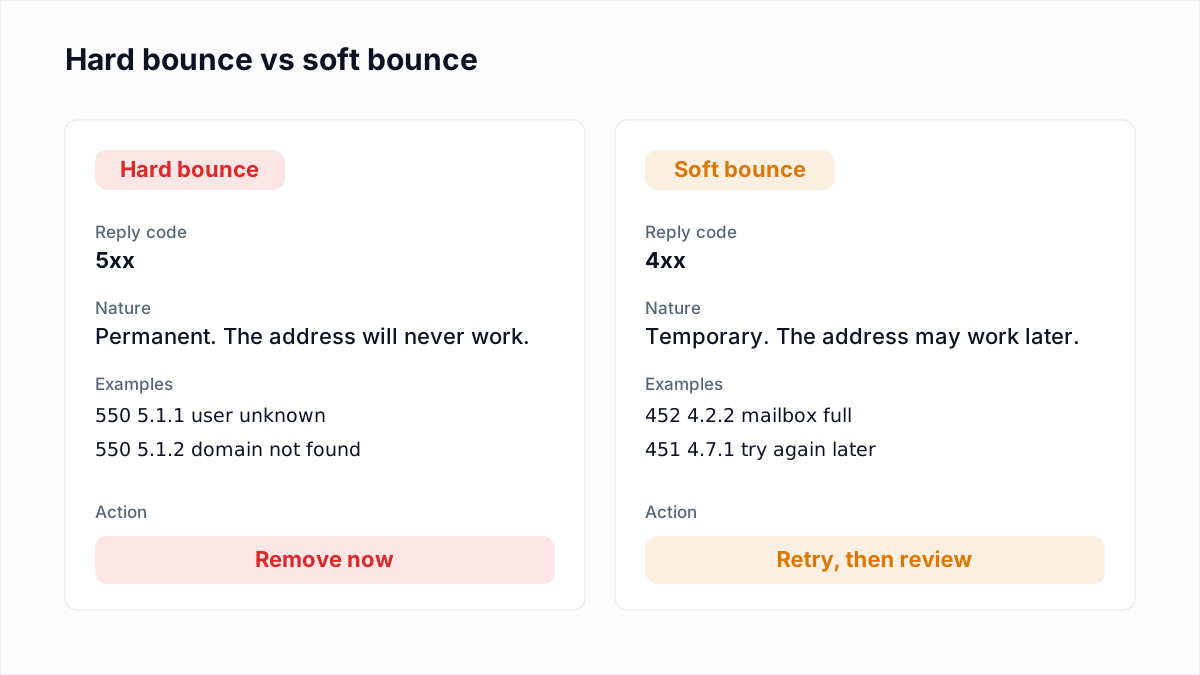
Most of these addresses are typed wrong at signup, which is why confirming the address matters (double opt-in vs single opt-in, email typos and invalid domains). Google's guidelines ask senders to "confirm each recipient's email address before subscribing them" and to "automatically unsubscribe recipients who have multiple bounced messages." Apply the second to transactional mail too: after a hard bounce, stop sending and ask the customer for a new address the next time they sign in.
InboxSure helps with the list side of this. It checks syntax, MX records and the mailbox over SMTP without sending an email, and marks addresses Deliverable, Risky, Undeliverable or Unknown. It works on lists you upload, so it suits an existing customer base or a marketing list before a send; there is no API for checking a signup form in real time today. Yahoo, AOL, Outlook.com and Hotmail addresses currently come back Unknown because those providers refuse the check.
To clear dead addresses from a customer or subscriber list before either stream sends to it, use the bulk email verifier: lists of up to 50 addresses are free with no card, and Pro is a flat $49 a month for lists of up to 10,000.
Frequently asked questions
Related reading
Ready to clean your email list?
Upload a CSV or XLSX and get every address marked deliverable, risky, undeliverable or unknown, with the reason. Free for lists of up to 50, no card. Nothing is sent to your contacts.