Dedicated vs Shared IP for Email: Which Do You Need?
The choice between a dedicated and a shared IP only exists if you send through an email service provider (ESP) or an SMTP relay. A dedicated IP is a sending address that only your account uses, so its reputation is built from your mail alone. A shared IP is one address, or a pool of them, that carries mail for many of the provider's customers at once. Several providers that sell dedicated IPs publish the volume below which they advise against one. Those figures are collected below, checked on 13 November 2026.
What is the difference between a dedicated IP and a shared IP?
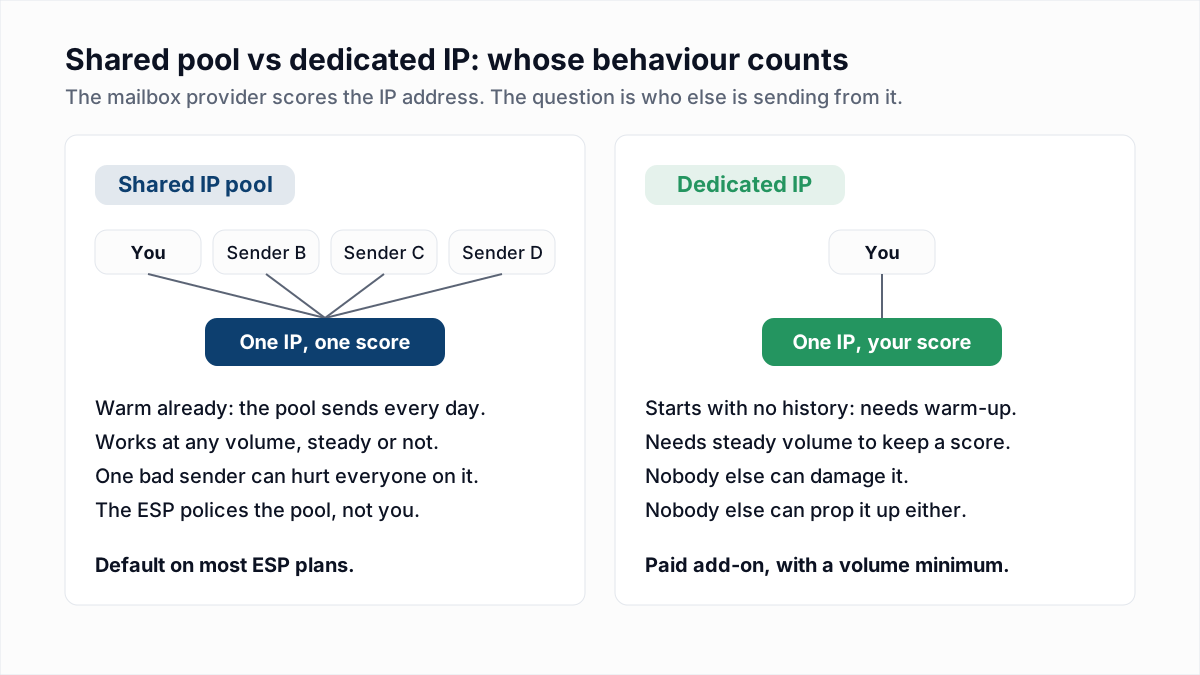
A dedicated IP carries the mail of one sender, and a shared IP carries the mail of many senders, so on a shared IP the mailbox provider scores everyone's behaviour together. Google's email sender guidelines put it this way: "The activity of any senders using a shared IP address affects the reputation of all senders for that shared IP address."
| Question | Shared IP pool | Dedicated IP |
|---|---|---|
| Whose mail builds the IP reputation? | Every customer in the pool | Only you |
| Is a warm-up needed? | No, the pool already sends every day | Yes, a new IP has no history |
| Does low or irregular volume hurt? | No, other senders fill the gaps | Yes, the IP loses its history when you go quiet |
| Can another sender damage delivery? | Yes, until the provider removes them | No |
| Is the IP address fixed? | No, pool addresses can change | Yes, which matters if a recipient allowlists you by IP |
Do I need a dedicated IP?
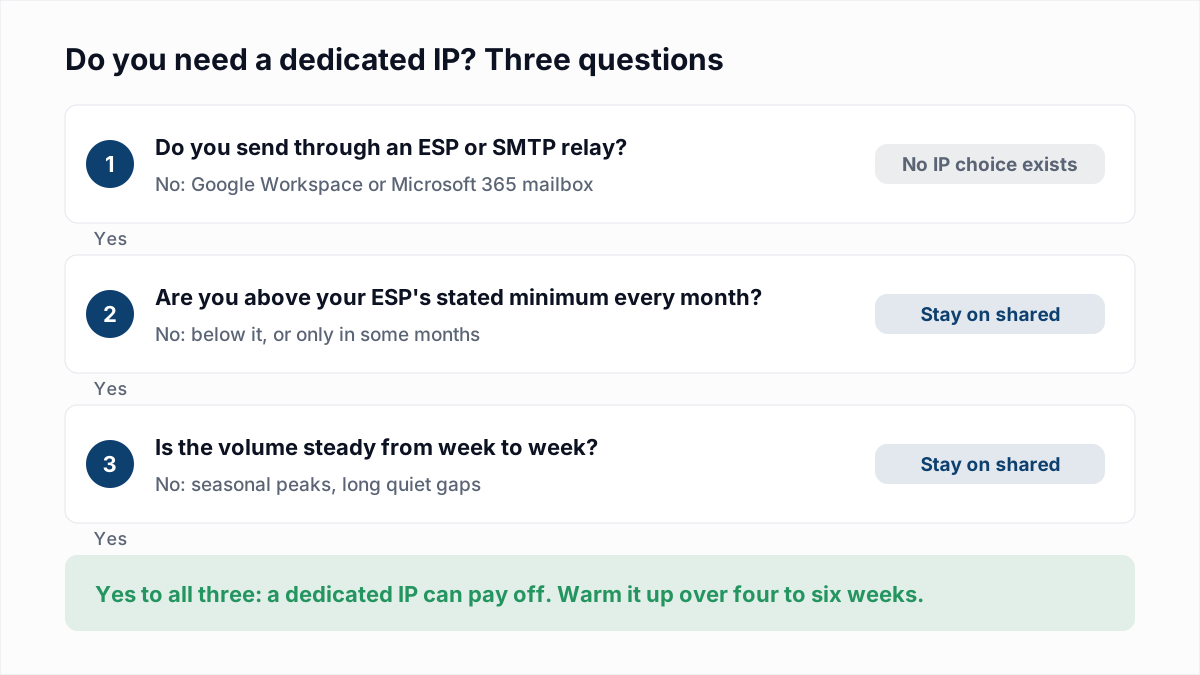
You need a dedicated IP only if you send a large volume of email every month at a steady rate; below your provider's stated minimum, or with volume that comes and goes, a shared IP will deliver better. Volume matters because of how reputation is measured. Amazon's SES documentation explains: "Most ISPs only track the reputation of a given IP address if they receive a significant volume of mail from that address." An IP that sends a few hundred messages a week never gives Gmail or Outlook enough to score, so it stays in the cautious "unknown" state that a brand-new IP starts in.
Work through these questions in order:
- Do you send through an ESP or SMTP relay at all? If your mail leaves from a Google Workspace or Microsoft 365 mailbox, there is no IP to choose. Skip to the section on mailboxes below.
- Are you above your provider's minimum every month? Use the table in the next section. If you clear the bar in November and December only, the answer is no.
- Is the volume steady from week to week? A daily or weekly rhythm keeps an IP scored. One large send a month, with silence in between, does not.
- Is your own sending clean? On a dedicated IP nobody else's good mail dilutes your bounces and complaints. Mailchimp's IP warming guide says of poor practices on a dedicated IP that "there's no shared reputation to help offset the damage."
- Do you have a reason beyond reputation? A recipient that allowlists by IP address, or a need to keep password resets apart from promotions, can justify a dedicated IP on its own.
How much email do you need to send to justify a dedicated IP?
Email providers that publish a figure put the minimum for a dedicated IP between 100,000 and 300,000 messages a month, sent consistently. The figures differ, and one of them is far lower than the rest, so here is each vendor's own guidance with its source.
| Provider | What the provider says | Stated figure |
|---|---|---|
| Postmark | "To qualify for a dedicated IP, you must send at least 300,000 messages a month." Postmark adds that "for most people, a pristine shared IP pool will have the best results." | 300,000 a month, required |
| Mailgun | Mailgun's help centre advises a dedicated IP for accounts that consistently send at least 100,000 messages a month, and a shared IP below that or when sending is volatile. | 100,000 a month, recommended |
| Twilio SendGrid | "If you send less than 100,000 emails per year, it might not be worth moving to a dedicated IP." SendGrid's dedicated IP documentation adds: "When your volume reaches 250,000 messages each month, allocate a minimum of two dedicated IP addresses." | 100,000 a year (blog, June 2022); two IPs from 250,000 a month |
| Amazon SES | "If you don't plan to send large volumes of email on a regular and predictable basis, we recommend that you use shared IP addresses." To keep a reputation with a mailbox provider, "you should send several hundred emails within a 24-hour period at least once per month." | No monthly figure; several hundred a day per mailbox provider as a floor |
| Mailchimp | "A dedicated IP isn't necessary if you're not sending hundreds of thousands of emails monthly." The same page states: "if you use Mailchimp, your emails are sent from a shared IP address." | Hundreds of thousands a month, no exact number |
The outlier is the Twilio SendGrid blog figure, which is per year, not per month, and works out to roughly 8,300 messages a month. It is often misquoted as a monthly number. Whatever provider you use, its own figure is the one to follow, because that provider runs the pool you would be leaving.
Does a dedicated IP need to be warmed up?
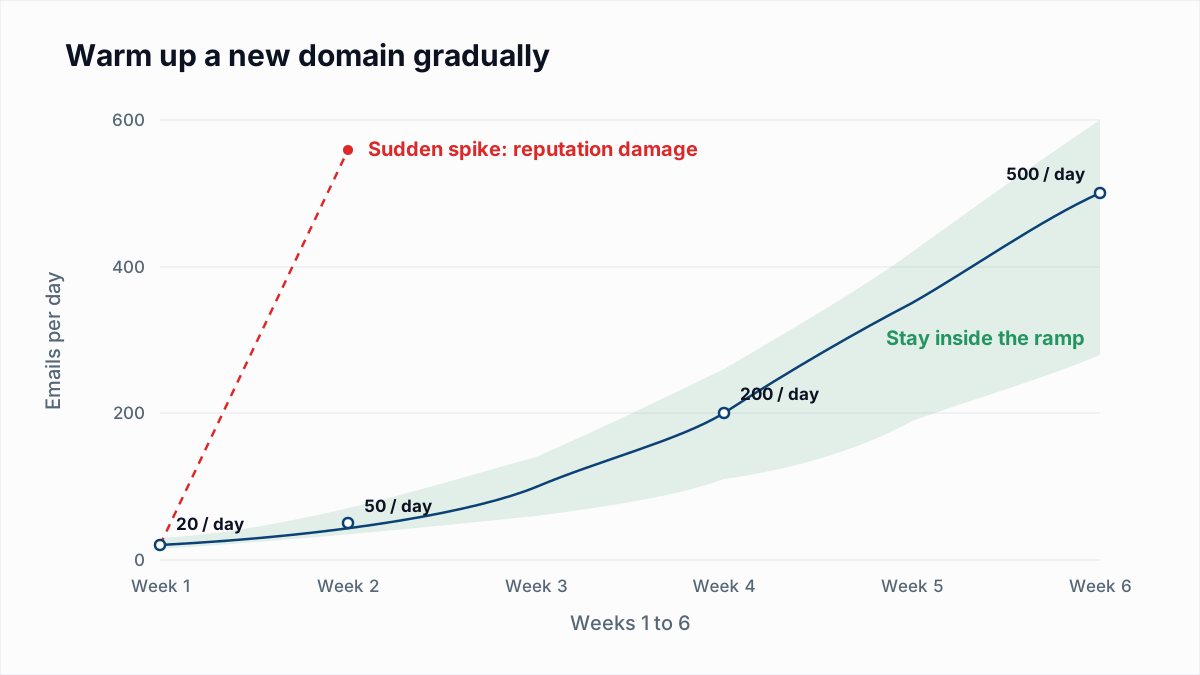
Yes, a new dedicated IP needs a warm-up, because mailbox providers have no sending history for it and limit or filter mail from unknown addresses. Amazon SES states that with standard dedicated IPs "you must warm up addresses by sending an amount of email that gradually increases every day." Google's sender guidelines give the same instruction for any new source: "Start with a low sending volume to engaged users, and slowly increase the volume over time."
Most providers automate the ramp. The published schedules, as of November 2026 (set side by side in our IP warm-up schedule):
- Twilio SendGrid: the automated warm-up schedule starts at 20 messages an hour on day 0 and runs to day 41, and it needs at least one other warm IP on the account.
- Mailchimp Transactional: the warm-up API shifts a growing share of mail onto the new IP "over a period of roughly 30 days."
- Amazon SES: managed dedicated IPs warm up automatically for each mailbox provider separately; standard dedicated IPs are warmed by hand.
A warm-up only works if you have enough mail to feed it every day for a month or more, which is the same volume test as before. An IP also does not stay warm by itself: SES says that after warm-up "you must then maintain a consistent sending pattern." A dedicated IP bought for a seasonal peak and left idle the rest of the year is cold again each time you return to it. The daily numbers and the signals to watch are in our guide to email warm-up and sender reputation.
What are the risks of a shared IP pool?
The main risk of a shared IP pool is that another customer's spam complaints or blocklist listing lowers delivery for everyone on the same address. Google's guidelines tell senders on shared IPs to "make sure the shared IP address isn't on any internet blocklist" and to check its standing in Postmaster Tools. There is a second, less obvious cost in the same guidelines: when Gmail rate-limits an address, "the IP address quota is shared for all senders that use that IP address." For what a third-party score means on a shared IP, see Sender Score explained.
How much this matters depends on who runs the pool. A provider that vets new accounts and suspends bad ones quickly keeps a pool that outperforms what a small sender could build alone. Signs that the pool, and not your own mail, is the problem:
| If you see this | It usually means | Do this |
|---|---|---|
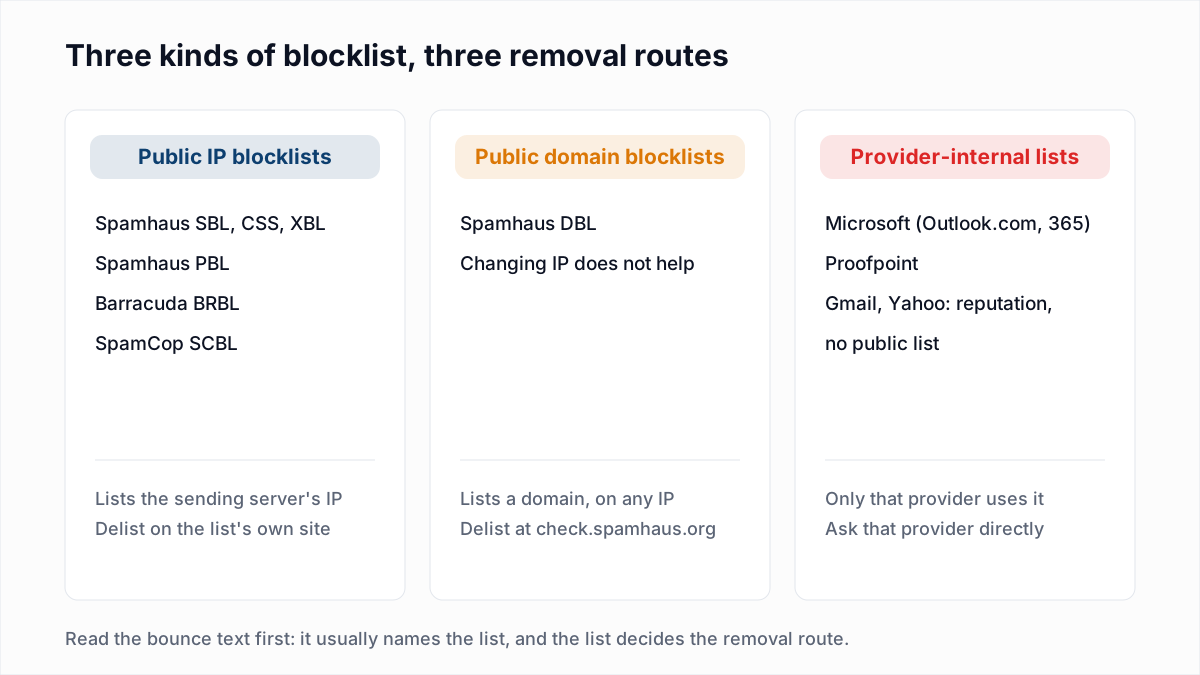
| A bounce that names a blocklist and an IP you do not recognise | The shared IP is listed because of another sender | Send the bounce text to your ESP's support; only the IP owner can request removal |
| Deferrals or spam placement that start and stop without any change on your side | Pool reputation is moving with other customers' sends | Ask the ESP whether a better pool or plan tier is available |
| Spam placement that follows your domain to a different ESP | The problem is your domain, list or content, not the IP | Fix complaints and list quality; a dedicated IP will not help |
The removal routes for each kind of listing are in how to check and get off an email blacklist.
Does Gmail care more about domain reputation than IP reputation?
Google does not publish a statement that domain reputation outweighs IP reputation at Gmail; what Google's documentation shows is that Gmail tracks both and that a domain's reputation follows it to any IP. The sender guidelines tell you to "check your spam rate and your domain and IP address reputation with Postmaster Tools", and warn that "over time, user spam reports can lower your domain's reputation." The widely repeated claim that Gmail now weighs the domain more heavily than the IP comes from deliverability practitioners. As of November 2026 we could not find it in Google's own wording, so we do not present it as Google's position.
What can be said safely: a dedicated IP changes only the IP half of the picture. Complaints and bounces attach to your authenticated domain, and that reputation travels with you from pool to dedicated IP and from one ESP to the next. Google is also retiring the Domain and IP Reputation charts from Postmaster Tools, as covered in our Google Postmaster Tools guide, so the spam rate and compliance dashboards are the ones to watch. If you do run more than one IP, Google asks you to "use a different IP address for each message type." Separating streams by name is covered in should you send email from a subdomain.
Can you get a dedicated IP for cold email from Google Workspace or Microsoft 365?
No, mail sent from a Google Workspace or Microsoft 365 mailbox always leaves through Google's or Microsoft's own shared outbound servers, and neither service lets a customer choose or reserve the IP address. That is why the SPF record for a Workspace domain is simply include:_spf.google.com: it authorises Google's whole outbound range, which every Workspace customer shares. Microsoft goes further and picks the pool per message. Its outbound delivery pools documentation says messages "determined to be spam are sent through the high-risk delivery pool", a separate set of addresses where "delivery to the intended recipients isn't guaranteed."
For cold outreach from mailboxes, then, the shared-or-dedicated question does not apply. The reputation you control is that of your domain and of each mailbox: how many messages it sends, how many bounce, and how many are reported as spam. The levers are the ones in email sending limits by provider and why cold emails go to spam.
What a dedicated IP will not fix
A dedicated IP removes other senders from your reputation. It does not remove your own bounces, complaints or unauthenticated mail, and it concentrates their effect. Before paying for one, confirm that SPF, DKIM and DMARC pass and align (see SPF, DKIM and DMARC explained), that your complaint rate is under the limits in spam complaint rate, and that the list you will use for the warm-up is free of dead addresses.
That last part is where InboxSure helps. It checks syntax, MX records and the mailbox itself over SMTP without sending a message, and marks each address Deliverable, Risky, Undeliverable or Unknown. It does not measure IP reputation or monitor blocklists, and Yahoo, AOL, Outlook.com and Hotmail addresses currently come back Unknown because those providers refuse the check. For the rest of a list, remove the Undeliverable rows before the first warm-up send. Upload a CSV to the bulk email verifier: lists of up to 50 addresses are free, and Pro is a flat $49 a month for lists of up to 10,000.
Frequently asked questions
Related reading
Ready to clean your email list?
Upload a CSV or XLSX and get every address marked deliverable, risky, undeliverable or unknown, with the reason. Free for lists of up to 50, no card. Nothing is sent to your contacts.