How to Whitelist an Email Address in Gmail, Outlook, Yahoo and Apple Mail
Whitelisting an email address is telling a mail service to treat one sender's mail as wanted, so the spam filter stops filing it in Spam or Junk. No provider has a button labelled "whitelist". Outlook calls the feature Safe senders, Gmail uses contacts and filters, and the admin tools at Google and Microsoft now say "allowlist": Google's setting is named Email allowlist and Microsoft's is the Tenant Allow/Block List. The words mean the same thing.
Every step below comes from the provider's own help page, read on 13 November 2026 and linked where it is used.
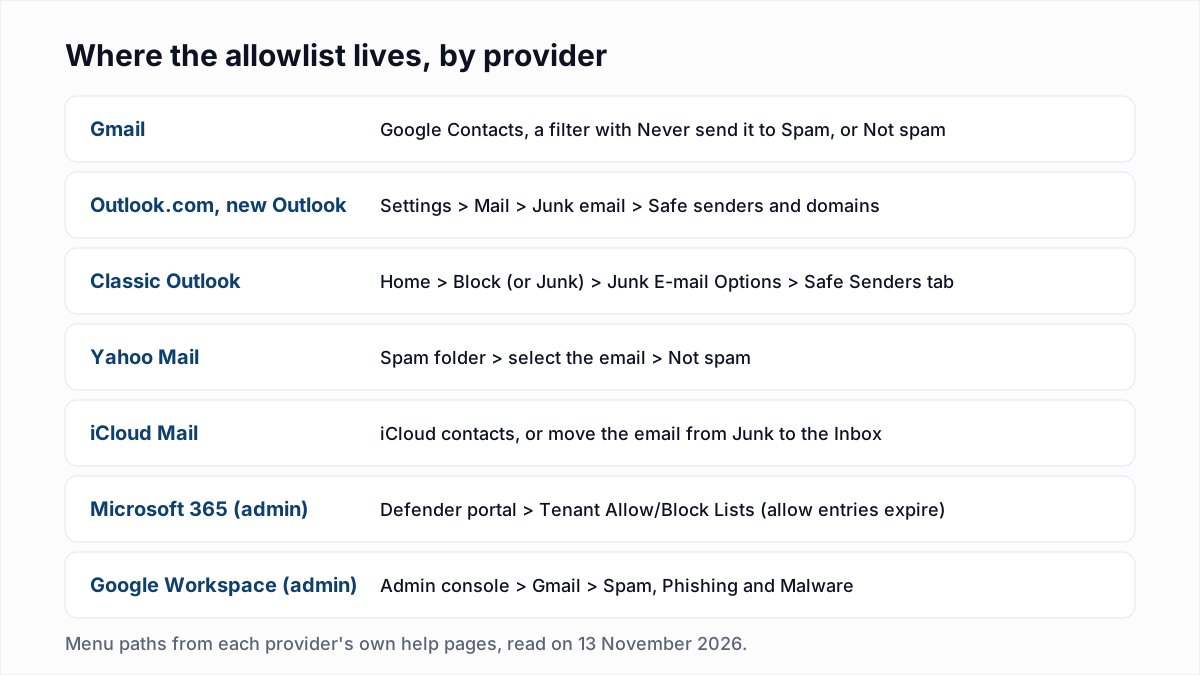
How do I whitelist an email address in Gmail?
To whitelist an email address in Gmail, add the sender to Google Contacts, create a filter for the sender with "Never send it to Spam" ticked, or open the Spam folder and click Not spam. Gmail Help lists all three on its page Fix issues with valid emails in Spam. The filter steps:
- On a computer, open Gmail.
- In the search bar at the top, click Show search options.
- Next to "From", enter the sender's email address.
- At the bottom of the search window, click Create filter.
- Tick the box next to "Never send it to Spam".
- Click Create filter.
For contacts, the same page says to go to Google Contacts, click Create contact, enter the details and click Save. For a message already in Spam, open More and then Spam in the left menu, tick the email and click Not spam at the top. Gmail's Report spam in Gmail page puts the contacts effect in one line: "When you add the sender to Google Contacts, Gmail stops sending their messages to Spam."
None of this moves mail between inbox tabs. Moving a newsletter from Promotions to Primary is a different action, covered in our guide to the Gmail Promotions tab.
How do I add a safe sender in Outlook.com and Outlook?
To add a safe sender in Outlook.com, new Outlook or Outlook on the web, open Settings, then Mail, then Junk email, and add the address under Safe senders and domains. Microsoft Support gives the steps in Add recipients to the Safe Senders List in Outlook:
- Select Settings, then Mail, then Junk email.
- Under Junk email, scroll down to Senders and select the Safe senders and domains tab.
- Select Add safe sender and enter the email address.
- Select OK, and then select Save.
For classic Outlook for Windows, the same Microsoft page says to go to the Home tab and, in the Delete group, select Block ("or it might say Junk"), then Junk E-mail Options, then the Safe Senders tab.
Microsoft describes the effect plainly: "Email addresses and domain names in the Safe Senders List are never treated as junk email, regardless of the content of the message." Microsoft's Safe Senders in Outlook.com page confirms that a whole domain can go in the same box.
How do I whitelist an email in Yahoo Mail?
To whitelist an email in Yahoo Mail, open the Spam folder, select a message from the sender and click Not spam. Yahoo Help says this moves the message to the inbox "and future messages from this sender will be delivered to the inbox". Yahoo has no list named safe senders in the pages we read.
- Open the Spam folder. Yahoo's Manage spam and mailing lists in Yahoo Mail says to click More below the Sent folder if Spam is not showing; the page for new Yahoo Mail says to click the More options icon and select Spam.
- Select the email.
- Click Not spam.
Neither Yahoo page mentions contacts, so we cannot say from Yahoo's own words that saving a contact keeps mail out of Spam. Yahoo's filters page describes filters that "automatically sort new emails to a folder or trash" without saying whether a filter overrides the spam filter. Use Not spam first.
How do I whitelist an email in Apple Mail and iCloud Mail?
To whitelist an email in iCloud Mail, add the sender to your iCloud contacts or move one of the sender's messages from Junk to the Inbox. Apple's Report and reduce spam in iCloud Mail says: "Emails from people in your iCloud contacts, or from recent conversations, won't go to the Junk folder."
- iPhone or iPad. Open the message in the Junk folder, tap the Move to Folder button, then tap Inbox.
- Mac. Select the message in the Junk folder and click the Junk button in the Mail toolbar, or drag the message to the Inbox.
- iCloud.com. Select the Junk folder, select the email, then choose Move to Inbox. Apple's Manage junk mail in Mail on iCloud.com says: "Subsequent emails from the same sender will no longer be marked as junk."
VIP is not an allowlist. Apple's Make a sender a VIP in Mail on iCloud.com says a VIP gets a star and a place in the VIP mailbox, and says nothing about junk filtering. Apple's page on VIPs in Mail on Mac did not load as readable text for us on 13 November 2026, so we make no claim about it. Apple's iCloud.com rules page describes rules that sort a sender's email into a folder and does not mention junk either.
How do admins allowlist a sender in Microsoft 365?
Microsoft 365 admins allowlist a sender with an allow entry in the Tenant Allow/Block List, which Microsoft calls its "number one recommended option". The list is in the Microsoft Defender portal under Email & collaboration, Policies & rules, Threat policies, Tenant Allow/Block Lists.
Microsoft attaches more warnings to this than any other provider. Its page Manage allows and blocks in the Tenant Allow/Block List says "Unnecessary allow entries expose your organization to malicious email that the system would otherwise filter", and sets these limits:
- Allow entries for domains and addresses can be created directly only to override bulk, spam, high confidence spam and (not high confidence) phishing verdicts.
- Malware and high confidence phishing verdicts need a submission to Microsoft first, and Microsoft's Create allowlists page says such messages "are always quarantined, regardless of the allowlist option you use".
- Allow entries expire. By default they are kept for 45 days after the filtering system decides the sender is clean, or an admin can set expiry up to 30 days after creation.
The Create allowlists page ranks the methods from most to least recommended: the Tenant Allow/Block List, mail flow rules, Outlook Safe Senders, the IP Allow List, and last the allowed sender and domain lists in anti-spam policies, which it says to avoid "if at all possible".
How do admins allowlist a sender in Google Workspace?
Google Workspace admins allowlist a sender in the Admin console under Apps, Google Workspace, Gmail, Spam, Phishing and Malware, using either the Email allowlist for IP addresses or an approved senders list for addresses and domains.
- Email allowlist (IP addresses). Google's Add IP addresses to allowlists in Gmail says messages from listed addresses "won't be marked as spam by Gmail". It takes public IP addresses only, always applies to the entire domain, and changes can take up to 24 hours.
- Approved senders (addresses or domains). Google's Add custom spam filters to Gmail offers "Bypass spam filters for messages from senders or domains in selected lists". The page tells admins to ask the sender to set up DMARC, and says a message from an approved sender that has a virus or is part of a larger email attack is still blocked.
Where is the allowlist in each provider, and what does it do?
The table lists where the allowlist is in each mail service and what the provider's own page says it does, as read on 13 November 2026.
| Provider | Where | What the provider says it does |
|---|---|---|
| Gmail | Google Contacts; a filter with "Never send it to Spam"; Not spam | Gmail stops sending that sender's messages to Spam. |
| Outlook.com, new Outlook, Outlook on the web | Settings, Mail, Junk email, Safe senders and domains | Safe senders are never treated as junk, regardless of content. |
| Classic Outlook | Home, Block or Junk, Junk E-mail Options, Safe Senders tab | Messages from safe senders are never moved to the Junk E-mail folder. |
| Yahoo Mail | Spam folder, select the email, Not spam | Future messages from the sender are delivered to the inbox. |
| iCloud Mail and Apple Mail | iCloud contacts; move the email from Junk to the Inbox | Later emails from the sender are no longer marked as junk. |
| Microsoft 365 (admin) | Defender portal, Tenant Allow/Block Lists | Overrides spam, bulk and phishing verdicts for a limited time. |
| Google Workspace (admin) | Admin console, Gmail, Spam, Phishing and Malware | Listed IPs or approved senders bypass Gmail spam filters for the whole domain. |
Does asking subscribers to whitelist you improve deliverability?
Asking subscribers to whitelist you helps in the mailboxes of the people who do it, and nowhere else. Google's Email sender guidelines say "Messages sent from an address in the recipient's contacts are less likely to be marked as spam", and that recipients can mark valid messages as not spam "so future messages from the sender should be delivered to their inbox".
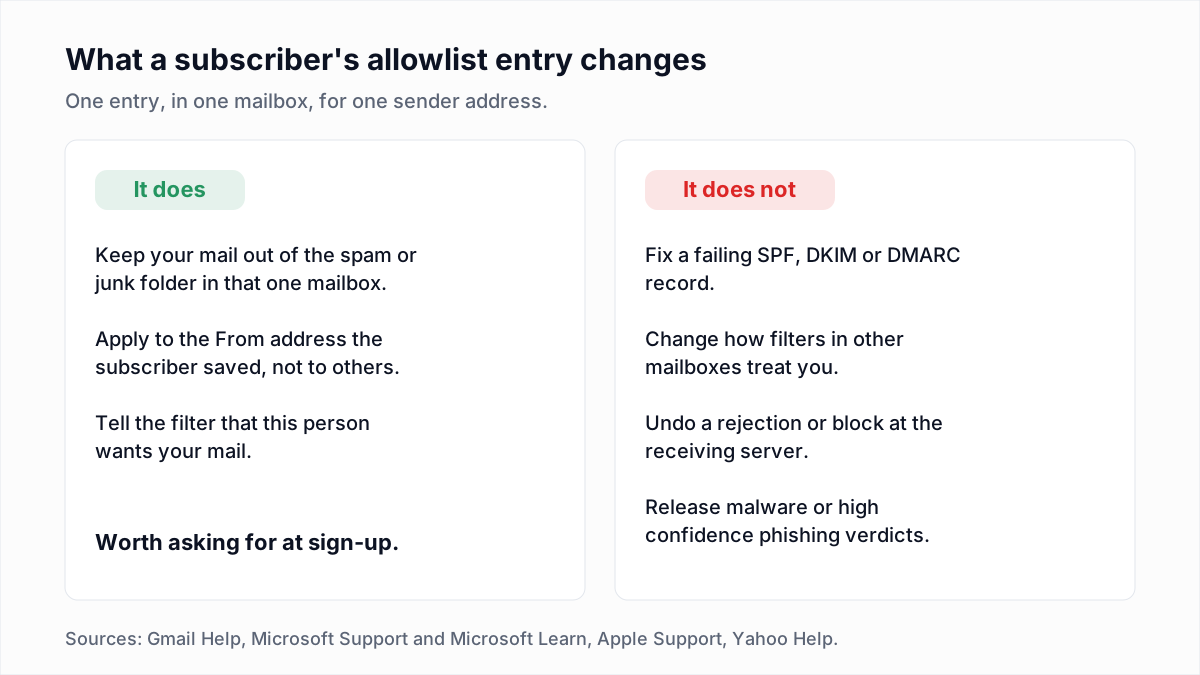
What an allowlist entry cannot do matters more to a sender:
- It does not fix authentication. Google's admin page tells the admin to ask the sender for DMARC, and Microsoft's example rule checks for
dmarc=passbefore skipping the filter. Set up SPF, DKIM and DMARC first. - It does not repair reputation. One contact entry changes one mailbox. Filters still judge you everywhere else; see the Gmail, Yahoo and Outlook sender requirements.
- It does not undo a rejection. Every setting above acts on mail that was accepted. A message bounced with a block-list error never reaches the mailbox where the allowlist lives.
- It is tied to the From address. Microsoft says Outlook Safe Senders and the anti-spam allowed lists "inspect only the From addresses". Change your From address and the entry stops matching. A stable, replyable address helps; see why a no-reply address costs you.
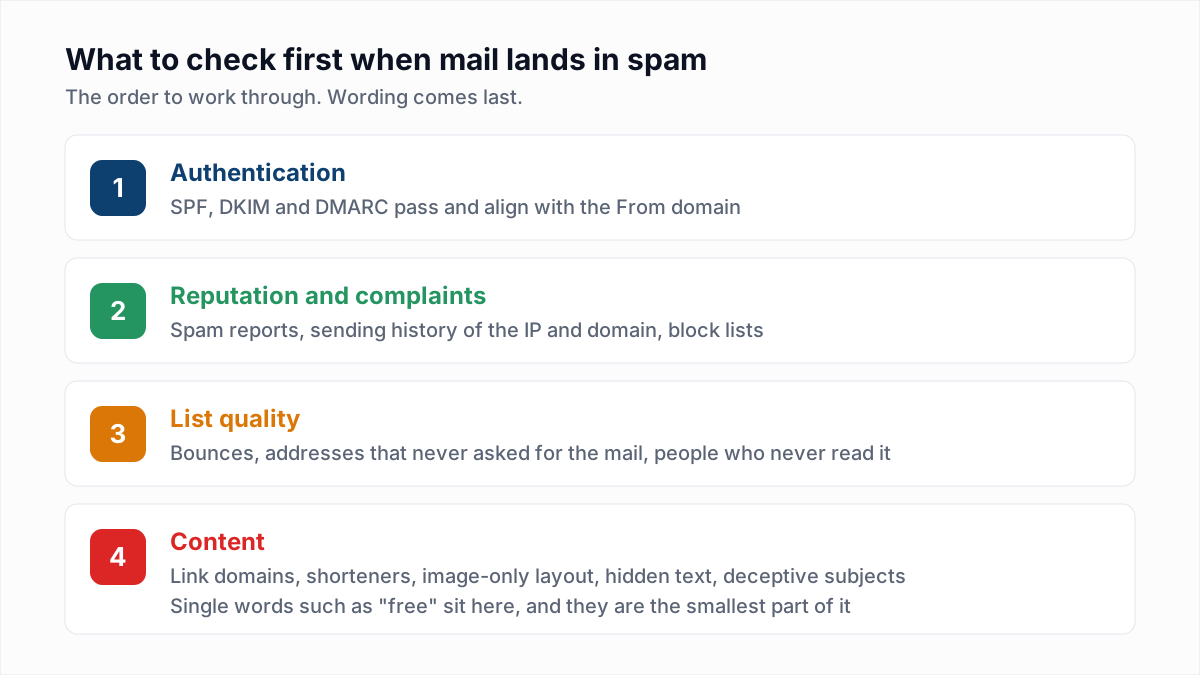
If mail is landing in spam for many recipients, the causes are upstream, and our spam-folder checklist starts there.
What should a welcome email say about whitelisting?
A welcome email should give a one-line instruction for each major mail service and name the exact From address to save. Replace the address below with your own:
To make sure you keep getting these emails, add
news@example.com to your address book:

Gmail: open this email, then add news@example.com to
Google Contacts. If it landed in Spam, select it and
click "Not spam".

Outlook.com / Outlook: Settings > Mail > Junk email >
Safe senders and domains > Add safe sender.

Yahoo Mail: if this email is in Spam, select it and
click "Not spam".

Apple Mail / iCloud: add news@example.com to your
contacts. If this email is in Junk, move it to the Inbox.
Send every campaign from that same address, and do not ask business recipients to have their IT team allowlist your domain as a routine step: Microsoft's admin pages treat every such entry as a risk to keep to a minimum.
Where InboxSure fits, and where it does not
InboxSure does not allowlist anything and cannot move a message out of a spam folder. It checks whether addresses exist before you send, with an SMTP mailbox check that sends no email. That lowers bounces, a reputation signal no subscriber's contact list can cover for. Yahoo, AOL and Outlook.com consumer addresses come back Unknown as of November 2026, because those providers refuse the check.
If welcome emails bounce before anyone can save your address, start with the list: upload it to the bulk email verifier, free for lists up to 50 addresses.
Frequently asked questions
Related reading
Ready to clean your email list?
Upload a CSV or XLSX and get every address marked deliverable, risky, undeliverable or unknown, with the reason. Free for lists of up to 50, no card. Nothing is sent to your contacts.