No-Reply Email Addresses: Why to Stop Using Them
One caveat before the argument: nothing in Google's or Yahoo's published sender rules bans a no-reply address, and using one will not, on its own, send your mail to spam. The case against it is about what you lose. Replies carry unsubscribe requests, address changes, legal requests and sales, and a no-reply address throws all of them away while telling the reader you would rather not hear from them.
A no-reply email address is a sender address, usually noreply@, no-reply@ or donotreply@, that a company uses for automated mail and does not read. This guide covers what happens to a reply sent to one, what the mailbox providers and the law actually say, and the setups that replace it, with the Reply-To header doing most of the work.
What is a no-reply email address?
A no-reply email address is a From address on automated email that is not monitored, so a reply to it is either rejected by the mail server or accepted and never read. It is used on receipts, password resets, shipping notices, alerts and newsletters.
Companies choose it for understandable reasons: a bulk send produces a wave of out-of-office messages and bounce notices, nobody wants those in a personal inbox, and the name discourages people from sending support questions to a mailbox with no owner. Those are routing problems. They can be solved by routing, without closing the door.
What happens when someone replies to a no-reply email?
A reply to a no-reply email does one of three things: the reply bounces because the mailbox does not exist, the reply is accepted and silently discarded, or the reply triggers an automatic message telling the person to go somewhere else.
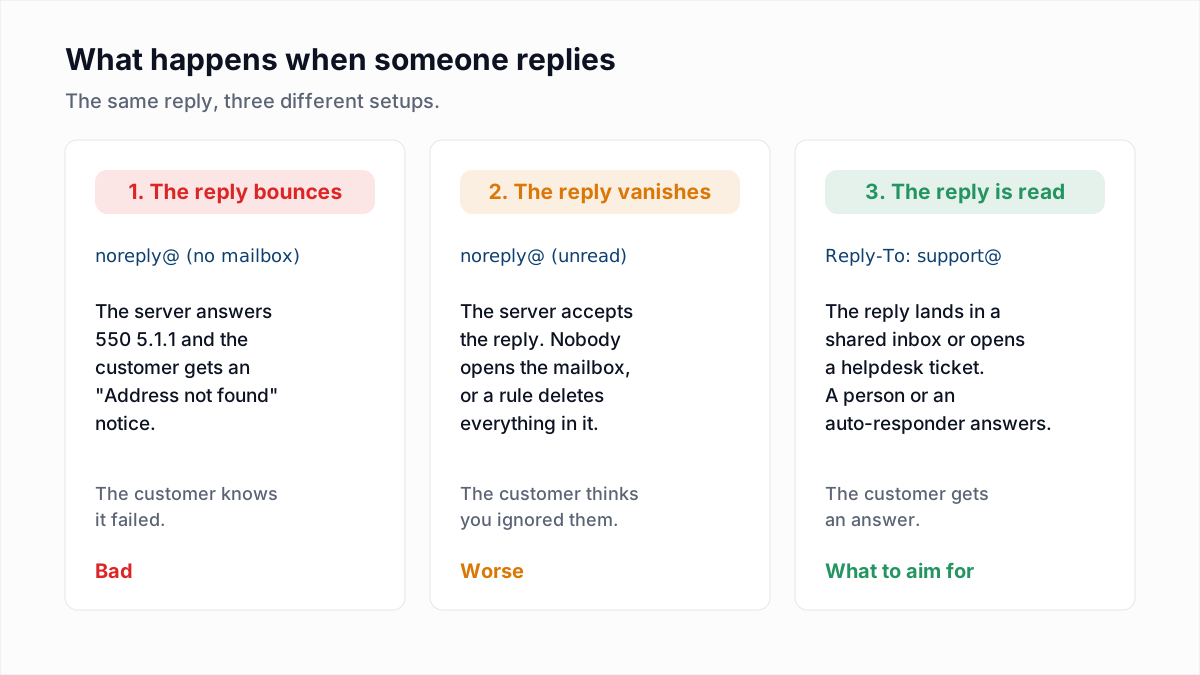
The bounce
If the address was never created as a mailbox, the company's mail server rejects the reply and the customer's own provider sends them a failure notice. On a domain hosted with Google the rejection is the standard missing-mailbox reply, which InboxSure captured in its provider research on 4 November 2026:
550-5.1.1 The email account that you tried to reach does not exist.The customer sees that wrapped in a notice from their provider's mailer-daemon, typically headed "Address not found" or "Undeliverable", a minute after they pressed send. Our guide to 550 5.1.1 explains the code and what the mailer-daemon is.
The black hole
If the mailbox exists but nobody opens it, or a rule deletes everything that arrives, the reply is accepted with a 250 OK and disappears. The customer gets no error. From their side they wrote to you and you ignored them. This is the more damaging version, because a bounce at least tells the person to try another route.
The auto-responder
Some companies attach an automatic reply to the no-reply mailbox: "This mailbox is not monitored. Visit our help centre." That is better than silence, but the customer has now written their question once and been asked to write it again somewhere else.
Does a no-reply address hurt deliverability?
A no-reply address is not listed as a negative signal in any rule that Gmail or Yahoo publish as of November 2026, so the honest answer is that a no-reply address removes possible positive signals and adds no documented penalty.
What the providers do publish, and what they do not:
| Claim | Status | Source |
|---|---|---|
| Mail from an address in the recipient's contacts is treated better. | Published by Google: "Messages sent from an address in the recipient's contacts are less likely to be marked as spam." | Google email sender guidelines |
| Engagement in general affects delivery. | Published by Yahoo: the best way to be delivered is to send "timely and relevant email to an active and engaged audience." | Yahoo sender best practices |
| A reply to your message improves your reputation. | Practitioner view. Neither Google's nor Yahoo's sender pages mention replies as a signal. | Not published |
| A noreply@ From address is penalised by filters. | Not published by Google or Yahoo. Neither page mentions no-reply addresses. | Not published |
The deliverability community widely holds that a reply is one of the strongest signs a person wants a sender's mail, and that is a reasonable inference: people do not reply to spam. It remains an inference. What is documented is the contacts line above, and it cuts against no-reply addresses in a practical way. A person can technically save noreply@yourcompany.com as a contact, but few people save an address that tells them not to write to it, and they have no reason to.
The larger, measurable risk is complaints. A reader who replies "please stop" and gets a bounce has one button left, and it is "Report spam". Gmail and Yahoo both enforce complaint thresholds, covered in spam complaint rate explained.
Can people unsubscribe by replying to a no-reply email?
No, people cannot unsubscribe by replying to a no-reply email, because the reply is never read, and a share of readers will always try a reply with "unsubscribe" or "remove me" before they look for a link.
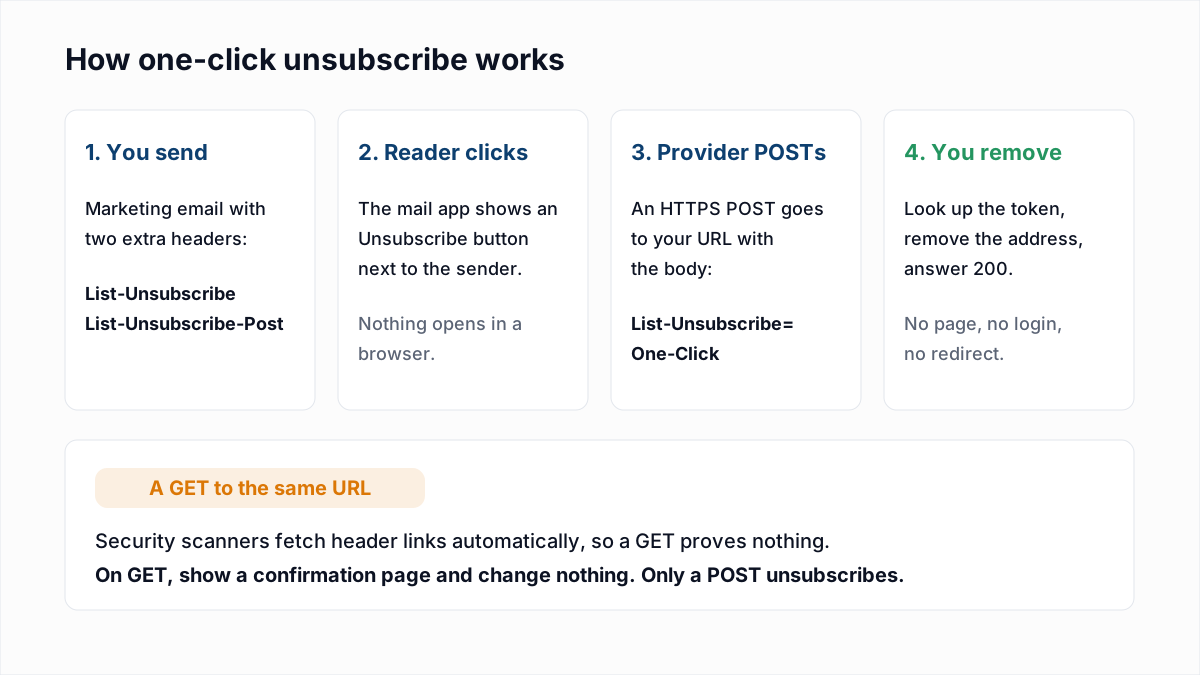
A visible unsubscribe link and the one-click header handle most opt-outs, and neither depends on the From address. The List-Unsubscribe header guide shows how the header carries its own URL and optional mailto: address. A monitored reply address catches the people who use neither.
Is a no-reply email address legal?
A no-reply email address is legal in the US, UK, EU and Canada, provided the message gives people another working way to opt out and to contact the sender. No law reviewed here requires that the From address itself accepts replies. The rules for cold outreach are in is cold email legal.
- United States. The FTC's CAN-SPAM compliance guide tells senders to "give a return email address or another easy Internet-based way to allow people to communicate their choice to you". The word is "or": a working unsubscribe link satisfies it. The mechanism must keep working for at least 30 days after the send, and header information, including the From and Reply-To, must not be false or misleading.
- United Kingdom. The ICO's guide to electronic mail marketing says "you must provide a valid contact address so they can opt out or unsubscribe". A no-reply From address is fine only if such an address is given elsewhere in the message.
- Canada. Section 6 of CASL requires each commercial message to "set out information enabling the person to whom the message is sent to readily contact" the sender, valid for at least 60 days after sending, plus an unsubscribe mechanism.
- GDPR access requests. The ICO's guidance on recognising a subject access request says "there are no formal requirements for a valid request", that a person can make one "to any part of your organisation" and that "they do not have to direct it to a specific person or contact point". Whether a reply that bounced off a no-reply address counts as received is a question for a lawyer. A reply that was accepted into an unread mailbox is the riskier case, because the request arrived and the one-month clock may be running without anyone knowing.
This section summarises public guidance and is not legal advice. Separately from the law, some platforms require a working reply address in their terms: HubSpot's Anti-Spam Policy says all messages must contain "valid, functioning reply-to addresses".
What should you use instead of a no-reply address?
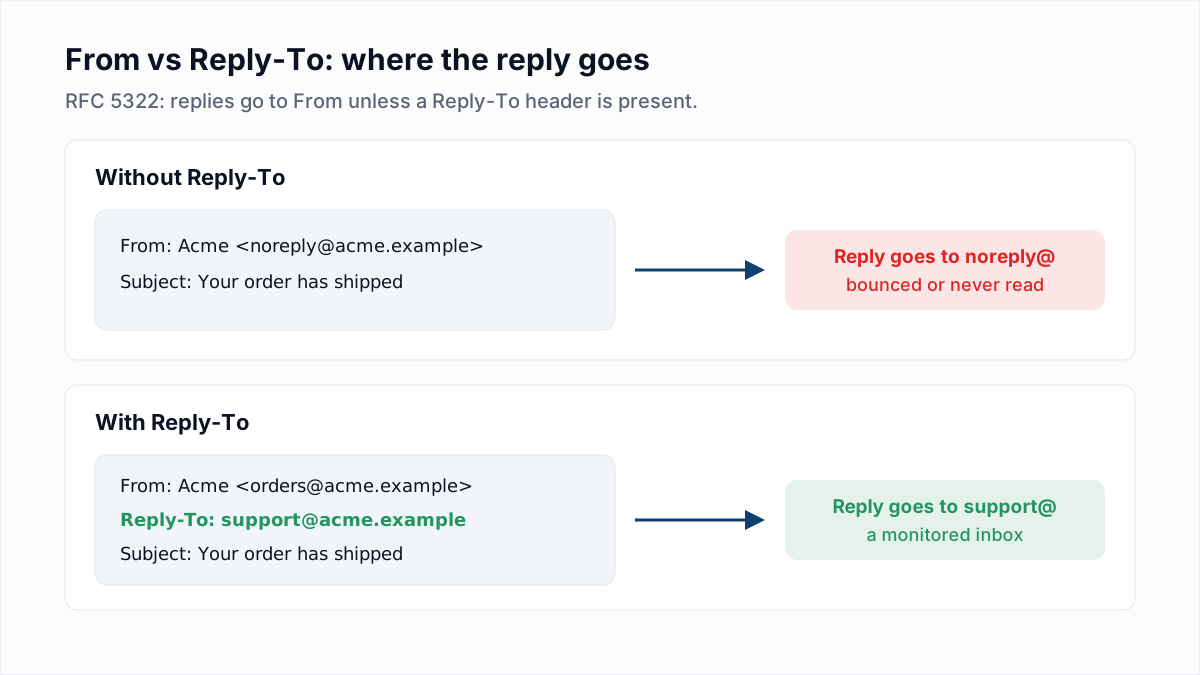
Use a real From address on your own domain and a Reply-To that points at an inbox someone or something reads: a shared mailbox, a helpdesk, or an auto-responder that answers with useful links and still files the message.
| Use case | Better From address | Better Reply-To setup |
|---|---|---|
| Order receipts and shipping notices | orders@ or the store name | Reply-To the helpdesk address, so a reply opens a ticket with the order email attached. |
| Password resets and login codes | accounts@ or security@ | Reply-To support, because "I did not request this" is a reply you want to see. |
| Newsletters and marketing | hello@ or a named person at the company | Reply-To a shared marketing inbox; filter auto-replies; treat "unsubscribe" replies as opt-outs. |
| Billing and invoices | billing@ | Reply-To the finance or support queue that can actually change an invoice. |
| Product alerts and system notifications | notifications@ or alerts@ | Reply-To support, or an auto-responder with help links that also forwards to a person. |
| Cold outreach | A named person's own mailbox | No separate Reply-To. The reply is the whole point. |
Three things make a monitored address manageable at volume:
- Send bounces elsewhere. Bounce notices go to the envelope sender, not to From or Reply-To, so they never reach the reply inbox if your platform sets its own return path. See Return-Path explained.
- Filter automatic replies. RFC 3834 says automatic responses "SHOULD be sent to the Return-Path field" and should carry an
Auto-Submitted: auto-repliedheader. Not every out-of-office system follows it, so add an inbox rule that files messages with that header, or with "Out of office" or "Automatic reply" in the subject. - Route by keyword. Send replies containing "unsubscribe", "remove" or "stop" to whoever maintains the suppression list, and the rest to support.
How do you set a Reply-To address?
You set a Reply-To address by adding a Reply-To header to the message, which most email platforms expose as a "reply-to" field in the sender or campaign settings. RFC 5322 defines the header: when Reply-To is present, "it indicates the address(es) to which the author of the message suggests that replies be sent", and when it is absent, replies go by default to the From address.
- Pick the From address. Use a real mailbox or alias on the domain you authenticate with SPF, DKIM and DMARC, for example
orders@yourcompany.com. - Create the reply inbox. A shared mailbox, a group alias, or your helpdesk's inbound address.
- Set the Reply-To field. In an email platform, fill in the reply-to address for the sender or the campaign. In code, set the header directly.
- Send yourself a test and press Reply. Check that the To line shows the reply address, then confirm the reply arrived and was answered or ticketed.
- Add the filters for auto-replies and unsubscribe keywords described above.
The raw headers look like this:
From: Acme Orders <orders@acme.example>
Reply-To: Acme Support <support@acme.example>
To: jane@example.com
Subject: Your order has shipped
In Node with Nodemailer, and in Python with the standard library:
// Node (Nodemailer)
await transporter.sendMail({
  from: '"Acme Orders" <orders@acme.example>',
  replyTo: "support@acme.example",
  to: "jane@example.com",
  subject: "Your order has shipped",
  text: "...",
});

# Python (email.message)
msg = EmailMessage()
msg["From"] = "Acme Orders <orders@acme.example>"
msg["Reply-To"] = "support@acme.example"
msg["To"] = "jane@example.com"
msg["Subject"] = "Your order has shipped"
Reply-To does not affect authentication. DMARC alignment is evaluated against the domain in the From header, so the Reply-To can sit on a different domain, such as your helpdesk's, without breaking SPF, DKIM or DMARC. To see which headers a message actually carried, follow how to read email headers.
What if no-reply addresses are on your own list?
No-reply addresses on your own mailing list should be removed, because noreply@ is a role-style address with no person behind it and mail sent to it is discarded or bounced. They get onto lists through scraped data, CRM imports that copied the sender of an automated email, and sign-up forms filled in with a fake address.
InboxSure's role-account check includes noreply and no-reply alongside prefixes such as info and support, so these addresses come back as Risky with the reason role-account, even when the mail server confirms the mailbox exists. The full list of prefixes and how to treat each group is in role-based email addresses.
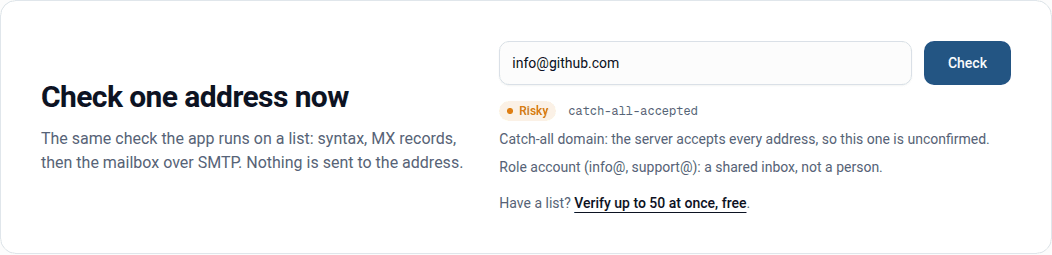
To see how many role and no-reply addresses a list contains, upload it to the bulk email verifier. The Free plan checks lists of up to 50 addresses with no card, and the results download as a CSV you can filter by reason. Verification tells you which addresses are role accounts and which mailboxes exist. It cannot tell you whether anyone reads them, which is the same problem your own customers have with your no-reply address.
Frequently asked questions
Related reading
Ready to clean your email list?
Upload a CSV or XLSX and get every address marked deliverable, risky, undeliverable or unknown, with the reason. Free for lists of up to 50, no card. Nothing is sent to your contacts.