What Is MAILER-DAEMON? Why You Got a Bounce Message
A message from MAILER-DAEMON almost always means one thing: an email could not be delivered, and a mail server is telling the sender why. MAILER-DAEMON is the name mail server software signs its automatic delivery reports with. The useful part is never the name. It is two lines further down, a status code and a diagnostic, and reading those tells you whether to fix an address, fix your sending setup, or ignore the message.
The one case that needs care is a bounce for an email you never sent. That is covered below, along with how to spot a fake bounce that is really phishing.
What is MAILER-DAEMON?
MAILER-DAEMON is the sender name a mail server uses for the bounce messages it generates automatically. A daemon is the Unix term for a program that runs in the background, so the name means "the mail program". No person reads replies sent to it.
The display name and subject depend on the software that wrote the bounce, which is why the same event shows up under several names:
| Mail system | How the bounce appears |
|---|---|
| Gmail and Google Workspace | From Mail Delivery Subsystem <mailer-daemon@googlemail.com>, usually with the subject "Delivery Status Notification (Failure)", as Google's help page on bounced emails describes. |
| Exim (common on cPanel hosting) | Subject "Mail delivery failed: returning message to sender", and a body that begins "This message was created automatically by mail delivery software". This is the default template in the Exim specification. |
| Postfix | From MAILER-DAEMON (Mail Delivery System) with the subject "Undelivered Mail Returned to Sender", the default in the Postfix bounce template. |
| Microsoft 365 and Exchange | Called a non-delivery report (NDR). The subject starts with "Undeliverable:", and the technical detail sits under "Diagnostic information for administrators", as Microsoft's NDR reference explains. |
Administrators can change these templates, so the wording on your bounce may differ. The structure underneath is the same.
Why did I get a message from MAILER-DAEMON?
You got a message from MAILER-DAEMON because a mail server accepted responsibility for an email with your address as the sender and then could not deliver it. The SMTP standard requires the server to report that failure to the sender.
The rule is in RFC 5321 section 6.1: once a server has accepted a message, if delivery fails it "MUST formulate and mail a notification message". The same section says the notification must be sent with an empty envelope sender, written <>. That is why a bounce has no real return address and why replying to it goes nowhere: an empty sender stops two servers bouncing each other's bounces forever. The mechanics are in Return-Path explained.
One detail surprises people. The server that writes the bounce is usually your own provider, not the recipient's. When you send from Gmail to an address that does not exist, the recipient's server refuses the message during the SMTP conversation, and Gmail, still holding the message, writes the bounce and quotes the refusal it was given.
How do I read a MAILER-DAEMON bounce message?
Read a MAILER-DAEMON bounce by finding the status code and the diagnostic line, because those two lines state what failed and whose problem it is. The friendly sentence at the top is a summary and is often vague.
Most modern bounces follow the delivery status notification (DSN) format defined in RFC 3464. A DSN has three parts: an explanation for humans, a machine-readable delivery-status block, and optionally the original message or its headers.
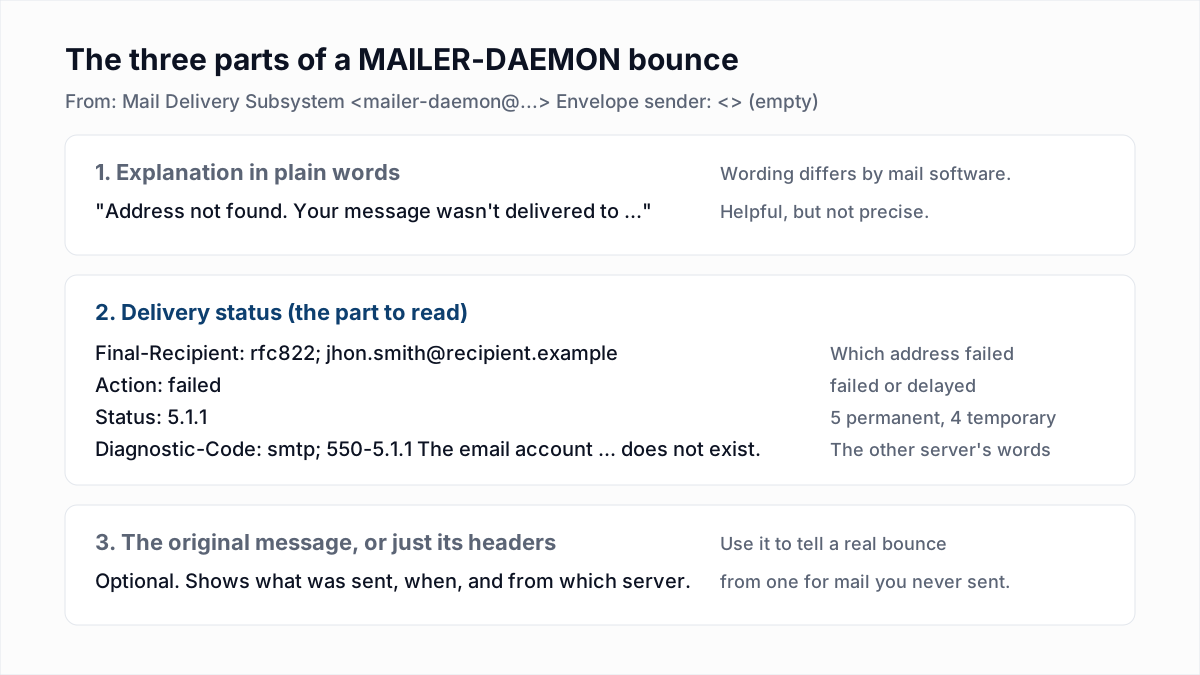
Here is an illustrative bounce in that format, with placeholder addresses. The diagnostic line uses the reply Gmail gave for a nonexistent mailbox in InboxSure's research on 4 November 2026.
From: Mail Delivery Subsystem <mailer-daemon@googlemail.com>
To: you@example.com
Subject: Delivery Status Notification (Failure)

Address not found
Your message wasn't delivered to jhon.smith@recipient.example because
the address couldn't be found, or is unable to receive mail.

Reporting-MTA: dns; googlemail.com
Final-Recipient: rfc822; jhon.smith@recipient.example
Action: failed
Status: 5.1.1
Remote-MTA: dns; mx.recipient.example
Diagnostic-Code: smtp; 550-5.1.1 The email account that you tried to reach
    does not exist.
Last-Attempt-Date: Thu, 12 Nov 2026 06:14:08 -0800 (PST)
Work through it in this order:
- Final-Recipient is the address that failed. Check it for typos first. Here it is
jhonwherejohnwas meant. - Action is what the server did.
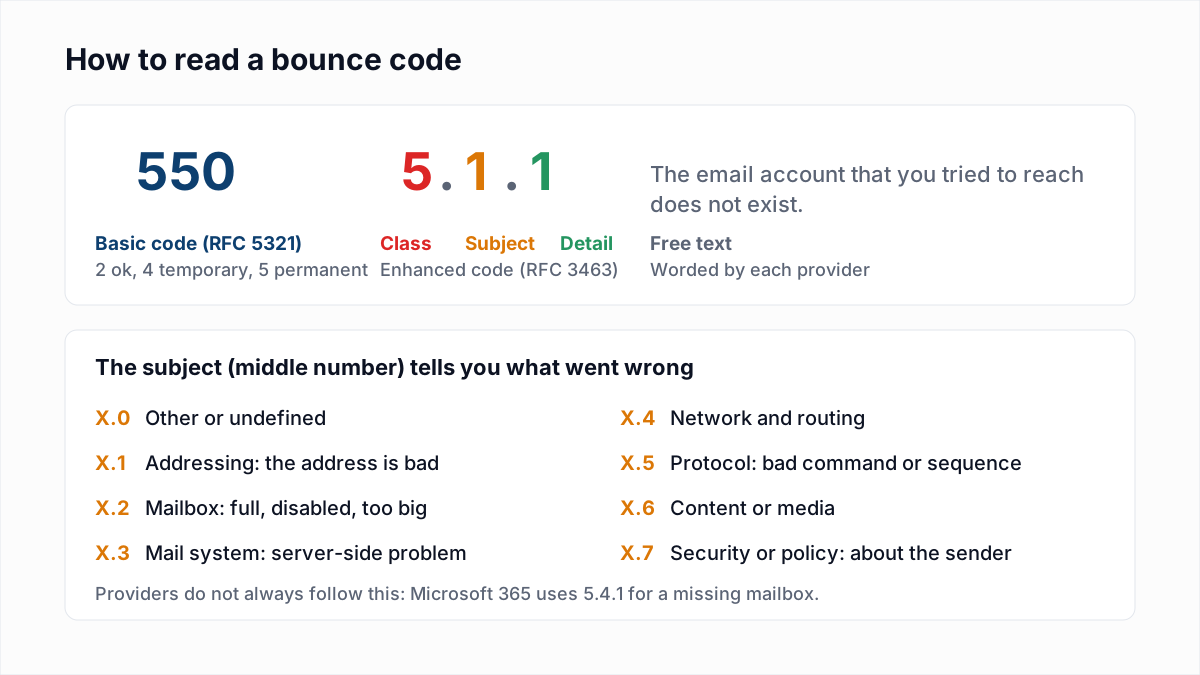
failedmeans it has given up.delayedmeans it is still trying, and you do not need to resend. - Status is the enhanced status code. The first digit is 5 for a permanent failure or 4 for a temporary one. The middle digit is the subject: 1 for the address, 2 for the mailbox, 7 for security or policy.
- Diagnostic-Code is the exact reply from the other server. Read the words as well as the numbers, because providers do not always use the codes consistently.
- Remote-MTA names the server that refused the message, which tells you which provider's rules you ran into.
RFC 3464 makes Final-Recipient, Action and Status mandatory for each recipient. The diagnostic line is optional, so a few bounces give you only the code.
What are the common reasons for a MAILER-DAEMON bounce?
The common reasons for a MAILER-DAEMON bounce fall into three groups: the address is wrong, the receiving server refused the sender, or something was temporarily unavailable. Match the code or the words in your bounce to a row below.
| What the bounce says | What it means | What to do |
|---|---|---|
550 5.1.1, "user unknown", "does not exist", "address not found" | The mailbox does not exist on that server. | Check for a typo, then remove the address. See 550 5.1.1. |
550 5.4.1 Recipient address rejected: Access denied | Microsoft 365 does not recognise the recipient at that organisation. | Treat it as a missing mailbox. See 550 5.4.1. |
552 5.2.2 or 452 4.2.2, "mailbox full", "over quota" | The recipient's mailbox is out of storage. | Try again later; suppress if it keeps repeating. See 552 5.2.2. |
550 5.7.1 with words such as blocked, policy, spam or a block list name | The receiving server refused the sender, not the address. | Keep the address and fix the sending side. See the Outlook and Gmail guides to 550 5.7.1. |
554 5.7.1, "relay access denied", "rejected for policy reasons" | A policy rejection, or a server refusing to relay mail it is not responsible for. | See 554 5.7.1. |
550 5.7.26 or 550 5.7.515 | The message failed the email authentication Gmail or Outlook requires. | Set up SPF, DKIM and DMARC. See 550 5.7.26 and 550 5.7.515. |
550 5.7.25, "reverse DNS", "PTR" | The sending IP address has no valid reverse DNS record. | Fix the PTR record. See 550 5.7.25. |
421 4.7.0, 451, "try again later", Action: delayed | A temporary refusal, such as rate limiting or greylisting. | Wait; the server retries by itself. See 421 4.7.0 and greylisting. |
| "You have reached a limit for sending mail" | Your own provider stopped the message because you hit a sending limit. | Wait for the limit to clear. See email sending limits and too many recipients errors. |
Any code not listed here is in the full email bounce code reference, and the difference between permanent and temporary failures is explained in soft bounce vs hard bounce.
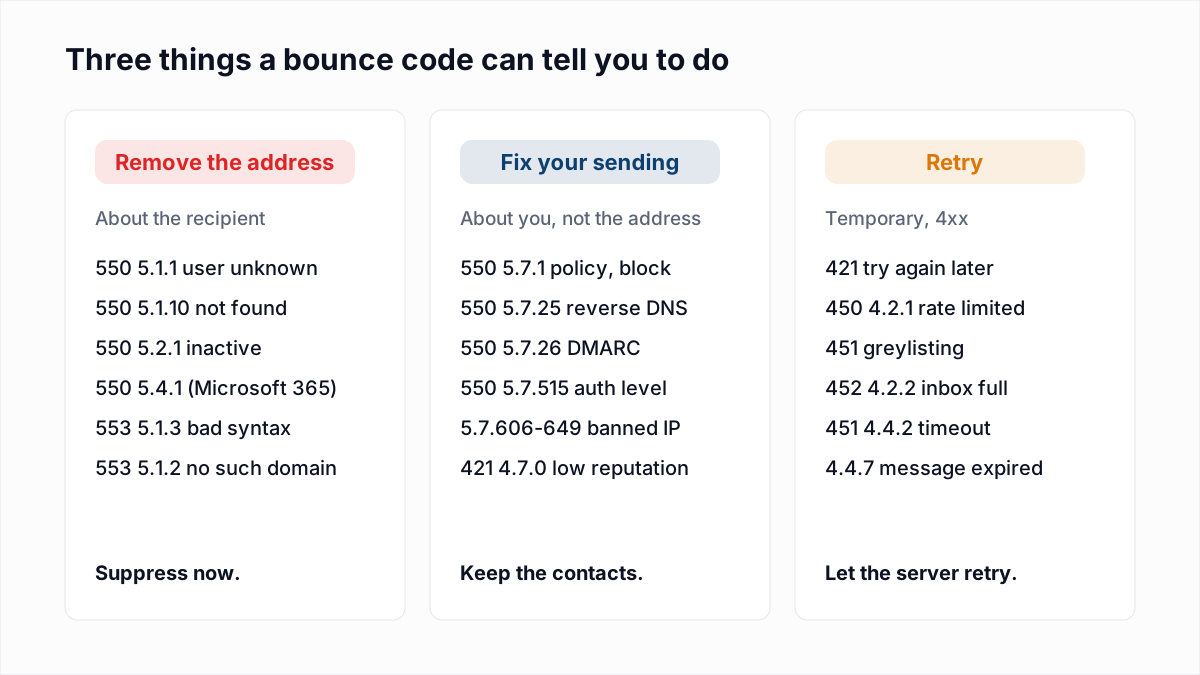
A bounce can also arrive days after you sent the message. A sending server keeps retrying a temporary failure, and RFC 5321 says it should generally keep trying for at least four to five days before giving up. Some servers send a "delayed" warning first and the final failure later.
Why did I get a MAILER-DAEMON bounce for an email I never sent?
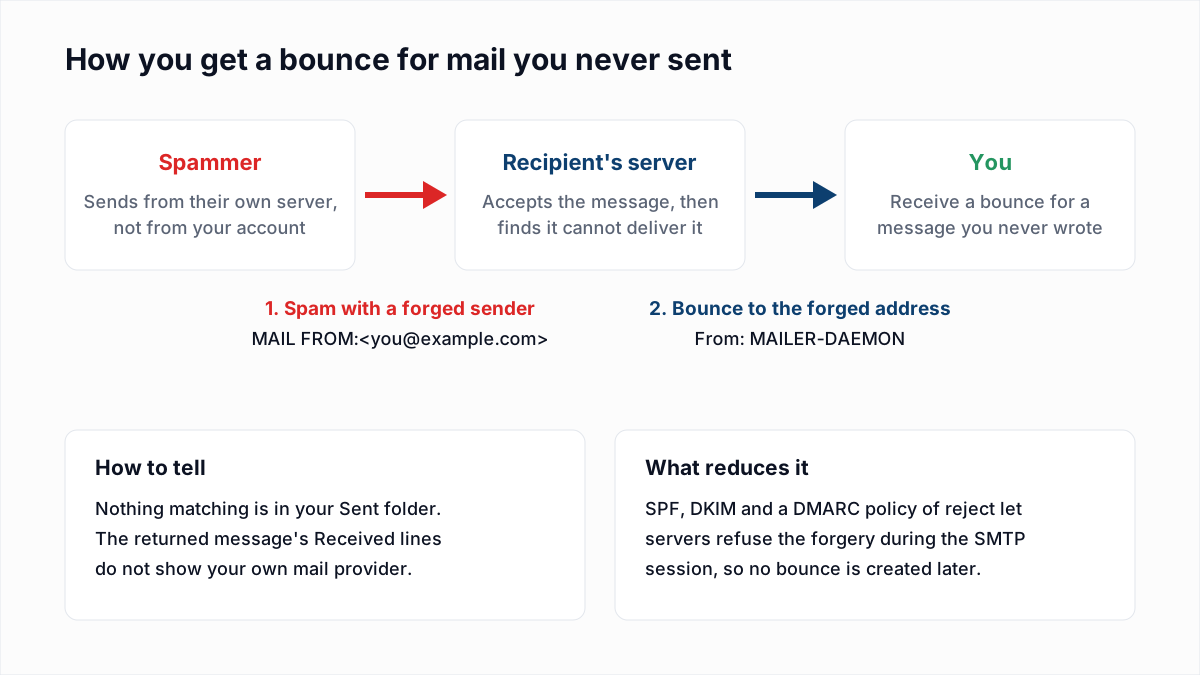
A MAILER-DAEMON bounce for an email you never sent usually means a spammer forged your address as the sender, and a server returned the undeliverable spam to you. This is called backscatter, and in most cases your account has not been broken into.
Microsoft's documentation on backscatter defines it as bounce messages "that you receive for messages you didn't send", and explains that spammers often use real email addresses as the sender to lend credibility to their messages. Google's help page on spoofing says the same, and adds that because these emails are created outside Gmail, Gmail cannot stop spammers from spoofing your address.
What to do, in order:
- Look in your Sent folder for the message the bounce refers to. If nothing matches, the mail did not come from your mailbox.
- Read the returned message's headers, if the bounce includes them. The Received lines show which server the message really came from. If your own provider is not among them, your address was forged. How to read email headers shows how.
- If the message is in your Sent folder, or the headers show your provider, treat the account as compromised: change the password, turn on two-step verification, and check for forwarding rules or connected apps you did not add.
- Do not open attachments or click links in the bounce. Mark it as spam or delete it.
- If you own the domain, publish SPF, DKIM and a DMARC policy. With a policy of
p=reject, servers that check DMARC refuse the forged message during the SMTP session, so no bounce is created afterwards. This reduces backscatter but does not end it, because not every server checks DMARC. Start with choosing a DMARC policy and the DMARC checker.
Backscatter tends to arrive in bursts while a spam run uses your address and then stops. If you use a free mailbox such as Gmail or Outlook.com, you cannot change the domain's DNS, and steps 1 to 4 are all there is to do.
Is a MAILER-DAEMON email spam or a virus?
A genuine MAILER-DAEMON email is neither spam nor a virus; it is an automatic report. But scammers imitate bounce messages because people open them, so a bounce you were not expecting deserves a second look.
Signs that a "bounce" is fake:
- It asks you to sign in, "release" held messages, or "resend" by clicking a button. A real bounce asks for nothing.
- It has no status code, no failed recipient address and no diagnostic line.
- The attachment is something other than the returned email, such as an HTML page or a compressed file.
- The links point to a domain that is not your mail provider.
Mail filters also file real backscatter under spam, which is reasonable: it is a bounce for spam. Finding MAILER-DAEMON messages in your spam folder is not a sign that anything is wrong with your account.
How do I stop getting MAILER-DAEMON bounces?
You stop MAILER-DAEMON bounces by removing the cause that the diagnostic line names: correct or remove bad addresses, fix authentication or reputation problems on the sending side, and wait out temporary failures.
For people who send to lists, bad addresses are the cause that can be removed before sending. Email platforms set their own Return-Path, so the bounces go to the platform and appear as a bounce count in your reports, not as MAILER-DAEMON emails in your inbox. The effect on your sender reputation is the same either way, as reducing your bounce rate explains.
InboxSure checks each address for valid syntax, a working mail server and an existing mailbox, using an SMTP check that stops before any message is sent, and marks it Deliverable, Risky, Undeliverable or Unknown. That removes the "user unknown" class of bounce. It cannot prevent bounces caused by your sending reputation or authentication, a verified address can still bounce later, and consumer Yahoo and Outlook.com addresses currently come back Unknown because those providers refuse the check. To check the one address that just bounced, use the free email verifier. For a whole list, upload a CSV to the bulk email verifier: the Free plan covers lists of up to 50 addresses with no card.
Frequently asked questions
Related reading
Ready to clean your email list?
Upload a CSV or XLSX and get every address marked deliverable, risky, undeliverable or unknown, with the reason. Free for lists of up to 50, no card. Nothing is sent to your contacts.