550 5.4.1 Recipient Address Rejected: Access Denied (Microsoft 365)
550 5.4.1 Recipient address rejected: Access denied is how Microsoft 365 (Exchange Online) says the address you wrote to does not exist in the recipient's organization. A feature called Directory-Based Edge Blocking checks every recipient against the company's directory and rejects unknown ones at the edge of Microsoft's network, before any spam filtering. For a sender it is a hard bounce: check the spelling, then remove the address. If you run the receiving tenant and the address should exist, the fix is a directory sync or accepted-domain setting, covered below.
What 550 5.4.1 means
This is the full reply InboxSure received from Microsoft's own tenant (microsoft.com) for a mailbox that does not exist, captured on 4 November 2026:
RCPT TO:<[random address]@microsoft.com>
550 5.4.1 Recipient address rejected: Access denied. For more information see https://aka.ms/EXOSmtpErrors
Microsoft's article Fix NDR error 550 5.4.1 in Exchange Online says the bounce "is generated when directory-based edge blocking in Microsoft Exchange Online blocks an incoming email message because the recipient's email address is invalid."
The code itself is misleading. In the standard scheme from RFC 3463, subject 4 means network and routing, and X.4.1 is registered as "No answer from host". Most providers report a missing mailbox as 5.1.1 (addressing). Microsoft uses 5.4.1 instead, which matters if your bounce handling filters on codes: a rule that only removes 5.1.1 will keep every missing Microsoft 365 mailbox on your list. Match the text "Recipient address rejected" as well. The full code reference is in our guide to email bounce codes.
What is Directory-Based Edge Blocking?
Directory-Based Edge Blocking (DBEB) is an Exchange Online feature that, in Microsoft's words, "lets you reject messages for invalid recipients at the service network perimeter". Mail to a valid address continues through anti-malware, anti-spam and mail flow rules. Mail to an address that is not in the directory is refused before any of that runs, with the reply 550 5.4.1 Recipient address rejected: Access denied.
Whether DBEB is on depends on how the tenant's domain is set up. Microsoft's page on accepted domains describes two types:
- Authoritative. "Emails for unknown recipients are rejected." Choosing this type enables DBEB. Microsoft says that if all recipients for the domain are in Exchange Online, DBEB is already in effect and nothing needs to be done.
- Internal relay. Mail for known recipients is delivered in Microsoft 365; mail for recipients Microsoft does not know is relayed on to the organization's own mail server. Microsoft 365 accepts the address at the edge and lets the other server decide.
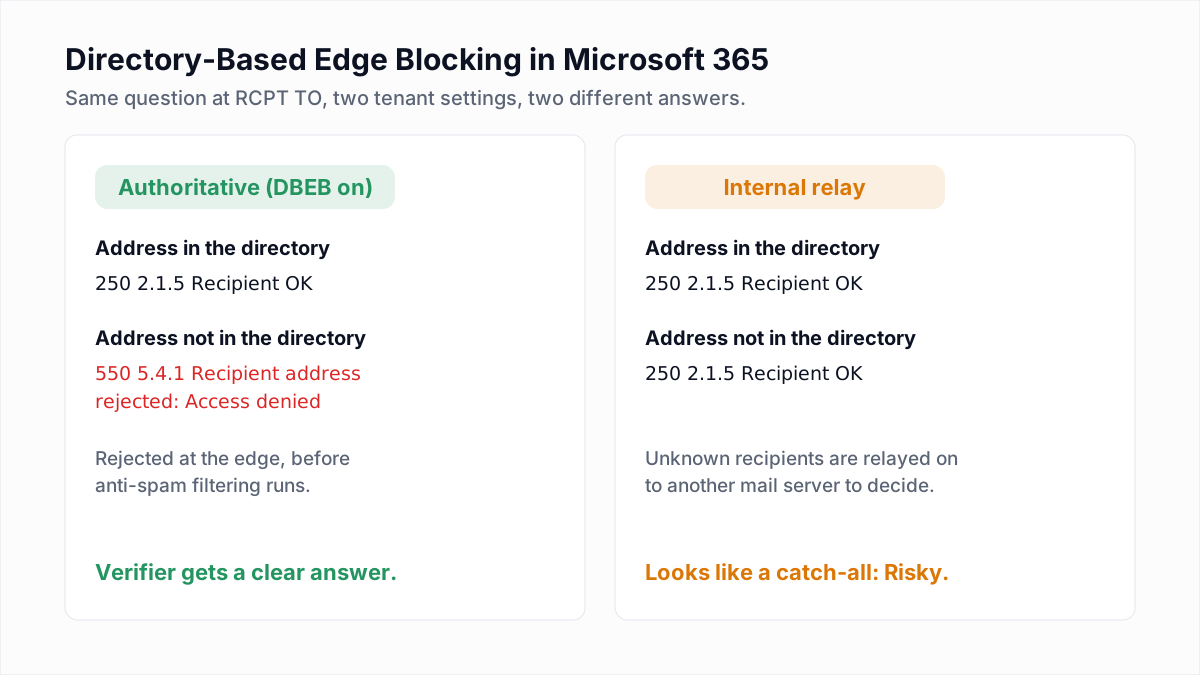
Why email verification gets a clear answer from Microsoft 365
Because DBEB answers at RCPT TO, a verifier sees the same 5.4.1 a real message would get, without sending anything. That makes most Microsoft 365 business domains easy to verify: an existing mailbox gets 250 2.1.5 Recipient OK, a missing one gets 5.4.1. The answer is not instant: in our run Exchange Online took just over fourteen seconds to reply, because it pauses before answering unfamiliar senders. How the check works is explained in verifying an email without sending.
Not every tenant behaves this way. In the same research run, a random address at github.com, also hosted on Microsoft 365, got 250 2.1.5 Recipient OK, and so did a second address that could not exist. That tenant accepts every address, so a 250 from it says nothing about whether a particular mailbox is real. Whether that comes from an Internal relay domain or another routing setup is not visible from outside; the effect on verification is the same. A verifier detects this with a probe and marks the domain as catch-all.
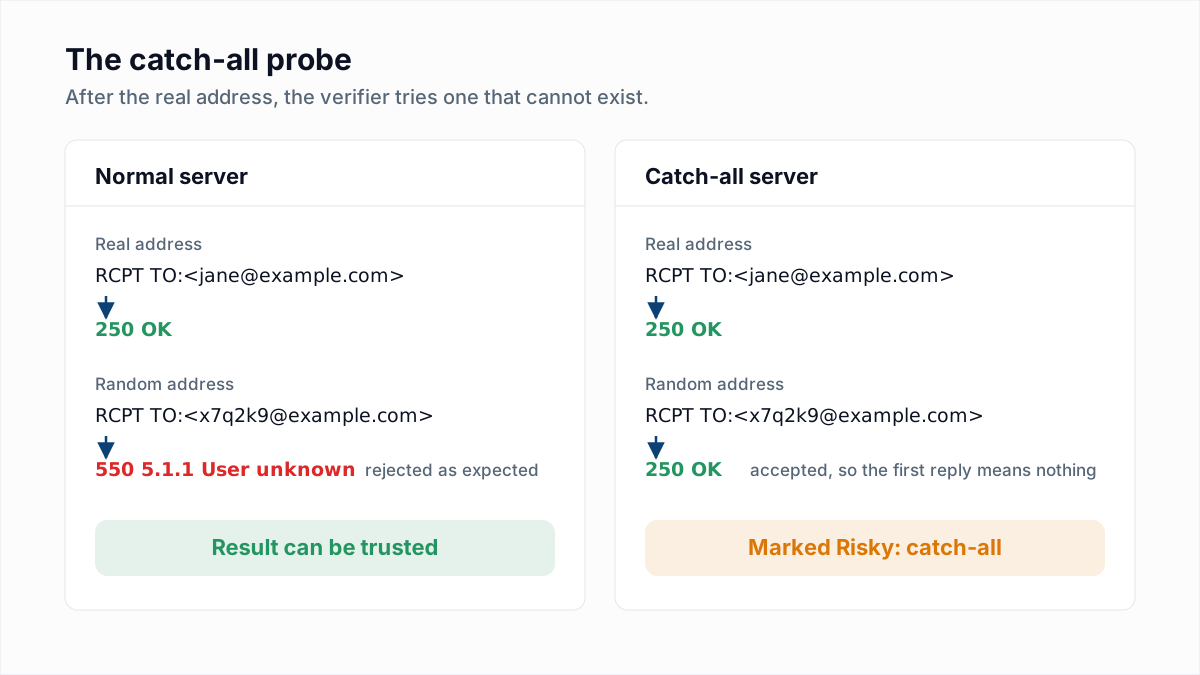
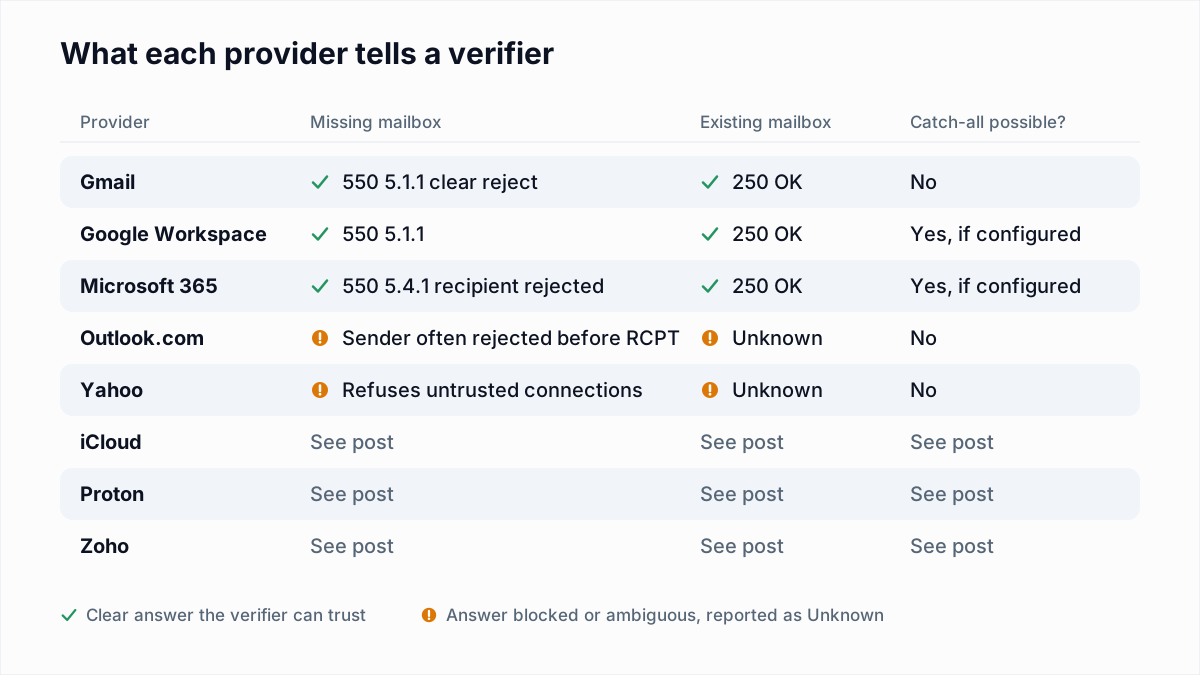
Consumer Outlook.com and Hotmail are a different system. They often reject the sender at MAIL FROM with a 5.7.1 block before any recipient is checked, which is covered in the Outlook 550 5.7.1 guide.
Other causes of 550 5.4.1
Microsoft documents more than one situation behind this code. The Exchange Online NDR reference lists two 5.4.1 variants with different wording.
| Wording | Cause Microsoft gives | Whose problem |
|---|---|---|
Recipient address rejected: Access denied | "The recipient's address doesn't exist." (DBEB) | Usually the address; occasionally the tenant's directory |
Relay Access Denied | "The mail server that's generating the error doesn't accept mail for the recipient's domain. Mail server or DNS misconfiguration causes this error." | The recipient's admin (MX records or accepted domains) |
Beyond a genuinely missing mailbox, the recipient-side causes Microsoft describes are:
- The whole domain is out of sync. If every address at the domain gets 5.4.1, the accepted domain needs resyncing (steps below).
- Hybrid setups. For DBEB to work in a hybrid environment, the domain's MX record must point to Microsoft 365. When an on-premises mailbox changes, Microsoft says to "allow up to 24 hours for directory-based edge blocking to fully update."
- Objects that do not sync. On-premises dynamic distribution groups cannot be synced to Exchange Online, so DBEB blocks them. On-premises mail-enabled public folders also need to be synced before DBEB will accept mail for them.
- New or migrating users. Microsoft advises leaving a domain on Internal relay "until all of your valid recipients have been added to Exchange Online and replicated through the system". A user who has not reached the directory yet is rejected like a stranger.
Microsoft also uses 5.7.504 with almost the same text, Recipient address rejected: Access denied, for an invalid recipient. Treat it the same way.
If you are the sender: what to do with the address
In most cases the mailbox is simply gone: the person left, or the address was guessed. Before you delete it, run through these checks.
| Situation | What to do |
|---|---|
| One address bounced, others at the same company deliver | Check for a typo. If it is spelled right, remove it. |
| You used a guessed format (first.last@) and it bounced | Remove it. The company uses a different format or the person is not there. |
| The address is an alias or shared inbox someone gave you | Confirm it with the contact through another channel. Aliases get retired. |
| The person told you they joined this week | Their mailbox may not have replicated yet. Retry in a day before removing. |
| Every address at the domain bounces with 5.4.1 | The recipient's tenant is misconfigured. Keep the contacts and tell them by phone or another email address. |
| The text says "Relay Access Denied" | The domain's mail routing is broken. Keep the address and retry later. |
Do not keep sending to addresses that return 5.4.1. Each one counts as a hard bounce against your sender reputation. The difference between this and a temporary failure is covered in soft bounce vs hard bounce.
If you are the admin: how to fix 550 5.4.1 in your tenant
These steps follow Microsoft's own fix article. Work down the list until mail flows.
- Check the spelling of the recipient address in the bounce. Most reports end here.
- Confirm the recipient exists in Exchange Online with that exact SMTP address, either as a primary address or a proxy address.
- Test one recipient versus the whole domain. Send to a second address at the same domain.
- If the whole domain fails, resync it. In the Exchange admin center, go to Mail flow, then Accepted domains, select the domain, switch it from Authoritative to Internal relay, save, then switch it back to Authoritative.
- If one hybrid user fails, reset the SMTP proxy address of their on-premises mailbox: change it to a temporary address, let directory sync run, then change it back. Allow up to 24 hours.
- If it is a dynamic distribution group created on-premises, create a mail contact in Exchange Online with the same external address. For a mail-enabled public folder, sync it to Exchange Online first.
- If the text says Relay Access Denied, check that the MX record points to Microsoft 365 and that the domain is listed as an accepted domain.
To check or change the domain type from Exchange Online PowerShell:
Get-AcceptedDomain -Identity contoso.com | Format-List
Set-AcceptedDomain -Identity contoso.com -DomainType InternalRelay
Set-AcceptedDomain -Identity contoso.com -DomainType Authoritative
Internal relay is a migration setting, not a permanent fix. Microsoft says not to choose it if all recipients for the domain are in Microsoft 365, and it needs a connector that routes mail to your own server. Leaving a cloud-only domain on Internal relay turns off the protection DBEB gives you against mail to made-up addresses.
You can confirm where a domain's mail is routed with the free MX lookup tool. Microsoft 365 MX hosts usually end in mail.protection.outlook.com.
550 5.4.1 compared with 550 5.1.1 and 550 5.7.1
| Code | Who sends it | What it means | Action |
|---|---|---|---|
| 550 5.4.1 | Microsoft 365 (Exchange Online) | Recipient not in the tenant directory, rejected by DBEB | Check spelling, then remove |
| 550 5.1.1 | Gmail, iCloud, Zoho and most other servers | Mailbox does not exist | Remove. See 550 5.1.1 explained |
| 550 5.7.1 | Outlook.com, Microsoft 365, many others | Refused for policy: your IP, reputation, or a restriction on the recipient | Keep the address; fix your sending or ask for permission |
5.4.1 and 5.1.1 are about the recipient and arrive at RCPT TO. 5.7.1 is about the sender and often arrives earlier, at MAIL FROM. If you mix them up you either keep dead addresses or throw away good ones.
How to catch 5.4.1 addresses before you send
Since Microsoft 365 rejects unknown recipients at RCPT TO, a verifier picks up these addresses before a campaign goes out. InboxSure runs that check without sending a message and reports a 5.4.1 address as Undeliverable. Tenants that accept every address are flagged as Risky (catch-all) rather than passed as valid.
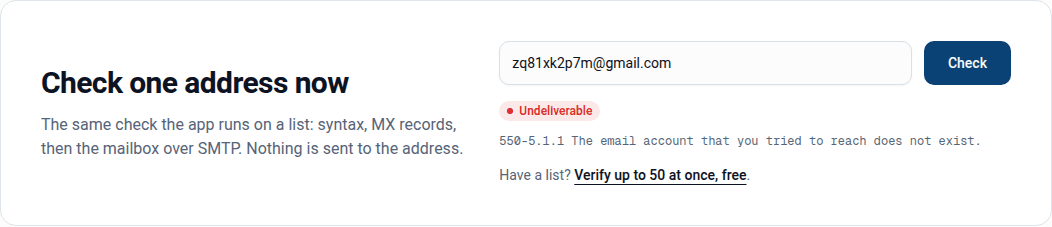
Check one address with the free email verifier, or upload a list of up to 50 addresses on the Free plan in the bulk email verifier.
Frequently asked questions
Related reading
Ready to clean your email list?
Upload a CSV or XLSX and get every address marked deliverable, risky, undeliverable or unknown, with the reason. Free for lists of up to 50, no card. Nothing is sent to your contacts.