Gmail 550 5.7.1 Error: Every Variant and the Fix
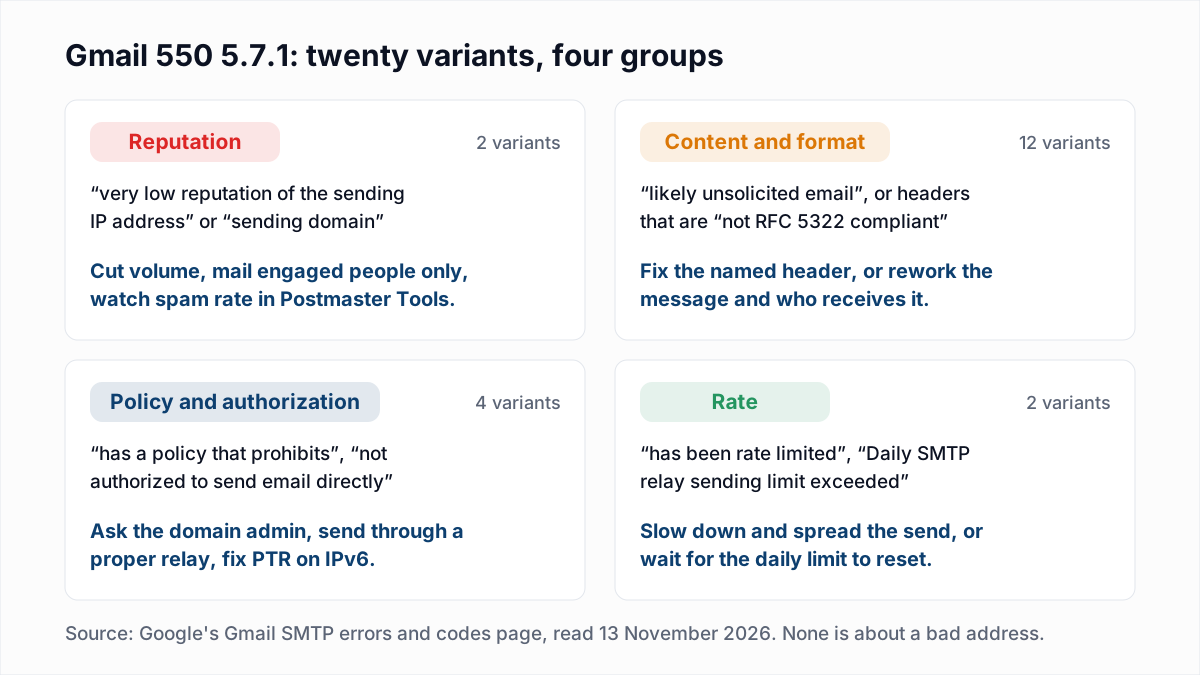
Gmail's 550 5.7.1 is a permanent policy rejection: Gmail received the message and refused to deliver it for a reason that has nothing to do with whether the mailbox exists. The catch is that Google reuses the code. Its Gmail SMTP errors and codes reference lists 20 different messages under 550 5.7.1 as of 13 November 2026, and they fall into four groups with four different fixes.
Every quoted message below is taken word for word from that Google page, minus the closing "For more information, go to ..." pointer. The Outlook.com error with the same number is a different problem, covered in why emails bounce from Outlook with 550 5.7.1.
What does Gmail's 550 5.7.1 error mean?
Gmail's 550 5.7.1 error means Gmail permanently refused a message on policy grounds: the sender's reputation, the message itself, a rule set by a domain administrator, or a sending limit. The words after the code say which.
550 is a permanent failure, and 5.7.1 is the enhanced status code for "delivery not authorized, message refused", part of the security and policy family explained in our guide to email bounce codes. In a real bounce the reply is spread over several lines, each starting 550-5.7.1, with the last line starting 550 5.7.1. The hyphen only means "more lines follow". The layout looks like this (where the lines break varies):
550-5.7.1 This message is likely unsolicited email. To reduce the amount of
550-5.7.1 spam sent to Gmail, this message has been blocked. For more
550 5.7.1 information, go to ... - gsmtp
The ending matters too. Google's reference says gsmtp "is added to all errors", while gcdp (Google Custom Domain Policies) "is added to errors resulting from customized rules created by a Google Workspace administrator". A bounce ending in gcdp was caused by one organisation's own rule, not by Gmail's spam filter.
Which Gmail 550 5.7.1 message did you get?
The Gmail 550 5.7.1 variant is identified by a few distinctive words in the reply, so match yours against this table before changing anything.
| Group | Words to look for | Who has to act | First move |
|---|---|---|---|
| Reputation (2 variants) | "very low reputation of the sending IP address" or "sending domain" | The sender | Reduce volume and send only to people who engage. |
| Content: spam verdict (1 variant) | "likely unsolicited email" | The sender | Review the message, its links and the audience it went to. |
| Content: message format (11 variants) | "not RFC 5322 compliant", "From: header", "Message-ID" | The sender's software | Fix the header the reply names. |
| Policy and authorization (4 variants) | "has a policy that prohibits", "not authorized to send email directly", "IPv6 sending guidelines", "Invalid credentials for relay" | The sender or a Workspace administrator | Send through a proper relay, or ask the administrator about the rule. |
| Rate (2 variants) | "has been rate limited", "Daily SMTP relay sending limit exceeded" | The sender | Slow down or wait for the limit to reset. |
What does "very low reputation of the sending IP address" or "sending domain" mean?
The "very low reputation" 550 5.7.1 means Gmail blocked the message because of the sending history of your IP address or your domain, before judging this particular email on its merits. Google lists two versions:
- "This message is likely suspicious due to the very low reputation of the sending IP address. To best protect our users from spam, the message has been blocked."
- "This message is likely suspicious due to the very low reputation of the sending domain. To best protect our users from spam, the message has been blocked."
The IP version follows the server. On an email platform's shared pool, other customers' mail may be the cause, and the platform has to deal with it. The domain version follows you: changing platform or IP does not help.
How to fix a reputation block:
- Pause large sends while you investigate.
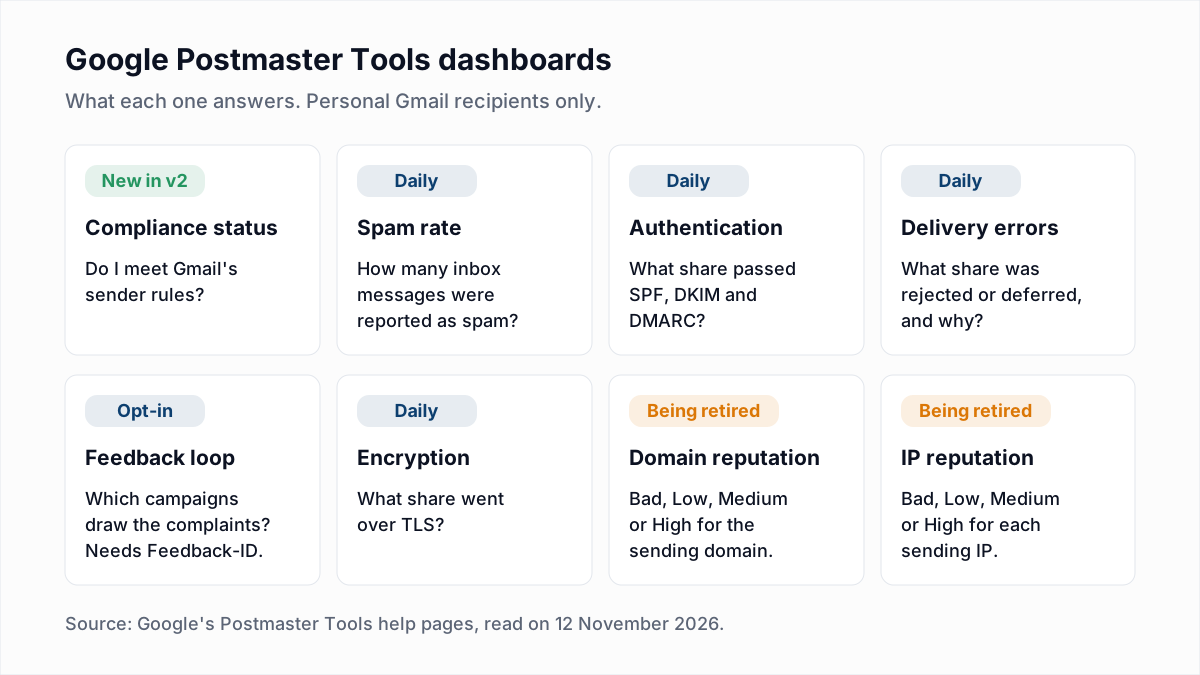
- Open Google Postmaster Tools. Check Compliance status first, where every row should read Compliant. Then check Spam rate. Google's email sender guidelines say to keep it below 0.10% and "avoid ever reaching a spam rate of 0.30% or higher". The Delivery errors dashboard shows what share of mail was rejected and the reason given.
- Restart small. Send only to people who opened or clicked recently, and raise volume gradually. Google's guidelines say to "start with a low sending volume to engaged users, and slowly increase the volume over time".
Do not rely on the Domain reputation and IP reputation charts: Google has said those two dashboards will be retired. Details are in our Google Postmaster Tools guide. Warm-up pacing is in email warm-up and sender reputation. The temporary form of the same message, 421 4.7.0, is covered in the 421 4.7.0 guide.
What does "This message is likely unsolicited email" mean?
"This message is likely unsolicited email" means Gmail's spam filter judged this specific message to be spam and rejected it outright instead of delivering it to the spam folder. Google's full text is:
- "This message is likely unsolicited email. To reduce the amount of spam sent to Gmail, this message has been blocked."
Many bounces in circulation, and many searches, quote a longer opening: "Our system has detected that this message is likely unsolicited mail". That phrasing is not in Google's reference as of 13 November 2026. The meaning and the fix are the same.
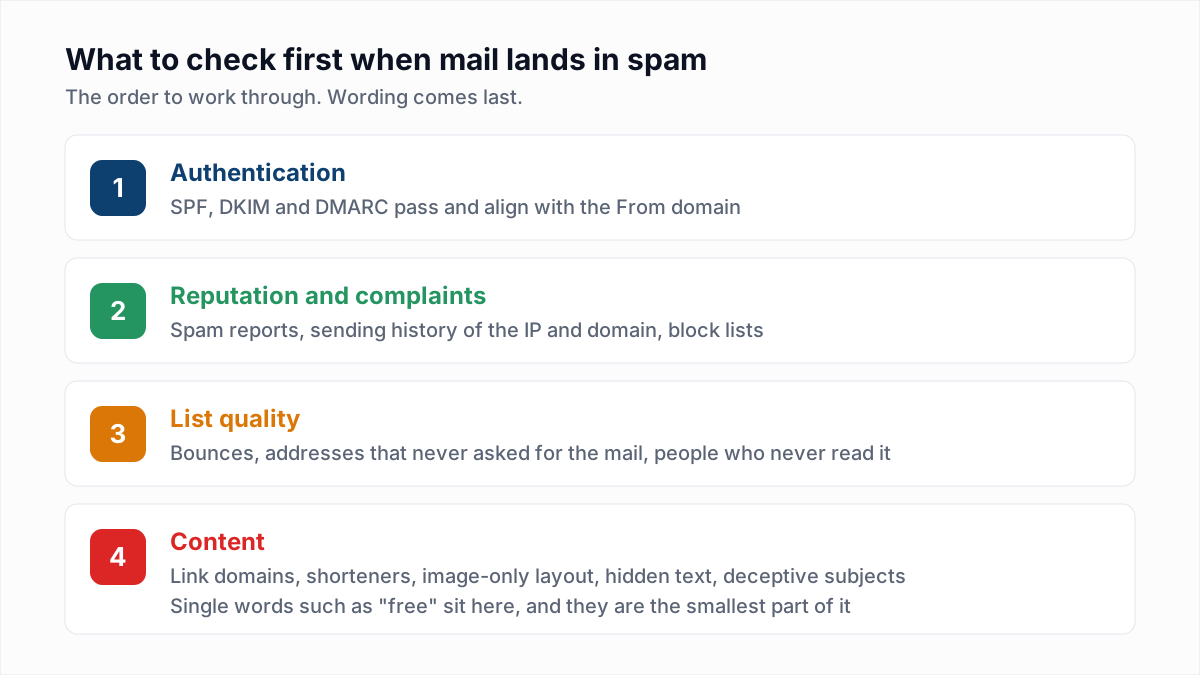
Google's help page Learn how Gmail blocks your messages says Gmail blocks only some of the mail that looks like spam, and points senders to Postmaster Tools and the sender guidelines. Check, in this order:
- Authentication. SPF and DKIM pass and align with the From domain. See SPF, DKIM and DMARC explained.
- Links. Remove URL shorteners and links to domains you do not control. Test by sending the same text with no links.
- Audience. A message sent to people who did not ask for it is "unsolicited" by definition. Who received the message matters more than how it was worded.
- Wording last. Individual words are the weakest signal, as our piece on spam trigger words shows.
The eleven message-format variants
Eleven of the 20 variants are not about spam at all. Gmail refuses messages whose headers break the internet message format standard, RFC 5322. The reply names the fault:
- "Messages missing a valid address in the From: header, or having no From: header, are not accepted."
- "Messages missing a valid Message-ID: header are not accepted."
- "Messages with multiple addresses in the From: header are not accepted."
- "The message contains a unicode character in a disallowed header."
- "This message is not RFC 5322 compliant because it has duplicate headers."
- "This message is not RFC 5322 compliant because the From: header is missing."
- "This message is not RFC 5322 compliant because it has multiple From: headers."
- "This message is not RFC 5322 compliant because the From: header has a non-compliant domain name."
- "Encoded-word syntax is not permitted in message header header-name."
- "This message is not RFC 5322 compliant. There are multiple header-name headers."
- "This message is not RFC 5322 compliant. There is a malformed header-name header."
These usually come from custom code, website forms and old scripts. The fix is in the software that builds the message: one From header with one address, one Message-ID, one of each header that may appear only once. Send a copy to a mailbox you control and inspect it using our guide to reading email headers.
Which Gmail 550 5.7.1 variants are about policy or authorization?
Four Gmail 550 5.7.1 variants are about policy or authorization: one is a rule set by a Google Workspace administrator, and three say the sending server is not permitted to deliver the way it tried to.
- "The user or domain that you are sending to (or from) has a policy that prohibits the email that you sent. Contact your domain administrator for assistance." A Workspace administrator, on the recipient's side or your own, has a rule that blocks this mail, for example a content or attachment rule. Only that administrator can change it. Ask the recipient to have you allowed.
- "The IP you're using to send email is not authorized to send email directly to our servers. Use the SMTP relay at your service provider instead." The connection came from an address range, typically home or dynamic broadband, that is not meant to deliver mail straight to Gmail. Google's help page for this error says the internet provider decides which addresses are authorized and that Google makes no exceptions. Send through your provider's or your domain's outgoing server.
- "This message does not meet IPv6 sending guidelines regarding PTR records and authentication." The server connected over IPv6 without matching reverse DNS or without SPF or DKIM. Add a PTR record for the IPv6 address, or send over IPv4. Reverse DNS is explained in the 550 5.7.25 guide.
- "Invalid credentials for relay ip-address. The IP address you've registered in your Workspace SMTP Relay service doesn't match the domain of the account this email is being sent from." This concerns your own Google Workspace SMTP relay, usually a device or app sending through it. Google's text gives the fix: use SMTP AUTH, or present one of your domain names in the HELO or EHLO command. If SMTP AUTH is then refused with a 535, see SMTP error 535 authentication failed.
One message people expect to find here is filed elsewhere. "Unauthenticated email from domain-name is not accepted due to domain's DMARC policy" is listed by Google under 550 5.7.26, not 5.7.1. If that is your bounce, go to the 550 5.7.26 guide.
Which Gmail 550 5.7.1 variants are rate limits?
Two Gmail 550 5.7.1 variants are rate limits: "This email has been rate limited." and "Daily SMTP relay sending limit exceeded for this customer." Both mean too much mail in a period, not bad mail.
The first points to Google's page on limits for sending and getting email and does not say which limit was hit. Pause, spread the send over more hours, and retry later. The second applies to Google Workspace customers who send through Google's SMTP relay service; it clears when the daily limit resets. Limits across providers are compared in email sending limits.
A related block has its own code: 550 5.7.28, "There is an unusual rate of unsolicited email originating from your IP address." The reputation steps above apply to it.
Should you remove addresses that bounce with Gmail 550 5.7.1?
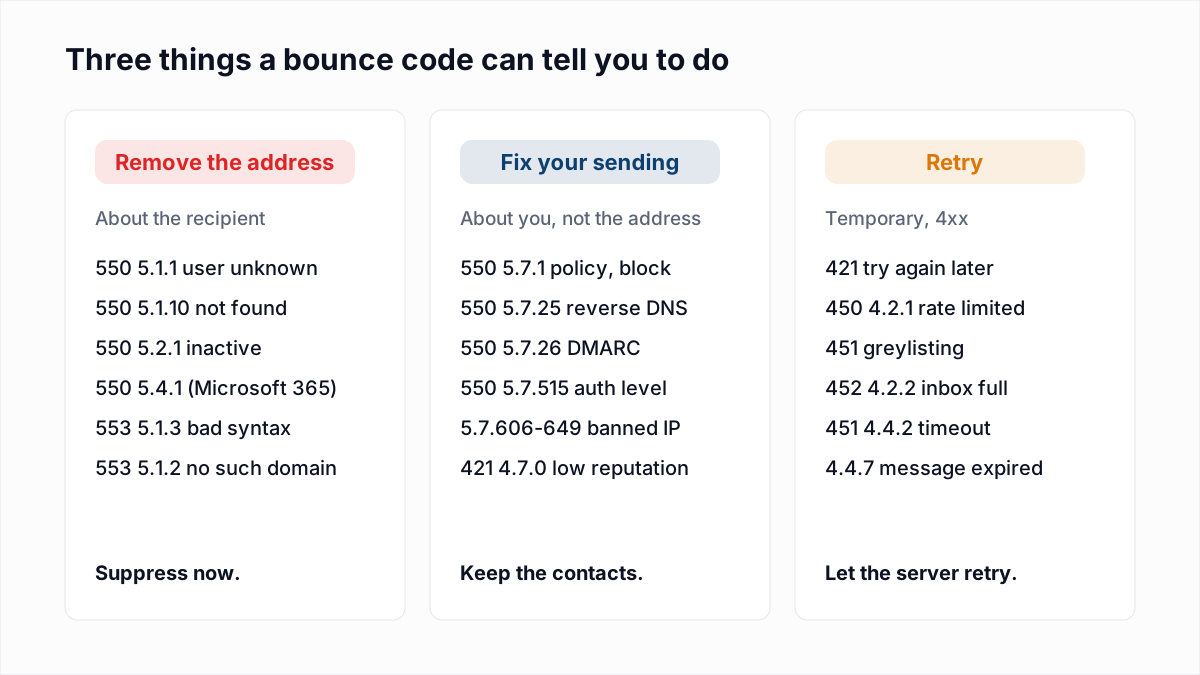
No, do not remove addresses that bounce with Gmail 550 5.7.1. None of the 20 variants says the recipient's mailbox is invalid. All of them are about the sender, the message, a sending limit or an administrator's rule.
When a Gmail address does not exist, Gmail says so with a different code. In InboxSure's own test on 4 November 2026, Gmail answered a nonexistent mailbox with 550-5.1.1 The email account that you tried to reach does not exist. That is the reply that justifies removal, as covered in the 550 5.1.1 guide.
If your sending platform suppressed contacts over a 5.7.1 bounce, restore them.
How do you fix Gmail 550 5.7.1 step by step?
To fix Gmail 550 5.7.1, identify the variant from its wording, fix that cause, and confirm with a small test send before resuming normal volume.
- Copy the full reply, including the ending (
gsmtporgcdp), and match it to a group in the table above. - Check Postmaster Tools for reputation, spam-verdict and rate variants: Compliance status, Spam rate, Authentication and Delivery errors. Postmaster Tools only shows data for mail to personal Gmail accounts, and only above a volume Google does not publish.
- Fix the one cause, then test with a handful of messages to Gmail addresses you control before scaling up over days.
- Escalate only after that. Google's Sender Contact Form accepts reports of mail rejected with SMTP errors from senders who already follow the guidelines. Google's sender guidelines say it does not accept allowlist requests from email providers.
Does email verification fix Gmail 550 5.7.1?
No, email verification does not clear a Gmail 550 5.7.1, because no variant of it is caused by an invalid address.
It helps with the conditions behind the reputation variants. Old and bought lists concentrate dead addresses and people who never asked for your mail, and mailing them is how a domain earns a poor history. InboxSure sorts each address into Deliverable, Risky, Undeliverable or Unknown without sending an email. It cannot tell you who will mark you as spam, and it does not measure reputation. The Free plan takes lists of up to 50 addresses with no card, and Pro is a flat $49 a month for lists of up to 10,000. Check a list in the bulk email verifier before the first send after a block.
Frequently asked questions
Related reading
Ready to clean your email list?
Upload a CSV or XLSX and get every address marked deliverable, risky, undeliverable or unknown, with the reason. Free for lists of up to 50, no card. Nothing is sent to your contacts.