421 4.7.0 Try Again Later: Why Gmail Defers Your Email
421 4.7.0 Try again later, closing connection means Gmail has deferred your message, not rejected it. The 421 is a temporary reply: your mail server keeps the message in its queue and retries on its own, and it only becomes a bounce if the retries are still being refused when the server's queue lifetime runs out (5 days by default in Postfix). The words after 4.7.0, or a more specific code such as 4.7.28, tell you why: low IP or domain reputation, a sudden jump in volume, missing PTR or TLS, or failed authentication. Fix the cause and slow down; do not resend by hand. Deferrals like this across providers are covered in email throttling.
Below are Gmail's exact 421 replies, a table of what to do and how long to wait for each, how retries work, and how other providers phrase the same thing.
What 421 4.7.0 means
- 421 is the SMTP reply for "service not available, closing transmission channel". The 4 makes it temporary. The receiving server is telling you to come back later, and it usually drops the connection right after.
- 4.7.0 is the enhanced status code: class 4 (temporary), subject 7 (security or policy), detail 0 (other). Gmail uses 4.7.0 for several unrelated reasons, so the text matters more than the number.
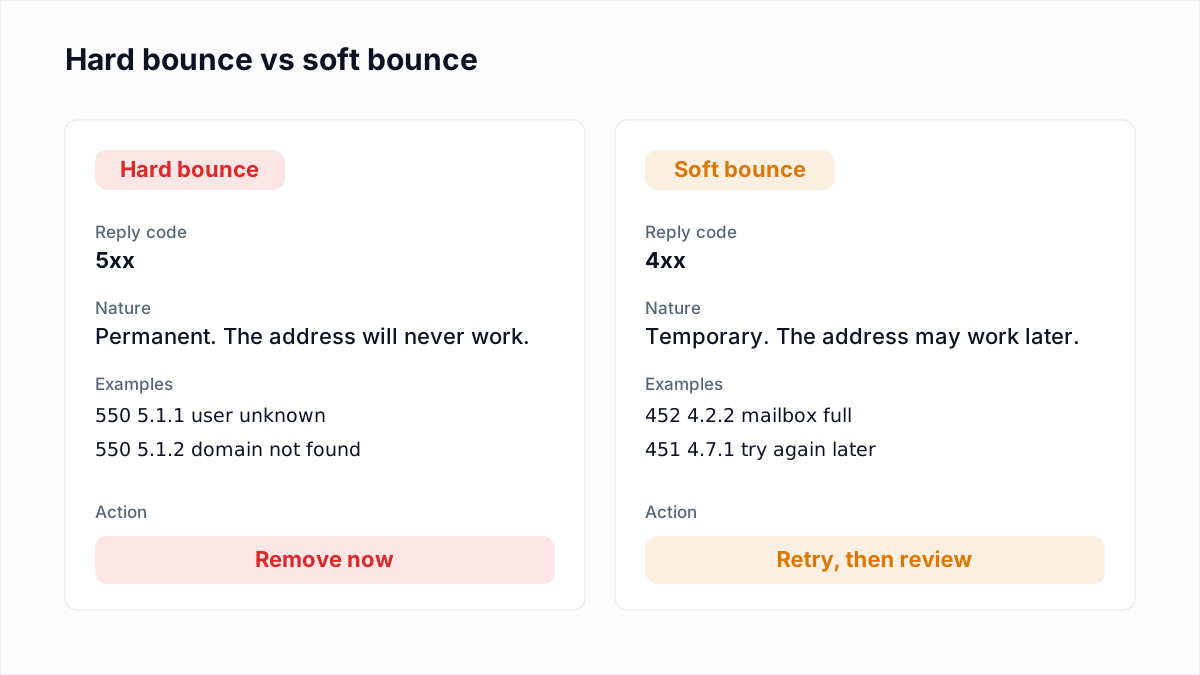
A 421 is a soft bounce at most. The difference from a 5xx is explained in soft bounce vs hard bounce, and the full set of codes is in email bounce codes. The short version: never delete a recipient because of a 421. The address is not the problem.
Gmail's exact 421 replies
These are quoted from Google's Gmail SMTP errors and codes reference as it read on 12 November 2026. Placeholders such as ip-address are filled in with your values in a real reply, and the reply is split across several lines each starting 421-4.7.0, with the last line starting 421 4.7.0.
The 421 4.7.0 family
421 4.7.0 Try again later, closing connection. (command)
421 4.7.0 Connection expired, try reconnecting.
421 4.7.0 IP not in whitelist for RCPT domain, closing connection.
421 4.7.0 TLS required for RCPT domain, closing connection.
421 4.7.0 The IP address sending this message does not have a PTR record,
  or the corresponding forward DNS entry does not point to the sending IP.
  To protect our users from spam, email sent from your IP address has been
  temporarily rate limited.
421 4.7.0 This message is suspicious due to the very low reputation of the
  sending IP address. To protect our users from spam, email sent from your
  IP address has been temporarily rate limited.
421 4.7.0 This message is suspicious due to the very low reputation of the
  sending domain. To best protect our users from spam, the message has been
  blocked.
421 4.7.0 This message is suspicious due to the nature of the content or
  the links within. To best protect our users from spam, the message has
  been blocked.
"Try again later, closing connection" is the generic one, and the word in brackets is the SMTP command Gmail was answering (for example (EHLO) or (RCPT)). "IP not in whitelist for RCPT domain" and "TLS required for RCPT domain" link to Google's Workspace pages on allowlists and on encryption in transit: the recipient's organisation has a rule about who may deliver to it and how. That is a setting on their side, not a verdict on your reputation. Domains can also publish a TLS requirement in DNS, which is what MTA-STS and TLS-RPT are for.
421 4.7.28: unusual rate of mail
421 4.7.28 Gmail has detected an unusual rate of email.
421 4.7.28 Gmail has detected an unusual rate of email originating from
  your IP address ip-address.
421 4.7.28 Gmail has detected an unusual rate of unsolicited email
  originating from your IP Netblock ip-address.
421 4.7.28 Gmail has detected an unusual rate of unsolicited email
  originating from your DKIM domain domain-name.
421 4.7.28 Gmail has detected an unusual rate of unsolicited email
  originating from your SPF domain domain-name.
421 4.7.28 Gmail has detected an unusual rate of unsolicited email
  containing one of your URL domains.
421 4.7.28 Gmail has detected an unusual amount of unsolicited email
  originating from your IP address.
421 4.7.28 Gmail has detected this sender exceeded the quota for sending
  messages that have the same Message-ID:.
Each variant names what Gmail is rate limiting: your IP, your whole netblock, your DKIM domain, your SPF domain, or a domain in your links. That is where the reputation problem sits. A URL-domain variant can hit you because of a link shortener or tracking domain shared with other senders.
Authentication and TLS versions
Gmail has temporary forms of its authentication blocks. Each begins "Your email has been rate limited because...", except 4.7.26:
421 4.7.26This email has been rate limited because it is unauthenticated. (SPF and DKIM both did not pass.)421 4.7.27...SPF authentication didn't pass for this message.421 4.7.30...DKIM authentication didn't pass for this message.421 4.7.32...the From: header (RFC5322) in this message isn't aligned with either the authenticated SPF or DKIM organizational domain.421 4.7.40...the sending domain doesn't have a DMARC record, or the DMARC record doesn't specify a DMARC policy.421 4.7.29...you're not using a TLS connection.
Google also lists permanent 5.7.x versions of most of these. If you ignore the 421, the next step can be a 550, which is why our guide to 550 5.7.26 covers the same records. The bulk-sender rules behind them are in Gmail, Yahoo and Outlook sender requirements.
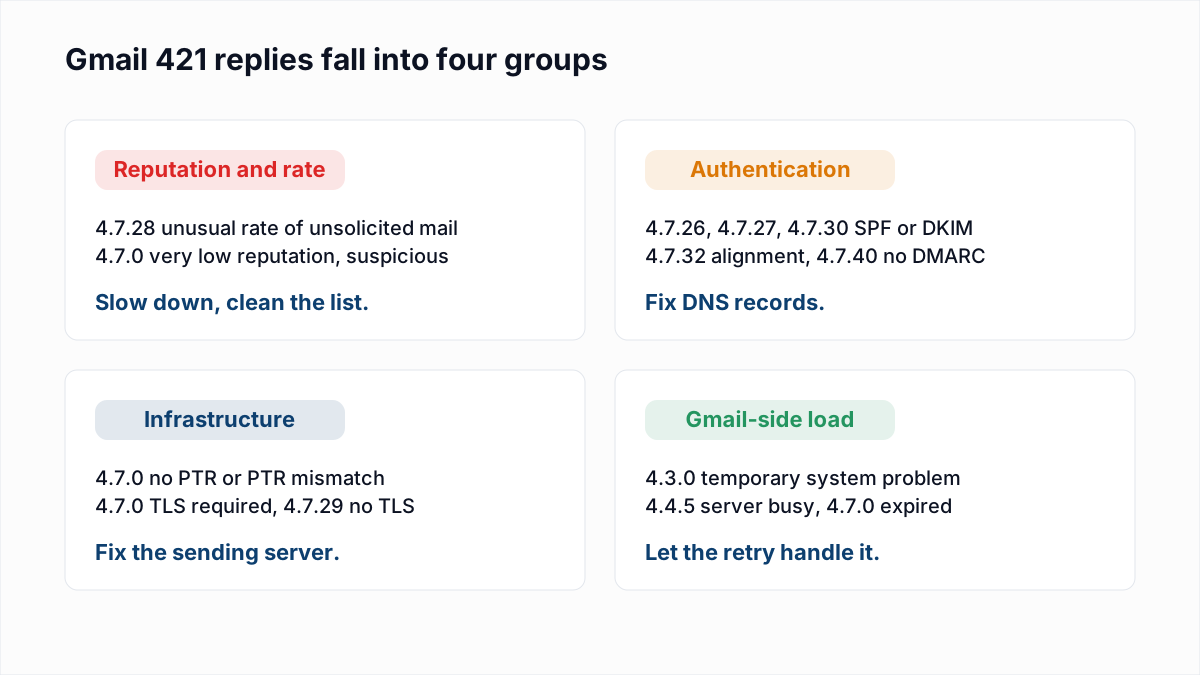
What to do for each 421 variant
| Variant | Meaning | Action | How long to wait |
|---|---|---|---|
| 4.7.0 Try again later / Connection expired | Generic deferral or idle connection | Nothing, unless it repeats for hours; then treat as reputation | Let normal retries run |
| 4.3.0 / 4.4.5 | Temporary system problem or server busy at Gmail | Nothing | Minutes; normal retries |
| 4.7.0 very low reputation (IP or domain) | Gmail distrusts the source | Cut volume sharply, send only to engaged recipients, check list quality | Days to weeks; reputation recovers slowly |
| 4.7.0 content or links | The message or a linked domain looks like spam | Remove shorteners and suspect links, test a plain version | Retry after changing the message |
| 4.7.28 unusual rate | Volume or complaints spiked from that IP, domain or URL | Throttle, spread sends over the day, warm up properly | Hours to days after you slow down |
| 4.7.28 same Message-ID | Your software reuses one Message-ID for many messages | Generate a unique Message-ID per message | Clears once fixed |
| 4.7.0 PTR record | Sending IP has no reverse DNS, or it does not match | Set a PTR that resolves back to the IP | After DNS change propagates |
| 4.7.0 TLS required / 4.7.29 | Recipient domain or Gmail rule needs TLS | Enable STARTTLS on the sending server | Immediate once fixed |
| 4.7.0 IP not in whitelist | Workspace admin allows only listed IPs | Contact the recipient's admin | Until they add you |
| 4.7.26 / 4.7.27 / 4.7.30 / 4.7.32 / 4.7.40 | SPF, DKIM, alignment or DMARC missing | Fix the DNS record named in the reply | Immediate once DNS is live |
The waiting times are our guidance, not Google's. Google does not publish how long a rate limit lasts. Its Postmaster Tools help says only that dashboard data is "typically" updated within 24 hours and suggests checking compliance again after 7 days.
How retries work, and when a 421 becomes a bounce
A properly configured mail server never gives up on a 4xx immediately. It moves the message to a deferred queue and tries again with growing gaps. In Postfix, per the postconf reference, minimal_backoff_time defaults to 300 seconds, maximal_backoff_time to 4000 seconds, and maximal_queue_lifetime to 5 days. The Postfix queue documentation explains that the next retry time is set by doubling the message's age in the queue, kept within those two limits, so young messages are retried more often than old ones.
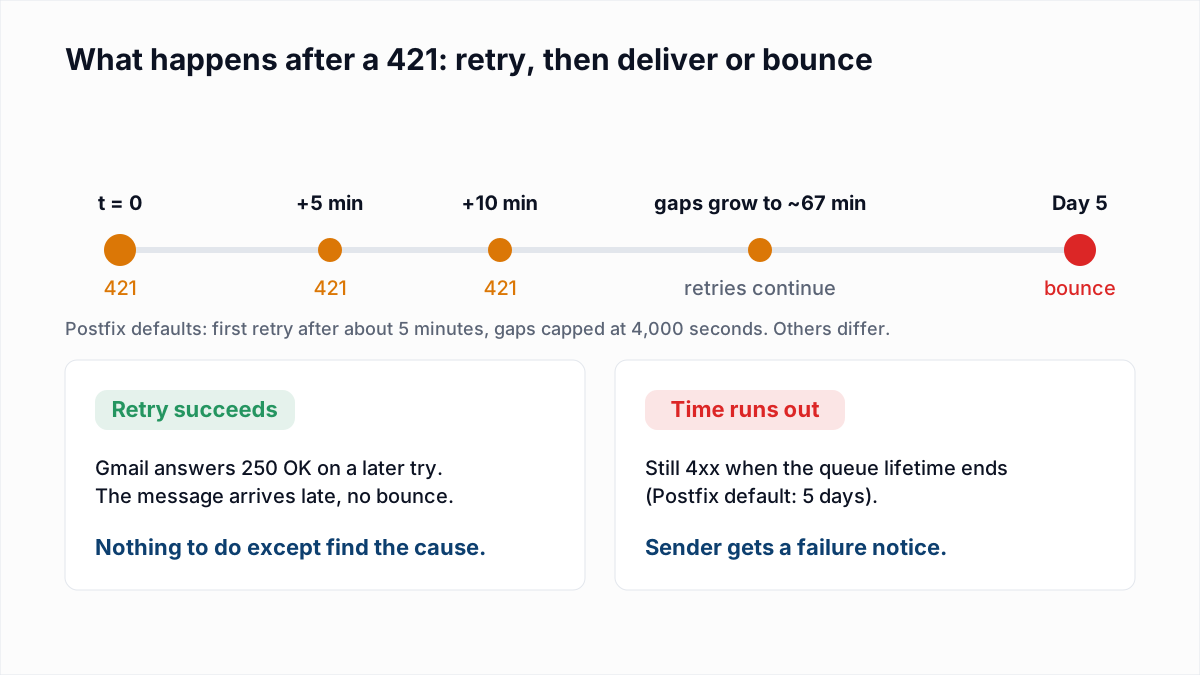
If any retry gets 250 OK, the message is delivered late and nobody sees a bounce. If Gmail is still answering 4xx when the lifetime expires, Postfix gives up and sends the sender a failure notice quoting the last 421. Other servers use different defaults, and hosted sending platforms set their own retry windows, which may be shorter than 5 days. If your platform reports a "deferred" or "soft bounce" status, check its documentation for how long it keeps trying.
Do not resend deferred messages manually. The queue is already retrying them, and a manual resend doubles the volume Gmail is objecting to.
Why new IPs and domains get 421 4.7.28
Gmail judges a sender by its history. A new IP or domain has none, so a first send of 20,000 messages looks exactly like what a spammer does with a fresh server: an "unusual rate". The same happens when an established sender suddenly triples volume, moves to a new IP, or mails an old segment that has not heard from them in a year and complains.
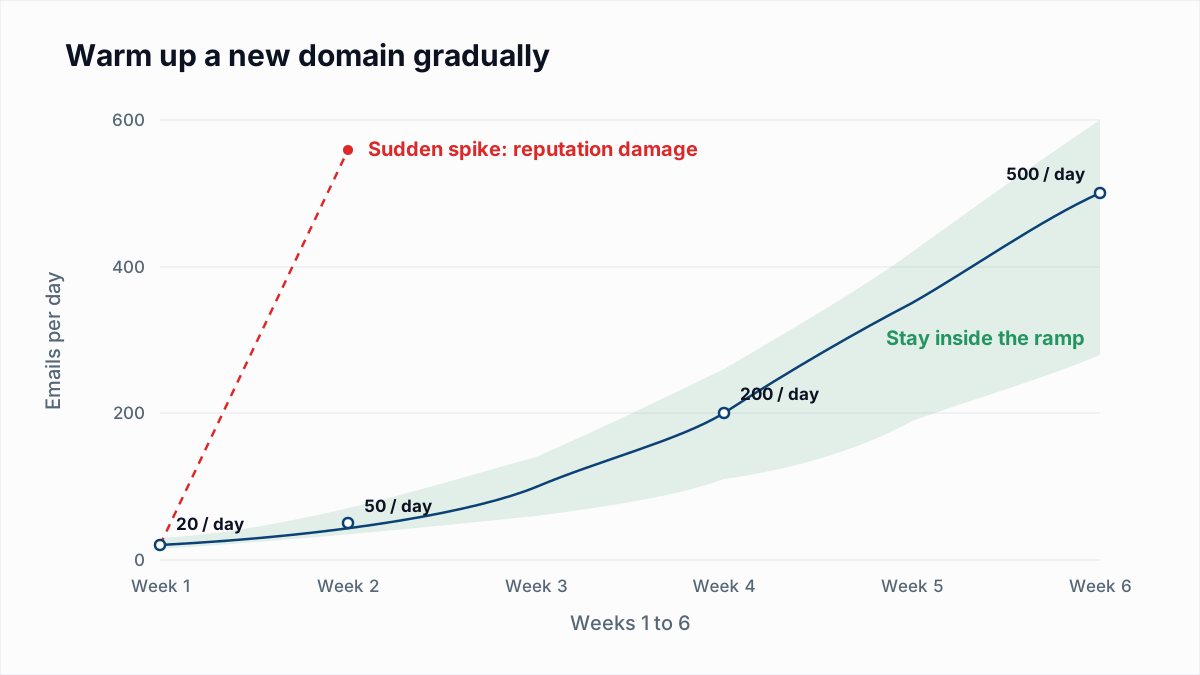
The fix is the same in each case:
- Throttle. Limit messages per hour and concurrent connections to Gmail. In Postfix you can give gmail.com its own transport with a lower
destination_concurrency_limitand adestination_rate_delay. - Warm up. Start with your most engaged recipients and raise volume over weeks, as described in email warmup and sender reputation.
- Clean the list before sending. Hard bounces and spam traps on an old list damage reputation fast. Verifying the list first removes addresses that do not exist; InboxSure checks the mailbox over SMTP without sending and flags catch-all, role and disposable addresses. Verification cannot tell you who will complain, so pair it with an engagement filter.
- Watch Postmaster Tools. Register your domain at postmaster.google.com. Google's help page lists dashboards for compliance status, spam rate, IP reputation, domain reputation, authentication, encryption and delivery errors. The spam rate there is the one Gmail's 0.3% ceiling refers to.
421 from other providers
Yahoo's SMTP error codes page says "A 421 or 451 SMTP error indicates a temporary problem blocking the delivery of your message" and lists the causes: unusual traffic from your IP, spam-like content, complaints from Yahoo users, busy servers, a name server that was temporarily unavailable, and authentication results that "could not be determined due to a temporary error". The page groups its deferrals as "Message temporarily deferred (eg: TS* Errors)" rather than listing each one, and asks you to file a Sender Support Request with the codes from your logs if the error persists. Replies quoted online carry tags such as [TSS04] after 421 4.7.0, but Yahoo's page does not define the individual tags, so we do not either. Treat any Yahoo TS deferral as a reputation or volume signal: slow down and review complaints. More in Yahoo 421 4.7.0 [TSS04].
Outlook.com's IP blocks arrive as permanent 550 5.7.1 replies with an S-code such as S3140, which is what Outlook.com and Hotmail returned in our own test; see Outlook 550 5.7.1. In that test on 4 November 2026, described in how Gmail, Outlook and Yahoo respond to email verification, Fastmail and Mimecast answered with 451 temporary replies rather than 421.
421 is not greylisting
Greylisting is a different 4xx. A greylisting server refuses the first attempt from an unknown sender with something like 451 4.7.1 Greylisted, try later, purely to see whether you retry, and accepts the second attempt a few minutes later. It says nothing about your reputation. A Gmail 421 is a judgement about you, and the next attempt will meet the same judgement unless something changes. More in greylisting explained.
A quick checklist
- Copy the full 421 text from your logs or the platform's event detail.
- Find its group in the table above.
- For authentication codes, check records with the SPF checker and DMARC checker.
- For reputation and rate codes, halve your Gmail volume and send to engaged contacts only.
- Leave the queue alone. Do not resend.
- If deferrals turn into 5.7.x rejections, treat it as a block and fix before sending more.
If an old or bought list is behind the spike, clean it before the next send. The bulk email verifier takes a CSV and returns Deliverable, Risky, Undeliverable and Unknown results. The free plan handles lists up to 50 addresses with no card, and Pro is a flat $49 a month for lists up to 10,000.
Frequently asked questions
Related reading
Ready to clean your email list?
Upload a CSV or XLSX and get every address marked deliverable, risky, undeliverable or unknown, with the reason. Free for lists of up to 50, no card. Nothing is sent to your contacts.