Yahoo 421 4.7.0 [TSS04] Error: Why Yahoo Defers Your Email
One caveat before anything else: Yahoo does not define TSS04. Its Sender Hub documents a whole family, "Message temporarily deferred (eg: TS* Errors)", and gives one list of causes for all of it. The pages we read on 13 November 2026 do not contain the strings TSS04, TS01, TS02 or TS03, or the sentence "unexpected volume or user complaints". So this guide separates what Yahoo says from what senders see in their logs, and marks the second kind as typical wording.
A deferral is a temporary refusal: the receiving server answers with a 4xx code, the sending server keeps the message in its queue, and it tries again later without anyone resending.
What does 421 4.7.0 [TSS04] mean?
421 4.7.0 [TSS04] means Yahoo Mail has temporarily put off accepting mail from your sending IP address, and your mail server is expected to retry. The message has not bounced and the recipient's address is not the problem.
421 4.7.0 [TSS04] Messages from 203.0.113.10 temporarily deferred due to
unexpected volume or user complaints - 4.16.55.1;
see https://postmaster.yahooinc.com/error-codes
That is typical wording, as it appears in sender logs. The parts read like this:
- 421 is the SMTP reply for "service not available". The leading 4 makes it temporary.
- 4.7.0 is the enhanced status code: temporary, security or policy, no further detail.
- [TSS04] is Yahoo's own tag. It belongs to the TS family that Yahoo's page calls temporary deferrals.
- The IP address is the server Yahoo saw connecting. On a shared sending platform that IP also carries other customers' mail.
Gmail uses the same 421 4.7.0 code with different text, covered in 421 4.7.0 try again later. Every other code is in the email bounce codes hub, and soft bounce vs hard bounce explains why a 4xx is handled differently from a 5xx.
What do TS01, TS02, TS03 and TSS04 mean?
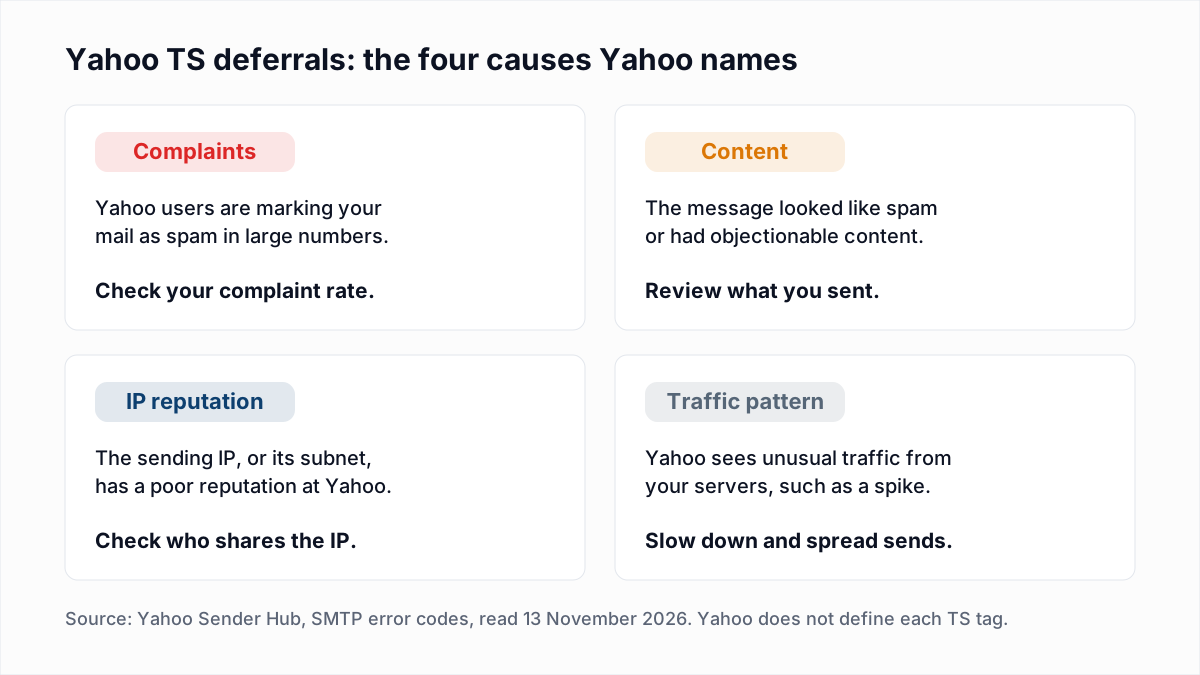
TS01, TS02, TS03 and TSS04 are all Yahoo temporary deferral tags, and Yahoo does not publish a separate meaning for any of them as of November 2026. Yahoo's SMTP error codes page gives one explanation for the family: the message "may have been deferred due to one or more of the following":
- "Emails from your mail server are generating substantial complaints from Yahoo users."
- "The message contained objectionable content or exhibited characteristics indicative of spam."
- The IP address or its subnet "has a poor reputation".
- "We are seeing unusual traffic patterns from your mail servers."
Many guides say TS01 and TS02 are early warnings and TS03 is the severe stage. That ranking is not on Yahoo's pages. It comes from the wording senders report for TS03, which is different in kind:
421 4.7.1 [TS03] All messages from 203.0.113.10 will be permanently deferred;
Retrying will NOT succeed.
That is also typical wording. Yahoo's page does use the phrase behind it: "We may permanently defer or reject mail for policy reasons". If your log says retrying will not succeed, believe the text over the 4xx number, stop sending from that IP and go to step 6 below.
Why does Yahoo defer email?
Yahoo defers email when it distrusts the traffic but has not decided to reject it. For 421 and 451 replies in general, Yahoo's error page lists seven reasons:
- Unusual traffic patterns from the sending server's IP address.
- A message with characteristics of spam.
- Complaints from Yahoo users about mail from your server.
- Yahoo's servers being busy when you connected.
- "Other suspicious behavior which leads Yahoo to enforce a dynamic deprioritization for your sender's server."
- Your name server being temporarily unavailable.
- Authentication results that could not be determined because of a temporary error.
Busy servers and temporary lookup errors clear by themselves. The rest come down to volume, complaints and reputation. Yahoo's Sender Hub FAQ states the complaint link directly: "Our system continuously evaluates mail, and we may defer mail from domains with a high complaint rate." On volume it says: "If you send emails at a certain rate and suddenly have a spike of activity, you could get flagged as a compromised sender and marked as spam."
What should you do about a Yahoo TSS04 deferral?
Work through six steps in order after a Yahoo TSS04 deferral: slow down, check your complaint rate, check authentication, clean the list, enrol in the Complaint Feedback Loop, and only then contact Yahoo.
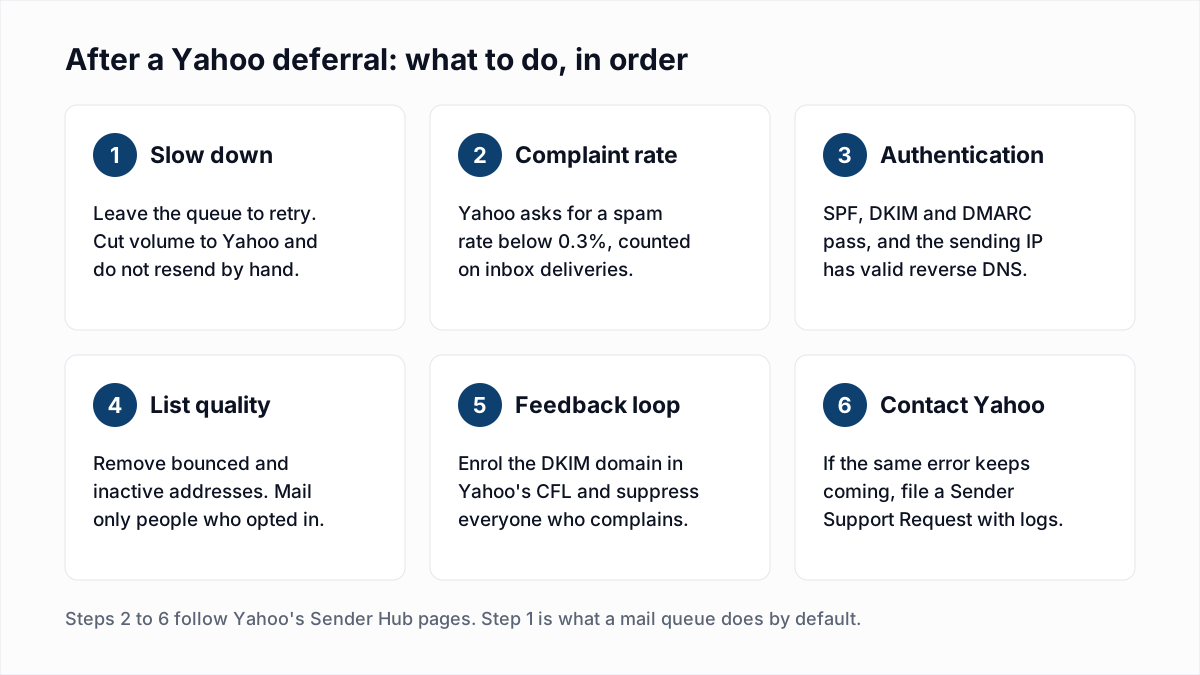
- Slow down. Leave the deferred messages in the queue. Do not resend them by hand, because that adds to the volume Yahoo is objecting to. Reduce what you send to Yahoo-hosted domains and spread it over the day. Yahoo's page names one common cause: a recently set up IP whose owner "did not increase the email traffic slowly". Our guides to email throttling and an IP warm-up schedule cover the mechanics.
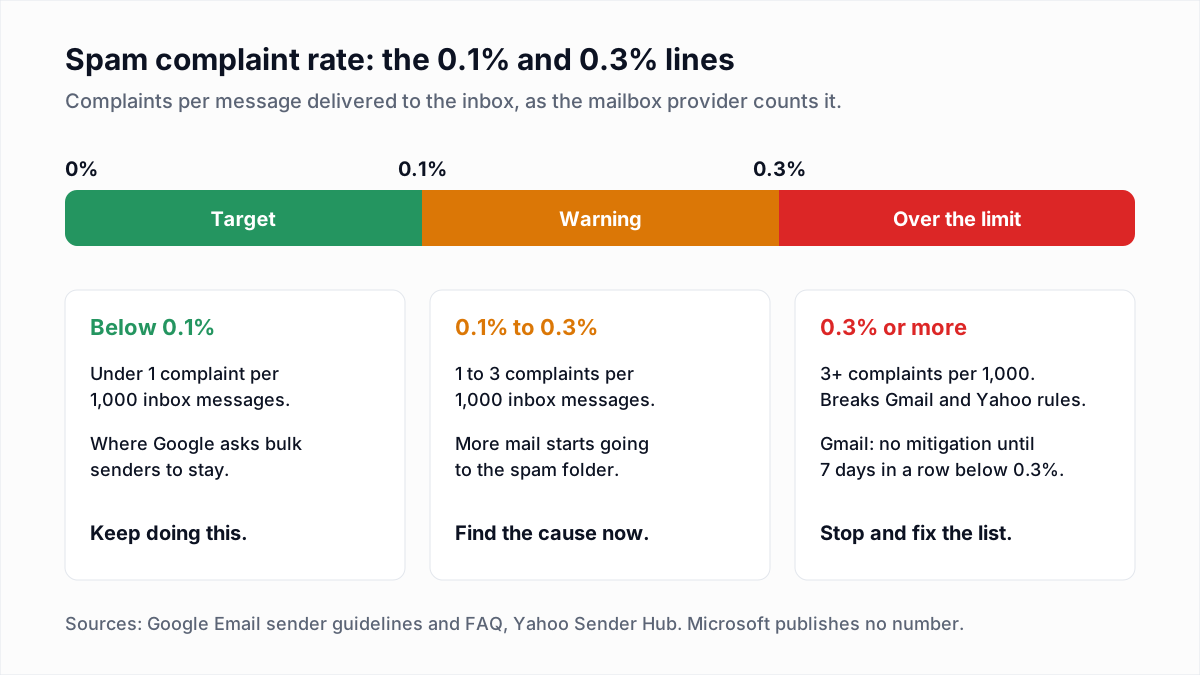
- Check your complaint rate. Yahoo's Sender Requirements and Recommendations say "Keep your spam rate below 0.3%" and that the rate "is calculated in our system based on mail delivered to the inbox". Your own figure, divided by everything sent, will look lower than Yahoo's. See spam complaint rate for the arithmetic.
- Check authentication and reverse DNS. Yahoo requires SPF or DKIM from every sender, and SPF, DKIM and a passing DMARC policy from bulk senders, plus valid forward and reverse DNS for sending IPs. Test with the SPF checker, DKIM checker and DMARC checker. The full rule list is in Gmail, Yahoo and Outlook sender requirements.
- Clean the list. Yahoo tells senders to "remove invalid recipients from your list promptly", to monitor hard and soft bounces and inactive recipients, and not to buy lists. Segment to people who opened or clicked recently and suppress the rest for now.
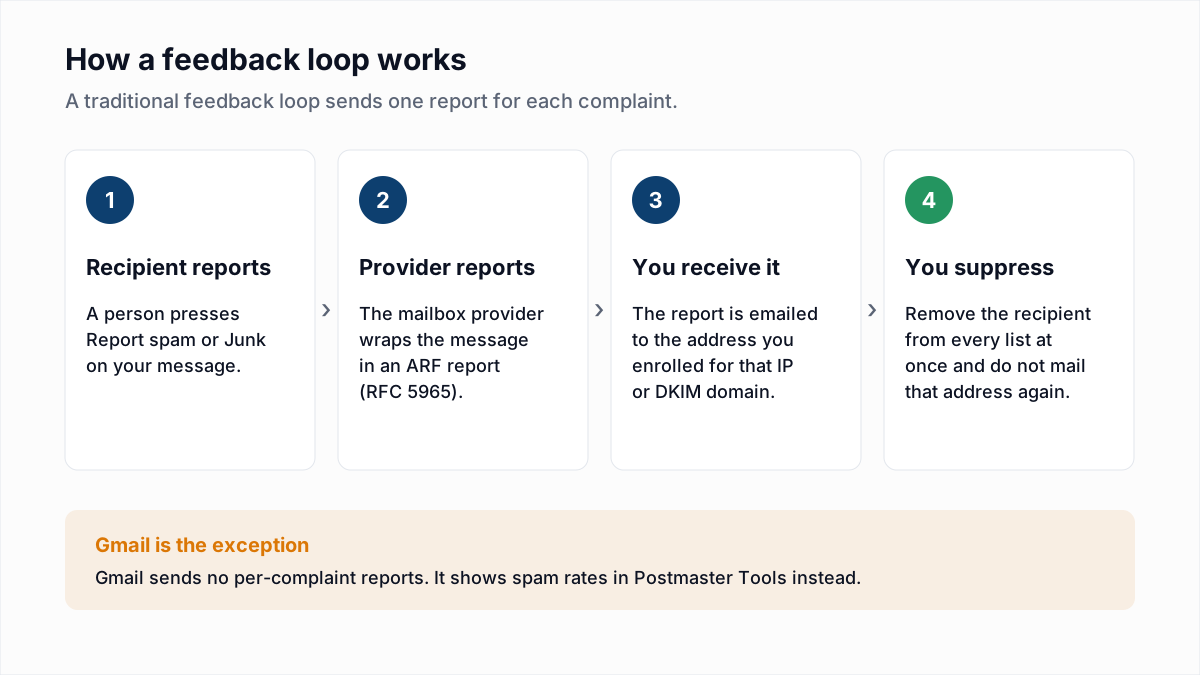
- Sign up for the Complaint Feedback Loop. Yahoo's Complaint Feedback Loop sends you a report each time a recipient marks DKIM-signed mail from your enrolled domain as spam, so you can suppress that person. Yahoo says "An active CFL is needed for all DKIM domains". Enrolment steps are in email feedback loops.
- Contact Yahoo. Yahoo's page says: "If you're seeing the same error consistently over an extended period of time, we encourage you to submit a Sender Support Request with specific details of the error and diagnostic codes you see in your logs." The form is on Yahoo's Sender Hub contact page, under problems delivering mail "to AOL or Yahoo mailboxes". Yahoo's FAQ adds that it has no whitelisting programme, and that a review does not guarantee inbox delivery.
One limit on step 4: a verifier cannot clean the Yahoo part of a list. As of November 2026 InboxSure returns Unknown for Yahoo and AOL addresses, because Yahoo refuses the check before a recipient is named. The reasons are in can you verify Yahoo email addresses. For Yahoo recipients, rely on your own bounce history and engagement instead.
How long does a Yahoo deferral last?
Yahoo does not publish how long a TSS04 deferral lasts. Its error page contains only three statements about time, and none is a duration for TS tags:
- For any 4xx error, "you may retry sending at a later time". No interval is given.
- For busy servers ("Resources temporarily unavailable"), "Such issues are generally brief".
- For excessive complaints or unsolicited mail, if "you've received this error for more than 48 hours", Yahoo asks you to review your outgoing mail for objectionable content or practices.
Treat 48 hours as the point where waiting stops being a plan. What turns a deferral into a bounce is your own server: when its queue lifetime runs out, it gives up and returns the message with the last 421 quoted. Postfix defaults and retry gaps are described in the 421 4.7.0 guide; hosted sending platforms set their own, often shorter, windows.
Does the TSS04 error apply to AOL and other Yahoo domains?
Yes, the same deferrals apply to AOL, because AOL mailboxes are hosted by Yahoo Mail. Yahoo's FAQ says its sender requirements "apply for all domains and consumer email brands hosted by Yahoo Mail", and that feedback loop reports are sent for AOL and "any of the thousands of domains we host and support".
Yahoo's pages name AOL and no other brand, so we do not list others here. The FAQ does name one exception: "Yahoo Japan is a separate entity". To find out whether a domain is Yahoo-hosted, look at where its MX records point with the MX lookup tool, and throttle by mail host, not by the text after the @.
What does each Yahoo error code mean, and what should you do?
The table below pairs each Yahoo reply with the category Yahoo's error page puts it in. Tags in square brackets are typical wording from logs; the meanings are Yahoo's.
| Code or wording | Meaning | Action |
|---|---|---|
421 4.7.0 [TSS04] temporarily deferred | A TS temporary deferral. Yahoo does not define TSS04 separately from the family. | Let the queue retry, cut volume to Yahoo and follow the six steps above. |
[TS01], [TS02] | TS temporary deferrals with the same four published causes. | Handle them exactly as TSS04. |
[TS03] permanently deferred | A TS tag whose reported text says retrying will not succeed. Yahoo gives no separate definition. | Stop sending from that IP, fix the cause and file a Sender Support Request. |
| 421 or 451 with no tag | Yahoo says it "indicates a temporary problem blocking the delivery of your message". | Retry later. Review Yahoo's sender requirements if it repeats. |
| Resources temporarily unavailable | Yahoo's mail servers were busy when you connected. | Do nothing. Yahoo says such issues are generally brief. |
| Excessive user complaints | Mail from your server is drawing too many spam reports from Yahoo users. | Review opt-in and content. On a shared IP, ask your host about a dedicated one. |
| Excessive unsolicited messages | Very high volume from one IP, which Yahoo treats as a sign of bulk spam. | Do not resend until you have reviewed the requirements. Ramp new IPs slowly. |
| 451 or 554, unresolvable From domain | Yahoo's SOA query could not confirm that the sending domain exists. | Publish SOA records, as well as A or MX records, for the domain or subdomain. |
PH tags, such as [PH01] | A content-based block: malware, phishing or links to them. | Check outbound queues for abuse and secure the server. |
| 553 or 554 | A permanent error. Yahoo says you should not retry. | Read the text. Remove the address if the account does not exist; see 554 5.7.1 otherwise. |
Should you remove addresses that Yahoo deferred?
No, do not remove an address because Yahoo deferred mail to it. A TS deferral is a verdict on the sending IP or domain, and every Yahoo recipient in that send got the same reply. Suppress only on a permanent reply that says the account does not exist.
Where verification does help is the rest of the list. Old Gmail, Microsoft 365 and company addresses that hard bounce pull down the reputation Yahoo also looks at. The bulk email verifier takes a CSV and marks each address Deliverable, Risky, Undeliverable or Unknown. The Free plan covers lists up to 50 addresses with no card, and Pro is a flat $49 a month for lists up to 10,000. It will not tell you who is likely to complain, so pair it with an engagement filter.
Frequently asked questions
Related reading
Ready to clean your email list?
Upload a CSV or XLSX and get every address marked deliverable, risky, undeliverable or unknown, with the reason. Free for lists of up to 50, no card. Nothing is sent to your contacts.