Email Feedback Loops (FBLs): What They Are and How to Sign Up
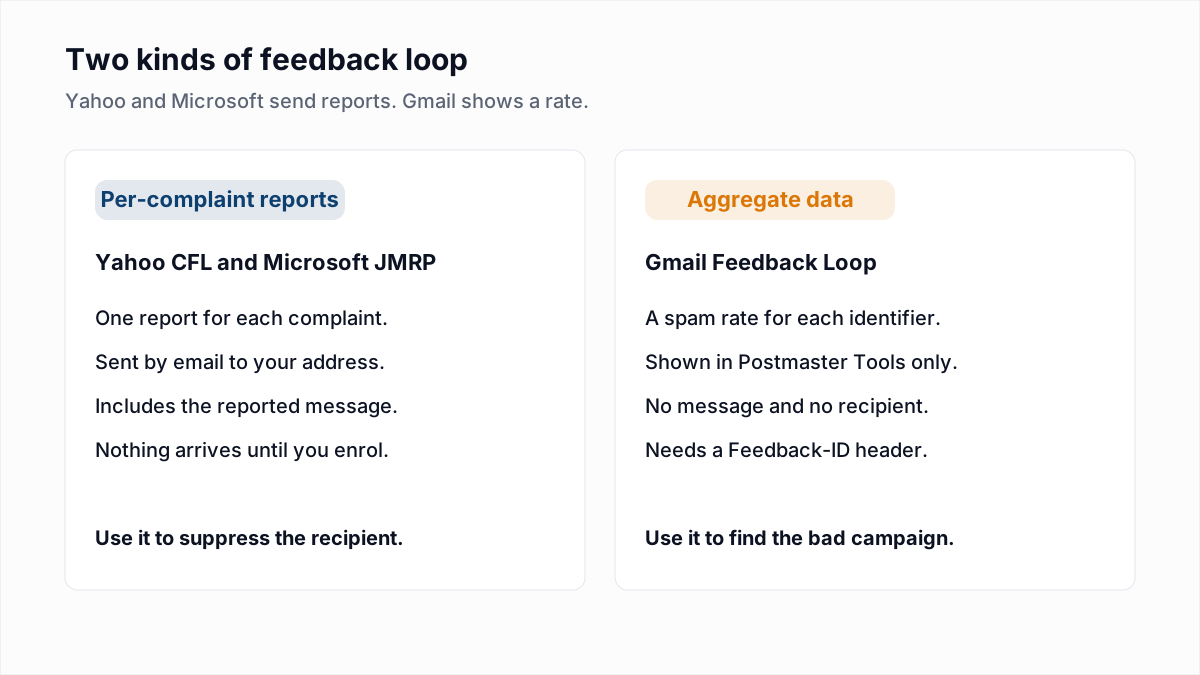
Three feedback loops matter to most senders, and they do not work the same way. Yahoo and Microsoft send you a report for each complaint, so you can remove the person who complained. Gmail sends no reports at all: it shows a spam rate in Postmaster Tools. If you send through an email platform on its shared IPs, the platform has usually enrolled already and you may have nothing to sign up for.
We checked each programme against its operator's own page on 13 November 2026. The Google and Yahoo pages loaded and are quoted below. Microsoft's postmaster site did not load for us that day, so the Microsoft details come from the text of its pages as indexed by search and are the least certain part of this guide.
What is an email feedback loop?
An email feedback loop (FBL) is a service run by a mailbox provider that tells a sender when a recipient marks one of its messages as spam. The sender enrols an IP address or a DKIM domain, gives a mailbox to receive reports, and the provider forwards each complaint to that mailbox.
The reports use the Abuse Reporting Format (ARF), defined in RFC 5965, published in August 2010. An ARF report is an email with three parts: a short human-readable note, a machine-readable message/feedback-report block, and the original message or its headers. The machine-readable block must carry three fields: Feedback-Type, User-Agent and Version. A trimmed, made-up example:
Content-Type: multipart/report; report-type=feedback-report

Content-Type: message/feedback-report

Feedback-Type: abuse
User-Agent: ExampleProvider-FBL/1.0
Version: 1
Original-Mail-From: <bounce-8841@mail.example.com>
Arrival-Date: Thu, 12 Nov 2026 09:14:02 +0000
Source-IP: 203.0.113.10

Content-Type: message/rfc822

(the message the recipient reported, with its headers)
Feedback-Type: abuse is the value for a spam complaint. The part your software needs is the third one: the original headers identify which recipient and which campaign the complaint belongs to.
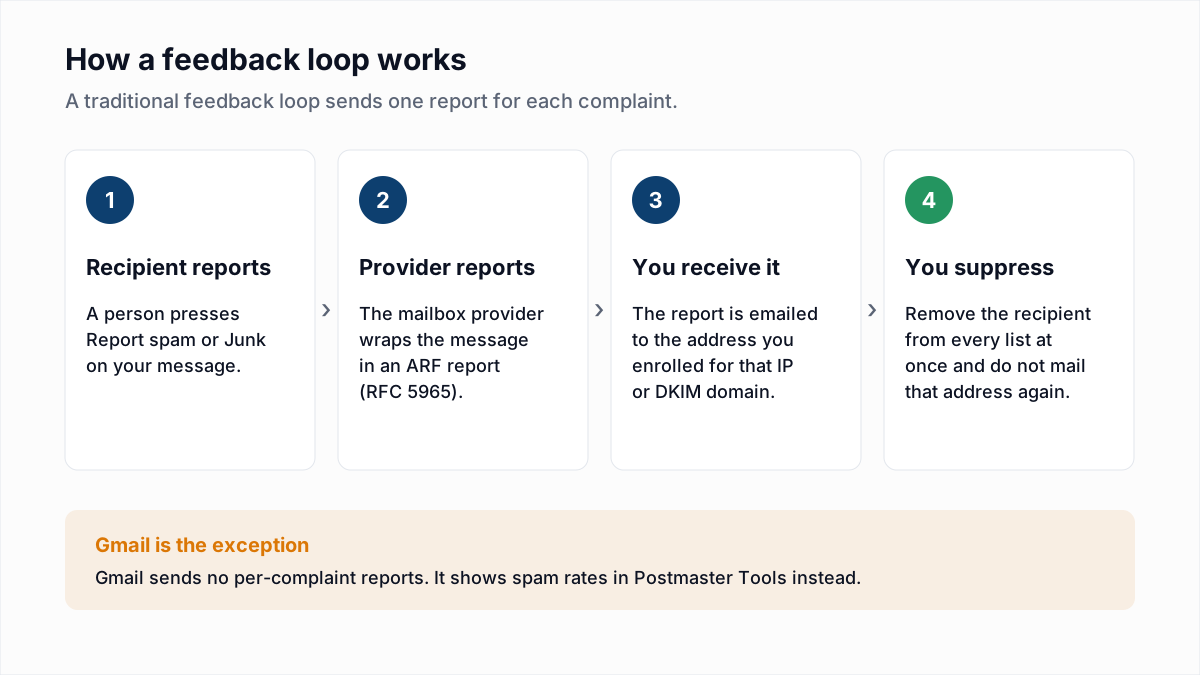
How is the Gmail feedback loop different from a traditional FBL?
The Gmail feedback loop reports aggregate spam rates per identifier in Postmaster Tools and never sends a report about an individual complaint, message or recipient. You cannot use it to unsubscribe the person who complained.
Google's Feedback Loop help page describes it as a tool for large-volume senders to "identify campaigns in your traffic that are getting a high volume of complaints from Gmail users", and says it is especially useful to email service providers. To use it you add one header:
Feedback-ID: a:b:c:SenderIdGoogle says SenderId is mandatory, 5 to 15 characters, and chosen by you. The first three fields are optional identifiers, for example a campaign, a customer and a mail type. The mail must be DKIM-signed by a domain you control, and that domain must be added and verified in Postmaster Tools. Google then reports identifiers "with an unusual spam rate" in the Feedback loop dashboard, and only when an identifier appears in "a certain volume of mails" and in distinct user spam reports. Google does not publish that volume, and the data covers @gmail.com recipients only. Setting up the dashboards is covered in our Google Postmaster Tools guide.
How does the Yahoo Complaint Feedback Loop work?
The Yahoo Complaint Feedback Loop (CFL) sends an ARF report to an address you choose each time a recipient marks DKIM-signed mail from your enrolled domain as spam. Enrolment is by DKIM domain, not by IP address.
Yahoo's Complaint Feedback Loop page says the programme "only supports DKIM-signed email and is a domain based service". Its Sender Hub FAQ adds the details that matter in practice:
- "Yahoo no longer offers IP or CIDR-based CFL reporting." The domain to enrol is the
d=value of your DKIM signature. Our DKIM guide shows where to find it. - The reporting address can be any address you control. It does not have to match the From or DKIM domain.
- Reports "include the full email headers and some additional machine readable meta-data", and arrive from "Yahoo! Mail AntiSpam Feedback".
- Reports are sent for AOL too, and for "any of the thousands of domains we host and support".
Yahoo's sender best practices go further than calling it optional: "An active CFL is needed for all DKIM domains to make sure you're processing complaints quickly."
What are Microsoft JMRP and SNDS?
Microsoft JMRP (Junk Email Reporting Program) is the Outlook.com feedback loop: it returns a report when an Outlook.com user marks your message as junk. Microsoft SNDS (Smart Network Data Services) is a separate portal that shows data about your sending IP addresses. See the Microsoft SNDS guide for that portal, and Sender Score explained for a third-party IP score.
Both are listed on Microsoft's Services for Senders and ISPs page. Both are free and both are keyed on IP address, not domain. You request access to an IP range in SNDS, Microsoft confirms you are responsible for it, and JMRP enrolment is done from the same SNDS portal. The old sendersupport.olc.protection.outlook.com addresses now redirect there.
SNDS is not a feedback loop in the per-complaint sense. Its FAQ describes per-IP data such as a complaint rate and a colour-coded filter result. It belongs in a reputation check, which we cover in how to check your email domain reputation. One caution: third-party write-ups from 2026 say JMRP reports changed format during the portal move. We could not confirm that on a Microsoft page, so test what your parser receives.
Which feedback loops can you sign up for?
As of 13 November 2026 the three large consumer mailbox providers each run a programme, and each is free.
| Provider | Programme | Keyed on | What you receive | Where to sign up |
|---|---|---|---|---|
| Gmail | Feedback Loop (Feedback-ID header) | DKIM domain verified in Postmaster Tools | Aggregate spam rate per identifier. No individual reports. | Google Feedback Loop help |
| Yahoo and AOL | Complaint Feedback Loop (CFL) | DKIM domain | One ARF report per complaint, by email | Yahoo Sender Hub |
| Outlook.com and Hotmail | Junk Email Reporting Program (JMRP) | IP address | One report per junk complaint, by email | Microsoft SNDS portal |
| Outlook.com and Hotmail | Smart Network Data Services (SNDS) | IP address | Per-IP data in a portal. Not a per-complaint loop. | Microsoft SNDS portal |
Verified on the operator's own page on 13 November 2026: the Gmail Feedback Loop and the Yahoo CFL. Confirmed only from search-indexed copies of Microsoft's pages: JMRP and SNDS. Other operators, such as cable ISPs and regional mailbox providers, also run loops, some through third parties. We could not load their own pages, so they are left out of the table.
Who needs to sign up for a feedback loop?
You need to sign up for feedback loops yourself if you send from your own IP addresses or sign mail with your own DKIM domain on infrastructure you run. If an email platform sends for you, the platform normally enrols and handles complaints.
| Your setup | Yahoo CFL | Microsoft JMRP and SNDS | Gmail Feedback-ID |
|---|---|---|---|
| Email platform, shared IPs | The platform usually enrols your domain | The platform enrols its IPs | The platform sets the header, if at all |
| Email platform, dedicated IP | Ask the platform who enrols | Ask the platform; it controls the IP | Ask the platform |
| Your own mail servers | You enrol each DKIM domain | You enrol each IP range | You add the header yourself |
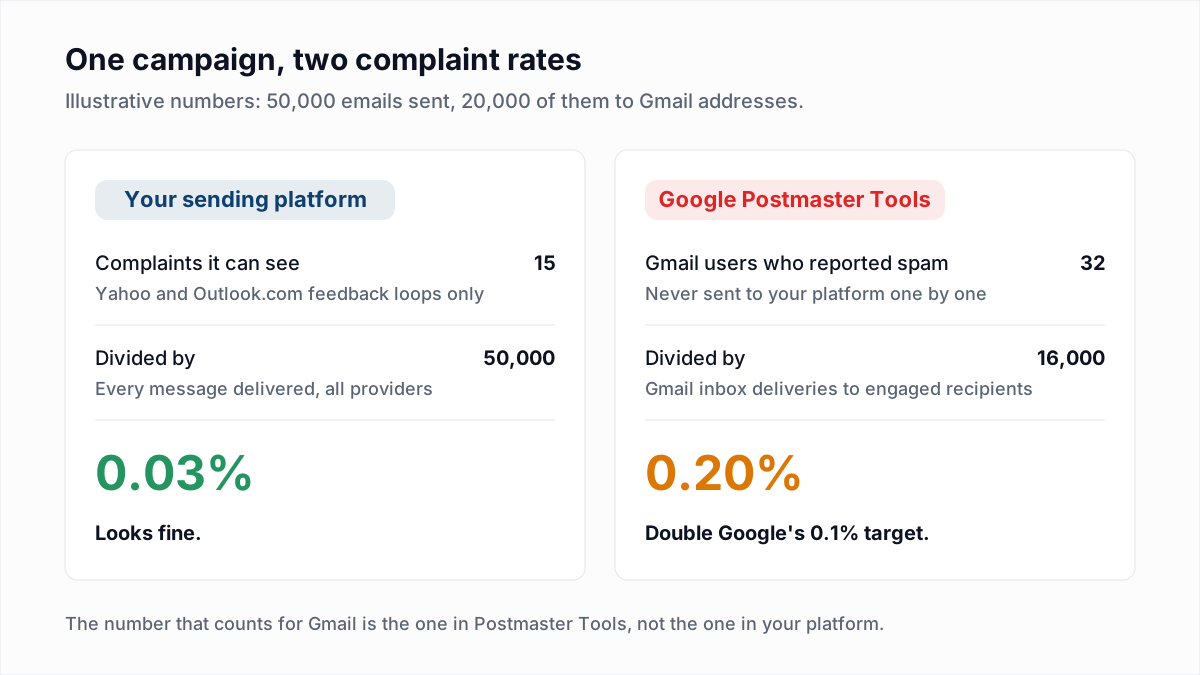
Yahoo's FAQ says of email service providers that "they will generally enroll your domain on your behalf and process complaints." That is where the complaint count in your platform's reports comes from, and why Gmail complaints are missing from it. The gap between the two numbers is explained in spam complaint rate explained, and the shared-or-dedicated question in dedicated vs shared IP.
How do you sign up for feedback loops?
- Create a mailbox for reports, such as
fbl@yourdomain.com. Software should read it, not a person. - Sign all mail with DKIM using a domain you control. Yahoo and Gmail both require it.
- Yahoo: create a Sender Hub profile, add and verify the DKIM domain, then enrol it in the CFL. Those are the three steps Yahoo lists.
- Microsoft: sign in to SNDS, request access for your IP ranges, then set up JMRP from your SNDS account.
- Gmail: verify the DKIM domain in Postmaster Tools and add one
Feedback-IDheader to every message. - Test the path. Send to your own Yahoo mailbox, mark the message as spam, and confirm that a report arrives and the address is suppressed.
What should you do with a feedback loop complaint?
Suppress the recipient immediately and permanently, on every list and every mail stream you control. A complaint is a stronger signal than an unsubscribe, and mailing that person again invites a second complaint.
| If you see | Do this |
|---|---|
| A single ARF report | Add the recipient to a global suppression list automatically |
| Many reports from one campaign | Stop the campaign and check where that segment came from |
| Reports clustered on old sign-ups | Apply an email sunset policy |
| A Feedback-ID identifier flagged by Gmail | Pause that campaign or customer; there is no recipient to remove |
| No reports at all after enrolling | Run the test in step 6 before assuming nobody complains |
Then make the spam button less attractive than the exit: a working one-click unsubscribe header gives people a way out that costs you nothing.
What feedback loops cannot tell you
Feedback loops report complaints from people whose mailboxes exist. They say nothing about addresses that bounce, and they are no early warning: a report arrives after the damage is done. Complaints come from consent and relevance problems, which no list tool can fix.
InboxSure handles the other half of list hygiene. It checks syntax, MX records and the mailbox over SMTP without sending an email, and flags catch-all, role and disposable addresses. It cannot predict who will complain, and Yahoo, AOL, Outlook.com and Hotmail addresses currently come back Unknown because those providers refuse the check. Clear the dead addresses with the bulk email verifier (up to 50 addresses per list free, up to 10,000 per list on Pro at a flat $49 a month), and let your feedback loops deal with the living ones who no longer want your mail.
Frequently asked questions
Related reading
Ready to clean your email list?
Upload a CSV or XLSX and get every address marked deliverable, risky, undeliverable or unknown, with the reason. Free for lists of up to 50, no card. Nothing is sent to your contacts.