Sender Score Explained: What the 0-100 Number Means
The caveat comes first: Sender Score is a third party's opinion of an IP address. Gmail, Outlook.com and Yahoo decide where your mail goes from their own data, and none of the provider pages we read names Sender Score as an input. A score of 95 does not promise the inbox, and a missing score does not mean anything is wrong.
Sender Score is a free 0 to 100 rating of a sending IP address, published by Validity at senderscore.org. Validity's blog has called it "a free credit rating for your IP address", and the comparison is fair in one respect: like a credit score, Sender Score is a summary made by someone other than the party making the decision.
A note on sources. The senderscore.org site reset our connection on every attempt on 13 November 2026, so nothing in this article is quoted from it directly. Validity's statements below come from two pages on validity.com that we did read that day: its sender reputation page and a blog post dated 21 May 2019. We could not find a Validity help centre article on how the score is calculated. Where a detail rests on something else, the text says so.
Who publishes Sender Score and what data is it built on?
Sender Score is published by Validity, an email data company. The score came from Return Path: Validity's 2019 blog post still attributes it to Return Path. Validity's sender reputation page calls Sender Score a free way to check "whether your IP reputation score is good or risky".
Neither validity.com page we read names the data behind the number. Our domain reputation guide quotes senderscore.org as saying the score is calculated from the Validity Data Network, "a collection of more than 80 mailbox and message security providers". We could not re-read that page for this article. Either way, the data is what Validity's partners share with Validity. Sender Score is not a feed of Gmail's or Microsoft's internal reputation.
Is Sender Score an IP score or a domain score?
Sender Score is an IP score, not a domain score. Validity's sender reputation page draws the line this way: "While domain reputation signals 'who' sent a message, IP reputation signals 'where' a message came from." A 2018 Validity blog post adds that Sender Score gives a number "for each of your IP addresses".
Three things follow from that:
- If you send from four IPs, you have four Sender Scores, not one.
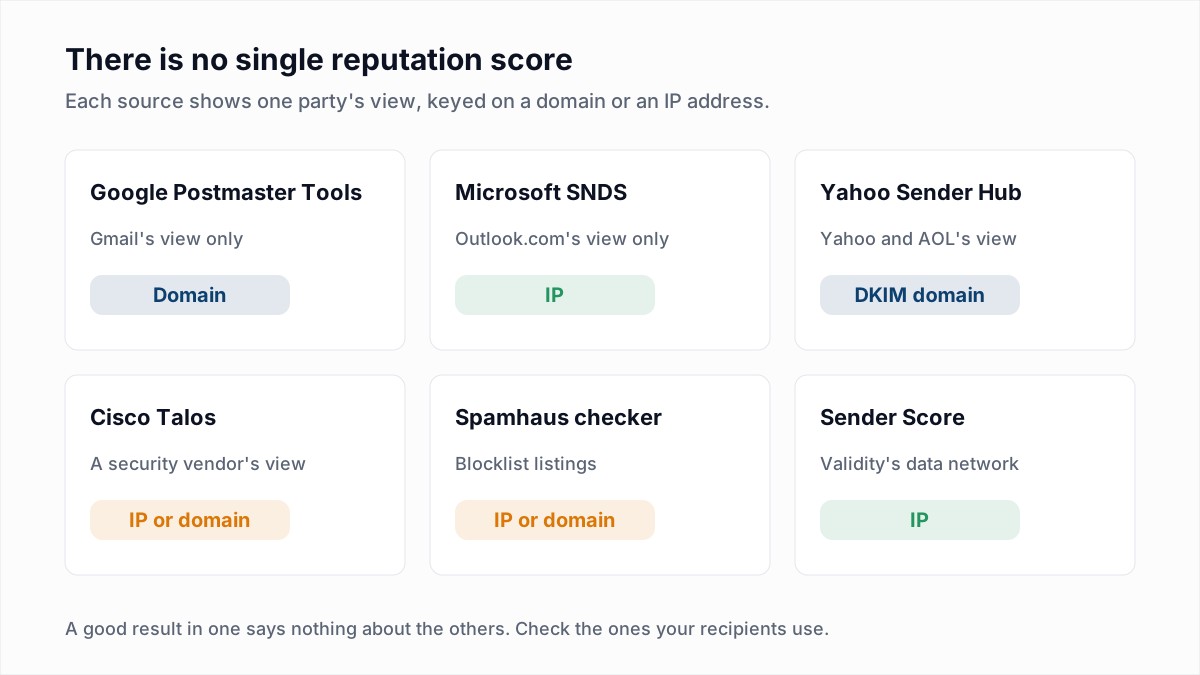
- Typing a domain into a reputation tool does not give you a domain Sender Score. Domain reputation lives in other places, mainly Google Postmaster Tools and Yahoo Sender Hub.
- Moving to a new IP gives you a new, empty history at Validity, while your domain history at the mailbox providers stays with the domain.
What is a good Sender Score?
A good Sender Score, by Validity's own description, is one over 80. Validity's sender reputation page describes three bands: below 70, 70 to 80, and over 80.
| Sender Score | What Validity says about it | What Validity suggests |
|---|---|---|
| Below 70 | One or more of the key reputation metrics is beyond what mailbox providers accept, and the programme needs improvement. | Check authentication, feedback loop enrolment and blocklist status. |
| 70 to 80 | "Senders with scores in this range have a solid grasp of email fundamentals", with room to optimise. | A preference centre, easy unsubscribing and consistent sending volume. |
| Over 80 | "A Sender Score over 80 indicates that you have an excellent reputation". | Keep improving through segmentation and personalisation. |
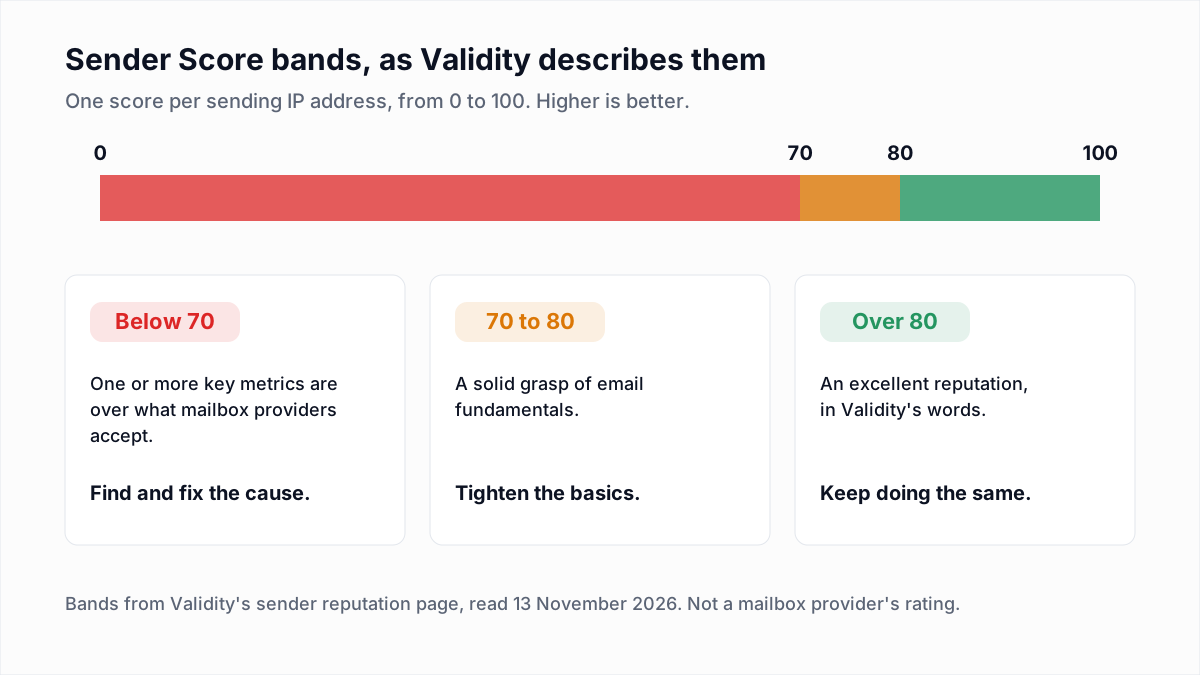
Validity's material is not consistent on where "good" starts. The 2019 blog post talks about a top band of 91 to 100 and treats anything under 91 as weaker. Read the bands as Validity's labels for its own number, not as thresholds any mailbox provider applies.
What factors go into Sender Score?
Validity names complaints, unknown users and spam traps as factors in Sender Score, and does not publish the full formula on the pages we read. The 2019 blog post says "there are eight reputational metrics taken into account" and discusses only those three, as the ones a sender can act on.
| Factor Validity names | What it means | What moves it |
|---|---|---|
| Complaints | Recipients marking your mail as spam. | Consent, frequency and an easy unsubscribe. See spam complaint rate. |
| Unknown users | Mail sent to addresses that do not exist, which bounce with replies such as 550 5.1.1. | Removing invalid addresses before sending. |
| Spam traps | Mail sent to addresses that exist only to catch careless senders. | List sources and confirmed opt-in. See spam traps explained. |
Validity's sender reputation page gives a longer list of what mailbox providers weigh in general: sender history, spam complaints, blocklist listings, spam trap hits, bounce rate, recipient engagement and unsubscribes. That list describes reputation broadly, not the Sender Score formula. No weights are given on either page.
Sender Score is widely reported to be a rolling 30-day average. That wording is attributed to the senderscore.org FAQ, which we could not load on 13 November 2026, so treat the window as unverified.
How do you check your Sender Score?
You check your Sender Score by entering your sending IP address in the lookup at senderscore.org. The lookup is free. Our domain reputation guide records that the form asks for a name, company and work email, so expect to hand over contact details.
- Find your sending IP. Open a message you sent and read the
Receivedlines, or paste the headers into our email header analyzer. - Find out whose IP it is. If your email platform owns it and other customers send from it, the score describes the pool.
- Look the IP up at senderscore.org.
- Repeat for every IP you send from, and write the numbers down with the date.
- Compare with the provider tools before acting on the number.
Does a high Sender Score mean your email reaches the inbox?
No, a high Sender Score does not mean your email reaches the inbox, because each mailbox provider filters on its own data and not on Validity's number.
Validity does publish a link between the two, and it should be read as Validity's claim. Its 2019 blog post cites Return Path's 2019 Sender Score Benchmark as finding that "if your Sender Score is below 91 your inbox placement rate on average will be at least 20 percent lower." That is a vendor's average across its own data from seven years ago. An average says nothing certain about your IP, and we know of no mailbox provider that confirms it.
The providers themselves are cautious about single reputation numbers. Google's notice on Postmaster Tools v2 says its own domain and IP reputation dashboards will be retired, partly because "the current dashboard can be misleading as reputation is only one of many factors affecting deliverability." Microsoft Learn's troubleshooting article for external senders lists "the sending IP, domain, email authentication, list accuracy, complaint rates, content, and more" as influences on filtering. If Google says its own reputation chart can mislead, a third party's score deserves at least the same care.
The authoritative views are the providers' own tools: Postmaster Tools for Gmail, and Microsoft SNDS for Outlook.com.
Why does my IP have no Sender Score?
An IP usually has no Sender Score because it sends too little mail for Validity's data partners to observe. The validity.com pages we read give no minimum volume, so we do not quote one.
Other reputation systems say the same thing about low volume in their own words. Cisco Talos's documentation says a Neutral rating can mean "there are very low levels of mail flow traffic reported for the IP". Microsoft Learn says IP addresses that have never sent email "typically don't have any reputation in our systems". A missing score on a small or new IP is expected. It is not a penalty, and it cannot be fixed by anything except sending wanted mail steadily. See our IP warm-up schedule.
What does Sender Score mean on a shared IP?
On a shared IP, Sender Score describes everyone who sends from that address, not you. A good score reflects how well your email platform polices its pool, and a bad one may be another customer's doing.
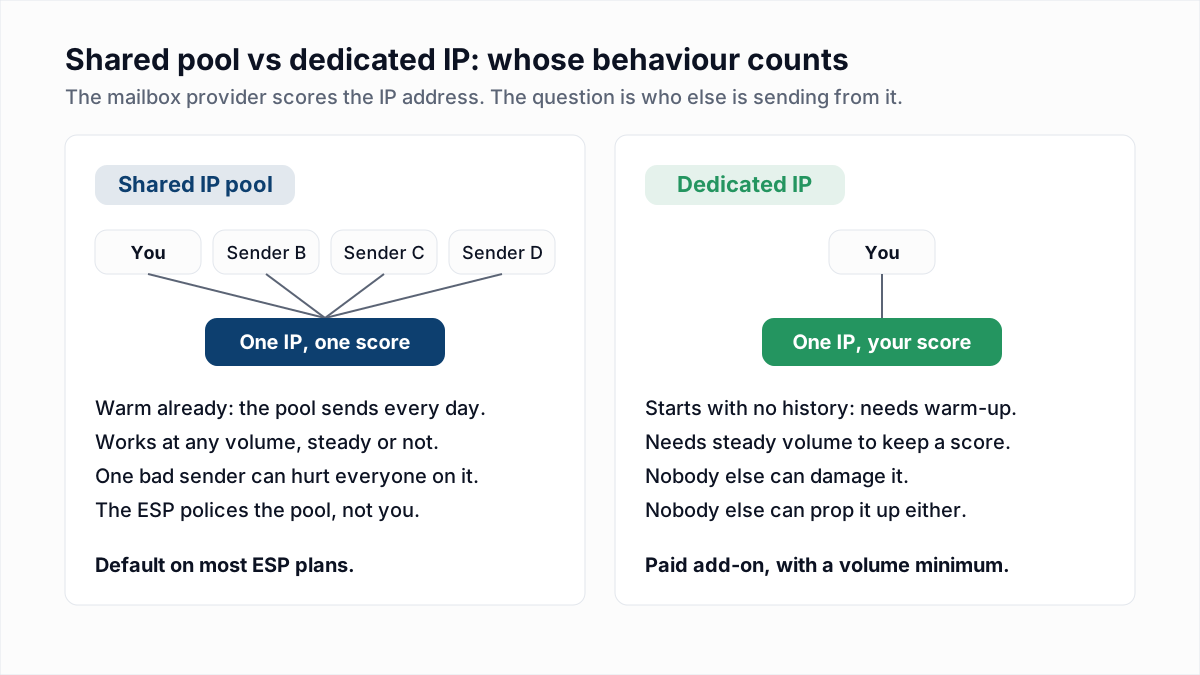
If a shared IP scores badly, send the result to your platform's support team. You cannot repair a pool from inside it. Whether to move is covered in dedicated vs shared IPs.
How does Sender Score compare with Postmaster Tools, SNDS and Talos?
Sender Score and Cisco Talos are third-party opinions, while Google Postmaster Tools and Microsoft SNDS show what the mailbox provider itself recorded. The provider tools are narrower and more authoritative.
| Tool | Whose view | Keyed on | What you get | Main limit |
|---|---|---|---|---|
| Sender Score | Validity, a third party | IP address | One number from 0 to 100 | Not a mailbox provider's rating. Thin at low volume. |
| Google Postmaster Tools | Gmail itself | Domain | Spam rate, compliance status, authentication and delivery errors | Gmail only. Google says its reputation dashboards will be retired. |
| Microsoft SNDS | Outlook.com itself | IP address | Per-IP data such as complaint rate and a filter result | Only for IPs you control. Not Microsoft 365 business mail. |
| Cisco Talos | Cisco, a security vendor | IP address or domain | Good, Neutral or Poor | Talos says it "does not block email". Neutral is common at low volume. |
The SNDS row follows our earlier guides, because Microsoft's SNDS pages did not load for us on 13 November 2026.
How should you use Sender Score?
Use Sender Score as a second opinion and a trend line, never as the target. The number is most useful when it moves.
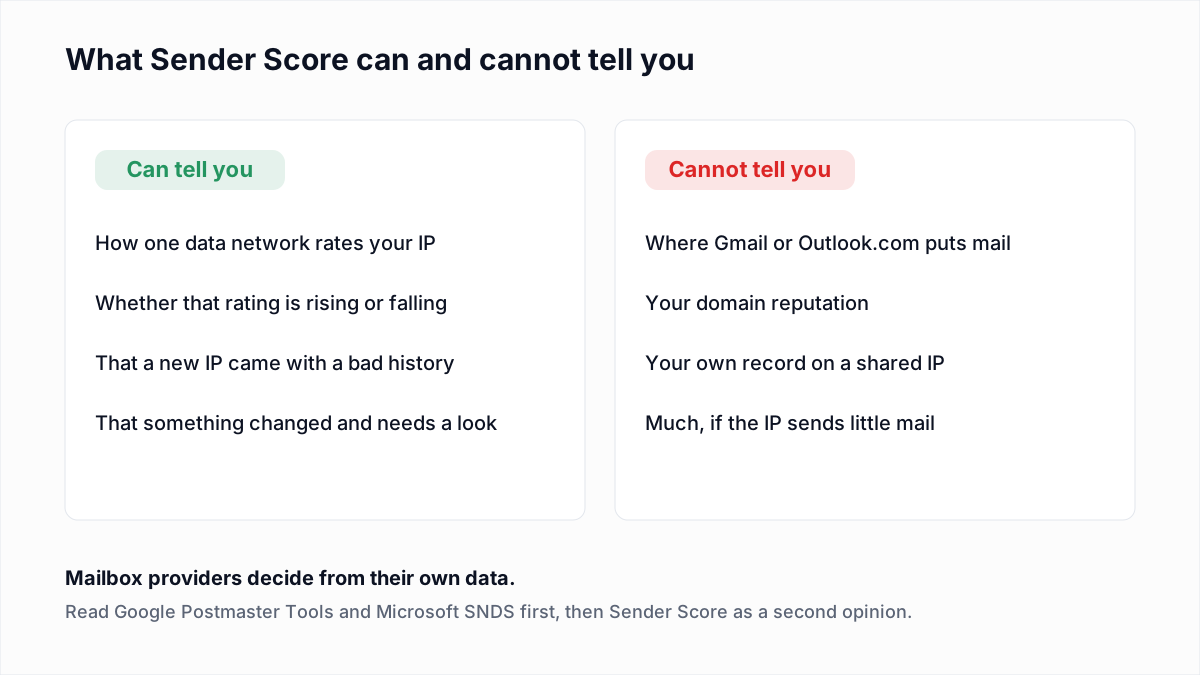
- Check a new dedicated IP before you use it. A low score on an IP you have never sent from means a previous user left a history. Ask for a different IP.
- Watch the direction. A sudden fall is a prompt to open Postmaster Tools, SNDS and your bounce logs that day.
- Do not chase points. Fix complaints, unknown users and trap hits. The score follows the behaviour.
- Do not report it as deliverability. Delivery rate, complaint rate and inbox placement are separate measures, set out in delivery rate vs deliverability.
- Ignore it at low volume. If you send a few hundred messages a week from a platform's shared pool, your authentication and your list matter and the score does not.
Where does list quality fit in?
Of the three factors Validity names, unknown users is the one a sender can remove before pressing send. InboxSure checks syntax, DNS and the mailbox itself without sending a message, and returns Deliverable, Risky, Undeliverable or Unknown for each address.
The limits are real. InboxSure does not detect spam traps, does not measure complaints, and does not monitor Sender Score, reputation or blocklists. As of November 2026 it returns Unknown for Yahoo, AOL and Outlook.com consumer addresses, because those providers refuse the check. What is left is still worth doing: dead mailboxes at every other domain come off the list before they bounce. The Free plan takes lists of up to 50 addresses with no card, and Pro is $49 a month for lists of up to 10,000 addresses. Try one address at the free email verifier.
Frequently asked questions
Related reading
Ready to clean your email list?
Upload a CSV or XLSX and get every address marked deliverable, risky, undeliverable or unknown, with the reason. Free for lists of up to 50, no card. Nothing is sent to your contacts.