IP Warm-Up Schedule: How to Warm a Dedicated IP (With Table)
One caveat before any table: no mailbox provider publishes an IP warm-up schedule. Gmail, Yahoo and Microsoft tell senders to raise volume slowly and give no daily numbers. Every schedule you will find comes from an email service provider (ESP), and the ESPs do not agree with each other. This post puts their published numbers side by side, as read on 13 November 2026.
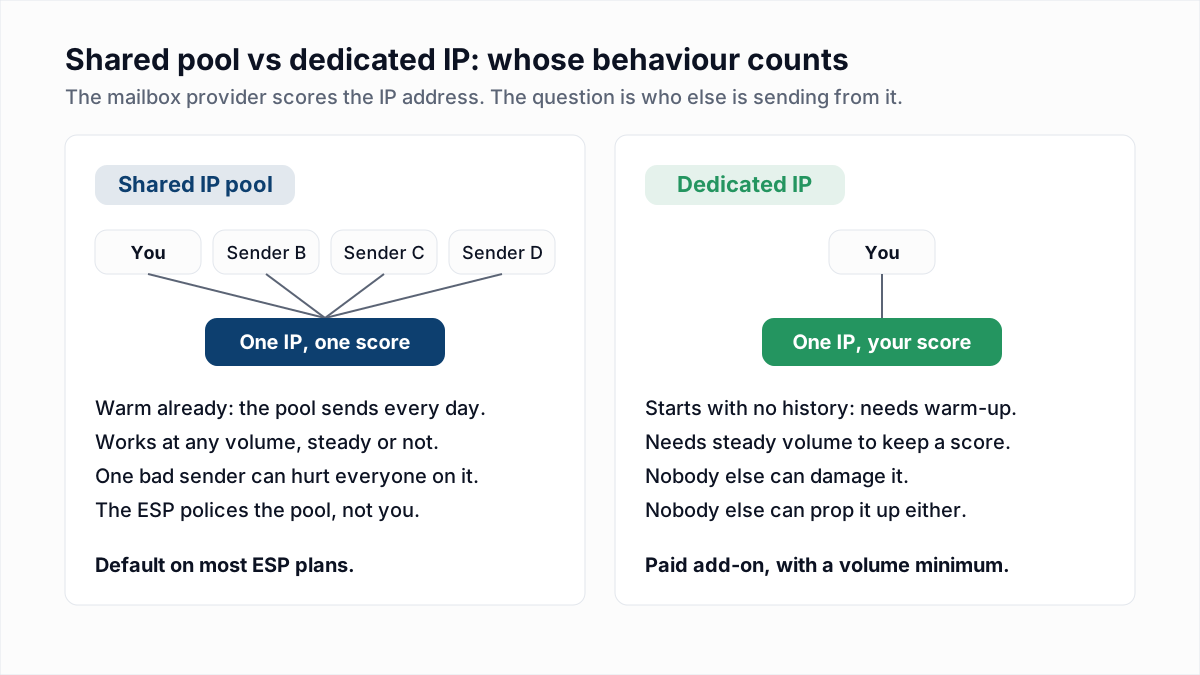
IP warm-up is the practice of sending a small, rising amount of mail from a new dedicated IP address so that mailbox providers can build a sending history for it. It is a different job from warming a new domain or a cold-outreach mailbox, which is covered in email warm-up and sender reputation. If you have not decided whether you need your own IP at all, read dedicated vs shared IP first.
Why do mailbox providers throttle a new IP address?
Mailbox providers throttle a new IP address because it has no sending history, and an unknown IP that suddenly sends a lot of mail looks the same as a spammer who has just switched addresses. Amazon's SES warm-up guide puts it this way: "Email providers are less likely to accept mail from new IP addresses that have little or no history."
The throttling arrives as temporary 4xx replies, not as bounces. Gmail answers with 421 4.7.0 or 421 4.7.28, Microsoft 365 with 451 4.7.500, and Yahoo with 421 4.7.0 [TSS04]. How those deferrals work is in email throttling.
What IP warm-up schedules do the ESPs publish?
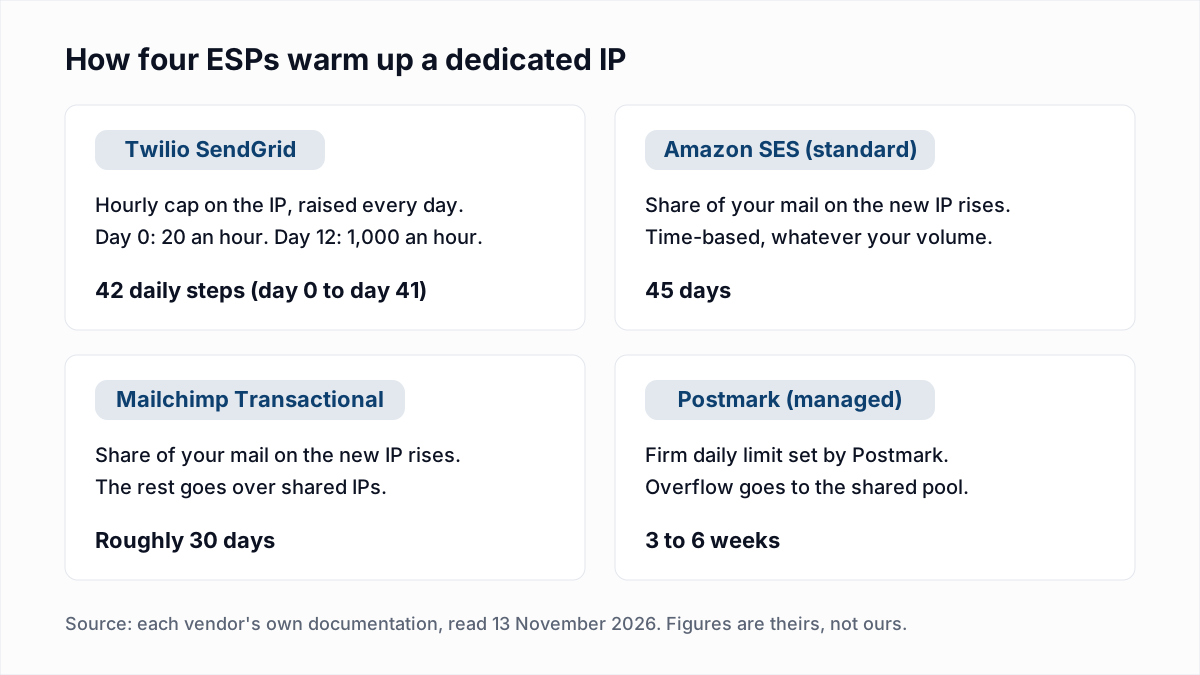
Twilio SendGrid publishes a full day-by-day table; Amazon SES, Mailchimp Transactional and Postmark publish a duration and a method but no daily numbers. The table below gives each vendor's own figures and nothing else.
| ESP | How the warm-up is paced | Published length | Where the extra mail goes |
|---|---|---|---|
| Twilio SendGrid (automated warm-up) | An hourly cap on the IP that rises every day: 20 messages an hour on day 0, 1,000 an hour on day 12, 19,601,056 an hour on day 41. | 42 daily steps, day 0 to day 41. | Other IPs on the account. With no other IP, SendGrid says it retries the messages for 72 hours. |
| Amazon SES (standard dedicated IPs) | A rising percentage of your mail goes through the new IP. SES: "The warmup percentage steadily increases over 45 days, independently from your sending volume." | 45 days. | SES shared IPs, or your existing warm dedicated IPs. |
| Mailchimp Transactional (start-warmup API) | Mailchimp gradually increases the percentage of your mail sent over the warming IP. No daily figures are given. | "Roughly 30 days". | Shared IPs, or other dedicated IPs in the same pool. |
| Postmark (Postmark-managed option) | Postmark sets "a firm daily limit on the volume the dedicated IP is allowed to send". The limits are not published. | Established reputation "in 3-6 weeks" for most senders. | Postmark's shared pool. |
| Mailgun (automatic warm-up) | Stages with an hourly and a daily cap, and a 24-hour wait between stages. The blog post we read lists no stage numbers. | Not stated on the page we read. | Shared IPs, or other dedicated IPs tied to the domain. |
Two notes on that table. Mailgun's help-centre article on automatic IP warm-up returned an error to us on 13 November 2026, so the Mailgun row uses only its blog post (last updated 20 June 2024) and leaves the stage numbers out. And Postmark says outright why it gives no table for the do-it-yourself option: "We do not provide warmup schedules, since experience tells us there's no one-size-fits-all solution."
What does a day-by-day IP warm-up schedule look like?
The only complete day-by-day IP warm-up schedule among these vendors is Twilio SendGrid's automated warm-up table, which caps mail per hour, not per day. The rows below are copied from that table. The last column is our arithmetic (the hourly cap times 24), which is the most the IP could send if mail left evenly around the clock.
| Day | SendGrid hourly cap | Most the IP can send that day (cap x 24) |
|---|---|---|
| 0 | 20 | 480 |
| 3 | 55 | 1,320 |
| 7 | 211 | 5,064 |
| 12 | 1,000 | 24,000 |
| 14 | 2,222 | 53,328 |
| 21 | 23,427 | 562,248 |
| 28 | 246,953 | 5,926,872 |
| 41 | 19,601,056 | 470,425,344 |
Each day's cap in SendGrid's table is about 1.4 times the day before (20, 28, 39, 55 and so on). That ratio is our reading of the numbers; SendGrid does not state it.
A worked example, using only that table. Say you send 50,000 messages a day. Spread evenly over 24 hours that is about 2,084 an hour, which first fits under the cap on day 14 (2,222 an hour). But if you send the 50,000 as one campaign inside an hour, the cap does not clear it until day 24 (64,284 an hour). The same volume takes ten days longer to warm when it leaves in a burst. If you run a manual warm-up at another ESP and want a starting plan, this is the one to copy, and you should say so in your notes: it is SendGrid's plan, not a rule from Gmail.
How long does IP warming take?
IP warming takes between 30 and 45 days at the vendors that state a length: roughly 30 days at Mailchimp Transactional, 42 days at Twilio SendGrid, 45 days at Amazon SES, and 3 to 6 weeks at Postmark. Amazon adds that the time differs by mailbox provider: "For some email providers, you can establish a positive reputation in around two weeks, while for others it may take up to six weeks."
Finishing the schedule is not the end. Amazon warns against "sending large volumes of email immediately after the warmup process is complete" and tells senders to keep increasing slowly up to the target.
What do Google's sender guidelines say about increasing volume?
Google's Email sender guidelines say to increase sending volume slowly, and they give rules of thumb but no schedule. Read on 13 November 2026, the section says:
- "The more email that you send, the more slowly you should increase sending volume."
- "You can increase the sending volume more quickly when you send daily instead of weekly."
- "For example, immediately doubling previously sent volumes suddenly could result in rate limiting or reputation drops."
- "Send email at a consistent rate. Avoid sending email in bursts."
- "If messages start bouncing or start being deferred, reduce the sending volume until the SMTP error rate decreases."
Google also notes that an IP's quota "is shared for all senders that use that IP address", which is the reason a dedicated IP is yours to warm and yours to damage.
How do you warm up a dedicated IP, step by step?
You warm up a dedicated IP by sending wanted mail to engaged recipients, at a volume that rises a little every day, while watching each mailbox provider's replies.
- Finish the DNS first. The IP needs a PTR record that matches forward DNS, and the mail needs SPF, DKIM and DMARC. Check them with the SPF checker and DKIM checker.
- Turn on the ESP's automated warm-up if it has one. It enforces the cap for you and sends the overflow through warm IPs, so no mail is held back.
- Start with your most engaged recipients. Amazon's guide says to "send emails to your most active users to ensure that your complaint rate remains low". In practice that means people who opened or clicked recently, and transactional mail people are waiting for.
- Split the day's volume by mailbox provider. Reputation is kept per provider. Amazon's managed dedicated IP page gives the example: "if you've been sending all your traffic to Gmail, the IP addresses are considered warmed up only for Gmail and cold for other ISPs." So ramp Gmail, Microsoft and Yahoo recipients separately, each from a small number.
- Send every day, spread through the day. A cap per hour, as in SendGrid's table, is easier to respect than a cap per day.
- Read the replies daily and adjust. Move up only when the day before was clean. The next section covers when to stop.
When should you pause an IP warm-up?
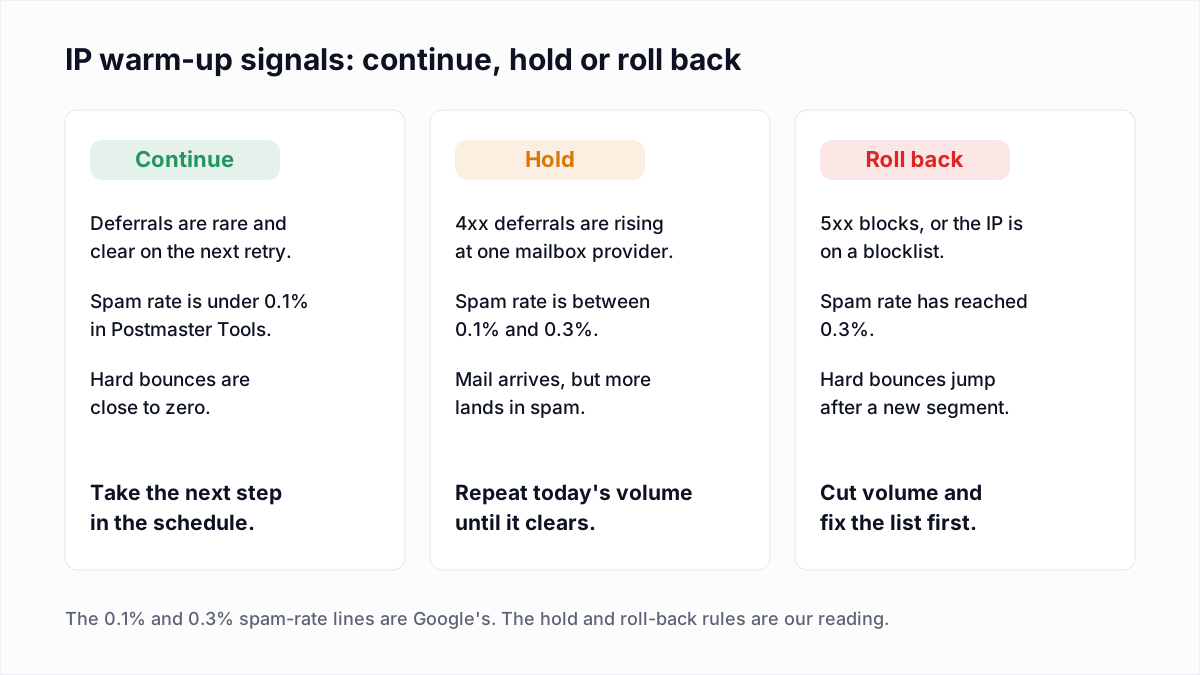
Pause an IP warm-up, meaning hold volume flat, as soon as deferrals rise at any one provider, and cut volume if replies turn into 5xx blocks or the spam rate reaches 0.3%. Both Google and Amazon say to send less when throttling notifications appear.
| If you see this | Do this |
|---|---|
| A few 421 or 451 deferrals that deliver on the next retry. | Continue. Some deferral is normal on a new IP. |
| Deferrals climbing day over day at one provider. | Hold that provider at the last clean volume. Keep the others on schedule. |
| Gmail 421 4.7.28 (quota exceeded). | Follow Google's steps: "Do not send email for at least 10 minutes", then "send emails from a single connection". |
| Spam rate in Postmaster Tools above 0.1%. | Hold, and narrow to more engaged recipients. Google asks senders to stay below 0.10% and never reach 0.30%; see spam complaint rate. |
| 550 5.7.x blocks, or the IP appears on a blocklist. | Stop the ramp, drop back a week, and fix the cause. Run a blacklist check on the IP. |
| Hard bounces (550 5.1.1) jump after adding a new segment. | Pull that segment and verify it before it goes back in. |
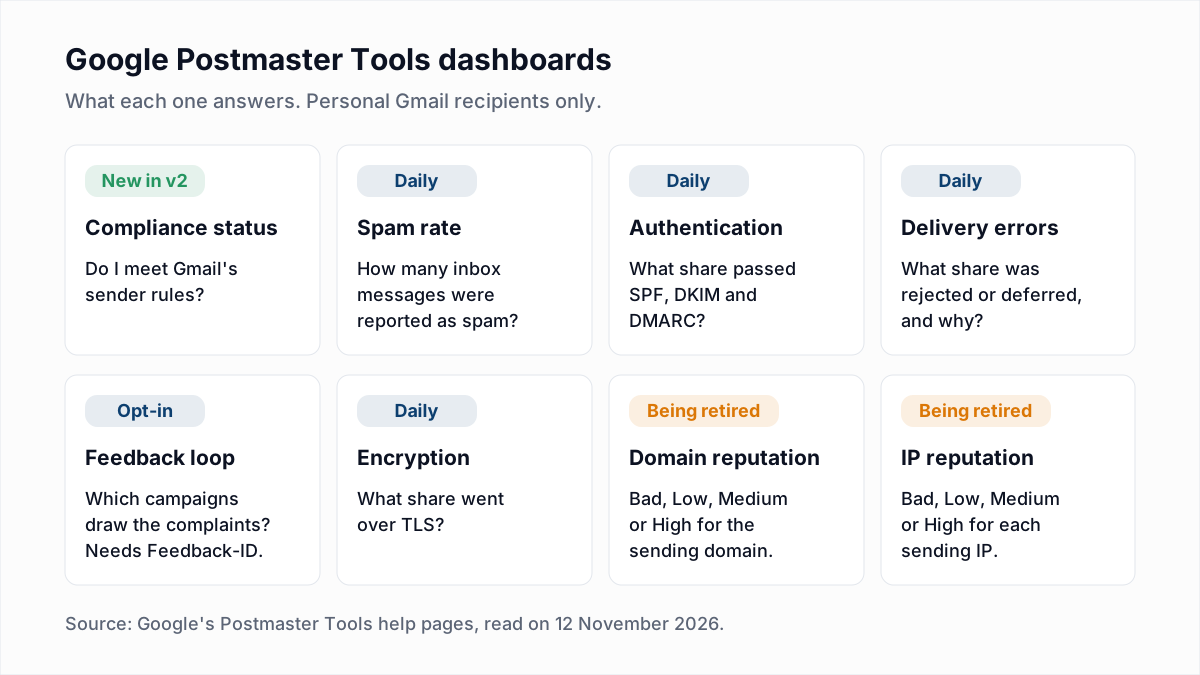
For Gmail, the Delivery errors and Spam rate dashboards are the ones to open each day. Google's deprecation notice says the IP reputation dashboard will be retired, so do not build the routine on it.
Does a warm IP go cold if you stop sending?
Yes, a warm IP goes cold after a period without mail, and three vendors put numbers on it. Twilio SendGrid: "If you haven't sent email messages through your IP address in more than 30 days, warm it up again." Postmark: if volume drops "to less than 20,000 messages a week for 4 weeks, we will require the IP goes through a selected warmup process again." Amazon SES says that after warm-up "you should send around 1,000 emails every day to each email provider that you want to maintain a positive reputation with."
A sender who mails once a month in one large burst therefore never has a warm dedicated IP. That pattern belongs on a shared pool.
Why does a clean list matter most during IP warm-up?
A clean list matters most during IP warm-up because the volume is tiny, so each bad address is a large share of everything the provider has seen from the IP. On day 0 of SendGrid's table the cap is 20 messages an hour. One dead address in that first hour is a 5% bounce rate, on an IP with no history to average it against. The same address in a 50,000-message send on a warm IP is 0.002%.
Verifying the warm-up segments before the first send removes that risk. InboxSure checks syntax, MX records and the mailbox itself over SMTP without sending a message, and marks each address Deliverable, Risky, Undeliverable or Unknown. Use Deliverable addresses for the first weeks and hold catch-all and role addresses until the IP has a record. Two limits to know: Yahoo, AOL, Outlook.com and Hotmail addresses come back Unknown as of November 2026, because those providers refuse the check, and verification says nothing about whether a real person will complain. Engagement data has to cover that part.
If a dedicated IP is on order, clean the list while you wait for it. Upload the CSV to the bulk email verifier: the Free plan takes lists of up to 50 addresses with no card, and Pro is a flat $49 a month for lists of up to 10,000 addresses each, with no credits.
Frequently asked questions
Related reading
Ready to clean your email list?
Upload a CSV or XLSX and get every address marked deliverable, risky, undeliverable or unknown, with the reason. Free for lists of up to 50, no card. Nothing is sent to your contacts.