451 4.7.500 Server Busy: Microsoft 365 Throttling Explained
The first thing to know about 451 4.7.500 Server busy is that Microsoft's servers are not busy. A 451 4.7.500 reply is a temporary deferral that Microsoft 365 gives a sending IP address it is throttling, and Microsoft's own name for it is IP throttling. The recipient address is fine, the message is still in your server's queue, and nothing has bounced yet.
Everything below about codes, ranges and wording comes from Microsoft's documentation as it read on 13 November 2026. Where Microsoft does not document something, such as the AS number or the length of the deferral, this page says so instead of guessing. The wider set of SMTP codes is in email bounce codes, and throttling at other providers is in email throttling.
What does 451 4.7.500 Server busy mean?
451 4.7.500 Server busy means Microsoft 365 has temporarily refused mail from your sending IP because of how that IP is behaving, not because of load on Microsoft's side. In mail logs the reply usually has this shape:
451 4.7.500 Server busy. Please try again later from [203.0.113.25]. (AS<number>)- 451 is a temporary SMTP reply. Your server keeps the message and tries again later.
- 4.7.500 is the enhanced status code: class 4 (temporary), subject 7 (security or policy), and a three-digit detail that is Microsoft's own numbering.
- The IP in brackets is the address Microsoft saw connecting. If you send through a platform, that IP is the platform's.
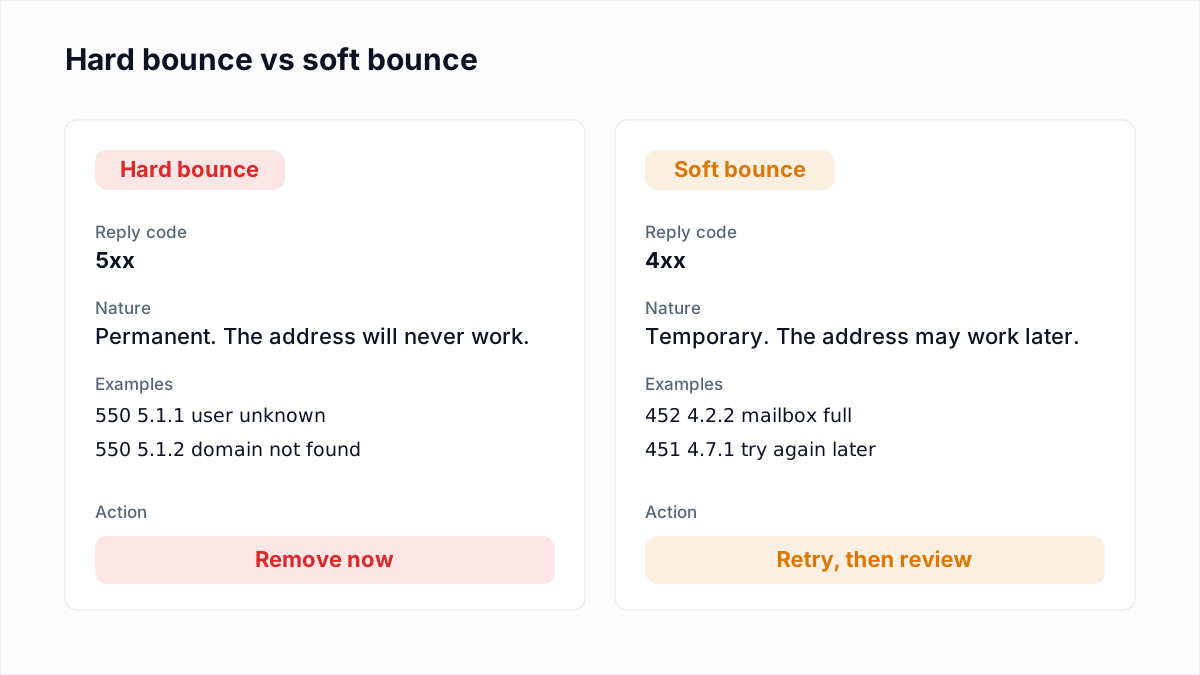
A 451 is a soft bounce at most. See soft bounce vs hard bounce for the difference, and do not remove a recipient because of one.
What does Microsoft's documentation say about 4.7.500-699?
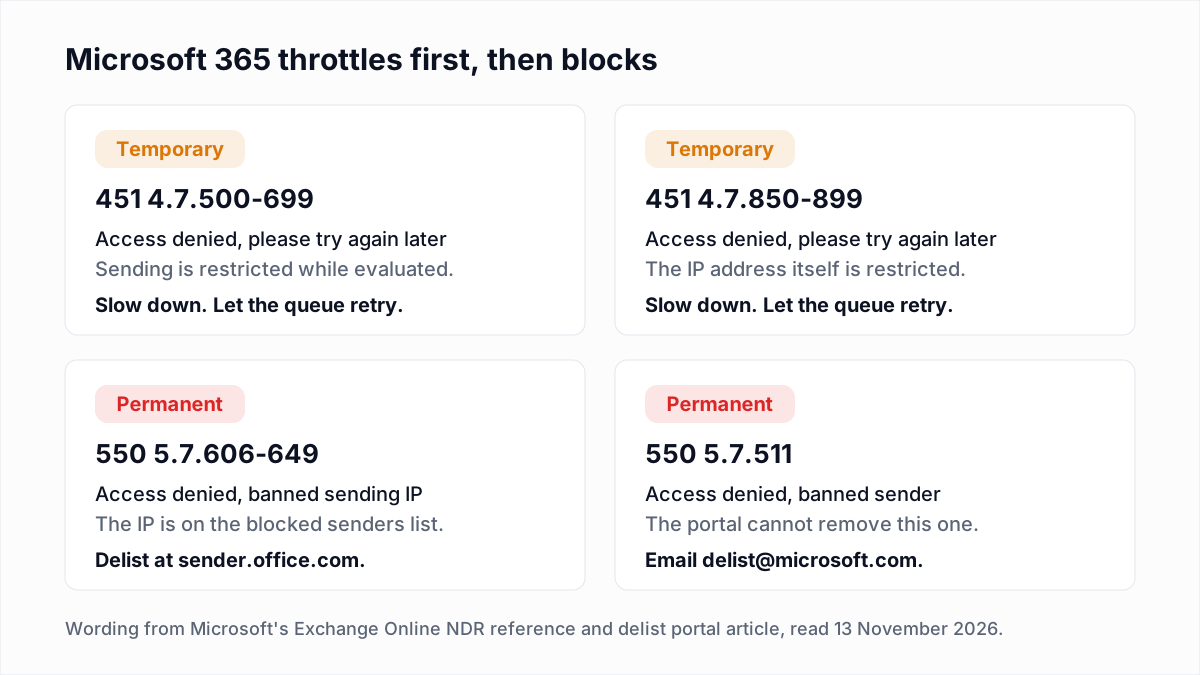
Microsoft documents the whole 4.7.500-699 range as one entry with the text "Access denied, please try again later". The Exchange Online NDR and SMTP error reference gives the cause as "Suspicious activity was detected and sending was temporarily restricted for further evaluation" and adds: "If this activity is valid, this restriction is lifted shortly." A second entry, 4.7.850-899, has the same text and says the suspicious activity was detected "on the IP in question".
The phrase "Server busy" does not appear in that reference. It is what senders see in logs and what they report in Microsoft's Q&A forum. Microsoft's dedicated article, Fix NDR error 451 4.7.500-699 (ASxxx) in Exchange Online, explains the range in one sentence: "the source email server (the connecting IP address) changed its previous email sending patterns by sending a much higher volume of messages than in the past." It then names the response: "This error response is called IP throttling".
What is the AS number in brackets?
Microsoft does not document what the AS number at the end of a 451 4.7.500 reply means. The fix article has "(ASxxx)" in its title and never explains it, and the NDR reference shows AS numbers on a few unrelated errors, such as AS(7555) on the 5.7.520 external forwarding block, without a list of values.
Many guides say what individual AS numbers stand for. None of that is in Microsoft's documentation, so we do not repeat it. Keep the number, because Microsoft support will ask for the full reply, and act on the code in front of it.
What is 451 4.7.650 "temporarily rate limited due to IP reputation"?
451 4.7.650 is a deferral that senders report from Outlook.com and Hotmail, the consumer service, and its number falls inside the 4.7.500-699 range. Microsoft's NDR reference has no separate entry for it. The text below is as a sender posted it in a Microsoft Q&A thread on 17 February 2026, with the IP replaced:
host outlook-com.olc.protection.outlook.com said: 451 4.7.650 The mail server
  [203.0.113.25] has been temporarily rate limited due to IP reputation. For
  e-mail delivery information, see https://aka.ms/postmaster (S775)
  (in reply to MAIL FROM command)
The reply arrives at MAIL FROM, before any recipient is named, so it is about the sending IP and not the address. A Microsoft forum moderator in that thread called it "just a temporary block" and listed volume, recipient engagement and content as possible triggers. That is a forum answer, not product documentation.
Why does Microsoft 365 throttle a sending IP?
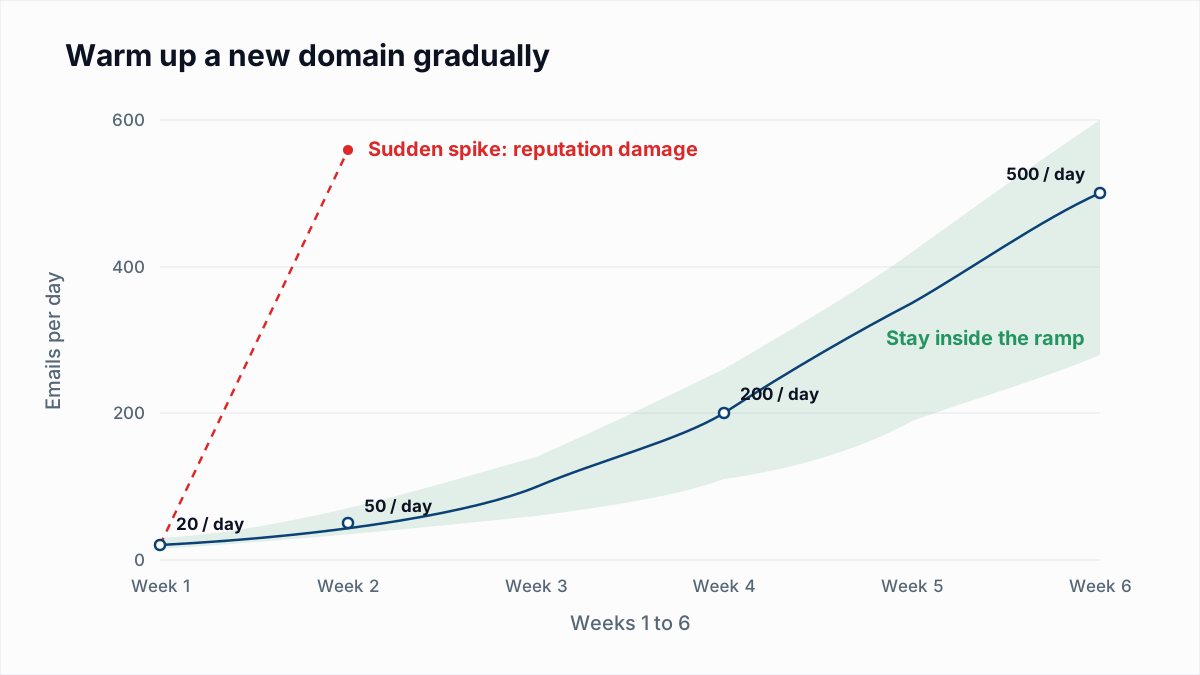
Microsoft 365 throttles a sending IP when the IP is new to it or when its volume changes sharply from its history. Microsoft's fix article says the error appears when the source IP "changes significantly from its previously-established patterns", and that new senders are "treated more suspiciously than senders with a previously-established history", which it compares to "a probation period".
Microsoft's Defender for Office 365 article Troubleshooting mail sent to Microsoft 365 adds the reputation side: "IP addresses that have never been used to send email typically don't have any reputation in our systems." It lists the factors that feed filtering as "the sending IP, domain, email authentication, list accuracy, complaint rates, content, and more", and names the junk email complaint rate as one of the principal factors.
The usual triggers follow from that:
- A new dedicated IP, or a move to a new sending platform.
- A campaign several times larger than your normal daily volume.
- An old or bought list mailed in one go, which raises bounces and complaints together.
- A shared IP whose other users caused the spike. See dedicated vs shared IP.
How long does a 451 4.7.500 deferral last?
Microsoft does not publish a fixed duration for a 451 4.7.500 deferral. Its documentation gives three statements, none of them a promise:
- The NDR reference says that if the activity is valid, the restriction "is lifted shortly".
- The fix article says the error "will resolve itself as you establish an email sending history with Microsoft 365 or Office 365 over a period of a few days."
- The troubleshooting article says "A new IP can expect to be fully ramped within a couple of weeks or less depending on volume, list accuracy, and junk email complaint rates."
During that time the sending server retries on its own schedule. How retry gaps and queue lifetimes work is covered in our guide to Gmail's 421 4.7.0; the mechanics are the same. The message only bounces if your server's queue lifetime ends while Microsoft is still deferring.
What should you do about each Microsoft throttling code?
| Code | Meaning | Action |
|---|---|---|
| 451 4.7.500-699 | Microsoft 365 temporarily restricted sending after detecting suspicious activity. | Reduce volume to Microsoft recipients and let the queue retry. |
| 451 4.7.650 (S775) | Outlook.com rate limited the IP for its reputation, as reported by senders. | Reduce volume, check complaints and list quality, let the queue retry. |
| 451 4.7.850-899 | Microsoft 365 temporarily restricted the IP address itself. | Reduce volume and check the IP for compromise or an open relay. |
| 421 RP-001, RP-002, RP-003 | Outlook.com rate or connection limit tied to IP or domain reputation. | Lower connections and messages per connection, then warm up. |
| 550 5.7.606-649 | Microsoft 365 banned the sending IP. This one is permanent. | Fix the cause, then request removal at sender.office.com. |
| 550 5.7.511 | Microsoft 365 banned the sender and wants to investigate first. | Forward the bounce to delist@microsoft.com with the IP. |
| 550 5.7.1 with an S-code | Outlook.com blocked the IP or its range. | Use the Outlook.com sender support form. |
For the temporary codes, work through these steps in order:
- Leave the queue alone. The deferred messages are already being retried. A manual resend adds volume to the exact thing Microsoft is measuring.
- Slow down. Cut the hourly rate and the number of simultaneous connections to Microsoft domains, and spread the send across the day.
- Warm up. Start with recipients who open and reply, and raise volume in steps. The method is in email warmup and sender reputation.
- Check authentication and reverse DNS. Microsoft's policies and guidelines for external senders say "Email servers must have valid reverse DNS records", and the troubleshooting article says new IPs on a domain with an existing SPF record inherit some of that domain's reputation. Test your records with the SPF checker and DMARC checker.
- Clean the list. Microsoft's troubleshooting article says incorrect addresses that produce NDRs "put your outbound email at risk for further scrutiny by email filtering services". Remove addresses that do not exist before the next send.
- If you are the recipient's admin, Microsoft's fix is a connector. That applies when your own servers or a third-party filter relay mail into your Microsoft 365 tenant. It is not something an outside sender can set up.
On step 5: InboxSure checks each mailbox over SMTP without sending and returns Deliverable, Risky, Undeliverable or Unknown. As of November 2026 it cannot check Outlook.com and Hotmail consumer addresses reliably, because those servers refuse the check before the recipient step, so those come back Unknown. Verification also cannot predict complaints.
When does throttling turn into a permanent block?
Microsoft throttling turns into a block when the reply changes from 451 to 550. The permanent cousin of the 4.7.5xx range is 550 5.7.606-649 Access denied, banned sending IP. Microsoft's article Remove yourself from the blocked senders list says to request removal at sender.office.com with the email address that received the NDR and the IP in the error, one IP per visit, and warns: "Results can vary widely before the restrictions are removed. It might take up to 24 hours or longer."
550 5.7.511 Access denied, banned sender is different. The same article says "you can't use the delist portal" for it; you forward the bounce to delist@microsoft.com with the full NDR code and IP, and "Microsoft will contact you within 48 hours with the next steps."
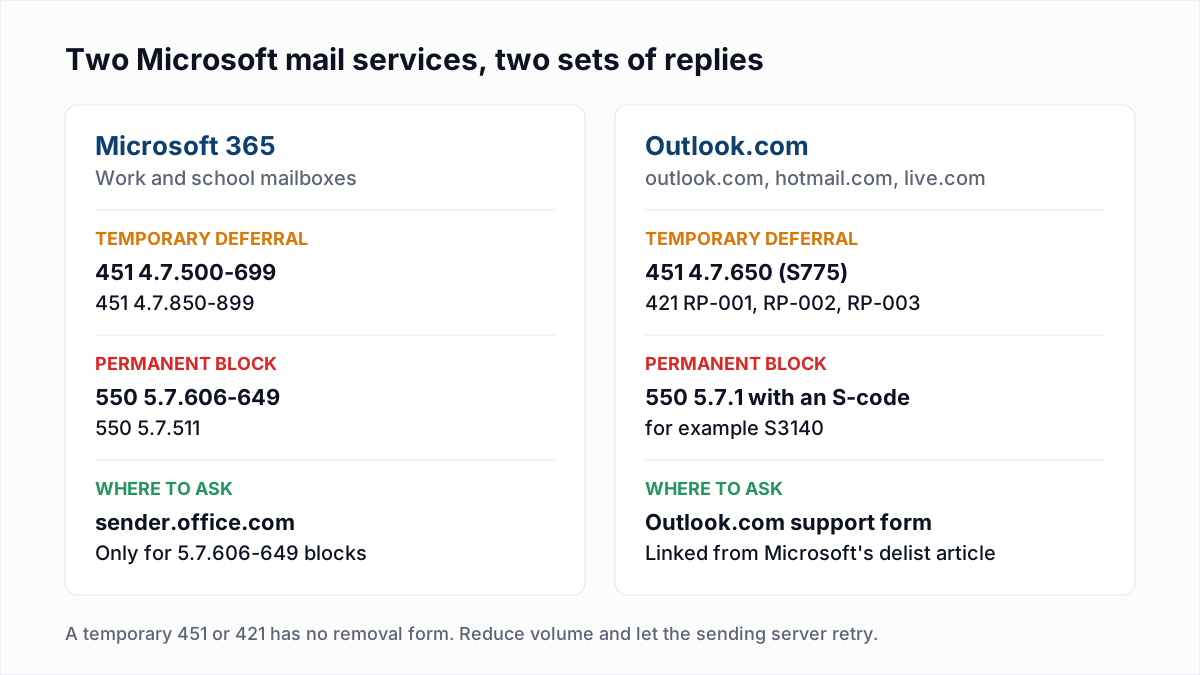
The delist portal is for those permanent 5.7 codes. Microsoft's documentation offers no removal form for a temporary 451: the stated fix is time and a steadier sending pattern. The portal steps and the Outlook.com equivalents are in Outlook 550 5.7.1 and email blacklist check and removal.
What are the Outlook.com equivalents, such as 421 RP-001?
Outlook.com, the consumer service, has its own temporary codes: 421 RP-001, RP-002 and RP-003. Its postmaster troubleshooting page describes them as limits tied to IP and domain reputation: RP-001 is a rate limit on the connecting IP, RP-002 a rate limit on a single connection, and RP-003 a limit on the number of connections.
A caveat on that paragraph. The Outlook.com postmaster troubleshooting page now redirects to a new address that returned a server error to us on 13 November 2026, so the descriptions above are paraphrased from the page as search engines index it, not quoted from a copy we loaded. Check the page yourself before relying on the exact wording.
You can tell the two services apart by the host in the bounce: Outlook.com answers from olc.protection.outlook.com, Microsoft 365 tenants from mail.protection.outlook.com. For authentication failures at Outlook.com, which are permanent, see 550 5.7.515.
Is 451 4.7.500 the same as greylisting?
Microsoft calls 451 4.7.500 part of "a filtering technique known as graylisting", but it does not behave like classic greylisting. A classic greylisting server refuses the first attempt from any unknown sender and accepts the retry minutes later, as explained in greylisting explained. Microsoft's throttle is tied to the IP's volume and history, so a retry at the same rate can be deferred again.
If the spike came from a list you have not mailed in a while, verify it before the next send. The bulk email verifier takes a CSV and returns the four results as a download. The Free plan covers lists up to 50 addresses with no card, and Pro is a flat $49 a month for lists up to 10,000 addresses.
Frequently asked questions
Related reading
Ready to clean your email list?
Upload a CSV or XLSX and get every address marked deliverable, risky, undeliverable or unknown, with the reason. Free for lists of up to 50, no card. Nothing is sent to your contacts.