Email Blacklists: How to Check If You're Listed and Get Removed
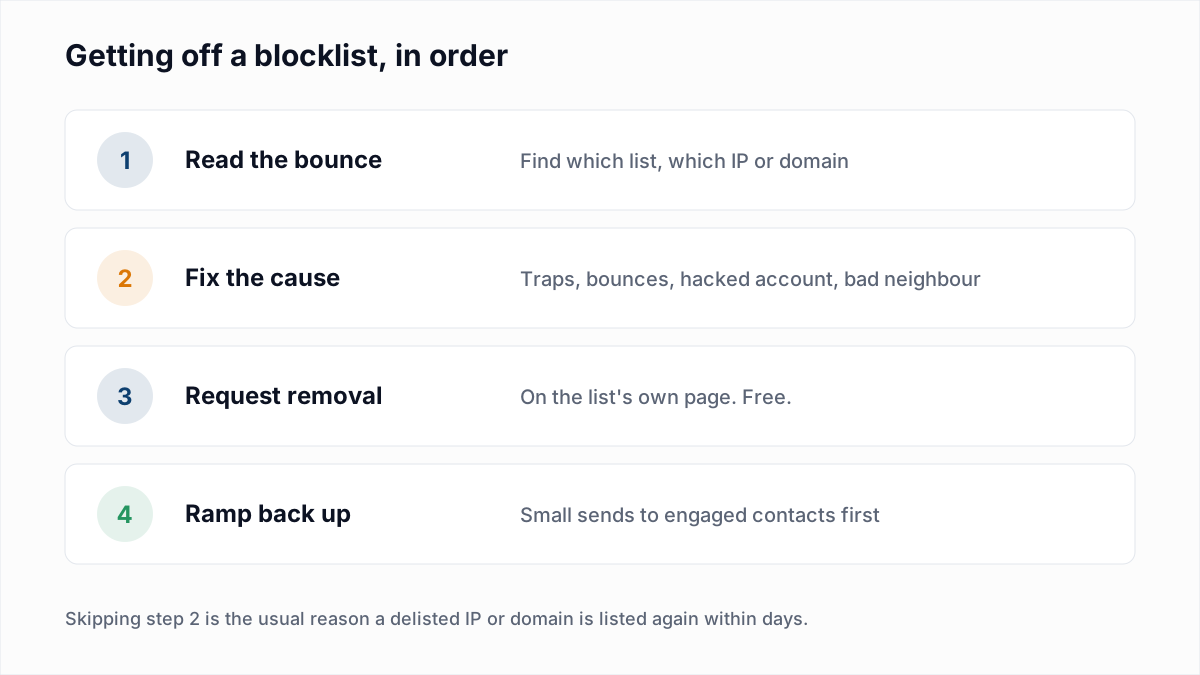
To check whether you are on an email blacklist, read the bounce text first (it usually names the list), then look up your sending IP and domain on the list's own checker, such as check.spamhaus.org for Spamhaus. To get removed, fix whatever caused the listing, then submit a removal request on that list's official page. Removal from the major lists is free. Some lists expire on their own once the problem stops, and anyone charging you to delist is not someone to pay.
This guide covers the difference between IP and domain lists, which lists actually affect delivery, how to check each one, the removal route for each, and how to avoid being listed again.
What an email blacklist is
A blacklist, more often called a blocklist or DNSBL, is a list of IP addresses or domains that a list operator considers a source of spam or abuse. Mail servers query these lists when a message arrives. If the sending IP or a domain in the message is listed, the server may reject the mail, send it to spam, or add to its spam score, depending on how the receiving organisation has set it up.
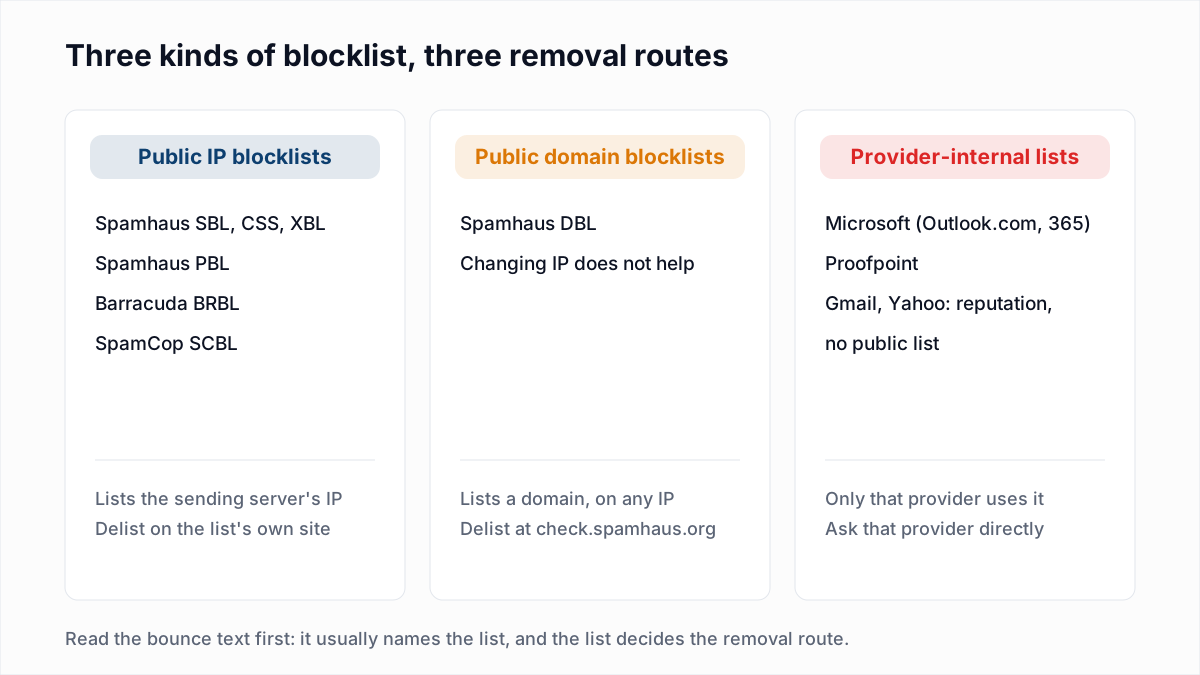
There are two kinds of thing a list can name, and the difference decides how you fix it.
- IP blocklists list the address of the server that sent the mail. If you send through a shared service, that IP is shared with other customers. Moving to a different IP can get mail flowing, but only if the cause has been fixed.
- Domain blocklists list a domain name: the one in your From address, or any domain linked in the message body. Changing IP does nothing here. The domain is listed wherever it sends from.
Then there is a third group: lists that big mailbox providers and filtering companies run internally. Nobody else uses them, and only that provider can remove you.
Which blacklists actually matter
Multi-list checkers test against dozens of lists, and many of them have little effect on real delivery. These are the ones worth acting on first.
| List | Lists | What it means if you are on it |
|---|---|---|
| Spamhaus SBL | IPs and ranges | Spamhaus has tied the range to spam, snowshoe sending, malicious hosting or similar. Serious |
| Spamhaus CSS | IPs | The IP has been seen sending spam, often from a misused mail server or form |
| Spamhaus XBL | IPs | The IP looks compromised: malware, a botnet, an open proxy |
| Spamhaus PBL | IP ranges | The IP is in a range, usually residential, that should not send mail directly. Not a sign of abuse |
| Spamhaus DBL | Domains | The domain has a poor reputation: spam, phishing, malware, or it was hijacked |
| Barracuda BRBL | IPs | Barracuda's automated system rates the IP as a spam source |
| SpamCop SCBL | IPs | SpamCop users reported mail from the IP as spam |
| Microsoft block list | IPs and ranges | Outlook.com, Hotmail or Microsoft 365 will not accept mail from the IP |
| Proofpoint Dynamic Reputation | IPs | Companies that filter mail through Proofpoint will delay or block the IP |
Spamhaus describes these lists on its blocklists page. Its ZEN list combines SBL, XBL and PBL in one lookup, which is why many rejections name zen.spamhaus.org rather than a single list. The steps for each one are in Spamhaus blocklist removal.
Gmail and Yahoo work differently. They rely mostly on their own reputation systems and do not publish a list you can look yourself up on. If Gmail is filtering you, the place to see your domain's standing is Google Postmaster Tools, not a blacklist checker. See how to check your domain reputation for the free methods.
How to check if you are blacklisted
1. Read the bounce text
The fastest check is the rejection itself. Receiving servers usually name the list that blocked you. A Postfix server using a public list replies in this format (the other wordings are in 554 5.7.1 explained):
554 5.7.1 Service unavailable; Client host [203.0.113.10] blocked using zen.spamhaus.orgReplace zen.spamhaus.org with b.barracudacentral.org or bl.spamcop.net and you have the Barracuda and SpamCop versions. Provider lists use their own wording. Microsoft 365 says 550 5.7.606-649 Access denied, banned sending IP and gives the delist URL in the same line, according to Microsoft's delisting documentation. Our guide to soft and hard bounces explains how to tell a block (5.7.x) from a missing mailbox (5.1.1).
2. Look up your IP and domain on the list's own checker
Once you know the list, use its official lookup. It shows whether you are listed, often why, and is usually where removal starts.
- Spamhaus (all lists, IPs and domains): check.spamhaus.org
- Barracuda: barracudacentral.org/lookups
- SpamCop: spamcop.net/bl.shtml
- Proofpoint: proofpoint.com/us/ipcheck (the
ipcheck.proofpoint.comlink in bounces redirects here); see the Proofpoint 550 5.7.0 block
Not sure which IP your mail leaves from? Open the headers of a message you sent to yourself and find the first Received line added by your provider, or ask your email platform. For a domain, also check the domains you link to, such as a link shortener or tracking domain: a listed link domain can get your mail blocked even if your own domain is clean.
3. Run a multi-list check for a wider view
Tools like MXToolbox's blacklist check and our free blacklist check query many public lists at once. They are useful for spotting a problem you did not know about. Two cautions: a hit on an obscure list that no major receiver uses may not affect delivery at all, and these tools cannot see provider-internal lists like Microsoft's or Proofpoint's. A clean multi-check does not mean Outlook.com will accept you.
What a block looks like: our own example
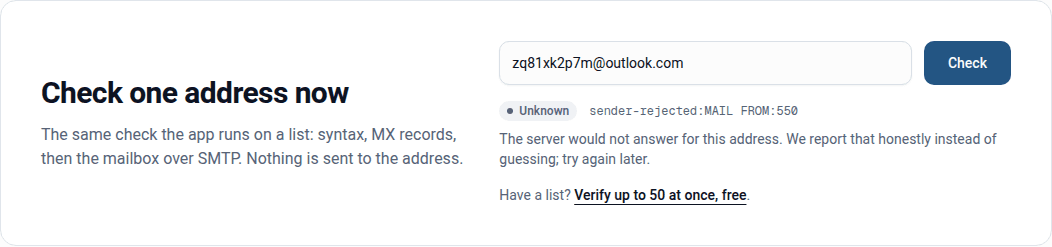
During our 4 November 2026 research into how providers answer verification checks, the IP InboxSure checks from was refused by two provider-internal lists. Outlook.com and Hotmail answered at MAIL FROM, before we had named any recipient:
550 5.7.1 Unfortunately, messages from [IP] weren't sent. Please contact your Internet service provider since part of their network is on our block list (S3140). You can also refer your provider to http://mail.live.com/mail/troubleshooting.aspx#errors.Domains filtered by Proofpoint answered:
550 5.7.0 Blocked - see https://ipcheck.proofpoint.com/?ip=[IP]Both are textbook examples of what to look for. The code is 5.7.x, which means policy, not a missing mailbox. The text names the sending IP, not the recipient. Microsoft's wording says "part of their network", which signals a block on a range of hosting addresses rather than on one sender's behaviour. Proofpoint's reply points straight to its lookup tool. Neither list is something a public multi-checker would have shown us.
For a verifier, the correct response is to treat those addresses as unconfirmed rather than bad. InboxSure reports them as Unknown with the reason that the sender was rejected, so nobody deletes a real Outlook.com address because of a block on our IP.
How to get removed from each blacklist
Every list has its own process, and the official page is the only one that counts.
| List | Removal route | What to expect |
|---|---|---|
| Spamhaus XBL, CSS, DBL | check.spamhaus.org | Spamhaus says XBL and DBL listings can also expire once the behaviour stops. If the problem is still there, the IP or domain is listed again |
| Spamhaus SBL | Your hosting company or ISP requests it | Spamhaus notifies the network owner and only they can request removal. Contact your provider |
| Spamhaus PBL | check.spamhaus.org, if your network's policy allows | Usually the real fix is to send through your provider's authenticated mail server instead of directly |
| Barracuda | Removal request form | Needs the IP, an email address and a phone number. Barracuda says valid requests are typically handled within 12 hours and repeat requests are ignored. See Barracuda blacklist removal |
| SpamCop | None needed | SpamCop's list is time-based and delists automatically when reports stop |
| Microsoft 365 (5.7.606-649) | sender.office.com | One email and one IP per request, confirmed by email. Microsoft says it can take up to 24 hours or longer. For 5.7.511, email delist@microsoft.com instead |
| Outlook.com and Hotmail (S3140 and similar) | Outlook.com sender support form | Microsoft lists this as the separate form for its consumer service. If the text says "part of their network", your hosting provider may need to act, or a different IP is the practical answer |
| Proofpoint | proofpoint.com/us/ipcheck | Proofpoint's FAQ says it aims to review reports within one business day, and blocked IPs are removed once spam stops for a period |
Our detailed walkthrough for Outlook 550 5.7.1 bounces covers the Microsoft forms step by step.
What not to do
- Do not pay for delisting. Spamhaus states that there is never a charge to remove any Spamhaus listing, and that any offer to remove one for a fee is a scam. None of the official removal pages linked in this guide ask for payment. One list, UCEPROTECT, does sell an optional express removal; our guide to UCEPROTECT Level 1, 2 and 3 explains why you rarely need it.
- Do not request removal before fixing the cause. If the compromised account is still sending or the bad list is still being mailed, you will be listed again, and repeat requests are often ignored or treated with more suspicion.
- Do not just switch IPs or domains. Moving to a fresh IP without fixing anything moves the problem. Rotating domains to escape a DBL listing is exactly the pattern domain lists are built to catch.
- Do not panic over every hit. One obscure list on a multi-checker, with no matching bounces, is rarely worth an afternoon.
Why IPs and domains get blacklisted
- Spam traps. Addresses that exist only to catch senders with poor list practices. Hitting them is one of the quickest ways onto a list. See spam traps explained.
- High bounce rates. Mailing many addresses that do not exist looks like a bought or scraped list, because it usually is one.
- Compromised accounts or servers. A hacked mailbox, a website contact form abused to send spam, or malware on an office network. This is the typical route onto the XBL and CSS.
- Shared IP neighbours. On shared sending IPs and hosting ranges, another customer's behaviour can get the IP or the whole range listed. Our Outlook.com block above is a range-level example. Whether to leave the pool is covered in dedicated vs shared IP.
- Spam complaints. Recipients pressing "report spam" feed SpamCop and the providers' own systems directly.
How to avoid getting blacklisted again
- Verify lists before you send. Removing addresses that do not exist keeps bounces low. Verification does not detect spam traps, but recycled traps are often old addresses, and the habits that keep bounces low (no bought lists, regular cleaning) are the same ones that keep traps out. Our list cleaning schedule covers how often.
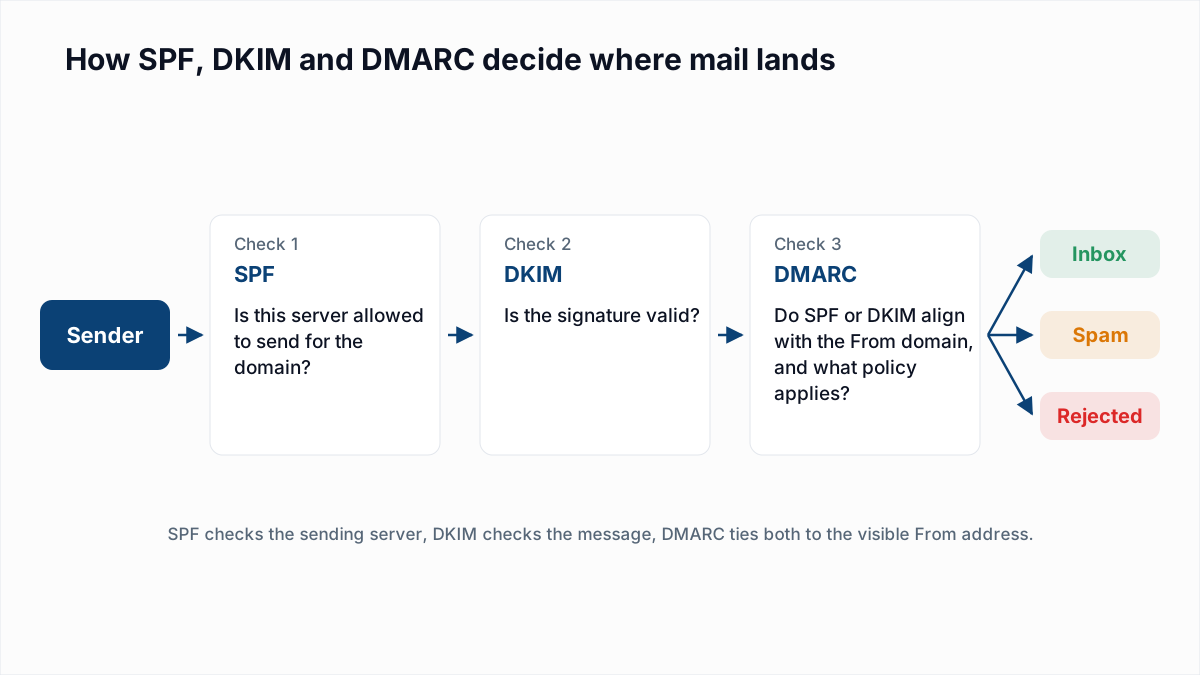
- Authenticate your domain. Set up SPF, DKIM and DMARC, and check them with the SPF checker and DMARC checker. Microsoft says that after delisting, mail still has to pass its filtering, including its authentication checks.
- Warm up new IPs and domains. Start with small volumes to engaged contacts and increase gradually. See email warmup and sender reputation.
- Secure your systems. Strong passwords and two-factor login on mailboxes, CAPTCHA on web forms, and no open relays.
- Watch your bounces. A sudden rise in 5.7.x rejections is the first sign of a listing, often before a checker shows anything.
InboxSure does not monitor blacklists. What it does is the list side of prevention: it checks syntax, MX records and whether each mailbox exists without sending an email, and flags catch-all, role and disposable addresses, so you send to fewer addresses that bounce. Start with the bulk email verifier before your next campaign.
Frequently asked questions
Related reading
Ready to clean your email list?
Upload a CSV or XLSX and get every address marked deliverable, risky, undeliverable or unknown, with the reason. Free for lists of up to 50, no card. Nothing is sent to your contacts.