Barracuda Blacklist (BRBL) Removal: How to Get Delisted
A Barracuda listing is cleared with one removal request, sent after the cause is gone. Sending the request first, or sending it five times, is how delisting fails.
A note on sources. On 13 November 2026 we read Barracuda Central's lookup page, its "Why is my IP listed" page and its removal request page, plus Barracuda's product documentation. The BRBL overview, "Listing Methodology" and "How to Use" pages on barracudacentral.org returned a 403 error to our fetch that day, so we do not describe them, including the terms for querying the list.
What is the Barracuda Reputation Block List (BRBL)?
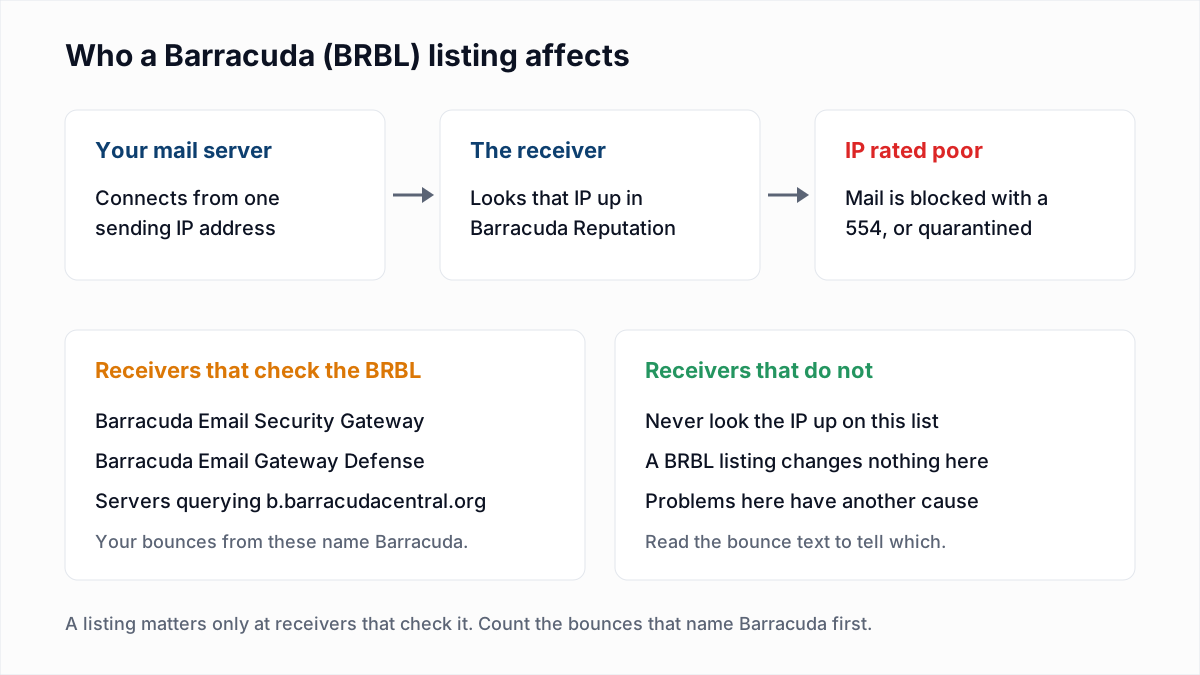
The Barracuda Reputation Block List (BRBL) is a list of IP addresses that Barracuda Networks rates as spam sources, which mail filters check when a message arrives. Barracuda's Email Gateway Defense documentation defines it as "A list maintained by Barracuda Central that includes IP addresses of known spammers."
Barracuda Central is the Barracuda team that runs the data. Its lookup page describes the Barracuda Reputation System as "a real-time database of IP addresses that have a 'poor' reputation for sending valid emails". Barracuda's documentation on Barracuda Reputation says the data comes from spam traps and other systems across the internet. The BRBL is an IP list: it is about the address your mail leaves from, not your domain.
Who uses the Barracuda blacklist?
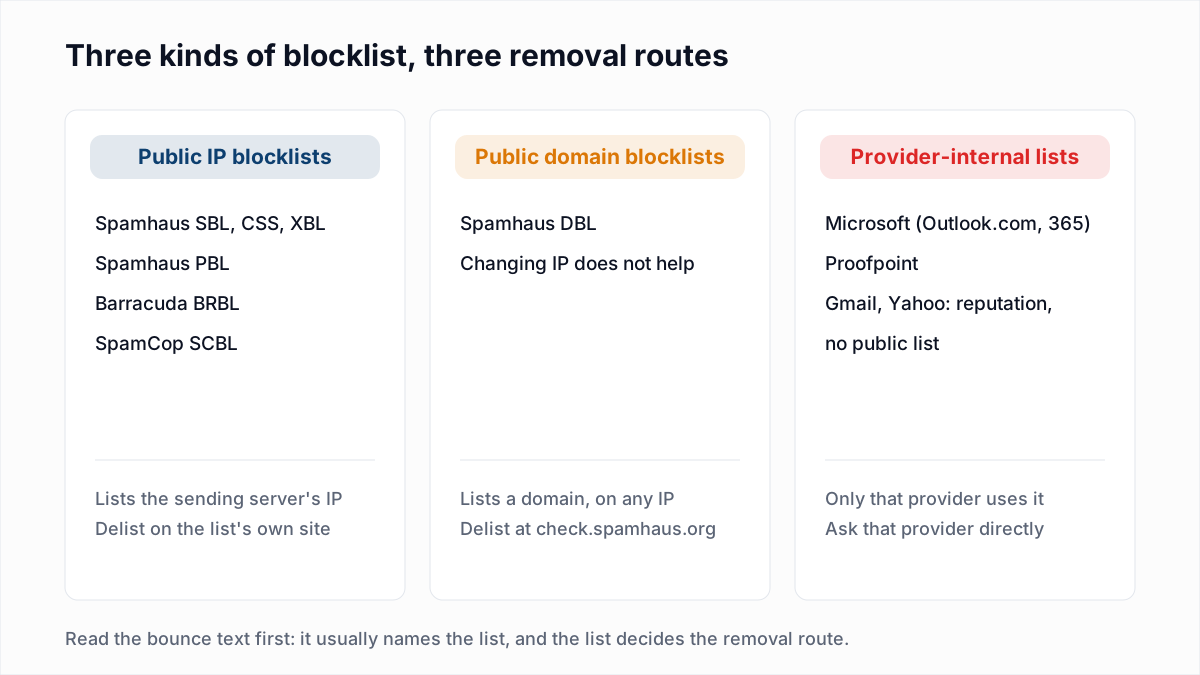
The Barracuda blacklist is used by organisations that filter mail with Barracuda products, and by other mail servers set up to query its DNS zone, b.barracudacentral.org. Nobody else sees it.
- Barracuda Email Security Gateway (the appliance, which Barracuda Central's pages call the Spam & Virus Firewall). Its IP analysis documentation says "it is strongly recommended that the Barracuda Reputation Block list (BRBL) option be set to 'Block'."
- Barracuda Email Gateway Defense (the cloud service). Its documentation lets the administrator set the BRBL to Block or Quarantine.
- Other mail servers that name
b.barracudacentral.orgin their blocklist settings. You will recognise these by the zone name in the bounce.
If none of your recipients use it, a listing changes nothing. Your bounce log is the only measure.
How do I look up my IP on BarracudaCentral?
You look up an IP on BarracudaCentral by entering it in the Reputation Lookup form at barracudacentral.org/lookups. The form has one field, labelled "IP or Domain".
- Find the sending IP. It is in the bounce, or in the
Receivedheaders of a message you sent. The email header analyzer pulls it out of a pasted header. - Enter it on the lookup page. Use the public IP of the server that hands mail to the recipient, not your laptop's address.
- Check the other lists too. The same cause often lists an IP elsewhere.
Our free blacklist check covers the third step. It is a one-time lookup, not monitoring, and it does not query Barracuda. From our server it also shows Spamhaus as "Could not check" and links to Spamhaus's checker; that route is in Spamhaus blocklist removal.
What does a "blocked by Barracuda" bounce look like?
A "blocked by Barracuda" bounce is a 554 rejection that names Barracuda Reputation or the zone b.barracudacentral.org. Barracuda's SMTP error code documentation lists this reply for its own gateway:
554 Service unavailable; client host [203.0.113.10] blocked using Barracuda Reputation; http://www.barracudanetworks.com/reputation/A server that is not a Barracuda product but queries the zone writes its own sentence. The typical Postfix wording (typical, not from a Barracuda page) is:
554 5.7.1 Service unavailable; Client host [203.0.113.10] blocked using b.barracudacentral.orgThe other meanings of the same code are in 554 5.7.1 explained and the bounce code reference. One caveat: when a Barracuda filter is set to Quarantine, there may be no bounce at all. The mail is held at the recipient's side.
Why is my IP on the Barracuda blacklist?
Barracuda's "Why is my IP listed" page gives eight possible reasons an IP is marked poor, most of them about infected machines and not about marketing email. In Barracuda's words:
- "Your email server contains a virus and has been sending out spam."
- "Your email server may be improperly configured."
- "Your PC may be infected with a virus or botnet software program."
- "Someone in your organization may have an infected PC with a virus or botnet program."
- "You may be using a dynamic IP address which was previously used by a known spammer."
- "Your marketing department may be sending out bulk emails that do not comply with the CAN-SPAM Act."
- "You may have an insecure wireless network which is allowing unknown users to use your network to send spam."
- "In some rare cases, your recipient's Barracuda Spam Firewall may be improperly configured."
The page says the system "uses automated algorithms for determining its results". Which reason applies to you has to come from your own logs.
What does a "poor" reputation mean on Barracuda?
A "poor" reputation on Barracuda means the IP address is in the Barracuda Reputation System as a likely spam source, so receivers that use the BRBL block or quarantine its mail. The reason page describes two ratings, "good" and "poor".
Barracuda's pages do not fully agree on how an IP gets the rating. The lookup page says Barracuda Central "maintains and manually verifies all IP addresses marked as 'poor'". The removal page says "the BRBL is generated by automated systems". The reason page admits that "From time to time, a valid IP address may be marked as 'poor'". The pages we could read give no score or threshold.
Barracuda symptoms, causes and actions
| Symptom | Likely cause | Action |
|---|---|---|
| Bounces say "blocked using Barracuda Reputation" | The recipient uses a Barracuda gateway and your IP is rated poor | Look the IP up, fix the cause, then send one removal request |
Bounces name b.barracudacentral.org | Another mail server queries the Barracuda zone and found your IP | Same route: the listing is Barracuda's, not the recipient's |
| The lookup says poor, but no bounce mentions Barracuda | None of your recipients check the list, or their filters quarantine | Fix the cause anyway and request removal once |
| Listed again days after removal | The infected device, open form or bad list is still sending | Stop sending, find the source in the mail log, and only then ask again |
| You send through an email platform or shared host | Another customer on the same IP caused the listing | Send the provider the bounce. The IP is theirs to delist |
| Listed on a home or office broadband IP that changes | A previous user of the dynamic IP sent spam, or a device on your network did | Send through your provider's authenticated mail server instead |
What should I fix before asking Barracuda for removal?
Fix whatever was sending the unwanted mail before you ask Barracuda for removal, because the request needs a valid explanation and a second request is ignored.
- Search the mail log for mail you did not send. A spike in volume or odd sender addresses points to a hacked mailbox or script.
- Scan every machine behind the IP. Four of Barracuda's eight reasons are an infected server, PC or network.
- Close the gaps. Reset mailbox passwords, lock the Wi-Fi, add a CAPTCHA to web forms, and block outbound port 25 for everything except the mail server.
- Check the server's configuration. It should not relay for strangers, and its reverse DNS should match its hostname. See reverse DNS and 550 5.7.25.
- Look at the bulk mail. Barracuda names non-compliant bulk email as a cause. Every campaign needs a working unsubscribe and a postal address. Drop bought or stale lists, which carry spam traps.
- Write down what you found and what you changed. That is your reason for removal.
How do I request removal from the Barracuda blacklist?
You request removal from the Barracuda blacklist with the form at barracudacentral.org/rbl/removal-request. Barracuda says removal requests "are typically investigated and processed within 12 hours of submission if provided with a valid explanation."
The page asks for "your email server's IP address, your email address, phone number and an optional reason for removal". The form itself has six fields: Email Server IP Address, Email Address, Barracuda Customer Name, Barracuda Customer Email Address, Phone Number and Reason for Removal. When we read the page, every field except the reason was marked as required, including the two customer fields. We did not submit the form, so we cannot say what it accepts there from a sender who is not a Barracuda customer.
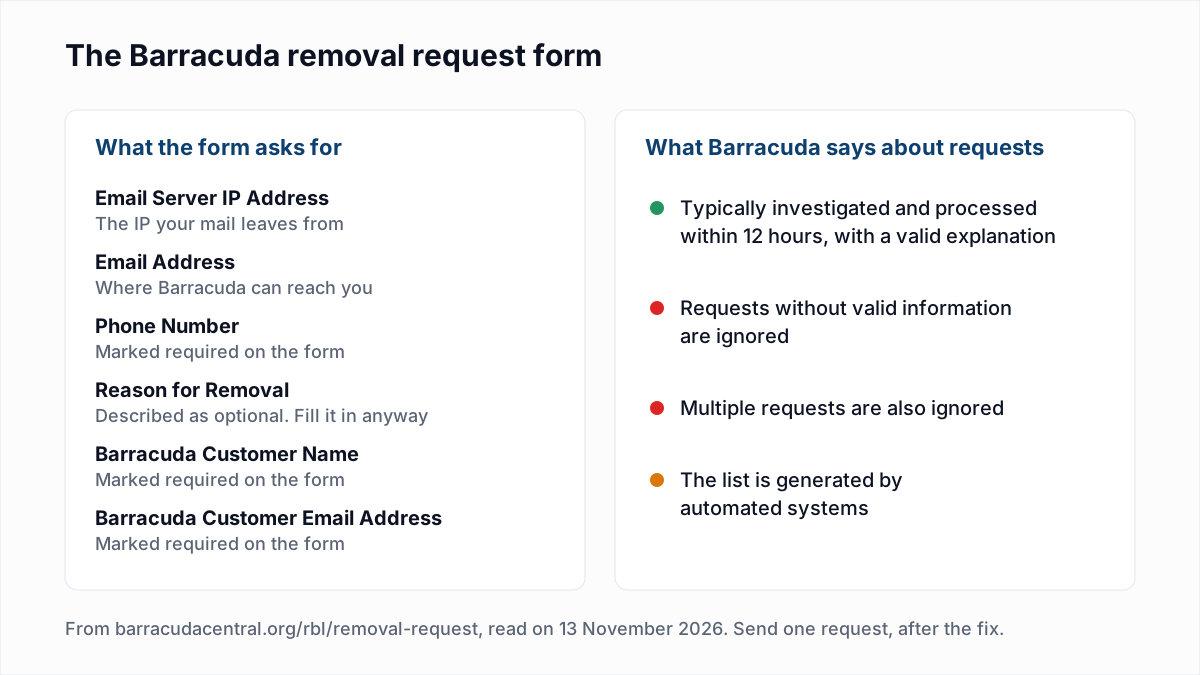
Treat the reason as the whole request. Something like: "A compromised mailbox sent spam from this IP on 10 and 11 November. The password was reset, the account now needs two-factor login, and outbound volume has been normal since."
The same page says the Barracuda Reputation System "honors domains registered at EmailReg.org", a registration site it links to. We have not evaluated EmailReg.org and do not recommend for or against it.
Why would Barracuda ignore or refuse a removal request?
Barracuda ignores a removal request for two stated reasons: "Requests without valid information will be ignored. Multiple requests will also be ignored." Those two sentences are the only refusal rules on the pages we could read.
A fake phone number, an empty reason or a second submission the next morning all work against you. Check the lookup page again after 12 hours instead of resending. If the IP is delisted and then rated poor again, the automated system saw the same behaviour again, and another form will not fix that.
What if I am on shared hosting or a shared IP?
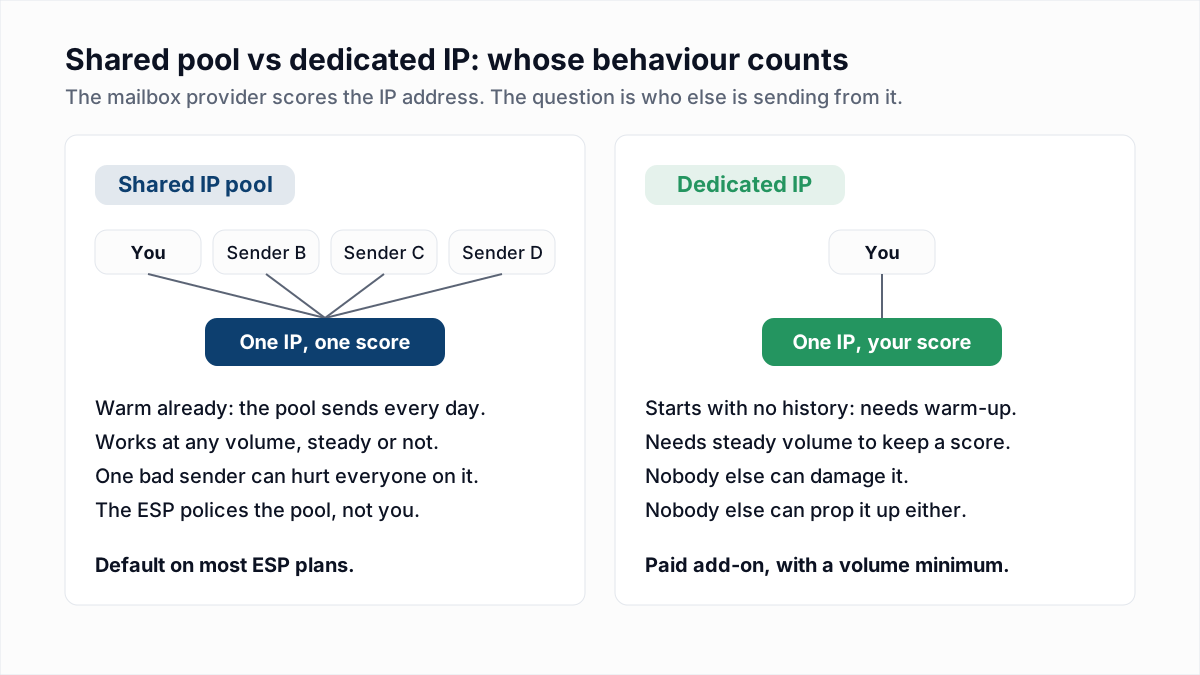
On shared hosting or a shared sending IP, a Barracuda listing usually belongs to the provider, because the IP is theirs and the mail that caused it may not be yours. Barracuda's reason page does not mention shared hosting, but the BRBL lists IPs, so everyone behind a listed IP is blocked together.
Forward the bounce to your host or email platform and ask them to request removal: they have the logs to write a valid explanation. The trade-offs are in dedicated vs shared IP.
What if I have a dynamic IP address?
With a dynamic IP address, the Barracuda listing may have been earned by whoever had the address before you. Barracuda lists this as a cause: "a dynamic IP address which was previously used by a known spammer."
Delisting a dynamic IP is a short-term fix, since the address will change. Send through your internet provider's or mailbox provider's outgoing server with a login, so that receivers see that server's IP instead of yours. See SMTP ports 25, 465 and 587.
Can the recipient unblock me instead?
Yes, a recipient who uses a Barracuda product can exempt your IP on their own filter, which is the fastest fix for one important contact. Barracuda's documentation says administrators can "exempt trusted sender IP addresses from BRBL checks", and that exempted mail still goes through all other spam and virus checks. It only helps with that one organisation.
After delisting
Return to normal volume gradually and watch the bounce log for the word Barracuda. For Spamhaus, Microsoft and Proofpoint, see how to check an email blacklist and get removed.
InboxSure does not monitor blacklists and cannot remove a listing or detect spam traps. Where it helps is the bulk-mail cause: it checks syntax, MX records and whether each mailbox exists without sending an email, and flags catch-all, role and disposable addresses. Run the list through the bulk email verifier before the first send after a delisting. The Free plan covers lists up to 50 addresses with no card; Pro is a flat $49 a month for lists up to 10,000 addresses.
Frequently asked questions
Related reading
Ready to clean your email list?
Upload a CSV or XLSX and get every address marked deliverable, risky, undeliverable or unknown, with the reason. Free for lists of up to 50, no card. Nothing is sent to your contacts.