Spamhaus Blocklist Removal: SBL, XBL, PBL, CSS and DBL
"Listed on Spamhaus" is not one problem. Spamhaus publishes five separate lists, each with its own cause and its own removal route, and a request sent down the wrong route goes nowhere. The Spamhaus blocklists are DNS-based lists of IP addresses and domains, maintained by The Spamhaus Project, that receiving mail servers query before they accept a message. For other blocklists and the general process, see how to check an email blacklist and get removed. Barracuda has its own guide: Barracuda blacklist removal.
Which Spamhaus list am I on?
The Spamhaus IP and Domain Reputation Checker at check.spamhaus.org names the list. Enter the sending IP address, then the domain. Spamhaus's list pages call the checker "the only place" where CSS, XBL, PBL and DBL removals are handled.
The checker returned a 403 error to our automated fetch on 13 November 2026, so what follows comes from Spamhaus's own blocklist pages, read that day. We do not describe its screens.
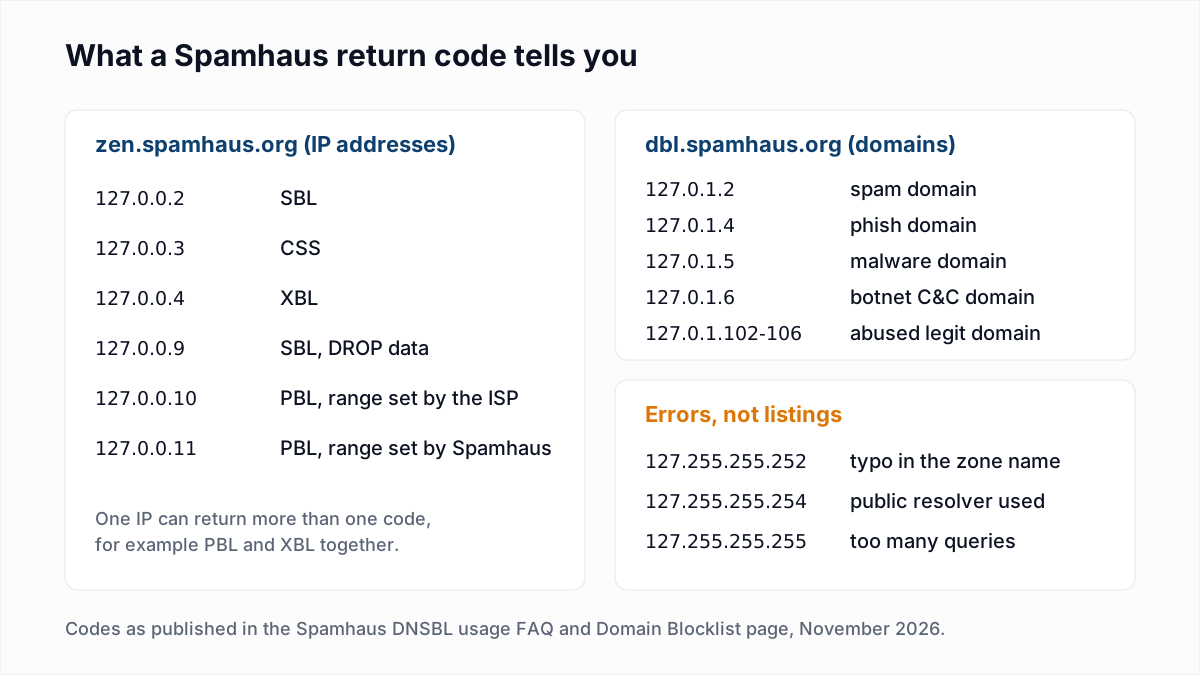
You can also ask over DNS. Reverse the four parts of the IP and look it up in the ZEN zone, which combines the SBL, CSS, XBL and PBL. For 203.0.113.10:
dig +short 10.113.0.203.zen.spamhaus.orgNo answer means not listed. An answer is a code, and the Spamhaus DNSBL usage FAQ says which list each code stands for. Run the query through your own resolver. The same FAQ says queries sent through a public resolver come back as 127.255.255.254, which is an error and not a listing.
Our free blacklist check is a one-time lookup, not monitoring, and it hits this limit: from our server the Spamhaus rows show "Could not check" with a link to Spamhaus's own checker.
Who can remove a Spamhaus listing?
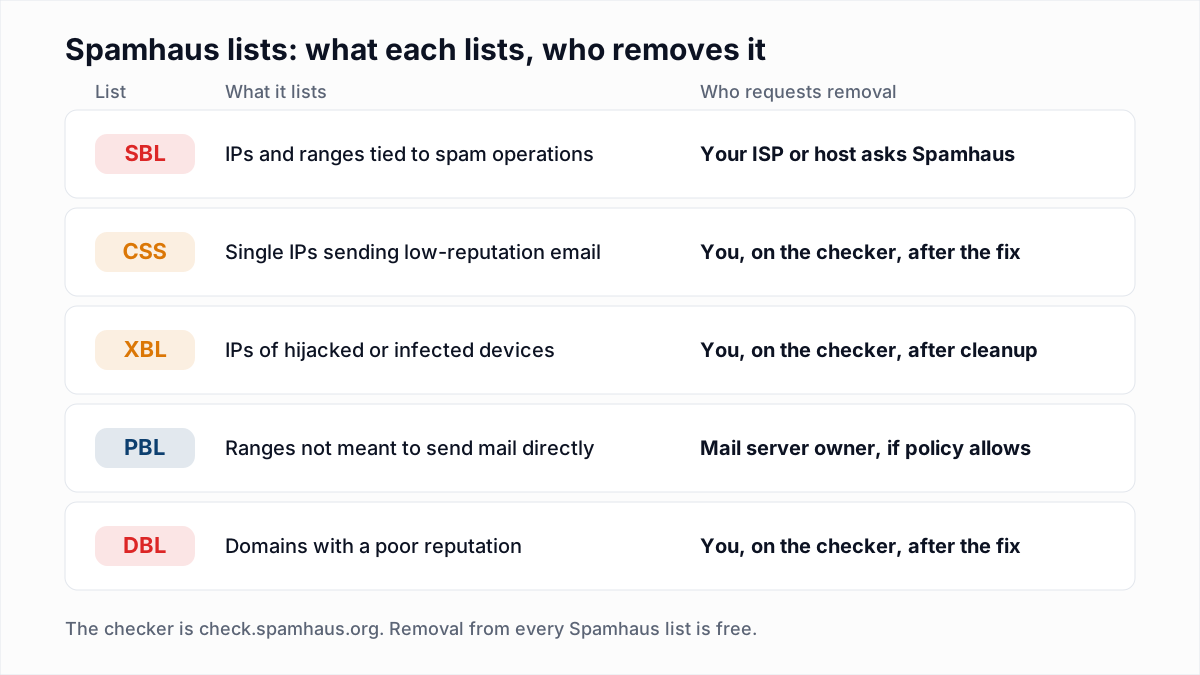
Who can remove a Spamhaus listing depends on the list: the network owner for the SBL, and the person responsible for the IP or domain for the CSS, XBL, PBL and DBL, through the Spamhaus checker.
| List | What it lists | Who removes | First step |
|---|---|---|---|
| SBL (Spamhaus Blocklist) | IP addresses and ranges that Spamhaus has identified as malicious | The ISP or hosting company in charge of the IP asks the SBL team | Read the SBL listing page, then contact your provider's abuse desk |
| CSS (Combined Spam Sources) | Single IP addresses that send low-reputation email | Whoever is authoritative for the IP, on the checker | Find and fix what sent the mail, then request removal |
| XBL (Exploits Blocklist) | IP addresses used by hijacked or infected devices | Requested on the checker. In practice, whoever runs the network behind the IP | Clean the infected device or account before anything else |
| PBL (Policy Blocklist) | End-user IP ranges that should not send email directly | The mail server's owner, if the network's policy allows it | Send through an authenticated mail server on port 587 or 465 |
| DBL (Domain Blocklist) | Domain names with a poor reputation | Requested on the checker. In practice, the domain's owner | Look up the domain and follow the instructions the checker returns |
How do I get delisted from Spamhaus, step by step?
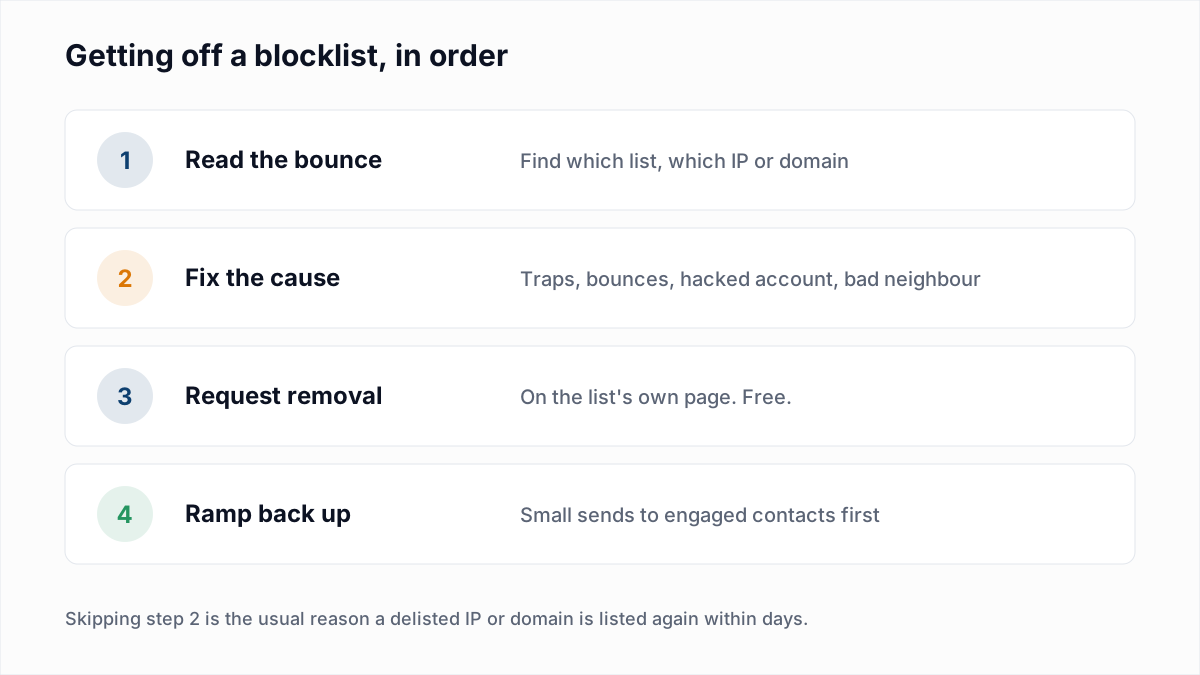
- Get the IP from the bounce, or from a sent message with the email header analyzer.
- Look up the IP and the domain on the Spamhaus checker. Spamhaus says IP and domain reputations are related, so check both.
- Work out who owns the IP. On an email platform or shared hosting it is the provider's. Send them the listing and stop here.
- Fix the cause. The sections below say what that is for each list.
- Request removal by the route for that list, once.
- Look the IP up again over the next few days before returning to full volume.
How do I get removed from the Spamhaus SBL?
You get removed from the Spamhaus SBL through your ISP or hosting company, not by yourself. Spamhaus's SBL page says: "Removal requests must be sent by the Internet Service Provider in charge of the listed IP address(es)."
The SBL is the manual, serious list. According to that page it covers snowshoe spam ranges, spam hosting, spam services and security threats such as botnet controllers and phishing. Each listing has its own page with an SBL ticket number, which you can open from the checker by IP, range or ticket. The process Spamhaus describes:
- Read the listing page to understand what Spamhaus saw.
- Solve the problem permanently.
- Tell your provider's abuse or security desk what happened and how you fixed it. Spamhaus adds: "we always need to know how the problem was solved".
- If the provider agrees, it sends the request using the contact link at the bottom of the listing page.
Spamhaus states that "All removals from the SBL are the sole decision of The Spamhaus Project." The page also describes escalation: when a network ignores listings, Spamhaus may list wider ranges of it or the whole network. That is how a clean customer ends up inside an SBL range, and the fix is still the provider's.
How do I remove an IP from Spamhaus CSS?
You remove an IP from Spamhaus CSS on the checker, yourself, after you have stopped whatever was sending the mail. Spamhaus describes the CSS as "an automatically produced dataset of IP addresses that are involved in sending low-reputation email".
The page lists what influences a listing: mail that looks unsolicited, poor list hygiene, and bad mail caused by "a compromise, insecure installation or misconfigured server". Check these:
- The list. Old, bought or scraped addresses contain spam traps. Stop mailing that segment.
- The server. Look for a hacked mailbox or web form sending mail you did not write.
- The server's identity. Spamhaus says the HELO value should be a fully qualified domain name, gives
localhost.localdomainas a common misconfiguration, and wants forward and reverse DNS to be correct.
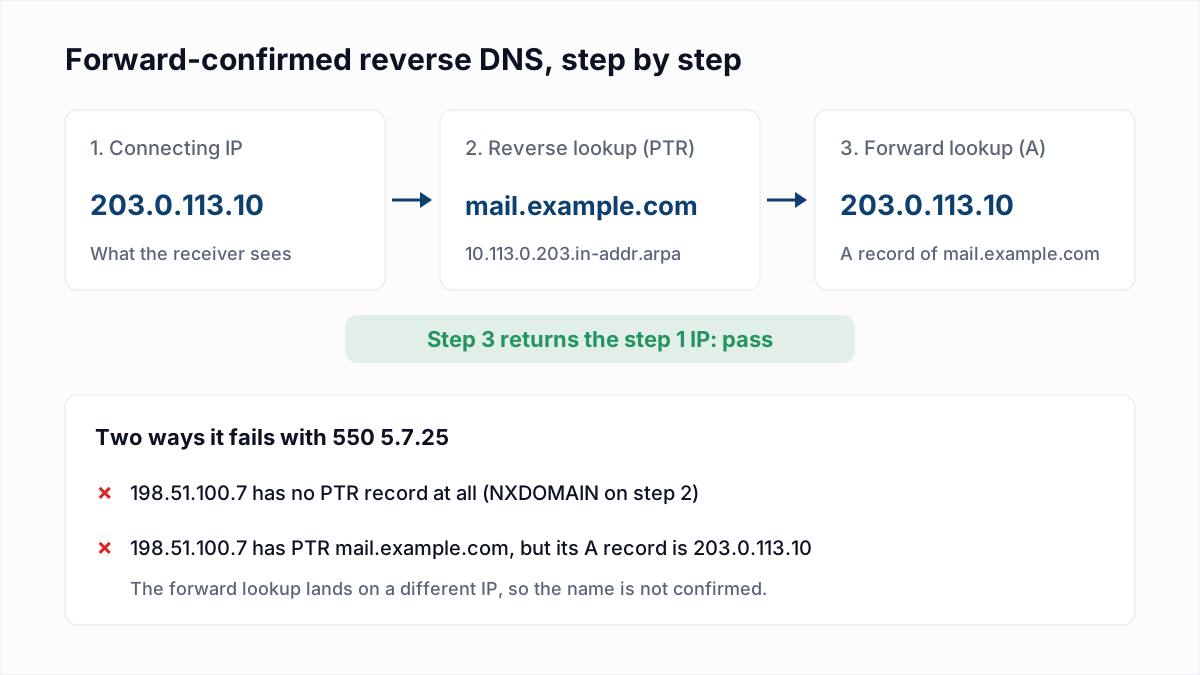
Reverse DNS is covered in our guide to 550 5.7.25 and PTR records. Spamhaus is blunt about order: "Whatever caused the problem MUST be identified and corrected before removing an IP from CSS." It adds that the CSS "will allow the removal of an IP, but it will also re-list it immediately if a problem continues to be detected", and that "Self-removals are limited." No number is given.
How do I get off the Spamhaus XBL?
You get off the Spamhaus XBL by cleaning the infected device or account behind the IP and then requesting removal on the checker. The XBL lists IPs where Spamhaus has evidence that a machine is "insecure, compromised, or infected".
Spamhaus does not publish the exact triggers. Its examples include malware on a device and attempts to relay mail with stolen credentials. Where to look:
- Every device behind the IP. Spamhaus says the infected device is usually a computer or phone behind the router, and sometimes the router itself.
- Outbound port 25. Spamhaus advises closing port 25 at the router or firewall for everything except known mail servers.
- Mail accounts. Change passwords on any account that could be relaying mail.
If the listing returns after removal, Spamhaus's answer is that "the detected problem has not been corrected".
Is a Spamhaus PBL listing a problem, and how do I remove it?
A Spamhaus PBL listing is not a spam accusation, and most people on it should not request removal. Spamhaus's PBL page says: "A PBL listing is NOT a result of any actions undertaken by the end users."
The PBL holds end-user ranges "from which email should never be sent directly to the final destination", entered by the network that owns them or by Spamhaus. If your mail goes out through your provider's server with a login, nothing is wrong. Spamhaus says that for SMTP authentication "the port should be 587 or 465, not 25"; see SMTP ports 25, 465 and 587.
Removal exists for one case: a real mail server on a listed IP. Spamhaus says the IP must be static, an outbound mail server, set up with forward and reverse DNS, and assigned to the person or company asking. Two details from the same page:
- Requests made from free email accounts such as Gmail.com are automatically invalidated.
- An end-user exclusion expires after one year and is reversed immediately if spam is detected from the IP. Several IPs are the ISP's job to remove.
How do I remove a domain from the Spamhaus DBL?
You remove a domain from the Spamhaus DBL by looking it up on the checker and following the instructions it returns. Spamhaus's DBL page warns that using the form does not guarantee removal.
The DBL follows you across IPs: "It ONLY lists domains. No IP addresses are listed in the DBL." Spamhaus does not disclose its criteria ("We do not discuss the specific criteria we use"), but the return code separates two cases. Codes 127.0.1.2 to 127.0.1.6 mean the domain itself is rated as spam, phishing, malware or botnet related. Codes from 127.0.1.102 are "abused legit": a real site that was hacked. For those, Spamhaus recommends taking the site offline while you clean it. Also check the link and tracking domains in your template. Wider reputation checks are in how to check your domain reputation.
What does a Spamhaus bounce look like?
A Spamhaus bounce names a Spamhaus zone, most often zen.spamhaus.org, in a 5xx rejection. Spamhaus does not write the sentence. The receiving server does, so the wording varies. A typical Postfix version:
554 5.7.1 Service unavailable; Client host [203.0.113.10] blocked using zen.spamhaus.orgA DBL rejection names dbl.spamhaus.org instead. These are typical formats, not text from a Spamhaus page. The variants, including the "open resolver" bounce that is the receiver's mistake, are in 554 5.7.1 explained and the bounce code reference.
How long does Spamhaus removal take?
Spamhaus removal takes minutes to appear in DNS once a request is approved, but Spamhaus publishes no review time for the SBL. These are the only timings its pages state, as of November 2026.
| List | What Spamhaus states |
|---|---|
| SBL | No removal time is given. The SBL zone is rebuilt every 5 minutes. |
| CSS | Listings expire "normally, three days after last spam detection". |
| XBL | Listings expire "after a period of time" once the behaviour stops. Allow 24 hours before opening a new ticket. |
| PBL | Allow approximately 15 minutes for DNS propagation after a removal. |
| DBL | An approved removal "should only take a few minutes". Some receivers lag up to 24 hours. |
Why does Spamhaus keep relisting my IP or domain?
Spamhaus relists an IP or domain because its systems detected the same behaviour again after the removal. The usual reasons:
- The infected device was cleaned but another one on the same network was not.
- The compromised password was changed but the web form or script is still open.
- You paused the campaign, were delisted, and sent to the same list again.
What should you not do about a Spamhaus listing?
- Do not pay anyone. Spamhaus says: "There is never any charge or fee associated with removing any Spamhaus listing."
- Do not repeat removal requests. Spamhaus limits CSS self-removals, says DBL "excessive removers" may be blocked, and can revoke PBL removal access.
- Do not rotate IPs or domains. Spamhaus describes snowshoe spam as the use of many IPs and domains that change frequently, and snowshoe ranges are an SBL criterion.
- Do not remove a dynamic IP from the PBL. Use authenticated submission.
Keeping the list side clean
Poor list hygiene is one of the influences Spamhaus names for the CSS. InboxSure does not monitor blocklists and cannot detect spam traps, because a trap is a working mailbox. It removes the addresses that no longer exist: it checks syntax, MX records and the mailbox itself without sending an email, and flags catch-all, role and disposable addresses. Before you mail an old segment again, run it through the bulk email verifier. The Free plan covers lists up to 50 addresses with no card; Pro is a flat $49 a month for lists up to 10,000 addresses.
Frequently asked questions
Related reading
Ready to clean your email list?
Upload a CSV or XLSX and get every address marked deliverable, risky, undeliverable or unknown, with the reason. Free for lists of up to 50, no card. Nothing is sent to your contacts.